
Primea ReviewsAll Reviews

Primea Reviews is reader-supported. When you buy through our Amazon links we may earn a commission, at no extra cost to you. Rankings are set by our editors and never sold. Learn more

Ranked & Reviewed by Primea Reviews

The 5 Best USB-Powered Laptop Cooling Pads of 2026, Ranked & Reviewed

By the Primea Editorial TeamUpdated November 1, 20269 min read5 products ranked
The 5 Best USB-Powered Laptop Cooling Pads of 2026, Ranked & Reviewed

The short answer

The Kootek is the best USB-powered laptop cooling pad, with five fans that run as 1, 4 or 5, six height settings and a dual USB hub for under $25. The ICE COOREL's single 160mm fan is the efficient pick, the TECKNET adds a speed dial, the Targus can take external power, and the Trullypine has twelve fans for plugged-in desks.

The Primea Scoreboard

Ranked & Reviewed

  1. Pick how many fans run, so you pick how much power it pulls.

    93Outstanding
    Check price
  2. One big fan keeps battery impact low.

    89Excellent
    Check price
  3. A speed dial that goes all the way down.

    86Excellent
    Check price
  4. Can draw power from a separate USB source.

    83Very Good
    Check price
  5. Twelve fans, best used on wall power.

    80Very Good
    Check price

A cooling pad is powered by the thing it is cooling. Plug it into a laptop USB port and the fans take current from the same battery that is trying to last the afternoon. A bank of twelve fans can cost more runtime than the heat it removes is worth, unless the laptop sits on wall power. That tradeoff is almost never mentioned on packaging, yet it shapes which pad suits which person.

So this ranking weighs control over power draw first, then fan hardware, noise and the range of laptop sizes covered. Five pads were chosen from eight whose listings we compared on paper. Fan diameter matters as much as fan count, because one large, slow fan can move air as well as several small ones while using less current and making less noise.

Before you buy

What Actually Matters

01

Power draw

A USB pad draws current from your laptop, and more fans draw more. On battery, that can shorten runtime noticeably. Look for staged fans, a speed dial or an external power option in the listing, and treat any pad with many fans and no control as a wall-power accessory, because it will keep drawing the full current.

02

Fan count versus size

Many small fans move less air each than one large fan, and they add noise. A single 160mm fan can match a pad with several small ones. Check fan diameter in the listing, not just the count, and note RPM, where lower speeds generally mean less noise and less power, so a slow big fan is the quiet choice.

03

Connector type

Most pads use a USB-A connector, so a USB-C only laptop needs an adapter, which adds a failure point. Look for the connector named in the bullets, as the TECKNET lists USB-C, and check your laptop's port type and where the ports sit before buying, since a side port can block the cable.

04

Size range

A pad that is too small leaves vents uncovered, and one that is too large is awkward in a bag. Match the stated range to your screen size, found in the title. The TECKNET covers 12 to 15.6 inches, while the Targus lists up to 17 inches. A pad slightly larger than the laptop is fine.

05

Height adjustment

Tilt improves typing posture and airflow underneath the laptop, and more settings give you more choice. Check the number of height positions, such as six on the Kootek or five on the Trullypine. A pad with no height adjustment is a flat tray only, and you lose the typing angle.

In-depth reviews

Our Ranked Picks, Reviewed

1

Best Overall

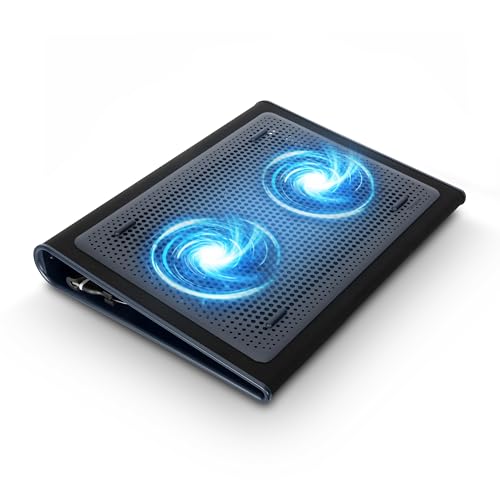
Kootek Laptop Cooling Pad Cooler Stand with 5 Quiet Fans

Our verdict: Pick how many fans run, so you pick how much power it pulls.

The Kootek wins by letting you decide how much power the pad takes. It has five fans selectable as 1, 4 or 5, six height settings, a built-in dual USB hub and a USB-A connector, under $25. Running one fan on battery and five on wall power is the most direct way to manage USB draw, and no other pad here offers staged operation.

It ranks first because staging beats the alternatives: the Trullypine below has more fans but no staging, and the ICE COOREL has one fan and no choice. The tradeoff is a basic, plain build.

Buy it if you switch between battery and wall power. The caveat is the hub, which also draws from the laptop, so plugging in accessories adds to the load. Check the supported laptop size on the listing before ordering.

Fans
5, run as 1, 4 or 5
Heights
6 settings
Hub
Dual USB
Price tier
Under $25

What we like

  • +Staged fan control
  • +Six height settings
  • +Built-in USB hub
  • +Under $25 tier

Watch out for

  • −Plain build
  • −Hub uses laptop power

Buy it if: People who move between battery and wall power.

Skip it if: You want a single quiet fan.

2

Most Efficient

ICE COOREL Aluminum Laptop Cooling Pad

Our verdict: One big fan keeps battery impact low.

The ICE COOREL takes the opposite approach to the Kootek: one fan, and a big one. It uses a single 160mm fan at 1000 to 1400 RPM on an aluminum alloy surface, with two USB 2.0 ports, at about 1.35 lbs and under $25. A large fan at low speed moves a lot of air gently, and aluminum pulls heat from the laptop's base by conduction.

It ranks second because one slow fan draws less than the multi-fan pads, though it cannot be toggled like the Kootek. You get low power use and light weight for travel.

Buy it if you carry the pad in a bag and care about battery life. The caveat is airflow: a single fan has limits, and a gaming laptop pushed hard will want more than 160mm can offer. Skip it for heavy sustained loads.

Fan
One 160mm, 1000-1400 RPM
Surface
Aluminum alloy
Ports
Two USB 2.0
Weight
About 1.35 lbs

What we like

  • +Low power draw
  • +Aluminum surface
  • +Light at 1.35 lbs
  • +Two USB ports

Watch out for

  • −Single fan only
  • −No fan staging

Buy it if: Travelers who care about battery life.

Skip it if: You push a gaming laptop hard.

3

Best Dial Control

TECKNET Laptop Cooling Pad, 12"-15.6" with Quiet Cooling Fan

Our verdict: A speed dial that goes all the way down.

The TECKNET gives you a dial rather than stages. It has two 110mm fans with speed adjustable from zero to maximum, USB-C and USB-A ports, and a second port that can power low-current accessories, for 12 to 15.6 inch laptops, under $25. A continuous dial lets you pick any speed, down to silence, which suits a quiet room.

It ranks third because a dial is finer than staged fans, but the size range stops at 15.6 inches and the fan count is two. Against the Kootek, it has less cooling headroom for hot machines.

Best for ultrabook owners who want smooth control. The caveat is size: a 17 inch laptop will overhang it and leave vents uncovered, so check your screen size first. The USB-C port is a convenience for newer laptops.

Fans
Two 110mm, adjustable
Ports
USB-C and USB-A
Fits
12 to 15.6 inch laptops
Price tier
Under $25

What we like

  • +Continuous speed dial
  • +USB-C and USB-A ports
  • +Powers small accessories
  • +Under $25 tier

Watch out for

  • −Tops out at 15.6 inches
  • −Only two fans

Buy it if: Ultrabook owners who want smooth speed control.

Skip it if: You own a 17 inch laptop.

4

Best External Power

Targus 17 Inch Dual Fan Lap Chill Mat

Our verdict: Can draw power from a separate USB source.

The Targus is the lap-friendly pad with an escape hatch. It has dual fans, a soft neoprene base, an open mesh top for airflow and fits laptops up to 17 inches. It plugs in over USB-A but can take power from a separate USB source, for $25 to $50. Powering it from a wall adapter or power bank spares your laptop battery entirely.

It takes fourth because external power is its real trick, but it costs more than the Kootek and lists no fan speed control. The neoprene base is comfortable on legs.

Best for lap use with a large laptop. The caveat is the missing control: with no staging or dial, the fans run at one speed, so you rely on the external power option to manage the draw. It also lists no adjustable height.

Fans
Dual
Fits
Up to 17 inch laptops
Base
Soft neoprene
Power
Laptop or separate USB

What we like

  • +Separate power option
  • +Soft neoprene base
  • +Open mesh top
  • +Fits 17 inch laptops

Watch out for

  • −No speed control listed
  • −Higher price tier

Buy it if: Lap users wanting to spare the laptop battery.

Skip it if: You want adjustable height.

5

Most Fans

Trullypine Laptop Cooling Pad with 12 Quiet Fans

Our verdict: Twelve fans, best used on wall power.

The Trullypine is the maximum-fan pad. It lists twelve quiet fans with an LED strip, dual USB 2.0 ports, five height settings and a reinforced braided cable, in the $25 to $50 tier. Twelve fans cover a broad area under the laptop, which helps spread heat across the base.

It ranks last because twelve fans pull the most power from a USB port, and no staging is listed. Coverage is wide, but battery life suffers.

Buy it for a desk setup where the laptop stays plugged in. The caveat is the one that defines it: on battery, the pad's draw can shave off meaningful runtime, and the LED strip adds more load. If you work unplugged often, pick the Kootek or the ICE COOREL instead.

Fans
12 plus LED strip
Ports
Dual USB 2.0
Heights
5 settings
Cable
Reinforced braided

What we like

  • +Widest fan coverage
  • +Five height settings
  • +Braided USB cable
  • +Dual USB ports

Watch out for

  • −Highest power draw
  • −No staging listed

Buy it if: Plugged-in desk setups.

Skip it if: You often work on battery.

Methodology

How We Ranked These

Power draw control

Staged fans, speed dials and external power options scored highest, since USB draws on your laptop.

Fan hardware

Fan count, size and documented RPM were compared on paper.

Laptop fit

Supported sizes decide whether the pad suits your machine.

Ports

Hub ports and connector types were weighed for convenience.

Value tier

Each pick was judged against its price bucket.

Every Primea Score uses the same weights: Performance 30% · Build & Materials 20% · Everyday Usability 20% · Value 20% · Owner Satisfaction 10%. Full scoring rules

Buyer's guide

How to Pick the Right One for You

By Power Source

Decide where the power should come from.

SituationOur pick
Mostly on batteryICE COOREL Aluminum Laptop Cooling Pad
Switch between battery and wallKootek 5-Fan Cooling Pad
Want separate powerTargus 17 Inch Dual Fan Lap Chill Mat
Always plugged inTrullypine 12-Fan Cooling Pad

By Budget

SpendOur pick
Under $25, flexibleKootek 5-Fan Cooling Pad
Under $25, efficientICE COOREL Aluminum Pad
Under $25, dialTECKNET 12-15.6 Cooling Pad
$25 to $50Targus 17 Inch Chill Mat

Staged Fans vs Speed Dial

Staged fans

Switch between 1, 4 and 5 fans. The Kootek does this.

Speed dial

Smoothly vary one speed setting. The TECKNET does this.

Most buyers should default to staged fans unless they want fine control.

By Laptop Size

LaptopOur pick
12 to 15.6 inchTECKNET 12-15.6 Cooling Pad
Up to 17 inchTargus 17 Inch Chill Mat
Travel ultrabookICE COOREL Aluminum Pad

For Battery Life Specifically

Look for

One large fan, staged operation or an external power option.

In this ranking

The ICE COOREL uses one fan, the Kootek stages fans, and the Targus accepts separate power.

When to Spend More

Spend more if

You want external power on the Targus 17 inch.

Save if

You stay plugged in, where the Kootek covers the need under $25.

Questions

Frequently Asked Questions

Does a USB cooling pad drain my battery?+

Yes, it draws from the laptop port. The ICE COOREL's single fan and the Kootek's fan staging limit the load, while the Trullypine's twelve fans draw the most, which is fine on wall power.

What is the common mistake?+

Choosing the most fans. More fans mean more draw and noise, and a single large fan like the ICE COOREL's 160mm can match several small ones for less power and less noise.

Is the Targus worth it over the Kootek?+

Only if you want separate power or a neoprene base for lap use. The Kootek is cheaper and gives staged fans, six heights and a USB hub for most desks.

How do I use staged fans?+

Use the switch on the Kootek to run 1, 4 or 5 fans. Pick one fan on battery, and move up to four or five when plugged in and working the laptop hard, such as during gaming or video exports.

How do I clean a pad?+

Unplug it and brush dust from the fans and the mesh. Use a soft brush or short bursts of air, and keep liquid away from the fans and ports. Dust slows the fans and raises noise, so clean every few months.

Does it fit a 17 inch laptop?+

The Targus lists up to 17 inches, while the TECKNET stops at 15.6. A 17 inch laptop on a smaller pad leaves vents uncovered, so check the size range first and compare it with the listing title.

Final take

Buy the Kootek if you move between battery and wall power, or the ICE COOREL if battery life matters most. The TECKNET suits ultrabooks that want smooth speed control, the Targus suits lap use up to 17 inches, and the Trullypine belongs on a plugged-in desk. Check the connector against your laptop before ordering.

More Ranked & Reviewed Guides