
Primea ReviewsAll Reviews

Primea Reviews is reader-supported. When you buy through our Amazon links we may earn a commission, at no extra cost to you. Rankings are set by our editors and never sold. Learn more

Ranked & Reviewed by Primea Reviews

The 4 Best USB-C Laptop Cooling Pads of 2026, Ranked & Reviewed

By the Primea Editorial TeamUpdated November 1, 202610 min read4 products ranked
The 4 Best USB-C Laptop Cooling Pads of 2026, Ranked & Reviewed

The short answer

The llano V10 is the best USB-C laptop cooling pad: a real USB-C port, up to 3500 RPM and a removable dust filter for 13 to 17.3 inch laptops. The Tilted Nation turns a pad into a four-port hub, the TECKNET is the cheap USB-C option with a three-year warranty, and the llano V12 ships a USB-A to USB-C cable.

The Primea Scoreboard

Ranked & Reviewed

  1. The most complete answer for a USB-C only laptop that runs hot.

    94Outstanding
    Check price
  2. Turns a cooling pad into a four-port desk hub.

    90Excellent
    Check price
  3. The cheapest way to get a physical USB-C port.

    85Excellent
    Check price
  4. Ships with the USB-A to USB-C cable that other pads leave out.

    82Very Good
    Check price

Plenty of cooling pads advertise USB-C friendliness and then ship a USB-A cable. If your laptop has no USB-A port, that gap turns a cheap purchase into a hunt for a dongle, and the dongle uses up the very port you were trying to save. The label means little until you check what actually plugs into the laptop.

We reviewed the spec sheets of pads that genuinely address USB-C, then ranked four on port layout, documented fan speed, tilt range, build extras and price tier. Everything here comes from listed specifications, so treat the rankings as an on-paper comparison. Cooling claims are maker statements, not independent numbers, and we treat them with caution, preferring documented fan speed and port layout. Dust filters and tilt range also counted for something, since they shape daily use.

Before you buy

What Actually Matters

01

Port type on the pad

A cooling pad connects through a USB port, and many still use USB-A. If your laptop only has USB-C, a pad with a USB-A cable needs an adapter, which costs money and can loosen over time. Look for the phrase USB-C port or USB-A to USB-C cable in the bullet points, not just the title. The llano V12 includes the cable, and the V10 has a USB-C port.

02

Data versus charging

A USB-C port on a cooling pad hub is often data only. That matters because you cannot swap your wall charger for the pad and expect your laptop to keep charging. Read the listing for the words data only or power delivery before counting on it. The Tilted Nation lists its USB-C ports as data only.

03

Fan speed and noise

RPM is the number of fan rotations per minute, and higher usually means more airflow and more noise. A pad that offers a speed range lets you run quiet for browsing and loud for gaming. Check for an adjustable dial or a stated RPM range, such as 600 to 2800 on the Tilted Nation and up to 3500 on the llano V10.

04

Laptop size range

A pad sized for 12 to 15.6 inch laptops will leave a 17 inch machine overhanging, which blocks the intake vents. Match the stated range to your screen size, and measure if your laptop is thick. The range is normally printed in the product title. The TECKNET stops at 15.6 inches, and the llano V10 reaches 17.3.

05

Dust filter and upkeep

Fans collect lint, and a clogged intake cuts airflow. A removable dust filter lets you rinse it instead of dismantling the pad. Look for the filter in the feature list, because most budget pads omit it. The llano V10 and V12 both list one, which lowers upkeep over the years.

In-depth reviews

Our Ranked Picks, Reviewed

1

Best Overall

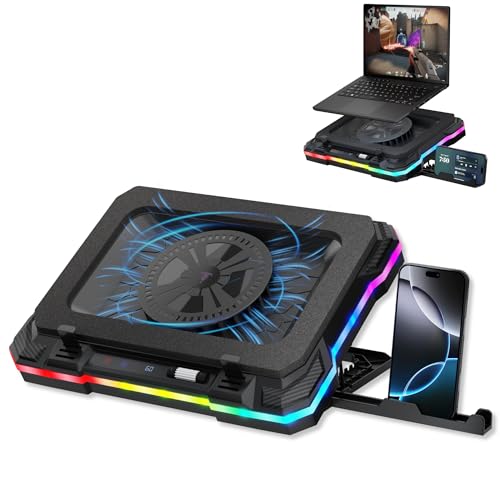
llano V10 Gaming Laptop Cooling Pad, RGB Laptop Cooler Stand

Our verdict: The most complete answer for a USB-C only laptop that runs hot.

The llano V10 has one USB-A and one USB-C port, a fan rated up to 3500 RPM with a copper motor, a removable dust filter and a fit for 13 to 17.3 inch laptops. A maker-stated 38 degree Celsius drop is a claim to treat with caution, but the real USB-C port solves the cable problem outright.

It ranks first because it handles the USB-C connection and gives the strongest documented airflow. The Tilted Nation adds ports but runs slower, and the TECKNET stops at 15.6 inches.

Buy it for a USB-C-only gaming or performance laptop that needs airflow. The caveats are maker-stated figures and a higher price than budget pads. Skip it if you only browse and answer email.

Ports
1x USB-A, 1x USB-C
Fan speed
Up to 3500 RPM
Fits
13 to 17.3 inch laptops
Extras
Removable dust filter

What we like

  • +Real USB-C port
  • +Fast documented fan speed
  • +Removable dust filter
  • +Wide laptop size range

Watch out for

  • −Maker-stated cooling figures
  • −Pricier than budget pads

Buy it if: Owners of a USB-C only gaming or performance laptop who want maximum airflow.

Skip it if: You only want a basic pad for light browsing and email.

2

Best Hub Pad

Tilted Nation Gaming Laptop Cooling Pad with USB Hub

Our verdict: Turns a cooling pad into a four-port desk hub.

The Tilted Nation pad has two USB-A 3.0 and two USB-C ports, a fan that runs from 600 to 2800 RPM, seven tilt levels from 20 to 40 degrees, ten RGB modes and a phone holder. Four hub ports and a wide tilt range make it a desk accessory as much as a cooler.

It ranks second because the USB-C ports are data only and the top fan speed is lower than the llano V10's. It beats the llano on tilt options.

Buy it if you want extra ports and an ergonomic tilt in one accessory. Skip it if you expect the USB-C ports to pass charging power. Keep your charger plugged in separately.

Ports
2x USB-A 3.0, 2x USB-C
Fan speed
600 to 2800 RPM
Tilt
7 levels, 20 to 40 degrees
Lighting
10 RGB modes

What we like

  • +Four hub ports
  • +Seven tilt levels
  • +Built-in phone holder
  • +Wide fan speed range

Watch out for

  • −USB-C is data only
  • −Lower top fan speed

Buy it if: Desk users who want extra ports and ergonomic tilt in one accessory.

Skip it if: You expect the USB-C ports to pass charging power.

3

Best Budget

TECKNET Laptop Cooling Pad, 12"-15.6" with Quiet Cooling Fan

Our verdict: The cheapest way to get a physical USB-C port.

The TECKNET pad has a physical USB-C port plus a USB-A port, two 110mm fans with adjustable speed, a fit for 12 to 15.6 inch laptops and a 3-year warranty, under $25. A cheap pad with a long warranty suits ultrabooks that run warm rather than hot.

It ranks third because the bundled cable is USB-A to USB-A and the size range stops at 15.6 inches. It is the cheapest way to get a USB-C port.

Buy it for an ultrabook owner who wants a quiet, inexpensive pad. Skip it if you own a 17 inch laptop or want a multi-port hub. Check that the cable you need is in the box.

Ports
USB-C plus USB-A
Fans
Two 110mm, adjustable
Fits
12 to 15.6 inch laptops
Warranty
3 years

What we like

  • +Physical USB-C port
  • +Under $25 tier
  • +Three year warranty
  • +Adjustable fan speed

Watch out for

  • −Bundled cable is USB-A
  • −Limited to 15.6 inches

Buy it if: Ultrabook owners who want a quiet, inexpensive pad with a long warranty.

Skip it if: You own a 17 inch laptop or want a multi-port hub.

4

Best Cable Connection

llano V12 Gaming Laptop Cooling Pad Laptop Cooler

Our verdict: Ships with the USB-A to USB-C cable that other pads leave out.

The llano V12 ships with a USB-A to USB-C cable, a three-port USB 2.0 hub, a removable dust filter and an optional 36W external adapter, with a maker-stated 44 degree Celsius drop in 90 seconds. Including the cable the other pads leave out saves a trip for an adapter.

It ranks fourth because the hub ports are not Type-C and the cooling figures come from the maker. It suits USB-A peripherals.

Buy it for a USB-C laptop whose peripherals are all USB-A. Skip it if you want Type-C ports on the pad itself. The optional adapter helps if your laptop port cannot power the fan.

Cable
USB-A to USB-C included
Hub
3-port USB 2.0
Cooling claim
44C drop in 90 seconds
Power
Optional 36W adapter

What we like

  • +USB-C cable included
  • +Three hub ports
  • +Removable dust filter
  • +Optional external power

Watch out for

  • −Hub ports not Type-C
  • −Maker-stated cooling figures

Buy it if: USB-C laptop owners whose peripherals are all USB-A.

Skip it if: You want Type-C ports on the pad itself.

Methodology

How We Ranked These

USB-C support

We checked whether the pad has a USB-C port, ships a USB-C compatible cable, or needs an adapter, because that decides whether a USB-C only laptop works out of the box.

Airflow hardware

Fan count, size and documented RPM were compared on paper, since real airflow depends on the fan design as much as the headline speed.

Port layout

Hub ports, their type, and whether any pass power were weighed against the ports a pad gives up on your laptop.

Fit and tilt

Supported laptop sizes and tilt range decide whether a pad suits your machine and your typing posture.

Value tier

Each pick was judged against its price bucket and its warranty or extras, not against the whole field.

Every Primea Score uses the same weights: Performance 30% · Build & Materials 20% · Everyday Usability 20% · Value 20% · Owner Satisfaction 10%. Full scoring rules

Buyer's guide

How to Pick the Right One for You

By Laptop Port Situation

The first decision is how your laptop plugs into the pad.

Your situationOur pick
USB-C only and want a native USB-C port on the padllano V10 Gaming Laptop Cooling Pad
USB-C only and want more peripheral portsTilted Nation Gaming Laptop Cooling Pad with USB Hub
USB-C only, tight budgetTECKNET 12"-15.6" Cooling Pad
USB-C only, devices are all USB-Allano V12 Gaming Laptop Cooling Pad

By Budget

SpendOur pick
Under $25TECKNET 12"-15.6" Cooling Pad
$50 to $100 for cooling powerllano V10 Gaming Laptop Cooling Pad
$50 to $100 for portsTilted Nation Gaming Laptop Cooling Pad with USB Hub
$50 to $100 with cable includedllano V12 Gaming Laptop Cooling Pad

Cooling Power vs Port Count

Cooling power

Prioritize fan speed and a dust filter. The llano V10 and llano V12 both list strong cooling claims and removable filters.

Port count

Prioritize hub ports. The Tilted Nation offers four, and the llano V12 offers three USB 2.0 ports.

Most buyers with a hot laptop should default to the llano V10 and only chase ports if their desk is short on them.

By Laptop Size

LaptopOur pick
13 to 15.6 inch ultrabookTECKNET 12"-15.6" Cooling Pad
13 to 17.3 inch gaming laptopllano V10 Gaming Laptop Cooling Pad
Desk setup with adjustable angleTilted Nation Gaming Laptop Cooling Pad with USB Hub
Laptop paired with USB-A accessoriesllano V12 Gaming Laptop Cooling Pad

For MacBook Owners Specifically

Look for

A real USB-C port or a USB-A to USB-C cable in the box, plus a size range that covers your screen.

In this ranking

The TECKNET is the budget route and the llano V12 includes the right cable. The llano V10 is the stronger cooler.

When to Spend More

Spend more if

You game or render for long sessions, in which case the llano V10 or Tilted Nation give you faster fans and more tilt.

Save if

Your laptop only runs warm during video calls, where the TECKNET covers the basics with a long warranty.

Questions

Frequently Asked Questions

Do I need a USB-C cooling pad if my laptop has USB-C only?+

You need a pad that either has a USB-C port or ships a USB-C cable, such as the llano V10 or V12. Otherwise a USB-A cable plus an adapter works, but it adds a loose link that can come away when you move the laptop.

Can a cooling pad charge my laptop through USB-C?+

Not necessarily. The Tilted Nation lists its USB-C ports as data only, so keep your normal charger connected. Check the listing before assuming charging passes through, because a pad that cannot charge may also cost you a port.

Is the llano V10 worth it over the TECKNET?+

If your laptop runs hot, yes, because of the 3500 RPM fan and dust filter. For light use the TECKNET is cheaper and has a 3 year warranty, which is a good fit for an ultrabook that only runs warm.

How do I set up a cooling pad with a thin laptop?+

Place the laptop so its bottom vents sit over the fans, then pick a tilt that keeps your wrists flat. Run the fan on low first, and raise it only under heavy load, keeping noise in check. A thin laptop may need foam inserts to seal the gap.

How do I clean a cooling pad?+

Unplug it and brush or vacuum the fan grill every month or two. Pads with a removable dust filter, like the llano V10 and V12, can be rinsed and dried before reuse, which keeps airflow high.

Will a cooling pad work with a 17 inch laptop?+

Only the llano V10 lists support up to 17.3 inches here. The TECKNET stops at 15.6 inches, so a larger laptop would overhang the pad and cover the intake vents the fans are meant to reach.

Final take

The llano V10 is the right USB-C cooling pad for most hot-running laptops, because it brings a real USB-C port and strong airflow. Choose the Tilted Nation for extra ports and the TECKNET for a cheap pad on a thin laptop. Check the cable and port type before the fan speed.

More Ranked & Reviewed Guides