
Primea ReviewsAll Reviews

Primea Reviews is reader-supported. When you buy through our Amazon links we may earn a commission, at no extra cost to you. Rankings are set by our editors and never sold. Learn more

Ranked & Reviewed by Primea Reviews

The 8 Best USB-C Docking Stations of 2026, Ranked & Reviewed

By the Primea Editorial TeamUpdated November 1, 202611 min read8 products ranked
The 8 Best USB-C Docking Stations of 2026, Ranked & Reviewed

The short answer

The UGREEN Revodok Pro 7-in-1 is the best USB-C docking station because it delivers dual 4K at 60Hz and 100W passthrough in the $25 to $50 tier. The Anker Nano 8-in-1 adds an SD and TF reader at 85W, the Anker 8-in-1 brings Gigabit Ethernet, and the Nano 13-in-1 drives three displays. The Anker Prime tops out at 160W, while the Acer, HP G5 and G6 docks suit niche needs.

The Primea Scoreboard

Ranked & Reviewed

  1. Dual 4K at 60Hz and 100W passthrough at a $25-50 price.

    94Outstanding
    Check price
  2. Dual 4K at 60Hz with an SD and TF card reader and 85W PD.

    91Excellent
    Check price
  3. Gigabit Ethernet, two HDMI ports and an SD slot in an 8-in-1.

    89Excellent
    Check price
  4. Three displays via 2 HDMI and 1 DisplayPort, with a detachable hub.

    87Excellent
    Check price
  5. 05
    Anker Prime Docking Station 14-Port

    Best for Power and Ports

    Anker Prime Docking Station 14-Port

    14 ports and up to 160W of output with independent PD circuitry.

    85Excellent
    Check price
  6. 06
    Acer USB-C Docking Station 9-in-1

    Best Known-Brand Budget Dock

    Acer USB-C Docking Station 9-in-1

    A compact 9-in-1 with two HDMI ports from a familiar brand.

    83Very Good
    Check price
  7. 07
    HP USB-C Dock G5 11-in-1

    Best for HP Office Setups

    HP USB-C Dock G5 11-in-1

    A business 11-in-1 dock with firmware update support.

    81Very Good
    Check price
  8. 08
    HP USB-C 100W G6 Dock

    Best HP 100W Dock

    HP USB-C 100W G6 Dock

    HP's current-generation G6 dock with genuine 100W PD.

    79Very Good
    Check price

The number in a dock's name is a port count, not a performance rating. An 8-in-1 can still leave a laptop on a slow trickle of power or drive two monitors at a stuttering 30Hz, and neither shows up in the title. Two specs decide whether a dock works at your desk: how many watts reach the laptop, and what refresh rate each display actually gets.

We reviewed eight docks against their listed ports, display support, power delivery and data speed, and scored them on the Primea framework. Wattage and verified 4K at 60Hz carried the most weight, then Ethernet and card readers. A dock is a cable's worth of trust, so we marked down anything vague. Listings that omit wattage or refresh rate lost points, because those omissions hide the facts that matter.

Before you buy

What Actually Matters

01

Power delivery wattage

Power delivery wattage is the charging power that passes through the dock to your laptop. The dock must meet your laptop's needs, and one below your charger's rating charges slowly or not at all under load. Compare the PD number in the listing against your original charger, and give yourself a small margin. A 65W dock on a 100W laptop will charge it only while idle.

02

Display count and refresh

Display count and refresh rate decide how smooth multi-monitor work feels. A dock can list dual monitor support yet drive them at 30Hz, which feels sluggish when scrolling. 4K at 60Hz is smooth. Look for the refresh rate in the specs, and be wary of listings that name only the display count. Two displays at 30Hz is a common hidden compromise.

03

Ethernet

Ethernet gives a wired connection that is steadier than Wi-Fi for calls and large file transfers. Not every dock includes it, and the UGREEN and Anker Nano 8-in-1 do not list it. Look for Gigabit Ethernet in the port list if your desk has a wall jack, because it saves a separate adapter and a cable. Wi-Fi drops are the usual cause of video call stutter.

04

Data speed

Data speed describes how fast the dock's ports move files. 10Gbps ports transfer from external SSDs far faster than older USB speeds, which matters for video and photo work. Check for a 10Gbps mention in the listing, and confirm which ports offer it, since a dock often mixes fast and slow ports. Put your SSD on the fast one.

05

Port count

Port count in the name covers everything, including the input to your laptop. Count what you need, such as HDMI, USB-A and card slots, and match that list to your peripherals instead of trusting the headline number. A 7-in-1 with the right ports beats a 14-port dock with the wrong ones.

In-depth reviews

Our Ranked Picks, Reviewed

1

Best Overall

UGREEN 7-in-1 Docking Station (Revodok Pro)

Our verdict: Dual 4K at 60Hz and 100W passthrough at a $25-50 price.

The Revodok Pro is a 7-in-1 hub with dual 4K at 60Hz HDMI outputs, 10Gbps data ports, 100W PD passthrough and an aluminum body, in the $25 to $50 tier. A metal shell matters in a dock because it spreads heat from the display chip, and cheap plastic docks throttle quietly when two screens run for hours.

It wins because it packs the specs that matter most, two sharp displays and strong power delivery, into the lowest price tier. Against the Anker docks, it gives up port count: there is no Ethernet or card slot in the spec list.

It suits a typical laptop desk with two monitors. The honest caveat is the port shortage, so skip it if you need wired networking or an SD slot without carrying a second adapter.

Ports
7-in-1
Displays
Dual 4K at 60Hz HDMI
Data
10Gbps
Power
100W PD passthrough

What we like

  • +Dual 4K at 60Hz
  • +100W PD passthrough
  • +10Gbps data ports
  • +Aluminum body

Watch out for

  • −Fewer ports than larger docks
  • −No Ethernet listed

Buy it if: Buyers who want dual 4K and real 100W PD at the lowest possible price.

Skip it if: You need Ethernet or an SD slot.

2

Best for Card Readers

Anker Nano Laptop Docking Station 8-in-1

Our verdict: Dual 4K at 60Hz with an SD and TF card reader and 85W PD.

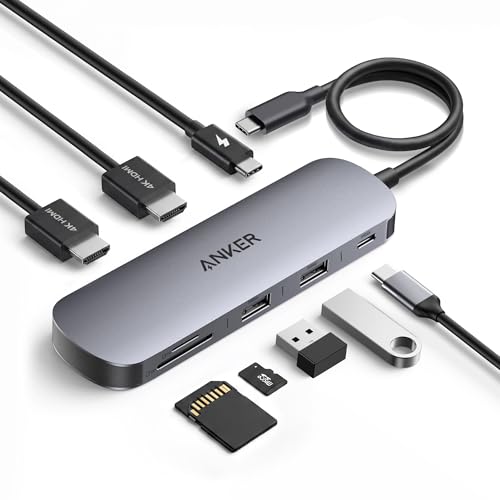
The Anker Nano 8-in-1 offers dual 4K at 60Hz HDMI, a 10Gbps USB-C port plus two USB-A ports, 85W PD and an SD and TF card reader, in the $25 to $50 tier. The card reader is the differentiator: photographers and drone owners offload straight to the laptop without a dongle.

It sits just behind the UGREEN because 85W is lower than 100W, which can matter for a laptop that draws more under load, and the UGREEN has the sturdier build. The Anker adds the reader the UGREEN lacks at a similar price.

It works for anyone moving card contents regularly. Check that 85W covers your laptop's charger rating, because a dock below it charges slowly under load. It lists no Ethernet, so wired-network users should look at the next pick.

Ports
8-in-1
Displays
Dual 4K at 60Hz HDMI
Power
85W PD
Card reader
SD/TF

What we like

  • +SD and TF card reader
  • +Dual 4K at 60Hz
  • +10Gbps USB-C port
  • +Two USB-A ports

Watch out for

  • −85W PD is below 100W
  • −No Ethernet listed

Buy it if: Buyers who want an SD/TF card reader without paying more than $30.

Skip it if: Your laptop needs more than 85W.

3

Best for Ethernet

Anker Laptop Docking Station 8-in-1

Our verdict: Gigabit Ethernet, two HDMI ports and an SD slot in an 8-in-1.

The Anker 8-in-1 lists dual 4K monitor support over two HDMI ports, Gigabit Ethernet, 85W PD passthrough and an SD card slot, in the $50 to $100 tier. Gigabit Ethernet gives a steadier connection than Wi-Fi for video calls and large transfers, which is why offices still wire desks.

It ranks third because it asks for more than the Nano yet gives the same 85W. What you gain is wired Ethernet, which the Nano and UGREEN lack. Against the UGREEN, you pay for ports and lose 15W of charging headroom.

It suits a desk that needs a stable wired connection. The listing does not state the refresh rate of the dual displays, which is a real gap; confirm it before assuming 60Hz on both. Skip it if you want the cheapest dock.

Ports
8-in-1
Network
Gigabit Ethernet
Displays
Dual 4K, 2 HDMI
Power
85W PD

What we like

  • +Gigabit Ethernet port
  • +Two HDMI outputs
  • +SD card slot
  • +85W PD passthrough

Watch out for

  • −Costs more than the Nano
  • −Refresh rate not listed

Buy it if: Buyers who want Ethernet and an SD slot without a big price jump.

Skip it if: You want the cheapest option.

4

Best for Three Displays

Anker Nano 13-in-1 Laptop Docking Station

Our verdict: Three displays via 2 HDMI and 1 DisplayPort, with a detachable hub.

The Nano 13-in-1 supports three displays at once through two HDMI ports and one DisplayPort, with 10Gbps USB-C, up to 100W PD and a detachable 6-in-1 hub in a compact modular design, at $100 to $200. The detachable hub lets you carry a slim part for travel and leave the rest on the desk.

It ranks fourth because it costs more than the 8-in-1 docks, but it is the pick when two monitors are not enough. It stops short of the 14-port Prime's 160W.

Choose it for a triple-screen desk. The caveat is your laptop: three displays need a laptop that supports them, and many do not, so check before paying. Skip it if you only use one or two monitors, where the UGREEN costs far less.

Ports
13-in-1
Displays
3 (2 HDMI + 1 DisplayPort)
Power
100W max PD
Design
Detachable 6-in-1 hub

What we like

  • +Three displays at once
  • +Detachable 6-in-1 hub
  • +100W max PD
  • +Compact modular design

Watch out for

  • −Pricier than 8-in-1 docks
  • −Laptop must support three displays

Buy it if: Buyers who want 3-display support without a full 14-port dock.

Skip it if: You only use one or two monitors.

5

Best for Power and Ports

Anker Prime Docking Station 14-Port

Our verdict: 14 ports and up to 160W of output with independent PD circuitry.

The Anker Prime has 14 ports in total, up to 160W maximum output, dual 4K display support, 10Gbps data throughput and independent PD circuitry. Independent power circuitry means charging does not compete with the data and display chips, which keeps behavior steady when a hungry laptop pulls hard.

It ranks fifth because the specs outclass the cheaper docks but the $100 to $200 price is steep for a single-laptop desk. It offers more power headroom than any other pick here, ahead of the Nano 13-in-1's 100W.

It suits power-hungry laptops and desks with many peripherals. The caveat is overkill: most buyers will not use 14 ports, so skip it if you only need basic connections, because the UGREEN does the job for a fraction of the cost.

Ports
14 total
Power
Up to 160W output
Displays
Dual 4K
Data
10Gbps

What we like

  • +14 ports in one dock
  • +Up to 160W output
  • +Independent PD circuitry
  • +10Gbps throughput

Watch out for

  • −Highest price tier here
  • −More ports than most need

Buy it if: Buyers who need the highest PD wattage and the most ports in one dock.

Skip it if: You only need basic connections.

6

Best Known-Brand Budget Dock

Acer USB-C Docking Station 9-in-1

Our verdict: A compact 9-in-1 with two HDMI ports from a familiar brand.

The Acer dock is a 9-in-1 with dual monitor support over two HDMI ports, a compact form factor and broad laptop compatibility, at $25 to $50. A familiar brand and nine ports make it attractive on a basic desk, and its small body travels easily.

It ranks sixth because the listing gives no wattage and no 4K refresh rate, which the UGREEN and Anker docks do. You are buying the brand and the port count, not verified performance, and the two specs that decide usability are blank.

It works for a basic desk where you do not need a stated power figure. The caveat is the unknown charging wattage, so skip it if your laptop needs a confirmed number, and expect to confirm 30Hz or 60Hz yourself.

Ports
9-in-1
Displays
Dual, 2 HDMI
Connection
USB-C
Form
Compact

What we like

  • +Nine ports
  • +Two HDMI outputs
  • +Compact form factor
  • +Broad laptop compatibility

Watch out for

  • −PD wattage not listed
  • −4K refresh not stated

Buy it if: Buyers who want a recognizable brand dock at a near-budget price.

Skip it if: You need a confirmed charging wattage.

7

Best for HP Office Setups

HP USB-C Dock G5 11-in-1

Our verdict: A business 11-in-1 dock with firmware update support.

The HP USB-C Dock G5 is a business-oriented 11-in-1 with firmware update support, designed for office desks and compatible with USB-C laptops beyond HP, at $50 to $100. Firmware updates matter in managed environments, where fixing a flaky display chip is routine.

It ranks seventh because it lists no wattage or display spec, so it offers less measurable value than the Anker docks. Its edge is business-grade support. Against the Acer, it costs more but adds an update path.

It suits business laptop buyers who want HP's firmware support and a consistent fleet dock. The caveat is value per dollar, and a home user shopping on specs will find the UGREEN and Anker docks clearer. Skip it unless an office policy points you here.

Ports
11-in-1
Type
Business USB-C dock
Updates
Firmware support
Compatibility
Beyond HP laptops

What we like

  • +Firmware update support
  • +11 ports
  • +Works beyond HP laptops
  • +Built for office desks

Watch out for

  • −No wattage listed
  • −Less value per dollar

Buy it if: Business laptop buyers who want HP's reliability and firmware support.

Skip it if: You are a home user shopping on specs.

8

Best HP 100W Dock

HP USB-C 100W G6 Dock

Our verdict: HP's current-generation G6 dock with genuine 100W PD.

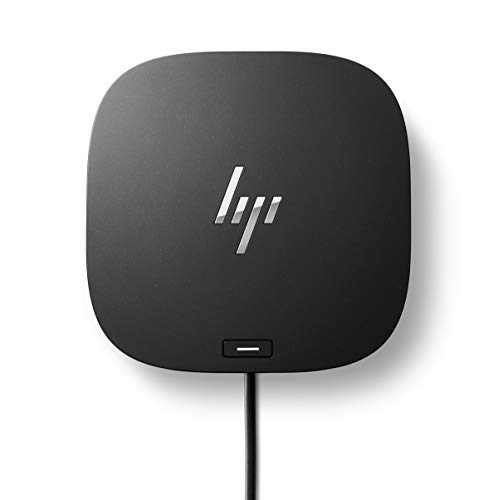
The HP USB-C 100W G6 Dock is a business-tier dock with 100W PD, firmware update support and a design built for the HP business laptop ecosystem, at $100 to $200. It is the current generation, and the 100W figure is stated, which the G5 does not give.

It ranks last because the $100 to $200 price is high for a listing with no stated port count or display spec. It does list 100W, which the G5 does not, but the UGREEN offers the same wattage for far less.

It makes sense for an HP fleet that wants a vendor dock. The caveat is cost and missing detail, so other buyers will get more from the Anker or UGREEN docks. Skip it if you do not use HP laptops.

Power
100W PD
Generation
G6
Tier
Business
Updates
Firmware support

What we like

  • +100W PD stated
  • +Current-generation G6
  • +Firmware update support
  • +HP ecosystem design

Watch out for

  • −High price tier
  • −Port count not listed

Buy it if: Business buyers who want HP's own ecosystem dock with genuine 100W PD.

Skip it if: You do not use HP laptops.

Methodology

How We Ranked These

Display support

We compared how many monitors each dock drives and at what resolution.

Power delivery

We weighed the wattage passed through to the laptop.

Port selection

We reviewed port counts and extras such as Ethernet and card readers.

Data speed

We noted 10Gbps ports where listed.

Value

We compared each dock against its price bucket.

Every Primea Score uses the same weights: Performance 30% · Build & Materials 20% · Everyday Usability 20% · Value 20% · Owner Satisfaction 10%. Full scoring rules

Buyer's guide

How to Pick the Right One for You

By Number of Displays

Your monitor count narrows the field fast.

Your setupOur pick
Two 4K monitors at 60HzUGREEN 7-in-1 Docking Station (Revodok Pro)
Three displaysAnker Nano 13-in-1 Laptop Docking Station
Two monitors plus wired networkAnker Laptop Docking Station 8-in-1
Two monitors, brand preferenceAcer USB-C Docking Station 9-in-1

By Budget

SpendOur pick
$25-50, dual 4K and 100WUGREEN 7-in-1 Docking Station (Revodok Pro)
$25-50, card readerAnker Nano Laptop Docking Station 8-in-1
$50-100Anker Laptop Docking Station 8-in-1
$100-200Anker Prime Docking Station 14-Port

Compact Hub vs Full Dock

Compact hub

Fewer ports, lower cost and easier to carry. Picks: UGREEN Revodok Pro, Anker Nano 8-in-1 and Acer 9-in-1.

Full dock

More ports and power for fixed desks. Picks: Anker Prime 14-Port and Anker Nano 13-in-1.

Most buyers should default to a compact hub like the UGREEN unless they run three screens or need 160W.

By Charging Need

Laptop powerOur pick
Needs up to 85WAnker Nano Laptop Docking Station 8-in-1
Needs 100WUGREEN 7-in-1 Docking Station (Revodok Pro)
Needs 100W in an HP fleetHP USB-C 100W G6 Dock
Needs more than 100WAnker Prime Docking Station 14-Port

For Office Fleets Specifically

Look for

Firmware update support and broad USB-C compatibility so the dock works across laptop models.

In this ranking

The HP USB-C Dock G5 11-in-1 and HP USB-C 100W G6 Dock both list firmware update support.

When to Spend More

Spend more if

You run three displays or a power-hungry laptop. The Anker Nano 13-in-1 and Anker Prime 14-Port cover those.

Save if

Two monitors and 100W are enough. The UGREEN Revodok Pro delivers both at $25-50.

Questions

Frequently Asked Questions

Will any USB-C dock work with my laptop?+

Not always. Docks need a USB-C port that supports video output and power delivery, and some laptop ports carry data only, so a dock plugged into one will charge nothing and show nothing. Check your laptop's specs before buying any of these.

What is the most common mistake?+

Buying on the in-one number. The UGREEN is a 7-in-1 yet outperforms bigger names, so check wattage and display refresh rate, which decide real usability far more than the port count.

Is the Anker Prime worth it over the UGREEN?+

Only if you need up to 160W output or 14 ports. The UGREEN handles dual 4K and 100W for much less, so most buyers are better served by it. The Prime suits heavy workstations and large peripheral collections.

How do I set up dual monitors?+

Connect the dock to your laptop's USB-C port, plug the monitors into the HDMI ports and the charger into the dock. Then arrange displays in system settings. The UGREEN and Anker Nano 8-in-1 list 4K at 60Hz.

Do docks need maintenance?+

Keep the dock ventilated and update firmware where supported. HP lists firmware updates for the G5 and G6, which is useful in a managed office environment. Home users can skip the update chase.

Can I run three screens?+

Only if your laptop supports it. The Anker Nano 13-in-1 offers two HDMI and one DisplayPort for three displays, but the laptop's graphics must drive them, and many models cannot. Look for a stated three-display or multi-stream capability.

Final take

Buy the UGREEN Revodok Pro unless a specific port forces your hand. Take the Anker Nano 8-in-1 for card offloading and the Anker 8-in-1 for wired networking. The Nano 13-in-1 is for three screens, and the Prime for laptops that draw serious power. Choose the HP docks only for office fleets, and confirm your laptop supports video output over USB-C before you spend anything.

More Ranked & Reviewed Guides