

Primea ReviewsAll Reviews

Primea Reviews is reader-supported. When you buy through our Amazon links we may earn a commission, at no extra cost to you. Rankings are set by our editors and never sold. Learn more

Ranked & Reviewed by Primea Reviews

The 7 Best Multi-Laptop USB-C Charging Stations for Desks and Classrooms, Ranked & Reviewed

By the Primea Editorial TeamUpdated November 3, 202610 min read7 products ranked
The 7 Best Multi-Laptop USB-C Charging Stations for Desks and Classrooms, Ranked & Reviewed

The short answer

The Anker Prime 200W is the most proven multi-laptop station, with up to 100W per USB-C port from a compact GaN body. The Zobirez 750W is the one for several laptops that all need real power at once, the 380W dual 100W block suits a two-laptop desk, and the JOXPRING wheeled cart is the answer for a classroom or shared fleet.

The Primea Scoreboard

Ranked & Reviewed

  1. A compact 200W GaN station that gives up to 100W per USB-C port.

    94Outstanding
    Check price
  2. Five 120W USB-C ports and 750W total for a house full of laptops.

    92Outstanding
    Check price
  3. Twelve ports in aluminum, with a dedicated 65W laptop port that holds speed under load.

    90Excellent
    Check price
  4. Two confirmed 100W ports on a 380W block, with four cables included.

    88Excellent
    Check price
  5. Ten USB-C ports on a 510W budget without paying for the top wattage tier.

    86Excellent
    Check price
  6. Six AC outlets and four USB ports for homes that still own barrel-plug laptops.

    84Very Good
    Check price
  7. A wheeled metal cart that stores and charges up to twelve devices.

    82Very Good
    Check price

The headline wattage on a charging station is the least useful number on the box. A 500W label tells you what the whole unit can pull from the wall, not what a single laptop will receive when six other devices are plugged in. Many buyers end up with ten ports that happily trickle-charge phones and quietly starve their second laptop.

This ranking is built around that gap. We reviewed seven stations from their spec sheets and listings, looking at total wattage, power per USB-C port, port mix, build and form factor. Where a listing gives only a total with no per-port detail, we say that plainly, because it affects how many laptops the unit can really feed.

Before you buy

What Actually Matters

01

Total wattage versus per-port wattage

The total is the most the station can draw, shared across every port. Per-port power is what each device can receive. A laptop needs roughly 65W to 100W, so a 200W total can only feed two of them. Read the listing for a per-port figure, not only the total.

02

Dedicated laptop ports

Some stations reserve one port that keeps full power even when the others are busy. This matters when phones and tablets are plugged in alongside a laptop. Look for the phrase dedicated or confirmed in the listing, as vague claims often hide shared power.

03

GaN construction

Gallium nitride chargers run cooler and can be smaller than silicon ones at the same output. That helps desk space and longevity. Look for GaN in the listing, and check the warranty length as a sign of maker confidence.

04

Port mix

USB-C handles modern laptops, tablets and phones, while USB-A suits older accessories, and AC outlets handle laptops with their own bricks. Count what you own before choosing. A station full of USB-A ports does little for laptops.

05

Cooling and body material

Aluminum conducts heat away better than plastic, which matters when several ports draw power at once. Poor cooling can throttle output. Look for aluminum or cooling mentions, and avoid burying the unit in a cabinet.

In-depth reviews

Our Ranked Picks, Reviewed

1

Best Overall

Anker Prime Charging Station, 200W 6-Port GaN Desktop Charger

Our verdict: A compact 200W GaN station that gives up to 100W per USB-C port.

The Anker Prime is a 200W, 6-port GaN desktop charger that can deliver up to 100W from a USB-C port while several are in use. It measures about 4.4 by 3.0 by 1.4 inches, weighs 1.24 pounds and carries a 24-month warranty. It falls in the $50 to $100 bracket.

It leads because it pairs a brand with a long track record and a small, stable body. GaN, or gallium nitride, lets a charger run cooler and shrink compared with older silicon designs, which is why this one fits on a desk corner. The honest limit is the 200W total: two 100W laptops would use the whole budget, so a third device will force the power to be shared.

Buy it if you charge one or two laptops plus phones and want the most proven option. Skip it if you need four laptops at full speed.

Total power
200W, 6 ports
Per USB-C port
Up to 100W
Size and weight
4.4 x 3.0 x 1.4 in, 1.24 lbs
Warranty
24 months

What we like

  • +Up to 100W per USB-C port
  • +GaN keeps the body small and cool
  • +Backed by a 24-month warranty
  • +Stable desk-friendly design

Watch out for

  • −200W total limits heavy loads
  • −Few ports versus larger stations

Buy it if: One or two laptops plus phones at a desk.

Skip it if: You need to fast charge four laptops at once.

2

Best High-Capacity Station

750W Charging Station for Multiple Devices, Zobirez 10-Port Fast Charger

Our verdict: Five 120W USB-C ports and 750W total for a house full of laptops.

The Zobirez has five USB-C ports at 120W each, five USB-A ports at 30W each, and a 750W total. It uses a one-piece ABS body with two wide bays for laptops or tablets and comes with a 10-cable kit. It sits in the $50 to $100 range.

It takes second place because it is the station that actually matches its marketing for multi-laptop families. Five 120W ports means several machines can draw serious power at once, and the cable kit saves a separate purchase. Compared with the Anker it is far bigger and has less of a premium feel, and ABS plastic does not shed heat like aluminum. Keep it in a ventilated spot.

Choose it for an office or a home with many laptops. Skip it if desk space is tight.

USB-C
5 ports at 120W each
USB-A
5 ports at 30W each
Total power
750W
Extras
10-cable kit, 2 device bays

What we like

  • +Five 120W USB-C ports
  • +750W total for many laptops
  • +Ten-cable kit included
  • +Two wide bays hold laptops

Watch out for

  • −Large footprint for a desk
  • −ABS body sheds heat poorly

Buy it if: Families and offices charging several laptops.

Skip it if: You have little desk space or only one laptop.

3

Best Value Many-Port

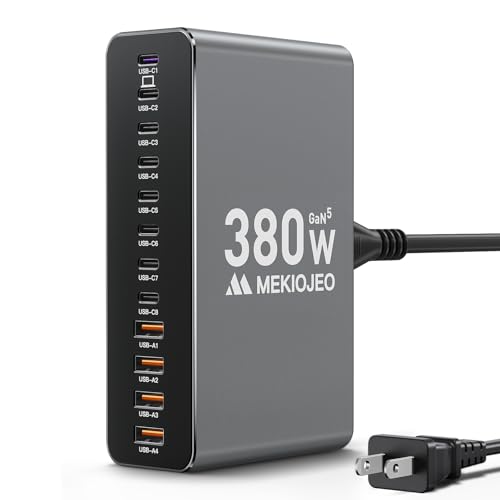
12 Ports Aluminum Alloy MEKIOJEO 380W Charging Station USB C Charger Block

Our verdict: Twelve ports in aluminum, with a dedicated 65W laptop port that holds speed under load.

The MEKIOJEO offers 12 ports, eight USB-C and four USB-A, from a 380W total in an aluminum alloy body with GaN III and cooling protection. One dedicated 65W Power Delivery port is listed as staying at full speed when the others are busy. It falls in the $25 to $50 bracket.

Third place comes down to the dedicated laptop port, which is an unusually honest design: you know one machine will always get 65W. That suits a mixed household with one main laptop and many phones, tablets and earbuds. It does not suit several large laptops, since only one port has that guarantee. The aluminum case helps with heat and feels sturdier than plastic rivals.

Buy it if you have many small devices and one laptop to protect. Skip it if you need two or more 100W laptops.

Total power
380W
Ports
8 USB-C, 4 USB-A
Laptop port
Dedicated 65W PD
Build
Aluminum alloy, GaN III

What we like

  • +Dedicated 65W laptop port
  • +Twelve ports for many devices
  • +Aluminum body for cooling
  • +Strong value in the $25 to $50 bracket

Watch out for

  • −Only one guaranteed laptop port
  • −Not for several large laptops

Buy it if: One laptop plus a pile of phones and tablets.

Skip it if: You charge two or more power-hungry laptops.

4

Best Two-Laptop Desk Pick

380W USB C Charger Block with 4 USB Cables Dual 100W Charging Station

Our verdict: Two confirmed 100W ports on a 380W block, with four cables included.

This 380W charger block lists dual 100W ports and comes with four USB cables. It falls in the $25 to $50 bracket. The detail that matters is the pair of 100W ports, which is what two full-size laptops need to charge at normal speed together.

The unit lands fourth because the listing is short on other specs: we do not see a port count breakdown or a build description, so it is hard to compare with the MEKIOJEO. What it does promise is clear, and clear matters in this category. Two laptops at full speed from one block, plus cables thrown in, is a neat package for a shared desk.

Choose it if two laptops at 100W is the entire brief. Skip it if you want a long list of ports or cooling details.

Total power
380W
Laptop ports
Dual 100W
Cables
4 included
Type
USB-C charger block

What we like

  • +Two confirmed 100W ports
  • +Four cables in the box
  • +380W total power
  • +Good for two-laptop desks

Watch out for

  • −Few specifics on other ports
  • −No build details listed

Buy it if: Desks with two full-size laptops.

Skip it if: You need a long list of extra ports.

5

Best Mid-Wattage 10-Port

510W Fast Charging Station for Multiple Devices, 10 Port USB C Charger Station

Our verdict: Ten USB-C ports on a 510W budget without paying for the top wattage tier.

The 510W station lists ten USB-C ports and a total of 510W, all in the $25 to $50 bracket. It targets buyers who want the port count of a big station without moving up to the largest wattage tier.

Its fifth place reflects thin details. The listing does not state per-port wattage, so we cannot say how many laptops it would feed at full speed. Ten ports sharing 510W works out to an average of 51W, which is fine for phones and tablets and tight for several laptops at once. It sits between the MEKIOJEO and the Zobirez in capacity but offers less proof of how power is split.

Buy it if you want many USB-C ports on a modest budget. Skip it if you need guaranteed power per laptop.

Total power
510W
Ports
10 USB-C
Per-port power
Not listed
Price
$25 to $50

What we like

  • +Ten USB-C ports in one unit
  • +510W total is a healthy budget
  • +Low price bracket
  • +Skips the top wattage premium

Watch out for

  • −Per-port wattage not stated
  • −Power split is unclear

Buy it if: Many USB-C devices on a modest budget.

Skip it if: You need guaranteed power for each laptop.

6

Best for AC Laptops

Plugsharge 10-Device Laptop & Tablet Charging Station with 6 AC & 4 USB

Our verdict: Six AC outlets and four USB ports for homes that still own barrel-plug laptops.

The Plugsharge station holds ten devices with six AC outlets and four USB ports, and it falls in the $100 to $200 bracket. The AC outlets are the point: they let you plug in the original adapters of laptops that do not charge over USB-C.

It ranks sixth because it solves a different problem from the rest of the list. If your laptops are older or are gaming machines with their own bricks, USB-C stations are useless to you, and a unit with AC outlets is the right tool. The cost is a higher price and less efficiency than a GaN USB-C design, because each laptop still carries its own bulky adapter.

Buy it if you mix AC and USB-C laptops. Skip it if everything you own charges over USB-C.

Capacity
10 devices
AC outlets
6
USB ports
4
Price
$100 to $200

What we like

  • +Six AC outlets for original adapters
  • +Mixes AC and USB charging
  • +Holds ten devices
  • +Useful for older laptops

Watch out for

  • −Highest price bracket here
  • −Bulky adapters still needed

Buy it if: Homes with a mix of AC and USB-C laptops.

Skip it if: All your laptops already charge over USB-C.

7

Best Mobile Cart

JOXPRING Metal Laptop Charging Station with Wheels, 12 Device Mobile Charging Cart

Our verdict: A wheeled metal cart that stores and charges up to twelve devices.

The JOXPRING is a metal charging cart on wheels with a capacity of 12 devices, priced from $50 to $100. It is built for storing and moving a group of laptops or tablets, rather than for sitting beside one desk.

It places last only because the job is specialized. A school, training room or small repair bench can roll it to where devices are needed and lock them away between uses, something a desktop block cannot do. The listing gives no wattage or port detail, so you should confirm what kind of charging it supports before depending on it for fast charging.

Buy it if you manage a shared fleet of devices. Skip it if you just want a charger on your desk.

Capacity
12 devices
Form
Wheeled mobile cart
Build
Metal
Price
$50 to $100

What we like

  • +Wheels move devices between rooms
  • +Twelve-device capacity
  • +Metal construction
  • +Stores devices as well as charging

Watch out for

  • −Charging specs not listed
  • −Overkill for a single desk

Buy it if: Classrooms and shared device fleets.

Skip it if: You only need a charger at one desk.

Methodology

How We Ranked These

Total and per-port power

We weighed the total wattage against what each port can deliver, since a laptop cares about its own port, not the headline figure.

Port mix

USB-C, USB-A and AC outlet counts were compared against the devices a typical desk or classroom actually charges.

Build and heat

Aluminum bodies, GaN circuitry and warranty length were scored, because chargers that run hot age poorly.

Form factor

Size, weight and whether the unit sits on a desk or rolls on a cart decide where it fits.

Value and listing clarity

Price bracket against capability, with a penalty when a listing leaves out the wattage details that matter.

Every Primea Score uses the same weights: Performance 30% · Build & Materials 20% · Everyday Usability 20% · Value 20% · Owner Satisfaction 10%. Full scoring rules

Buyer's guide

How to Pick the Right One for You

By Number of Laptops

The number of laptops you charge at once drives everything else.

LaptopsOur pick
One or two, compactAnker Prime Charging Station, 200W 6-Port GaN Desktop Charger
Two at full speed380W USB C Charger Block with 4 USB Cables Dual 100W Charging Station
One plus many devices12 Ports Aluminum Alloy MEKIOJEO 380W Charging Station
Four or five750W Charging Station for Multiple Devices, Zobirez 10-Port Fast Charger
A shared fleetJOXPRING Metal Laptop Charging Station with Wheels

By Budget

SpendOur pick
$25 to $50 (many ports)12 Ports Aluminum Alloy MEKIOJEO 380W Charging Station
$25 to $50 (two laptops)380W USB C Charger Block with 4 USB Cables Dual 100W Charging Station
$25 to $50 (10 USB-C)510W Fast Charging Station for Multiple Devices, 10 Port USB C Charger Station
$50 to $100Anker Prime Charging Station, 200W 6-Port GaN Desktop Charger
$100 to $200Plugsharge 10-Device Laptop & Tablet Charging Station with 6 AC & 4 USB

Compact vs High-Capacity

Compact

Small GaN blocks with fewer ports sit on a desk corner. The Anker Prime is the standout, and the dual 100W block handles two laptops.

High-capacity

Bigger stations feed many devices at once, but need space and ventilation. The Zobirez and MEKIOJEO lead this group.

Default to the Anker Prime unless you charge more than two laptops at once.

By Charging Style

StyleOur pick
All USB-CAnker Prime Charging Station, 200W 6-Port GaN Desktop Charger
Mixed AC and USBPlugsharge 10-Device Laptop & Tablet Charging Station
Store and chargeJOXPRING Metal Laptop Charging Station with Wheels
Cables included750W Charging Station for Multiple Devices, Zobirez 10-Port
Dedicated laptop port12 Ports Aluminum Alloy MEKIOJEO 380W Charging Station

For a Classroom or Shared Office Specifically

Look for

High total wattage, multiple 100W-class ports or a storage cart, and a build robust enough for daily plug and unplug cycles. Cable management helps.

In this ranking

The JOXPRING cart suits storage and movement, and the Zobirez 750W offers the most real power for a busy room.

When to Spend More

Spend more if

You charge several laptops simultaneously or want a known brand. The Anker Prime and Zobirez justify the step up.

Save if

You charge phones and one laptop. The MEKIOJEO covers that in the $25 to $50 bracket.

Questions

Frequently Asked Questions

Will these stations charge any laptop?+

Most USB-C laptops accept Power Delivery chargers, but some need more wattage than a port provides. Check your laptop's power requirement. Laptops that use a barrel plug need an AC outlet station such as the Plugsharge.

What is the most common mistake buyers make?+

Trusting the total wattage. A 510W label does not mean each laptop gets a full share. Check the per-port power and any dedicated port.

Is the Anker Prime worth it over a cheaper block?+

It is if you value a proven brand, a compact GaN body and a 24-month warranty. For many phones and tablets, cheaper stations offer more ports. Pick by how many laptops you charge.

How do I set one up?+

Plug the station into a wall outlet, then connect each device with a cable rated for the wattage. Use the cables included where possible. A low-rated cable can limit laptop charging speed.

Do charging stations get hot?+

They warm up under heavy loads, and aluminum or GaN designs handle heat better. Leave space around the unit. Avoid covering it with papers or putting it inside a closed drawer.

Can I leave a laptop charging overnight?+

Modern laptops manage their own battery charging, so it is generally fine. Use a quality unit and keep it ventilated. If a unit feels very hot, unplug it.

Final take

The Anker Prime 200W is the safest pick for most desks, thanks to GaN efficiency, 100W ports and a proven brand. The Zobirez 750W is the answer for several laptops at once, and the MEKIOJEO is the budget route for one laptop plus many gadgets. For a shared fleet, the JOXPRING cart is the practical choice.

More Ranked & Reviewed Guides