

Primea ReviewsAll Reviews

Primea Reviews is reader-supported. When you buy through our Amazon links we may earn a commission, at no extra cost to you. Rankings are set by our editors and never sold. Learn more

Ranked & Reviewed by Primea Reviews

The 7 Best Laptop Charging Stations for Home of 2026, Ranked & Reviewed

By the Primea Editorial TeamUpdated November 1, 202610 min read7 products ranked
The 7 Best Laptop Charging Stations for Home of 2026, Ranked & Reviewed

The short answer

The Zobirez 750W station is the best laptop charging station for homes, with five 120W USB-C ports for several laptops at once. The 510W model is the value buy with one 100W laptop port. The Plugsharge handles mixed AC and USB, while the JOXPRING and VEVOR carts fit multi-kid and homeschool setups.

The Primea Scoreboard

Ranked & Reviewed

  1. 5 USB-C ports at 120W each and a 750W total.

    94Outstanding
    Check price
  2. A 100W laptop port, a 65W USB-C and 510W total across 10 ports.

    91Excellent
    Check price
  3. 6 AC outlets plus 4 USB ports with a built-in surge-protected strip.

    88Excellent
    Check price
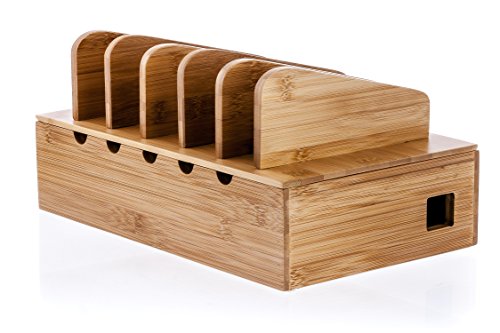
  4. A wooden organizer with adjustable dividers and a hidden cord box.

    85Excellent
    Check price
  5. Holds a laptop up to 1.25 inches thick, a tablet and 3 phones.

    83Very Good
    Check price
  6. A 12-device steel cart on 4 locking casters.

    81Very Good
    Check price
  7. A 16-device cart with a lock, surge protection and a power strip.

    79Very Good
    Check price

The classic mistake with a charging station is buying one that cannot charge a laptop. Plenty of organizers hold devices but supply no power at all, and many powered models top out at phone-level wattage, so a ten-port station can leave a laptop sitting at one percent. Wattage per port matters far more than the port count printed on the box.

We reviewed seven stations that range from simple organizers to rolling carts, ranking them on power per port, capacity and how well they suit a home rather than a school. The two carts with 12 and 16 slots are larger than most homes need, and the guide notes that where it matters. Where a listing omits a wattage or a dimension, we mark it as unlisted instead of filling the gap with a guess, because a laptop that never reaches full charge is a failed purchase.

Before you buy

What Actually Matters

01

Wattage per port

A laptop usually needs far more power than a phone, so a USB-C port rated 100W can charge it while a 30W port cannot. Total wattage is shared across ports, so check the per-port figure. The Zobirez lists 120W each. Check the wattage of the USB-C ports in the title and bullets, then compare it with the number printed on your laptop's charger.

02

Powered or organizer

Some stations supply power, and others are holders that need your own chargers. Mixing them up means a station that cannot charge anything. Know which you are buying. Look for a total wattage or the phrase power source not included, as on the Prosumer's Choice and the G.U.S. dock. A holder is fine if you already own every charger you need.

03

Capacity

Capacity is the device count the station holds at once. A household rarely needs 16 slots. Count your laptops, tablets and phones, then add a few for guests. Extra slots cost more in price and space. Check how many devices the listing says it holds and whether slots fit large laptops, since a slot sized for a tablet will not take a thick gaming machine.

04

Footprint

Desktop docks suit a desk, while carts need floor space and an outlet nearby. Footprint decides where the station can live. Measure the area, and check the dimensions on the listing, such as the G.U.S. dock's 10 by 9 by 5.5 inches. Leave room around ventilation slots so devices do not trap heat.

05

Security

A lock matters if children share devices or the station sits in a common area. Few stations include one, and only the VEVOR lists a lock and key. Check for a lock and key in the title, and look for surge protection too, which the Plugsharge and VEVOR list. Locks deter casual use, not a determined thief.

In-depth reviews

Our Ranked Picks, Reviewed

1

Best Overall

750W Charging Station for Multiple Devices, Zobirez 10-Port Fast Charger

Our verdict: 5 USB-C ports at 120W each and a 750W total.

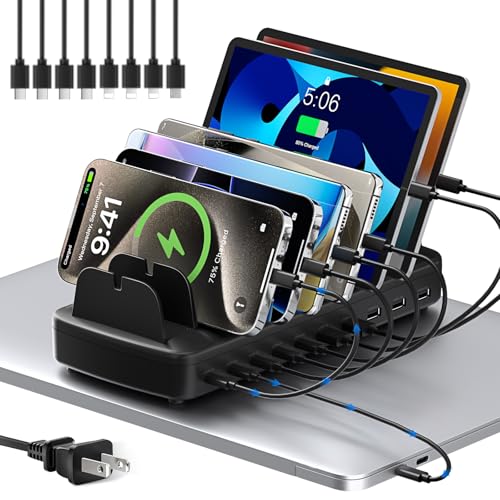
The Zobirez earns first place on power. It lists five USB-C ports at 120W each, five USB-A ports at 30W each and a 750W total, inside a one-piece flame-retardant ABS body with two wide bays for laptops and tablets. A 10-cable kit, including 100W C-to-C cables, means you can plug in on day one without hunting for leads.

It leads because it is the only pick with enough per-port power to charge several laptops together, which is what a modern household with kids and remote work needs. The 510W station gives the same port count for less, but only one port reaches 100W.

Buy it if many people charge at once and you want the highest stated ceiling. The caveat is that laptops must charge over USB-C, so confirm yours accepts it. It costs more than basic docks in the $50 to $100 tier, so skip it if you only charge phones.

USB-C
5 ports at 120W each
USB-A
5 ports at 30W each
Total
750W
Cables
10-cable kit

What we like

  • +120W per USB-C port
  • +750W total power
  • +Cable kit included
  • +Flame-retardant ABS

Watch out for

  • −Costs more than basic docks
  • −Laptops must charge by USB-C

Buy it if: Households charging many devices at once who want the highest stated power ceiling.

Skip it if: You only charge phones.

2

Best Value

510W Fast Charging Station for Multiple Devices, 10 Port USB C Charger Station

Our verdict: A 100W laptop port, a 65W USB-C and 510W total across 10 ports.

The 510W station is the sensible middle path. It dedicates a 100W USB-C port to a laptop, adds a 65W USB-C and 30W USB-A ports, and totals 510W across ten ports. The one-piece flame-retardant ABS body and a pack of eight mixed cables are included, at $25 to $50.

It ranks second because it matches the Zobirez on port count at roughly half the price, but only one port reaches 100W, so it cannot fast-charge several laptops at the same time. A second laptop would draw from the 65W port, which suits many ultrabooks but not powerful machines. Total power is also lower.

It works for a household with one or two laptops plus phones and tablets. Skip it if you charge several laptops together, since the budget runs dry quickly under that load.

Laptop port
100W USB-C
Second USB-C
65W
Total
510W, 10 ports
Cables
8 mixed cables

What we like

  • +100W dedicated laptop port
  • +10-port capacity
  • +8 cables included
  • +Lower price than the 750W

Watch out for

  • −One 100W port only
  • −Lower total than the 750W

Buy it if: Households wanting 10-port capacity without paying for the highest wattage tier.

Skip it if: You charge several laptops together.

3

Best for Mixed AC and USB

Plugsharge 10-Device Laptop & Tablet Charging Station with 6 AC & 4 USB

Our verdict: 6 AC outlets plus 4 USB ports with a built-in surge-protected strip.

The Plugsharge is the pick for households that cannot go fully USB-C. Six AC outlets plus four USB ports serve ten devices, and a pre-installed surge-protected power strip rated 110V/10A sits inside an open vertical-slot layout with no cabinet doors. The AC outlets mean laptops can use their own original chargers.

It ranks third because the AC outlets cover older laptops and gaming machines that USB-C cannot power, which the USB-only stations cannot match. It costs $100 to $200 and lists no USB-C wattage, so it gives up the fast-charging story of the first two.

Buy it for a home office with a real mix of laptops, tablets and phones. Skip it if you want USB-C fast charging, since the USB wattage is not listed. Open slots also mean dust and cables stay visible.

Outlets
6 AC plus 4 USB
Capacity
10 devices
Power strip
Surge-protected, 110V/10A
Layout
Open vertical slots

What we like

  • +AC outlets for original chargers
  • +Surge-protected strip included
  • +Open slot layout
  • +10-device capacity

Watch out for

  • −Higher price tier
  • −USB wattage not listed

Buy it if: A home office charging a genuine mix of laptops, tablets and phones.

Skip it if: You want USB-C fast charging.

4

Best Organizer

Prosumer's Choice Wooden Charging Station Organizer - 5-Port Base for Phones, Tablets

Our verdict: A wooden organizer with adjustable dividers and a hidden cord box.

The Prosumer's Choice is an organizer, not a charger. A 5-port wooden base has adjustable dividers and a concealed cord box that hides the power strip. Its power source is not included, so you bring your own chargers and strip. That makes the cost modest, at $25 to $50.

It ranks fourth because it holds devices neatly but supplies no wattage of its own. Against the powered stations above, it is a clean-up tool. Against the G.U.S. dock below, it holds only five devices but looks like furniture on a counter, which matters if the station sits in a living area.

It suits families tidying phones and tablets on a counter. It will not charge laptops by itself, and you must supply the chargers. Skip it if you need built-in charging or a laptop bay.

Ports
5-port base
Dividers
Adjustable
Cord box
Concealed
Power
Not included

What we like

  • +Adjustable dividers
  • +Concealed cord box
  • +Wooden look
  • +Uses your own chargers

Watch out for

  • −No power supplied
  • −Holds only five devices

Buy it if: Families organizing phones and tablets on a home desk or counter.

Skip it if: You need built-in charging.

5

Best Compact Dock

Great Useful Stuff G.U.S. Multi-Device Charging Station Dock & Organizer

Our verdict: Holds a laptop up to 1.25 inches thick, a tablet and 3 phones.

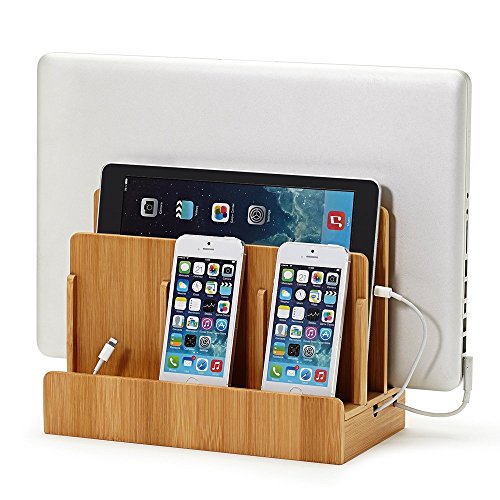
The G.U.S. dock is a compact desk organizer. It fits laptops up to 1.25 inches thick, tablets and three phone slots in a 10 by 9 by 5.5 inch footprint, and it offers no power of its own. A dedicated laptop slot is rare in this price class.

It ranks fifth because, like the wooden organizer, it only holds devices. It does add a laptop slot and a smaller footprint, and it sits in the $25 to $50 tier. Against the Prosumer's Choice, it suits a small desk where a laptop is the main device.

Buy it if you prefer this dock layout and already own enough chargers. Pair it with your own power. Skip it if your laptop is thicker than 1.25 inches, since it will not fit, and if you want charging included.

Laptop fit
Up to 1.25 inches thick
Slots
Laptop, tablet, 3 phones
Footprint
10 x 9 x 5.5 inches
Power
Not included

What we like

  • +Dedicated laptop slot
  • +3 phone slots
  • +Compact footprint
  • +Tablet slot

Watch out for

  • −No power supplied
  • −Laptop thickness limit

Buy it if: Buyers who prefer this dock's organizer layout over the wooden alternative.

Skip it if: Your laptop is thicker than 1.25 inches.

6

Best Mobile Cart

JOXPRING Metal Laptop Charging Station with Wheels, 12 Device Mobile Charging Cart

Our verdict: A 12-device steel cart on 4 locking casters.

The JOXPRING is a mobile cart. An all-steel frame holds 12 devices, a lower shelf carries books or materials, a rear cable organizer keeps leads tidy and four locking casters let you park it. It stands 34.6 inches tall, which puts devices at an accessible height.

It ranks sixth because 12 slots suit a homeschool group more than a single household, and it sits in the $50 to $100 tier. Steel construction is sturdy, but the footprint needs floor space. Unlike the VEVOR below, it has no lock listed.

Choose it for multi-kid homes or co-ops with ten or more devices. Skip it for a single home office, where a desktop station is simpler and cheaper. The cart also needs a nearby outlet and does not list its power details, so verify those on the page.

Capacity
12 devices
Frame
All steel
Casters
4 locking
Height
34.6 inches

What we like

  • +12-device capacity
  • +All-steel frame
  • +Locking casters
  • +Lower storage shelf

Watch out for

  • −Large for most homes
  • −Needs floor space

Buy it if: Homeschool co-ops or multi-kid households with 10 or more devices.

Skip it if: You have a single home office.

7

Best Lockable Cart

VEVOR 16 Device Charging Station with Lock & Key, Mobile Charging Cart

Our verdict: A 16-device cart with a lock, surge protection and a power strip.

The VEVOR is the largest and the only locked option. It holds 16 devices, with screens up to 15.6 inches, and adds built-in surge protection, a lock and key and an integrated power strip. Surge protection matters because a cart full of expensive devices shares one wall outlet.

It ranks last because it is oversized for homes and costs $200 to $500, the highest tier here. The lock is the unique feature, valuable for households that want kids' devices secured overnight.

Choose it if you have many children or want locked storage. Skip it for a desktop setup, where the Zobirez or the 510W station is a better fit. The caveat is size and price, plus the fact that it is built more for schools than for a spare room.

Capacity
16 devices
Screens
Up to 15.6 inches
Security
Lock and key
Power
Integrated strip, surge protection

What we like

  • +Lock and key included
  • +Built-in surge protection
  • +16-device capacity
  • +Integrated power strip

Watch out for

  • −Highest price tier
  • −Oversized for homes

Buy it if: Multi-kid households wanting locked device storage.

Skip it if: You want a desktop setup.

Methodology

How We Ranked These

Power per port

We compared wattage at the port, since laptops need much more than phones.

Capacity

We weighed the number of devices each station holds.

Home suitability

We favored sizes that fit a home rather than a classroom.

Included extras

We noted cables, power strips and locks.

Value

We compared each against its price tier.

Every Primea Score uses the same weights: Performance 30% · Build & Materials 20% · Everyday Usability 20% · Value 20% · Owner Satisfaction 10%. Full scoring rules

Buyer's guide

How to Pick the Right One for You

By Number of Laptops

Laptops set the power need.

Your homeOur pick
Several laptops at once750W Charging Station for Multiple Devices, Zobirez 10-Port Fast Charger
One or two laptops plus phones510W Fast Charging Station for Multiple Devices, 10 Port USB C Charger Station
Laptops using their own chargersPlugsharge 10-Device Laptop & Tablet Charging Station with 6 AC & 4 USB
Mostly phones and tabletsProsumer's Choice Wooden Charging Station Organizer - 5-Port Base for Phones, Tablets

By Budget

SpendOur pick
$25-50, powered510W Fast Charging Station for Multiple Devices, 10 Port USB C Charger Station
$25-50, organizerProsumer's Choice Wooden Charging Station Organizer - 5-Port Base for Phones, Tablets
$50-100750W Charging Station for Multiple Devices, Zobirez 10-Port Fast Charger
$100-200Plugsharge 10-Device Laptop & Tablet Charging Station with 6 AC & 4 USB

Powered Station vs Organizer

Powered station

Supplies the charging itself. Picks: Zobirez 750W, the 510W station and Plugsharge.

Organizer

Holds devices and hides cords, but you add the chargers. Picks: Prosumer's Choice and G.U.S.

Most buyers should default to a powered station like the 510W unless they already own all their chargers.

By Placement

PlacementOur pick
Small deskGreat Useful Stuff G.U.S. Multi-Device Charging Station Dock & Organizer
Kitchen counterProsumer's Choice Wooden Charging Station Organizer - 5-Port Base for Phones, Tablets
Rolling around the houseJOXPRING Metal Laptop Charging Station with Wheels, 12 Device Mobile Charging Cart
Locked storageVEVOR 16 Device Charging Station with Lock & Key, Mobile Charging Cart

For Homeschool Setups Specifically

Look for

Capacity of 10 or more devices, casters to move it and a shelf for materials.

In this ranking

The JOXPRING lists 12-device capacity, 4 locking casters and a lower shelf.

When to Spend More

Spend more if

You charge several laptops together. The Zobirez 750W has five 120W USB-C ports.

Save if

You have one laptop. The 510W station has a 100W laptop port at $25-50.

Questions

Frequently Asked Questions

Can a charging station charge a laptop?+

Only if it supplies enough wattage. The Zobirez lists 120W USB-C ports, and the 510W station lists a 100W laptop port, which are enough for most laptops. USB-A ports at 30W cannot charge one, so look at the USB-C figures first.

What is the biggest mistake?+

Buying an organizer and expecting it to charge. The wooden Prosumer's Choice and the G.U.S. dock do not include a power source, so they need your own chargers and strip, and the cost of those adds up.

Is the Zobirez worth it over the 510W station?+

If you charge several laptops together, yes. The Zobirez has five 120W ports against one 100W port on the 510W station. For one laptop, the 510W covers it for half the price.

How do I hide cables?+

The Prosumer's Choice includes a concealed cord box for the power strip. For powered stations like the Zobirez, the 10-cable kit lets you use short leads that avoid clutter, and the JOXPRING adds a rear cable organizer.

Do I need surge protection?+

It is a good idea. The Plugsharge lists a surge-protected strip rated 110V/10A, and the VEVOR lists built-in surge protection, which protects a cart full of devices from a spike. Check whether the other stations specify any protection at all.

Are carts too big for home use?+

For most homes, yes. The JOXPRING with 12 slots and the VEVOR with 16 suit multi-kid or homeschool setups, while a single home office is better served by the Zobirez or the 510W station.

Final take

For most homes, the Zobirez 750W station is the best laptop charging station, since five 120W USB-C ports can charge several laptops at once. The 510W model is the cheaper buy for one or two laptops, and the Plugsharge suits mixed AC needs. Reserve the JOXPRING and VEVOR carts for multi-kid or homeschool setups.

More Ranked & Reviewed Guides