
Primea ReviewsAll Reviews

Primea Reviews is reader-supported. When you buy through our Amazon links we may earn a commission, at no extra cost to you. Rankings are set by our editors and never sold. Learn more

Ranked & Reviewed by Primea Reviews

The 5 Best 10-Laptop Charging Carts of 2026, Ranked & Reviewed

By the Primea Editorial TeamUpdated November 1, 202610 min read5 products ranked
The 5 Best 10-Laptop Charging Carts of 2026, Ranked & Reviewed

The short answer

The Pearington 10-Device station is the best overall for rooms where the rack never moves, with AC outlets, four USB-A ports and built-in cord management in a 17 inch footprint. The 10 Slot cart is the cheaper way to roll devices between rooms. The Dyna-Living is the only pick with a ten-port strip, so every slot gets an outlet. The Gtouse adds a shelf, and the Suuiwau is a steel frame with thin documentation.

The Primea Scoreboard

Ranked & Reviewed

  1. A compact true 10-device station with AC outlets and built-in cord management.

    94Outstanding
    Check price
  2. A rolling 10-slot cart with detachable dividers for rugged laptops.

    90Excellent
    Check price
  3. A rolling cart with a 10-port power strip and a painted iron frame.

    86Excellent
    Check price
  4. A two-tier cart with a bottom shelf for extra storage.

    83Very Good
    Check price
  5. A heavy-duty steel rolling cart with the thinnest documentation here.

    79Very Good
    Check price

Slot count is the least interesting number on a ten-laptop cart. What decides whether the thing works on a Monday morning is the power layout behind those slots. A cart with ten bays and two outlets sends you hunting for extension cords, and a rack of daisy-chained strips under a classroom desk is where tripped breakers and cooked adapters come from.

We reviewed five carts and stations that list a true capacity of ten devices and ranked them on the Primea framework. Outlet provision, mobility, frame construction and how well each listing documents itself carried the most weight. Anything that only reaches ten by squeezing is not here, so every pick fits ten laptops as listed. Where a listing is silent on power or size, we say so and mark the pick down.

Before you buy

What Actually Matters

01

Power per slot

Power per slot is the number of sockets or charger ports actually available to the ten laptops. Without one outlet per device you end up chaining adapters, which clutters the cart and overloads strips. A fully wired cart is the main difference between a tidy classroom setup and a hazard. On a listing, look for an outlet count or a named strip such as a 10-port one.

02

Mobile versus fixed

Mobility decides whether the rack lives in one room or serves a whole building. Casters let you roll ten laptops between classes, while a fixed station suits one desk. Locking brakes matter because a loaded cart is heavy enough to drift on a slope. Check the listing for swivel casters and the number that lock, since some frames lock only two of four.

03

Dividers

Dividers hold each laptop upright and apart so lids do not scratch one another and cooling air can move. Their spacing sets which machines fit: thin Chromebooks sit loosely in wide slots, while rugged laptops can refuse to enter narrow ones. Removable or detachable dividers let you change the layout. Look for the word detachable on the listing and any named rugged model compatibility.

04

Footprint and weight

Footprint and weight set how a cart fits real rooms. A frame that clears a doorway and a closet shelf gets used, while a bulky one stays in a corner. Weight matters twice, once for pushing and once for stability when loaded. Compare the listed width, depth and height with your space, and check whether the stated weight is for the empty cart.

05

Open versus lockable

Open versus lockable describes whether devices are protected when the room is empty. Open frames are cheaper and quicker to load, but anyone can walk off with a laptop. If devices sit overnight in a shared space, that gap is a real cost. Check the listing for a lockable door or cabinet, and note that none of these five picks advertises one.

In-depth reviews

Our Ranked Picks, Reviewed

1

Best Overall

Pearington 10-Device USB Laptop Charging Station for Classroom, Home, or Office

Our verdict: A compact true 10-device station with AC outlets and built-in cord management.

The Pearington is a fixed charging station, and that is its strength. It holds 10 devices in a 17 by 13 by 16 inch open frame, with AC outlets, four USB-A ports and built-in cord management. Having the outlets integrated means the power question is answered before the first laptop is seated, which is the step most carts leave to you.

It takes first place over the Dyna-Living because it solves cabling in a smaller footprint, though the Dyna-Living adds wheels and a dedicated ten-port strip. The 10 Slot cart costs less but documents its power far more thinly.

Buy it for a classroom, library desk or office corner where the rack never leaves the wall. The honest caveat is that it has no casters, so moving ten laptops to another room means unplugging and carrying them by hand.

Capacity
10 devices
Size
17 x 13 x 16 in
Ports
AC outlets + 4 USB-A
Price bucket
$100-200

What we like

  • +Compact 17 inch footprint
  • +AC plus USB-A ports
  • +Built-in cord management
  • +True 10-device capacity

Watch out for

  • −Not on wheels
  • −Mid-high price bucket

Buy it if: Classrooms and offices that need a compact fixed station.

Skip it if: You need to roll devices between rooms.

2

Best Budget Rolling Cart

10 Slot Mobile Open Charging Cart for Laptops Chromebooks Tablet Devices

Our verdict: A rolling 10-slot cart with detachable dividers for rugged laptops.

The 10 Slot Mobile Open cart earns second place by being the cheapest way here to roll ten devices around a building. Its detachable dividers are rated to fit rugged machines such as Toughbooks, and the swivel casters come with locking brakes plus a side handle for quiet transport. Detachable dividers matter because fixed slots reject thick rugged laptops.

It sits under the Pearington because the listing says little about how power reaches the slots. The Dyna-Living costs more but states a ten-port strip outright, and the Gtouse at least lists dimensions.

Choose it for a school that shares devices between rooms on a tight budget. The caveat is real: the open design has no lock, and you must confirm the power arrangement before you count on it for a full set of ten.

Capacity
10 slots
Dividers
Detachable
Mobility
Swivel casters, brakes
Price bucket
$50-100

What we like

  • +Rolls on swivel casters
  • +Locking brakes
  • +Detachable dividers
  • +Lower price bucket

Watch out for

  • −Power details thin
  • −Open design, no lock

Buy it if: Schools moving devices between rooms on a budget.

Skip it if: You need a locked cabinet.

3

Best Power Strip Setup

Dyna-Living Laptop Charging Cart 10-Device Open Laptop Charging Station

Our verdict: A rolling cart with a 10-port power strip and a painted iron frame.

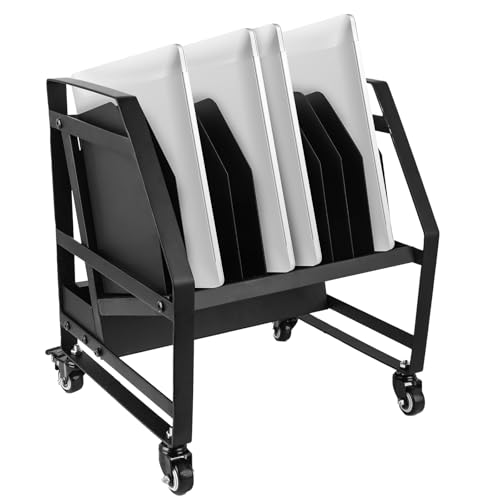
The Dyna-Living is the cart for buyers who refuse to compromise on outlets. It holds 10 devices and ships with a 10-port power strip, so each laptop gets its own socket. The painted iron frame is described as corrosion resistant, and the scratch-free swivel wheels include two locking casters so it can park without creeping.

It ranks third behind the 10 Slot cart for a plain reason: price. It sits in the $100 to $200 bucket, against $50 to $100 for the cheaper rolling cart. The Gtouse also lists a bottom shelf, which this frame lacks.

Buy it if tidy, predictable power matters more than saving money. Only two casters lock, so on a sloped floor a loaded cart can still drift. Open slots also mean no theft protection overnight.

Capacity
10 devices
Power
10-port strip
Wheels
Swivel, 2 locking
Price bucket
$100-200

What we like

  • +10-port power strip
  • +Scratch-free swivel wheels
  • +Corrosion-resistant frame
  • +Two locking casters

Watch out for

  • −Higher price bucket
  • −Open design

Buy it if: Buyers who want an outlet for every laptop.

Skip it if: You want the cheapest wheeled cart.

4

Best Two-Tier Layout

Gtouse 2 Tier Open Laptop Charging Cart with Wheels, 10 Device

Our verdict: A two-tier cart with a bottom shelf for extra storage.

The Gtouse is a two-tier cart, and the second tier is the point. A bottom shelf gives chargers, mice and spare cables a home, and the 15.47 by 11.88 by 24.48 inch frame weighs 21.61 lbs empty, light enough that one person pushes it without strain. Removable dividers and two locking casters round out the build.

It lands fourth because the listing shows no power strip. A cart without outlets is a shelf with slots until you add your own strip, and the Dyna-Living ships with one. It still beats the Suuiwau by documenting its size and weight.

It fits a lab or office that wants accessories stored with the laptops. Plan the electrical side yourself: a ten-port strip or two shorter ones, mounted so cords do not hang across the casters.

Capacity
10 devices
Size
15.47 x 11.88 x 24.48 in
Weight
21.61 lbs
Price bucket
$50-100

What we like

  • +Bottom storage shelf
  • +Removable dividers
  • +Light at 21.61 lbs
  • +Two locking casters

Watch out for

  • −No power strip listed
  • −Open design

Buy it if: Buyers who want a shelf for accessories.

Skip it if: You need built-in outlets.

5

Budget Steel Frame

Suuiwau Laptop Charging Station 10-Device Rolling Open Charging Cart for Laptops

Our verdict: A heavy-duty steel rolling cart with the thinnest documentation here.

The Suuiwau is the budget steel frame. The listing describes a heavy-duty steel build for 10 devices, with removable dividers, cord clips and two lockable casters. Steel resists the racking and flex that cheap tubular carts show once ten laptops are loaded, which matters if the cart gets pushed over school floors daily.

It ranks last because the listing offers no dimensions and no power details. You cannot check whether it fits a closet or a doorway, and you cannot confirm how charging works. The Gtouse, one rung up, lists both size and weight.

Consider it only if you already have a power strip plan and want the sturdiest frame in the lowest bucket. Before ordering, read the full listing and ask the seller for the footprint, because the spec sheet leaves too much unstated.

Capacity
10 devices
Frame
Heavy-duty steel
Casters
2 lockable
Price bucket
$50-100

What we like

  • +Heavy-duty steel frame
  • +Removable dividers
  • +Cord clips included
  • +Lockable casters

Watch out for

  • −Sparse specs
  • −No power details

Buy it if: Budget buyers who want a steel frame.

Skip it if: You want full documentation.

Methodology

How We Ranked These

True capacity

Every pick holds ten devices as listed, not by stretching the count.

Power setup

We favored carts that state outlets, strips or USB ports.

Mobility

We compared casters, brakes and weight.

Footprint

We used listed dimensions to judge fit in a classroom.

Price bucket

We judged value within the bucket, not by exact price.

Every Primea Score uses the same weights: Performance 30% · Build & Materials 20% · Everyday Usability 20% · Value 20% · Owner Satisfaction 10%. Full scoring rules

Buyer's guide

How to Pick the Right One for You

By Mobility

Decide whether the cart must travel.

If you needOur pick
A fixed compact stationPearington 10-Device Station
Cheap rolling cart10 Slot Mobile Open Charging Cart
Rolling with outletsDyna-Living 10-Device Cart
Rolling with a shelfGtouse 2 Tier Cart

By Budget

SpendOur pick
$50-100, rolling10 Slot Mobile Open Charging Cart
$50-100, two tierGtouse 2 Tier Cart
$50-100, steelSuuiwau 10-Device Cart
$100-200Pearington 10-Device Station

Station vs Rolling Cart

Station

Compact and tidy, but fixed. The Pearington is the example.

Rolling cart

Moves between rooms. The 10 Slot, Dyna-Living, Gtouse and Suuiwau all roll.

Choose a station for one room, a cart for shared devices.

By Power Layout

You wantOur pick
AC plus USB-A portsPearington 10-Device Station
10-port power stripDyna-Living 10-Device Cart
Cord clipsSuuiwau 10-Device Cart
Storage for chargersGtouse 2 Tier Cart

For Classrooms Specifically

Look for

Locking casters, dividers and one outlet per device.

In this ranking

The Dyna-Living cart has a 10-port strip and two locking casters.

When to Spend More

Spend more if

You want AC and USB ports in a tidy footprint, as on the Pearington.

Save if

Cheaper rolling is enough, which the 10 Slot cart delivers.

Questions

Frequently Asked Questions

Do these carts fit Chromebooks and tablets?+

The 10 Slot cart is the one that names Chromebooks and tablets as supported devices. The Pearington and Dyna-Living list a capacity of 10 devices without naming types, so measure your thickest device against the slot width before you buy.

What is the biggest mistake buying one?+

Ignoring the power layout. A cart with ten slots and two outlets leaves you chaining adapters. The Dyna-Living with its ten-port strip and the Pearington with built-in outlets avoid that, while the Gtouse and Suuiwau leave power to you.

Is a station worth it over a cart?+

If the rack never leaves one room, the Pearington is neater than any rolling frame because it integrates outlets and cord management in a compact 17 inch footprint. If devices move between classrooms, a cart like the Dyna-Living or 10 Slot is the right format.

How do I set one up?+

Park it near a wall outlet, seat each laptop in its own slot, and run charger cables through the cord management or clips. On the Dyna-Living, plug the ten-port strip into a single wall socket and engage the locking casters.

How do I keep cords tidy?+

Use the built-in cord management on the Pearington or the clips supplied with the Suuiwau. On open frames like the Gtouse, bundle surplus charger length at the rear so cables never hang near the casters.

Can rugged laptops fit?+

Only the 10 Slot cart states it directly, with detachable dividers that fit Toughbooks. The Gtouse and Suuiwau have removable dividers, which suggests flexibility but is not a stated fit, so confirm slot width with the seller.

Final take

Buy the Pearington if the rack stays put and you want power sorted out of the box, and the Dyna-Living if you need wheels and one outlet per laptop. The 10 Slot cart is the budget route for schools that move devices, provided you confirm how it is powered. Treat the Gtouse and Suuiwau as frames that still need a power plan from you.

More Ranked & Reviewed Guides