
Primea ReviewsAll Reviews

Primea Reviews is reader-supported. When you buy through our Amazon links we may earn a commission, at no extra cost to you. Rankings are set by our editors and never sold. Learn more

Ranked & Reviewed by Primea Reviews

The 5 Best Chromebook and Laptop Charging Carts of 2026, Ranked & Reviewed

By the Primea Editorial TeamUpdated November 1, 202610 min read5 products ranked
The 5 Best Chromebook and Laptop Charging Carts of 2026, Ranked & Reviewed

The short answer

The POCHAR 30 is the best charging cart for mixed fleets, with 30 numbered bays for Chromebooks, iPads and laptops up to 14 inches. The Plugsharge adds 32 devices and 15.6 inch screens in an open rack. The Pearington 20 fits screens to 17 inches with locks, the POCHAR 20 adds an anchor hook, and the Meteteel is the easiest to assemble.

The Primea Scoreboard

Ranked & Reviewed

  1. 30 numbered bays with a clear Chromebook, iPad and 14 inch laptop claim.

    95Outstanding
    Check price
  2. 32 devices up to 15.6 inches, with surge and ground fault protection.

    91Excellent
    Check price
  3. 20 devices, padded bays and locks on both sides.

    88Excellent
    Check price
  4. 20 devices with a 20-outlet surge strip and an anchor chain hook.

    85Excellent
    Check price
  5. 95% pre-assembled with independent front and back locks.

    82Very Good
    Check price

Procurement teams count bays. A cart that charges thirty devices sounds like thirty devices charged, until the first 15.6 inch laptop meets a slot cut for 14. Screen size and device thickness quietly decide whether a bay works, and a bay that rejects your hardware is a bay you paid for twice: once on the invoice, once when the cart sits empty in a closet.

Five carts are ranked here, all in the $200 to $500 bucket, so fit and features carry the decision rather than price. We compared capacity, the largest screen size each listing states, locking, power protection and how explicitly the listing names Chromebooks. Where a number is missing from a listing, we say so, because a missing number is a question you must ask before ordering.

Before you buy

What Actually Matters

01

Screen size limit

Each bay has a maximum screen size, such as 14 or 15.6 inches. A laptop that does not fit will not charge or lock in, and the cart becomes dead capacity. Measure your largest device with its case on and check the size in the listing, noting that thickness limits, such as 1.5 inches on the POCHAR 30, also apply.

02

Capacity

Capacity is the number of bays, from 20 to 32 here. You want room for spares and loaners, so count your devices and add a few. A cart that holds exactly your fleet leaves no space when one is out for repair, and growth is the usual reason schools outgrow carts within a year or two.

03

Locking

Locks stop theft and tampering between classes, which matters in shared rooms. Check whether the cart locks front, back or both, and whether doors are removable, as on the POCHAR 30. An open rack like the Plugsharge offers less enclosure, so confirm what security options exist before you order, or plan to keep the room itself locked.

04

Power protection

Surge and ground fault protection protect devices on the shared circuit, which matters when thirty chargers draw power at once. Look for it by name in the listing, such as the Plugsharge or POCHAR 20 outlet strip, and avoid overloading a single wall outlet with a fully loaded cart, since all chargers run at once.

05

Compatibility claim

Some listings name Chromebooks and iPads, others say only laptops. Vague wording is harder to trust, since fit can depend on case thickness and port position. Prefer explicit wording, and check that charging method suits your devices, as mixed fleets can need different cables and adapters inside the same bays.

In-depth reviews

Our Ranked Picks, Reviewed

1

Best Overall

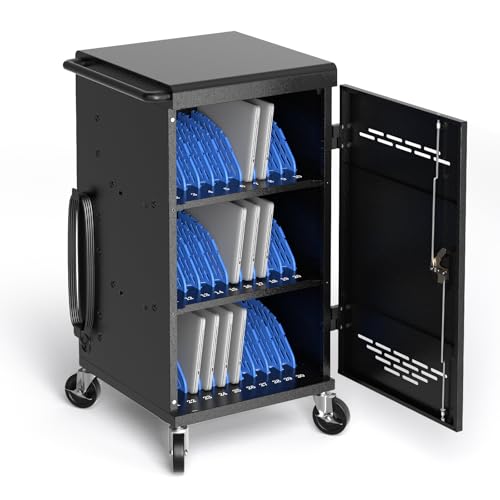
POCHAR 30 Unit Device Charging Station for Chromebook, iPad, 14'' Laptop

Our verdict: 30 numbered bays with a clear Chromebook, iPad and 14 inch laptop claim.

The POCHAR 30 leads because its listing is the clearest about what it holds. It is a 30-device cart for Chromebooks, iPads and laptops up to 14 inches, with devices up to 1.5 inches thick. Numbered bays make returns trivial to check by sight, four keys are included, and removable doors give full access to cables when the wiring needs attention. It sits in the $200 to $500 bucket.

It ranks above the Meteteel on the strength of its explicit compatibility wording. Against the Plugsharge, it holds two fewer devices and a smaller maximum screen size.

Choose it for a classroom mixing Chromebooks, tablets and compact laptops. The caveat is the 14 inch ceiling: any 15.6 inch machine will not fit, so measure your largest device and skip this cart if those are in your fleet.

Capacity
30 devices
Max screen
14 inch
Keys
4
Price bucket
$200-500

What we like

  • +30 numbered bays
  • +Names Chromebook and iPad
  • +Removable cable doors
  • +Four keys included

Watch out for

  • −14 inch screen limit
  • −Premium price bucket

Buy it if: Classrooms with mixed Chromebooks and tablets.

Skip it if: Your laptops are 15.6 inches.

2

Most Capacity

Plugsharge 32-Device Laptop Charging Cart for Chromebooks, iPad & Tablets

Our verdict: 32 devices up to 15.6 inches, with surge and ground fault protection.

The Plugsharge is the capacity and screen-size leader. It holds 32 devices up to 15.6 inches, names Chromebooks explicitly, and lists surge plus ground fault protection with 32 cable organizers. Numbered slots keep devices in order, and the extra capacity gives room for spares. It uses an open rack.

It ranks second because an open rack gives less enclosure than a locked cabinet, and the listing leaves lock details unlisted. It beats the POCHAR 30 on both capacity and screen size, which is why fleets with bigger laptops should look here first.

Buy it for the largest mixed fleet. The caveat is security: if the cart sits in a hallway or shared room where devices must be locked away between classes, an open rack is the wrong format, and you should check for lock accessories before ordering.

Capacity
32 devices
Max screen
15.6 inch
Protection
Surge + ground fault
Design
Open rack

What we like

  • +32 device capacity
  • +15.6 inch screens fit
  • +Surge protection
  • +Cable organizers

Watch out for

  • −Open rack design
  • −Lock details unlisted

Buy it if: Large fleets and bigger laptops.

Skip it if: You need a locked enclosure.

3

Best 20-Device Value

Pearington 20 Device Mobile Charging and Storage Cart for iPads, Chromebooks

Our verdict: 20 devices, padded bays and locks on both sides.

The Pearington 20 is the mid-size cart with the broadest screen range. It has 18 bays plus a shelf for 20-device capacity, fits screens up to 17 inches, and lists padded bays, surge protectors, front and back locks and two locking casters. Padding helps protect screens during transport, and locks on both sides secure the contents.

It ranks third because it targets iPads and Chromebooks, giving up capacity against the 30-plus carts. It does accept larger screens than the POCHAR 30, a real advantage when laptops exceed 14 inches.

Buy it for a mid-size fleet that includes larger Chromebooks. The caveat is size: capacity tops out at 20, and only two of the casters lock, so you should park it on a level floor and check whether the wheels hold on slopes before leaving it loaded.

Capacity
20 devices
Max screen
17 inch
Locks
Front and back
Casters
2 locking

What we like

  • +Padded bays
  • +Screens to 17 inch
  • +Front and back locks
  • +Surge protectors

Watch out for

  • −Only 20 devices
  • −Two locking casters only

Buy it if: Mid-size iPad and Chromebook fleets.

Skip it if: You have over 20 devices.

4

Best POCHAR 20

POCHAR 20 Device Laptop Charging Cart for iPads Chromebooks, Tablet Charging Station

Our verdict: 20 devices with a 20-outlet surge strip and an anchor chain hook.

The POCHAR 20 is the small sibling of the top pick. It lists 20-device capacity with explicit iPad and Chromebook compatibility, a 20-outlet power strip with surge protection, and a chain hook that anchors the cart. A securing point matters in classrooms where a cart can otherwise be wheeled away.

It ranks fourth because it adds little over the Pearington 20 beyond the anchor hook and the outlet strip, and the listing leaves the maximum screen size unlisted. That omission is the problem: you cannot confirm fit.

Buy it if the anchor point is the deciding feature. The caveat is exactly that gap, so ask the seller for the supported dimensions before ordering, and note it costs the same $200 to $500 bucket as carts that state their limits.

Capacity
20 devices
Outlets
20, surge protected
Anchoring
Chain hook
Price bucket
$200-500

What we like

  • +20-outlet surge strip
  • +Chain hook anchor
  • +Names iPad and Chromebook
  • +20 device capacity

Watch out for

  • −Screen limit unlisted
  • −Same capacity as cheaper

Buy it if: Rooms that want a securable 20-device cart.

Skip it if: You need larger capacity.

5

Easiest Assembly

Meteteel Fully Assembled 20 Device Laptop Charging Cart for School (Black)

Our verdict: 95% pre-assembled with independent front and back locks.

The Meteteel arrives 95% pre-assembled, holds 20 devices and has independent front and back locks, in black. For schools short on staff time, skipping the flat-pack build is a tangible saving, and separate locks let you open one side without exposing the other.

It finishes fifth because the listing does not name Chromebooks explicitly. Compared with the POCHAR and Pearington listings, that makes compatibility harder to confirm, and a cart that cannot confirm fit costs more in returns than any assembly time saved.

Buy it if setup effort matters most and you have verified your device sizes against the manual. The caveat is the vague compatibility claim, so confirm fit with the seller before ordering, and have your device dimensions ready when you ask.

Capacity
20 devices
Assembly
95% pre-assembled
Locks
Front and back
Finish
Black

What we like

  • +95% pre-assembled
  • +Independent front and back locks
  • +20 device capacity
  • +Black finish

Watch out for

  • −No Chromebook naming
  • −Compatibility unclear

Buy it if: Schools that want minimal setup.

Skip it if: You need explicit Chromebook support.

Methodology

How We Ranked These

Device capacity

We compared how many devices each cart is listed to hold.

Screen size limit

We checked the maximum screen size so your laptops actually fit.

Security

We looked at keys, front and back locks and anchoring.

Compatibility claims

We favored listings that name Chromebooks and iPads outright.

Assembly

We noted pre-assembled versus flat-pack shipping.

Every Primea Score uses the same weights: Performance 30% · Build & Materials 20% · Everyday Usability 20% · Value 20% · Owner Satisfaction 10%. Full scoring rules

Buyer's guide

How to Pick the Right One for You

By Fleet Size

Count devices first.

DevicesOur pick
Up to 20Pearington 20 Device Mobile Charging Cart
20 with anchoringPOCHAR 20 Device Charging Cart
Up to 30POCHAR 30 Unit Device Charging Station
Up to 32Plugsharge 32-Device Charging Cart

By Budget

SpendOur pick
$200-500, 30 devicesPOCHAR 30 Unit Device Charging Station
$200-500, 32 devicesPlugsharge 32-Device Charging Cart
$200-500, easy setupMeteteel Fully Assembled Cart
$200-500, padded baysPearington 20 Device Cart

Enclosed vs Open Rack

Enclosed

Locks protect devices. The POCHAR, Pearington and Meteteel carts fit here.

Open rack

Easier access and airflow. The Plugsharge 32 uses this design.

Most schools should choose an enclosed, lockable cart.

By Screen Size

Largest screenOur pick
14 inchPOCHAR 30 Unit Device Charging Station
15.6 inchPlugsharge 32-Device Charging Cart
17 inchPearington 20 Device Cart
UnlistedPOCHAR 20 Device Charging Cart

For Mixed Chromebook and iPad Fleets Specifically

Look for

A listing that names both Chromebooks and iPads.

In this ranking

POCHAR 30 Unit Device Charging Station names Chromebook, iPad and 14 inch laptops.

When to Spend More

Spend more if

You need the Plugsharge's 32 slots and 15.6 inch support.

Save if

You have 20 devices, where the Pearington 20 is enough.

Questions

Frequently Asked Questions

Will a 14 inch cart fit my laptops?+

Only if your devices are 14 inches or smaller. The POCHAR 30 tops out at 14 inches, while the Plugsharge handles up to 15.6 inches and the Pearington 20 up to 17 inches, so the sizes differ a lot.

What is the most common mistake?+

Counting bays and ignoring screen size. Check the maximum size first, then capacity, because a cart that rejects your laptops is the costly error, and extra bays are easy to add later.

Is a 30-bay cart worth it over 20?+

Only if you have the devices to fill it. Otherwise the 20-bay carts do the job, and the Pearington 20 fits larger screens. A 30-bay cart also needs more floor space and weighs more when loaded, which matters on carpet.

Is assembly difficult?+

The Meteteel is 95% pre-assembled, while others ship flat-pack or need assembly. Plan time for the build and check that every part, key and cable organizer is in the box before you start.

How do I maintain a cart?+

Keep cables tidy and check that locks work every term. Do not overload the circuit or daisy-chain strips, and use the surge-protected strips the carts include rather than plugging chargers into extension cords, which can overheat under a full load.

Does the Meteteel work with Chromebooks?+

Its listing does not name them, so confirm fit before buying. The POCHAR and Pearington listings do name Chromebooks, which makes them the safer choice for a Chromebook fleet.

Final take

Choose the POCHAR 30 for a classroom of compact Chromebooks and tablets, or the Plugsharge when screens reach 15.6 inches and you can live with an open rack. The Pearington 20 suits mid-size fleets with larger screens, the POCHAR 20 suits rooms that want to anchor a cart, and the Meteteel suits schools that want minimal setup and will verify fit first.

More Ranked & Reviewed Guides