
Primea ReviewsAll Reviews

Primea Reviews is reader-supported. When you buy through our Amazon links we may earn a commission, at no extra cost to you. Rankings are set by our editors and never sold. Learn more

Ranked & Reviewed by Primea Reviews

The 7 Best Budget Docking Stations Under $100 of 2026, Ranked & Reviewed

By the Primea Editorial TeamUpdated November 1, 202610 min read7 products ranked
The 7 Best Budget Docking Stations Under $100 of 2026, Ranked & Reviewed

The short answer

The HP USB-C Dock G5 is the best budget dock under $100: 11 ports and its own power adapter, so it charges the laptop while you work. The Anker 8-in-1 is the sturdier hub, and the UGREEN 10-in-1 advertises dual HDMI at 4K@60Hz. The Selore targets three monitors, and the UGREEN Revodok Pro is the cheapest.

The Primea Scoreboard

Ranked & Reviewed

  1. The only self-powered dock under $100 here, so it charges the laptop while it works.

    94Outstanding
    Check price
  2. A sturdier hub with dual monitor output from a brand with a long support record.

    91Excellent
    Check price
  3. Advertises dual HDMI at 4K@60Hz, a spec many budget docks quietly fail to meet.

    89Excellent
    Check price
  4. The only budget dock built around three external displays.

    87Excellent
    Check price
  5. Fourteen ports and dual HDMI aimed at Dell, Lenovo and HP business laptops.

    85Excellent
    Check price
  6. Pocket-sized with dual monitor support, built for people who move between desk and bag.

    83Very Good
    Check price
  7. The lowest price here, but single display output only.

    81Very Good
    Check price

A dock under $100 is really two products sharing a label. One is a hub, a small box that borrows power from your laptop and hands you extra ports. The other is a true dock with its own power brick that feeds the laptop back. Most listings blur the two, and the difference decides whether your laptop battery drains while you work.

We ranked seven budget docks on how honestly they deliver what the title promises. Display output came first, since many cheap docks quietly drop a second screen to 30Hz. Power delivery came next, then heat and build, then how many ports you realistically get for the money. Every score draws on listed specs and owner reports, nothing more.

Before you buy

What Actually Matters

01

Self-powered or bus-powered

A bus-powered dock draws its electricity from the laptop and passes nothing back, so your own charger still does the charging. A self-powered dock has a power brick and feeds the laptop. If you dock all day, that difference shows up in battery health. Look for power adapter included or a stated charging wattage in the listing. Only the HP G5 is self-powered here, and its adapter adds bulk to a desk.

02

Refresh rate on the second screen

Many budget docks list 4K without saying 4K at what refresh. A second screen at 30Hz feels sluggish for anything but spreadsheets. Only trust a dock that states 4K@60Hz per output, and confirm in the spec table, not in the marketing copy. The UGREEN 10-in-1 states 60Hz on both HDMI outputs.

03

Does your laptop support multiple displays

The dock cannot add display outputs your laptop's USB-C port does not provide. Some base ultrabooks are limited to one external screen. Check your laptop's spec sheet for the number of supported external displays before paying for a dual or triple dock, especially the Selore.

04

Heat under sustained use

Compact plastic hubs get warm when two 4K screens and several devices are active together, and heat is the usual cause of random disconnects. Metal housings and larger bodies cope better. Read buyer feedback for the words drops out or gets hot before committing, and keep the dock off soft surfaces. The Revodok Pro has an aluminum shell, and the Anker 8-in-1 has a reinforced one.

05

Ports you will actually use

Count the ports you plug in today, plus one spare for growth, rather than chasing the highest number. Check for wired Ethernet if your Wi-Fi is flaky and for USB-A if you use a wired mouse or keyboard. The 14-in-1 has the most ports, while the UGREEN 10-in-1 has no Ethernet.

In-depth reviews

Our Ranked Picks, Reviewed

1

Best Overall

HP USB-C Dock G5, 11-in-1 Adapter

Our verdict: The only self-powered dock under $100 here, so it charges the laptop while it works.

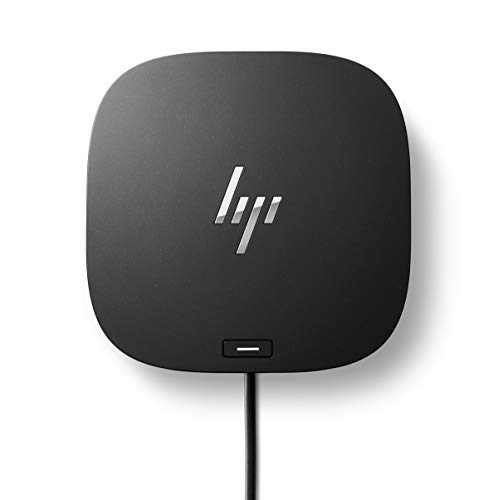
The HP USB-C Dock G5 offers 11 ports on a single USB-C cable, with its own power adapter and an enterprise-style build. A self-powered dock feeds the laptop, so the battery does not drain during a workday. That is the one thing a bus-powered hub cannot do.

It ranks first because it is the only self-powered dock under $100 here. The Anker has a better shell but no power of its own, and the UGREEN has dual 4K but no charging.

Buy it for a desk worker who stays docked all day. The caveats are the highest price here, a bulkier body and more than light users need. Skip it if you only need a few extra ports or travel with the dock.

Ports
11-in-1
Power
Own power adapter
Connection
Single USB-C cable
Build
Enterprise-style HP

What we like

  • +Own power adapter included
  • +Charges laptop while docked
  • +Solid enterprise-style build
  • +11 ports on one cable

Watch out for

  • −Highest price in the roundup
  • −Bulkier than hub-style docks
  • −Overkill for light use

Buy it if: Desk workers who stay docked all day and need laptop charging.

Skip it if: You only need a few extra ports or travel with the dock.

2

Best Build Quality

Anker 8-in-1 USB-C Docking Station, Dual Monitor

Our verdict: A sturdier hub with dual monitor output from a brand with a long support record.

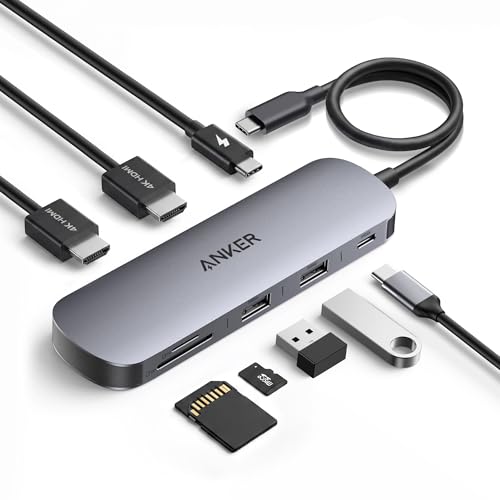
The Anker 8-in-1 is a bus-powered dual monitor dock with eight ports and a reinforced housing built to handle heat. A sturdier shell than cheap hubs matters because heat is the usual cause of random disconnects with two screens running.

It ranks second because it has fewer ports than the 14-in-1 and no power adapter. It costs more than basic hubs.

Buy it if cheap hubs have burned you and you want a dependable dual-screen box with support. Skip it if you want the most ports per dollar. Anker's support record is the real extra, and the reinforced housing keeps temperatures down when both monitors run. Dual output lets two screens work without a second cable, although the laptop must support it. It costs a little more than an unbranded hub, and that premium buys peace of mind.

Ports
8-in-1
Displays
Dual monitor output
Power
Bus-powered
Housing
Reinforced for heat

What we like

  • +Sturdier shell than cheap hubs
  • +Dual monitor support
  • +Handles sustained use well
  • +Established brand and support

Watch out for

  • −Fewer ports than the 14-in-1
  • −No power adapter of its own
  • −Pricier than basic hubs

Buy it if: Buyers burned by cheap hubs who want a dependable dual-screen box.

Skip it if: You want the most ports per dollar.

3

Best for Dual 4K

UGREEN 10-in-1 USB-C Docking Station, Dual HDMI 4K@60Hz

Our verdict: Advertises dual HDMI at 4K@60Hz, a spec many budget docks quietly fail to meet.

The UGREEN 10-in-1 has dual HDMI both rated at 4K@60Hz, USB-A ports, a card reader and bus power, for $25 to $50. Stating 60Hz on both outputs is the point, since many budget docks quietly fail that spec.

It ranks third because it lacks Ethernet and a power supply, and the plastic body runs warm. It is the best dual-4K value.

Buy it for a two-monitor desk that needs smooth 4K on both screens. Skip it if you need wired Ethernet or laptop charging from the dock. Leave airflow around it, and avoid stacking papers on top. The card reader and USB-A ports cover cameras and mice, but there is no Ethernet, so a wired network needs a separate adapter. For smooth video on both screens, check that the laptop port supports dual output.

Ports
10-in-1
Video
Dual HDMI 4K@60Hz
Extras
USB-A, SD/TF reader
Power
Bus-powered

What we like

  • +Dual HDMI stated at 4K@60Hz
  • +Ten ports for the price
  • +Card reader included
  • +Good dual-screen value

Watch out for

  • −No Ethernet port
  • −Plastic body runs warmer
  • −No own power supply

Buy it if: Two-monitor desks that need smooth 4K on both screens.

Skip it if: You need wired Ethernet or laptop charging from the dock.

4

Best for Three Monitors

Selore Laptop Docking Station, 3 Monitors Triple 4K Display

Our verdict: The only budget dock built around three external displays.

The Selore drives three 4K displays from a single USB-C cable, with USB-A ports and bus power. A triple-display dock for under $100 is rare, and it saves the cost of business-class triple docks.

It ranks fourth because many laptops cannot drive three screens and it adds no charging power. The brand is less proven.

Buy it for a capable laptop that needs a three-monitor desk on a budget. Skip it if your laptop supports only two external displays. Check the laptop's spec sheet first, since a dock cannot create outputs the laptop lacks. A three-screen desk also asks a lot of the GPU, so expect lower performance on integrated graphics. Without charging, keep the power brick plugged in during long sessions.

Displays
Up to 3 at 4K
Connection
Single USB-C cable
Extras
USB-A ports
Power
Bus-powered

What we like

  • +Three 4K displays on one cable
  • +Cheaper than business triple docks
  • +Single-cable desk setup
  • +USB-A ports included

Watch out for

  • −Many laptops cannot drive three screens
  • −No charging power added
  • −Less proven brand

Buy it if: Capable laptops that need a three-monitor desk on a budget.

Skip it if: Your laptop supports only two external displays.

5

Most Ports

14-in-1 USB-C Laptop Docking Station for Dell / Lenovo / HP

Our verdict: Fourteen ports and dual HDMI aimed at Dell, Lenovo and HP business laptops.

The 14-in-1 dock for Dell, Lenovo and HP laptops has the most ports in the group, dual HDMI output and bus power, for $25 to $50. Fourteen ports at that price suit a business laptop that needs many connections.

It ranks fifth because heat builds with every port busy and the brand has little support history. It adds no charging.

Buy it for Dell, Lenovo or HP laptops that need many connections cheaply. Skip it if you value brand support over port count. Keep the unit ventilated, because fourteen busy ports generate heat. The cheap price is the draw, and the broad compatibility with common business laptops helps. Treat the brand as unproven, and check the return window in case it disconnects during sustained use.

Ports
14-in-1
Displays
Dual HDMI
Fits
Dell, Lenovo, HP
Power
Bus-powered

What we like

  • +Most ports in the roundup
  • +Dual monitor out of the box
  • +Aimed at common business laptops
  • +Low price for the port count

Watch out for

  • −Heat builds with all ports busy
  • −Little brand support history
  • −No power brick of its own

Buy it if: Dell, Lenovo or HP laptops that need many connections cheaply.

Skip it if: You value brand support over port count.

6

Most Compact

Anker Nano 8-in-1 USB-C Docking Station

Our verdict: Pocket-sized with dual monitor support, built for people who move between desk and bag.

The Anker Nano 8-in-1 is a compact bus-powered dock with dual monitor output, USB-A ports and a card reader. It is small enough for a laptop bag, and consistent Anker build quality backs it up.

It ranks sixth because a small body limits heat shedding and it has fewer USB-A ports. It relies on the laptop for power.

Buy it if you carry one dock between desk and bag. Skip it if you dock for full days with several devices attached. It is a travel dock first, so keep the cable short and tidy in a bag. The dual monitor output works for a short session, but long days with many peripherals may warm it. Pair it with the laptop's own charger at your desk.

Ports
8-in-1
Displays
Dual monitor output
Size
Compact, portable
Power
Bus-powered

What we like

  • +Small enough for a laptop bag
  • +Dual monitor output
  • +Card reader included
  • +Anker build consistency

Watch out for

  • −Small body limits heat shedding
  • −Fewer USB-A ports
  • −Relies on laptop for power

Buy it if: Hybrid workers who carry one dock between desk and bag.

Skip it if: You dock for full days with several devices attached.

7

Cheapest Pick

UGREEN Revodok Pro 7-in-1 USB-C Docking Station

Our verdict: The lowest price here, but single display output only.

The UGREEN Revodok Pro is a 7-in-1 bus-powered dock with an aluminum shell and a single external display output, for $25 to $50. Aluminum sheds heat better than plastic, and the single-cable setup is simple.

It ranks last because it supports one external display only and offers basic ports. It is the cheapest in the group.

Buy it for a one-monitor home office that needs extra ports cheaply. Skip it if you run two monitors or need laptop charging. The aluminum shell is its other advantage, and it fits a small desk without crowding the laptop. A simple one-display setup avoids the heat issues that bother larger multi-monitor docks. Add a hub later if you need more USB ports.

Ports
7-in-1
Displays
Single external
Body
Aluminum
Power
Bus-powered

What we like

  • +Lowest price in the group
  • +Aluminum shell sheds heat
  • +Simple single-cable setup
  • +Fine for one-monitor desks

Watch out for

  • −Only one external display
  • −No dedicated power supply
  • −Basic port selection

Buy it if: One-monitor home offices that need extra ports cheaply.

Skip it if: You run two monitors or need laptop charging.

Methodology

How We Ranked These

Display honesty

We checked whether each dock states its refresh rate per screen, because a second display capped at 30Hz is the most common hidden weakness at this price.

Power delivery

Self-powered docks with their own adapter were separated from bus-powered hubs, since only the first group can actually keep a laptop charged.

Heat and housing

Housing material and size were weighed against how long each dock is realistically meant to run under load.

Port mix

We looked at usable ports, not just the headline count: USB-A, card readers, video outputs and whether Ethernet is present.

Brand support

Established warranty and support history counted, since a failed dock is hard to diagnose without it.

Every Primea Score uses the same weights: Performance 30% · Build & Materials 20% · Everyday Usability 20% · Value 20% · Owner Satisfaction 10%. Full scoring rules

Buyer's guide

How to Pick the Right One for You

By Number of Monitors

The screen count narrows the field fast.

Your screensOur pick
One monitor, lowest costUGREEN Revodok Pro 7-in-1 USB-C Docking Station
Two monitors, safe brandAnker 8-in-1 USB-C Docking Station, Dual Monitor
Two smooth 4K monitorsUGREEN 10-in-1 USB-C Docking Station, Dual HDMI 4K@60Hz
Three monitorsSelore Laptop Docking Station, 3 Monitors Triple 4K Display
Two monitors on a business laptop14-in-1 USB-C Laptop Docking Station for Dell / Lenovo / HP

By Budget

SpendOur pick
Under $30UGREEN Revodok Pro 7-in-1 USB-C Docking Station
$30 to $50UGREEN 10-in-1 USB-C Docking Station, Dual HDMI 4K@60Hz
$50 to $80Anker 8-in-1 USB-C Docking Station, Dual Monitor
Up to $100HP USB-C Dock G5, 11-in-1 Adapter

Self-Powered vs Bus-Powered

Self-powered

Has its own power adapter and charges the laptop through the dock, so one cable does everything. Costs more and takes more desk. Pick in this guide: HP USB-C Dock G5.

Bus-powered

Borrows power from the laptop, adds no charge and stays small and cheap. Picks: Anker 8-in-1, Anker Nano, UGREEN 10-in-1, UGREEN Revodok Pro, Selore, 14-in-1.

Choose self-powered if you dock daily; bus-powered is fine for occasional use.

By How You Work

Work styleOur pick
Docked all day at one deskHP USB-C Dock G5, 11-in-1 Adapter
Moves between desk and cafeAnker Nano 8-in-1 USB-C Docking Station
Needs many ports at once14-in-1 USB-C Laptop Docking Station for Dell / Lenovo / HP
Needs a three-screen trading setupSelore Laptop Docking Station, 3 Monitors Triple 4K Display

For a Dell, Lenovo or HP Work Laptop Specifically

Look for

A dock that states compatibility with your brand, a charging adapter if the laptop draws 65W or more, and dual video if you run two monitors.

In this comparison

The HP USB-C Dock G5 for HP laptops that need real charging, and the 14-in-1 USB-C Laptop Docking Station for Dell / Lenovo / HP when ports matter more.

When to Spend More

Spend more if

You dock for full days or your laptop needs charging from the dock. The HP USB-C Dock G5 is the only pick here with its own power adapter.

Save if

You run one screen and a few accessories. The UGREEN Revodok Pro 7-in-1 covers that for the least money.

Questions

Frequently Asked Questions

Can a dock under $100 really run two 4K monitors?+

Yes, but only if it states 4K@60Hz per output and your laptop's USB-C port supports dual video. The UGREEN 10-in-1 lists that spec. Many cheaper docks drop the second screen to 30Hz, which feels sluggish for anything but static work.

Will a budget dock charge my laptop?+

Most hub-style docks here are bus-powered and add no charge. Only the HP USB-C Dock G5 has its own power adapter. Keep your laptop's own charger plugged in with the others, and use a second port.

Why does my dock get hot?+

Compact plastic bodies hold heat when two 4K screens and several devices run together. Metal housings like the Revodok Pro's aluminum shell, or larger bodies like the Anker 8-in-1, handle it better. Leave airflow around the unit.

Is the Anker 8-in-1 worth more than the 14-in-1?+

If reliability and support matter, yes. The Anker has fewer ports but a sturdier shell and a known support record. If you need many connections cheaply and run a Dell, Lenovo or HP laptop, the 14-in-1 offers more.

Can I use a triple-monitor dock with any laptop?+

No. The laptop decides how many displays it can drive. Many base ultrabooks stop at two. Check the spec sheet before buying the Selore, and read the dock's display compatibility note.

Do I need Ethernet on a dock?+

Only if Wi-Fi is unreliable or you do video calls where stability matters. Several picks here, including the UGREEN 10-in-1, have no Ethernet port, so check the port list before you order.

Final take

The HP USB-C Dock G5 is the right budget dock for anyone who works docked all day, since it is the only one that charges the laptop. Choose the UGREEN 10-in-1 for dual 4K and the Anker 8-in-1 for build quality. Check refresh rate and power type before port count.

More Ranked & Reviewed Guides