
Primea ReviewsAll Reviews

Primea Reviews is reader-supported. When you buy through our Amazon links we may earn a commission, at no extra cost to you. Rankings are set by our editors and never sold. Learn more

Ranked & Reviewed by Primea Reviews

The 8 Best Printers with USB Ports of 2026, Ranked & Reviewed

By the Primea Editorial TeamUpdated November 1, 202610 min read8 products ranked
The 8 Best Printers with USB Ports of 2026, Ranked & Reviewed

The short answer

The Canon PIXMA TR8620a is the best printer with a USB port for home offices that want a cable link plus a feeder, fax and mobile printing. The HP OfficeJet Pro 8125e matches the feeder and duplex for under $100. The Brother DCP-L2640DW is the pick for text-only work. None of the eight confirms a flash drive slot on its listing.

The Primea Scoreboard

Ranked & Reviewed

  1. A USB-B wired connection with a full home-office feature set.

    94Outstanding
    Check price
  2. Feeder, duplex and a USB-B backup for under $100.

    92Outstanding
    Check price
  3. A wired monochrome laser with no ink to dry out.

    90Excellent
    Check price
  4. A business-minded MAXIFY with a USB-B link and fax.

    88Excellent
    Check price
  5. The only listing that names USB connectivity in writing.

    86Excellent
    Check price
  6. Its small screen shows the connection status as you plug in.

    84Very Good
    Check price
  7. A low-cost USB-B printer with an automatic feeder.

    82Very Good
    Check price
  8. Wireless first, with a plain USB-B port as a fallback.

    80Very Good
    Check price

Printer shopping has a vocabulary problem. Almost every model on the market carries a square USB-B socket for a cable to your computer, yet plenty of buyers searching for a USB printer actually want the flat USB-A slot that reads a thumb drive. The two ports do different jobs, and retailers rarely make the difference obvious. A listing that says USB with no further detail could mean either one, and a cable-only printer will not read your flash drive.

We ranked eight printers from their listings, scoring the wired connection first and then the office features around it: feeders, duplex, fax and mobile support. Several listings never confirm a flash drive slot, so none of them earns a place for that reason. Where a spec is missing, we say so rather than assume it exists, so you know which claims are confirmed before you order.

Before you buy

What Actually Matters

01

USB-B vs USB-A

USB-B is the square socket that links a printer to a computer, while USB-A is the flat slot that reads flash drives. Most listings here confirm only USB-B, so a printer sold as having USB may not take a thumb drive. Check the port description in the bullets or product images, not the title, and ask the seller if the wording is vague.

02

Why wired at all

A cable avoids wifi drops, router setup and driver confusion, which matters most for a desktop sitting a meter from the printer. A wired link also keeps working when the network is down. Check whether a USB-B cable is in the box, since some bundles omit it and you must buy one separately before the first print.

03

Document feeder

An automatic document feeder pulls pages through the scanner without you lifting the lid, which turns a ten-page scan from a chore into a single press. It separates office printers from basic ones. The Canon TR8620a, HP 8125e and Canon TR4720 list one. Look for ADF or automatic document feeder in the title or bullets, and check the sheet capacity if you scan long documents.

04

Duplex

Duplex printing prints both sides of a sheet automatically, cutting paper use by half on reports and drafts. Models without it need you to flip pages by hand. The HP 8125e, Brother DCP-L2640DW and Canon TS6520 list it. Check the bullets for duplex or two-sided printing, because a feeder alone does not imply it, and never assume a basic model prints on both sides.

05

Ink or toner

Laser printers use toner that stays stable when idle, while inkjet cartridges can dry out during long gaps, wasting money and clogging nozzles. That makes the Brother DCP-L2640DW better for occasional black text and the inkjets better for color. Check the printer type in the title and whether the listing says monochrome or color before you commit.

In-depth reviews

Our Ranked Picks, Reviewed

1

Best Overall

Canon PIXMA TR8620a All-in-One Printer

Our verdict: A USB-B wired connection with a full home-office feature set.

Canon's TR8620a earns first place by stacking the wired link on top of a genuine office toolset. It has a USB-B port for a direct computer connection, an auto document feeder, AirPrint and Android printing, and fax, copy and scan in the same body. The feeder is the part that matters day to day, because scanning a ten-page contract without lifting the lid saves real time.

It outranks the HP 8125e by covering fax and broader mobile support, at a higher $100 to $200 bucket. The Brother laser is cheaper to keep running for text, but prints black only. Nothing else here adds as many office functions on one cable-ready machine.

Buy it if the printer sits beside a desktop and handles scans and the occasional fax. Expect a large, office-style body, and note that the listing does not confirm a flash drive slot.

Wired port
USB-B
Feeder
Auto document feeder
Mobile
AirPrint and Android
Functions
Fax, copy, scan

What we like

  • +USB-B wired connection
  • +Auto document feeder
  • +AirPrint and Android support
  • +Fax, copy, scan

Watch out for

  • −Higher price bracket
  • −Large office-style body

Buy it if: Home offices that want a wired link and full toolset.

Skip it if: You only print occasionally.

2

Best Home Office Value

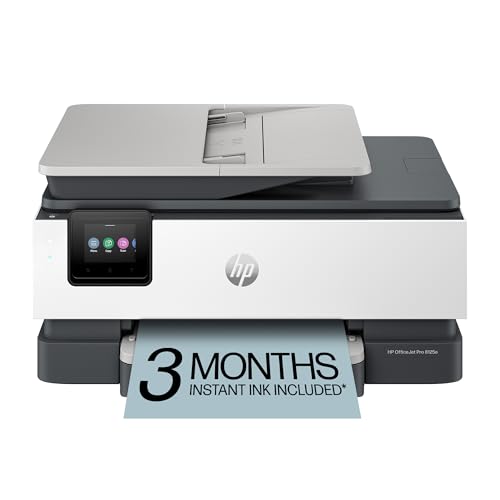
HP OfficeJet Pro 8125e Wireless All-in-One Color Inkjet Printer

Our verdict: Feeder, duplex and a USB-B backup for under $100.

The HP OfficeJet Pro 8125e is the value play for a home office. A USB-B port gives you a wired backup, an automatic document feeder handles multi-page scans, duplex printing halves paper use, and a three-month Instant Ink trial is included. All of that lands in the $50 to $100 bucket, roughly half of what the Canon asks.

It ranks second because it drops the Canon's fax and the longer mobile list. For most home offices that is a fair trade, since fax has become a niche need. Compared with the Canon TS6520 below, it adds the feeder that the TS6520 lacks, which is why it sits well above it.

Buy it if you want feeder plus duplex without paying for features you will not use. Skip it if you need fax. The listing also leaves a USB-A flash drive slot unconfirmed.

Wired port
USB-B
Feeder
Auto document feeder
Printing
Duplex
Trial
3-month Instant Ink

What we like

  • +USB-B wired backup
  • +Feeder and duplex
  • +Instant Ink trial
  • +Budget price bracket

Watch out for

  • −No fax listed
  • −No confirmed flash slot

Buy it if: Home offices wanting feeder and duplex cheaply.

Skip it if: You need fax.

3

Best Wired Laser

Brother DCP-L2640DW Wireless Compact Monochrome Laser Printer

Our verdict: A wired monochrome laser with no ink to dry out.

The Brother DCP-L2640DW is the only laser here, and that changes the ownership math. Toner does not dry out the way inkjet cartridges can, so a printer that sits idle for weeks still prints cleanly. It adds a USB-B port, duplex printing, copy and scan, and Alexa support in a compact monochrome body.

It ranks third because the inkjets above cover color and the Canon adds fax, and it costs the most in the $200 to $500 bucket. Against the HP 8125e, the Brother gives up color and a listed feeder but wins on idle reliability for text-heavy jobs like invoices and forms.

Buy it if you print mostly black documents in bursts. Skip it if you need color. The flash drive slot is not confirmed, and the price tier is the highest in this ranking.

Type
Monochrome laser
Wired port
USB-B
Printing
Duplex
Smart
Alexa support

What we like

  • +No ink to dry out
  • +USB-B wired connection
  • +Duplex printing
  • +Copy and scan

Watch out for

  • −Black only
  • −Highest price bracket

Buy it if: Text-heavy printing that sits idle between jobs.

Skip it if: You print in color.

4

Best for Small Office Fax

Canon MAXIFY MB2720 Wireless Color Photo Printer

Our verdict: A business-minded MAXIFY with a USB-B link and fax.

Canon's MAXIFY MB2720 is built around small-business use. Its USB-B port connects directly to a computer, and the body handles scan, copy and fax, plus color photo printing. The MAXIFY line is aimed at office workloads rather than casual home printing, which is why it carries fax rather than a photo-first feature set.

It lands fourth because Canon's own TR8620a gives you the same price band and adds an auto document feeder and mobile printing, features the MB2720 does not list. What the MB2720 keeps is its office pedigree and a USB-B link that suits a fixed desk.

Buy it if you need fax over a cable and run a small office. Skip it if scanning stacks of pages matters, since no feeder is listed. The design is also older, and a flash drive slot is unconfirmed.

Wired port
USB-B
Functions
Scan, copy, fax
Printing
Color photo capable
Line
MAXIFY business

What we like

  • +USB-B wired connection
  • +Fax built in
  • +Color photo printing
  • +Business-oriented design

Watch out for

  • −No feeder listed
  • −Older design

Buy it if: Small offices that need fax over USB.

Skip it if: You want a document feeder.

5

Best for Photos

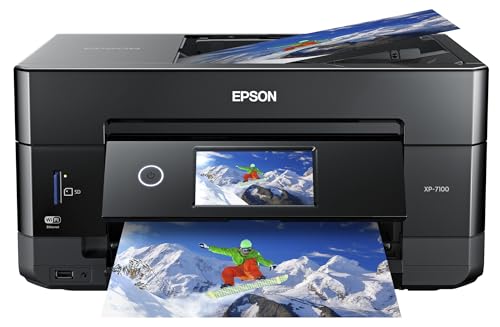
Epson Expression Premium XP-7100 Wireless Photo Printer, USB Connect

Our verdict: The only listing that names USB connectivity in writing.

Epson's Expression Premium XP-7100 is the only printer here whose listing names USB connectivity directly in writing, which makes it the safest buy for shoppers who want the port confirmed before ordering. It pairs that with wireless duplex color photo printing, a built-in scanner and copier, mobile printing and a compact photo-oriented body.

It ranks fifth because the design is photo-first and no feeder is listed, so the Canon TR8620a and HP 8125e handle paperwork better. The XP-7100 pulls ahead of the TS6520 behind it on print quality focus and its explicit USB listing, though it costs more at $100 to $200.

Buy it for photo prints with a cable option. Skip it for office document runs, where the missing feeder slows scanning, and remember that USB Connect on the listing does not mean a flash drive slot.

Wired
USB Connect
Printing
Duplex color photo
Functions
Scan and copy
Mobile
Mobile printing

What we like

  • +USB named on listing
  • +Duplex color printing
  • +Scanner and copier
  • +Compact photo design

Watch out for

  • −Photo-first design
  • −No feeder listed

Buy it if: Photo printers who want USB confirmed in writing.

Skip it if: You print mostly documents.

6

Best with Status Screen

Canon PIXMA TS6520 Wireless Color Inkjet Printer

Our verdict: Its small screen shows the connection status as you plug in.

The Canon PIXMA TS6520 is the budget printer that shows you its wired status. A 1.42 inch OLED display reports connection state, so you can confirm the USB-B link is live without opening settings. Duplex printing and a compact body round out a $50 to $100 package.

It ranks sixth because it has no feeder and few office extras. The HP 8125e costs the same bucket and adds both a feeder and a trial of Instant Ink, so it simply does more for the money. The TS6520 earns its spot over the TR4720 below by offering duplex, which that model does not list.

Buy it if you print occasionally from one computer and like a clear on-screen cue. Skip it if you scan multi-page documents. The listing does not confirm a USB-A flash drive slot.

Wired port
USB-B
Screen
OLED status display
Printing
Duplex
Price bracket
$50-100

What we like

  • +Shows connection status
  • +USB-B wired connection
  • +Duplex printing
  • +Budget price

Watch out for

  • −No feeder
  • −Few office extras

Buy it if: Users who want visible confirmation of a wired link.

Skip it if: You need a document feeder.

7

Best Budget Feeder

Canon PIXMA TR4720 All-in-One Wireless Printer

Our verdict: A low-cost USB-B printer with an automatic feeder.

Canon's PIXMA TR4720 gives budget buyers a feeder and a cable option. It lists a USB-B port, an automatic document feeder, wireless connectivity and built-in fax. Within the $50 to $100 bucket, the feeder is the real prize, since scanning stacks of paper without lifting the lid is rare at this price.

It sits seventh because the HP 8125e offers that same feeder plus duplex printing at a similar cost, and the Canon TS6520 above it has duplex too. The TR4720 lists no duplex, and its fax is a legacy feature that most households will never touch.

Buy it if you want a cheap feeder and a wired fallback, and you do not mind printing one side at a time. Skip it if paper use matters. As with most here, a flash drive slot is not confirmed on the listing.

Wired port
USB-B
Feeder
Automatic
Fax
Built in
Price bracket
$50-100

What we like

  • +USB-B wired backup
  • +Automatic feeder
  • +Low price
  • +Wireless too

Watch out for

  • −No duplex listed
  • −Legacy fax feature

Buy it if: Budget buyers who want a feeder and cable option.

Skip it if: You want duplex printing.

8

Best Budget Fallback

HP DeskJet 4355 Wireless All-in-One Color Inkjet Printer

Our verdict: Wireless first, with a plain USB-B port as a fallback.

The HP DeskJet 4355 treats USB as an afterthought, and the listing is honest about it. A standard USB-B port is there as a fallback, but wireless is the primary connection. A three-month Instant Ink trial is included, the body is compact, and the price falls between $50 and $100.

It ranks last because every printer above it either puts the cable first or adds a feeder, duplex or fax. The DeskJet matches the TR4720 on price but has no feeder to offset the basic feature set. Its one advantage is that a cable exists when wifi drops.

Buy it for a spare room or student desk where you want a cheap printer with a cable fallback. Skip it if you scan paperwork, because no feeder is listed. The flash drive slot is also unconfirmed.

Wired port
USB-B
Main connection
Wireless
Trial
3-month Instant Ink
Price bracket
$50-100

What we like

  • +USB-B fallback
  • +Instant Ink trial
  • +Compact design
  • +Low price

Watch out for

  • −Wireless is primary
  • −Basic feature set

Buy it if: Budget buyers wanting a cable fallback.

Skip it if: You need a feeder.

Methodology

How We Ranked These

Port type

We separated USB-B computer ports from USB-A flash drive slots, which the listings often blur.

Office features

Feeder, duplex and fax were weighed as the extras that go with a wired setup.

Listing clarity

Listings that state USB directly ranked higher than those that imply it.

Print type

Inkjet, photo and laser were weighed against typical home use.

Price bracket

Each model was scored against its bucket, from $50-100 to $200-500.

Every Primea Score uses the same weights: Performance 30% · Build & Materials 20% · Everyday Usability 20% · Value 20% · Owner Satisfaction 10%. Full scoring rules

Buyer's guide

How to Pick the Right One for You

By Primary Use

Pick the printer by the job it does most.

UseOur pick
Full home officeCanon PIXMA TR8620a
Documents with duplexHP OfficeJet Pro 8125e
Text on an idle printerBrother DCP-L2640DW
PhotosEpson Expression Premium XP-7100

By Budget

SpendOur pick
$50-100, feeder and duplexHP OfficeJet Pro 8125e
$50-100, basicHP DeskJet 4355
$100-200Canon PIXMA TR8620a
$200-500Brother DCP-L2640DW

Inkjet vs Laser

Inkjet

Color and photos, lower upfront cost. Canon, HP and Epson models here.

Laser

No ink drying out, black only. The Brother DCP-L2640DW.

Most buyers should default to an inkjet unless printing is rare and text-only.

By Fax and Feeder Needs

NeedOur pick
Fax and feederCanon PIXMA TR8620a
Fax without feederCanon MAXIFY MB2720
Feeder without faxHP OfficeJet Pro 8125e

For Wired Desktop Setups Specifically

Look for

A USB-B port and, if you want it, USB named in the listing.

In this ranking

The Epson XP-7100 names USB Connect directly, and the Canon TR8620a lists USB-B.

When to Spend More

Spend more if

You want fax, mobile printing and a feeder, which the Canon TR8620a combines.

Save if

You want a cable fallback. The HP DeskJet 4355 is the cheapest.

Questions

Frequently Asked Questions

Do these printers have a USB flash drive slot?+

No listing confirms one. They all list USB-B for a computer cable, and only the Epson XP-7100 names USB on its listing in so many words. If you need a flash drive slot, confirm it with the maker before buying.

Does a cable come in the box?+

Check the listing, because some bundles omit it. The HP 8125e and Canon TR8620a use a standard USB-B printer cable, which is cheap to buy separately if the box lacks one.

Is a wired printer worth it over wireless?+

For a desktop beside the printer, yes. A cable avoids the dropped connections wifi can bring, and the Canon TS6520 even shows link status on its screen. Wireless suits shared use across rooms, which every model here also supports.

How do I set up a USB printer?+

Install the driver from the maker's site, plug in the USB-B cable and select the printer in your computer's settings. The HP 8125e and Canon TR8620a follow this same path, and then add wireless afterward if you want it.

Do I need ink for the Brother laser?+

No, it uses toner. The Brother DCP-L2640DW is a monochrome laser, so there is no ink to dry out during idle weeks, which suits occasional text printing better than the inkjets like the HP DeskJet 4355.

Can I still print wirelessly?+

Yes. Every model here also lists wireless or mobile printing. The Canon TR8620a adds AirPrint and Android support, the Epson XP-7100 lists mobile printing, and the HP DeskJet 4355 treats wireless as its primary connection.

Final take

For most home offices, the Canon PIXMA TR8620a is the best USB printer, because it pairs the cable link with a feeder, fax and mobile printing. The HP OfficeJet Pro 8125e gets you the feeder and duplex for under $100. Choose the Brother DCP-L2640DW for text-heavy work. If you need a flash drive slot, none of these listings confirm one.

More Ranked & Reviewed Guides