

Primea ReviewsAll Reviews

Primea Reviews is reader-supported. When you buy through our Amazon links we may earn a commission, at no extra cost to you. Rankings are set by our editors and never sold. Learn more

Ranked & Reviewed by Primea Reviews

The 7 Best AirPrint Printers of 2026, Ranked & Reviewed

By the Primea Editorial TeamUpdated November 1, 20269 min read7 products ranked
The 7 Best AirPrint Printers of 2026, Ranked & Reviewed

The short answer

The Canon PIXMA TS5320 is the best AirPrint printer, the only one here to name AirPrint on its listing, a compact wireless all-in-one in the $100 to $200 bucket. The Epson EcoTank ET-2800 is the low-running-cost choice, and the HP OfficeJet Pro 8125e adds a feeder and duplex. The TR4720, TS6520, DeskJet 4355 and TS4320 fill the budget end, all with AirPrint unnamed.

The Primea Scoreboard

Ranked & Reviewed

  1. The only printer here that names AirPrint right on the listing.

    94Outstanding
    Check price
  2. A cartridge-free tank printer for people who print often.

    91Excellent
    Check price
  3. ADF and duplex printing for a home workspace.

    88Excellent
    Check price
  4. An auto document feeder and mobile support at a low price.

    85Excellent
    Check price
  5. A small OLED screen shows Wi-Fi status messages.

    82Very Good
    Check price
  6. A low-cost print, scan and copy machine with an ink trial.

    80Very Good
    Check price
  7. Duplex printing and a copier/scanner in a compact tray design.

    78Very Good
    Check price

The word AirPrint appears on plenty of printer boxes and goes missing from plenty of product pages, which is the catch for shoppers. A printer can work with an iPhone and still fail to say so on its listing, leaving you to verify it yourself in Apple's compatibility list. Only one printer here names AirPrint outright, and the rest carry a note that tells you to check first.

Seven printers were put through the Primea framework, with a written AirPrint claim, ink system, feeder, duplex and Wi-Fi setup weighing most. Prices appear as buckets only. Where the listing is silent, we say so, and we do not assume that a missing mention means missing support. Treat every unnamed claim as something to check yourself.

Before you buy

What Actually Matters

01

AirPrint support

AirPrint lets an iPhone or iPad print wirelessly without installing a driver. It matters because it avoids app setup. Look for the word AirPrint in the title, or check Apple's compatibility list before buying, since a printer can support it without saying so and another can say little about it. A written mention is the strongest proof.

02

Ink system

Cartridge printers have a low upfront price but a higher cost per page, while tank printers cost more initially and far less to run. If you print weekly, tanks save money. Look for the terms ink tank or cartridge-free, as on the ET-2800. Bottled ink costs far less per page than cartridges.

03

Document feeder

An automatic feeder scans or copies multiple pages without lifting the lid each time. It saves time on contracts and forms. Check the listing for ADF, as on the OfficeJet Pro and TR4720, and note that the others have flatbed-only scanning. Feeders save the most time on long documents.

04

Duplex printing

Automatic two-sided printing halves paper use and suits reports. Without it, you flip pages by hand. Look for duplex in the specs, since it saves paper and time on long jobs, and note that the TR4720 and DeskJet 4355 do not list it. Duplex pays back on long reports and school work.

05

Wi-Fi setup

Wireless setup is where many users get stuck. A display or a guided app flow helps. Check whether the listing mentions a control panel or app setup, as on the TS6520's OLED screen, since a printer that is hard to connect never gets used. Place it within a clear signal path of your router.

In-depth reviews

Our Ranked Picks, Reviewed

1

Best Overall

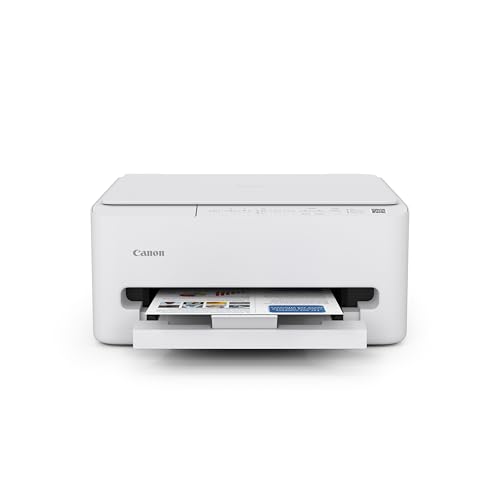
Canon TS5320 All-in-One Wireless Printer with AirPrint

Our verdict: The only printer here that names AirPrint right on the listing.

The TS5320 is a compact wireless all-in-one that prints, scans and copies, with AirPrint named explicitly in the product title. It sits in the $100 to $200 bucket and supports Amazon Dash Replenishment. A written AirPrint claim is a promise you can hold the seller to, which no other listing here offers.

It ranks first because it removes the main uncertainty, and the rest of the package is competent. Cartridge running costs are its weakness, and the ET-2800 beats it on ink.

Buy it for buyers who want AirPrint confirmed in writing. The caveats are cartridge running costs and a basic feature set. Skip it if you print heavily and want low ink cost.

Functions
Print, scan, copy
AirPrint
Named on listing
Ink system
Cartridge
Price bucket
$100-200

What we like

  • +AirPrint named in title
  • +Print, scan and copy
  • +Compact design
  • +Dash Replenishment ready

Watch out for

  • −Cartridge running costs
  • −Basic feature set

Buy it if: Buyers who want AirPrint confirmed in writing.

Skip it if: You print heavily and want low ink cost.

2

Best Low Running Cost

Epson EcoTank ET-2800 Wireless Cartridge-Free Supertank Printer

Our verdict: A cartridge-free tank printer for people who print often.

The ET-2800 is a wireless cartridge-free supertank printer with scan and copy functions and the Epson Smart Panel app, in the $100 to $200 bucket. The listing does not name AirPrint, so check it before buying. Tank printers cost less per page because bottled ink replaces small cartridges.

It ranks second since the running cost is far lower for frequent printing, but the missing AirPrint claim means a step you must verify. The TS5320 is safer for iPhone owners, and this one is cheaper to run.

Buy it for frequent printers who dislike buying cartridges. The caveats are the unnamed AirPrint and refilling tanks. Skip it if you print once a month.

Ink system
Cartridge-free tank
Functions
Print, scan, copy
App
Epson Smart Panel
AirPrint
Not named; verify

What we like

  • +Cartridge-free ink tanks
  • +Lower cost per page
  • +Scan and copy
  • +Smart Panel app

Watch out for

  • −AirPrint not on listing
  • −Tanks need refilling

Buy it if: Frequent printers who dislike buying cartridges.

Skip it if: You print once a month.

3

Best for Home Office

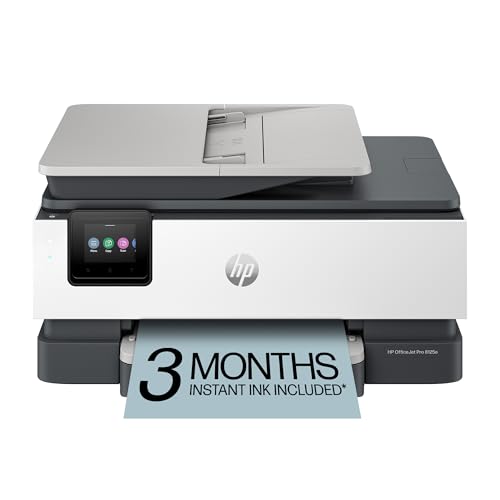
HP OfficeJet Pro 8125e Wireless All-in-One Color Inkjet Printer

Our verdict: ADF and duplex printing for a home workspace.

The OfficeJet Pro 8125e is a color inkjet that scans and copies, with a sheet feeder that handles stacks of pages, two-sided printing, a 3-month Instant Ink trial and the HP Smart app as a fallback for mobile printing. It sits in the $50 to $100 bucket. AirPrint is not named, but the app is a fallback.

It ranks third because the feeder and duplex suit a home office, while the AirPrint note holds it back. The feeder saves real time on multi-page scans.

Buy it for home offices printing multi-page documents. The caveats are the unnamed AirPrint and the ink subscription upsell. Skip it if you only print photos occasionally.

Feeder
Automatic document feeder
Duplex
Yes
Trial
3-month Instant Ink
AirPrint
Not named; verify

What we like

  • +Automatic document feeder
  • +Duplex printing
  • +HP Smart app
  • +Instant Ink trial

Watch out for

  • −AirPrint not on listing
  • −Ink subscription upsell

Buy it if: Home offices printing multi-page documents.

Skip it if: You only print photos occasionally.

4

Best for Scanning

Canon PIXMA TR4720 All-in-One Wireless Printer

Our verdict: An auto document feeder and mobile support at a low price.

The TR4720 is a color inkjet all-in-one with an auto document feeder, mobile printing support and a built-in fax. It lies in the $50 to $100 bucket. AirPrint is not named on the listing. Mobile printing support is listed, but that is not the same as AirPrint.

It ranks fourth because it lacks the duplex printing of the OfficeJet and the AirPrint mention of the TS5320. Its feeder is the draw for people who scan paperwork.

Buy it for people who scan paperwork often. The caveats are the unnamed AirPrint and a fax feature that is rarely used. Skip it if you want duplex printing.

Feeder
Auto document feeder
Mobile
Printing support
Extra
Built-in fax
AirPrint
Not named; verify

What we like

  • +Auto document feeder
  • +Mobile printing support
  • +Low price bucket
  • +Wireless

Watch out for

  • −AirPrint not on listing
  • −Fax feature rarely used

Buy it if: People who scan paperwork often.

Skip it if: You want duplex printing.

5

Best Display for Setup

Canon PIXMA TS6520 Wireless Color Inkjet Printer

Our verdict: A small OLED screen shows Wi-Fi status messages.

The TS6520 is a color inkjet with duplex printing and a 1.42 inch OLED display that shows network status messages. It lies in the $50 to $100 bucket. AirPrint is not named on the listing. A screen that shows Wi-Fi status helps when setup stalls.

It ranks fifth because the display helps you fix Wi-Fi problems, but there is no feeder and AirPrint is unconfirmed. For iPhone printing, that status screen is useful when pairing fails.

Buy it for buyers who want help with Wi-Fi setup. The caveats are no feeder and no AirPrint mention. Skip it if you need to scan stacks of pages.

Display
1.42 inch OLED
Duplex
Yes
Type
Color inkjet
AirPrint
Not named; verify

What we like

  • +OLED status display
  • +Duplex printing
  • +Compact design
  • +Intuitive control panel

Watch out for

  • −No feeder
  • −AirPrint not on listing

Buy it if: Buyers who want help with Wi-Fi setup.

Skip it if: You need to scan stacks of pages.

6

Best Budget HP

HP DeskJet 4355 Wireless All-in-One Color Inkjet Printer

Our verdict: A low-cost print, scan and copy machine with an ink trial.

HP's DeskJet 4355 is a small color all-in-one inkjet with a 3-month Instant Ink trial and a simple wireless setup flow, in the $50 to $100 bucket. AirPrint is not named on the listing. A simple setup flow helps first-time buyers connect an iPhone.

It ranks sixth because it offers no duplex or feeder, features rivals at the same price include, and AirPrint is unconfirmed. It does cost little.

Buy it for light home use and students. The caveats are no duplex or feeder and no AirPrint mention. Skip it if you print a lot of documents.

Type
Color inkjet all-in-one
Trial
3-month Instant Ink
Setup
Simple wireless
AirPrint
Not named; verify

What we like

  • +Low price bucket
  • +Simple wireless setup
  • +Compact
  • +Instant Ink trial

Watch out for

  • −No duplex or feeder
  • −AirPrint not on listing

Buy it if: Light home use and students.

Skip it if: You print a lot of documents.

7

Budget Duplex Pick

Canon PIXMA TS4320 Wireless Color Inkjet Printer

Our verdict: Duplex printing and a copier/scanner in a compact tray design.

The TS4320 is a color inkjet with duplex printing, a built-in copier and scanner, a compact single-tray design and mobile app printing support. It sits in the $50 to $100 bucket. AirPrint is not named. The listing tells you to verify through iPhone settings before buying.

It ranks last because it has no display, no feeder and no AirPrint mention. It does give duplex for a low price, which helps budget buyers in tight spaces.

Buy it for budget buyers in tight spaces. The caveats are no display and unnamed AirPrint. Skip it if you want a feeder or screen.

Duplex
Yes
Functions
Copy and scan
Design
Compact single tray
AirPrint
Not named; verify

What we like

  • +Duplex printing
  • +Copier and scanner
  • +Mobile app support
  • +Compact tray design

Watch out for

  • −No display
  • −AirPrint not on listing

Buy it if: Budget buyers in tight spaces.

Skip it if: You want a feeder or screen.

Methodology

How We Ranked These

AirPrint confirmation

Printers that name AirPrint on the listing ranked above those that leave it for the buyer to verify.

Ink economy

Tank and cartridge systems were compared for running cost.

Office features

Document feeder, duplex printing and scanning were weighed.

Setup help

Displays and apps that ease Wi-Fi setup earned credit.

Price bucket

Value was judged within each printer's price tier.

Every Primea Score uses the same weights: Performance 30% · Build & Materials 20% · Everyday Usability 20% · Value 20% · Owner Satisfaction 10%. Full scoring rules

Buyer's guide

How to Pick the Right One for You

By Print Volume

Match the ink system to how much you print.

VolumeOur pick
A few pages a monthHP DeskJet 4355 Wireless All-in-One
Weekly household useCanon TS5320 All-in-One with AirPrint
Daily printingEpson EcoTank ET-2800
Office-style documentsHP OfficeJet Pro 8125e

By Budget

SpendOur pick
Under $50No pick sits in this bucket
$50-100HP DeskJet 4355 or Canon PIXMA TS4320
$50-100 with feederCanon PIXMA TR4720
$100-200Canon TS5320 or Epson EcoTank ET-2800

Cartridge vs Ink Tank

Cartridge

Lower upfront price, but each page costs more over time. The Canon TS5320, TR4720, TS6520 and TS4320 use cartridges.

Ink tank

Higher upfront price with a much lower page cost, and bottles instead of cartridges. The Epson EcoTank ET-2800 is the tank option here.

Most buyers who print weekly should default to ink tanks.

By Workspace Need

NeedOur pick
Multi-page scanningCanon PIXMA TR4720
Two-sided reportsHP OfficeJet Pro 8125e
Wi-Fi setup helpCanon PIXMA TS6520
Confirmed AirPrintCanon TS5320

For iPhone-Only Households Specifically

Look for

AirPrint named in the title, a printer that appears when you tap Print on the iPhone, and a simple Wi-Fi setup.

In this ranking

The Canon TS5320 names AirPrint outright. For the others, confirm via the manufacturer or Apple support.

When to Spend More

Spend more if

You print daily or need office features. The Epson EcoTank ET-2800 and HP OfficeJet Pro 8125e justify it.

Save if

You print occasionally. The HP DeskJet 4355 or Canon TS4320 cover basics.

Questions

Frequently Asked Questions

How do I know if a printer supports AirPrint?+

Look for AirPrint in the product title or specs, or check the manufacturer's compatibility list. Only the Canon TS5320 names it in its listing here. For the others, check Apple's list or the maker's page before ordering, because support is likely but unconfirmed.

What is the most common mistake?+

Assuming every Wi-Fi printer supports AirPrint. Some use proprietary apps only, so verify before buying. The HP and Epson listings here point to their own apps instead of naming AirPrint.

Is an EcoTank worth it over a cartridge printer?+

If you print often, yes, since ink costs drop sharply. For light use, a cartridge model costs less upfront. A tank printer pays back only with regular printing.

How do I set up AirPrint?+

Connect the printer and iPhone to the same Wi-Fi network, using the printer's setup steps first, then tap the share icon and choose Print. No driver is needed, which is the whole appeal.

How do I maintain an inkjet?+

Print something every couple of weeks so the ink does not dry in the nozzles, especially on cartridge models like the TS4320, and run the head cleaning only when quality drops. Cleaning uses ink, so do not run it needlessly.

What if the printer does not show up on my iPhone?+

Check that both are on the same network, restart both, and confirm the printer's wireless setup is complete. A guest network or a router setting can block discovery.

Final take

Buy the TS5320 if you want AirPrint confirmed in writing, and the ET-2800 if you print often. The OfficeJet Pro 8125e suits a home office, and the TR4720 suits scanning. The TS6520, DeskJet 4355 and TS4320 are budget printers that need their AirPrint support verified. Check the compatibility list before ordering anything unnamed.

More Ranked & Reviewed Guides