

Primea ReviewsAll Reviews

Primea Reviews is reader-supported. When you buy through our Amazon links we may earn a commission, at no extra cost to you. Rankings are set by our editors and never sold. Learn more

Ranked & Reviewed by Primea Reviews

The 6 Best Cartridge-Free Printers of 2026, Ranked & Reviewed

By the Primea Editorial TeamUpdated November 1, 202610 min read6 products ranked
The 6 Best Cartridge-Free Printers of 2026, Ranked & Reviewed

The short answer

The Epson EcoTank ET-3850 is the best cartridge-free printer, adding an automatic document feeder, Ethernet and a bonus black ink bottle in the $200 to $500 bracket. The ET-4950 suits heavier office use with a touchscreen and 18 ppm, and the ET-2800 and ET-2400 are the compact home models. The ET-4850 adds fax, and the Canon PIXMA G620 is the photo-focused MegaTank.

The Primea Scoreboard

Ranked & Reviewed

  1. A feeder, scanner, Ethernet and a bonus ink bottle make it the best balance.

    94Outstanding
    Check price
  2. A touchscreen, feeder and rated three years of ink refills for heavier use.

    91Excellent
    Check price
  3. A compact print, scan and copy printer with ink bottles included for setup.

    88Excellent
    Check price
  4. Fax, Ethernet and a feeder in an office-oriented white body.

    85Excellent
    Check price
  5. A photo-focused MegaTank printer that works with Alexa.

    82Very Good
    Check price
  6. A compact everyday EcoTank for simple home printing.

    79Very Good
    Check price

Cartridge-free does not mean ink-free. These printers replace the small cartridge with a tank you top up from a bottle, and the money you save comes from how much ink a bottle holds compared with a cartridge. The decision that remains is practical: do you need a document feeder and a wired network port, or just a compact machine for a few pages a week?

Six tank printers were weighed against the Primea framework, with feeder, networking, print speed, ink supply and price bucket doing most of the work. Five are Epson EcoTank models and one is a Canon MegaTank, so the choice is mostly about features within one family. Prices are buckets, and none of the listings quotes a cost per page.

Before you buy

What Actually Matters

01

Refillable tank

A tank printer holds ink in a reservoir you refill from a bottle, replacing small cartridges. This usually lowers running cost for regular printers. Check the listing for the words EcoTank or MegaTank and see whether bottles are included, because starter ink varies and a missing bottle adds an immediate cost. Check the refill price too.

02

Document feeder

An automatic document feeder pulls multi-page originals through the scanner. Without one you place every page on the glass by hand. Look for the feeder in the bullets, not the photos, and decide how many pages you scan, since a long contract is slow without a feeder. Feeders also reduce skewed scans from pages pushed crooked on the glass.

03

Wired networking

Ethernet gives a stable connection for shared printers, where Wi-Fi may drop. It matters if several people print. Check the listing for an Ethernet port, as on the ET-3850 and ET-4850, and consider it for a home office with a router nearby and an extra port. A wired link also avoids drops during long scans.

04

Print speed

Speed is listed in pages per minute and affects long jobs. The ET-4950 lists 18 ppm. Look for a number in the specs, since vague words such as fast do not help, and remember that photo and color pages print slower than plain text. Speed matters mostly for office volume.

05

Fax

Fax support adds cost and matters mainly for legacy business workflows. Most homes can skip it, since phones and email have taken its place. Confirm in the listing whether fax is built in, along with the phone-line connection, and weigh the premium for the ET-4850 against the few times you would use it. Email scanning has replaced most faxing.

In-depth reviews

Our Ranked Picks, Reviewed

1

Best Overall

Epson EcoTank ET-3850 Wireless Cartridge-Free Supertank Printer

Our verdict: A feeder, scanner, Ethernet and a bonus ink bottle make it the best balance.

The Epson EcoTank ET-3850 combines an automatic document feeder, scanner and copier, Ethernet and mobile printing support in a refillable tank design. A bonus black ink bottle and USB cable are included, in the $200 to $500 bracket. A feeder pulls a stack through the scanner, so copying a contract does not need you at the glass.

It ranks above the ET-4950 because it gives the useful office features without the premium for speed and screen. Against the ET-2800, it adds the feeder and wired networking.

Buy it for home offices that scan and copy multi-page documents. The caveats are a higher cost than entry models and no touchscreen listed. Skip it if you print a few pages a month.

Feeder
Automatic document feeder
Network
Ethernet and wireless
Functions
Print, scan, copy
Extras
Bonus black ink, USB cable

What we like

  • +Automatic document feeder
  • +Ethernet connection
  • +Bonus ink bottle included
  • +Mobile printing support

Watch out for

  • −Costs more than entry models
  • −No touchscreen listed

Buy it if: Home offices that scan and copy multi-page documents.

Skip it if: You print a few pages a month.

2

Best for Offices

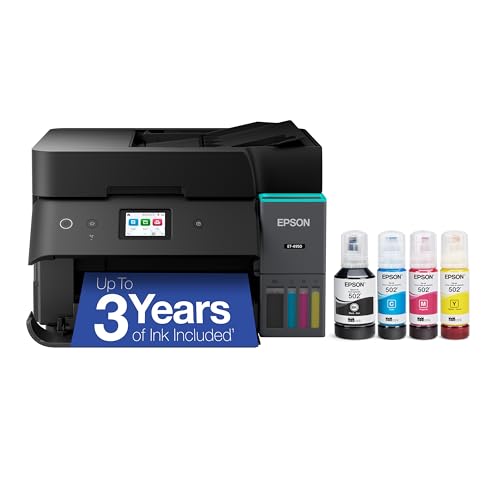
Epson EcoTank ET-4950 Wireless Cartridge-Free Supertank Printer

Our verdict: A touchscreen, feeder and rated three years of ink refills for heavier use.

The ET-4950 adds a 2.4-inch colour touchscreen and an automatic document feeder, with an 18 ppm print speed and ink refills rated for up to three years. It is designed for people who print regularly, in the $200 to $500 bracket. A rated ink supply gives a sense of how long a set of bottles lasts under normal office use.

It ranks second because the touchscreen and speed improve daily use, but they raise the price tier above the ET-3850. If you print every day, the speed helps, and if you do not, the ET-3850 is enough.

Buy it for busy home offices printing every day. The caveats are the higher tier and the small screen. Skip it if you want the lowest cost per printer.

Screen
2.4-inch colour touchscreen
Speed
18 ppm
Feeder
Automatic document feeder
Ink rating
Up to 3 years of refills

What we like

  • +Colour touchscreen
  • +18 ppm print speed
  • +Document feeder
  • +Long ink supply rating

Watch out for

  • −Higher price tier
  • −Small 2.4-inch screen

Buy it if: Busy home offices printing every day.

Skip it if: You want the lowest cost per printer.

3

Best for Home Use

Epson EcoTank ET-2800 Wireless Cartridge-Free Supertank Printer (Black)

Our verdict: A compact print, scan and copy printer with ink bottles included for setup.

The Epson EcoTank ET-2800 is a compact wireless all-in-one that prints, scans and copies, and ships with ink bottles for setup. It sits in the $100 to $200 tier. A small body fits a shelf or desk, and the included bottles mean the first fill costs nothing extra.

It ranks below the ET-3850 because it has no listed document feeder or Ethernet, but it costs a tier less and keeps the tank system. Against the ET-2400, it lists the setup bottles.

Buy it for students and light home printing. The caveats are no feeder listed and no Ethernet. Skip it if you scan stacks of paper.

Functions
Print, scan, copy
Network
Wireless
Ink
Bottles included
Design
Compact all-in-one

What we like

  • +Compact footprint
  • +Ink bottles included
  • +Wireless printing
  • +Lower price tier

Watch out for

  • −No feeder listed
  • −No Ethernet listed

Buy it if: Students and light home printing.

Skip it if: You scan stacks of paper.

4

Best with Fax

Epson EcoTank ET-4850 Wireless Cartridge-Free Supertank Printer

Our verdict: Fax, Ethernet and a feeder in an office-oriented white body.

The ET-4850 includes fax, Ethernet, an automatic document feeder, scanner and copier in a white, office-oriented design, in the $200 to $500 bracket. Fax is the headline: a few offices still receive faxes, and this model handles them without a separate machine.

It ranks below the ET-4950 because it lacks the touchscreen and speed detail, though it matches it on feeder and Ethernet. Fax is niche, so most buyers pay for a feature they never use.

Buy it for small businesses that still fax. The caveats are that fax is niche and the tier is higher. Skip it if you never send faxes.

Fax
Included
Network
Ethernet
Feeder
Automatic document feeder
Finish
White

What we like

  • +Fax included
  • +Ethernet port
  • +Document feeder
  • +Office-focused design

Watch out for

  • −Fax is niche
  • −Higher price tier

Buy it if: Small businesses that still fax.

Skip it if: You never send faxes.

5

Best for Photos

Canon PIXMA G620 Wireless MegaTank Photo All-in-One Printer

Our verdict: A photo-focused MegaTank printer that works with Alexa.

The Canon PIXMA G620 is a refillable MegaTank photo all-in-one that prints, copies and scans with wireless connectivity and Alexa support. It targets photo output rather than documents, in the $200 to $500 bracket. A photo-oriented tank system suits families who print albums and school pictures.

It ranks below the Epson office models because it lists no feeder and is less suited to documents. Against the ET-2800, it spends more for photo focus.

Buy it for families printing photos at home. The caveats are no feeder listed and a document weakness. Skip it if your printing is mostly paperwork.

System
MegaTank refillable ink
Focus
Photo colour output
Functions
Print, copy, scan
Voice
Works with Alexa

What we like

  • +Photo-focused output
  • +Alexa support
  • +Refillable MegaTank
  • +Wireless connectivity

Watch out for

  • −No feeder listed
  • −Less suited to documents

Buy it if: Families printing photos at home.

Skip it if: Your printing is mostly paperwork.

6

Best Entry Pick

Epson EcoTank ET-2400 Wireless Cartridge-Free Supertank Printer

Our verdict: A compact everyday EcoTank for simple home printing.

The Epson EcoTank ET-2400 is a compact wireless print, scan and copy printer built for everyday home printing, with the refillable tank system, in the $100 to $200 bracket. It is a simple machine for simple jobs.

It ranks last because the listing is plain next to the ET-2800, with no setup bottle mention and no feeder. Both share the tank, so the ET-2400 is a fallback when price decides, and little is lost on print quality.

Buy it for light, simple home printing. The caveats are the thin listing and no feeder. Skip it if you need a document feeder.

System
EcoTank refillable ink
Functions
Print, scan, copy
Network
Wireless
Design
Compact

What we like

  • +Compact design
  • +Cartridge-free tank
  • +Wireless printing
  • +Simple everyday use

Watch out for

  • −Thin listing
  • −No feeder listed

Buy it if: Light, simple home printing.

Skip it if: You need a document feeder.

Methodology

How We Ranked These

Ink system

We checked that each model uses a refillable tank rather than cartridges.

Document handling

An automatic document feeder separates office printers from entry models.

Connectivity

Ethernet, wireless and mobile printing support affect shared use.

Everyday features

Touchscreens, print speed and listed ink supply shape daily convenience.

Size and price tier

We weighed footprint against the listed price bracket.

Every Primea Score uses the same weights: Performance 30% · Build & Materials 20% · Everyday Usability 20% · Value 20% · Owner Satisfaction 10%. Full scoring rules

Buyer's guide

How to Pick the Right One for You

By Printing Volume

Match the machine to your habits.

VolumeOur pick
A few pages a monthEpson EcoTank ET-2400
Weekly home useEpson EcoTank ET-2800
Daily office useEpson EcoTank ET-4950
Shared multi-page jobsEpson EcoTank ET-3850

By Budget

SpendOur pick
$100 to $200, basicEpson EcoTank ET-2800
$100 to $200, simplestEpson EcoTank ET-2400
$200 to $500, balancedEpson EcoTank ET-3850
$200 to $500, photosCanon PIXMA G620

Epson vs Canon

Epson EcoTank

Broad lineup with feeders and Ethernet. The ET-3850, ET-4950, ET-4850, ET-2800 and ET-2400 are all Epson.

Canon MegaTank

Photo-focused with Alexa support. The Canon PIXMA G620 is the one Canon in this ranking.

Most buyers should default to Epson unless photos matter most.

By Feature Need

NeedOur pick
TouchscreenEpson EcoTank ET-4950
FaxEpson EcoTank ET-4850
Ethernet and feederEpson EcoTank ET-3850
Voice assistantCanon PIXMA G620

For Home Offices Specifically

Look for

An automatic document feeder, scanner and wired networking for steady use.

In this ranking

The Epson EcoTank ET-3850 has all three plus a bonus ink bottle.

When to Spend More

Spend more if

You print daily and want the touchscreen and speed of the Epson EcoTank ET-4950.

Save if

You print occasionally, where the Epson EcoTank ET-2800 is enough.

Questions

Frequently Asked Questions

What does cartridge-free mean?+

The printer uses a refillable ink tank instead of cartridges. You pour ink from bottles into the tank, and a bottle holds far more than a cartridge. Every model here, from the ET-2400 to the Canon G620, works this way.

What is the biggest mistake buyers make?+

Skipping the feeder. If you scan more than a page or two, a model without one gets tedious, and the ET-3850 or ET-4950 saves real time. Count the pages you scan in a typical month before deciding.

Is the ET-3850 worth it over the ET-2800?+

Yes if you scan documents or want Ethernet. If not, the ET-2800 does the basics for less, and it also lists included setup bottles. Choose on the feeder first, then on speed, then on the price bucket.

Are ink bottles included?+

The ET-2800 and ET-3850 list included bottles. Check each listing before relying on it, because the others do not state it and a missing bottle means an immediate purchase.

How do I fill the tanks?+

Match the bottle colour to the tank and pour carefully. Follow the setup guide in the box, and fill slowly so ink does not spill on the printer or your hands. Keep the bottles upright after you finish.

Can these print photos?+

They all print in colour, but the Canon PIXMA G620 is the one aimed at photos. The Epson models suit documents first, with photos as a bonus.

Final take

Buy the ET-3850 for a home office that scans and copies multi-page documents, and the ET-4950 for daily printing. The ET-2800 suits light home use, the ET-4850 only matters if you still fax, and the G620 is for photos. Skip any model without a feeder if you scan stacks of paper, because loading glass page by page gets old fast.

More Ranked & Reviewed Guides