
Primea ReviewsAll Reviews

Primea Reviews is reader-supported. When you buy through our Amazon links we may earn a commission, at no extra cost to you. Rankings are set by our editors and never sold. Learn more

Ranked & Reviewed by Primea Reviews

The 7 Best Printers With Automatic Document Feeders of 2026, Ranked & Reviewed

By the Primea Editorial TeamUpdated November 1, 202610 min read7 products ranked
The 7 Best Printers With Automatic Document Feeders of 2026, Ranked & Reviewed

The short answer

The Canon MF753Cdw II is the best printer with an automatic document feeder: a 35 ppm duplex color laser with a three-year warranty. The Epson ET-4950 is the low-ink-cost pick, and the HP OfficeJet Pro 8125e adds duplex at a mid-range price. The ET-4800 is the entry tank, and the Canon TR4720 is the cheapest feeder.

The Primea Scoreboard

Ranked & Reviewed

  1. The only laser here, and the one built for a steady daily paper load.

    94Outstanding
    Check price
  2. Refillable tanks turn a feeder printer into a low-running-cost workhorse.

    91Excellent
    Check price
  3. A feeder and duplex printing at a mid-range price, with an ink subscription option.

    88Excellent
    Check price
  4. Cartridge-free printing and a feeder at a lower entry price than the ET-4950.

    86Excellent
    Check price
  5. 05
    Canon PIXMA TR8620a All-in-One Printer with ADF

    A feeder printer that also handles photos and works with Alexa.

    84Very Good
    Check price
  6. Feeder and duplex at a mid-range price, with the same core features as the 8125e.

    82Very Good
    Check price
  7. The cheapest route to a feeder, sized for occasional multi-page scanning.

    79Very Good
    Check price

Printers get picked for speed and ink price, and then the weekly routine turns out to be scanning a stack of pages by lifting the lid and feeding them one at a time. An automatic document feeder ends that chore. It only helps, though, if the rest of the machine suits how you work, and a feeder bolted onto a slow, ink-hungry body can still disappoint.

We reviewed seven all-in-ones that list an automatic document feeder on the spec sheet and ranked them on feeder usefulness, duplex support, running cost, connectivity and fit for a home office. We left out any model whose feeder we could not confirm from the listing. Duplex printing is listed for some, but duplex scanning is not stated for any.

Before you buy

What Actually Matters

01

Feeder vs flatbed only

An automatic document feeder pulls a stack of pages through the scanner without you lifting the lid for each one. It matters because scanning a ten-page contract by hand is slow and error-prone. Check the listing bullets for the words automatic document feeder, not just scanner. Every model ranked here lists one, which is why they made the cut.

02

Duplex printing

Duplex means the printer prints on both sides of the page automatically. It saves paper and makes reports look professional. Confirm it is automatic duplex, since some listings mean manual flipping. The Canon MF753Cdw II and the HP OfficeJet Pro models list it, while the Epson tanks and PIXMA models here do not highlight it, so check before you rely on two-sided output.

03

Ink system

Cartridge, tank and toner systems differ sharply in cost per page. Tank printers like the Epson EcoTank models cost more upfront but save on refills for steady users. Check whether the listing says refillable tank or cartridge before you buy, and consider how much you really print each week before choosing, since that figure drives the payback time.

04

Print speed

Rated pages per minute tells you how long a stack takes. A 35 PPM laser clears a long report far faster than an 18 PPM inkjet. Look for the PPM figure in the specs, and remember it measures black text, not photos. The Canon MF753Cdw II lists 35 ppm and the ET-4950 18, which is roughly half the pace.

05

Connectivity

Wireless is standard, but Ethernet helps a shared desk stay reliable. Mobile standards like AirPrint let phones print without drivers. Look for the exact protocols in the listing, not just the word wireless. The ET-4800 lists Ethernet, and the TR8620a lists AirPrint, Android and Alexa, so match the protocol to the devices you use.

In-depth reviews

Our Ranked Picks, Reviewed

1

Best Overall

Canon Color imageCLASS MF753Cdw II Duplex Laser Printer with ADF

Our verdict: The only laser here, and the one built for a steady daily paper load.

The Canon MF753Cdw II pairs an automatic document feeder with a color laser engine that prints duplex at 35 pages per minute, plus copy, scan, fax, wireless and a three-year limited warranty. Laser output keeps its edge on stacks of plain paper, and a feeder that matches the print speed lets you finish a document batch in minutes.

It ranks first because it is the only laser in the group, built for a steady paper load. The Epson tanks cost far less to run but print at 18 ppm.

Buy it for a home office with weekly stacks to print and scan. The caveats are the highest upfront price here and toner that costs more than tank ink. Skip it if you print only a handful of pages a month.

Print type
Color laser
Speed
35 PPM duplex
Warranty
3-year limited
Connectivity
Wireless

What we like

  • +Fast 35 PPM duplex printing
  • +Laser-class reliability
  • +Three-year limited warranty
  • +ADF plus fax built in

Watch out for

  • −Highest upfront cost here
  • −Toner costs more than tank ink

Buy it if: Home offices with weekly stacks of documents to print and scan.

Skip it if: You print only a handful of pages a month.

2

Best for Low Ink Cost

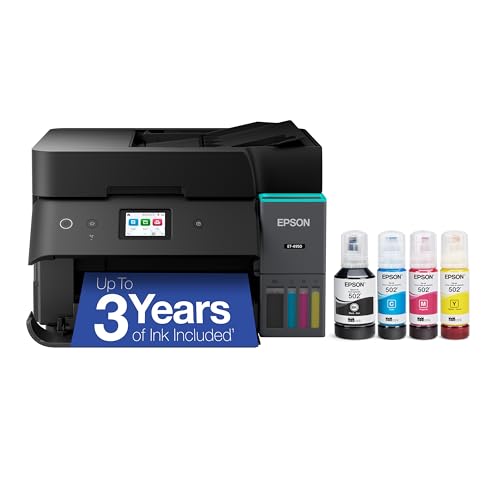
Epson EcoTank ET-4950 Wireless Supertank Printer with ADF

Our verdict: Refillable tanks turn a feeder printer into a low-running-cost workhorse.

The Epson ET-4950 offers an automatic document feeder, refillable ink tanks with up to three years of ink, a 2.4 inch color touchscreen and an 18 ppm print speed. Tanks make the feeder cheap to use all year, because scanning is free and printing draws on bottled ink.

It ranks second because it prints slower than the Canon laser and costs more upfront than cartridge models. It beats the ET-4800 on the touchscreen and ink supply.

Buy it for steady home-office work where cartridge prices irritate you. Skip it if you print rarely, because unused ink dries in the print head over time. For heavy daily output, the laser Canon above is faster.

Ink system
Refillable tanks
Ink supply
Up to 3 years
Speed
18 PPM
Screen
2.4-inch touchscreen

What we like

  • +Refillable supertank ink
  • +Up to three years of ink
  • +Color touchscreen
  • +Includes document feeder

Watch out for

  • −Slower than laser
  • −Higher upfront than cartridge models

Buy it if: Steady home-office users who hate buying cartridges.

Skip it if: You print rarely and the ink would dry out unused.

3

Best Duplex Inkjet

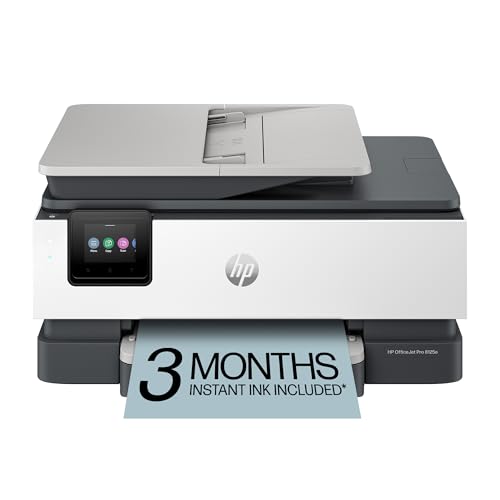
HP OfficeJet Pro 8125e Wireless All-in-One with ADF

Our verdict: A feeder and duplex printing at a mid-range price, with an ink subscription option.

The HP OfficeJet Pro 8125e combines an automatic document feeder with duplex printing, a three-month Instant Ink trial, wireless setup and a home-office design, in the $50 to $100 range. Duplex printing halves paper use on long documents, and the feeder handles stacks of scans.

It ranks third because cartridge ink adds up, and the subscription option comes with terms. It costs far less up front than the Canon laser.

Buy it for a home office that duplex prints and scans regularly. Skip it if you want the lowest long-term ink cost. Read the Instant Ink terms before enrolling, since billing can continue after the trial.

Feeder
ADF
Duplex
Automatic
Ink trial
3 months Instant Ink
Connectivity
Wireless

What we like

  • +ADF with duplex printing
  • +Instant Ink trial included
  • +Home-office oriented design
  • +Wireless setup

Watch out for

  • −Cartridge ink adds up
  • −Subscription option has terms

Buy it if: Home offices that duplex print and scan regularly.

Skip it if: You want the lowest long-term ink cost.

4

Best Entry Supertank

Epson EcoTank ET-4800 Wireless Supertank Printer with ADF

Our verdict: Cartridge-free printing and a feeder at a lower entry price than the ET-4950.

The Epson ET-4800 gives a cartridge-free supertank ink system, an automatic document feeder, scan, copy and fax, plus Ethernet and wireless, in a compact body at a lower entry price. Wired networking helps a shared desk stay stable under load.

It ranks fourth because it is an older design than the ET-4950, with no touchscreen noted. In return it costs less.

Buy it for a budget-minded office that wants tank ink and a feeder. Skip it if you want a touchscreen and the latest model. The fax is a leftover feature, but it is handy for occasional paperwork.

Ink system
Supertank
Network
Ethernet and Wi-Fi
Functions
Scan, copy, fax
Feeder
ADF

What we like

  • +Cartridge-free ink tanks
  • +Ethernet and wireless
  • +Compact for a supertank
  • +Lower entry price

Watch out for

  • −No touchscreen noted
  • −Older design than ET-4950

Buy it if: Budget-minded offices that want tank ink and a feeder.

Skip it if: You want a touchscreen and the latest model.

5

Best for Photos and Smart Home

Canon PIXMA TR8620a All-in-One Printer with ADF

Our verdict: A feeder printer that also handles photos and works with Alexa.

The Canon PIXMA TR8620a handles print, copy, scan and fax with an automatic document feeder, works with AirPrint, Android and Alexa, and prints photos as well as documents. Phones can print without drivers, and voice control adds a smart-home touch.

It ranks fifth because cartridge ink costs add up and it is not built for heavy volume. It mixes photos and documents, which the laser and tank models do not emphasize.

Buy it for a household that prints photos and scans documents. Skip it if you only print text and want the lowest page cost. For heavier loads, an Epson tank saves money.

Functions
Print, copy, scan, fax
Mobile
AirPrint and Android
Voice
Alexa compatible
Feeder
ADF

What we like

  • +Handles photos and documents
  • +Works with Alexa
  • +AirPrint and Android support
  • +Includes document feeder

Watch out for

  • −Cartridge ink costs add up
  • −Not built for heavy volume

Buy it if: Households mixing photo printing with document scanning.

Skip it if: You only print text and want lowest page cost.

6

Best Value HP

HP OfficeJet Pro 8125 Wireless All-in-One with ADF

Our verdict: Feeder and duplex at a mid-range price, with the same core features as the 8125e.

The HP OfficeJet Pro 8125 shares its core with the 8125e: an automatic document feeder, automatic duplex, a three-month Instant Ink trial, wireless and a home-office design, in the $100 to $200 bracket. It is a near twin.

It ranks sixth because it is near-identical to the 8125e and cartridge ink costs add up. The price difference is the only reason to consider it.

Buy it for a budget-aware home office that wants an HP feeder printer. Skip it if you want the lowest ink cost per page. If the two prices are close, pick whichever is cheaper.

Feeder
ADF
Duplex
Automatic
Ink trial
3 months Instant Ink
Price tier
$100-200

What we like

  • +ADF with duplex printing
  • +Instant Ink trial included
  • +Wireless connectivity
  • +Lower price than 8125e

Watch out for

  • −Near-identical to 8125e
  • −Cartridge ink costs add up

Buy it if: Budget-aware home offices wanting an HP feeder printer.

Skip it if: You want the lowest ink cost per page.

7

Best Budget Feeder

Canon PIXMA TR4720 All-in-One Wireless Printer with ADF

Our verdict: The cheapest route to a feeder, sized for occasional multi-page scanning.

The Canon PIXMA TR4720 is a compact all-in-one with an automatic document feeder for standard paper, print, scan, copy and fax functions, wireless and mobile printing. It is the cheapest route to a feeder.

It ranks last because it is a light-duty machine and cartridge ink costs add up. It trails everything above it on volume, but wins on price.

Buy it for occasional multi-page scanning on a tight budget. Skip it if you scan or print every day. A feeder at this price is useful for a ten-page contract, not a hundred-page archive.

Feeder
ADF
Functions
Print, scan, copy, fax
Mobile
Mobile printing
Price tier
$50-100

What we like

  • +Lowest price with a feeder
  • +Compact home design
  • +Mobile printing support
  • +Wireless connectivity

Watch out for

  • −Light-duty machine
  • −Cartridge ink costs add up

Buy it if: Occasional scanners on a tight budget.

Skip it if: You scan or print every day.

Methodology

How We Ranked These

Feeder confirmation

We only ranked models whose listing names an automatic document feeder, and dropped any we could not confirm.

Running cost

We compared tank, toner and cartridge systems, since ink spend usually outweighs the purchase price within a couple of years.

Duplex support

Automatic two-sided printing earned credit because it halves paper use for document-heavy offices.

Speed and class

We weighed rated print speed and whether the machine is laser or inkjet, per the spec sheet.

Connectivity

We checked wireless, Ethernet and mobile printing support for shared and small-desk setups.

Every Primea Score uses the same weights: Performance 30% · Build & Materials 20% · Everyday Usability 20% · Value 20% · Owner Satisfaction 10%. Full scoring rules

Buyer's guide

How to Pick the Right One for You

By Print Volume

Volume decides which machine pays back its price.

Monthly volumeOur pick
Heavy, daily stacksCanon Color imageCLASS MF753Cdw II
Steady, mixed documentsEpson EcoTank ET-4950
Moderate, duplex reportsHP OfficeJet Pro 8125e
Occasional scanningCanon PIXMA TR4720

By Budget

SpendOur pick
$50-100Canon PIXMA TR4720
$100-200Epson EcoTank ET-4800
$100-200HP OfficeJet Pro 8125
$200-500Canon Color imageCLASS MF753Cdw II

Laser vs Inkjet

Laser

Laser uses toner fused by heat, so it prints fast and does not clog when idle. The Canon Color imageCLASS MF753Cdw II is the laser pick here.

Inkjet

Inkjet is cheaper upfront and better for photos, but ink can dry out if unused. The Epson EcoTank ET-4950, HP OfficeJet Pro 8125e and Canon PIXMA TR8620a are inkjets.

Most home offices should default to inkjet unless they print daily, in which case the Canon laser is worth the jump.

By Ink Preference

PreferenceOur pick
Never buy cartridgesEpson EcoTank ET-4950
Cheap tank entryEpson EcoTank ET-4800
Subscription inkHP OfficeJet Pro 8125e
Photos tooCanon PIXMA TR8620a

For Small Home Offices Specifically

Look for

A compact body, a feeder, wireless, and ideally Ethernet if more than one person prints.

In this ranking

The Epson EcoTank ET-4800 is compact for a supertank and offers Ethernet, while the Canon PIXMA TR4720 is the smallest budget option.

When to Spend More

Spend more if

You print or scan daily. The Canon Color imageCLASS MF753Cdw II and Epson EcoTank ET-4950 pay back their price in speed and ink savings.

Save if

You scan occasionally. The Canon PIXMA TR4720 gives you the feeder at the lowest cost here.

Questions

Frequently Asked Questions

Do all-in-one printers with a feeder also scan double-sided pages?+

Not necessarily. The listings here confirm a feeder and, for the HP models, duplex printing, but they do not state duplex scanning. Check the specific model's scanner specs before relying on it, because single-sided scanning means flipping stacks by hand.

What is the most common mistake when buying a feeder printer?+

Assuming every all-in-one has a feeder. Many only have a flatbed glass. Always find the words automatic document feeder in the listing before you order, and ignore vague wording such as scanner or multifunction.

Is an EcoTank worth it over a cartridge printer?+

If you print steadily, yes, because refillable tanks cut ink spend. If you print rarely, the higher upfront cost may never pay back, and unused ink can dry out. The ET-4950 and ET-4800 are the tank options here.

How do I set up a wireless feeder printer?+

Connect it to your Wi-Fi from the printer screen or companion app, then add it on your computer or phone. AirPrint and Android printing work without extra drivers on supported models, such as the PIXMA TR8620a and TR4720.

Do I need to maintain the feeder?+

Wipe the feeder rollers and scanner glass occasionally to avoid streaks and jams. Use standard paper and avoid stapled or curled pages in the feeder, which jam most. Dust is the quiet cause of faint lines.

Can I use a feeder printer for fax?+

Several picks list fax, including the Canon and Epson models. You will still need a phone line and should check the model's fax details first, since the feature is a legacy extra.

Final take

The Canon MF753Cdw II is the right feeder printer for a home office with a steady paper load, thanks to laser speed and a long warranty. Pick the Epson ET-4950 to cut ink costs and the HP 8125e for duplex on a mid budget. Confirm the feeder and duplex in the listing, not the title.

More Ranked & Reviewed Guides