
Primea ReviewsAll Reviews

Primea Reviews is reader-supported. When you buy through our Amazon links we may earn a commission, at no extra cost to you. Rankings are set by our editors and never sold. Learn more

Ranked & Reviewed by Primea Reviews

The 7 Best Printers for Teachers of 2026, Ranked & Reviewed

By the Primea Editorial TeamUpdated November 1, 202610 min read7 products ranked
The 7 Best Printers for Teachers of 2026, Ranked & Reviewed

The short answer

The Brother DCP-L2640DW is the best overall: a compact monochrome laser with automatic duplex, copy and scan. The Epson EcoTank ET-2400 is the pick for ink cost and colour. Brother's HL-L3220CDW adds a colour laser. The HP Smart Tank 5101 includes two years of ink, and the Epson WF-2930 and HP OfficeJet Pro 8139 add document feeders for grading.

The Primea Scoreboard

Ranked & Reviewed

  1. A compact laser that handles daily worksheets, copies and scans.

    94Outstanding
    Check price
  2. Refillable tanks keep color printing affordable on a fixed stipend.

    91Excellent
    Check price
  3. Color laser at up to 19 PPM for shared department use.

    88Excellent
    Check price
  4. Two years of ink in the box, but no document feeder.

    85Excellent
    Check price
  5. Automatic feeder and duplex make scan-to-cloud grading practical.

    82Very Good
    Check price
  6. A fuller inkjet with fax, feeder and a one-year Instant Ink trial.

    80Very Good
    Check price
  7. A small duplexing inkjet for rubrics and parent letters at home.

    78Very Good
    Check price

Teachers print more pages than almost any other buyer, and the true cost of a printer is the ink or toner it swallows across a school year. A cheap inkjet that costs little on day one can eat a classroom stipend in a few months of worksheets. That is the trap most shoppers walk into, because the sticker price hides the cartridge bill that arrives in October.

We ranked seven printers on paper for classroom and home-grading use under the Primea framework, with the most weight on print engine, duplexing, document feeders and ink or toner economics. Order of preference follows the work teachers actually do: lots of black and white, some colour, and plenty of scanning. Prices appear only as buckets.

Before you buy

What Actually Matters

01

Laser versus ink

Lasers use toner and suit black and white volume, while inkjets handle colour and photos. Toner does not dry out, which helps over school breaks. The title names the engine, so check it first. The Brother DCP-L2640DW is mono laser, the HL-L3220CDW colour laser, and the Epson and HP models are inkjet.

02

Refillable tanks

Tank printers use bottled ink instead of cartridges, which lowers cost per page. They are bulkier than cartridge printers. Look for the words EcoTank or Smart Tank, and note what ink is included in the box. The HP Smart Tank 5101 includes two years of ink, and the ET-2400 includes bottled refills.

03

Automatic duplex

Duplex prints both sides of a sheet automatically, halving paper use for worksheets and saving trips to the supply cabinet. Check the spec bullets for automatic two-sided printing, not manual duplex, which forces you to flip pages by hand. The Brother and Epson WF-2930 list automatic duplex, as do the HP OfficeJet and Canon.

04

Automatic document feeder

A feeder scans stacks of pages without placing each one on the glass. It speeds up grading and digitising. Look for ADF in the listing, since the HP Smart Tank 5101 notes it has none. The WF-2930 and OfficeJet Pro 8139 list one, which makes them better for paperless grading than the Canon. Without a feeder, scanning a class set page by page takes an afternoon.

05

Wireless limits

Some printers connect only on 2.4GHz WiFi, which can be an issue on school networks that use 5GHz. The HP Smart Tank 5101 lists 2.4GHz only. Check the listing for 2.4GHz or 5GHz wording before buying, and ask your IT staff which band the classroom network uses. A printer that cannot join the network is worth nothing.

In-depth reviews

Our Ranked Picks, Reviewed

1

Best Overall

Brother DCP-L2640DW Wireless Compact Monochrome Laser

Our verdict: A compact laser that handles daily worksheets, copies and scans.

The Brother DCP-L2640DW is the printer for a teacher who prints a ream of worksheets a month. It uses a monochrome laser engine, prints both sides automatically, copies and scans, and connects wirelessly from a phone. Laser toner does not dry out over a long break, which is a real problem for inkjets sitting idle in July.

It ranks first because toner economics beat cartridge inkjets for black and white volume, and the compact body fits a classroom desk. The EcoTank ET-2400 matches it on running costs but adds colour. The HL-L3220CDW prints colour but is a laser at the same $200 to $500 bucket.

Buy it for black and white worksheets, tests and handouts. The caveat is colour: it cannot print it, so keep an inkjet for diagrams and display work.

Engine
Monochrome laser
Duplex
Automatic
Functions
Print, copy, scan
Price bucket
$200-500

What we like

  • +Automatic duplex printing
  • +Copy and scan built in
  • +Compact for a desk
  • +Wireless and mobile printing

Watch out for

  • −Black and white only
  • −Higher upfront cost

Buy it if: Teachers printing worksheets every day.

Skip it if: You need color pages.

2

Best for Ink Cost

Epson EcoTank ET-2400 Wireless Cartridge-Free Supertank Printer

Our verdict: Refillable tanks keep color printing affordable on a fixed stipend.

The Epson EcoTank ET-2400 replaces cartridges with refillable tanks, and bottled ink is included in the box. It prints in colour, scans and copies, connects wirelessly and is built for high-volume jobs. Because ink comes in bottles, the cost per page falls well below a cartridge printer.

It ranks second because it solves the main trap: ink cost. It beats the Canon PIXMA and WF-2930, which use cartridges, and costs $100 to $200. Against the Brother laser, it offers colour but loses the idle-time reliability of toner, since ink can dry out in a printer left unused over summer.

Choose it for a teacher who prints colour posters and diagrams regularly. The caveat is that tank printers are bulkier than cartridge models, so check your desk space and plan where the bottles will sit.

Ink system
Refillable EcoTank
Functions
Print, scan, copy
Refills
Bottled ink included
Price bucket
$100-200

What we like

  • +Cartridge-free tank system
  • +Bottled ink included
  • +Color print, scan and copy
  • +Built for steady volume

Watch out for

  • −Bulkier than cartridge models
  • −No feeder listed

Buy it if: Color printing on a fixed budget.

Skip it if: You want the smallest footprint.

3

Best Color Laser

Brother HL-L3220CDW Wireless Color Laser Printer

Our verdict: Color laser at up to 19 PPM for shared department use.

The Brother HL-L3220CDW is a colour laser at 19 PPM with a 250-sheet tray and automatic duplex. Laser colour gives consistent contrast on worksheets and diagrams, and it connects wirelessly to phones and laptops. Toner is stable when idle.

It ranks third because a colour laser costs more in the $200 to $500 bucket than the EcoTank, and colour toner replacement is pricier than bottled ink. It sits behind the DCP-L2640DW because that model copies and scans, which this printer's listing does not mention. Against the HP tank printers, it brings a 250-sheet tray that suits stacks of handouts.

Buy it for a classroom that prints colour in volume and wants lasers. The caveat is the lack of a scanner in the listing, so confirm functions before ordering if you plan to copy handouts.

Engine
Color laser
Speed
Up to 19 PPM
Tray
250 sheets
Duplex
Automatic

What we like

  • +Color laser output
  • +250-sheet paper tray
  • +Automatic duplex
  • +Wireless printing

Watch out for

  • −Print only
  • −Higher upfront cost

Buy it if: Shared school color printing.

Skip it if: You need scanning.

4

Best Included Ink

HP Smart Tank 5101 Wireless All-in-One Refillable Printer

Our verdict: Two years of ink in the box, but no document feeder.

The HP Smart Tank 5101 ships with two years of ink in the box, uses a refillable tank, prints, scans and copies, and has a compact footprint for an ink-tank printer. Two years of included ink means no cartridge purchases for a long time.

It ranks fourth because it has no automatic document feeder, so scanning a stack of tests means placing each page on the glass. It also connects on 2.4GHz WiFi only, which can fail on a school network that uses 5GHz. The EcoTank ET-2400 sits in the same $100 to $200 bucket and also lacks a feeder, but it carries no band restriction in its listing.

Buy it for a home office where scanning is occasional. The caveat is the missing feeder and the 2.4GHz limit, so check your network first, because a failed connection wastes a morning.

Ink system
Refillable tank
Included ink
2 years
WiFi
2.4GHz only
Feeder
None

What we like

  • +Two years of ink included
  • +Print, scan and copy
  • +Compact tank design
  • +Refillable system

Watch out for

  • −2.4GHz WiFi only
  • −No document feeder

Buy it if: Teachers watching ink costs.

Skip it if: You scan stacks of papers.

5

Best for Paperless Grading

Epson Workforce WF-2930 Wireless All-in-One Printer

Our verdict: Automatic feeder and duplex make scan-to-cloud grading practical.

The Epson WorkForce WF-2930 is a colour inkjet all-in-one that prints, scans, copies and faxes. It has an automatic document feeder, automatic two-sided printing, a 1.4 inch colour display and a cartridge based ink system, in the $50 to $100 bucket.

It ranks fifth because cartridges make the running cost higher than any tank or laser here. Its edge is the feeder: it scans a stack of student work without placing each page, which speeds up paperless grading. It costs half the price of the EcoTank, so it suits a light-volume teacher.

Buy it for a home grading desk where you scan more than you print. The caveat is ink cost, so avoid it for heavy worksheet printing.

Type
Color inkjet all-in-one
Feeder
Automatic document feeder
Duplex
Automatic
Functions
Print, scan, copy, fax

What we like

  • +Automatic document feeder
  • +Automatic duplex
  • +Color display
  • +Low upfront price bucket

Watch out for

  • −Cartridge ink adds up
  • −Not for heavy volume

Buy it if: Teachers scanning student work.

Skip it if: You print hundreds of pages weekly.

6

Best Full Document Handling

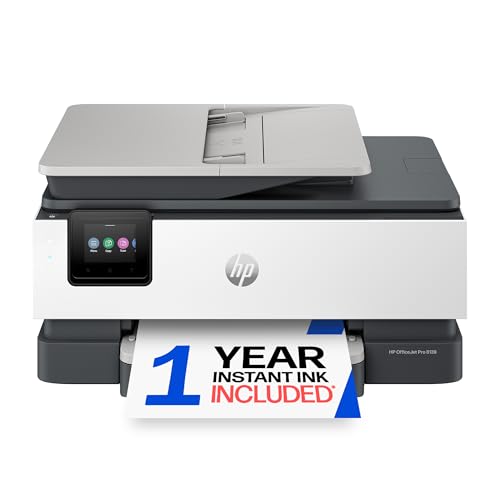
HP OfficeJet Pro 8139 Wireless All-in-One Color Inkjet

Our verdict: A fuller inkjet with fax, feeder and a one-year Instant Ink trial.

The HP OfficeJet Pro 8139 is a colour inkjet all-in-one with automatic document feeder, automatic duplex printing, a one-year Instant Ink trial and wireless printing. It prints, scans, copies and faxes, and sits in the $100 to $200 bucket.

It ranks sixth because the feeder and duplex are available on the WF-2930 for half the price. The trial is also temporary: after a year, the Instant Ink plan becomes a subscription you must manage. Its advantage over the WF-2930 is the pairing of feeder and duplex with the Instant Ink trial.

Choose it for a teacher who scans and copies a lot and prints moderate amounts. The caveat is the ink plan, so read the terms before continuing after the first year.

Type
Color inkjet all-in-one
Feeder
Automatic document feeder
Ink plan
1-year Instant Ink trial
Functions
Print, scan, copy, fax

What we like

  • +Automatic document feeder
  • +Automatic duplex
  • +One-year ink trial
  • +Fax included

Watch out for

  • −Ink plan terms to read
  • −Costs more than WF-2930

Buy it if: Home-office teachers needing full document handling.

Skip it if: You dislike ink subscriptions.

7

Best for Home Grading

Canon PIXMA TS6520 Wireless Color Inkjet Printer

Our verdict: A small duplexing inkjet for rubrics and parent letters at home.

The Canon PIXMA TS6520 is a colour inkjet with automatic duplex, a built-in copier and scanner, a 1.42 inch OLED display and a compact body, in the $50 to $100 bucket. Cartridges feed it, and the compact design suits a small desk.

It ranks last because it has no automatic document feeder, unlike the WF-2930, and uses cartridges, unlike the tank printers. For heavy printing, cartridge costs add up. Its duplex and scanner keep it useful for light jobs.

Buy it for a home grading desk and occasional printing at a low price. The caveat is cost per page, so do not use it for classroom volumes.

Type
Color inkjet
Duplex
Automatic
Display
1.42 inch OLED
Ink
Cartridge-based

What we like

  • +Compact design
  • +Automatic duplex
  • +Copy and scan
  • +OLED display

Watch out for

  • −Cartridge ink adds up
  • −No feeder

Buy it if: Light home grading and parent notes.

Skip it if: You print classroom volumes.

Methodology

How We Ranked These

Print engine

We compared laser, cartridge inkjet and ink-tank designs for classroom volumes.

Running cost

We favored refillable tanks and lasers over cartridge-based ink for heavy use.

Document handling

Feeders and duplexing earned credit for scanning and saving paper.

Footprint and WiFi

We noted compact bodies and WiFi limits like 2.4GHz only.

Price bucket fit

We weighed each against its bucket, from $50-100 up to $200-500.

Every Primea Score uses the same weights: Performance 30% · Build & Materials 20% · Everyday Usability 20% · Value 20% · Owner Satisfaction 10%. Full scoring rules

Buyer's guide

How to Pick the Right One for You

By Printing Volume

Volume decides the engine.

VolumeOur pick
Daily black-and-white worksheetsBrother DCP-L2640DW
Steady color all yearEpson EcoTank ET-2400
Shared color for a departmentBrother HL-L3220CDW
Light grading at homeCanon PIXMA TS6520

By Budget

SpendOur pick
$50 to $100Epson Workforce WF-2930
$100 to $200, tank inkEpson EcoTank ET-2400
$100 to $200, ink includedHP Smart Tank 5101
$200 to $500Brother DCP-L2640DW

Laser vs Ink Tank

Laser

Toner holds up over breaks and handles heavy text volume. The Brother DCP-L2640DW and HL-L3220CDW are lasers.

Ink tank

Refillable tanks cut color cost per page. The Epson EcoTank ET-2400 and HP Smart Tank 5101 use tanks.

Most teachers printing text should default to laser; color-heavy rooms should pick a tank.

By Scanning Need

NeedOur pick
Scan stacks of student workEpson Workforce WF-2930
Scan plus faxHP OfficeJet Pro 8139
Occasional single-page scansBrother DCP-L2640DW
No scanning neededBrother HL-L3220CDW

For Classroom Use Specifically

Look for

Automatic duplex, wireless printing, a large tray and a low cost per page.

In this ranking

The Brother HL-L3220CDW offers a 250-sheet tray and duplex, while the DCP-L2640DW adds copy and scan.

When to Spend More

Spend more if

You print daily or in color for a whole department, which points to the Brother lasers.

Save if

You print occasionally. The Epson WF-2930 or Canon TS6520 cover home use.

Questions

Frequently Asked Questions

Is a laser or inkjet better for teachers?+

Lasers suit heavy black and white work and long breaks, since toner does not dry out between terms. Inkjets and tanks suit colour, and the EcoTank ET-2400 keeps ink cost down for diagrams and posters.

Will the HP Smart Tank connect to school WiFi?+

It lists 2.4GHz only, so check your network before relying on it in class. If the school uses 5GHz or blocks the older band, choose the Brother DCP-L2640DW or another model, and ask your IT staff first.

Is the EcoTank worth it over the Canon?+

For regular printing, yes. Bottled refills cost far less than cartridges, which are the Canon PIXMA's weak spot over a school year. For occasional printing and light grading, the Canon's lower price may be enough.

What is the biggest mistake?+

Judging by upfront price alone. Cartridge ink on the WF-2930 or Canon can cost more across a year than a pricier tank or laser like the Brother DCP-L2640DW, which erases the early saving.

How do I scan to the cloud?+

Use the manufacturer's mobile app with a scanner such as the WF-2930's feeder, and send files straight to your cloud folder so student work is backed up. The OfficeJet Pro 8139 handles stacks the same way, with its feeder doing the page turning.

Does the HP OfficeJet need a subscription?+

It includes a one-year Instant Ink trial. Read the terms before continuing the plan, because it becomes a subscription you must manage or cancel. A tank printer like the Smart Tank 5101 avoids that, with ink already in the box.

Final take

Buy the Brother DCP-L2640DW if most of your printing is worksheets in black and white. Choose the Epson EcoTank ET-2400 when colour matters and you want the lowest ink cost. Take the HL-L3220CDW for colour laser output, and the WF-2930 or OfficeJet Pro 8139 when a document feeder speeds up your scanning. Judge by cost per page, not by sticker price.

More Ranked & Reviewed Guides