

Primea ReviewsAll Reviews

Primea Reviews is reader-supported. When you buy through our Amazon links we may earn a commission, at no extra cost to you. Rankings are set by our editors and never sold. Learn more

Ranked & Reviewed by Primea Reviews

The 6 Best Printers for Remote Workers of 2026, Ranked & Reviewed

By the Primea Editorial TeamUpdated November 1, 202610 min read6 products ranked
The 6 Best Printers for Remote Workers of 2026, Ranked & Reviewed

The short answer

The Brother DCP-L2640DW is the best printer for remote workers, a compact monochrome laser with duplex, copy and scan. The HP OfficeJet Pro 8139 is the all-in-one with feeder and fax, the Epson EcoTank ET-2800 handles occasional color, and the Brother HL-L2405W prints text only. The Epson WF-2930 is the budget office, and the HP Smart Tank 5101 bundles two years of ink.

The Primea Scoreboard

Ranked & Reviewed

  1. The lowest running cost for daily work, with copy and scan.

    94Outstanding
    Check price
  2. Print, scan, copy and fax with a document feeder.

    91Excellent
    Check price
  3. Color printing from refillable ink tanks, with no cartridges.

    88Excellent
    Check price
  4. A simple laser for printing text and nothing else.

    85Excellent
    Check price
  5. Scan, copy and fax with a feeder at a low price.

    82Very Good
    Check price
  6. Two years of ink included, but 2.4GHz Wi-Fi only.

    79Very Good
    Check price

Home printing habits are lumpy: nothing for two weeks, then a stack of forms in one afternoon. That pattern punishes the wrong printer type. An inkjet that rests for weeks can clog its nozzles and burn ink on cleaning cycles, whereas a laser's dry toner sits unchanged until you need it. Before comparing feeders, fax and apps, match the technology to how irregularly you print.

Eight wireless printers were considered and six ranked on print type, office functions, ink or toner cost and desk footprint. The order comes from spec sheets, not print tests. Remote workers also care about the unglamorous parts: whether a contract scans through a feeder, whether the printer joins a modern router, and how much shelf it demands when the desk doubles as a dining table.

Before you buy

What Actually Matters

01

Laser or inkjet

Lasers use dry toner that never clogs and suit steady document printing. Inkjets print color but can dry out if unused. Match the type to how often you print, not what you hope to print. Look for monochrome laser in the title if documents are the job, and for supertank if color matters, and ignore vague high-yield claims.

02

Running cost

The cheap printer is not the cheap printing. Tank printers carry large ink reservoirs that lower per-page cost, and toner lasts for many pages. Check what is included in the box, such as the two years of ink with the HP Smart Tank 5101, and compare consumable prices before choosing a model, because refills are the long-term cost.

03

Scanner and feeder

A flatbed scanner handles single pages, while an automatic feeder handles multipage contracts. Remote workers who sign and return documents benefit from a feeder. Look for ADF or auto document feeder in the specs, and note that the OfficeJet 8139 and WF-2930 list one while the Brother DCP-L2640DW does not, so paper-heavy desks should weigh that.

04

Wi-Fi band

Some printers only join 2.4GHz networks, and routers set to 5GHz only will not see them. The Smart Tank 5101 is one. Confirm the band before buying, and check whether your router has a separate 2.4GHz network that you can enable for printer setup, then switch back afterward.

05

Footprint

Tank printers are larger because of the ink tanks, while a compact laser fits a shelf. Measure the space first, including room to open the scanner lid and refill tanks. If your desk doubles as a table, a small footprint matters more than a bigger paper tray, and a shelf unit can free the surface.

In-depth reviews

Our Ranked Picks, Reviewed

1

Best Overall

Brother DCP-L2640DW Wireless Compact Monochrome Laser Printer

Our verdict: The lowest running cost for daily work, with copy and scan.

The Brother DCP-L2640DW fits the way most remote workers print: invoices, contracts, the odd form, often unannounced. It is a wireless compact monochrome laser with duplex printing, copy and scan, mobile printing, Alexa support and a Refresh subscription trial, in the $200 to $500 band. Dry toner lasts through long idle spells, so the first page after a quiet month prints cleanly.

It ranks first because toner holds up far better than ink for steady daily printing. It also sits above the HL-L2405W by adding a scanner and copier, for a higher cost.

Buy it for a desk where documents are the daily load. The caveat is color: it prints black and white only, so presentations and marketing pages need another printer, and the price band is the highest in this ranking.

Type
Mono laser
Functions
Print, copy, scan
Duplex
Yes
Price band
$200-500

What we like

  • +Low running cost
  • +Duplex printing
  • +Copy and scan
  • +Alexa and mobile support

Watch out for

  • −Black and white only
  • −Highest price band

Buy it if: Daily document printers.

Skip it if: You need color.

2

Best All-in-One

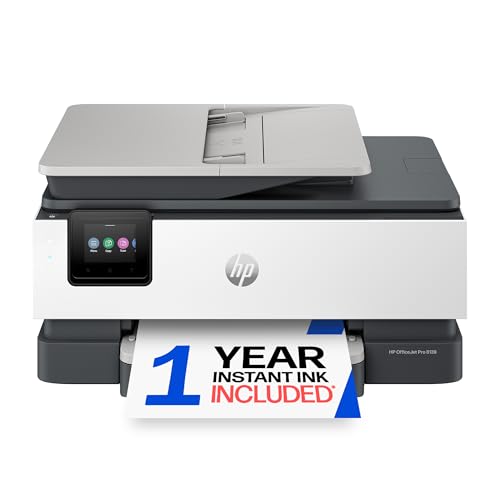
HP OfficeJet Pro 8139 Wireless All-in-One Color Inkjet Printer

Our verdict: Print, scan, copy and fax with a document feeder.

HP's OfficeJet Pro 8139 is the all-in-one for people who handle paper. It is a wireless color inkjet with print, scan, copy and fax, an automatic document feeder, duplex printing and a 1-year Instant Ink trial, in the $100 to $200 range. The feeder is the practical gain: a ten-page contract scans in one go, without lifting the lid ten times.

It ranks second because it is the only pick with both a feeder and fax, and it gives color that the lasers cannot. Against the DCP-L2640DW, ink costs more over time than toner.

Buy it if you scan multipage documents regularly or still need fax for a client. The caveat is idle behavior: if you print only a few pages a month, ink may dry out, and the cleaning cycles waste ink. Heavy, steady printing suits the laser better.

Type
Color inkjet
Functions
Print, scan, copy, fax
Feeder
Auto document feeder
Price band
$100-200

What we like

  • +Auto document feeder
  • +Fax included
  • +Duplex printing
  • +Instant Ink trial

Watch out for

  • −Ink costs more over time
  • −Heads can clog if idle

Buy it if: Workers who scan multipage documents.

Skip it if: You print only a few pages a month.

3

Best For Color

Epson EcoTank ET-2800 Wireless Color All-in-One Supertank Printer

Our verdict: Color printing from refillable ink tanks, with no cartridges.

The Epson EcoTank ET-2800 is the color choice for occasional jobs. It is a wireless color all-in-one with cartridge-free refillable ink tanks, and it prints, scans and copies, in the $100 to $200 range. Bottled ink costs far less per page than cartridges, which matters when a color presentation is a rare but large print job.

It ranks third because tanks lower ink cost for occasional color, while the body is larger than a compact laser.

Buy it for workers who print color slides and reports now and then. The caveat is space: leave desk room for the tanks, and note there is no document feeder, so multipage scanning means the glass.

Type
Supertank inkjet
Functions
Print, scan, copy
Ink
Refillable tanks
Price band
$100-200

What we like

  • +Cartridge-free tanks
  • +Color printing
  • +Scan and copy
  • +Low ink cost

Watch out for

  • −Larger footprint
  • −No document feeder

Buy it if: Occasional color printing.

Skip it if: Desk space is tight.

4

Best Text-Only

Brother HL-L2405W Wireless Compact Monochrome Laser Printer

Our verdict: A simple laser for printing text and nothing else.

Brother's HL-L2405W is the printer for people who only need text. It is a wireless compact monochrome laser with mobile printing, Alexa support and a Refresh subscription trial, in the $100 to $200 range. It prints, and that is it, which keeps the machine small and the setup simple.

It ranks fourth because it lacks the scanner and copier of the DCP-L2640DW, though it costs a band less. Single-function printers also have fewer parts to fail.

Buy it if you print only: reports, labels, shipping forms. The caveat is a hard limit: if you ever scan a receipt or copy an ID, you will need another device or a phone app, so pick the DCP-L2640DW or an all-in-one if that matters to you.

Type
Mono laser
Functions
Print only
Output
Black and white
Price band
$100-200

What we like

  • +Compact laser
  • +Mobile printing
  • +Alexa support
  • +Lower price band

Watch out for

  • −No scanner
  • −No color

Buy it if: Text-only printing.

Skip it if: You need scan or copy.

5

Best Budget Office

Epson Workforce WF-2930 Wireless All-in-One Printer

Our verdict: Scan, copy and fax with a feeder at a low price.

The Epson Workforce WF-2930 is the budget office. It is a wireless all-in-one inkjet with print, scan, copy and fax, an automatic document feeder, duplex printing and a 1.4 inch color display, in the $50 to $100 range. A feeder and fax at this price are unusual, and the compact design suits a crowded desk.

It ranks fifth because cartridge ink costs more over time than the EcoTank models, though the low entry price is attractive. The small display shows menus but little guidance.

Buy it for a budget home office that needs office functions without the investment. The caveat is running cost: heavy printers will spend more on cartridges than the savings, so consider a tank model such as the ET-2800 if volume is high. Light users get the best value.

Type
Inkjet
Functions
Print, scan, copy, fax
Feeder
Auto document feeder
Price band
$50-100

What we like

  • +Lowest price band
  • +Auto document feeder
  • +Fax included
  • +Compact design

Watch out for

  • −Cartridge ink cost
  • −Small display

Buy it if: Budget home offices.

Skip it if: You print a lot.

6

Best Ink Included

HP Smart Tank 5101 Wireless All-in-One Refillable Printer

Our verdict: Two years of ink included, but 2.4GHz Wi-Fi only.

HP's Smart Tank 5101 attacks the ink problem. It is a wireless refillable all-in-one with print, scan and copy, two years of ink included and a cartridge-free tank design, in the $100 to $200 range. For a worker who prints weekly, two years of ink means the running cost is effectively prepaid.

It ranks last for one reason: it supports 2.4GHz wireless only, which can be a problem on modern routers or networks set to 5GHz only. It also lacks a document feeder.

Buy it if you want to forget about ink for two years. The caveat is the router: check your network band first, and confirm a dual-band setup exists. If your home network is 5GHz only, the printer will not connect.

Type
Refillable tank
Functions
Print, scan, copy
Ink
2 years included
Wi-Fi
2.4GHz only

What we like

  • +Two years of ink
  • +Cartridge-free tank
  • +Scan and copy
  • +Fair price band

Watch out for

  • −2.4GHz Wi-Fi only
  • −No document feeder

Buy it if: Workers who hate buying ink.

Skip it if: Your network is 5GHz only.

Methodology

How We Ranked These

Print technology

Laser versus inkjet versus tank was compared against how often a remote worker prints.

Office functions

Scan, copy, fax and auto document feeders were weighed for home-office usefulness.

Running cost

Toner, cartridges, tanks and included ink were compared as ongoing costs.

Footprint

Compact bodies scored higher for small desks.

Connectivity

Wireless, mobile printing and voice assistant support earned credit.

Every Primea Score uses the same weights: Performance 30% · Build & Materials 20% · Everyday Usability 20% · Value 20% · Owner Satisfaction 10%. Full scoring rules

Buyer's guide

How to Pick the Right One for You

By Printing Volume

How much you print should decide laser or ink.

You printOur pick
Daily documentsBrother DCP-L2640DW Wireless Compact Monochrome Laser Printer
Text only, no scanningBrother HL-L2405W Wireless Compact Monochrome Laser Printer
Occasional colorEpson EcoTank ET-2800 Wireless Color All-in-One Supertank Printer
Rarely, with faxEpson Workforce WF-2930 Wireless All-in-One Printer

By Budget

SpendOur pick
$50 to $100Epson Workforce WF-2930 Wireless All-in-One Printer
$100 to $200, textBrother HL-L2405W Wireless Compact Monochrome Laser Printer
$100 to $200, officeHP OfficeJet Pro 8139 Wireless All-in-One Color Inkjet Printer
$200 to $500Brother DCP-L2640DW Wireless Compact Monochrome Laser Printer

Laser vs Ink Tank

Laser

Dry toner for steady, low-cost black printing and compact bodies. Picks: Brother DCP-L2640DW and HL-L2405W.

Ink tank

Refillable tanks for cheap color, in larger bodies. Picks: Epson EcoTank ET-2800 and HP Smart Tank 5101.

Most remote workers who print documents should default to a laser.

By Office Functions

You needOur pick
Document feeder and faxHP OfficeJet Pro 8139 Wireless All-in-One Color Inkjet Printer
Cheap feederEpson Workforce WF-2930 Wireless All-in-One Printer
Scan and copy, no feederBrother DCP-L2640DW Wireless Compact Monochrome Laser Printer
Two years of inkHP Smart Tank 5101 Wireless All-in-One Refillable Printer

For Small Desks Specifically

Look for

A compact body with no oversized ink tanks, and wireless setup so it can sit on a shelf.

In this ranking

The Brother HL-L2405W and DCP-L2640DW are compact lasers; the Epson WF-2930 is also listed as compact.

When to Spend More

Spend more if

You print daily. The Brother DCP-L2640DW cuts running cost with toner.

Save if

You print rarely. The Epson WF-2930 sits in the $50 to $100 band.

Questions

Frequently Asked Questions

Can these print from my phone?+

The Brother models list mobile printing support. Most wireless printers here also work with phone apps, so check the maker's app list for your phone before buying and confirm the app supports your phone's version.

Why not buy cartridge inkjet?+

Cartridges are costly per page, and the price of a full set can rival the printer. The WF-2930 is a budget exception for light users, while a tank model like the ET-2800 or a toner laser gives lower running cost for steady printing, while a cartridge machine suits only occasional pages.

Is the HP Smart Tank 5101 compatible with my router?+

It supports 2.4GHz wireless only, so a 5GHz-only router will not work. Many routers offer both bands, and you can enable 2.4GHz for printer setup. Check your router app for a split network option.

How do I set up wirelessly?+

Use the maker's app, join your Wi-Fi network and install the driver on your computer. Follow the app prompts, then print a test page and send one scan to check the connection works.

How do I prevent clogged ink?+

Print a page weekly. Lasers like the Brother DCP-L2640DW do not clog, so they suit irregular use better than inkjets, which can dry out in the nozzles and waste ink on cleaning cycles.

Do I need fax?+

Few remote workers do. The HP OfficeJet Pro 8139 and Epson WF-2930 are the picks that include it. If you only e-sign documents, skip fax and save money, since a phone scan app covers the rest.

Final take

Buy the Brother DCP-L2640DW if you print documents most days, or the HP OfficeJet Pro 8139 if multipage scanning and fax matter more than running cost. The ET-2800 suits occasional color, the HL-L2405W a text-only desk, and the WF-2930 a tight budget. Check your router band before choosing the Smart Tank 5101.

More Ranked & Reviewed Guides