
Primea ReviewsAll Reviews

Primea Reviews is reader-supported. When you buy through our Amazon links we may earn a commission, at no extra cost to you. Rankings are set by our editors and never sold. Learn more

Ranked & Reviewed by Primea Reviews

The 6 Best Printers for Home Offices, from Laser to Inkjet, Ranked & Reviewed

By the Primea Editorial TeamUpdated November 3, 202611 min read6 products ranked
The 6 Best Printers for Home Offices, from Laser to Inkjet, Ranked & Reviewed

The short answer

The Brother DCP-L2640DW is the home office printer to buy if you print a lot of text documents, with a monochrome laser engine, duplex printing and the highest duty cycle in this ranking. The HP OfficeJet Pro 8125e is the best color all-in-one with an automatic document feeder,, and the Canon PIXMA TR4720 is the budget pick that includes fax.

The Primea Scoreboard

Ranked & Reviewed

  1. A compact monochrome laser with duplex printing, wireless and mobile printing and the highest duty cycle here.

    94Outstanding
    Check price
  2. A color inkjet with an automatic document feeder, duplex printing and a 3-month Instant Ink trial.

    91Excellent
    Check price
  3. The same OfficeJet family with a feeder, duplex and a 3-month Instant Ink trial, for two or three people on one network.

    89Excellent
    Check price
  4. A budget wireless all-in-one with an automatic document feeder, built-in fax and mobile printing.

    87Excellent
    Check price
  5. A compact color inkjet with duplex printing, a 1.42 inch OLED display and a simple control panel.

    85Excellent
    Check price
  6. A compact wireless inkjet with duplex printing, a 1-year limited warranty and easy setup.

    80Very Good
    Check price

The sticker price of a printer is the smallest part of owning one. A cheap inkjet that sips ink on every page can cost several times its purchase price in cartridges over a few years, while a laser that costs more upfront often prints thousands of pages on a single toner. Before you compare features, decide how many pages you print a month and what kind of pages they are.

We reviewed eight listings, set aside a label maker that does not replace a document printer, and ranked the seven printers that remain. The ranking uses spec sheets and listings: print technology, duplex, document feeder, duty cycle and connectivity. Cartridge prices change often, so we describe cost structure and avoid quoting numbers. Price buckets replace exact prices.

Before you buy

What Actually Matters

01

Laser vs inkjet

Laser printers use toner that does not dry out, print text fast and cost less per page at volume. Inkjets print color and photos well but use cartridges that clog if unused. Choose by what you print most, not by the cheapest sticker.

02

Automatic document feeder

A feeder lets you scan or copy a stack without lifting the lid for each page. It is a major time saver for contracts and receipts. Look for ADF or automatic document feeder on the listing, as on the HP OfficeJet and Canon TR4720.

03

Duplex printing

Automatic two-sided printing cuts paper use in half and makes documents look tidy. Many cheap printers print duplex only by hand. Check for the word automatic before you assume the feature.

04

Duty cycle

The duty cycle is the maximum pages a printer is designed to handle per month. Running far below it is normal, and running above it shortens life. The Brother laser has the highest ceiling here, which suits sustained use.

05

Ink subscriptions

HP's Instant Ink and similar plans can lower the cost per page, but they tie the printer to a service and may stop working if you cancel. Read the terms before you enroll. A plan trial is not the same as a permanent price.

In-depth reviews

Our Ranked Picks, Reviewed

1

Best for High Text Volume

Brother DCP-L2640DW Wireless Compact Monochrome Laser Printer

Our verdict: A compact monochrome laser with duplex printing, wireless and mobile printing and the highest duty cycle here.

The DCP-L2640DW is a compact monochrome laser all-in-one with duplex printing, wireless and mobile printing, Alexa support and the highest duty cycle ceiling in this ranking. It falls in the $200 to $500 range.

Laser is the right engine for text. Toner does not dry out the way ink does, pages come out sharp, smudge-resistant and fast, and a home office that prints contracts, invoices and reports will find the cost per page far lower than inkjet. The duty cycle, the maximum monthly pages the printer is designed for, tells you it will not struggle with sustained volume. The limit is color: you get black and white only, so colored charts and photos are out.

Buy it if text documents fill most of your printing. Skip it if you print color graphics regularly.

Technology
Monochrome laser
Duplex
Automatic
Duty cycle
Highest in this ranking
Connectivity
Wireless, mobile, Alexa

What we like

  • +Laser toner does not dry out
  • +Highest duty cycle in this ranking
  • +Automatic duplex printing
  • +Wireless and mobile printing

Watch out for

  • −Black and white only
  • −Highest price bracket in the group

Buy it if: Home offices that print lots of text documents.

Skip it if: You need color charts or photos.

2

Best Color All-in-One

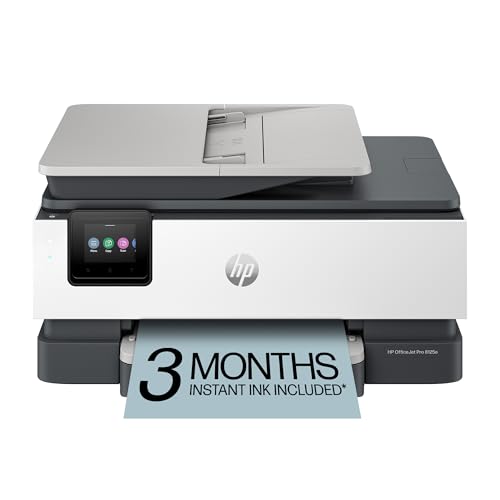
HP OfficeJet Pro 8125e Wireless All-in-One Color Inkjet Printer

Our verdict: A color inkjet with an automatic document feeder, duplex printing and a 3-month Instant Ink trial.

The OfficeJet Pro 8125e is a wireless color all-in-one with an automatic document feeder, duplex printing, a 3-month Instant Ink trial and AI-enabled setup. It is rated for home office use and priced in the $50 to $100 bracket.

The document feeder is the feature that justifies the rank. Scanning or copying a multi-page contract by hand, one sheet at a time, wastes a surprising amount of time. Duplex printing halves paper use. Color is there when you need it for a presentation. The trial of Instant Ink, HP's ink subscription, is useful for the first months but is not the whole story: after it ends, you either subscribe, with the conditions that come with it, or buy cartridges.

Buy it if you scan and copy regularly and want color. Skip it if you want to avoid subscription services.

Technology
Color inkjet
Feeder
Automatic document feeder
Duplex
Yes
Ink plan
3-month Instant Ink trial

What we like

  • +Automatic document feeder
  • +Duplex printing saves paper
  • +Color for presentations
  • +Wireless and easy setup

Watch out for

  • −Inkjet cartridges cost more per page
  • −Instant Ink adds subscription terms

Buy it if: Offices that scan, copy and print in color.

Skip it if: You want to avoid ink subscriptions.

3

Best for Shared Printing

HP OfficeJet Pro 8125 Wireless All-in-One Color Inkjet Printer

Our verdict: The same OfficeJet family with a feeder, duplex and a 3-month Instant Ink trial, for two or three people on one network.

The 8125 shares the 8125e's specs: wireless color all-in-one, automatic document feeder, duplex printing, a 3-month Instant Ink trial and AI-capable setup. It is rated for home office use and sits in the $100 to $200 bracket.

It places behind the e model purely on listing detail and positioning. Both are aimed at households where two or three people print from different devices over wifi, and both benefit from a feeder. The listing here is a little less clear on its edition and costs more according to its bracket, so the e version is the safer buy. If the two cost the same on the day, the specs are close enough that either one will serve.

Buy it if it is cheaper than the e model on the day or if it is the one in stock. Check the model number printed on the listing before you pay.

Technology
Color inkjet
Feeder
Automatic document feeder
Duplex
Yes
Bracket
$100 to $200

What we like

  • +Document feeder for fast scans
  • +Duplex printing
  • +Shares well over wifi
  • +Instant Ink trial included

Watch out for

  • −Costs more than the e model
  • −Cartridge costs add up

Buy it if: Two or three people printing over wifi.

Skip it if: The 8125e is available for less.

4

Best Budget with Fax

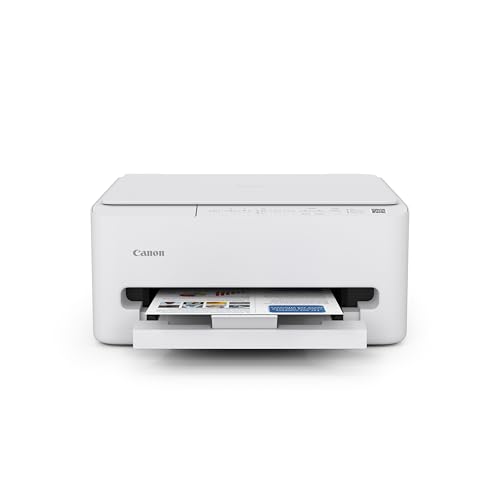
Canon PIXMA TR4720 All-in-One Wireless Printer

Our verdict: A budget wireless all-in-one with an automatic document feeder, built-in fax and mobile printing.

The PIXMA TR4720 is a wireless all-in-one with an automatic document feeder, a built-in fax, mobile printing support and the lowest price in this list. It sits in the $50 to $100 bracket.

The fax matters more than people expect: some businesses, doctors and landlords still insist on it, and a printer with built-in fax means no separate machine. With a feeder, it handles multi-page scans too. It ranks fourth because it is a standard cartridge inkjet with higher per-page costs than a laser, and because the listing gives no duplex support, which the HP and Brother offer.

Buy it if you are a single-user office on a tight budget that needs to fax or scan stacks. Skip it if you print a lot, where ink costs will add up.

Technology
Color inkjet
Feeder
Automatic document feeder
Extra
Built-in fax
Bracket
$50 to $100

What we like

  • +Built-in fax for rare needs
  • +Automatic document feeder
  • +Mobile printing support
  • +Lowest price in this list

Watch out for

  • −No duplex support listed
  • −Ink costs rise with heavy use

Buy it if: Single-user offices that still need fax.

Skip it if: You print hundreds of pages a month.

5

Best for Shared Wifi

Canon PIXMA TS6520 Wireless Color Inkjet Printer

Our verdict: A compact color inkjet with duplex printing, a 1.42 inch OLED display and a simple control panel.

The TS6520 is a compact wireless color inkjet with duplex printing, a 1.42 inch OLED display and an intuitive control panel. It falls in the $50 to $100 bracket.

The OLED display is a small but real convenience, since it shows status and errors without a trip to your computer. It is built for a home office shared by two or three people on the same wifi network. It ranks fifth because the listing shows no document feeder, and for a business user who scans paperwork that is the feature that saves time. Without it, you scan by hand.

Buy it if you share the printer and want duplex and a simple panel. Skip it if you need to copy or scan multi-page documents.

Technology
Color inkjet
Display
1.42 in OLED
Duplex
Yes
Design
Compact

What we like

  • +OLED display shows status
  • +Duplex printing included
  • +Compact for a small desk
  • +Wireless for shared use

Watch out for

  • −No document feeder listed
  • −Inkjet running costs

Buy it if: Shared wifi offices with light scanning.

Skip it if: You scan multi-page paperwork.

6

Best for Tight Spaces

Canon PIXMA TS4320 Wireless Color Inkjet Printer

Our verdict: A compact wireless inkjet with duplex printing, a 1-year limited warranty and easy setup.

The TS4320 is a compact color inkjet with duplex printing, a built-in copier and scanner, a 1-year limited warranty and easy setup. It falls in the $50 to $100 bracket.

It earns its place because it fits in tight corners and the warranty is clearly stated. Duplex is welcome at this price. It ranks sixth because it is the basic end of the Canon range: no feeder, no display, and a small footprint comes at the cost of paper capacity. For a corner desk in a small room it is a sensible fit, and setup is simple.

Buy it if space is the main constraint. Skip it if you print or scan in volume.

Technology
Color inkjet
Duplex
Yes
Warranty
1-year limited
Design
Compact

What we like

  • +Compact for corner desks
  • +Duplex printing included
  • +1-year limited warranty
  • +Easy setup

Watch out for

  • −No feeder or display listed
  • −Small paper capacity assumed

Buy it if: Small rooms and corner desks.

Skip it if: You scan or print in volume.

Methodology

How We Ranked These

Print technology and cost structure

We compared monochrome laser with color inkjet, since toner and ink behave differently when a printer sits idle between jobs.

Document handling

Automatic document feeders and duplex printing were weighed for how much time and paper they save an office user.

Duty cycle and volume

Duty cycle ceilings and the sizes of each printer's intended household or office were checked against likely monthly volume.

Connectivity and sharing

Wireless, mobile printing and shared use over one network were compared for two- and three-person offices.

Subscription and warranty

Instant Ink trials and stated warranties were noted, since ink plans change the long-term cost of a printer.

Every Primea Score uses the same weights: Performance 30% · Build & Materials 20% · Everyday Usability 20% · Value 20% · Owner Satisfaction 10%. Full scoring rules

Buyer's guide

How to Pick the Right One for You

By What You Print

Content decides the engine: text for laser, color for inkjet.

Main printingOur pick
Mostly black text documentsBrother DCP-L2640DW Wireless Compact Monochrome Laser Printer
Color presentations and reportsHP OfficeJet Pro 8125e Wireless All-in-One Color Inkjet Printer
Scans, copies and occasional faxCanon PIXMA TR4720 All-in-One Wireless Printer
A little of everything, sharedCanon PIXMA TS6520 Wireless Color Inkjet Printer

By Budget

SpendOur pick
$50 to $100 (cheapest)Canon PIXMA TS4320 Wireless Color Inkjet Printer
$50 to $100 (with feeder)HP OfficeJet Pro 8125e Wireless All-in-One Color Inkjet Printer
$100 to $200HP OfficeJet Pro 8125 Wireless All-in-One Color Inkjet Printer
$200 to $500Brother DCP-L2640DW Wireless Compact Monochrome Laser Printer

Laser vs Inkjet

Laser

Fast, sharp text and toner that lasts. Black and white only in this ranking. Pick: Brother DCP-L2640DW.

Inkjet

Color and photos at a lower purchase price, but cartridges cost more per page. Picks: HP OfficeJet models, Canon PIXMA models.

Default to laser if most of your pages are text.

By Space and Users

SituationOur pick
Corner deskCanon PIXMA TS4320 Wireless Color Inkjet Printer
Two or three usersHP OfficeJet Pro 8125 Wireless All-in-One Color Inkjet Printer
Single user, scans and faxCanon PIXMA TR4720 All-in-One Wireless Printer
Shared with a display panelCanon PIXMA TS6520 Wireless Color Inkjet Printer

For Remote Workers Specifically

Look for

A document feeder for scanning forms, duplex printing for contracts, wireless setup and a reliable text engine. Fax is still needed by some employers.

In this ranking

The Brother DCP-L2640DW for text, the HP OfficeJet Pro 8125e for scanning, and the Canon TR4720 for fax.

When to Spend More

Spend more if

You print dozens of pages every week. The Brother laser costs more upfront but pays back in toner and reliability.

Save if

You print a handful of pages a month. A Canon TS4320 or TS6520 is sufficient.

Questions

Frequently Asked Questions

Do these printers work with Mac and Windows?+

Yes, all of them print wirelessly from both, and most support mobile printing. Check the maker's driver page for your operating system version before you buy.

What is the biggest mistake when buying an office printer?+

Choosing on purchase price alone. A cheap inkjet used heavily can cost more in cartridges than a laser costs to buy. Estimate your monthly pages first and compare cost per page.

Is the Brother laser worth it over an HP OfficeJet?+

If you print mostly text, yes. The toner lasts longer and costs less per page. If you need color, an automatic feeder for color scans or photos, the HP OfficeJet is the better fit.

How hard is setup?+

Most are ready in 10 to 20 minutes: unpack, install the ink or toner, load paper, connect to wifi from the app and test a page. HP and Canon apps guide the process.

How do I stop ink from drying out?+

Print a page or two each week and leave the printer on standby. Cartridges that sit idle clog, especially in dry climates. A laser avoids this problem entirely.

Do I need an Instant Ink subscription?+

No. The trials on the HP models are optional, and you can buy cartridges instead. A subscription can save money at certain volumes, but read the terms, since the plan can lock the printer to the service.

Final take

For text-heavy home offices, the Brother DCP-L2640DW is the best printer here, with a laser engine, duplex and the highest duty cycle. Color users should choose the HP OfficeJet Pro 8125e for its feeder, and the Canon PIXMA TR4720 is the budget answer if you still fax. Estimate your monthly pages before you compare prices, because running cost beats sticker price.

More Ranked & Reviewed Guides