
Primea ReviewsAll Reviews

Primea Reviews is reader-supported. When you buy through our Amazon links we may earn a commission, at no extra cost to you. Rankings are set by our editors and never sold. Learn more

Ranked & Reviewed by Primea Reviews

The 6 Best Printers for High-Volume Printing of 2026, Ranked & Reviewed

By the Primea Editorial TeamUpdated November 1, 202610 min read6 products ranked
The 6 Best Printers for High-Volume Printing of 2026, Ranked & Reviewed

The short answer

The Canon MF753Cdw II is the best high-volume printer here: 35 ppm, a document feeder and a three-year warranty. The Brother DCP-L2640DW is the pick for text-only offices, and the Epson ET-4950 is the cheapest way to print color at scale. The HP Smart Tank 5101 and Epson ET-4800 handle tighter budgets, with real tradeoffs in feeder and design age.

The Primea Scoreboard

Ranked & Reviewed

  1. The fastest and sturdiest machine here for offices that never stop printing.

    94Outstanding
    Check price
  2. A compact black-and-white workhorse for text-heavy volume.

    91Excellent
    Check price
  3. Refillable tanks that keep color cheap over thousands of pages.

    88Excellent
    Check price
  4. A modest color laser for steady volume without the Canon bulk.

    86Excellent
    Check price
  5. A small tank printer that ships with two years of ink.

    83Very Good
    Check price
  6. Older but capable tank printer with Ethernet and fax.

    80Very Good
    Check price

Printer pricing is a shell game. The machine on the shelf is often subsidized, and the maker earns the difference back through toner, ink and drum replacements for the next three years. That is why a bargain unit can quietly become the most expensive object in a busy office, and why a heavier, pricier laser can end up the cheaper tool at 3,000 pages a month.

Our six picks split into two camps: fast laser engines built for shared queues, and refillable tank inkjets built for cheap color. We reviewed each on engine type, rated speed, paper handling, running-cost design and warranty, then ranked them on the Primea framework. Speed and duty design carried the most weight, because volume punishes slow, fussy machines first.

Before you buy

What Actually Matters

01

Engine type

Engine type decides almost everything else. Laser printers fuse toner with heat and excel at fast, crisp text. Tank inkjets spray liquid ink from refillable reservoirs and print color far more cheaply per page. The Canon and Brother models here are lasers, the Epson and HP ones are tanks. Confirm the word laser or tank in the title before comparing anything else.

02

Rated speed

Rated speed is pages per minute, and it determines how long a stack ties up the machine. At 18 ppm, a 500-page job runs about 28 minutes; at the Canon's 35 ppm, about 14. Find the ppm figure in the spec bullets, and remember it is a best-case number for plain black text, not photos.

03

Ink and toner economics

Ink and toner economics decide the real price of ownership. Refillable tanks and high-yield cartridges lower the cost per page, while cheap cartridge machines recover their discount through refills. At high volume the consumables bill dwarfs the purchase price. Look for tank, high-yield or included-ink wording in the listing, such as the HP's two years of ink.

04

Paper handling

Paper handling is duplex plus feeder. Automatic duplex prints both sides and halves paper use. An automatic document feeder lets you copy or scan a stack without standing at the glass. The Canon and the Epsons include feeders; the HL-L3220CDW and HP 5101 do not. Check that both features are named in the listing, not implied.

05

Warranty and connectivity

Warranty and connectivity signal how the maker expects the machine to be used. A three-year limited warranty, like the Canon's, suggests duty-cycle confidence. Ethernet keeps a shared printer stable when Wi-Fi congests, as on the ET-4800. Look for the warranty length and the word Ethernet in the spec list before buying for multiple users.

In-depth reviews

Our Ranked Picks, Reviewed

1

Best Overall

Canon Color imageCLASS MF753Cdw II Wireless Duplex Laser Printer

Our verdict: The fastest and sturdiest machine here for offices that never stop printing.

The Canon MF753Cdw II is a color laser rated at 35 pages per minute, and it bundles an automatic document feeder, duplex printing, fax, copy and scan. That combination matters at volume: a feeder lets one person scan a stack unattended, and duplex halves paper use on every long job. A three-year limited warranty is the longest coverage in this group.

It beats the Brother HL-L3220CDW, at 19 ppm, by a wide margin. A 500-page job that takes about 14 minutes on the Canon takes closer to 26 on the Brother. The Epson tanks trail further, at 18 ppm, though they print color more cheaply per page.

Buy it for a shared office that prints color all day. The caveat is footprint: it is the largest machine in the ranking, and laser toner for color gets expensive at low volume, so skip it under a few hundred pages a month.

Engine
Color laser
Rated speed
35 ppm
Warranty
3-year limited
Extras
ADF, fax, duplex

What we like

  • +Fastest rated speed here
  • +Three-year limited warranty
  • +Automatic document feeder
  • +Fax, copy and scan included

Watch out for

  • −Largest footprint of the group
  • −Laser toner costs add up

Buy it if: Busy shared offices that print in color all day.

Skip it if: You print a few hundred pages a month or have a tight desk.

2

Best Mono Laser

Brother DCP-L2640DW Wireless Compact Monochrome Laser

Our verdict: A compact black-and-white workhorse for text-heavy volume.

The Brother DCP-L2640DW is a monochrome laser with automatic duplex, copy and scan, wireless and mobile printing, and a compact body built for sustained use. Dropping color removes the costliest part of a laser's consumables, which is why text-heavy offices running invoices, contracts and reports tend to see the lowest cost per page from mono engines.

It sits behind the Canon because it gives up color, the faster rated engine and fax. Against the HL-L3220CDW below, it is the smarter buy if color never appears in your workflow, since you are not paying for toner you will not use.

Choose it for a legal, accounting or admin desk. The limit is blunt: any client chart or branded handout must be outsourced, and the listing shows no fax, so check before replacing an old fax line.

Engine
Monochrome laser
Duplex
Automatic
Functions
Print, copy, scan
Connectivity
Wireless and mobile

What we like

  • +Automatic two-sided printing
  • +Compact for sustained use
  • +Copy and scan built in
  • +Wireless and mobile printing

Watch out for

  • −No color output
  • −No fax listed

Buy it if: Text-heavy offices that never need color.

Skip it if: You print marketing material or charts.

3

Best Ink Tank

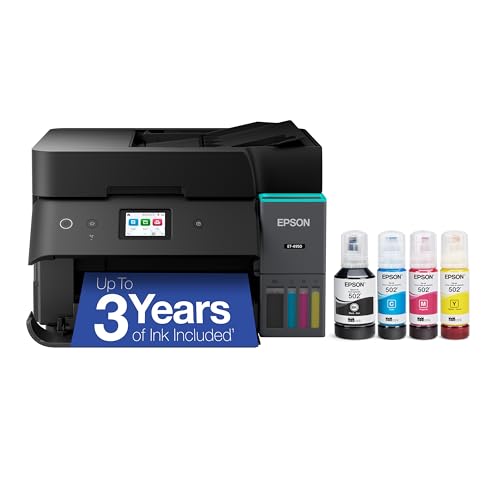
Epson EcoTank ET-4950 Wireless Cartridge-Free Supertank Printer

Our verdict: Refillable tanks that keep color cheap over thousands of pages.

The Epson EcoTank ET-4950 swaps cartridges for refillable ink tanks, rated for up to three years of ink refills, and adds an automatic document feeder and a 2.4-inch color touchscreen. Tank systems move the economics: bottled ink costs far less per page than cartridges, and color stops being a luxury line item.

It lands third because 18 ppm cannot keep up with the Canon or a big queue. What it does beat is every laser here on the cost of a color page. Against the ET-4800 below, the touchscreen and longer rated ink supply justify stepping up.

Pick it for a color-heavy shop that prints steadily rather than in bursts, such as a design or real estate office. The caveat is refilling: bottles are messier than swapping a toner cartridge, and fast bursts of pages are not its strength.

Ink system
Refillable tanks
Rated speed
18 ppm
Ink supply
Up to 3 years rated
Screen
2.4-inch touch

What we like

  • +No cartridges to replace
  • +Long rated ink supply
  • +Document feeder included
  • +Touchscreen controls

Watch out for

  • −Slower than laser
  • −Refilling can be messy

Buy it if: Color-heavy shops wanting the lowest running cost.

Skip it if: You need fast bursts or mostly black text.

4

Best Budget Color Laser

Brother Color Laser Printer HL-L3220CDW

Our verdict: A modest color laser for steady volume without the Canon bulk.

The Brother HL-L3220CDW is a color laser at 19 ppm with automatic duplex, a 250-sheet tray and wireless and mobile printing. It is print-only, with no scanner or feeder, which keeps the machine smaller and cheaper than the Canon while still giving you laser-sharp text and color.

It ranks fourth because it trails the Canon on speed by nearly half and lacks any scan function. Compared with the mono DCP-L2640DW above, you pay for color capability that only earns its keep if clients or marketing work need it regularly.

It suits an office that prints color documents in moderate runs and handles scanning elsewhere. The 250-sheet tray is the practical limit: heavy days mean frequent refills, so this is not the machine for a queue that never stops.

Engine
Color laser
Rated speed
19 ppm
Paper tray
250 sheets
Duplex
Automatic

What we like

  • +Color laser at lower cost
  • +Automatic duplex
  • +Wireless and mobile printing
  • +Solid 250-sheet tray

Watch out for

  • −Print only, no scanner
  • −Slower than the Canon

Buy it if: Offices needing regular color without a big machine.

Skip it if: You also need scanning or a document feeder.

5

Best Compact Tank

HP Smart Tank 5101 Wireless All-in-One Refillable Printer

Our verdict: A small tank printer that ships with two years of ink.

The HP Smart Tank 5101 is a compact refillable ink tank all-in-one that ships with about two years of ink and prints, scans and copies over 2.4GHz Wi-Fi. Bundling that much ink at a low entry price makes the first two years of color unusually cheap, and it takes less desk space than larger tank models.

It ranks below both Epson tanks because it has no automatic document feeder, so every multi-page scan or copy becomes a manual page-by-page job. The Epsons also offer faster paths to scanning stacks. The size trade is real, though, since the HP is the smallest tank machine here.

Best for a home office or small team that prints color on a budget but scans single pages. The sharper caveat is Wi-Fi: it joins only 2.4GHz networks, so check your router band before ordering.

Ink system
Refillable tanks
Included ink
About 2 years
Wi-Fi
2.4GHz only
Feeder
None

What we like

  • +Two years of ink included
  • +Compact for a tank model
  • +Low entry price
  • +Print, scan and copy

Watch out for

  • −No document feeder
  • −2.4GHz Wi-Fi only

Buy it if: Small offices wanting cheap color on a budget.

Skip it if: You scan multi-page documents often.

6

Best Value Tank

Epson EcoTank ET-4800 Wireless Cartridge-Free Supertank Printer

Our verdict: Older but capable tank printer with Ethernet and fax.

The Epson EcoTank ET-4800 uses the same cartridge-free tank approach as the ET-4950 but adds Ethernet alongside Wi-Fi, plus fax, an automatic document feeder, scanner and copier. Wired networking matters in shared offices, where wireless drops under load can stall a print queue mid-job.

It closes the list because the ET-4950 is the newer design with a touchscreen and a longer rated ink supply. The ET-4800 is the cheaper way into tank economics, and it beats the HP Smart Tank 5101 on feeder and Ethernet, though it sits in the same price bucket.

Choose it for a budget office scaling up to heavy printing that wants a wired connection and fax. The caveat is age: it is an older model with fewer conveniences, and no touchscreen.

Ink system
Refillable tanks
Network
Wi-Fi and Ethernet
Extras
Fax, ADF
Functions
Print, scan, copy

What we like

  • +Ethernet and Wi-Fi
  • +Fax included
  • +Document feeder
  • +Tank ink economics

Watch out for

  • −Older design
  • −Fewer extras than ET-4950

Buy it if: Budget offices wanting wired network printing.

Skip it if: You want a touchscreen or the longest ink supply.

Methodology

How We Ranked These

Engine design

We compared laser and refillable tank designs, since each suits different page mixes.

Rated speed

We used published pages per minute as a rough guide to how fast a large queue clears.

Running-cost model

We looked at how each machine delivers ink or toner and what it implies for long-term cost.

Paper handling

We checked duplex, tray size and document feeders for multi-page work.

Warranty and support

We noted listed warranty terms and connectivity options such as Ethernet.

Every Primea Score uses the same weights: Performance 30% · Build & Materials 20% · Everyday Usability 20% · Value 20% · Owner Satisfaction 10%. Full scoring rules

Buyer's guide

How to Pick the Right One for You

By Page Mix

What you print most decides the engine.

Your workloadOur pick
Mostly black textBrother DCP-L2640DW
Heavy color, shared officeCanon Color imageCLASS MF753Cdw II
Color on a tight budgetBrother Color Laser Printer HL-L3220CDW
Photos and graphics, low ink costEpson EcoTank ET-4950

By Budget

SpendOur pick
$100-200Epson EcoTank ET-4800
$100-200, compactHP Smart Tank 5101
$200-500, text onlyBrother DCP-L2640DW
$200-500, fastestCanon Color imageCLASS MF753Cdw II

Laser vs Ink Tank

Laser

Fast, crisp text and little maintenance. Picks: Canon MF753Cdw II, Brother DCP-L2640DW and Brother HL-L3220CDW.

Ink tank

Cheapest color per page but slower and messier to refill. Picks: Epson ET-4950, Epson ET-4800 and HP Smart Tank 5101.

Default to laser for text and speed, tank for color volume.

By Paper Handling

You needOur pick
Document feeder plus faxEpson EcoTank ET-4800
Feeder and fastest speedCanon Color imageCLASS MF753Cdw II
Duplex in a small bodyBrother DCP-L2640DW
No feeder, smallest tankHP Smart Tank 5101

For a Shared Office Specifically

Look for

A rated speed above 30 ppm, an automatic document feeder and a multi-year warranty.

In this ranking

The Canon MF753Cdw II is the only pick that satisfies all three.

When to Spend More

Spend more if

Queues back up daily or color jobs are routine. The Canon MF753Cdw II or Epson ET-4950 pay back quickly.

Save if

Volume is moderate and you can live without a feeder. The Epson ET-4800 or HP Smart Tank 5101 do the job.

Questions

Frequently Asked Questions

Is a laser or ink tank printer better for high volume?+

Laser wins on speed and plain text, which is why the Canon MF753Cdw II and Brother DCP-L2640DW lead. Tank printers like the Epson ET-4950 win on the cost of color. Decide by your page mix, not just by monthly volume.

What is the most common mistake when buying one?+

Judging by machine price alone. Consumables dominate cost within a couple of years, so check whether a model uses toner, high-yield cartridges or refillable tanks. The HP Smart Tank 5101 even ships with about two years of ink included.

Is the Canon worth it over the Brother color laser?+

If you print constantly, yes. The Canon rates 35 ppm against the Brother HL-L3220CDW's 19, and its feeder saves scanning time. For modest color runs without scanning, the Brother covers the job at a lower footprint.

How do I set up a shared printer?+

Use Ethernet where the model has it, such as the Epson ET-4800, and assign the printer a fixed address so users never lose it. Wi-Fi works on the Canon and Brother lasers, but wired links hold up better under shared load.

How do I maintain a tank printer?+

Refill tanks with the matching bottles before they run dry, and print a page weekly so nozzles do not clog. On the Epson ET-4950 and HP Smart Tank 5101, avoid letting ink fall to the bottom of the tank.

Does the HP Smart Tank work on 5GHz Wi-Fi?+

No. The listing says 2.4GHz only, so a router running only a 5GHz band will not connect it. Check your network settings first, or use the Epson ET-4800 with Ethernet if your office network is awkward.

Final take

The Canon MF753Cdw II is the right call when several people print color all day. Text-only offices should pick the Brother DCP-L2640DW and stop paying for color toner. Color on a tighter budget points to the Epson ET-4950, and the ET-4800 or HP 5101 when price matters most. Match the engine to your page mix before anything else.

More Ranked & Reviewed Guides