
Primea ReviewsAll Reviews

Primea Reviews is reader-supported. When you buy through our Amazon links we may earn a commission, at no extra cost to you. Rankings are set by our editors and never sold. Learn more

Ranked & Reviewed by Primea Reviews

The 8 Best Printers for Low-Volume Printing at Home, Ranked & Reviewed

By the Primea Editorial TeamUpdated November 3, 202610 min read8 products ranked
The 8 Best Printers for Low-Volume Printing at Home, Ranked & Reviewed

The short answer

The Canon TS6420 is the printer to buy if you print only now and then but want duplex, a display and good photo quality. The Canon TR4720 is the pick if you occasionally need to scan or fax, the TS6520 suits a household that shares one printer, and the MT610Pro thermal printer is the only option that avoids ink entirely.

The Primea Scoreboard

Ranked & Reviewed

  1. 01
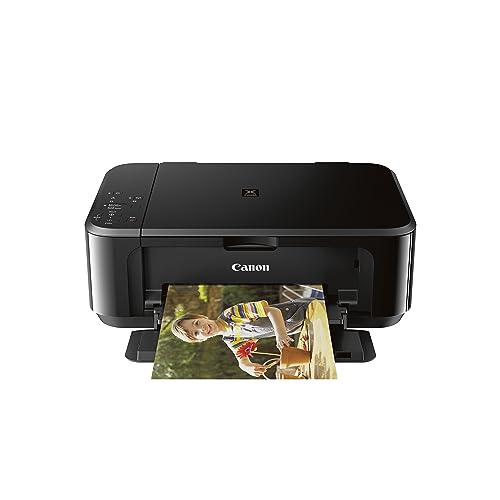
    Canon TS6420 All-in-One Wireless Printer

    Best Full-Featured Light Printer

    Canon TS6420 All-in-One Wireless Printer

    Duplex printing, a display, intuitive controls and good photo quality in a wireless all-in-one.

    93Outstanding
    Check price
  2. Sheet feeder, fax modem and phone printing make it the paperwork pick for light households.

    91Excellent
    Check price
  3. A compact wireless inkjet with duplex, an OLED display and a simple control panel for a shared household.

    89Excellent
    Check price
  4. Strong mobile and tablet printing support in a compact wireless all-in-one.

    86Excellent
    Check price
  5. A compact wireless inkjet with duplex, copy and scan functions, a 1-year warranty and easy setup.

    84Very Good
    Check price
  6. The lowest upfront price here, with print, scan and copy and a 3-month Instant Ink trial.

    82Very Good
    Check price
  7. A basic wireless all-in-one that prints, scans and copies, with no duplex.

    80Very Good
    Check price
  8. An inkless Bluetooth thermal printer for Letter and A4, 300 DPI, with no ink to dry out.

    78Very Good
    Check price

If you print a dozen pages a month, the enemy is not the cost of a page. It is the cartridge that dries out between jobs. Inkjet nozzles clog when ink sits unused for weeks, and many people throw away half-full cartridges that no longer flow. For a low-volume printer, ease of upkeep, a low purchase price and tolerance for long idle periods matter more than speed or per-page cost.

We reviewed eight printers, from basic Canon and HP inkjets to an inkless thermal model, and ranked them for light home use. The comparison rests on spec sheets and listings: duplex, scanning and fax, display and controls, mobile printing and how the machine handles being idle. Where a listing is silent, we say so. Price buckets replace exact prices.

Before you buy

What Actually Matters

01

Ink dry-out

Inkjet nozzles clog if ink sits unused, especially in dry climates. Printing a test page every couple of weeks helps. If you print only a few times a year, an inkless thermal printer or a laser is a better answer.

02

Purchase price vs running cost

At low volume, a cheap printer with cheap cartridges beats an expensive one with cheaper ink per page. Your total spend is dominated by the printer and by cartridges you throw out. Buy small, replace when needed.

03

Display and controls

When you print rarely, a screen that shows ink levels and error messages saves a manual search. The TS6420 and TS6520 have displays. Basic models rely on lights and a computer.

04

Scanning, copying and fax

Many light users need to scan a form or copy an ID more often than they print. A document feeder and a fax, as on the TR4720, help. Look for ADF or fax in the listing.

05

Mobile printing

If your documents live on a phone, wireless and mobile support matter more than paper capacity. Look for app support or standard mobile printing in the description.

In-depth reviews

Our Ranked Picks, Reviewed

1

Best Full-Featured Light Printer

Canon TS6420 All-in-One Wireless Printer

Our verdict: Duplex printing, a display, intuitive controls and good photo quality in a wireless all-in-one.

The TS6420 is a wireless color all-in-one with duplex printing, a display with intuitive controls and good photo print quality. It uses standard cartridges and sits in the $100 to $200 bracket.

The display and controls are the quiet advantage for someone who prints rarely. When you print once a month, you forget how everything works, and a screen that walks you through paper loading, ink status and scanning saves a trip to the manual. Duplex halves paper use for documents, and photo quality is a bonus for the occasional family print. The tradeoff is price: it is the most expensive inkjet in this ranking, which is hard to justify if you print only a handful of pages.

Buy it if you print little but want a printer that makes the rare job easy. Skip it if the cheapest possible printer is the goal.

Technology
Color inkjet, standard cartridges
Duplex
Yes
Controls
Display and intuitive panel
Bracket
$100 to $200

What we like

  • +Display guides rare tasks
  • +Automatic duplex printing
  • +Good photo print quality
  • +Wireless all-in-one

Watch out for

  • −Priciest inkjet in this group
  • −Standard cartridges dry out when idle

Buy it if: Light users who want an easy, capable printer.

Skip it if: You only want the cheapest printer.

2

Best for Scanning and Fax

Canon PIXMA TR4720 All-in-One Wireless Printer

Our verdict: Sheet feeder, fax modem and phone printing make it the paperwork pick for light households.

Canon sells the TR4720 as a cheap wireless multifunction unit: a sheet feeder for scans, a fax modem, mobile printing, and ordinary ink cartridges.

Low-volume households often have a different job from printing: scanning a form, faxing a document to an office that still demands it, or copying a stack of receipts. The feeder and fax answer all three. For an occasional user, those tasks matter more than speed. The weakness is that, like most inkjets, cartridges can dry if the printer sits idle for long stretches, and the listing does not mention duplex.

Buy it if paperwork, not photos, is why you own a printer. Skip it if you want automatic double-sided printing.

Technology
Color inkjet, standard cartridges
Feeder
Automatic document feeder
Extra
Built-in fax
Mobile
Mobile printing support

What we like

  • +Feeder scans stacks quickly
  • +Built-in fax for rare needs
  • +Mobile printing support
  • +Low purchase price

Watch out for

  • −Duplex is not listed
  • −Idle cartridges can dry out

Buy it if: Households that scan and fax now and then.

Skip it if: You need automatic duplex printing.

3

Best for Shared Use

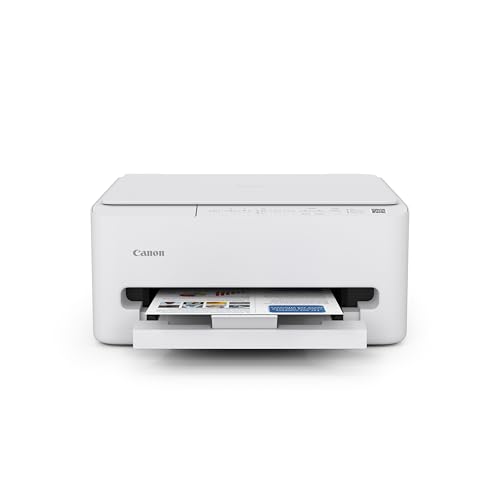
Canon PIXMA TS6520 Wireless Color Inkjet Printer

Our verdict: A compact wireless inkjet with duplex, an OLED display and a simple control panel for a shared household.

Canon packs the TS6520 into a small wireless color inkjet body, adding two-sided printing, a tiny 1.42 inch OLED screen and a menu that is easy to follow.

Its value is sharing. In a household where several people print a few pages each, a printer needs to be reachable from every phone and laptop on the network, and a small display tells anyone what is wrong without a computer. Duplex helps with school and work printouts. It ranks third because it has no document feeder and is a standard inkjet, so the dry-out risk remains.

Buy it if a family of printers-by-the-page needs one compact machine. Skip it if you need to scan stacks.

Technology
Color inkjet
Display
1.42 in OLED
Duplex
Yes
Network
Wireless, multi-device

What we like

  • +Reachable from every household device
  • +OLED display shows status
  • +Duplex printing included
  • +Compact body

Watch out for

  • −No feeder listed
  • −Ink dries if left unused

Buy it if: Families sharing one printer for light jobs.

Skip it if: You scan multi-page documents.

4

Best for Phone and Tablet Printing

Canon Pixma MG3620 Wireless All-in-One Color Inkjet Printer

Our verdict: Strong mobile and tablet printing support in a compact wireless all-in-one.

The MG3620 is a compact wireless color all-in-one with strong mobile and tablet printing support, using standard cartridges. It prints, scans and copies and falls in the $100 to $200 bracket.

For a household that never opens a laptop to print, phone and tablet support is the key. Boarding passes, recipes and school forms usually start on a phone, and a printer that accepts them directly saves a few steps. It ranks fourth because it is an older design that costs more than the basic Canons without adding duplex or a display in the listing.

Buy it if most of your printing starts on a phone. Skip it if you want duplex, a display or a lower price.

Technology
Color inkjet
Mobile
Strong phone and tablet support
Functions
Print, scan, copy
Bracket
$100 to $200

What we like

  • +Strong phone and tablet printing
  • +Compact design
  • +Prints, scans and copies
  • +Wireless setup

Watch out for

  • −No duplex or display listed
  • −Costs more than basic models

Buy it if: Households that print mainly from phones.

Skip it if: You want duplex printing.

5

Best for Small Spaces

Canon PIXMA TS4320 Wireless Color Inkjet Printer

Our verdict: A compact wireless inkjet with duplex, copy and scan functions, a 1-year warranty and easy setup.

Canon keeps the TS4320 small and simple: wireless color inkjet, two-sided printing, scanning and copying on the same unit, one year of limited warranty and a painless first setup.

Its footprint and its clear warranty are the selling points for light use. It fits on a shelf or in a corner, setup is quick, and a year of coverage matters for a printer you might not use for months. It ranks fifth because it has no feeder or display, so every scan and every status check is manual.

Buy it if space and simplicity matter most. Skip it if you want the TS6420's controls.

Technology
Color inkjet
Duplex
Yes
Warranty
1-year limited
Design
Compact

What we like

  • +Very compact body
  • +Duplex printing included
  • +1-year limited warranty
  • +Easy setup

Watch out for

  • −No feeder or display listed
  • −Scans are manual

Buy it if: Shelves, corners and small rooms.

Skip it if: You want a display and controls.

6

Best Lowest Upfront Price

HP DeskJet 4355 Wireless All-in-One Color Inkjet Printer

Our verdict: The lowest upfront price here, with print, scan and copy and a 3-month Instant Ink trial.

The DeskJet 4355 is a wireless all-in-one with print, scan and copy functions, standard cartridges, AI-capable setup and a 3-month Instant Ink trial. It has the lowest upfront price in this ranking.

The lowest price is its argument for people who print five or ten pages a month. A trial of HP's ink service can lower the cost of cartridges for the first months, but it comes with terms, and a light user may do better buying cartridges as needed. It ranks sixth because it lacks duplex, a display and a feeder in the listing.

Buy it if the purchase price is the only concern. Be ready to replace cartridges sooner than you expect if the printer sits idle.

Technology
Color inkjet
Functions
Print, scan, copy
Ink plan
3-month Instant Ink trial
Bracket
$50 to $100

What we like

  • +Lowest upfront price here
  • +Prints, scans and copies
  • +Easy wireless setup
  • +Instant Ink trial included

Watch out for

  • −No duplex or display listed
  • −Cartridges run out quickly

Buy it if: Very light printing on the smallest budget.

Skip it if: You want convenience features.

7

Cheapest All-in-One

Canon PIXMA TS3720 Wireless All-in-One Printer

Our verdict: A basic wireless all-in-one that prints, scans and copies, with no duplex.

The TS3720 is a basic wireless all-in-one that prints, scans and copies in a compact design. It has no duplex printing and is the cheapest all-in-one on this list.

It ranks seventh because it strips features back to the minimum: single-sided printing, manual scanning and no display. For the lightest possible use, that is enough, and it asks little of you. If you print more than a few pages a week, the missing duplex will cost you paper and time.

Buy it if you want the least expensive all-in-one for rare jobs. Skip it if you print school or work documents regularly.

Technology
Color inkjet
Functions
Print, scan, copy
Duplex
No
Design
Compact

What we like

  • +Cheapest all-in-one in the group
  • +Compact body
  • +Wireless printing
  • +Simple to use

Watch out for

  • −No duplex printing
  • −No display or feeder

Buy it if: The lightest occasional printing.

Skip it if: You print regularly for school or work.

8

Best Ink-Free Option

MT610Pro Inkless Portable Thermal Printer

Our verdict: An inkless Bluetooth thermal printer for Letter and A4, 300 DPI, with no ink to dry out.

The MT610Pro is an inkless portable thermal printer with a Bluetooth connection. It supports 8.5 by 11 inch US Letter and A4 and prints at 300 DPI, with no ink or toner to dry out or expire.

The lack of ink is its whole story. A printer that sits for months costs nothing while idle and works the moment you need it, which no inkjet can promise. The compromise is output: thermal printing is monochrome and typically suited to text and simple graphics, and it needs thermal paper. It is not an all-in-one, so there is no scanning or copying.

Buy it if you print rarely and hate maintenance. Skip it if you want color, photos or normal paper.

Technology
Inkless thermal
Connection
Bluetooth
Paper
Letter and A4
Resolution
300 DPI

What we like

  • +No ink or toner to dry out
  • +Portable and Bluetooth-connected
  • +Supports Letter and A4
  • +Costs nothing while idle

Watch out for

  • −Not a scanner or copier
  • −Thermal paper and monochrome output

Buy it if: Rare printing where upkeep must be zero.

Skip it if: You want color or normal paper.

Methodology

How We Ranked These

Idle tolerance

We considered how each technology handles weeks between jobs, since dried ink is the main failure of an occasional printer.

Ease for rare use

Displays, guided controls and simple setup were weighed, because infrequent users forget how a printer works.

Document tasks

Duplex printing, automatic document feeders and fax were compared for the paperwork a light household actually does.

Mobile and sharing

Phone, tablet and multi-device support were checked, since most light printing starts on a phone.

Price and warranty

Feature depth was set against the $50 to $100 and $100 to $200 brackets, with a note on stated warranties.

Every Primea Score uses the same weights: Performance 30% · Build & Materials 20% · Everyday Usability 20% · Value 20% · Owner Satisfaction 10%. Full scoring rules

Buyer's guide

How to Pick the Right One for You

By Reason for Printing

Why you print at all decides which printer suits a light user.

ReasonOur pick
Everyday documents and photosCanon TS6420 All-in-One Wireless Printer
Forms, scanning and faxCanon PIXMA TR4720 All-in-One Wireless Printer
Family sharingCanon PIXMA TS6520 Wireless Color Inkjet Printer
Phone and tablet printingCanon Pixma MG3620 Wireless All-in-One Color Inkjet Printer

By Budget

SpendOur pick
$50 to $100 (cheapest)Canon PIXMA TS3720 Wireless All-in-One Printer
$50 to $100 (duplex)Canon PIXMA TS4320 Wireless Color Inkjet Printer
$50 to $100 (ink-free)MT610Pro Inkless Portable Thermal Printer
$100 to $200Canon TS6420 All-in-One Wireless Printer

Inkjet vs Inkless Thermal

Inkjet

Color, photos and normal paper, but cartridges dry out when idle. Picks: all the Canon and HP models.

Inkless thermal

No ink to dry out, ready whenever you are, but monochrome and special paper. Pick: MT610Pro.

Default to inkjet unless you print less than once a month.

By Home Setup

SetupOur pick
Shelf or tight cornerCanon PIXMA TS4320 Wireless Color Inkjet Printer
Dorm or travelMT610Pro Inkless Portable Thermal Printer
Kitchen table, family useCanon PIXMA TS6520 Wireless Color Inkjet Printer
Desk with paperworkCanon PIXMA TR4720 All-in-One Wireless Printer

For Occasional Home Paperwork Specifically

Look for

An automatic document feeder, fax if you need it, a clear display and easy wireless setup. Avoid paying for speed or high-capacity cartridges.

In this ranking

The Canon TR4720 for scanning and fax, and the Canon TS6420 for a printer that guides you through the rare job.

When to Spend More

Spend more if

You print occasional photos or want a display and duplex. The Canon TS6420 at $100 to $200 is the most capable light printer here.

Save if

You print a handful of pages a month. The TS3720 or HP DeskJet 4355 is enough.

Questions

Frequently Asked Questions

Will ink dry out if I do not use the printer?+

It can. Inkjet nozzles clog when ink sits unused for weeks, especially in dry rooms. Printing a test page every couple of weeks keeps ink moving, and an inkless thermal printer avoids the problem entirely.

What is the biggest mistake when buying a printer for light use?+

Buying a high-volume machine. A printer rated for thousands of pages is overkill and expensive. At low volume, a simple inkjet or a thermal model costs less overall.

Is the Canon TS6420 worth it over a cheaper Canon?+

If you want duplex, a display and good photos, yes. If you print five pages a month, the TS3720 or TS4320 covers the basics for much less.

How hard is setup?+

Most inkjets take 10 to 20 minutes: install cartridges, load paper, connect to wifi through the app and print an alignment page. The MT610Pro pairs over Bluetooth with its app.

Does a thermal printer replace a normal one?+

Not for most people. The MT610Pro is monochrome, uses thermal paper and cannot scan or copy. It suits rare text printing where zero upkeep matters.

Do I need an Instant Ink plan?+

Light users usually do not. A trial is fine, but a plan ties the printer to a service. Buying cartridges as needed is simpler when you print little.

Final take

For light printing with some comfort, the Canon TS6420 is the best printer here, with duplex, a display and good photo quality. The Canon TR4720 is the choice for scanning and fax, the TS6520 serves shared households, and the MT610Pro is the only one that never dries out. If you print rarely, buy small and keep upkeep simple.

More Ranked & Reviewed Guides