
Primea ReviewsAll Reviews

Primea Reviews is reader-supported. When you buy through our Amazon links we may earn a commission, at no extra cost to you. Rankings are set by our editors and never sold. Learn more

Ranked & Reviewed by Primea Reviews

The 8 Best Printers for Envelopes of 2026, Ranked & Reviewed

By the Primea Editorial TeamUpdated November 1, 202610 min read8 products ranked
The 8 Best Printers for Envelopes of 2026, Ranked & Reviewed

The short answer

The Brother DCP-L2640DW is the best printer for envelopes: laser toner that resists smearing, plus copy and scan in a compact body. The HL-L2405W does the same print job for less, and the Canon LBP6030w is the cheapest laser here. Choose the HL-L3220CDW when logos in color matter. The inkjets suit occasional mail only.

The Primea Scoreboard

Ranked & Reviewed

  1. A compact laser all-in-one built for steady mailing.

    94Outstanding
    Check price
  2. A print-only laser with low per-page toner cost.

    92Outstanding
    Check price
  3. Color laser output for branded envelopes, up to 19 PPM.

    90Excellent
    Check price
  4. The least expensive laser here, at 19 PPM.

    88Excellent
    Check price
  5. An inkjet with a single envelope feed and an ADF.

    86Excellent
    Check price
  6. A duplex inkjet that suits occasional card and invitation envelopes.

    84Very Good
    Check price
  7. Guided envelope alignment with a 3-month Instant Ink trial.

    82Very Good
    Check price
  8. An OLED display walks you through envelope setup.

    80Very Good
    Check price

An envelope is the hardest thing most home printers ever touch. It is thicker than copy paper, it has a folded seam and a glued flap, and it must travel a straighter path than a flat sheet. Cheap machines answer with jams, creased corners and smeared return addresses, and the first stack of stamps-ready envelopes goes in the bin.

So this ranking leans on mechanism over marketing. We reviewed eight printers by spec sheet and scored each on the Primea framework, with engine type weighted first because heat-fused toner resists smearing and moisture better than water-based ink. Feed design, duplex, extra functions and price tier came next. No spec sheet promises flawless results on every envelope size, so we treat feed design as the deciding hardware feature.

Before you buy

What Actually Matters

01

Laser vs inkjet

Laser toner is heat-fused to the page, so it resists smearing and moisture. Inkjet ink is water-based and can bleed on glossy or damp envelopes. That difference is why the Brother DCP-L2640DW and HL-L2405W outrank every inkjet here. Confirm the engine type in the product title before you read any other spec on the page.

02

Envelope feed

Some printers feed envelopes one at a time through a rear slot, while others pull from a stack. A single feed is slow for volume, as on the Canon PIXMA TR4720, and every hand-loaded piece is another chance to skew it. Look for envelope feed notes in the bullets, and see what the manual says about stack capacity.

03

Duplex

Duplex prints both sides automatically. It helps for letters and invoices but is rarely needed for the envelope itself. It matters if the same printer produces your documents, since flipping pages by hand wastes time. The Brother DCP-L2640DW and HL-L3220CDW list it, while the HL-L2405W does not. Check the spec table before ordering.

04

Toner or ink cost

Toner usually costs less per page than ink at volume, and the Brother HL-L2405W lists a low per-page toner cost. Color lasers like the HL-L3220CDW multiply that by four cartridges. If you mail often, running cost beats sticker price within a year. Look for yield or cost per page in the listing, or on the cartridge page.

05

Size of envelope

Standard business envelopes feed easily on most printers, but large, padded or square sizes may not. The envelope path is narrower than the paper path, and an unsupported size can crease or jam. Check the supported sizes in the printer manual before you buy, and test the printer on one envelope before running a full stack.

In-depth reviews

Our Ranked Picks, Reviewed

1

Best Overall

Brother DCP-L2640DW Wireless Compact Monochrome Laser

Our verdict: A compact laser all-in-one built for steady mailing.

The DCP-L2640DW is a compact monochrome laser with automatic duplex, copy, scan and wireless and mobile printing. For envelopes the engine is the argument: laser toner is fused to the surface with heat, so a return address stays sharp and does not bleed if the envelope picks up a little moisture in the mailbag.

It tops the list ahead of the HL-L2405W because it keeps every laser benefit and adds a scanner and copier, so one machine handles invoices, forms and mailing. It also costs the most of the lasers here, at the $200 to $500 tier.

Buy it if you mail regularly and want a single device for the office. The caveat is color: addresses print in black only, so branded stationery needs the HL-L3220CDW instead.

Engine
Monochrome laser
Duplex
Automatic
Functions
Print, copy, scan
Price tier
$200-500

What we like

  • +Laser toner resists smudging
  • +Automatic duplex
  • +Copy and scan included
  • +Wireless and mobile printing

Watch out for

  • −Higher price tier
  • −Black and white only

Buy it if: Small businesses mailing envelopes regularly.

Skip it if: You need color on the envelope.

2

Best Budget Laser

Brother HL-L2405W Wireless Compact Monochrome Laser

Our verdict: A print-only laser with low per-page toner cost.

Brother's HL-L2405W is the pure envelope machine, print-only and monochrome, with wireless and mobile printing and a low per-page toner cost, in the $100 to $200 tier. Because toner cost is the recurring expense of mail merges, that spec matters more here than speed.

It ranks second because it gives up the DCP-L2640DW's scanner, copier and duplex, then passes the saving to you. If envelopes and letters are all you print, those three missing features cost you nothing. Against the Canon LBP6030w below, the extra spend buys mobile printing the Canon does not list.

Buy it for a home office that mails often and prints little else. The honest limit is no scanner, so every signed page that must go back digitally needs a phone app or another device.

Engine
Monochrome laser
Functions
Print only
Connectivity
Wireless, mobile
Price tier
$100-200

What we like

  • +Low per-page toner cost
  • +Compact chassis
  • +Wireless and mobile printing
  • +Laser durability

Watch out for

  • −No scan or copy
  • −No duplex listed

Buy it if: Home offices printing envelopes on a budget.

Skip it if: You need scanning or two-sided printing.

3

Best Color Laser

Brother HL-L3220CDW Wireless Color Laser Printer

Our verdict: Color laser output for branded envelopes, up to 19 PPM.

The HL-L3220CDW brings color laser to envelopes. It lists up to 19 PPM, a 250-sheet tray, automatic duplex, and wireless and mobile compatibility, in the $200 to $500 tier, and it is built for daily office use.

It sits third because most envelope jobs are black text, and color toner multiplies running cost across four cartridges. What you get in return is a logo or a colored return address that survives handling, which inkjet ink cannot promise. For shops sending branded mailings, it is the clear winner over the monochrome Brothers.

Buy it if presentation counts: wedding suites, boutique orders, client mailers. Skip it if you only print black addresses, because the toner expense shows up on every cartridge change.

Engine
Color laser
Speed
Up to 19 PPM
Tray
250 sheets
Duplex
Automatic

What we like

  • +Color laser output
  • +250-sheet tray
  • +Automatic duplex
  • +Built for daily office use

Watch out for

  • −Higher toner cost
  • −Higher price tier

Buy it if: Businesses printing branded envelopes.

Skip it if: Black text is all you print.

4

Best Cheap Laser

Canon imageCLASS LBP6030w Monochrome Wireless Laser Printer

Our verdict: The least expensive laser here, at 19 PPM.

Canon's LBP6030w is the cheapest way into laser here, a print-only monochrome unit running 19 PPM with a compact wireless design and a 1-year limited warranty, in the $50 to $100 tier. Toner fusing is what separates it from every inkjet below it.

It lands fourth because its shortcuts show next to the Brothers. The listing carries no mobile printing feature, there is no duplex, and the design is plainly older. Spend the extra to reach the HL-L2405W and you pick up mobile support and a lower stated per-page toner cost.

Buy it if you want smear-resistant addresses on the smallest budget and print from a desktop. Skip it if your phone is how you print, since the listing never mentions that capability and you would be relying on a workaround.

Engine
Monochrome laser
Speed
19 PPM
Warranty
1-year limited
Price tier
$50-100

What we like

  • +Cheapest laser option
  • +19 PPM speed
  • +Compact wireless design
  • +1-year warranty

Watch out for

  • −Print only
  • −No mobile support listed

Buy it if: Budget buyers wanting laser output.

Skip it if: You need scanning or mobile printing.

5

Best Inkjet All-in-One

Canon PIXMA TR4720 All-in-One Wireless Printer

Our verdict: An inkjet with a single envelope feed and an ADF.

The PIXMA TR4720 brings an auto document feeder, built-in fax, mobile printing and a tray that accepts a single envelope at a time. It sits in the $50 to $100 tier.

Single-envelope feeding is the limit. You hand-load each piece, so a batch of 40 invitations turns into a chore, and inkjet ink can smear on glossy or damp stock. That is why every laser here outranks it. It does lead the other inkjets because the feeder and fax make it useful for general office work between mailings.

Buy it if envelopes are a sideline and you also scan or fax paper. Skip it if you mail in volume, where the hand-feed and smear risk both add up.

Engine
Color inkjet
Envelope feed
Single envelope
Feeder
Auto document feeder
Price tier
$50-100

What we like

  • +Auto document feeder
  • +Color inkjet
  • +Mobile printing
  • +Compact home office design

Watch out for

  • −Single envelope feed
  • −Ink can smear

Buy it if: Occasional business envelopes.

Skip it if: You mail envelopes in volume.

6

Best for Invitations

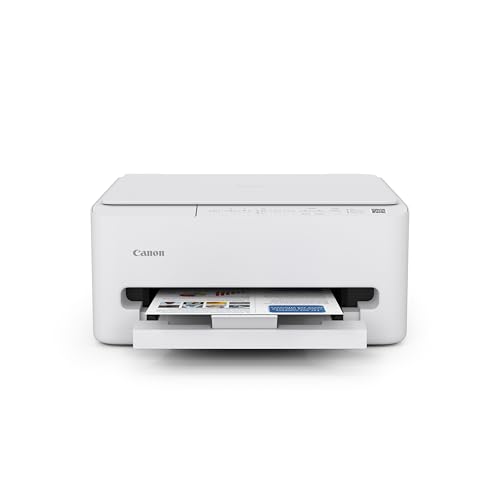
Canon PIXMA TS4320 Wireless Color Inkjet Printer

Our verdict: A duplex inkjet that suits occasional card and invitation envelopes.

The TS4320 prints in color on both sides, copies and scans, and lists envelope support at the tray, all in a compact footprint. It sits in the $50 to $100 tier and puts color at the center of the pitch.

That color is why it suits holiday cards, wedding invitations and party mailers, where a printed pattern or a colored name matters more than speed. It ranks below the TR4720 for business use because it lacks a document feeder, which makes multi-page scanning slower.

Buy it for personal mailing a few times a year. Skip it if you post daily, since inkjet ink can smear on some envelopes and the ink will cost more per page than toner. If you test a new envelope stock, run a single sheet first and let it dry before stacking.

Engine
Color inkjet
Duplex
Yes
Functions
Print, copy, scan
Price tier
$50-100

What we like

  • +Envelope support in tray
  • +Duplex printing
  • +Color for invitations
  • +Compact footprint

Watch out for

  • −Inkjet ink can smear
  • −No document feeder

Buy it if: Holiday cards and invitations.

Skip it if: You mail daily for business.

7

Best Guided Setup

HP DeskJet 4355 Wireless All-in-One Color Inkjet Printer

Our verdict: Guided envelope alignment with a 3-month Instant Ink trial.

HP's DeskJet 4355 pairs a small-footprint color inkjet body with a tray envelope feed, AI-capable printing features and a 3-month Instant Ink trial. The software angle is its distinction: guided alignment in the app is meant to cut the wasted envelopes that come from loading them the wrong way.

It ranks seventh because the spec sheet adds software, not hardware. The Canons above it add a feeder or duplex, and none of them depends on an app to feed paper correctly. The Instant Ink trial also lasts only three months, so judge the ongoing ink cost before enrolling.

Buy it if you are new to envelope printing and want step-by-step help. Skip it if you mail in volume, because the feed is limited and inkjet ink adds up.

Engine
Color inkjet
Envelope
Standard tray feed
Ink plan
3-month Instant Ink trial
Price tier
$50-100

What we like

  • +Guided envelope alignment
  • +Instant Ink trial
  • +Compact design
  • +All-in-one functions

Watch out for

  • −Inkjet ink cost
  • −Limited envelope feed

Buy it if: Buyers wanting step-by-step setup help.

Skip it if: You mail in volume.

8

Best Screen Guidance

Canon PIXMA TS6520 Wireless Color Inkjet Printer

Our verdict: An OLED display walks you through envelope setup.

Canon's TS6520 mounts a 1.42-inch OLED display on a color inkjet that prints two-sided, copies and scans. The screen is the feature: instead of guessing at menu settings, you read prompts at the printer itself.

It ranks last because nothing else in the listing speaks to envelopes. There is no envelope-specific feature beyond the general tray, and ink can smear on some stock, which puts it behind both the lasers and the TS4320 that shares its duplex and copy hardware. The OLED guidance helps the first time you load an envelope and then fades into the background.

Buy it if you want on-screen prompts and print envelopes only now and then. Skip it if you want a laser, or if the mailing work is steady.

Engine
Color inkjet
Display
1.42-inch OLED
Duplex
Yes
Price tier
$50-100

What we like

  • +OLED display guidance
  • +Duplex printing
  • +Copy and scan
  • +Compact design

Watch out for

  • −No envelope-specific feature
  • −Inkjet ink can smear

Buy it if: Buyers who want on-screen help.

Skip it if: You want a laser.

Methodology

How We Ranked These

Print engine

We compared laser and inkjet for smear resistance on envelopes.

Envelope feed

We checked tray and single-feed notes for envelope handling.

Functions

We weighed duplex, scanning, and feeders against mailing needs.

Running cost

We considered toner versus ink cost over many envelopes.

Price tier

We compared each bracket against what the specs deliver.

Every Primea Score uses the same weights: Performance 30% · Build & Materials 20% · Everyday Usability 20% · Value 20% · Owner Satisfaction 10%. Full scoring rules

Buyer's guide

How to Pick the Right One for You

By Mailing Volume

Volume decides whether laser is worth it.

VolumeOur pick
Daily or weekly business mailBrother DCP-L2640DW Wireless Compact Monochrome Laser
Regular home office mailBrother HL-L2405W Wireless Compact Monochrome Laser
Occasional business mailCanon PIXMA TR4720 All-in-One Wireless Printer
A few holiday cards a yearCanon PIXMA TS4320 Wireless Color Inkjet Printer

By Budget

SpendOur pick
$50 to $100, laserCanon imageCLASS LBP6030w Monochrome Wireless Laser Printer
$50 to $100, inkjetHP DeskJet 4355 Wireless All-in-One Color Inkjet Printer
$100 to $200Brother HL-L2405W Wireless Compact Monochrome Laser
$200 to $500Brother DCP-L2640DW Wireless Compact Monochrome Laser

Laser vs Inkjet

Laser

Heat-fused toner resists smearing. Brother DCP-L2640DW, HL-L2405W, HL-L3220CDW, and Canon LBP6030w are lasers.

Inkjet

Inkjets add color at a low price but ink can smear. Canon TR4720, TS4320, TS6520, and HP DeskJet 4355 are inkjets.

Most people who mail regularly should default to laser.

By Color Need

NeedOur pick
Color logo on envelopeBrother HL-L3220CDW Wireless Color Laser Printer
Color invitations, low costCanon PIXMA TS4320 Wireless Color Inkjet Printer
Black text onlyBrother HL-L2405W Wireless Compact Monochrome Laser

For Home Office Use Specifically

Look for

A compact laser with wireless printing and low toner cost.

In this ranking

The Brother HL-L2405W is a compact laser with wireless and low toner cost.

When to Spend More

Spend more if

You mail in volume or need color, where the Brother DCP-L2640DW or HL-L3220CDW earn their price.

Save if

You mail occasionally, where the Canon TS4320 or HP DeskJet cover it.

Questions

Frequently Asked Questions

Can any printer handle envelopes?+

Not all. Check the listing for envelope support or a dedicated feed. The Canon PIXMA TR4720 takes a single envelope at a time, while the Brother lasers suit steady mailing because they take a stack and fuse toner that will not smear in transit.

What is the common mistake?+

Feeding envelopes without choosing the envelope setting, which causes jams and smears. Pick the envelope size in the print dialog first, then load as the manual shows. The Brother HL-L2405W and Canon LBP6030w both reward this step.

Is laser worth it over inkjet?+

For regular mailing, yes. Toner from the Brother DCP-L2640DW resists smearing and moisture, while inkjet ink on the TS4320 or TS6520 can bleed. For a few invitations a year, an inkjet is acceptable, as long as you let the ink dry before stacking.

How do I set up envelope printing?+

Select the envelope size in the print dialog, then load the envelope in the orientation the manual shows. The HP DeskJet 4355 adds guided alignment in its app, and the Canon TS6520 shows prompts on its OLED screen.

How do I prevent jams?+

Use flat envelopes without bubbles or lumps, and on a single-feed model like the PIXMA TR4720 load one at a time. Avoid stacking freshly printed inkjet envelopes while the ink is wet, since that causes smears.

Can I print on large envelopes?+

Check the supported sizes in the manual before buying, since envelope paths are narrower than paper paths. Standard business envelopes are common, but large or padded ones may not feed on compact models such as the Canon LBP6030w or Brother HL-L2405W.

Final take

For envelopes, buy a laser. The Brother DCP-L2640DW is the best printer here, thanks to smear-resistant toner and a scanner and copier for the rest of the office. If you only print mail, the HL-L2405W saves money, and the Canon LBP6030w is the cheapest laser. Choose the HL-L3220CDW for color branding. Keep the inkjets for occasional cards, not steady mailing.

More Ranked & Reviewed Guides