
Primea ReviewsAll Reviews

Primea Reviews is reader-supported. When you buy through our Amazon links we may earn a commission, at no extra cost to you. Rankings are set by our editors and never sold. Learn more

Ranked & Reviewed by Primea Reviews

The 8 Best Printers for College Students of 2026, Ranked & Reviewed

By the Primea Editorial TeamUpdated November 1, 202610 min read8 products ranked
The 8 Best Printers for College Students of 2026, Ranked & Reviewed

The short answer

The HP DeskJet 4355 is the best printer for college students who do not yet know their workload: print, scan and copy for $50 to $100 with a 3-month Instant Ink trial. The Canon TS4320 adds duplex for color work, the Brother HL-L2405W suits text-heavy majors, and the Canon TR4720 handles scanning.

The Primea Scoreboard

Ranked & Reviewed

  1. The most flexible compact printer for a general student.

    94Outstanding
    Check price
  2. Duplex printing makes it the best pick for visual coursework.

    92Outstanding
    Check price
  3. A black-and-white laser for students who print a lot of text.

    90Excellent
    Check price
  4. An auto document feeder for multi-page scanning.

    88Excellent
    Check price
  5. A light, basic printer for occasional printing.

    86Excellent
    Check price
  6. Mobile and tablet printing suits locked-down laptops.

    84Very Good
    Check price
  7. No ink or toner, but it only does thermal prints.

    82Very Good
    Check price
  8. A fuller control panel for shared use.

    80Very Good
    Check price

Sticker price is the wrong number to shop by in a dorm. A $50 inkjet that burns through cartridges during finals week costs more per page than a laser that cost twice as much, and the student who prints a hundred pages of readings feels it first, usually at the worst moment. Before you compare models, decide what you actually print: essays, color posters, or scanned problem sets.

We reviewed eight printers on paper, comparing technology, duplex, auto document feeders, mobile printing and how well each fits a cramped desk. The ranking rewards versatility for mixed coursework first, then lets specialists win their niche, so a general-education student and a law major can land on different answers from the same list, and neither is wrong.

Before you buy

What Actually Matters

01

Inkjet vs laser

Inkjets print color and photos well, but cartridges run out and dry up with disuse. Laser printers use toner and suit lots of black text, and toner does not clog during idle weeks. Decide based on whether you print color and how much text you print. The listing names the technology in the title, so check it before comparing prices.

02

Duplex printing

Duplex means automatic two-sided printing, which halves paper use on long readings and makes thick packets easier to carry. Many cheap printers lack it, and the HP DeskJet lists none. Look for the word duplex or auto two-sided on the spec sheet, not just in marketing copy. Without it you must flip pages by hand.

03

Auto document feeder

An auto document feeder scans a stack of pages without lifting the lid for each one. That saves real time on problem sets, contracts and signed forms. Check the listing for ADF or auto document feeder, as the Canon TR4720 lists. A flatbed alone makes multi-page scanning a slow, page-by-page chore.

04

Mobile and Chromebook support

School Chromebooks and locked laptops often block driver installs, so a USB or driver-based printer may not work at all. Mobile printing support lets you print from a phone, tablet or browser instead. Look for wireless and mobile or tablet printing in the bullets, as the Canon MG3620 lists, and ask your IT office what is allowed.

05

Running cost

Purchase price is only part of the cost, since ink or toner is the rest, and it often exceeds the printer after a year. Trials like Instant Ink can help early on. Check which cartridges the model uses, how many pages they print, and whether a subscription fits your volume before deciding.

In-depth reviews

Our Ranked Picks, Reviewed

1

Best Overall

HP DeskJet 4355 Wireless All-in-One Color Inkjet Printer

Our verdict: The most flexible compact printer for a general student.

The HP DeskJet 4355 is a wireless color inkjet that prints, scans and copies from a compact body, and it comes with a 3-month Instant Ink trial. Instant Ink bills by pages printed, not by cartridge, which softens the early cost for a student who prints in bursts. Its price tier is $50 to $100.

It takes first place because it covers every basic need without specializing in one. The Canon TS4320 adds duplex but is aimed at color-heavy work, and the Brother laser gives up scanning and color entirely. This is the printer to buy before your major sets the demands.

Buy it if you are undeclared or print a mix of essays and the odd color page. The caveat is running cost: inkjet cartridges add up over a semester, and the listing shows no duplex, so long readings cost double the paper. Skip it if you print hundreds of text pages monthly.

Type
Wireless color inkjet AIO
Functions
Print, scan, copy
Ink plan
3-month Instant Ink trial
Price tier
$50-100

What we like

  • +Print, scan, and copy
  • +Compact dorm-friendly size
  • +Instant Ink trial included
  • +Wireless setup

Watch out for

  • −Inkjet cartridges add up
  • −No duplex listed

Buy it if: Undeclared or general education students with mixed needs.

Skip it if: You print hundreds of text pages a month.

2

Best for Color and Duplex

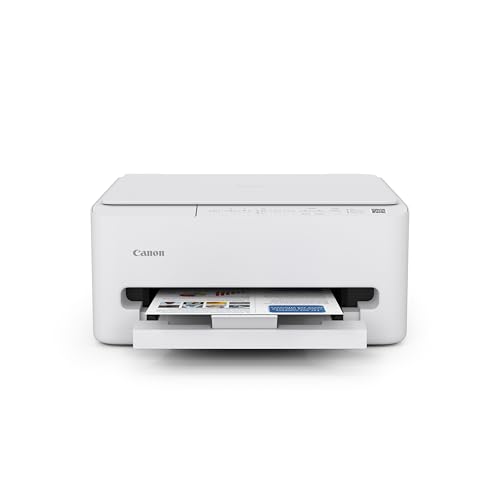
Canon PIXMA TS4320 Wireless Color Inkjet Printer

Our verdict: Duplex printing makes it the best pick for visual coursework.

The Canon PIXMA TS4320 is a wireless color inkjet that prints, copies and scans, and it adds automatic duplex so a long reading uses half the paper. A 1-year limited warranty comes with it, and the price tier is $50 to $100. Color matters here because art, design and architecture students print mockups and proofs that need accurate output on every page.

It takes second place because duplex saves paper on long readings, a feature the HP DeskJet lacks. The HP wins overall only because its Instant Ink trial and broader appeal edge it out. Against the TR4720 below, the TS4320 trades the document feeder for two-sided printing.

Buy it if you are in a visual major or print in color weekly. The caveat is the same inkjet running cost as the HP, and no document feeder, so scanning a stack means lifting the lid each time.

Type
Wireless color inkjet AIO
Duplex
Yes
Warranty
1-year limited
Price tier
$50-100

What we like

  • +Duplex printing saves paper
  • +Color for visual work
  • +Compact desktop footprint
  • +1-year warranty

Watch out for

  • −Inkjet ink costs add up
  • −No document feeder

Buy it if: Art and design students who print in color.

Skip it if: You only print black text.

3

Best for Text-Heavy Majors

Brother HL-L2405W Wireless Compact Monochrome Laser Printer

Our verdict: A black-and-white laser for students who print a lot of text.

The Brother HL-L2405W is a compact monochrome laser with wireless and mobile printing and Alexa support. It also includes a Refresh Subscription trial. Laser toner does not dry out the way inkjet cartridges do when a printer sits idle between assignments, and toner pages generally cost less than ink when the volume is high. It is priced at $100 to $200.

It ranks third because it is print-only. The inkjets above also scan and copy, and two of them print in color, which makes them more flexible for a first dorm printer. Where the laser wins is volume: a law, business or humanities student who prints PDFs by the stack gets cheaper black text than any inkjet here.

Buy it if you read mostly on paper. The caveat is blunt: no color, no scanning, no copying. Skip it if any of those matter.

Type
Monochrome laser
Connectivity
Wireless, mobile printing
Voice
Works with Alexa
Price tier
$100-200

What we like

  • +Compact laser body
  • +Mobile printing support
  • +Works with Alexa
  • +Refresh Subscription trial

Watch out for

  • −Black and white only
  • −No scan or copy

Buy it if: Law, business, and reading-heavy majors.

Skip it if: You need color or scanning.

4

Best for Scanning

Canon PIXMA TR4720 All-in-One Wireless Printer

Our verdict: An auto document feeder for multi-page scanning.

The Canon PIXMA TR4720 is the scanning specialist, with an auto document feeder, wireless and mobile printing, and print, scan, copy and fax functions. A feeder lets you drop a multi-page problem set or a signed lease on the tray and scan it in one pass, instead of lifting the lid for every page. Price tier is $50 to $100.

It ranks fourth because the feeder is a real advantage for multi-page work, but students rarely need fax, and the TS4320 offers duplex that this model does not list. Against the HP DeskJet, the feeder is the entire reason to pay attention to this one, since the basics are the same.

Buy it if you scan paperwork often, such as signed forms, receipts or handwritten notes. The caveat is that fax is an unused extra, and duplex is missing, so skip it if you only print.

Type
Wireless AIO
Feeder
Auto document feeder
Functions
Print, scan, copy, fax
Price tier
$50-100

What we like

  • +Auto document feeder
  • +Mobile printing support
  • +Built-in fax
  • +Handles multi-page scans

Watch out for

  • −Fax is rarely used
  • −No duplex listed

Buy it if: Students who scan many pages or signed documents.

Skip it if: You only print and never scan.

5

Best Budget

Canon PIXMA TS3720 Wireless All-in-One Printer

Our verdict: A light, basic printer for occasional printing.

The Canon PIXMA TS3720 is the basic option: a wireless color inkjet all-in-one with a compact, lightweight body that prints, scans and copies. Its weight matters in a dorm that gets packed up each semester, and the simple controls suit someone who prints a handful of pages a week. The price tier is $50 to $100.

It ranks fifth because it has no duplex, no document feeder and no trial ink plan, so it offers less than the four picks above. The HP DeskJet 4355 and Canon TS4320 sit in the same price tier with a trial or duplex. What the TS3720 keeps is a low profile and basic wireless printing.

Buy it for light printing needs and a small desk. The caveat is that it does not stand out in any feature, so every page costs the same inkjet premium. Skip it if you print long readings or scan stacks.

Type
Wireless color inkjet AIO
Functions
Print, scan, copy
Weight
Lightweight
Price tier
$50-100

What we like

  • +Light and compact
  • +Print, scan, copy
  • +Wireless
  • +Simple to use

Watch out for

  • −No duplex or feeder
  • −Basic feature set

Buy it if: Students with light, general printing needs.

Skip it if: You want duplex or a feeder.

6

Best for Chromebooks

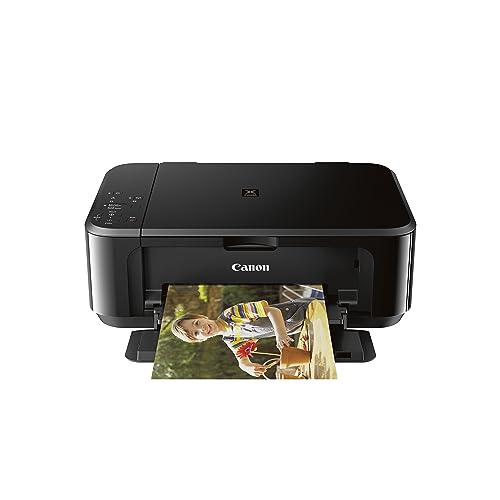
Canon Pixma MG3620 Wireless All-in-One Color Inkjet Printer

Our verdict: Mobile and tablet printing suits locked-down laptops.

The Canon PIXMA MG3620 is a wireless color inkjet all-in-one with mobile and tablet printing support, in a black compact body. Printing from a phone or tablet bypasses the driver installs that school-issued Chromebooks and restricted laptops often block. It prints, scans and copies, and sells in the $100 to $200 tier.

It ranks sixth because it costs more than the TS3720 and TS4320 yet adds no feature beyond mobile printing. If your laptop is unrestricted, you pay extra for something you will not use. If it is locked down, that mobile path is the reason to pick it, and the HP and Canon picks above are less certain to work.

Buy it if your laptop blocks driver installs. The caveat is a higher price for modest specs, and no duplex is listed. Skip it if value for money leads.

Type
Wireless color inkjet AIO
Mobile
Mobile and tablet printing
Functions
Print, scan, copy
Price tier
$100-200

What we like

  • +Mobile and tablet printing
  • +Print, scan, copy
  • +Compact desktop design
  • +Works around locked laptops

Watch out for

  • −Costs more than newer Canons
  • −No duplex listed

Buy it if: Students with a Chromebook or restricted laptop.

Skip it if: You want the best value for the money.

7

Best Portable

Inkless Portable Printer for Travel (MT610Pro)

Our verdict: No ink or toner, but it only does thermal prints.

The MT610Pro is a Bluetooth inkless thermal printer that handles 8.5 by 11 inch Letter and A4 at 300 DPI. It uses heat on special paper, so there are no ink or toner cartridges to dry out or replace. It works with iOS, Android and laptops, and the price tier is $50 to $100.

It ranks seventh because thermal output is monochrome and it does not scan or copy, so it replaces a full printer only for light use. Against the Brother laser, which is also black-and-white only, it gives up volume and print quality but needs no consumables. The tradeoff is zero ink cost for a narrow job.

Buy it if you mostly use library printers and need an occasional page at your desk. The caveat is that thermal paper is its own ongoing cost and output type is limited. Skip it for scanning or regular color prints.

Type
Bluetooth thermal
Paper
Letter and A4
Resolution
300 DPI
Consumables
No ink or toner

What we like

  • +No ink or toner needed
  • +Portable for small desks
  • +Works with phones and laptops
  • +Prints Letter and A4

Watch out for

  • −No scan or copy
  • −Thermal output only

Buy it if: Students with very light printing needs.

Skip it if: You need scanning or regular color prints.

8

Best for Roommates

Canon TS6420 All-in-One Wireless Printer

Our verdict: A fuller control panel for shared use.

The Canon TS6420 is a wireless color inkjet all-in-one in a black compact body, with a fuller control panel layout than the simpler Canon models. It prints, scans and copies, and it sits in the $100 to $200 tier, above the TS4320. A proper panel helps when several people use one printer and need to reach copy or scan quickly without opening an app.

It ranks last because its spec sheet lists no standout feature beyond that panel. The TS4320 gives you duplex for less, and the TR4720 gives you a document feeder. For a single student, the extra money buys convenience, not capability.

Buy it if you split a printer with roommates and want a panel everyone can use. The caveat is the higher price tier for few listed extras. Skip it if you are buying alone on a tight budget.

Type
Wireless color inkjet AIO
Functions
Print, scan, copy
Panel
Fuller control layout
Price tier
$100-200

What we like

  • +Fuller control panel
  • +Print, scan, copy
  • +Compact design
  • +Easy for shared use

Watch out for

  • −Higher price tier
  • −Few listed extras

Buy it if: Roommates sharing a single printer.

Skip it if: You are buying alone on a tight budget.

Methodology

How We Ranked These

Print technology

We compared inkjet, laser, and thermal for the typical student print mix.

Functions

We weighed scanning, copying, duplex, and feeders against dorm needs.

Footprint

We favored compact bodies that fit a small desk or shelf.

Connectivity

We checked wireless and mobile printing support for laptops and phones.

Price tier

We compared each price bracket to the features delivered.

Every Primea Score uses the same weights: Performance 30% · Build & Materials 20% · Everyday Usability 20% · Value 20% · Owner Satisfaction 10%. Full scoring rules

Buyer's guide

How to Pick the Right One for You

By Major or Workload

What you print decides which machine is the right fit.

WorkloadOur pick
Mixed or undeclaredHP DeskJet 4355 Wireless All-in-One Color Inkjet Printer
Art, design, color heavyCanon PIXMA TS4320 Wireless Color Inkjet Printer
Law, business, text heavyBrother HL-L2405W Wireless Compact Monochrome Laser Printer
Frequent multi-page scansCanon PIXMA TR4720 All-in-One Wireless Printer

By Budget

SpendOur pick
$50 to $100, generalHP DeskJet 4355 Wireless All-in-One Color Inkjet Printer
$50 to $100, basicCanon PIXMA TS3720 Wireless All-in-One Printer
$50 to $100, no inkInkless Portable Printer for Travel (MT610Pro)
$100 to $200, laserBrother HL-L2405W Wireless Compact Monochrome Laser Printer

Inkjet vs Laser

Inkjet

Inkjets print color and scan or copy in one body. The HP DeskJet 4355, Canon TS4320, TR4720, TS3720, MG3620, and TS6420 are inkjets.

Laser

A monochrome laser suits heavy text printing and uses toner. The Brother HL-L2405W is the only laser here, but it prints black and white only.

Most students should default to inkjet unless they print mostly black text in volume.

By Living Situation

SituationOur pick
Shared with roommatesCanon TS6420 All-in-One Wireless Printer
Locked-down school laptopCanon Pixma MG3620 Wireless All-in-One Color Inkjet Printer
Tiny dorm, mostly library printingInkless Portable Printer for Travel (MT610Pro)

For Dorm Rooms Specifically

Look for

A compact, lightweight body with wireless printing so it fits a shelf and works without cables.

In this ranking

The Canon PIXMA TS3720 is lightweight and compact, and the HP DeskJet 4355 adds a compact design with more flexibility.

When to Spend More

Spend more if

You print daily text readings, where the Brother laser's toner suits you better than inkjet cartridges.

Save if

You print only occasionally, where the Canon TS3720 or the inkless MT610Pro are enough.

Questions

Frequently Asked Questions

Does a printer work with a Chromebook?+

Many do via wireless and mobile printing. The Canon MG3620 lists mobile and tablet support, which helps on locked-down laptops. Confirm compatibility on the listing and with your school's IT office before buying, because a locked laptop can block wired and driver setups.

What mistake do students make buying printers?+

Buying on sticker price alone. A cheap inkjet like the Canon TS3720 can cost more per page than a laser once ink is counted. Match the technology to what you print before comparing prices, and count ink as part of the cost.

Is a laser worth it over an inkjet?+

Only if you print lots of black text. The Brother HL-L2405W is a laser but cannot do color, scanning or copying. Light or mixed users do better with the HP DeskJet 4355.

How do I set up a wireless printer?+

Connect it to your Wi-Fi from the control panel or app, then add it to your laptop or phone. Dorm networks sometimes restrict this, so ask your IT office. The HP DeskJet 4355 and Canon models all use wireless setup.

How do I keep inkjet ink from drying?+

Print something short every week or two, since long idle gaps let inkjet cartridges clog. That applies to the HP, Canon and Brother inkjets alike. A laser like the Brother HL-L2405W is far more forgiving of long idle stretches.

Can I rely on a portable thermal printer?+

For occasional black pages, yes. The MT610Pro prints at 300 DPI on Letter and A4 with no ink, but it does not scan or copy and the output is monochrome. Keep a full printer for anything else, especially forms you must scan.

Final take

Buy the HP DeskJet 4355 if you are undeclared or print a mix, the Canon TS4320 for color and paper savings, and the Brother HL-L2405W if your major means stacks of black text. The TR4720 wins for scanning, and the MT610Pro suits a student who mostly uses library printers. Match the technology to the workload before anything else.

More Ranked & Reviewed Guides