

Primea ReviewsAll Reviews

Primea Reviews is reader-supported. When you buy through our Amazon links we may earn a commission, at no extra cost to you. Rankings are set by our editors and never sold. Learn more

Ranked & Reviewed by Primea Reviews

The 6 Best Printers for Cardstock of 2026, Ranked & Reviewed

By the Primea Editorial TeamUpdated November 1, 20269 min read6 products ranked
The 6 Best Printers for Cardstock of 2026, Ranked & Reviewed

The short answer

The Epson EcoTank ET-2800 is the best printer for cardstock because refillable tanks cut ink cost on card-heavy projects. The Canon MegaTank G3270 is the compact tank alternative, and the ET-4800 adds a feeder and Ethernet for home offices. The Brother laser suits black-and-white inserts only.

The Primea Scoreboard

Ranked & Reviewed

  1. Cheap ink for people who print card after card.

    92Outstanding
    Check price
  2. A compact refillable-tank option for craft rooms.

    89Excellent
    Check price
  3. The tank printer for offices that also make cards.

    86Excellent
    Check price
  4. An OLED display makes setting media type easier.

    83Very Good
    Check price
  5. A small office printer for light cards and scanning.

    80Very Good
    Check price
  6. Black-and-white inserts, but with warping risk on lighter stock.

Cardstock exposes the limits of home printers. Thick stock jams in a tray built for plain paper, and a machine that feeds 20 lb copy paper happily may refuse heavy cover weight altogether. The listing rarely warns you, which means the decision hangs on two things you can actually check: how the ink is supplied and how the paper moves through the machine.

We reviewed six printers suited to card-making and ranked them on paper by ink cost model, paper path, controls and footprint. The important caveat is that none of the listings states a maximum paper weight, so confirm that on the maker's page before ordering. Card projects eat ink, which is why the refillable tank printers sit at the top.

Before you buy

What Actually Matters

01

Cardstock weight support

Printers list a maximum paper weight in pounds or grams per square meter. Heavy cover stock can jam or smear if you exceed it. Look for the maker's paper spec on the manufacturer page, since none of these listings states one, and test a single sheet before a big batch. Maximum weight is quoted in lb or gsm, so convert before you compare, and keep a margin below the limit.

02

Ink economics

Cards use a lot of ink, so refillable tank printers cost far less per page. Cartridge printers are cheaper up front but costlier to run. Look for tank, MegaTank or EcoTank wording. The Epson ET-2800, ET-4800 and the Canon G3270 are the tank models here.

03

Paper path

A straight, rear feed path handles thick stock better than a tight curved one. Many listings do not describe it. Check the manual for rear feed, and look at product photos for a flat output tray and the sheet path, because stiff cards cannot bend around a tight curve. A tight curve forces stiff stock to bend and jam.

04

Laser vs inkjet

Lasers fuse toner with heat, which can curl or warp light cardstock, while inkjets spray ink. Check the engine type in the title. The Brother is a laser, and the rest are inkjets, which suit color designs better but can smear on glossy stock. Choose by the color needs of your cards, since mono lasers cannot print a colored background and inkjets cannot match laser text sharpness.

05

Controls

A display lets you set the media type so the printer adjusts ink and speed. Look for OLED or LCD screen mentions, as on the Canon TS6520. Without a display, you set the type from your computer, which works but is slower, and easy to forget between jobs, which causes jams and smudged first sheets.

In-depth reviews

Our Ranked Picks, Reviewed

1

Best Overall

Epson EcoTank ET-2800 Wireless Color All-in-One Supertank Printer

Our verdict: Cheap ink for people who print card after card.

The ET-2800 is a cartridge-free EcoTank all-in-one that prints, scans and copies wirelessly, with bottled ink included, in the $100 to $200 bucket. Card projects use far more ink than letters, because covers, borders and photo fills lay down solid color. Refillable tanks cost much less per page than cartridges, which turns the ink bill from a nuisance into a rounding error for a frequent crafter.

It comes out on top because the economics fit the job. The ET-4800 below adds a feeder and Ethernet, which most card makers do not need.

It suits frequent crafters and small card sellers. The caveats are that the listing does not state cardstock weight and that refilling tanks can be messy. Check Epson's page for the maximum paper weight before you buy.

Ink system
Refillable EcoTank
Functions
Print, scan, copy
Connectivity
Wireless
Ink
Bottles included

What we like

  • +Low-cost refillable ink
  • +Bottled ink included
  • +Print, scan and copy
  • +Wireless printing

Watch out for

  • −Cardstock weight not listed
  • −Refilling can be messy

Buy it if: Frequent card makers.

Skip it if: You print cards once a year.

2

Best Compact Tank

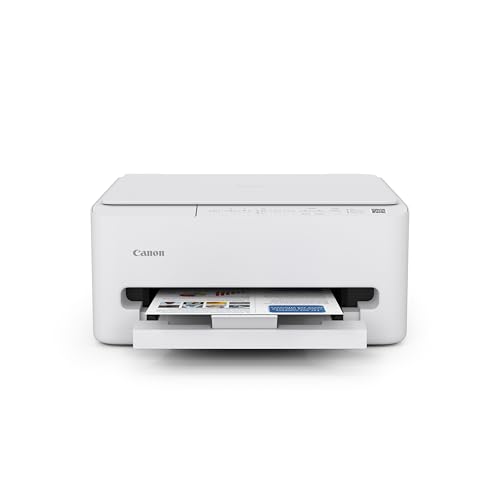
Canon MegaTank G3270 All-in-One Wireless Inkjet Printer

Our verdict: A compact refillable-tank option for craft rooms.

The Canon MegaTank G3270 uses a MegaTank refillable ink system, prints, scans and copies wirelessly, and is compact for a tank printer, in the $100 to $200 bucket. A smaller body suits a craft room where a tank printer would otherwise dominate a shelf.

It follows the Epson because it offers the same ink economics, but the listing says less about paper handling, so there is less certainty about heavy stock. Neither listing lists a maximum weight, but Epson's page gives more on the feed.

It fits dedicated craft setups that want a small footprint. The caveat is the few paper details and no feeder listed. Skip it if you cannot confirm cardstock support on Canon's page, and ask in the questions section.

Ink system
MegaTank refillable
Functions
Print, scan, copy
Connectivity
Wireless
Size
Compact tank

What we like

  • +Refillable tank savings
  • +Compact for a tank model
  • +Scan and copy included
  • +Wireless printing

Watch out for

  • −Few paper details
  • −No feeder listed

Buy it if: Small craft rooms.

Skip it if: You need paper specs confirmed.

3

Best for Home Office

Epson EcoTank ET-4800 Wireless All-in-One Supertank Printer

Our verdict: The tank printer for offices that also make cards.

The Epson EcoTank ET-4800 adds an automatic document feeder, fax, Ethernet and wireless to the EcoTank design and prints, scans and copies in color, in the $100 to $200 bucket. The feeder helps a small office scan stacks without lifting the lid, and Ethernet gives a stable network link.

It sits third because the extras mean a bigger body, and a card maker pays for features the ET-2800 skips. Fax and a document feeder do nothing for a card.

It suits a home office that mixes documents with card projects. The caveat is the larger body and the unneeded features. Skip it if you only want to print cards, since the ET-2800 gives the same ink savings for a smaller footprint.

Ink system
Refillable EcoTank
Feeder
Automatic document feeder
Network
Ethernet and wireless
Extras
Fax

What we like

  • +Document feeder
  • +Ethernet and wireless
  • +Fax included
  • +Refillable ink

Watch out for

  • −Larger body
  • −Features card makers skip

Buy it if: Home offices with some crafting.

Skip it if: You only want to print cards.

4

Best Controls

Canon PIXMA TS6520 Wireless Color Inkjet Printer

Our verdict: An OLED display makes setting media type easier.

The Canon PIXMA TS6520 is a color inkjet with duplex printing, a 1.42 inch OLED display, a copier and scanner and wireless printing, in the $50 to $100 bucket. The display matters for cardstock because you can set the media type on the printer itself, which changes how it handles ink and speed.

It lands fourth because it uses ink cartridges, so card projects cost more per page than on the tank printers above. Cartridge printers are cheaper to buy and costlier to run, which is the wrong trade for a frequent crafter.

Choose it for occasional card projects. The caveats are that cartridge costs add up and cardstock weight is unlisted. Skip it if you print cards often, where a tank printer pays back its higher purchase price quickly.

Ink system
Cartridges
Display
1.42-inch OLED
Duplex
Automatic
Functions
Print, scan, copy

What we like

  • +OLED display
  • +Automatic duplex
  • +Scanner and copier
  • +Compact design

Watch out for

  • −Cartridge costs add up
  • −Cardstock weight unlisted

Buy it if: Occasional card projects.

Skip it if: You print cards often.

5

Best with Feeder

Canon PIXMA TR4720 All-in-One Wireless Printer

Our verdict: A small office printer for light cards and scanning.

The Canon PIXMA TR4720 is a color inkjet that scans stacks through its feeder, prints from phones and handles faxes, in the $50 to $100 bucket. It is a small office printer, with a standard tray paper feed that suits plain paper better than heavy stock.

It holds fifth because its cartridge ink model costs more over time, and the listing is about office tasks, not heavy stock. It is the right trade for someone who scans more than they craft.

Use it for light cardstock plus document work. The caveat is that it is not craft-focused, and cartridge costs rise with card projects. Skip it if you craft heavily, or if you plan to feed thick cover stock through the standard tray.

Ink system
Cartridges
Feeder
Document feeder
Extras
Fax, mobile printing
Price
$50-100

What we like

  • +Document feeder
  • +Fax included
  • +Mobile printing
  • +Low price bucket

Watch out for

  • −Cartridge costs
  • −Not craft-focused

Buy it if: Light cards plus document scanning.

Skip it if: You craft heavily.

6

Best Laser Option

Brother DCP-L2640DW Wireless Compact Monochrome Laser

Our verdict: Black-and-white inserts, but with warping risk on lighter stock.

Brother's DCP-L2640DW is a compact black-and-white laser in the $200 to $500 bucket, with two-sided printing, copy and scan and wireless setup. Laser printers fuse toner to the page with heat, which gives crisp black text for inserts, booklets and templates.

The Brother closes the list because card makers mostly want color, and the fuser heat can warp or curl lighter stock. Toner can also crack on a fold if the stock is thick and scored. It is the priciest here, too.

Pick it only for black-and-white card inserts and sentiments. Skip it if you want color covers or backgrounds. Test a sample sheet before committing a stack of expensive stock to it.

Engine
Monochrome laser
Duplex
Automatic
Functions
Print, copy, scan
Price
$200-500

What we like

  • +Crisp black text
  • +Automatic duplex
  • +Compact body
  • +Wireless printing

Watch out for

  • −No color
  • −Heat may warp light stock

Buy it if: Black-and-white card inserts.

Skip it if: You need color cards.

Methodology

How We Ranked These

Ink cost

We favored refillable tanks for card-making, where volume is high.

Paper path

We looked at feed type and noted where listings lack stock weight information.

Controls

We weighed displays that help set media type.

Footprint

We compared body sizes for craft rooms and desks.

Extras

We noted feeders, fax and network ports for office use.

Every Primea Score uses the same weights: Performance 30% · Build & Materials 20% · Everyday Usability 20% · Value 20% · Owner Satisfaction 10%. Full scoring rules

Buyer's guide

How to Pick the Right One for You

By Project Frequency

How often you print decides the ink model.

FrequencyOur pick
Weekly or moreEpson EcoTank ET-2800
Weekly, small craft roomCanon MegaTank G3270
OccasionalCanon PIXMA TS6520
Rare, with scanningCanon PIXMA TR4720

By Budget

SpendOur pick
$50-100Canon PIXMA TS6520
$50-100, with feederCanon PIXMA TR4720
$100-200Epson EcoTank ET-2800
$200-500Brother DCP-L2640DW

Tank vs Cartridge

Tank

Lower running cost and bottled ink. Picks: Epson EcoTank ET-2800, ET-4800 and Canon MegaTank G3270.

Cartridge

Cheaper up front but costlier per page. Picks: Canon PIXMA TS6520 and TR4720.

Most card makers should default to a tank printer.

By Office Needs

NeedOur pick
Document feeder and faxEpson EcoTank ET-4800
Feeder on a budgetCanon PIXMA TR4720
Black-and-white insertsBrother DCP-L2640DW
Easier media settingsCanon PIXMA TS6520

For Small Card Businesses Specifically

Look for

Low cost per page, a confirmed cardstock weight, and wireless printing.

In this ranking

The Epson EcoTank ET-2800 has the lowest ink cost, but confirm the paper weight in Epson's specs.

When to Spend More

Spend more if

You print daily or run an office. The Epson EcoTank ET-4800 gives you a feeder and Ethernet.

Save if

You print a few cards a month. The Canon PIXMA TS6520 will do.

Questions

Frequently Asked Questions

Can these printers handle heavy cardstock?+

The listings do not state a maximum weight, so confirm on the maker's page before buying. Heavy cover stock is where inkjet feed paths most often fail, so ask the seller or read owner questions on the exact model.

What is the common mistake?+

Forcing heavy stock through a curved paper path, which causes jams. Use a rear feed if the printer has one, and feed one sheet at a time, supporting the card as it enters.

Is a tank printer worth it for cards?+

If you print often, yes. Ink is a major cost of card projects, and a tank like the Epson ET-2800 reduces it far below cartridge prices. Buy bottles in bulk to save more, and keep a spare black bottle for text-heavy covers.

How do I set up for cardstock?+

Select the paper type in the print dialog and feed one sheet at a time. Test a sample first, and use the printer's media setting on the OLED display if it has one. Save the profile for the next project, so you do not have to hunt through menus.

How do I avoid smearing?+

Let prints dry before stacking, especially on glossy stock. Inkjet ink on coated cardstock can smear for several minutes, so lay sheets flat and separate, and keep humidity low where you work.

Is a laser OK for cards?+

The Brother is mono only and its heat may warp lighter stock, so it suits inserts. For color cards, an inkjet tank model like the Epson ET-2800 is better.

Final take

Buy the Epson EcoTank ET-2800 if you print cards often. The Canon MegaTank G3270 fits small craft rooms, and the ET-4800 suits offices that also craft. Cartridge printers like the Canon TS6520 work for occasional projects. Confirm the maximum paper weight before ordering any of them.

More Ranked & Reviewed Guides