

Primea ReviewsAll Reviews

Primea Reviews is reader-supported. When you buy through our Amazon links we may earn a commission, at no extra cost to you. Rankings are set by our editors and never sold. Learn more

Ranked & Reviewed by Primea Reviews

The 7 Best Portable Monitors for MacBook Pro of 2026, Ranked & Reviewed

By the Primea Editorial TeamUpdated November 1, 202610 min read7 products ranked
The 7 Best Portable Monitors for MacBook Pro of 2026, Ranked & Reviewed

The short answer

The cocopar 16 inch 2.5K portable monitor is the best for a MacBook Pro: a 16:10 panel at 2560 by 1600, 110% sRGB, a 1.5 lb metal body, dual USB-C and VESA holes for $100 to $200. The VisionOwl 4K suits color work, the 470 nit VisionOwl handles bright rooms, and the cocopar 18.5 inch adds screen space.

The Primea Scoreboard

Ranked & Reviewed

  1. The closest shape and feature match for a MacBook Pro without paying for 4K.

    94Outstanding
    Check price
  2. The sharpest and widest-gamut panel for photo and design work.

    92Outstanding
    Check price
  3. The best bet beside bright windows or outdoors.

    89Excellent
    Check price
  4. A big, sharp, bright screen if you accept the weight.

    87Excellent
    Check price
  5. Raw screen space at a modest price, but softer pixels.

    84Very Good
    Check price
  6. A plain, affordable screen for chat and reference windows.

    81Very Good
    Check price
  7. The cheapest way to add a USB-C second screen.

    78Very Good
    Check price

Buyers pick a MacBook Pro portable monitor on resolution alone, and then regret it. A MacBook screen is 16:10, bright and rich in color, so a dim 16:9 panel beside it looks washed out and awkwardly tall or short, whatever the pixel count, and the difference is hard to unsee. Aspect ratio, brightness and gamut matter at least as much, because the eye compares the two screens every time you drag a window across.

We reviewed seven portable monitors and ranked them on spec sheets and owner reports by aspect ratio, resolution, color gamut, brightness, ports and travel weight. There are no lab readings here. Positions come from how each model's compromises compare with the monitors around it, and gamut percentages are manufacturer claims, not independent measurements.

Before you buy

What Actually Matters

01

Aspect ratio

A MacBook Pro screen is 16:10, taller than a standard 16:9 monitor. Matching it makes windows move naturally between screens and avoids wasted bars. Check the resolution on the listing, since 2560 by 1600 is 16:10 and 1920 by 1080 is not. Only the cocopar 16 inch matches the laptop's shape, and the other 16:9 panels leave unused bars when you resize.

02

Color gamut

A percentage of sRGB describes how much of the standard color range the panel covers. MacBook displays are wide gamut, so a narrow monitor looks dull beside them. For creative work look for 110% or more, and treat marketing percentages as claims. The cocopar 15.6 inch lists 85%, the VisionOwl 4K a claimed 145%. A narrow panel will look flat next to the MacBook.

03

Brightness in nits

Nits measure screen brightness. A MacBook Pro is very bright, so a 250 nit portable looks dim next to it. Look for a stated figure, with around 470 to 500 nits for bright rooms. The VisionOwl 16 inch lists 470 and the cocopar 18.5 inch 500, while many listings state none, so treat missing brightness as a warning for sunny rooms.

04

USB-C power draw

Most portable monitors run on the laptop's USB-C port, which drains the MacBook battery. Higher brightness and refresh increase the load. Check whether the monitor accepts a separate power input. The 470 nit VisionOwl and 500 nit cocopar draw the most, so plug in when working for hours. A separate charger keeps both screens at full brightness.

05

VESA and stand

A VESA mount lets you use an arm or stand instead of a flimsy kickstand. It matters on a desk but not on a plane. Check the listing for 75x75mm or dual holes if mounting matters. The KYY has no mount, while the cocopar and VisionOwl models include one. A stand with VESA holes also steadies a big screen.

In-depth reviews

Our Ranked Picks, Reviewed

1

Best Overall

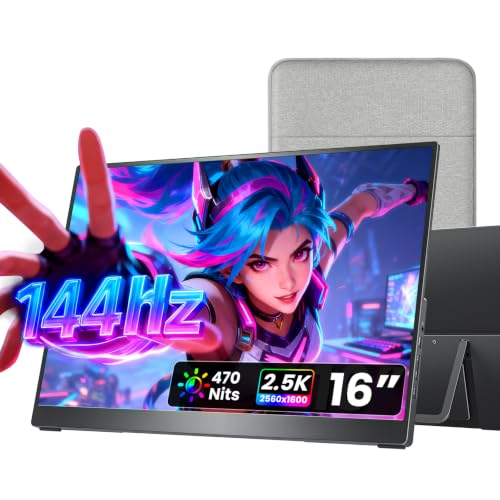
cocopar Portable Monitor 16 Inch 2.5K QHD 110% sRGB 144Hz USB-C, 120Hz HDMI

Our verdict: The closest shape and feature match for a MacBook Pro without paying for 4K.

The cocopar is a 16 inch 2.5K QHD panel at 2560 by 1600 with a 16:10 ratio, 110% sRGB and a metal chassis weighing 1.5 lb. It offers dual USB-C, a full-size HDMI port and dual VESA mounting holes, and sells for $100 to $200. A 16:10 shape matches the MacBook, so windows keep their proportions when you drag them across.

It ranks first because the shape matches a MacBook Pro display and it adds real VESA mounting, which most travel monitors only half deliver. The VisionOwl 4K below beats it on gamut, but costs more and has a smaller, differently shaped screen. Against the 470 nit VisionOwl, it is nearly identical but less bright.

It suits almost any MacBook Pro owner who wants a sensible second screen. The caveat is that 110% sRGB is good, not color-critical. Skip it if you need the widest gamut for design work.

Screen
16 inch 2.5K, 16:10
Refresh
144Hz USB-C
Ports
Dual USB-C and HDMI
Weight
1.5 lb

What we like

  • +16:10 matches MacBook shape
  • +Dual VESA mounting holes
  • +Metal chassis, 1.5 lb
  • +Dual USB-C plus HDMI

Watch out for

  • −Not color-critical gamut
  • −Below 4K resolution

Buy it if: Most MacBook Pro owners wanting a close-match second screen.

Skip it if: You need the widest color gamut for design work.

2

Best for Color Work

VisionOwl Portable Monitor 15.6 Inch 4K UHD 145% sRGB

Our verdict: The sharpest and widest-gamut panel for photo and design work.

The VisionOwl is a 15.6 inch 4K UHD monitor with a claimed 145% sRGB gamut, a full metal chassis, 75x75mm VESA mounting and a built-in kickstand. It includes two USB-C cables and an HDMI cable, and sells for $200 to $500. Four-K at 15.6 inches is dense enough that text and photos look crisp, which designers and photographers notice.

It ranks second because it offers the best color and pixel density here, but with a 16:9 shape that does not match the MacBook. The cocopar 16 inch above wins on shape and price. Wide gamut helps when you compare images side by side with the laptop.

It suits photo and design users who want the closest gamut match. The caveat is that 145% sRGB is a claim, so calibrate before critical work. Skip it if price matters more than color depth.

Screen
15.6 inch 4K UHD
Gamut
145% sRGB claimed
Mount
75x75mm VESA
Cables
2 USB-C and HDMI

What we like

  • +4K sharpness
  • +Wide gamut claim
  • +Metal chassis with VESA
  • +Three cables included

Watch out for

  • −16:9 shape mismatch
  • −Higher price tier

Buy it if: Photo and design work needing a close gamut match.

Skip it if: Price matters more than color depth.

3

Brightest Panel

VisionOwl Portable Monitor 16 Inch 2.5K QHD 144Hz, 470 Nits

Our verdict: The best bet beside bright windows or outdoors.

This VisionOwl is a 16 inch 2.5K QHD monitor at 144Hz with 470 nits brightness, an 8-bit plus 2FRC panel and 110% sRGB. It has a full-size HDMI port, dual USB-C, dual VESA holes, a kickstand and a 1.48 lb metal body. It sells for $100 to $200. Brightness is the spec most travel monitors skimp on, and 470 nits holds up beside a window.

It ranks third because it mirrors the top cocopar's spec closely, with brightness as the differentiator. If your workspace is dim, the cocopar is the simpler choice. Against the cocopar 18.5 inch, it is lighter and cheaper but smaller.

It suits people who work near windows or outside. The caveat is that brightness drains battery power if you drive it from the laptop. Skip it if you work in dim spaces and want the lowest cost.

Screen
16 inch 2.5K QHD
Brightness
470 nits
Refresh
144Hz
Weight
1.48 lb

What we like

  • +470 nits brightness
  • +144Hz refresh rate
  • +Dual VESA holes
  • +Light 1.48 lb body

Watch out for

  • −Brightness drains laptop power
  • −Gamut only 110% sRGB

Buy it if: Bright rooms, windows and outdoor work.

Skip it if: You work in dim spaces and want the lowest cost.

4

Best Large Screen

cocopar Portable Monitor 18.5 Inch 2K QHD 120Hz 120% sRGB

Our verdict: A big, sharp, bright screen if you accept the weight.

The cocopar 18.5 inch is a 2K QHD panel at 120Hz with 120% sRGB and 500 nits brightness. It has full-size HDMI, dual USB-C, 75x75mm VESA mounting, an adjustable kickstand and weighs 2.48 lb. It sells for $200 to $500. A bigger panel gives you room for two windows side by side, which a 16 inch screen cramps.

It ranks fourth because it gives more space and better brightness than the 16 inch picks, but loses on portability and costs more. The VisionOwl 18.5 inch below is lighter on resolution. Against the 16 inch VisionOwl, it has 30 more nits and 2.5 more inches.

It suits desk-bound travel setups. The caveat is the extra weight and bulk in a backpack. Skip it if you carry it daily and weight matters.

Screen
18.5 inch 2K QHD
Brightness
500 nits
Gamut
120% sRGB
Weight
2.48 lb

What we like

  • +Large 18.5 inch screen
  • +500 nits brightness
  • +120% sRGB gamut
  • +Sharp 2K QHD

Watch out for

  • −2.48 lb adds travel weight
  • −Higher price tier

Buy it if: Travelers who want more screen than a 16 inch panel.

Skip it if: You carry it daily and weight matters.

5

Best for Spreadsheets

VisionOwl Portable Monitor for Laptop, 18.5 Inch FHD 100Hz

Our verdict: Raw screen space at a modest price, but softer pixels.

This VisionOwl is an 18.5 inch FHD monitor at 100Hz with 125% sRGB, a full-size HDMI, dual USB-C, 75x75mm VESA and a kickstand. It has a metal back panel and weighs 2.7 lb. It sells for $100 to $200. A large FHD screen suits spreadsheets and multi-window layouts, where pixel space matters more than sharpness.

It ranks fifth because FHD stretched over 18.5 inches is less sharp than the cocopar 2K above it. You are buying space for spreadsheets rather than pixel density. Against the 18.5 inch cocopar, it costs less but is heavier and softer.

It suits multi-window work. The caveat is the heaviest weight in this list. Skip it if you want sharp text or light weight.

Screen
18.5 inch FHD
Refresh
100Hz
Gamut
125% sRGB
Weight
2.7 lb

What we like

  • +Large 18.5 inch workspace
  • +125% sRGB gamut
  • +Metal back panel
  • +Mid-range price

Watch out for

  • −Heaviest at 2.7 lb
  • −FHD softer at this size

Buy it if: Spreadsheets and multi-window work.

Skip it if: You want sharp text or light weight.

6

Best Basic Second Screen

cocopar Portable Monitor 15.6 Inch 1080P FHD 60Hz 85% sRGB

Our verdict: A plain, affordable screen for chat and reference windows.

This cocopar is a 15.6 inch 1080P monitor at 60Hz with 85% sRGB, full-size HDMI, dual USB-C, two VESA holes, a smart stand case and a 1.5 lb weight without cover. It sells for $100 to $200. A smart stand case folds into a kickstand, so there is nothing extra to carry.

It ranks sixth because the 85% sRGB gamut and 60Hz refresh are below the other cocopar models. It exists for people who just need a second window. Against the KYY, it adds VESA holes and costs more.

It suits chat, notes and reference. The caveat is that creative work will look dull beside a MacBook display. Skip it if you edit photos or video.

Screen
15.6 inch 1080P
Refresh
60Hz
Gamut
85% sRGB
Weight
1.5 lb

What we like

  • +Affordable second screen
  • +Light 1.5 lb body
  • +Two VESA mounting holes
  • +Smart stand case included

Watch out for

  • −Low 85% sRGB gamut
  • −Only 60Hz refresh

Buy it if: Chat, notes and reference windows.

Skip it if: You edit photos or video.

7

Best Budget USB-C

KYY Portable Monitor 15.6" 1080P Computer Monitor Screen Extender w/Cover

Our verdict: The cheapest way to add a USB-C second screen.

The KYY is a 15.6 inch 1080P IPS monitor with a 178 degree viewing angle, two USB-C ports and mini-HDMI. A magnetic smart cover doubles as a stand, and it measures 0.3 inches thick at 1.7 lb. It sells for $50 to $100. A thin body slips into a laptop sleeve, which is its entire argument.

It ranks last because it has no VESA mount and a thinner feature set than the cocopar above. The trade is the lowest price and a slim profile. Against the cocopar 15.6 inch, it saves a tier and gives up mounting.

It suits budget buyers who connect over USB-C. The caveat is that the mini-HDMI port needs the right cable. Skip it if you want to mount it on an arm.

Screen
15.6 inch 1080P IPS
Ports
2 USB-C and mini-HDMI
Stand
Magnetic smart cover
Thickness
0.3 inch

What we like

  • +Lowest price in ranking
  • +Slim 0.3 inch profile
  • +178 degree viewing angle
  • +Cover doubles as stand

Watch out for

  • −No VESA mount
  • −Mini-HDMI needs cable

Buy it if: Budget buyers connecting over USB-C.

Skip it if: You want to mount it on an arm.

Methodology

How We Ranked These

Aspect ratio match

We rewarded 16:10 panels that sit naturally beside a MacBook Pro display.

Resolution and size

Pixel density across size was weighed, since FHD on a large panel looks soft.

Color gamut

Listed sRGB coverage mattered for photo and design users, treated as a claim.

Ports and mounting

USB-C, HDMI and VESA support decided how flexible each monitor is.

Travel weight

Weight and thickness were compared for daily carry.

Every Primea Score uses the same weights: Performance 30% · Build & Materials 20% · Everyday Usability 20% · Value 20% · Owner Satisfaction 10%. Full scoring rules

Buyer's guide

How to Pick the Right One for You

By Primary Use

Your work decides whether color, brightness or screen size comes first.

UseOur pick
General second screencocopar 16 Inch 2.5K QHD
Photo and designVisionOwl 15.6 Inch 4K
Bright rooms or outdoorsVisionOwl 16 Inch 470 Nits
Spreadsheets and multi-windowVisionOwl 18.5 Inch FHD
Chat and reference onlycocopar 15.6 Inch 1080P

By Budget

SpendOur pick
$50-100KYY Portable Monitor
$100-200 basiccocopar 15.6 Inch 1080P
$100-200 bestcocopar 16 Inch 2.5K QHD
$100-200 brightVisionOwl 16 Inch 470 Nits
$200-500VisionOwl 15.6 Inch 4K

16 Inch vs 18.5 Inch

16 inch

Lighter, 16:10 shaped and easy to carry daily. Picks here: the cocopar 16 inch, VisionOwl 16 inch and VisionOwl 4K at 15.6 inch.

18.5 inch

More workspace, but heavier at 2.48 to 2.7 lb. Picks here: the cocopar 18.5 inch and VisionOwl 18.5 inch.

Most MacBook Pro owners should default to 16 inch unless the monitor lives on a desk.

By Mounting Need

NeedOur pick
Dual VESA holescocopar 16 Inch 2.5K QHD
75x75mm VESA with 4KVisionOwl 15.6 Inch 4K
Adjustable kickstand on a large panelcocopar 18.5 Inch 2K
Cover that doubles as standKYY Portable Monitor
Two VESA holes at low costcocopar 15.6 Inch 1080P

For Remote Workers on the Road Specifically

Look for

Light weight under 1.7 lb, a slim body, dual USB-C and a stand that works on a hotel desk.

In this ranking

The VisionOwl 16 inch at 1.48 lb and the cocopar 16 inch at 1.5 lb are the lightest, and the KYY is just 0.3 inches thick.

When to Spend More

Spend more if

You do color-sensitive work, where the VisionOwl 15.6 inch 4K with 145% sRGB earns its tier.

Save if

You only need chat and reference windows, where the cocopar 15.6 inch or KYY is enough.

Questions

Frequently Asked Questions

Will a portable monitor work with every MacBook Pro?+

Most work over USB-C or HDMI with an adapter. Check that your Mac port supports video output. Newer models with Thunderbolt are the simplest, and the cocopar and VisionOwl panels list dual USB-C. One cable covers power and video on the right port.

What is the biggest mistake buyers make?+

Buying only on resolution and ignoring 16:10 and brightness. A dim 16:9 panel looks off beside a MacBook. Match shape and brightness first, then pick pixels. A bright 16:10 panel at 2.5K beats a dim 4K one for daily work.

Is 4K worth it over 2.5K QHD?+

On a 15.6 inch screen, 4K helps with color work and fine text. For general use the cocopar 2.5K is more than sharp enough. The price gap, $200 to $500 against $100 to $200, is the deciding factor. Choose 4K only if color is your trade.

How do I set one up?+

Connect by USB-C for power and video, then use System Settings to arrange displays. Set it to extended mode. Adjust brightness to match your Mac. If the screen stays black, try the other USB-C port or cable.

How do I reduce battery drain?+

Lower the monitor brightness and use a separate power input if available. A high refresh rate also draws more, so drop the 144Hz VisionOwl to 60Hz on battery. Plug in your Mac when working long.

Does FreeSync matter on a Mac?+

No, FreeSync is aimed at Windows gaming and is not useful with macOS. Do not pay extra for it. Focus on color and brightness instead, and check the panel's refresh range if you watch fast video.

Final take

Buy the cocopar 16 inch for most MacBook Pro owners, since its 16:10 shape matches the laptop. Choose the VisionOwl 4K for photo and design work, the 470 nit VisionOwl beside windows, and the cocopar 18.5 inch for a desk-bound setup. The FHD models are for chat and reference, and the KYY is the cheapest USB-C screen.

More Ranked & Reviewed Guides