
Primea ReviewsAll Reviews

Primea Reviews is reader-supported. When you buy through our Amazon links we may earn a commission, at no extra cost to you. Rankings are set by our editors and never sold. Learn more

Ranked & Reviewed by Primea Reviews

The 8 Best Docking Stations for MacBook Pro of 2026, Ranked & Reviewed

By the Primea Editorial TeamUpdated November 1, 202611 min read8 products ranked
The 8 Best Docking Stations for MacBook Pro of 2026, Ranked & Reviewed

The short answer

The CalDigit TS4 is the best dock for a MacBook Pro: certified Thunderbolt 4, 18 ports and native display output. The Plugable 16-in-1 is the pick for dual 4K on newer chips, and the UGREEN Revodok Max 208 is the best value. Thunderbolt 5 docks only pay off if your Mac supports them.

The Primea Scoreboard

Ranked & Reviewed

  1. Certified Thunderbolt 4 with 18 ports, from a Mac-first dock maker.

    94Outstanding
    Check price
  2. 02
    Plugable 16-in-1 Thunderbolt 4 Dock

    Best for Dual 4K Monitors

    Plugable 16-in-1 Thunderbolt 4 Dock

    16 ports, 100W charging and dual 4K validated for newer MacBook chips.

    92Outstanding
    Check price
  3. Genuine 40Gbps Thunderbolt 4 with three downstream ports, for far less.

    90Excellent
    Check price
  4. 04
    Plugable Thunderbolt 4 Dock (TBT-UDM)

    Best Compact Thunderbolt Dock

    Plugable Thunderbolt 4 Dock (TBT-UDM)

    Certified Thunderbolt 4, 100W charging and a compact body.

    88Excellent
    Check price
  5. 05
    CalDigit TS5 Plus Thunderbolt 5 Dock

    Best for Pro and Max Multi-Display

    CalDigit TS5 Plus Thunderbolt 5 Dock

    Thunderbolt 5 bandwidth for multi-4K and 8K, aimed at Pro and Max chips.

    86Excellent
    Check price
  6. 06
    Anker Prime TB5 Docking Station 14-in-1

    Best Thunderbolt 5 Alternative

    Anker Prime TB5 Docking Station 14-in-1

    14 ports and Thunderbolt 5 for newer multi-display Mac setups.

    84Very Good
    Check price
  7. 07
    Anker Prime Docking Station 14-Port

    Best High-Wattage Budget Hub

    Anker Prime Docking Station 14-Port

    14 ports and up to 160W output, but not Thunderbolt certified.

    81Very Good
    Check price
  8. 08
    Anker Laptop Docking Station 8-in-1

    Dual HDMI, Ethernet, SD and 85W passthrough, for the lowest price.

    78Very Good
    Check price

The dock does not decide how many monitors your MacBook Pro can drive. The chip does. A base M-series chip supports one external display natively, while Pro and Max chips handle more, and no accessory raises that ceiling without a workaround. Listings that promise dual 4K from a cheap box usually mean DisplayLink, a software trick that compresses the picture and needs drivers.

We reviewed eight docks and hubs, from Thunderbolt 5 flagships to a plain USB-C hub, and ranked them by connection type, display support, charging power and port count. The order comes from spec sheets and owner-reported behavior. Check your own Mac's display limit in Apple's tech specs before buying, because that number caps every dock in this list.

Before you buy

What Actually Matters

01

Your chip sets the display limit

Your Mac's chip sets the display limit. A base M-series chip supports one external display natively, while Pro and Max chips handle more. A dock cannot raise that ceiling without DisplayLink, which compresses the picture and needs drivers. Look up your Mac's limit in Apple's tech specs, then choose a dock that fits within that number instead of trusting a headline claim of dual or triple 4K.

02

Thunderbolt versus USB-C

Thunderbolt 4 provides 40Gbps and can drive monitors and fast drives at once. A plain USB-C hub tops out lower, often around 10Gbps, as on the Anker Prime 14-Port. If you move large files or run two screens, pay for Thunderbolt. Look for the Thunderbolt logo and the word certified in the listing.

03

Charging wattage must cover the laptop

Charging wattage must cover the laptop. A 14 inch MacBook Pro charges comfortably at around 70W, while 16 inch models can draw more under load. A dock at 85W or 100W is fine for most. If the dock's wattage falls short, the laptop may drain while you work. Check the passthrough number in the listing, and note the laptop's own charger rating for comparison.

04

Count ports you actually use

List your devices first: monitors, drive, keyboard, webcam, Ethernet. Then compare that list against the dock's downstream ports, counting each type separately. Extra Thunderbolt ports matter more than extra USB-A, because they can chain fast drives or another dock. The UGREEN offers three Thunderbolt 4 ports; the CalDigit TS4 has 18 ports in total.

05

Mind the cable length

Most docks ship with a short Thunderbolt cable, around 0.8 meters. If your desk layout needs more reach, a longer certified Thunderbolt cable costs extra, and uncertified long cables can drop bandwidth. Check the cable length in the box contents before ordering, and measure where the dock will sit relative to your laptop and the nearest outlet.

In-depth reviews

Our Ranked Picks, Reviewed

1

Best Overall

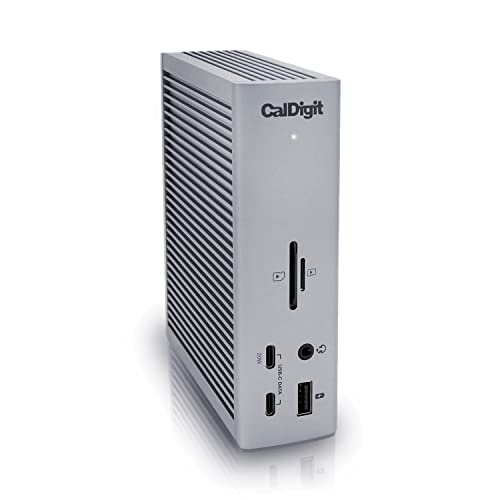
CalDigit TS4 18 Port Thunderbolt 4 Dock

Our verdict: Certified Thunderbolt 4 with 18 ports, from a Mac-first dock maker.

The CalDigit TS4 is a certified Thunderbolt 4 dock with 18 ports, the most in this guide, and native Thunderbolt display output. Certification matters because it guarantees the full 40Gbps path, which lets monitors, fast drives and Ethernet run at once without fighting for bandwidth. A Mac-first maker also tends to get Apple quirks right.

It tops the ranking over the Plugable 16-in-1, which has two fewer ports, and over the UGREEN with only eight. Neither rival matches its port count, and the TS5 Plus below moves to Thunderbolt 5 at a higher price.

Buy it for a desk crowded with peripherals that you want to keep for years. The caveat is price and footprint: it is premium, takes real desk space, and is overkill if you only need a handful of ports.

Connection
Thunderbolt 4 certified
Ports
18 total
Display
Native Thunderbolt output
Brand
CalDigit, Mac-first

What we like

  • +18 ports, the most here
  • +Certified Thunderbolt 4
  • +Native display output
  • +Mac-first brand

Watch out for

  • −Premium price
  • −Overkill for light users
  • −Larger desk footprint

Buy it if: Desks with many peripherals that want a dock for years.

Skip it if: You only need a handful of ports.

2

Best for Dual 4K Monitors

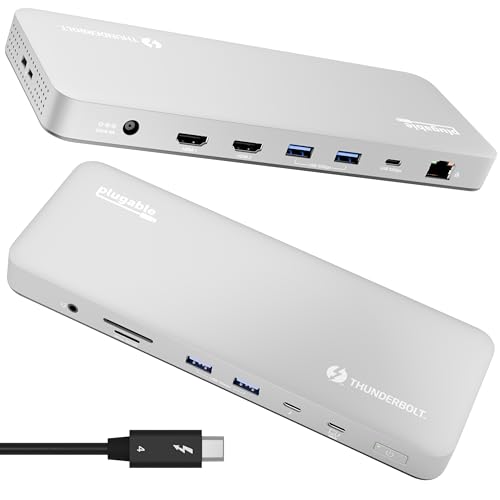
Plugable 16-in-1 Thunderbolt 4 Dock

Our verdict: 16 ports, 100W charging and dual 4K validated for newer MacBook chips.

Plugable's 16-in-1 is a certified Thunderbolt 4 dock with 16 ports, 100W charging passthrough and dual 4K support validated for M4 and M5 MacBook Air and Pro. Because it uses native GPU output and no DisplayLink, the picture is not compressed and you skip driver installs, which cuts the odd flicker and wake-from-sleep bugs that DisplayLink hubs bring.

It ranks second since the TS4 adds two ports and a longer Mac-first record. It sits above the UGREEN because 100W covers a heavier laptop than the UGREEN's 85W.

Buy it for a dual 4K desk on newer chips. Skip it if you run an older base M-series chip, since that chip, not the dock, limits displays.

Connection
Thunderbolt 4 certified
Ports
16 total
Charging
100W passthrough
Display
Dual 4K, no DisplayLink

What we like

  • +Dual 4K validated for newer chips
  • +100W charging passthrough
  • +Driverless native output
  • +16 ports

Watch out for

  • −Older base chips limit displays
  • −Fewer ports than the TS4
  • −Higher price than the UGREEN

Buy it if: Dual 4K desks on newer MacBook Pro chips.

Skip it if: You run an older base M-series chip.

3

Best Value Thunderbolt

UGREEN 8-in-1 Thunderbolt 4 Docking Station (Revodok Max 208)

Our verdict: Genuine 40Gbps Thunderbolt 4 with three downstream ports, for far less.

The UGREEN Revodok Max 208 is a genuine Thunderbolt 4 dock rated at 40Gbps, with three Thunderbolt 4 ports, dual 4K at 60Hz or one 8K display, and 85W charging. Three downstream Thunderbolt ports are rare at this price, and they let you chain fast SSDs or a second dock without a hub.

It ranks third since it has only eight ports and 85W charging, against the Plugable's 16 ports and 100W. Its edge is price: it costs less than any certified Thunderbolt dock above it.

Choose it for a high-bandwidth desk with few devices, such as two monitors and an SSD. Skip it if you charge a 16 inch MacBook Pro under heavy load, since 85W can fall behind then, and legacy ports are sparse.

Connection
Thunderbolt 4, 40Gbps
Displays
Dual 4K at 60Hz or one 8K
Charging
85W
TB4 ports
3

What we like

  • +Genuine Thunderbolt 4
  • +Three Thunderbolt 4 ports
  • +Dual 4K or one 8K
  • +Lower price than rivals

Watch out for

  • −Only 85W charging
  • −Eight ports in total
  • −Fewer legacy ports

Buy it if: High-bandwidth setups that do not need many ports.

Skip it if: You charge a 16 inch MacBook Pro under heavy loads.

4

Best Compact Thunderbolt Dock

Plugable Thunderbolt 4 Dock (TBT-UDM)

Our verdict: Certified Thunderbolt 4, 100W charging and a compact body.

The Plugable TBT-UDM is a certified Thunderbolt 4 dock with 100W charging, six USB ports, an SD card reader, Ethernet, and either dual 4K HDMI or one 6K display. It is driverless, so a Mac recognizes it on connection and keeps the cable simple. The compact body saves desk space.

It ranks fourth because dual monitors must both use HDMI, with no DisplayPort outputs, and it has far fewer ports than the 16-in-1 from the same maker. It does beat the UGREEN on charging, at 100W versus 85W.

Buy it for a compact desk with one or two HDMI monitors. Skip it if you need DisplayPort, since that forces an adapter, or if your port list is long.

Connection
Thunderbolt 4 certified
Displays
Dual 4K HDMI or one 6K
Charging
100W
Ports
6 USB, SD, Ethernet

What we like

  • +100W charging
  • +Certified Thunderbolt 4
  • +Driverless setup
  • +SD card and Ethernet

Watch out for

  • −HDMI only for dual displays
  • −Fewer ports than the 16-in-1
  • −Mid-range price

Buy it if: Compact desks with one or two HDMI monitors.

Skip it if: You need DisplayPort outputs.

5

Best for Pro and Max Multi-Display

CalDigit TS5 Plus Thunderbolt 5 Dock

Our verdict: Thunderbolt 5 bandwidth for multi-4K and 8K, aimed at Pro and Max chips.

The CalDigit TS5 Plus is a Thunderbolt 5 dock built for M3 and M4 Pro and Max multi-display workflows, with a high port count and bandwidth for multi-4K and 8K. Thunderbolt 5 doubles the headroom of Thunderbolt 4, which only pays off when several high-resolution screens and fast storage share one cable.

It ranks fifth despite the specs, because it is the most expensive dock here and needs a supported laptop to use the extra bandwidth. The Anker Prime TB5 below it undercuts the price, while the TS4 above handles most desks with no extra cost.

Buy it if you edit with a Pro or Max chip across three screens. Skip it on a base chip or a single monitor, where the bandwidth goes unused.

Connection
Thunderbolt 5
Aimed at
M3 and M4 Pro and Max
Bandwidth
Multi-4K and 8K
Brand
CalDigit

What we like

  • +Thunderbolt 5 bandwidth
  • +High port count
  • +Built for multi-display desks
  • +Mac-first brand

Watch out for

  • −Most expensive here
  • −Needs a supported laptop
  • −Overkill for most users

Buy it if: Editors with Pro or Max chips and three screens.

Skip it if: You run a base chip or one monitor.

6

Best Thunderbolt 5 Alternative

Anker Prime TB5 Docking Station 14-in-1

Our verdict: 14 ports and Thunderbolt 5 for newer multi-display Mac setups.

The Anker Prime TB5 is a 14-in-1 Thunderbolt 5 dock aimed at newer M4 and M5 multi-display Macs, with Thunderbolt compatibility certification and high bandwidth headroom. It brings Thunderbolt 5 to a lower price than the CalDigit TS5 Plus, which is the reason to look at it.

It ranks sixth because Thunderbolt 5 pays off only with a TB5 Mac, and Anker has a shorter Mac track record than CalDigit. Against the TS4, you pay more for headroom you may never use.

Buy it if your MacBook Pro already has Thunderbolt 5 and you want cheaper bandwidth than the TS5 Plus. Skip it if your Mac only has Thunderbolt 4, since it then runs at Thunderbolt 4 speed and costs more than the Plugable options.

Connection
Thunderbolt 5
Ports
14-in-1
Aimed at
Newest M4 and M5 setups
Certification
Thunderbolt compatible

What we like

  • +Thunderbolt 5
  • +14-in-1 layout
  • +Cheaper than the TS5 Plus
  • +High bandwidth headroom

Watch out for

  • −Benefit only on TB5 Macs
  • −Shorter Mac track record
  • −Costs more than TB4 docks

Buy it if: Thunderbolt 5 owners who want a cheaper dock.

Skip it if: Your Mac only has Thunderbolt 4.

7

Best High-Wattage Budget Hub

Anker Prime Docking Station 14-Port

Our verdict: 14 ports and up to 160W output, but not Thunderbolt certified.

The Anker Prime 14-Port dock offers 14 ports, up to 160W output and dual 4K support at 10Gbps, but it is USB-C and not Thunderbolt certified. A 160W ceiling gives heavy 16 inch laptops charging margin that 85W docks lack, and port count is high for the money.

It ranks seventh because 10Gbps cannot match 40Gbps for external drives, so editing from an SSD through it feels slower than through the TS4. Compared with the 8-in-1 below, it adds power and ports for a modest increase in price.

Choose it for a budget desk that needs many ports and strong charging. Skip it if you edit video from external SSDs, where the data ceiling hurts most.

Ports
14 total
Output
Up to 160W
Displays
Dual 4K
Data
10Gbps, not Thunderbolt

What we like

  • +14 ports
  • +Up to 160W output
  • +Dual 4K support
  • +Lower price than Thunderbolt docks

Watch out for

  • −Not Thunderbolt certified
  • −10Gbps data ceiling
  • −Slower for external drives

Buy it if: Budget desks that need many ports and power.

Skip it if: You edit video from external SSDs.

8

Best Budget Travel Hub

Anker Laptop Docking Station 8-in-1

Our verdict: Dual HDMI, Ethernet, SD and 85W passthrough, for the lowest price.

The Anker 8-in-1 is a compact hub with two HDMI ports for dual 4K, Gigabit Ethernet, an SD card slot and 85W Power Delivery passthrough. It is the lowest price in the guide, and its small body fits a travel bag or a secondary desk.

It ranks last because it is a USB-C hub, not a Thunderbolt dock, so bandwidth for storage is limited. Dual display output also depends on your chip: a base M-series Mac will not drive both HDMI ports natively.

Buy it for a travel kit or a second desk where the job is basic connectivity. Skip it for a primary desk with fast storage, where the Plugable and CalDigit docks above deliver much more headroom.

Ports
8-in-1
Displays
Dual 4K, two HDMI
Charging
85W passthrough
Network
Gigabit Ethernet

What we like

  • +Lowest price in the guide
  • +Compact and portable
  • +Two HDMI ports
  • +SD card slot

Watch out for

  • −Hub, not Thunderbolt
  • −Dual display limits on base chips
  • −Fewer ports

Buy it if: Travel or a secondary desk.

Skip it if: Your main desk needs fast storage.

Methodology

How We Ranked These

Connection type

Certified Thunderbolt docks were ranked above USB-C hubs, since they deliver full display and storage bandwidth.

Display support

We compared stated monitor counts against what Mac chips can drive natively, and noted workarounds.

Charging power

Passthrough wattage was weighed against the needs of 14 and 16 inch MacBook Pro models.

Port mix

Total ports mattered, but so did the type: Thunderbolt, USB, SD and Ethernet.

Value in bracket

Each dock was compared with others at a similar price on the spec sheet.

Every Primea Score uses the same weights: Performance 30% · Build & Materials 20% · Everyday Usability 20% · Value 20% · Owner Satisfaction 10%. Full scoring rules

Buyer's guide

How to Pick the Right One for You

By Display Setup

Start with how many screens you drive.

Your setupOur pick
Dual 4K, newer chipPlugable 16-in-1 Thunderbolt 4 Dock
Three displays, Pro or Max chipCalDigit TS5 Plus Thunderbolt 5 Dock
One monitor, lots of portsCalDigit TS4 18 Port Thunderbolt 4 Dock
Two HDMI monitors, compactPlugable Thunderbolt 4 Dock (TBT-UDM)
Quick second screen while travellingAnker Laptop Docking Station 8-in-1

By Budget

SpendOur pick
Under $75Anker Laptop Docking Station 8-in-1
$150 to $200UGREEN Revodok Max 208 Thunderbolt 4
$200 to $300Plugable Thunderbolt 4 Dock (TBT-UDM)
$350 and upCalDigit TS4 18 Port Thunderbolt 4 Dock

Thunderbolt 4 vs Thunderbolt 5

Thunderbolt 4

40Gbps, plenty for dual 4K and fast drives, and widely compatible. Picks: CalDigit TS4, Plugable 16-in-1, UGREEN Max 208, Plugable TBT-UDM.

Thunderbolt 5

Higher bandwidth for three or more displays on Pro and Max chips. Picks: CalDigit TS5 Plus, Anker Prime TB5.

Most buyers should default to Thunderbolt 4 unless they run three displays on a Pro or Max chip.

By Charging Need

LaptopOur pick
14 inch MacBook Pro, light useUGREEN Revodok Max 208 Thunderbolt 4
16 inch MacBook ProPlugable 16-in-1 Thunderbolt 4 Dock
Heavy load, many devicesAnker Prime Docking Station 14-Port
Travel charging onlyAnker Laptop Docking Station 8-in-1

For a Video Editing Desk Specifically

Look for

Thunderbolt, enough Thunderbolt ports for drives and displays, and 100W charging so the laptop stays topped up.

In this comparison

The CalDigit TS4 gives 18 ports and native display output. Step up to the TS5 Plus only if you run three displays.

When to Spend More

Spend more if

You run a Pro or Max chip with several displays. The CalDigit TS4 or TS5 Plus will keep up as the desk grows.

Save if

You want one extra monitor and Ethernet. The UGREEN Revodok Max 208 gives real Thunderbolt for far less.

Questions

Frequently Asked Questions

Do I need a Thunderbolt dock for a MacBook Pro?+

Not always. A USB-C hub like the Anker 8-in-1 works for basics. Choose Thunderbolt, such as the CalDigit TS4, when you need dual displays, fast drives or heavy charging. Match the dock to your actual workload.

Can a dock give me more monitors than my Mac supports?+

Only with DisplayLink, which compresses video and needs drivers. Native Thunderbolt docks like the Plugable 16-in-1 stay within the chip's limit and keep the picture uncompressed. Check your Mac's limit first.

Is the CalDigit TS4 worth it over the UGREEN Max 208?+

If you have many peripherals, yes. The TS4 offers 18 ports against eight on the UGREEN Revodok Max 208. For one monitor and a few devices, the UGREEN is enough and costs noticeably less.

Will Thunderbolt 5 docks work on Thunderbolt 4 Macs?+

Yes, but they run at Thunderbolt 4 speed. The extra bandwidth on the CalDigit TS5 Plus or Anker Prime TB5 is only used by a Thunderbolt 5 laptop, so buying one for an older Mac wastes money.

How much charging do I need?+

Around 85W to 100W suits most MacBook Pro models. Heavy 16 inch workloads may want more, as on the Anker Prime 14-Port at up to 160W. The Plugable TBT-UDM and 16-in-1 both pass 100W.

Do docks need drivers on a Mac?+

Thunderbolt docks like the Plugable models are driverless. DisplayLink based hubs need a driver for extra displays. Install any required driver before connecting the dock, and restart the Mac if the screens do not appear.

Final take

The CalDigit TS4 is the right dock for most MacBook Pro desks with a crowd of peripherals. Pick the Plugable 16-in-1 for dual 4K on newer chips and the UGREEN Revodok Max 208 when budget matters. Buy Thunderbolt 5 only if your Mac supports it. Look up your chip's display limit before you spend anything.

More Ranked & Reviewed Guides