
Primea ReviewsAll Reviews

Primea Reviews is reader-supported. When you buy through our Amazon links we may earn a commission, at no extra cost to you. Rankings are set by our editors and never sold. Learn more

Ranked & Reviewed by Primea Reviews

The 6 Best 2K Portable Monitors of 2026, Ranked & Reviewed

By the Primea Editorial TeamUpdated November 3, 202610 min read6 products ranked
The 6 Best 2K Portable Monitors of 2026, Ranked & Reviewed

The short answer

The VisionOwl 16 Inch 2.5K is the best all-round 2K portable screen, with 470 nits and a 144Hz refresh rate. The cocopar 16 Inch 2.5K is the safer pick if you want the same panel class from a name with a long track record. For creative work, the Upperizon 145% sRGB model has the widest gamut here, and the VisionOwl 18.5 Inch gives you a bigger canvas without the usual scaling headaches.

The Primea Scoreboard

Ranked & Reviewed

  1. The sharpest, brightest 16-inch panel in the roundup, with a metal body that suits a laptop bag.

    94Outstanding
    Check price
  2. Same 16-inch 2.5K class as the winner, from the brand with the longest owner track record here.

    92Outstanding
    Check price
  3. The widest gamut of any 16-inch pick, at 145% sRGB and 100% DCI-P3, in a 1.6 lb aluminum shell.

    90Excellent
    Check price
  4. A bigger 2K canvas that needs far less scaling, with up to 500 nits and 120% sRGB.

    88Excellent
    Check price
  5. Large-screen 2K at a friendlier price, if you can live without a stated brightness peak.

    86Excellent
    Check price
  6. A plain 16-inch 2.5K panel that ships with a 30W power adapter and a smart cover.

    84Very Good
    Check price

The most common mistake with a portable monitor is buying on the word 2K and ignoring screen size. Resolution only turns into sharpness when you divide it by diagonal inches. Stretch a QHD panel across 18.5 inches and text looks comfortable at native scale. Pack 2560x1600 pixels into 16 inches and you get roughly 189 pixels per inch, which is crisp but small enough that Windows will push you toward 150 percent scaling.

So this ranking sorts by how well each panel balances sharpness, brightness and cabling. We reviewed six portable monitors from the spec sheets and listing details, with brightness in nits, refresh rate over USB-C versus HDMI, and what is actually in the box.

Before you buy

What Actually Matters

01

Pixel density, not the word 2K

Pixels per inch equals the diagonal pixel count divided by screen size. A 2560x1600 panel at 16 inches is about 189 PPI, while QHD at 18.5 inches is around 159 PPI. Higher density means sharper text but smaller UI. On a listing, find the native resolution and screen size, then plan on 125 to 150 percent scaling for the 16-inch panels.

02

USB-C must carry video

Not every USB-C port can send a display signal. You need DisplayPort Alt Mode or Thunderbolt on the laptop port. Without it you get no picture, and the screen then needs HDMI. Check the laptop's spec for a small display icon next to the port or the words DisplayPort over USB-C.

03

Power budget over one cable

A portable monitor at 144Hz and several hundred nits can draw more than a laptop port wants to give. Single-cable setups drain the laptop battery and sometimes dim the screen. Look for a second USB-C port that accepts a wall charger, or an included adapter like the 30W unit with the Upperizon 106% model.

04

Peak brightness in nits

Brightness decides whether you can read the screen near a window or on a train. Around 250 nits is dim in daylight, while the 470 and 500 nit figures here stay readable. Treat the nit rating on the listing as a peak, and be wary of listings that do not give one at all.

05

Refresh rate by connection

Several listings give two numbers, 144Hz over USB-C and 120Hz over HDMI. The lower figure applies when your laptop only has HDMI. For office work the difference is invisible, but for gaming or fast scrolling the USB-C link is the one to use.

In-depth reviews

Our Ranked Picks, Reviewed

1

Best Overall

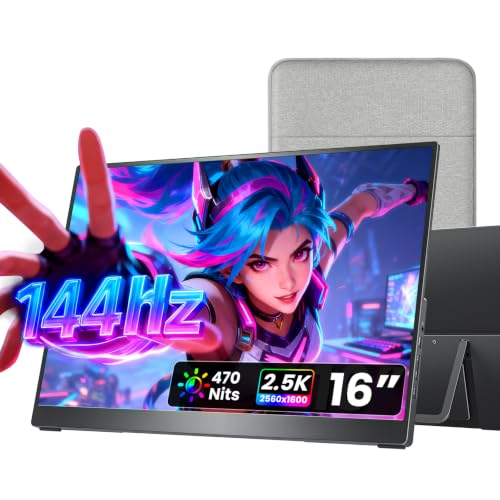
VisionOwl Portable Monitor 16 Inch 2.5K QHD 144Hz, 470 Nits

Our verdict: The sharpest, brightest 16-inch panel in the roundup, with a metal body that suits a laptop bag.

This is a 16-inch 2560x1600 panel running at 144Hz with a 470 nit peak, which is the figure that matters most for working near a window or in a bright cafe. Most portable screens stall around 250 to 300 nits and wash out fast. It covers 110% sRGB, has a metal chassis, and offers full-size HDMI plus two USB-C ports.

It edges the cocopar below on the brightness figure and on vertical room, since the 16:10 shape gives you more rows of text than a 16:9 screen of the same width. The tradeoff is the same one every 16-inch 2.5K panel carries: small UI elements at native scale. If you never touch scaling settings, expect to bump it to 125 or 150 percent.

Buy it if one portable screen has to handle spreadsheets, code and the odd film on the road. Skip it if you are happy with a plain 1080p panel and want to save money.

Panel
16 in, 2560x1600, 144Hz
Brightness
470 nits
Color
110% sRGB
Ports
HDMI + 2x USB-C, VESA

What we like

  • +470 nits stays readable near windows
  • +Taller 16:10 shape fits more rows
  • +Metal chassis feels solid in a bag
  • +Two USB-C ports plus full HDMI

Watch out for

  • −UI scaling is needed at 16 inches
  • −Costs more than 1080p portables

Buy it if: Remote workers who want one sharp, bright screen for laptop plus travel.

Skip it if: You only read email and would rather buy a cheaper 1080p panel.

2

Best Proven Pick

cocopar Portable Monitor 16 Inch 2.5K QHD 110% sRGB 144Hz USB-C, 120Hz HDMI

Our verdict: Same 16-inch 2.5K class as the winner, from the brand with the longest owner track record here.

The cocopar 16 Inch matches the leader on panel size, 2560x1600 resolution, 110% sRGB and a metal body, with a full-size HDMI port, two USB-C ports and dual VESA holes. The listing is explicit about the refresh split: 144Hz over USB-C and 120Hz over HDMI.

That split is why it sits second. Pull a video signal over HDMI and you lose 24Hz compared with the USB-C connection, and it does not state a nit figure as clearly as the VisionOwl. If your laptop only has an HDMI output, the practical gap is small, but brightness-sensitive buyers should lean the other way.

Choose it when you value the most widely reviewed 2.5K model over the last bit of headline brightness. Be aware that you need a USB-C port with display output to hit 144Hz.

Panel
16 in, 2560x1600
Refresh
144Hz USB-C, 120Hz HDMI
Color
110% sRGB
Ports
HDMI + 2x USB-C, dual VESA

What we like

  • +Metal chassis with dual VESA holes
  • +144Hz over a single USB-C link
  • +Full-size HDMI for older laptops
  • +Widely reviewed 2.5K model

Watch out for

  • −HDMI caps refresh at 120Hz
  • −Brightness is not as clearly stated

Buy it if: Buyers who want the familiar, most-reviewed 2.5K panel.

Skip it if: You work in bright rooms and need the highest nit rating.

3

Best for Color Work

Upperizon Portable Monitor 16 inch 2K QHD 145% sRGB, 144Hz USB-C, 120Hz HDMI

Our verdict: The widest gamut of any 16-inch pick, at 145% sRGB and 100% DCI-P3, in a 1.6 lb aluminum shell.

Where the first two aim for balance, this Upperizon aims at color. It lists 145% sRGB and 100% DCI-P3 on a 2560x1600 panel, still running at 144Hz over USB-C and 120Hz over HDMI. The aluminum chassis weighs 1.6 lb and is VESA compatible.

It ranks third rather than first because a gamut figure above 100% sRGB does not make colors more accurate. On a laptop with a standard sRGB profile, over-wide panels can look oversaturated unless you switch the monitor to a restricted mode. Photo and video editors who work in DCI-P3 will benefit most.

Buy it if you edit stills or video on the road and want the widest gamut in a light body. Plain office users gain nothing from it.

Panel
16 in, 2560x1600
Color
145% sRGB, 100% DCI-P3
Weight
1.6 lb, aluminum
Refresh
144Hz USB-C, 120Hz HDMI

What we like

  • +Widest gamut among 16-inch picks
  • +Light 1.6 lb aluminum body
  • +100% DCI-P3 suits video editors
  • +144Hz available over USB-C

Watch out for

  • −Wide gamut can look oversaturated
  • −Brightness is not a headline spec

Buy it if: Photo and video editors working away from a desk.

Skip it if: You only run documents and want accurate default colors.

4

Best Large Screen

VisionOwl Portable Monitor 18.5 Inch 2K QHD 120Hz Second Screen

Our verdict: A bigger 2K canvas that needs far less scaling, with up to 500 nits and 120% sRGB.

At 18.5 inches this is the largest portable here, with a 2K QHD panel at 120Hz and up to 500 nits. It offers 120% sRGB, a metal backplate, full-size HDMI, two USB-C ports and a 75x75mm VESA pattern.

It lands fourth because a bigger panel is a different kind of travel companion. QHD across 18.5 inches works out to about 159 pixels per inch, which reads comfortably at 100 percent scale, a clear advantage over the 16-inch models. The cost is bulk: it lives in a backpack rather than a slim laptop sleeve, and refresh tops out at 120Hz.

It is the right pick for a hybrid desk where this screen stays plugged in most days and travels occasionally. Frequent flyers should stay with the 16-inch models.

Panel
18.5 in 2K QHD, 120Hz
Brightness
Up to 500 nits
Color
120% sRGB
Ports
HDMI + 2x USB-C, 75x75 VESA

What we like

  • +Up to 500 nits, brightest here
  • +Readable at native scale
  • +Metal backplate adds rigidity
  • +Full-size HDMI and two USB-C

Watch out for

  • −Bulkier than the 16-inch models
  • −Refresh caps at 120Hz

Buy it if: Hybrid workers who want a roomy second screen that occasionally travels.

Skip it if: You carry it daily in a slim laptop sleeve.

5

Best Budget Large Screen

cocopar Portable Monitor 18.5 Inch 2K QHD 120Hz 120% sRGB

Our verdict: Large-screen 2K at a friendlier price, if you can live without a stated brightness peak.

The cocopar 18.5 Inch shares the VisionOwl's size and 120% sRGB gamut, and its 2K QHD panel also runs at 120Hz. It weighs 2.48 lb, has full-size HDMI plus two USB-C ports, and combines a 75x75mm VESA pattern with a built-in kickstand.

It sits one place below the VisionOwl 18.5 because the listing does not advertise a brightness peak, and brightness is the spec that separates portable screens in sunlit rooms. The built-in kickstand is a real bonus on a cafe table, though: no separate cover needed.

Pick it if you want the large-format 2K experience and will use it mostly indoors. If you need the extra brightness, move up one rank.

Panel
18.5 in 2K QHD, 120Hz
Color
120% sRGB
Weight
2.48 lb
Stand
Kickstand + 75x75 VESA

What we like

  • +Large 2K canvas for the money
  • +Built-in kickstand needs no cover
  • +Two USB-C ports plus HDMI
  • +VESA compatible for desk arms

Watch out for

  • −No stated peak brightness figure
  • −Heavier than any 16-inch pick

Buy it if: Budget buyers who want a big, sharp indoor second screen.

Skip it if: You regularly work in bright light or outdoors.

6

Best with Included Adapter

Upperizon Portable Monitor 16 inch 2K QHD 106% sRGB, 144Hz USB-C, 120Hz HDMI

Our verdict: A plain 16-inch 2.5K panel that ships with a 30W power adapter and a smart cover.

This Upperizon is the same 2560x1600 size at 16 inches, with 106% sRGB, 144Hz over USB-C and 120Hz over HDMI. The differentiator is the box: a 30W PD adapter and a smart cover are included, along with a 75x75mm VESA mount.

The adapter matters more than it sounds. A portable monitor drawing power from a laptop's USB-C port can drain the battery quickly, and a laptop that cannot supply enough power may leave the screen dim or flickering. Having a wall adapter in the box avoids hunting for a compatible one.

It ranks last because its gamut and brightness are unremarkable next to the leaders, but for someone buying a first portable screen, the included accessories trim the extra spend.

Panel
16 in, 2560x1600
Color
106% sRGB
In the box
30W PD adapter + smart cover
Refresh
144Hz USB-C, 120Hz HDMI

What we like

  • +Includes a 30W PD adapter
  • +Smart cover doubles as a stand
  • +Same 2.5K resolution as pricier picks
  • +VESA 75x75 mounting

Watch out for

  • −Color gamut is modest
  • −No standout brightness spec

Buy it if: First-time buyers who want everything needed in the box.

Skip it if: You edit photos or want the highest brightness.

Methodology

How We Ranked These

Pixel density at size

We compared resolution to diagonal, since 2560x1600 at 16 inches and QHD at 18.5 inches produce very different pixels per inch and scaling needs.

Brightness in nits

Peak nits were weighed against realistic use, because a screen under 300 nits struggles near windows and outdoors.

Connection and refresh

We checked USB-C versus HDMI refresh rates, the number of USB-C ports, and whether single-cable power is plausible from a laptop.

Build and carry weight

Metal versus plastic bodies, listed weight and stand design were compared on the spec sheets.

Value within the field

Included accessories, VESA support and panel quality were scored against each price bracket in this guide.

Every Primea Score uses the same weights: Performance 30% · Build & Materials 20% · Everyday Usability 20% · Value 20% · Owner Satisfaction 10%. Full scoring rules

Buyer's guide

How to Pick the Right One for You

By Screen Size

Start with how far you carry it and how much room you need.

Your priorityOur pick
Sharpest 16-inch, brightestVisionOwl Portable Monitor 16 Inch 2.5K QHD 144Hz, 470 Nits
Most proven 16-inchcocopar Portable Monitor 16 Inch 2.5K QHD 110% sRGB 144Hz USB-C, 120Hz HDMI
Biggest canvas, brightestVisionOwl Portable Monitor 18.5 Inch 2K QHD 120Hz Second Screen
Big screen, lower costcocopar Portable Monitor 18.5 Inch 2K QHD 120Hz 120% sRGB

By Budget

SpendOur pick
$100 to $200VisionOwl Portable Monitor 16 Inch 2.5K QHD 144Hz, 470 Nits
$100 to $200 (adapter included)Upperizon Portable Monitor 16 inch 2K QHD 106% sRGB, 144Hz USB-C, 120Hz HDMI
$200 to $500 (large screen)VisionOwl Portable Monitor 18.5 Inch 2K QHD 120Hz Second Screen
$200 to $500 (value large)cocopar Portable Monitor 18.5 Inch 2K QHD 120Hz 120% sRGB

16 Inch vs 18.5 Inch

16 inch

Fits a laptop sleeve, runs 144Hz over USB-C, and packs about 189 PPI. Expect to scale the interface up. Picks: VisionOwl 16, cocopar 16, Upperizon 145%, Upperizon 106%.

18.5 inch

About 159 PPI, so text reads at native scale, and the extra width suits side-by-side windows. It is heavier and tops out at 120Hz. Picks: VisionOwl 18.5, cocopar 18.5.

Default to 16 inches unless the monitor will mostly sit on a desk.

By Color Needs

Work typeOur pick
Office, coding, spreadsheetsVisionOwl Portable Monitor 16 Inch 2.5K QHD 144Hz, 470 Nits
Photo and video editingUpperizon Portable Monitor 16 inch 2K QHD 145% sRGB, 144Hz USB-C, 120Hz HDMI
Casual media and browsingcocopar Portable Monitor 18.5 Inch 2K QHD 120Hz 120% sRGB
Travel with bare minimum gearUpperizon Portable Monitor 16 inch 2K QHD 106% sRGB, 144Hz USB-C, 120Hz HDMI

For Working Outdoors or Near Windows Specifically

Look for

A published peak brightness of 450 nits or more, a matte surface, and a connection that can pull full power from a wall charger.

In this ranking

The VisionOwl 16 Inch at 470 nits, or the VisionOwl 18.5 Inch at up to 500 nits if you accept the larger size.

When to Spend More

Spend more if

You use the screen for hours daily, want 470 to 500 nits, or need the 18.5-inch canvas of the VisionOwl 18.5 Inch.

Save if

You mostly use it indoors for chat windows and email. The Upperizon 106% model includes a power adapter and covers the basics.

Questions

Frequently Asked Questions

Will a 2K portable monitor work with my laptop over USB-C?+

Only if the laptop's USB-C port supports DisplayPort Alt Mode or Thunderbolt. Many cheaper laptops use USB-C for charging only. If yours does not output video, use the full-size HDMI port on any monitor in this ranking.

Is 2.5K the same as 2K QHD?+

Marketing uses the terms loosely. The 16-inch models here are 2560x1600, often called 2.5K, while the 18.5-inch models are described as 2K QHD. Both are sharper than 1080p, so compare native resolution and screen size instead of the label.

Is a 2K portable monitor worth it over 1080p?+

On a 16-inch screen, yes if you read lots of text or edit images, because 189 PPI looks noticeably cleaner than 1080p. If you mainly show video calls or a chat window, 1080p saves money and battery.

How do I set it up with one cable?+

Connect a USB-C cable from a video-capable laptop port to one of the monitor's USB-C ports. If the screen dims or flickers, plug a charger into the second port so the monitor stops drawing from the laptop.

Why does text look tiny at native resolution?+

High pixel density packs pixels into a small area. In Windows or macOS, set display scaling to 125 or 150 percent on a 16-inch 2560x1600 panel. The 18.5-inch models need less scaling.

Can I mount these on a monitor arm?+

Several listings carry a 75x75mm VESA pattern, and the VisionOwl 16 and cocopar 16 list dual VESA holes. Check the arm's weight limit and bracket size, since portable monitors are thin and need a gentle clamp.

Final take

For most buyers the VisionOwl 16 Inch 2.5K is the one to get: 470 nits, 144Hz and a metal body that suits bags. The cocopar 16 Inch is the conservative choice if you value track record. Editors should go for the Upperizon 145% sRGB panel, and anyone who wants a roomy second screen for a hybrid desk should consider the VisionOwl 18.5 Inch. Whichever you pick, confirm your laptop's USB-C port can output video before you order.

More Ranked & Reviewed Guides