

Primea ReviewsAll Reviews

Primea Reviews is reader-supported. When you buy through our Amazon links we may earn a commission, at no extra cost to you. Rankings are set by our editors and never sold. Learn more

Ranked & Reviewed by Primea Reviews

The 7 Best Portable Monitors for MacBook Air of 2026, Ranked & Reviewed

By the Primea Editorial TeamUpdated November 4, 202610 min read7 products ranked
The 7 Best Portable Monitors for MacBook Air of 2026, Ranked & Reviewed

The short answer

The cocopar 16 inch 2.5K QHD is the sharpest, best-built portable screen for an Air owner who can spare the power. The Upperizon 16 inch 2K ships with its own 30W power adapter, which solves the battery question. For the lightest draw, the MNN 15.6 inch 1080p is the cheap, safe match, and the VisionOwl 18.5 inch gives the most screen space.

The Primea Scoreboard

Ranked & Reviewed

  1. A metal-bodied 16 inch 2.5K screen with a 16:10 shape, at 1.5 lb.

    93Outstanding
    Check price
  2. A 16 inch 2K QHD screen that ships with a 30W power adapter and a smart cover.

    91Excellent
    Check price
  3. The cheapest screen here, a 1080p 60Hz IPS panel that sips power.

    89Excellent
    Check price
  4. A 1080p screen with two VESA holes that doubles as a permanent desk monitor.

    87Excellent
    Check price
  5. An 18.5 inch FHD screen at 100Hz that trades portability for room to work.

    85Excellent
    Check price
  6. A 1080p IPS screen with a magnetic cover stand and mini HDMI, for USB-C connections.

    83Very Good
    Check price
  7. A 4K panel claiming 145% sRGB in a metal chassis, with the heaviest power demands.

    81Very Good
    Check price

A MacBook Air is a thin, quiet laptop with a small battery and few ports, and that shapes which portable monitor makes sense. A bus-powered monitor takes its electricity from the same USB-C port the laptop would use to charge, so a bright, high-resolution, high-refresh panel can drain the Air faster than you expect. Resolution is a power decision, not just a sharpness one.

We ranked seven portable monitors and scored them on the Primea framework, weighting power draw and connection options most heavily, then panel sharpness, color, weight and stand or mounting design. Every monitor here offers USB-C, and most add HDMI as a backup. Our rankings favour screens you can run comfortably from a thin laptop, with a power adapter when the panel demands it.

Before you buy

What Actually Matters

01

Power draw

A bus-powered monitor draws power from the laptop, and sharper, faster, brighter panels draw more. A thin laptop with a small battery loses runtime quickly. Check whether the listing includes a power adapter, and plan to plug the monitor into a wall charger when running a 2.5K or 4K panel at length.

02

Resolution and size

Resolution spread over screen size sets sharpness. A 1080p image on a 15.6 inch panel looks fine, but stretched over 18.5 inches it softens. Choose 2.5K or 2K QHD on 16 inches for crisp text. Check the pixel count in the listing, not just words like HD, because loose labels hide how sharp the screen really is.

03

Aspect ratio

16:10 panels, like the cocopar 16 inch, are taller than 16:9, which gives more room for documents and web pages. The difference shows most in spreadsheets and writing, where each extra line saves scrolling. Look for 16:10 in the title or specs, since many listings only name the screen size and leave the shape for you to infer from the photos.

04

Ports and cables

USB-C carries power and video together over one cable, while HDMI is a backup that needs separate power. Mini-HDMI needs an adapter. Dual USB-C ports let you pass power through. Check the exact connectors in the listing and what cables ship in the box, since a short cable can force the monitor into an awkward spot beside the laptop.

05

Weight and mounting

A 1.5 lb screen disappears in a laptop bag, while a 2.7 lb screen does not. VESA holes let you mount the monitor on an arm, and a cover stand folds flat for travel. Match the design to how often the screen moves and where it will live, and check the listed weight, because that figure rarely includes the cover.

In-depth reviews

Our Ranked Picks, Reviewed

1

Best Overall

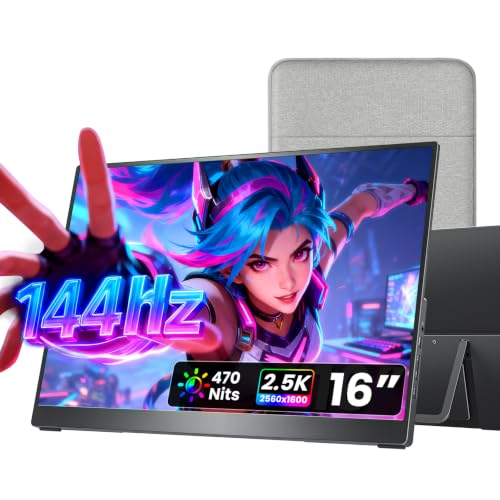
cocopar Portable Monitor 16 Inch 2.5K QHD 110% sRGB 144Hz USB-C, 120Hz HDMI

Our verdict: A metal-bodied 16 inch 2.5K screen with a 16:10 shape, at 1.5 lb.

The cocopar is a 16 inch 2.5K QHD panel in 16:10, taller than a 16:9 screen, so documents show more lines without scrolling. It covers 110% sRGB, sits in a metal chassis, adds dual USB-C and full-size HDMI, offers dual VESA holes and weighs 1.5 lb.

It ranks first because it is the sharpest and best built of the group, and 16:10 gives you more vertical room than the 16:9 screens. The cost is power: a 2.5K panel at high refresh draws more from the laptop than a 1080p screen, so plug the monitor into its own charger when you can. Against the Upperizon it is lighter on paper but includes no adapter.

Best for Air owners who work with documents and spreadsheets and want crisp text. Pair it with a wall charger.

Panel
16 in 2.5K QHD, 16:10
Color
110% sRGB
Ports
Dual USB-C + HDMI
Weight
1.5 lb

What we like

  • +Sharp 2.5K 16:10 panel
  • +Metal chassis
  • +Dual USB-C plus full HDMI
  • +Light at 1.5 lb

Watch out for

  • −Higher power draw from the laptop
  • −No power adapter listed
  • −Priced at $100 to $200

Buy it if: Air owners who want the sharpest portable screen for documents.

Skip it if: You want the lightest power draw on a small battery.

2

Best Bundle

Upperizon Portable Monitor 16 inch 2K QHD 106% sRGB, 144Hz USB-C, 120Hz HDMI

Our verdict: A 16 inch 2K QHD screen that ships with a 30W power adapter and a smart cover.

Upperizon offers a 16 inch 2K QHD panel at 144Hz over USB-C and 120Hz over HDMI, 106% sRGB in an aluminum body, a 75x75mm VESA pattern, a smart cover and a 30W PD adapter in the box. Weight is 1.76 lb.

It ranks second because the included 30W adapter answers the question this guide keeps asking: where does the power come from? Plug the adapter into the monitor and the Air only supplies a signal. It trails the cocopar on color by 4 points and weighs 0.26 lb more, but it costs less in the same $100 to $200 bracket.

It suits travellers who want a screen that works without draining the laptop. Keep the adapter in the bag.

Panel
16 in 2K QHD
Refresh
144Hz USB-C, 120Hz HDMI
Power
30W PD adapter included
Weight
1.76 lb

What we like

  • +30W adapter in the box
  • +Aluminum body
  • +High refresh on USB-C
  • +VESA 75x75 and smart cover

Watch out for

  • −Slightly heavier than cocopar
  • −Lower color coverage at 106% sRGB
  • −Another cable to carry

Buy it if: Travellers who want power sorted without buying a charger.

Skip it if: You want the lightest possible kit.

3

Best Budget

MNN 15.6" FHD 60Hz Portable Monitor USB-C HDMI IPS HDR Gaming Laptop

Our verdict: The cheapest screen here, a 1080p 60Hz IPS panel that sips power.

MNN gives you a 15.6 inch 1080p IPS panel at 60Hz with an HDR mode, dual USB-C plus HDMI, multiple display modes and a smart cover stand, at the lowest price in this guide, between $25 and $50.

It ranks third because it is the safest power match for a thin laptop: 1080p at 60Hz asks the least of the port. It is also plain, with no stated color coverage or weight, and the panel is less sharp than the 16 inch screens above. Against the KYY, which sits in the same class, it adds HDR mode and a lower price.

A smart first monitor for an Air. If you want crisp text, go up to the cocopar.

Panel
15.6 in FHD IPS, 60Hz
Ports
Dual USB-C + HDMI
Extras
HDR mode, smart cover stand
Price tier
$25 to $50

What we like

  • +Lowest price in the guide
  • +Light load on the laptop
  • +Dual USB-C plus HDMI
  • +Smart cover doubles as stand

Watch out for

  • −Only 1080p at 60Hz
  • −Weight and color not listed
  • −No VESA mounting listed

Buy it if: First-time portable monitor buyers watching battery and budget.

Skip it if: You want a sharper panel or wall mounting.

4

Best for Desk Mounting

cocopar Portable Monitor 15.6 Inch 1080P FHD 60Hz 85% sRGB

Our verdict: A 1080p screen with two VESA holes that doubles as a permanent desk monitor.

This cocopar is a 15.6 inch 1080p panel at 60Hz covering 85% sRGB, with full-size HDMI, dual USB-C, two VESA mounting holes and a weight of 1.5 lb without the cover.

It ranks fourth because the color coverage of 85% sRGB is the lowest on the list, so colors look slightly muted next to the 106% and 110% panels. What it gains is mounting: the VESA holes let you fix it to an arm, turning it into a lightweight second screen. It sits in the $100 to $200 bracket while the MNN is far cheaper for a similar resolution, so you are paying for the mounting.

Choose it if the monitor will stay at a desk on an arm. Photographers should aim higher.

Panel
15.6 in 1080p, 60Hz
Color
85% sRGB
Mounting
2 VESA holes
Weight
1.5 lb without cover

What we like

  • +VESA-mountable design
  • +Light at 1.5 lb
  • +Dual USB-C plus full HDMI
  • +Low power 1080p panel

Watch out for

  • −Lowest color coverage at 85%
  • −Costs more than the MNN
  • −Only 60Hz refresh

Buy it if: Desk setups that mount the screen on an arm.

Skip it if: Color accuracy matters or you only travel with it.

5

Best Big Screen

VisionOwl Portable Monitor for Laptop, 18.5 Inch FHD 100Hz

Our verdict: An 18.5 inch FHD screen at 100Hz that trades portability for room to work.

VisionOwl stretches to 18.5 inches at 1080p and 100Hz with 125% sRGB, full-size HDMI, dual USB-C, a 75x75mm VESA pattern, a kickstand and a weight of 2.7 lb.

It ranks fifth because the size that makes it attractive also makes it clumsy: 2.7 lb is nearly double the 1.5 lb cocopar, and the same 1080p resolution is stretched over a larger panel, so text is softer than on the 16 inch QHD screens. In return you get the most screen real estate and the second-highest color coverage at 125% sRGB.

A good choice for a home desk or a hotel stay with a table. Not for a laptop bag in a hurry.

Panel
18.5 in FHD, 100Hz
Color
125% sRGB
Mounting
75x75mm VESA + kickstand
Weight
2.7 lb

What we like

  • +Largest screen in the guide
  • +125% sRGB color coverage
  • +100Hz refresh
  • +Kickstand and VESA mounting

Watch out for

  • −Heaviest at 2.7 lb
  • −1080p on a large panel is softer
  • −Awkward to carry daily

Buy it if: Home desks and hotel stays where screen size matters most.

Skip it if: You carry the monitor every day.

6

Best USB-C Only Budget

KYY Portable Monitor 15.6" 1080P Computer Monitor Screen Extender w/Cover

Our verdict: A 1080p IPS screen with a magnetic cover stand and mini HDMI, for USB-C connections.

KYY offers a 15.6 inch 1080p IPS panel with two USB-C ports, a mini-HDMI input, a magnetic smart cover stand and a weight of 1.7 lb, in the $50 to $100 bracket.

It ranks sixth because it is the budget monitor with the least to distinguish it: the MNN is cheaper and adds HDR mode and a full-size HDMI port, while the KYY uses mini-HDMI, which needs an adapter cable. It is aimed at Air owners connecting over USB-C who do not need VESA mounting, and the magnetic cover makes setup quick.

A fair buy for a USB-C-only workflow. Price-sensitive buyers should compare it with the MNN.

Panel
15.6 in 1080p IPS
Ports
2x USB-C + mini-HDMI
Stand
Magnetic smart cover
Weight
1.7 lb

What we like

  • +Two USB-C ports
  • +Magnetic cover stand
  • +Light at 1.7 lb
  • +Low power 1080p panel

Watch out for

  • −Mini-HDMI needs a cable
  • −No VESA mounting
  • −Costs more than the MNN

Buy it if: USB-C-only setups that value quick setup.

Skip it if: You need mounting or full-size HDMI.

7

Best Color

VisionOwl Portable Monitor 15.6 Inch 4K UHD 145% sRGB

Our verdict: A 4K panel claiming 145% sRGB in a metal chassis, with the heaviest power demands.

This VisionOwl packs 4K UHD resolution into 15.6 inches with 145% sRGB claimed, a full metal chassis, 75x75mm VESA mounting, USB-C and full-size HDMI, and a built-in kickstand. It is the priciest panel here, above $200.

Last place comes from power: 4K at this size is the hungriest for power, and a thin laptop with a small battery is where that hurts most. The 145% sRGB figure is a claim, and wider gamut is only useful for color-sensitive work. For the money you could buy a cocopar and an adapter. Next to the Upperizon, it lacks a power adapter in the listing.

Only worth it for occasional color-sensitive work. Others should buy a 16 inch QHD.

Panel
15.6 in 4K UHD
Color
145% sRGB claimed
Build
Full metal chassis
Mounting
75x75mm VESA + kickstand

What we like

  • +Sharpest 4K panel in the guide
  • +Claimed 145% sRGB coverage
  • +Full metal chassis
  • +Built-in kickstand

Watch out for

  • −Heaviest power demand
  • −Priciest at $200 to $500
  • −Color figure is a claim

Buy it if: Occasional color-sensitive work on a desk with power.

Skip it if: You run on battery or want value.

Methodology

How We Ranked These

Power draw and connection

We assessed how hard each panel is likely to work the laptop's USB-C port, based on resolution, refresh rate and whether a power adapter ships.

Sharpness and shape

Resolution and aspect ratio were compared, favouring 16:10 and QHD panels for document work.

Color

Stated sRGB coverage from 85% to 145% was compared, with claims treated cautiously.

Weight and stand design

Weight from 1.5 to 2.7 lb, kickstands, covers and VESA mounting were weighed for travel and desk use.

Value

Price brackets from $25 to $500 were weighed against panel quality and included extras.

Every Primea Score uses the same weights: Performance 30% · Build & Materials 20% · Everyday Usability 20% · Value 20% · Owner Satisfaction 10%. Full scoring rules

Buyer's guide

How to Pick the Right One for You

By Resolution

Sharpness and power draw rise together.

ResolutionOur pick
1080p, lowest powerMNN 15.6" FHD 60Hz Portable Monitor USB-C HDMI IPS HDR Gaming Laptop
1080p, VESA mountablecocopar Portable Monitor 15.6 Inch 1080P FHD 60Hz 85% sRGB
1080p, 18.5 inchVisionOwl Portable Monitor for Laptop, 18.5 Inch FHD 100Hz
2K QHD, adapter includedUpperizon Portable Monitor 16 inch 2K QHD 106% sRGB, 144Hz USB-C, 120Hz HDMI
2.5K QHDcocopar Portable Monitor 16 Inch 2.5K QHD 110% sRGB 144Hz USB-C, 120Hz HDMI

By Budget

SpendOur pick
$25 to $50MNN 15.6" FHD 60Hz Portable Monitor USB-C HDMI IPS HDR Gaming Laptop
$50 to $100KYY Portable Monitor 15.6" 1080P Computer Monitor Screen Extender w/Cover
$100 to $200, sharpestcocopar Portable Monitor 16 Inch 2.5K QHD 110% sRGB 144Hz USB-C, 120Hz HDMI
$100 to $200, adapter in boxUpperizon Portable Monitor 16 inch 2K QHD 106% sRGB, 144Hz USB-C, 120Hz HDMI
$200 to $500VisionOwl Portable Monitor 15.6 Inch 4K UHD 145% sRGB

Bus-Powered vs Wall-Powered

Bus-powered

One cable from the Air does everything, but the battery drains faster with sharper panels. Best with 1080p screens: MNN, KYY and cocopar 15.6 inch.

Wall-powered

A separate adapter runs the screen so the Air supplies only the signal. The Upperizon ships with one, and the cocopar 16 inch and VisionOwl 4K benefit from one.

Default to bus power for 1080p screens and wall power for QHD and 4K.

By Weight and Size

NeedOur pick
Lightest at 1.5 lbcocopar Portable Monitor 16 Inch 2.5K QHD 110% sRGB 144Hz USB-C, 120Hz HDMI
1.7 lb, USB-C onlyKYY Portable Monitor 15.6" 1080P Computer Monitor Screen Extender w/Cover
1.76 lb, adapter includedUpperizon Portable Monitor 16 inch 2K QHD 106% sRGB, 144Hz USB-C, 120Hz HDMI
Largest at 18.5 inchesVisionOwl Portable Monitor for Laptop, 18.5 Inch FHD 100Hz
Metal 4KVisionOwl Portable Monitor 15.6 Inch 4K UHD 145% sRGB

For Travelling Light Specifically

Look for

A weight near 1.5 lb, a cover that folds into a stand, USB-C power and video on one cable, and a modest resolution that spares the battery.

In this ranking

The MNN 15.6 inch for the lowest draw, or the cocopar 16 inch at 1.5 lb if you will carry a charger.

When to Spend More

Spend more if

You work on documents all day and want sharper text and 16:10 proportions. That is the cocopar 16 inch 2.5K.

Save if

You mostly mirror slides or browse. The MNN gives a decent 1080p IPS screen in the lowest price tier.

Questions

Frequently Asked Questions

Will a portable monitor drain my MacBook Air battery?+

It can, especially with sharper panels. The MNN 1080p screen asks little of the port, while the cocopar 2.5K and VisionOwl 4K draw more. The Upperizon ships a 30W adapter, so the Air supplies only the signal.

What mistake do buyers make?+

Buying for resolution without checking power. A 4K screen like the VisionOwl 15.6 inch looks impressive in specs, but on a thin laptop with limited ports it can shorten battery life noticeably.

Is the cocopar 16 inch worth it over the MNN?+

For document work, yes. The cocopar has a 2.5K 16:10 panel in a metal body at 1.5 lb. The MNN costs far less and sips power, so it is the better pick for light use.

How do I set up a portable monitor?+

Connect one USB-C cable from the monitor to the laptop, then arrange displays in System Settings. If the screen stays dark, try the HDMI port with an adapter, or plug a wall charger into the monitor's second USB-C port.

How do I carry a portable monitor safely?+

Keep it in its cover and slide it into a padded laptop sleeve. Covers on the MNN and KYY double as stands, while the metal chassis on the cocopar and VisionOwl 4K resists bending.

Do I need HDMI if I have USB-C?+

Not usually. USB-C carries power and video together on every monitor here. HDMI is a backup for other devices, though the KYY uses mini-HDMI and needs a cable adapter.

Final take

For most MacBook Air owners, the cocopar 16 inch 2.5K QHD is the best portable monitor: sharp, light and well built, as long as you have a charger for it. Buy the Upperizon if you want a power adapter in the box, the MNN if battery and budget matter most, and the VisionOwl 18.5 inch if size beats portability. Skip the 4K VisionOwl unless color work justifies the draw.

More Ranked & Reviewed Guides