
Primea ReviewsAll Reviews

Primea Reviews is reader-supported. When you buy through our Amazon links we may earn a commission, at no extra cost to you. Rankings are set by our editors and never sold. Learn more

Ranked & Reviewed by Primea Reviews

The 6 Best Portable Docking Stations for Remote Work of 2026, Ranked & Reviewed

By the Primea Editorial TeamUpdated November 1, 202610 min read6 products ranked
The 6 Best Portable Docking Stations for Remote Work of 2026, Ranked & Reviewed

The short answer

The UGREEN Revodok Pro 210 is the best overall, a bus-powered 10-in-1 with dual HDMI, gigabit ethernet and 100W pass-through. The 14-in-1 adapter has the most ports, and the UGREEN 7-in-1 gives dual 4K at 60Hz with 10Gbps data. The Anker 13-in-1 is the only triple display dock, and the Anker Nano is the most compact but drives one screen.

The Primea Scoreboard

Ranked & Reviewed

  1. Light, bus-powered and still carries dual HDMI plus 100W pass-through.

    94Outstanding
    Check price
  2. Most ports in the group without needing an outlet.

    90Excellent
    Check price
  3. Real dual 4K@60Hz in a small aluminum shell.

    87Excellent
    Check price
  4. The only pick that drives three screens.

    84Very Good
    Check price
  5. A compact Anker with two HDMI outputs and 85W charging.

    81Very Good
    Check price
  6. The smallest dock here, built for a single external display.

    78Very Good
    Check price

Remote workers tend to count ports on a dock and ignore video bandwidth. A 14-in-1 label means little if your laptop's single USB-C video lane has to split between two monitors, and two screens on one cable often fall to a lower refresh rate than the box promises. For a dock that travels in a bag, weight, power source and honest video specs outrank a long port list.

Our editors reviewed six USB-C docks suited to a laptop bag, a hotel desk or a shared co-working table. Scores weigh display output, pass-through wattage, bus-powered operation, data speeds and how clearly each listing states them. Where the title promises more than the specs deliver, as with one Anker Nano, the pick is marked down.

Before you buy

What Actually Matters

01

Display bandwidth

A USB-C port carries a fixed video bandwidth. Two 4K screens at 60Hz can strain it, and some laptops only support one video stream. Check your laptop's video-out spec and the dock's stated resolution per screen. A dock cannot create bandwidth your laptop does not provide, which is where most disappointment starts, so read the laptop manual or spec page first.

02

Pass-through wattage

The dock forwards power to the laptop, and the wattage must match what your charger delivers. A 100W dock charges larger laptops fully, while 85W may slow them under load. Compare the listed PD wattage with your charger and laptop. The Revodok docks list 100W, and the Anker docks list 85W, so match the dock to the charger you already carry.

03

Bus-powered operation

Bus-powered docks draw power from the laptop or the charger, so no extra brick is needed. That saves bag weight and a wall socket. Check the listing for whether a separate adapter is required. A bus-powered dock with many peripherals can strain the supply, so heavy drives may need a powered hub, or a wall adapter if the dock accepts one.

04

Data port speed

Ten gigabit ports move large files faster than 5Gbps ones, which matters for external SSDs and backups. Look for the Gbps figure beside each USB port, because docks often mix speeds, and the USB-C port may be faster than the USB-A ports. The 7-in-1 UGREEN lists 10Gbps on both USB types, while the Revodok Pro 210 lists 5Gbps.

05

Ethernet and card reader

Hotels and offices often have shaky Wi-Fi, so a gigabit port helps. A card reader helps photographers and videographers. Confirm both are listed as individual ports, not just in the title. The 7-in-1 UGREEN has neither, which is a real gap for travel, and the Nano lists only a card slot, with no network jack.

In-depth reviews

Our Ranked Picks, Reviewed

1

Best Overall

UGREEN 10-in-1 USB C Docking Station (Revodok Pro 210)

Our verdict: Light, bus-powered and still carries dual HDMI plus 100W pass-through.

The Revodok Pro 210 is a bus-powered 10-in-1 hub that runs two 4K displays at 60Hz or a single 8K display at 30Hz through dual HDMI. It adds gigabit ethernet, 5Gbps USB-C and USB-A ports, an SD and TF reader, and 100W pass-through charging. No wall adapter is needed, which keeps the bag light.

It beats the 7-in-1 UGREEN by adding ethernet and card slots, and it beats Anker's larger docks on weight and price. The tradeoff is that its USB ports run at 5Gbps, slower than the cheaper UGREEN's 10Gbps.

Buy it for hotel and co-working use. The caveat: a single video lane is shared between the two outputs, and your laptop must support dual video streams. It is a hub, not a Thunderbolt dock, and it sits in the $25 to $50 bucket.

Ports
10-in-1
Video
Dual 4K@60Hz or one 8K@30Hz
Charging
100W pass-through
Power
Bus-powered

What we like

  • +Dual HDMI output
  • +100W pass-through
  • +Gigabit ethernet
  • +No wall adapter

Watch out for

  • −5Gbps data only
  • −Single video lane shared

Buy it if: Travelers who want one dock for hotel and co-working use.

Skip it if: You need three displays.

2

Best Port Count

USB C Laptop Docking Station Dual Monitor, 14-in-1 Multiport Adapter

Our verdict: Most ports in the group without needing an outlet.

This 14-in-1 adapter is bus-powered and packs dual HDMI plus DisplayPort, gigabit ethernet, four USB-A ports, two USB-C ports, a 100W PD charging port, an SD and TF reader and audio. Fourteen ports let you leave a keyboard, mouse, headset, drive and card reader plugged in.

It ranks below the Revodok Pro 210 because the listing gives less detail on data speeds, and the brand is less established. It still leads on port count, in the same $25 to $50 bucket.

Choose it for a cafe or desk with many peripherals. Skip it if you want a name-brand warranty. The caveats are shared bandwidth, since all those ports sit behind one cable, and a body that will run warm with every port in use. Check return terms in case a unit proves flaky.

Ports
14-in-1
Video
Dual HDMI plus DisplayPort, 4K
USB
4 USB-A, 2 USB-C
Power
Bus-powered

What we like

  • +Fourteen ports
  • +100W PD port
  • +Bus-powered
  • +Gigabit ethernet

Watch out for

  • −Less brand clarity
  • −Shared bandwidth

Buy it if: Cafe workers with many peripherals.

Skip it if: You prefer a name-brand warranty.

3

Best Budget Dual 4K

UGREEN 7-in-1 Docking Station Dual Monitor (Revodok Pro)

Our verdict: Real dual 4K@60Hz in a small aluminum shell.

The 7-in-1 Revodok Pro offers dual 4K at 60Hz over HDMI, 10Gbps USB-A and USB-C data ports, 100W pass-through and an aluminum housing. It sits in the $25 to $50 bucket. The 10Gbps ports suit external SSDs and backups.

It ranks under the 10-in-1 because it drops ethernet and the card reader, but its data ports are faster than the 5Gbps ones on the pricier UGREEN. The aluminum case spreads heat better than plastic, which helps on long video calls.

Ideal if you want two monitors on a budget and care about fast storage. Skip it if you need wired internet on the road. The caveat: without ethernet, a hotel with poor Wi-Fi leaves you with no fallback, and there is no card slot for a camera.

Ports
7-in-1
Video
Dual 4K@60Hz HDMI
Data
10Gbps USB-A/C
Housing
Aluminum

What we like

  • +Dual 4K@60Hz
  • +10Gbps data ports
  • +100W pass-through
  • +Aluminum shell

Watch out for

  • −No ethernet port
  • −No card reader

Buy it if: Budget buyers wanting two monitors.

Skip it if: You need wired internet on the road.

4

Best Triple Display

Anker Laptop Docking Station, 13-in-1 Triple Display

Our verdict: The only pick that drives three screens.

Anker's 13-in-1 dock gives two HDMI outputs and one DisplayPort for triple displays, plus a 10Gbps USB-C port, slower 5Gbps USB-A ports, a wired network jack, a headphone jack and a memory card slot. It tops out at 85W of laptop charging, and Anker says it works with Dell, HP, Lenovo and others.

It ranks below the UGREENs for portability and price: it is the largest dock here and sits in the $100 to $200 bucket. It is also the only pick that drives three screens.

Buy it for a three-monitor co-working or home desk. Skip it if you pack light. The caveat: 85W of charging may slow a power-hungry laptop under load, and three screens still depend on your laptop supporting that many video streams.

Ports
13-in-1
Video
2x HDMI plus DisplayPort
Charging
85W
Price bucket
$100-200

What we like

  • +Triple display output
  • +Ethernet and audio
  • +Multi-brand compatibility
  • +10Gbps USB-C

Watch out for

  • −Bigger to carry
  • −Only 85W charging

Buy it if: Workers with a three-monitor co-working desk.

Skip it if: You pack light.

5

Best Mid-Range Dual HDMI

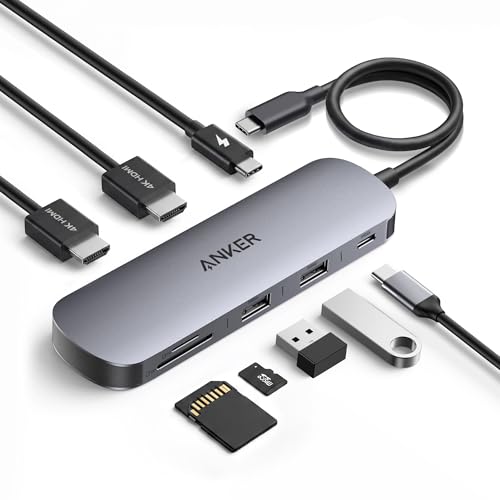
Anker Laptop Docking Station Dual Monitor, 8-in-1

Our verdict: A compact Anker with two HDMI outputs and 85W charging.

This Anker 8-in-1 hub has two HDMI ports for dual 4K output, 1Gbps ethernet, 85W power delivery and an SD card reader, in the $50 to $100 bucket. A recognisable brand with dock support is the argument for choosing it over cheaper rivals.

It ranks below the 7-in-1 UGREEN because it costs more and the listing says less about data speed. Against the 10-in-1 Revodok, it lacks the 100W pass-through.

Good for buyers who prefer Anker's support and want dual HDMI with ethernet. The caveats are modest charging wattage, which may slow a larger laptop under load, and a price premium over UGREEN. If you carry a 100W charger, the Revodok Pro 210 makes better use of it.

Ports
8-in-1
Video
Dual HDMI, 4K
Charging
85W
Ethernet
1Gbps

What we like

  • +Dual HDMI
  • +Ethernet included
  • +85W delivery
  • +Anker brand

Watch out for

  • −Costs more than UGREEN 7-in-1
  • −Modest wattage

Buy it if: Anker loyalists wanting dual HDMI.

Skip it if: You want 100W charging.

6

Most Compact

Anker Nano Laptop Docking Station Dual Monitor, 8-in-1

Our verdict: The smallest dock here, built for a single external display.

The Anker Nano is an 8-in-1 USB-C dock in a nano form factor with a 4K HDMI output at 60Hz, 10Gbps USB-C, two USB-A ports, 85W pass-through and an SD and TF reader. It is the smallest dock here and fits in a jacket pocket.

It ranks last because the listing shows one HDMI output despite the name Dual Monitor, so it does not match the dual-display picks. Size is its argument. The confusing title is also a warning to read the specifications, not the headline.

Buy it if you carry one external screen and want the lightest kit. Skip it if you need two monitors. The caveat: you pay for compactness with one display only, and 85W of charging suits a thin laptop better than a workstation.

Ports
8-in-1
Video
One 4K@60Hz HDMI
Charging
85W
Form factor
Nano

What we like

  • +Very small
  • +4K@60Hz HDMI
  • +10Gbps USB-C
  • +Card reader

Watch out for

  • −One display only
  • −Confusing title

Buy it if: Minimalist travelers with one screen.

Skip it if: You need two monitors.

Methodology

How We Ranked These

Display output

We counted real video outputs and resolutions, not just port labels.

Power delivery

Pass-through wattage was compared against typical laptop charger needs.

Data speed

5Gbps and 10Gbps ports were separated since storage use differs.

Portability

Bus-powered operation and size decided travel fit.

Port selection

Ethernet, card readers and USB mix were weighed by remote-work usefulness.

Every Primea Score uses the same weights: Performance 30% · Build & Materials 20% · Everyday Usability 20% · Value 20% · Owner Satisfaction 10%. Full scoring rules

Buyer's guide

How to Pick the Right One for You

By Number of Displays

Display count is the hard limit, so start here.

DisplaysOur pick
One monitor, light bagAnker Nano Laptop Docking Station 8-in-1
Two monitors, travelUGREEN 10-in-1 USB C Docking Station (Revodok Pro 210)
Two monitors, budgetUGREEN 7-in-1 Docking Station Dual Monitor
Three monitorsAnker Laptop Docking Station, 13-in-1 Triple Display

By Budget

SpendOur pick
$25-50, featuresUGREEN 10-in-1 USB C Docking Station (Revodok Pro 210)
$25-50, portsUSB C 14-in-1 Multiport Adapter
$50-100Anker Laptop Docking Station Dual Monitor, 8-in-1
$100-200Anker Laptop Docking Station, 13-in-1 Triple Display

Bus-Powered vs Wall-Powered

Bus-powered

No extra brick, lighter bag. The UGREEN 10-in-1 and the 14-in-1 adapter are listed this way.

Wall-powered

Can drive more screens and power but needs an outlet. The Anker 13-in-1 fits this style of use.

Travelers should default to bus-powered unless they need three displays.

By Peripheral Load

PeripheralsOur pick
Many USB-A devicesUSB C 14-in-1 Multiport Adapter
Fast external SSDUGREEN 7-in-1 Docking Station Dual Monitor
Wired internetUGREEN 10-in-1 USB C Docking Station (Revodok Pro 210)
SD card and ethernetAnker Laptop Docking Station, 13-in-1 Triple Display

For Hotel and Co-Working Desks Specifically

Look for

Bus-powered operation, ethernet, and a size that fits a laptop sleeve pocket.

In this ranking

The UGREEN 10-in-1 combines all three, while the Anker Nano wins on size alone.

When to Spend More

Spend more if

You need three screens, which points to the Anker 13-in-1, or a brand with a stronger support record.

Save if

Two screens are enough. The UGREEN 7-in-1 handles dual 4K in the $25-50 range.

Questions

Frequently Asked Questions

Will a dock work with my laptop?+

Your USB-C port needs to support video output (DisplayPort Alt Mode or Thunderbolt). Check the laptop's spec page, since some USB-C ports only carry data and charging. A lightning-bolt or DisplayPort symbol beside the port is a good sign.

What is the biggest mistake buyers make?+

Assuming two monitors always run at 4K@60Hz. Many laptops share video bandwidth, so a dock's headline resolution may not match what your machine delivers. Read the laptop spec before you buy, and test both screens during the return window.

Is a pricier dock worth it?+

Only if you need extra displays or want the better support of a known brand. For one or two screens, the cheaper UGREEN docks cover the basics, and the Anker 13-in-1 adds a third screen for desks that need it.

How do I set up dual monitors?+

Plug the dock into a USB-C port that supports video, connect each HDMI cable, then set arrangement in your OS display settings. Pick a refresh rate for each screen in the same menu, starting with 60Hz.

Do docks get hot?+

Bus-powered docks warm up under load, especially aluminum ones like the 7-in-1 UGREEN. Keep them ventilated and off soft surfaces, and unplug unused peripherals to reduce heat. A very hot case is worth a return.

Can I use a dock with a phone or tablet?+

Often yes for charging and some peripherals, but display output depends on the device. Check the phone or tablet's video-out support, and note that docks designed for laptops may not power small devices. Test charging before relying on it.

Final take

Buy the Revodok Pro 210 for general travel and remote work, the 7-in-1 for a budget dual monitor setup, and the Anker 13-in-1 only if you need three screens. Take the 14-in-1 for peripheral-heavy desks. Check your laptop's video-out spec before choosing any dock.

More Ranked & Reviewed Guides