

Primea ReviewsAll Reviews

Primea Reviews is reader-supported. When you buy through our Amazon links we may earn a commission, at no extra cost to you. Rankings are set by our editors and never sold. Learn more

Ranked & Reviewed by Primea Reviews

The 7 Best Mini Printers for Small Spaces of 2026, Ranked & Reviewed

By the Primea Editorial TeamUpdated November 1, 202610 min read7 products ranked
The 7 Best Mini Printers for Small Spaces of 2026, Ranked & Reviewed

The short answer

The Epson EcoTank ET-2800 is the best mini printer for frequent printers thanks to its refillable tanks, flatbed scanner and wireless printing. The Canon TR160 is the battery powered portable pick. Canon's TS4320 and TR4720 and the HP DeskJet 4355 cover the cartridge based middle, while two inkless thermal models suit tiny spaces.

The Primea Scoreboard

Ranked & Reviewed

  1. Refillable ink tanks, scanning and wireless printing for frequent printers.

    94Outstanding
    Check price
  2. A rechargeable battery lets it print away from an outlet.

    91Excellent
    Check price
  3. A small color inkjet with duplex printing and a scanner.

    88Excellent
    Check price
  4. Compact all-in-one with scan and copy and the HP Smart app.

    85Excellent
    Check price
  5. An auto document feeder for multi-page scanning in a compact body.

    82Very Good
    Check price
  6. Inkless thermal printing with a carry case and three paper rolls.

    80Very Good
    Check price
  7. The smallest option, with no ink cartridges to store.

    78Very Good
    Check price

Small printers hide their costs. The compact body that fits your shelf can quietly drain money in cartridges, while the inkless thermal model that tucks into a drawer cannot print color at all. Size is only one of four trade-offs, and it is rarely the one that bites later.

Seven compact printers made this ranking, from tank based inkjets to pocketable thermal units. Our editors scored them from listed specifications: ink system, scan and copy features, duplex support, connectivity and portability. Nothing here is based on print quality claims, since the sources give none.

Before you buy

What Actually Matters

01

Ink system

The ink system is how the printer stores and delivers ink. Cartridges are cheap upfront but expensive over time, tanks refill from bottles, and thermal printers need special paper instead. It matters because running costs outweigh purchase price for frequent users. Look for cartridge free or inkless wording in the listing title.

02

Scan and copy

Scan and copy means a built in flatbed that lets one device replace a separate scanner. It matters for forms, receipts and IDs in a small workspace. Check the title for scan and copy, and look for an automatic document feeder like the Canon TR4720 if you scan multi page stacks.

03

Duplex printing

Duplex printing is automatic two sided output. It saves paper and cuts the number of pages you handle. Among these printers, the Canon TS4320 lists it in the title. If you print long documents, look for the word duplex in the listing, since many compact models skip it.

04

Connectivity

Connectivity is how the printer receives jobs. Wireless suits a shared network, while Bluetooth suits a phone for the thermal models. It matters because setup and sharing depend on it. Confirm the listed connection type and whether an app such as HP Smart is required.

05

Portability

Portability is whether the printer can work away from a wall outlet. A rechargeable battery, as on the Canon TR160, makes travel printing possible. Look for battery power in the specs, and check the paper tray size, since the TR160's 50 sheet tray sets the practical print run.

In-depth reviews

Our Ranked Picks, Reviewed

1

Best Overall

Epson EcoTank ET-2800 Wireless Color All-in-One Cartridge-Free Ink Supertank Printer

Our verdict: Refillable ink tanks, scanning and wireless printing for frequent printers.

The Epson ET-2800 is a color all-in-one with refillable ink tanks instead of cartridges, plus a flatbed scanner and copier and wireless printing. It ships with startup ink bottles and sits in the $100 to $200 tier.

It wins because tanks go straight at the cost that hurts compact inkjets most: refills. The Canon TS4320 sits in a similar footprint class, but it runs on cartridges and comes in cheaper upfront, which is the whole trade. The Canon TR160 is more portable but has no scanner.

Buy it if you print color regularly from a small office or desk. Skip it if you print rarely, or if you need the smallest body possible, since the tank design makes it larger than the thermal and battery models.

Ink system
Refillable tanks
Functions
Print, scan, copy
Connectivity
Wireless
Price tier
$100 to $200

What we like

  • +Cartridge-free ink tanks
  • +Flatbed scanner
  • +Startup ink included
  • +Wireless printing

Watch out for

  • −Larger than thermal models
  • −Higher price tier

Buy it if: Small home offices that print color often.

Skip it if: You print rarely and need the smallest body.

2

Best Portable

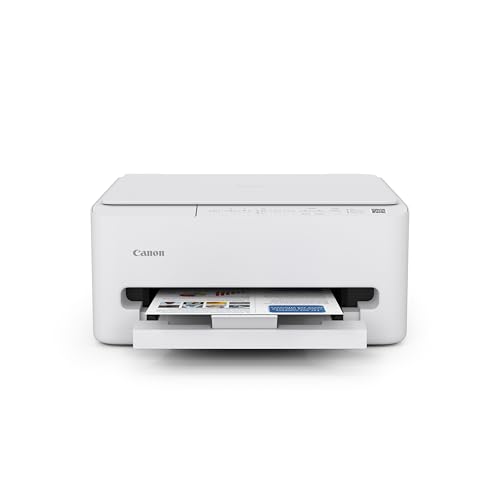
Canon PIXMA TR160 Wireless Portable Lightweight Compact Printer with Battery

Our verdict: A rechargeable battery lets it print away from an outlet.

The Canon TR160 is a portable wireless inkjet with a rechargeable battery, a 1.44 inch display and a 50 sheet paper tray. It lives in the $100 to $200 tier, the same as the Epson above it.

It takes second place because it is the only inkjet in the list that can print away from an outlet. The ET-2800 beats it on features because it offers a scanner and copier, which the TR160 lacks, and tanks over cartridges for running costs.

It suits people who print at home and sometimes on the road, at a hobby stall or in a rented room. The honest caveat is that it cannot scan or copy, so anyone who handles paperwork should look at the Canon TS4320 or Epson instead.

Power
Rechargeable battery
Tray
50 sheets
Display
1.44 in
Connectivity
Wireless

What we like

  • +Rechargeable battery
  • +Lightweight body
  • +50-sheet tray
  • +Wireless printing

Watch out for

  • −No scanner listed
  • −Higher price tier

Buy it if: People who print at home and on trips.

Skip it if: You need to scan or copy.

3

Most Compact Color Inkjet

Canon PIXMA TS4320 Wireless Color Inkjet Printer for Duplex Printing

Our verdict: A small color inkjet with duplex printing and a scanner.

The Canon TS4320 is the most compact true color inkjet here: duplex printing, a flatbed scanner and copier, wireless connectivity and easy setup, in the $50 to $100 tier. Duplex support lets it print on both sides of a page automatically.

It ranks third because it uses regular cartridges, which means ongoing cost over time, unlike the Epson. It beats the HP DeskJet 4355 on the duplex feature that the HP does not list, and it undercuts the Epson on price.

Choose it for a small desk that needs color, duplex and a scanner without the larger tank body. The caveat is cartridge spending and no document feeder, so multi page scans mean lifting the lid for each sheet.

Printing
Duplex
Functions
Print, scan, copy
Type
Color inkjet
Price tier
$50 to $100

What we like

  • +Duplex printing
  • +Flatbed scanner
  • +Compact design
  • +Easy setup

Watch out for

  • −Uses cartridges
  • −No document feeder

Buy it if: Small desks needing color and duplex.

Skip it if: You want to avoid cartridges.

4

Best for HP App Users

HP DeskJet 4355 Wireless All-in-One Color Inkjet Printer, Scanner, Copier

Our verdict: Compact all-in-one with scan and copy and the HP Smart app.

The HP DeskJet 4355 is a compact color all-in-one with scan and copy functions, wireless printing and HP Smart app support. It includes a 3 month Instant Ink trial and falls in the $50 to $100 tier.

It ranks fourth because the listing shows no duplex printing, which the Canon TS4320 offers, though the HP adds app control that makes setup and phone printing simpler. Against the TR4720, the HP is a lighter feature set without a document feeder or fax.

It suits small spaces that want basic all in one use and prefer an app driven setup. The honest caveat is that the Instant Ink trial is temporary, so factor in what you will actually pay for ink once the trial ends.

Functions
Print, scan, copy
App
HP Smart
Trial
3-month Instant Ink
Price tier
$50 to $100

What we like

  • +Scan and copy
  • +HP Smart app
  • +Wireless printing
  • +Compact design

Watch out for

  • −No duplex listed
  • −Trial is temporary

Buy it if: Small spaces needing basic all-in-one use.

Skip it if: You need duplex printing.

5

Best with Document Feeder

Canon PIXMA TR4720 All-in-One Wireless Printer with Auto Document Feeder

Our verdict: An auto document feeder for multi-page scanning in a compact body.

The Canon TR4720 is a compact wireless all-in-one with an auto document feeder and built in fax, listed in the $50 to $100 tier. The feeder is the headline: you can scan or copy a stack without lifting the lid for every page.

It sits fifth because the feeder adds bulk compared with the TS4320, and it uses cartridge ink. It is also the only printer in this ranking with fax, which will matter to a few buyers and no one else.

Buy it if you occasionally scan multi page documents, contracts or forms, and still need to keep the footprint small. Skip it if the smallest body is the priority. The caveat is that it feels larger than the TS4320, and the extra mechanism is wasted if you rarely scan.

Feeder
Auto document feeder
Fax
Built in
Connectivity
Wireless
Price tier
$50 to $100

What we like

  • +Auto document feeder
  • +Built-in fax
  • +Wireless printing
  • +Easy setup

Watch out for

  • −Bulkier than TS4320
  • −Cartridge ink

Buy it if: Multi-page scanning in a compact space.

Skip it if: You want the smallest footprint.

6

Best Thermal Kit

Gloryang Inkless Portable Printer, Wireless Thermal Printer with Carry Case

Our verdict: Inkless thermal printing with a carry case and three paper rolls.

The Gloryang is an inkless Bluetooth thermal printer that supports 8.5 by 11 inch thermal paper. It ships with a carry case and three paper rolls, and is listed in the $50 to $100 tier. There is no ink to buy or spill.

It ranks sixth because thermal printing is monochrome and needs special paper, which the inkjets above avoid. It beats the NDYIN on the bundled case and rolls, though it costs more.

It suits drawer storage and light printing, such as forms, shipping labels or school work in a tight space. The caveat is ongoing paper cost and the lack of scanning. If you ever need color or copies, one of the Canon or Epson all-in-ones is a better home.

Type
Inkless thermal
Paper
8.5 x 11 in
Includes
Case, 3 rolls
Connectivity
Bluetooth

What we like

  • +Inkless printing
  • +Carry case included
  • +3 paper rolls
  • +Lightweight body

Watch out for

  • −Thermal paper required
  • −No scanning

Buy it if: Drawer storage and light printing.

Skip it if: You need color.

7

Best Compact Thermal

NDYIN Portable Printer Wireless, N80 Bluetooth Inkless Thermal Printer

Our verdict: The smallest option, with no ink cartridges to store.

The NDYIN N80 is an inkless Bluetooth thermal printer supporting Letter and A4 thermal paper, with iOS, Android and laptop compatibility. It carries the lowest price tier in the ranking, at $25 to $50.

It ranks last because it ships without the Gloryang's carry case and bundled rolls, even though it is the cheaper of the two. It also shares the thermal limits: monochrome output, special paper and no scanning.

Buy it if you have almost no space, print occasionally from a phone and do not want ink cartridges around. Skip it if you want color or a scanner. The honest caveat is that thermal paper has to be restocked, so check what the paper costs before you commit.

Type
Inkless thermal
Paper
Letter and A4
Connectivity
Bluetooth
Price tier
$25 to $50

What we like

  • +No ink cartridges
  • +Letter and A4 support
  • +Works with iOS and Android
  • +Lowest price tier

Watch out for

  • −Thermal paper required
  • −No scanning

Buy it if: Tiny spaces with light printing.

Skip it if: You want color or scanning.

Methodology

How We Ranked These

Footprint

We compared compact design claims across the listings.

Ink system

Cartridge, tank and inkless thermal systems were compared.

Functions

Scan, copy, fax and duplex features were counted.

Connectivity

Wireless and Bluetooth options were checked.

Portability

Battery power and carry cases were weighed.

Every Primea Score uses the same weights: Performance 30% · Build & Materials 20% · Everyday Usability 20% · Value 20% · Owner Satisfaction 10%. Full scoring rules

Buyer's guide

How to Pick the Right One for You

By Printing Volume

Volume decides ink system.

If you printOur pick
Often in colorEpson EcoTank ET-2800
OccasionallyCanon PIXMA TS4320
Rarely, light useNDYIN N80 Bluetooth Inkless Thermal Printer

By Budget

SpendOur pick
$25 to $50NDYIN N80 Bluetooth Inkless Thermal Printer
$50 to $100Canon PIXMA TS4320
$100 to $200Epson EcoTank ET-2800

Inkjet vs Thermal

Inkjet

Color output and scanning: Epson ET-2800, Canon TS4320, HP DeskJet 4355.

Thermal

Inkless and tiny: NDYIN N80 and Gloryang.

Most buyers should choose inkjet unless storage space is the main problem.

By Extra Feature

If you needOur pick
Document feederCanon PIXMA TR4720
Battery powerCanon PIXMA TR160
Duplex printingCanon PIXMA TS4320

For Travel Specifically

Look for

A battery or carry case.

In this ranking

The Canon TR160 has a battery and the Gloryang includes a case.

When to Spend More

Spend more if

You want the refillable tanks of the Epson ET-2800.

Save if

You print rarely, as with the NDYIN.

Questions

Frequently Asked Questions

Do thermal printers need ink?+

No. The NDYIN N80 and Gloryang are inkless and use thermal paper instead. That saves cartridges but means you must keep stocking compatible paper, and output is monochrome.

What mistake do buyers make with mini printers?+

Ignoring ongoing ink cost. A cheap cartridge printer such as the Canon TS4320 can cost more over a year than the tank based Epson ET-2800 if you print a lot. Compare ink or paper costs.

Is the EcoTank worth it over the Canon TS4320?+

If you print often, the tanks target lower running costs, which is where compact inkjets hurt. If you print rarely, the Canon TS4320 costs less upfront and ink in the cartridges will not dry out as long.

How do I set one up?+

Use the maker's app or the printer display to join your Wi-Fi network, or pair over Bluetooth for the thermal models. The HP DeskJet 4355 works through HP Smart, and the Canon TR160 has a small display for setup.

How do I maintain it?+

Keep the printer covered and use only the paper types in the listed specs. Thermal models such as the Gloryang need thermal paper, and tank printers like the Epson should be printed regularly to keep ink flowing.

Can I print from a phone?+

Yes for the models that list it. The NDYIN N80 lists iOS and Android support, the Gloryang uses Bluetooth, and the HP DeskJet 4355 prints through the HP Smart app. Check the other listings for app details.

Final take

If you print often, the Epson ET-2800 is the one to buy, because its tanks attack running costs. The Canon TR160 is the travel friendly choice, and the TS4320 is the budget color all-in-one. Choose a thermal model only if drawer storage matters more than color, and always compare ink or paper costs before the sticker price.

More Ranked & Reviewed Guides