
Primea ReviewsAll Reviews

Primea Reviews is reader-supported. When you buy through our Amazon links we may earn a commission, at no extra cost to you. Rankings are set by our editors and never sold. Learn more

Ranked & Reviewed by Primea Reviews

The 7 Best Printers for Small Businesses of 2026, Ranked & Reviewed

By the Primea Editorial TeamUpdated November 1, 202611 min read7 products ranked
The 7 Best Printers for Small Businesses of 2026, Ranked & Reviewed

The short answer

The Brother DCP-L2640DW is the best overall, a compact mono laser with automatic duplex, copy and scan for text-heavy offices. The Brother HL-L3220CDW is the colour laser for client-facing work, and the HP OfficeJet Pro 8139 adds fax and a feeder. The Epson EcoTank ET-2400 and HP Smart Tank 651 cut ink cost, and the HL-L2405W and WF-2930 serve light budgets.

The Primea Scoreboard

Ranked & Reviewed

  1. A compact mono laser that prints, copies and scans with automatic two-sided output.

    94Outstanding
    Check price
  2. Professional color pages at up to 19 per minute with duplex and a 250-sheet tray.

    91Excellent
    Check price
  3. A color inkjet with an automatic document feeder, fax and duplex.

    88Excellent
    Check price
  4. A refillable ink tank that suits steady color printing.

    85Excellent
    Check price
  5. Ink tank economics with a document feeder, fax and two years of ink supplied.

    82Very Good
    Check price
  6. A small mono laser that only prints, and does it dependably.

    80Very Good
    Check price
  7. A cheap all-in-one with a feeder, duplex and fax for light use.

    78Very Good
    Check price

Small businesses tend to buy a printer on its sticker price and learn the real cost a year later in toner or ink. The cheapest unit is often the most expensive to run, and a colour printer used mostly for black text quietly wastes money. Matching the technology to what you print is the largest saving available, well ahead of any discount on the machine.

Our editors reviewed seven printers from their listings and ranked them on print technology, functions, duplex, document feeder and running cost. We give more weight to supply type than to the purchase price, because toner, cartridges and ink bottles decide long-term spend. Where a listing does not state a feature, such as duplex on the cheapest laser, we say so.

Before you buy

What Actually Matters

01

Laser vs inkjet vs ink tank

Lasers print black text cheaply and fast, inkjets handle colour and photos with pricier ink, and ink tank models refill cheaply but suit steady volume. Look for the technology word in the title and choose by what you print most. Check the tray size too. A laser is the default for text, and a tank suits colour output in volume.

02

Automatic duplex

Two-sided printing halves paper use and looks more professional on contracts and reports. Check for automatic duplex or auto 2-sided in the specifications rather than a manual option. The DCP-L2640DW, HL-L3220CDW, OfficeJet Pro 8139 and WF-2930 list it, while the HL-L2405W does not. Duplex also saves handling time on multi-page documents and keeps bundles slimmer.

03

Document feeder

An automatic document feeder scans or copies multi-page files without you placing each sheet. It saves time on paperwork, especially for stacks of invoices. Look for ADF or automatic document feeder in the listing. The OfficeJet Pro 8139, Smart Tank 651 and WF-2930 list one, while the ET-2400 scans from the glass.

04

Fax and scan needs

Some industries still use fax. If you do, check that the model lists it. Printers like the Brother HL-L2405W omit scanning and fax entirely, and the DCP-L2640DW scans but does not list fax. Confirm the function list before buying, since a missing function means buying a second device, which erases any saving.

05

Running cost

Cartridges, toner and ink bottles decide long-term spend. A cheap printer with expensive refills costs more over time. Check the supply type and any bundled ink on the listing, such as the two years on the Smart Tank 651. Add the cost of a first refill set to your budget. Compare page yields and refill prices before you commit to a model, and keep the first set of supplies in mind.

In-depth reviews

Our Ranked Picks, Reviewed

1

Best Overall

Brother DCP-L2640DW Wireless Compact Monochrome Laser

Our verdict: A compact mono laser that prints, copies and scans with automatic two-sided output.

The DCP-L2640DW is a wireless monochrome laser multifunction with automatic duplex printing, plus copy and scan. A laser fuses dry toner, so black text prints cheaply and does not smear, and the compact body suits a shared desk or counter. Automatic duplex halves paper use on contracts and statements.

It ranks first because most small business paper is black text, and a laser keeps the per-page cost low while the scanner covers day-to-day digitising. The HL-L2405W is cheaper but prints only, and the colour laser lacks scan and copy.

Buy it for a law office, accounting firm or other text-heavy service. The caveats: no colour printing, and the $200 to $500 upfront price is above the budget models. If clients expect colour handouts, add a colour device.

Technology
Monochrome laser
Functions
Print, copy, scan
Duplex
Automatic
Price bucket
$200-500

What we like

  • +Automatic duplex
  • +Copy and scan built in
  • +Wireless
  • +Compact body

Watch out for

  • −No color printing
  • −Higher upfront price

Buy it if: Text-heavy offices like law and accounting.

Skip it if: You need color output for clients.

2

Best Color Laser

Brother HL-L3220CDW Wireless Color Laser Printer

Our verdict: Professional color pages at up to 19 per minute with duplex and a 250-sheet tray.

The HL-L3220CDW is a laser that prints in colour at a rated up to 19 pages per minute, holds 250 sheets in its tray, and flips pages itself for two-sided jobs. It handles wireless and mobile printing, and is built for daily professional office use. Colour laser toner dries on the page, which resists smudging on brochures and listings.

It ranks second because colour laser output looks sharp for client-facing documents, but it is print only, and a full toner set is costly. The DCP-L2640DW scans and copies, which this model cannot.

Buy it for design studios, real estate offices and agencies that print colour handouts. Skip it if you also need scanning. The caveat is toner cost: four cartridges add up, so check the page yield before you buy.

Technology
Color laser
Speed
Up to 19 ppm
Tray
250 sheets
Duplex
Automatic

What we like

  • +Color laser output
  • +250-sheet tray
  • +Automatic duplex
  • +Wireless

Watch out for

  • −Print only
  • −Costly toner set

Buy it if: Studios and agencies printing client-facing color.

Skip it if: You also need scanning and copying.

3

Best for Fax and Scanning

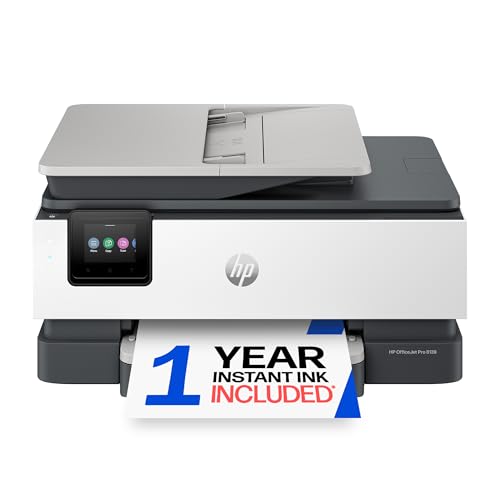
HP OfficeJet Pro 8139 Wireless All-in-One Color Inkjet

Our verdict: A color inkjet with an automatic document feeder, fax and duplex.

The OfficeJet Pro 8139 is an inkjet that prints, scans, copies and faxes, with an automatic document feeder and automatic duplex. The feeder lets you scan a stack of multi-page originals without placing each sheet. A one-year Instant Ink trial is included, and it prints in colour.

It ranks third because the feeder and fax make it the most complete office tool in the $100 to $200 bucket. Compared with the Brother lasers, the ink costs more per page and the engine is slower.

Buy it for an office that still faxes and scans stacks of paper. Skip it if you print mostly black text in volume. The caveat: inkjet cartridges add up, so the low sticker price hides a higher running cost than the DCP-L2640DW over a year of steady use.

Technology
Color inkjet all-in-one
Functions
Print, scan, copy, fax
Feeder
Automatic document feeder
Price bucket
$100-200

What we like

  • +Fax included
  • +Document feeder
  • +Automatic duplex
  • +Color printing

Watch out for

  • −Ink costs add up
  • −Slower than a laser

Buy it if: Offices that still fax and scan stacks of pages.

Skip it if: You print mainly black text in volume.

4

Best for Low Ink Cost

Epson EcoTank ET-2400 Wireless Cartridge-Free Supertank Printer

Our verdict: A refillable ink tank that suits steady color printing.

The ET-2400 swaps cartridges for a refillable ink tank. It prints, scans and copies in colour over wireless, and bottled ink refills are included in the box. Refilling from bottles costs far less per page than buying cartridges, which is why tank printers suit steady colour volume.

It ranks fourth because tank economics pay off only with regular printing, and it has no document feeder or fax like the OfficeJet Pro 8139. For the right volume, though, running costs drop sharply. Its price falls between $100 and $200.

Buy it for an office printing colour regularly. Skip it if you print only a few pages a week, because ink in the tank can dry out. The caveat: scanning is by flatbed only, so multi-page originals take time.

Ink system
Refillable tank
Functions
Print, scan, copy
Output
Color
Price bucket
$100-200

What we like

  • +No cartridges
  • +Low ink cost
  • +Color scanning
  • +Wireless

Watch out for

  • −No document feeder
  • −Little value if idle

Buy it if: Offices printing color regularly.

Skip it if: You print only a few pages a week.

5

Best Ink Tank with Feeder

HP Smart Tank Plus 651 Wireless All-in-One Ink Tank Printer

Our verdict: Ink tank economics with a document feeder, fax and two years of ink supplied.

The Smart Tank Plus 651 uses an ink tank system and ships with two years of ink. It adds an automatic document feeder plus fax, scan, copy and print, and a higher-capacity tank design is meant for sustained volume. Mobile printing support is included.

It ranks fifth because it combines the low-cost refills of the Epson with the feeder and fax the Epson lacks, but it costs more, in the $200 to $500 bucket, and has a larger body.

Buy it if you want ink tank savings with full office features. Skip it if you want the cheapest printer to buy. The caveat: the upfront cost is high, so the savings arrive only after enough pages. Two years of bundled ink soften that, but only for a busy office.

Ink system
Tank, 2 years of ink included
Feeder
Automatic
Functions
Fax, scan, copy, print
Price bucket
$200-500

What we like

  • +Two years of ink included
  • +Document feeder
  • +Fax built in
  • +Low running cost

Watch out for

  • −Higher upfront price
  • −Larger body

Buy it if: Offices wanting ink-tank savings with full features.

Skip it if: You want the cheapest printer to buy.

6

Best Print-Only Workhorse

Brother HL-L2405W Wireless Compact Monochrome Laser

Our verdict: A small mono laser that only prints, and does it dependably.

The HL-L2405W is a wireless monochrome laser that handles printing only, with mobile printing and a compact chassis. It prints at a low per-page cost, as lasers do, and sits in the $100 to $200 bucket.

It ranks sixth because it lacks the scan and copy functions of the DCP-L2640DW, and no automatic duplex is listed. It is a cheaper way to get text onto paper.

Choose it if you already have a separate scanner and only need dependable black text. Skip it if you want one machine to do everything. The caveat: without scanning, a signed contract needs another device, and two-sided output may be a manual job. For most offices, the extra spend on the DCP-L2640DW buys back time.

Technology
Monochrome laser
Functions
Print only
Wireless
Yes, with mobile printing
Price bucket
$100-200

What we like

  • +Compact chassis
  • +Wireless and mobile printing
  • +Low price for a laser
  • +Simple operation

Watch out for

  • −No scan or copy
  • −Print only

Buy it if: Businesses with a separate scanner.

Skip it if: You want one machine to do everything.

7

Best Low-Volume Budget

Epson Workforce WF-2930 Wireless All-in-One Printer

Our verdict: A cheap all-in-one with a feeder, duplex and fax for light use.

The WF-2930 packs a document feeder, two-sided printing, fax, scanning and copying into a colour inkjet body, with a 1.4 inch colour display. It uses cartridges and costs $50 to $100.

It ranks last because cartridges make it costly if volume rises. For a home-based business with occasional printing, though, it offers the most features per dollar here. A feeder and fax at this price are unusual.

Buy it for a very small operation that prints only now and then. Skip it if you print more than occasionally. The caveat: cartridge costs can quickly exceed the savings on the printer, so watch the page yield, and ink left idle can dry out.

Technology
Color inkjet all-in-one
Feeder
Automatic
Duplex
Automatic
Price bucket
$50-100

What we like

  • +Lowest price here
  • +Document feeder
  • +Duplex printing
  • +Fax included

Watch out for

  • −Cartridge costs
  • −Not for heavy use

Buy it if: Very small or home-based businesses.

Skip it if: You print more than occasionally.

Methodology

How We Ranked These

Print technology

Laser, inkjet and ink tank systems were compared for running cost and output type.

Document handling

Automatic duplex, document feeders and fax were weighed for office workflows.

Output type

Monochrome versus color capability was matched to the businesses each suits.

Running costs

We looked at toner, cartridge and refillable ink approaches rather than upfront price alone.

Fit for the business

Each model was matched to the buyer type named in its listing.

Every Primea Score uses the same weights: Performance 30% · Build & Materials 20% · Everyday Usability 20% · Value 20% · Owner Satisfaction 10%. Full scoring rules

Buyer's guide

How to Pick the Right One for You

By Print Mix

What you print most should drive the technology.

Mostly printingOur pick
Black text and contractsBrother DCP-L2640DW
Color brochures and listingsBrother HL-L3220CDW
Color in steady volumeEpson EcoTank ET-2400
Mixed work with faxHP OfficeJet Pro 8139
Text only, scanner ownedBrother HL-L2405W

By Budget

SpendOur pick
$50 to $100Epson Workforce WF-2930
$100 to $200HP OfficeJet Pro 8139 or Brother HL-L2405W
$100 to $200, ink tankEpson EcoTank ET-2400
$200 to $500Brother DCP-L2640DW or HP Smart Tank Plus 651

Laser vs Ink Tank

Laser

The Brother DCP-L2640DW, HL-L3220CDW and HL-L2405W use toner, which holds up well for occasional or steady text.

Ink tank

The Epson ET-2400 and HP Smart Tank Plus 651 use refillable tanks, cheaper per page for regular color.

Most small businesses should default to a laser, the Brother DCP-L2640DW, unless color is central to the work.

By Office Workflow

WorkflowOur pick
Scan stacks of paperworkHP Smart Tank Plus 651
Send the occasional faxHP OfficeJet Pro 8139
Print two-sided in volumeBrother DCP-L2640DW
Light home-based tasksEpson Workforce WF-2930

For Client-Facing Printing Specifically

Look for

A color laser for crisp text and graphics, with a decent tray and duplex.

In this ranking

The Brother HL-L3220CDW is a color laser with a 250-sheet tray and automatic duplex, the best fit.

When to Spend More

Spend more if

Output is heavy or professional, so the DCP-L2640DW or the HL-L3220CDW pays back in running cost and polish.

Save if

You print rarely. The Epson WF-2930 handles light work for less.

Questions

Frequently Asked Questions

Is a laser or inkjet better for a small business?+

A laser such as the Brother DCP-L2640DW suits text-heavy work. An inkjet or ink tank suits colour and photos. Choose by what you print most, not by what you could print, and price a year of supplies.

What is the most common buying mistake?+

Buying on the sticker price and ignoring toner or ink cost. Over a year, supplies can exceed the printer's price, particularly with cartridge inkjets like the WF-2930. Ask what the supplies cost per page.

Is the EcoTank worth it over an inkjet?+

If you print colour regularly, yes, since refills cost far less than cartridges. For low volume the savings do not arrive, and idle ink can dry out, which wastes both ink and money.

How do I connect these to a network?+

All are listed as wireless. Check that your router and any security settings suit the printer before buying, and keep it on the same network as the computers that use it. Print a test page from each machine.

How do I maintain a laser?+

Replace toner when prompted and keep the paper path clean. Lasers need less upkeep than inkjets that sit idle, which is a point in favour of the Brother models if the printer sits idle for weeks.

Do I still need a fax?+

Only if your clients require it. The HP OfficeJet Pro 8139, HP Smart Tank 651 and Epson WF-2930 include fax; the Brother lasers here do not, so a fax-dependent office should start with the HP.

Final take

Buy the DCP-L2640DW for most small businesses and the HL-L3220CDW when colour output matters. Choose the OfficeJet Pro 8139 if you still fax, an ink tank model for steady colour volume, and the cheaper HL-L2405W or WF-2930 only for light use. Price the supplies before you pay for the printer.

More Ranked & Reviewed Guides