
Primea ReviewsAll Reviews

Primea Reviews is reader-supported. When you buy through our Amazon links we may earn a commission, at no extra cost to you. Rankings are set by our editors and never sold. Learn more

Ranked & Reviewed by Primea Reviews

The 7 Best Compact Printers for Small Desks of 2026, Ranked & Reviewed

By the Primea Editorial TeamUpdated November 1, 202610 min read7 products ranked
The 7 Best Compact Printers for Small Desks of 2026, Ranked & Reviewed

The short answer

The Canon PIXMA TS4320 is the best compact printer for a small desk: a color inkjet that prints, copies and scans, with automatic duplex and wireless setup, for $50 to $100. The TS6520 adds an OLED display, the TR4720 an auto document feeder and fax, and the Brother HL-L2405W a toner that never dries.

The Primea Scoreboard

Ranked & Reviewed

  1. A small color all-in-one that still prints on both sides of the page.

    94Outstanding
    Check price
  2. Same compact all-in-one idea, with a small screen for status checks.

    91Excellent
    Check price
  3. The only pick here with an automatic document feeder and fax.

    88Excellent
    Check price
  4. A compact HP all-in-one that leans on an ink subscription trial.

    85Excellent
    Check price
  5. The no-frills option for occasional printing in a tiny footprint.

    82Very Good
    Check price
  6. A print-only laser whose toner will not dry out on you.

    80Very Good
    Check price
  7. Pocket-sized inkless printing for desks with no room for anything else.

    78Very Good
    Check price

A desk-friendly printer is one you can forget about between jobs, and the footprint printed on the box rarely tells you that. Ink that dries out, a paper tray that sticks out, or a scanner lid you cannot open under a shelf can turn a small printer into a daily annoyance. Open the lid, pull the tray and feed the paper in your head before you buy.

We ranked seven compact models on paper, weighing body size, what each can do, how ink or toner behaves when idle, and the limits buried in spec lines. Rankings come from spec sheets and owner reports, not bench measurements. Five are inkjets, one is a laser and one is a pocket thermal printer, so running cost differs more than size.

Before you buy

What Actually Matters

01

Printer technology

Inkjet, laser and thermal printers behave very differently. Inkjets handle color and photos but ink can dry out; lasers print sharp text and keep toner for months; thermal prints without ink but needs special paper. Check the listing title for the type, since it decides running costs. Five of the seven here are inkjets.

02

Automatic duplex

Duplex means the printer flips the sheet itself to print on both sides. It halves paper use and keeps stacks thin on a cramped desk. Look for the words auto duplex in the spec bullets; the TS4320 and TS6520 list it, while the TS3720 does not. Manual two-sided printing is slow and easy to get wrong.

03

Scan, copy and fax

Not every compact printer scans. The Brother HL-L2405W is print only, while the Canon all-in-ones scan and copy. If you scan multi-page paperwork, look for an automatic document feeder, as on the TR4720, rather than a flatbed alone. A flatbed handles single pages and books but is slow on stacks. A feeder adds bulk but saves time.

04

Paper size limits

Most compact printers accept letter and A4 only. If you print legal documents or large posters, this matters. Check the listing for supported sizes and be wary of silence, since it usually means standard letter. Envelopes and labels may also need a rear feed. The Canon models here are letter and A4 only, and the MT610Pro lists the same two.

05

Ink or toner behavior

Inkjet cartridges can dry if the printer sits unused, leading to clogged heads. Laser toner does not dry out, as noted for the Brother. If you print rarely, a laser or thermal model may avoid wasted cartridges. A weekly short print keeps an inkjet healthy, and storing a printer in a dry place helps too.

In-depth reviews

Our Ranked Picks, Reviewed

1

Best Overall

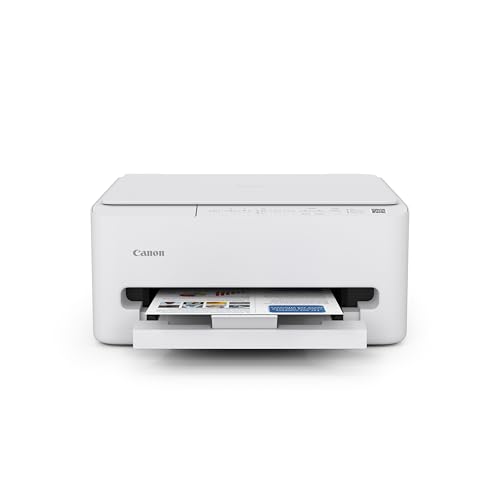
Canon PIXMA TS4320 Wireless Color Inkjet Printer

Our verdict: A small color all-in-one that still prints on both sides of the page.

The TS4320 is a compact color inkjet that prints, copies and scans, and it adds automatic two-sided printing. It connects over wireless and works with the Canon PRINT mobile app. It sells for $50 to $100. Two-sided printing halves paper use, which keeps the paper tray smaller and the stack thinner on a cramped desk.

It ranks first because duplex printing is rare at this size. Against the TS6520 below, you give up the built-in OLED screen, which is a minor loss for most home users. Against the TS3720, it adds duplex for the same price bucket.

Buy it if you want one tidy machine for school and home paperwork. The caveat is that it handles only letter and A4 paper, with no legal or tabloid sizes, and inkjet ink can dry. Skip it if you print mostly black text and want toner.

Type
Color inkjet all-in-one
Duplex
Automatic
Functions
Print, copy, scan
Paper sizes
Letter and A4

What we like

  • +Automatic two-sided printing
  • +Print, copy and scan
  • +Wireless with mobile app
  • +Compact color body

Watch out for

  • −Letter and A4 only
  • −Inkjet ink can dry out

Buy it if: Students and remote workers needing a complete small printer.

Skip it if: You print mostly black text and want toner.

2

Best with Display

Canon PIXMA TS6520 Wireless Color Inkjet Printer

Our verdict: Same compact all-in-one idea, with a small screen for status checks.

The TS6520 is a compact color inkjet all-in-one with a 1.42 inch OLED display and automatic duplex printing. Setup runs through the Canon PRINT app. It sells for $50 to $100. A small screen lets you see ink levels and errors on the machine, without picking up a phone.

It lands just behind the TS4320 because the screen is a convenience, not a capability, and both share the same feature set otherwise. The display does let you check ink or errors without reaching for a phone. Against the TR4720, it is slimmer but lacks a feeder.

Pick it if you like seeing status on the machine itself. The caveat is that the screen adds nothing else, and the phone app is still needed. Skip it if you are happy managing everything from a phone.

Display
1.42 inch OLED
Duplex
Automatic
Functions
Print, copy, scan
Setup
Canon PRINT app

What we like

  • +Built-in OLED display
  • +Automatic duplex
  • +Print, copy and scan
  • +Compact color body

Watch out for

  • −Display adds little else
  • −Phone app still needed

Buy it if: Households who want status shown on the printer.

Skip it if: You are happy managing everything from a phone.

3

Best for Scanning

Canon PIXMA TR4720 All-in-One Wireless Printer

Our verdict: The only pick here with an automatic document feeder and fax.

The TR4720 is a compact all-in-one that adds an auto document feeder and built-in fax to the usual print and scan duties. It pairs with mobile printing through the Canon PRINT app and sells for $50 to $100. A feeder scans a stack of pages without lifting the lid, which saves time on forms and receipts.

It sits third because the feeder adds bulk to a small desk, and the listing does not mention duplex printing. The tradeoff versus the TS4320 is paper handling for document handling. Against the DeskJet 4355, it offers a feeder and fax where the HP offers an ink trial.

It is a strong choice for people who scan multi-page forms or still send faxes. The caveat is the feeder body, so measure your shelf before ordering. Skip it if you rarely scan and want the smallest body.

Feeder
Auto document feeder
Fax
Built in
Wireless
Canon PRINT app
Price bucket
$50-100

What we like

  • +Auto document feeder
  • +Built-in fax
  • +Mobile printing supported
  • +Compact all-in-one body

Watch out for

  • −Feeder adds bulk
  • −Duplex not listed

Buy it if: Home offices that scan or fax multi-page documents.

Skip it if: You rarely scan and want the smallest body.

4

Best Low Upfront Cost

HP DeskJet 4355 Wireless All-in-One Color Inkjet Printer

Our verdict: A compact HP all-in-one that leans on an ink subscription trial.

The DeskJet 4355 is a compact color inkjet that prints, scans and copies, pairs through the HP Smart app and includes a three-month HP Instant Ink trial. It also lists AI-assisted print management features. It sells for $50 to $100. An ink trial lowers the early cost, since cartridges are billed by pages, not by the refill.

It ranks fourth because its appeal depends on the ink trial, and subscription ink can feel limiting once the trial ends. The Canon models list duplex printing; this listing does not. Against the TS3720, it adds an app and a trial but no duplex.

Choose it if you already use the HP app and want a gentle start on ink. The caveat is that you should read the Instant Ink terms before relying on the plan. Skip it if you dislike subscription ink programs.

Type
Color inkjet all-in-one
Ink trial
3-month Instant Ink
App
HP Smart
Functions
Print, scan, copy

What we like

  • +Includes ink trial
  • +HP Smart app pairing
  • +Print, scan and copy
  • +Compact color body

Watch out for

  • −Trial ends after three months
  • −Duplex not listed

Buy it if: New printer owners wanting a gentle start on ink costs.

Skip it if: You dislike subscription ink programs.

5

Best Basic

Canon PIXMA TS3720 Wireless All-in-One Printer

Our verdict: The no-frills option for occasional printing in a tiny footprint.

The TS3720 is a basic compact color all-in-one that prints, copies and scans, with wireless setup through the Canon PRINT app. It has a small, no-frills body and sells for $50 to $100. A smaller body fits shelves that a feeder-equipped model will not.

It ranks fifth because it lacks automatic duplex printing, which the TS4320 and TS6520 include. That is the main reason to step up a model within the same bucket. Against the TR4720, it is simpler and lighter but has no feeder.

Best for people who print a few pages a month. The caveat is manual two-sided printing, which takes extra steps and wastes time on bigger jobs. Skip it if you print long documents regularly.

Type
Basic color all-in-one
Duplex
None
Functions
Print, copy, scan
Setup
Canon PRINT app

What we like

  • +Small no-frills footprint
  • +Print, copy and scan
  • +Wireless setup
  • +Low-cost entry

Watch out for

  • −No automatic duplex
  • −Basic feature set

Buy it if: Light users who print occasionally.

Skip it if: You print long documents regularly.

6

Best Mono Laser

Brother HL-L2405W Wireless Compact Monochrome Laser Printer

Our verdict: A print-only laser whose toner will not dry out on you.

The HL-L2405W is a compact monochrome laser that prints only, with wireless mobile printing and Alexa compatibility. The listing notes that toner does not dry out between uses. It sells for $100 to $200. Laser toner is dry powder, so a printer that sits for weeks starts without clogged nozzles.

It ranks sixth purely because it cannot scan or copy and prints in black only, which is a bigger limit than the Canon all-in-ones. The tradeoff is reliability when the printer sits idle for weeks. Against the MT610Pro, it prints on standard paper and needs no special stock.

Choose it if you print mainly text and want a machine that works when you need it. The caveat is that scanning needs a second device. Skip it if you need color or a scanner.

Type
Monochrome laser
Functions
Print only
Smart home
Alexa compatible
Price bucket
$100-200

What we like

  • +Toner does not dry out
  • +Compact laser body
  • +Wireless mobile printing
  • +Alexa compatible

Watch out for

  • −No scan or copy
  • −Black and white only

Buy it if: Text-heavy printing with long gaps between jobs.

Skip it if: You need color or a scanner.

7

Smallest Option

Inkless Portable Bluetooth Thermal Printer (MT610Pro)

Our verdict: Pocket-sized inkless printing for desks with no room for anything else.

The MT610Pro is an inkless Bluetooth thermal printer at 300 DPI that handles 8.5 by 11 inch Letter and A4 paper. It pairs with iOS, Android and laptops, and it is the smallest, lightest device in this list. It sells for $50 to $100. Thermal printing heats special paper, so there is no cartridge to dry out.

It ranks last because it needs special thermal paper rather than standard copy paper, which adds a running cost and a supply to remember. That limit separates it from every other pick here. Against the HL-L2405W, it saves desk space but costs more per page.

Buy it for occasional printing where space is the only concern. The caveat is that thermal output is not meant for color work. Skip it if you want standard copy paper.

Technology
Inkless thermal
Resolution
300 DPI
Paper
Letter and A4 thermal
Connection
Bluetooth

What we like

  • +Smallest and lightest here
  • +No ink or toner
  • +Bluetooth pairing
  • +Works with iOS and Android

Watch out for

  • −Needs thermal paper
  • −Not a full printer

Buy it if: Occasional printing where desk space is minimal.

Skip it if: You want standard copy paper.

Methodology

How We Ranked These

Footprint

We favored bodies that fit a narrow shelf or a corner of a small desk.

Functions per square inch

We compared what each machine can do, from print only to print, copy, scan and fax.

Idle behavior

We weighed whether ink dries out, toner holds or the printer needs special paper.

Paper handling

Duplex printing, document feeders and paper size limits all counted.

Price bucket fit

We asked what each step up from the $50-100 bucket actually buys.

Every Primea Score uses the same weights: Performance 30% · Build & Materials 20% · Everyday Usability 20% · Value 20% · Owner Satisfaction 10%. Full scoring rules

Buyer's guide

How to Pick the Right One for You

By Printing Habit

How often and what you print decides the technology.

HabitOur pick
Weekly color and school printingCanon PIXMA TS4320
Mostly black text, long idle gapsBrother HL-L2405W
Scanning multi-page documentsCanon PIXMA TR4720
Rare printing, no desk spaceInkless Portable Bluetooth Thermal Printer (MT610Pro)

By Budget

SpendOur pick
$50 to $100, basicCanon PIXMA TS3720
$50 to $100, duplexCanon PIXMA TS4320
$50 to $100, displayCanon PIXMA TS6520
$100 to $200Brother HL-L2405W

Inkjet vs Laser

Inkjet

Prints in color and handles photos, but cartridges can dry out when idle. The Canon TS4320, TS6520, TS3720, TR4720 and HP DeskJet 4355 are inkjets.

Laser

Monochrome laser prints sharp text, and toner does not dry out between uses. The Brother HL-L2405W is the laser pick.

Most home users should default to inkjet unless they print only black text.

By Desk Space

Space availableOur pick
Almost noneInkless Portable Bluetooth Thermal Printer (MT610Pro)
Smallest full all-in-oneCanon PIXMA TS3720
Room for a feederCanon PIXMA TR4720
Room for a bit more bodyCanon PIXMA TS6520

For Remote Workers Specifically

Look for

Wireless setup, automatic duplex to save paper, and a scanner for contracts and forms.

In this ranking

The Canon PIXMA TS4320 covers all three, and the TR4720 adds a document feeder for longer scans.

When to Spend More

Spend more if

You print rarely and hate dried ink, which points to the Brother HL-L2405W, or you scan stacks of pages, which points to the TR4720.

Save if

You print a few pages monthly. The Canon TS3720 does the basics.

Questions

Frequently Asked Questions

Will these printers fit under a shelf?+

Check the listing for exact dimensions, since scanner lids and paper trays need extra clearance. The thermal MT610Pro is the easiest to store. A TR4720 with its feeder is the tallest, and any model needs space behind it for the paper tray to extend.

Do I need special paper for the thermal printer?+

Yes. The MT610Pro requires thermal paper, not standard copy paper, so plan for that running cost. Thermal sheets cost more than copy paper, and you cannot reuse a tray of ordinary stock.

Is the Brother laser worth it over a Canon inkjet?+

Only if you print mostly black text and rarely use it. Toner does not dry out, but you lose color, scanning and copying. For a student or home worker who scans receipts, a Canon all-in-one is the more useful machine.

What is the most common mistake when buying a small printer?+

Ignoring paper size limits. These Canon models are letter and A4 only, so legal documents will not work. If you must print legal paper or large sheets, look for a model that lists those sizes or use a print shop.

How do I set up the Canon models?+

Install the Canon PRINT app on your phone, then follow the wireless setup prompts. It works with iOS and Android. Keep the printer and phone on the same wireless network during setup, and update the app first.

What happens to the HP Instant Ink trial?+

The three-month trial ends, after which you decide whether to subscribe. Read the terms first so you know the ongoing plan. A subscription can cost more than occasional cartridge refills if you print little.

Final take

Buy the Canon PIXMA TS4320 for one tidy machine for school and home paperwork. Take the TS6520 if you like a status screen, the TR4720 if you scan or fax stacks, and the Brother HL-L2405W if you print text now and then. The TS3720 is the basic option, and the MT610Pro suits desks with no room. Check the shelf clearance first.

More Ranked & Reviewed Guides