
Primea ReviewsAll Reviews

Primea Reviews is reader-supported. When you buy through our Amazon links we may earn a commission, at no extra cost to you. Rankings are set by our editors and never sold. Learn more

Ranked & Reviewed by Primea Reviews

The 7 Best Laptop Cooling Pads for Lenovo Laptops of 2026, Ranked & Reviewed

By the Primea Editorial TeamUpdated November 1, 202610 min read7 products ranked
The 7 Best Laptop Cooling Pads for Lenovo Laptops of 2026, Ranked & Reviewed

The short answer

The Trullypine 12-fan pad is the best cooling pad for Lenovo laptops: a 12 to 17.3 inch range, five height settings and two USB ports for $25 to $50. The TECKNET 9-fan is the quiet pick for 15.6 inch laptops, and the TECKNET 2-fan adds USB-C and a three-year warranty. The Targus is for laps.

The Primea Scoreboard

Ranked & Reviewed

  1. Twelve fans and a 12 to 17.3 inch range cover almost any Lenovo.

    94Outstanding
    Check price
  2. Nine fans rated under 40 dB for everyday productivity.

    91Excellent
    Check price
  3. Two big 110mm fans with USB-C and a three-year warranty.

    88Excellent
    Check price
  4. Five fans, one switch wheel, and a 12-month warranty.

    85Excellent
    Check price
  5. Two switches let you run some fans or all of them.

    83Very Good
    Check price
  6. A soft neoprene base made for laps, not desks.

    80Very Good
    Check price
  7. A slim, packable three-fan pad powered over USB.

    78Very Good
    Check price

No cooling pad is built specifically for Lenovo. What counts is whether the pad matches your model's screen size and, even more, whether its fans sit under the places your laptop breathes. A pad sized for a 15.6 inch IdeaPad leaves a 17 inch Legion hanging over the edge, and a ThinkPad with side vents gets little from fans parked in the middle of the platform.

We reviewed seven pads on paper, ranking them on compatible screen sizes, fan layout, noise claims, height range and ports. The Lenovo pairings below come from screen size and use case, not any brand certification, and we relied on spec sheets and owner reports. Three of the seven are TECKNET models, so the entries name each by its fan count.

Before you buy

What Actually Matters

01

Screen size range

Pads state a screen-size range, such as 12 to 15.6 inches. A laptop larger than the range overhangs and loses fan coverage. Measure your laptop width, not just the screen size, and compare with the listing. The Trullypine reaches 17.3 inches and the Kootek 17, while the 9-fan and 2-fan TECKNET and the AIMIUZI stop at 15.6.

02

Fan placement

Fans must sit under your laptop's intake area, which varies by model, and Lenovo places vents on the bottom, side or back depending on the line. A pad with more fans spread wide is more forgiving. Look at the product photos to see fan positions, and compare them with an image of your laptop's underside. A ThinkPad and a Legion draw air in different places.

03

Noise rating

Fan noise is rated in decibels or RPM. Under 40 dB is quiet, and higher RPM is louder. Check for a stated dB figure, as on the 9-fan TECKNET, since marketing says quiet on almost every listing. Larger fans like the 110mm pair move air at lower RPM, which helps keep sound down.

04

Height adjustment

Raising the laptop improves typing angle and airflow underneath, because it opens a gap for intake air. Pads here range from one fixed tilt to six settings. Look for the exact count in the specs: the Kootek lists six and the 9-fan TECKNET five, plus a 6 inch maximum lift. More lift is not always better, since steep angles strain your wrists.

05

Port type

Cooling pads use USB power. Most use USB-A, and one here adds USB-C. Confirm that your laptop has the port the pad needs, and check whether the pad leaves a port free, as with the Trullypine's two USB 2.0 ports. A newer ThinkPad may offer only USB-C, so a USB-A pad could need an adapter.

In-depth reviews

Our Ranked Picks, Reviewed

1

Best Overall

Trullypine Laptop Cooling Pad with 12 Quiet Fans, 12-17.3 Inch

Our verdict: Twelve fans and a 12 to 17.3 inch range cover almost any Lenovo.

The Trullypine spreads twelve fans across a wide mesh surface and fits laptops from 12 to 17.3 inches. It has five height settings, two USB 2.0 ports, a phone holder and three RGB light modes, and sells for $25 to $50. With so many fans, at least some sit under the intake vents of any layout, which makes it forgiving across ThinkPad, IdeaPad and Legion designs.

It ranks first because it is the only pad here that stretches to 17.3 inches while keeping a full fan array, which matters for a big Legion or LOQ. Against the 9-fan TECKNET, you get wider coverage and more fans but also more bulk.

Buy it for a broadly compatible, well-rounded pad. The caveat is that it is larger than the compact options, and RGB adds nothing to cooling. Skip it if you want a slim pad for travel.

Fans
12
Fit
12 to 17.3 inches
Heights
5 settings
Ports
2 USB 2.0, phone holder

What we like

  • +Twelve-fan coverage
  • +Fits up to 17.3 inches
  • +Five height settings
  • +Two USB ports

Watch out for

  • −Larger than compact pads
  • −RGB adds little value

Buy it if: ThinkPad, IdeaPad and Legion owners wanting one pad that fits many sizes.

Skip it if: You want a slim pad for travel.

2

Best Quiet Pick

TECKNET Laptop Cooling Pad with Phone Stand, 12-15.6 Inch

Our verdict: Nine fans rated under 40 dB for everyday productivity.

This TECKNET uses nine fans running up to 2600 RPM, with a noise rating under 40 dB. It fits 12 to 15.6 inch laptops, lifts them up to 6 inches across five settings, and adds two USB ports and a phone holder. It sells for $25 to $50. A stated dB rating is rare, and it lets you judge office-friendliness before buying.

It ranks second because the 15.6 inch ceiling rules out the biggest Legion models, which the Trullypine handles. Within its size range, the noise claim and extra height make it the more comfortable pad for office work, and nine fans give broad coverage.

Choose it for an IdeaPad or similar mid-size laptop. The caveat is that 2600 RPM fans will still be audible at full speed. Skip it if your laptop is 17 inches.

Fans
9, up to 2600 RPM
Noise
Under 40 dB
Fit
12 to 15.6 inches
Height
Up to 6 inches

What we like

  • +Noise rated under 40 dB
  • +Raises up to 6 inches
  • +Built-in phone holder
  • +Two USB ports

Watch out for

  • −Tops out at 15.6 inches
  • −Fans still audible at max

Buy it if: IdeaPad owners wanting a quiet pad for everyday use.

Skip it if: Your laptop is 17 inches.

3

Best for USB-C

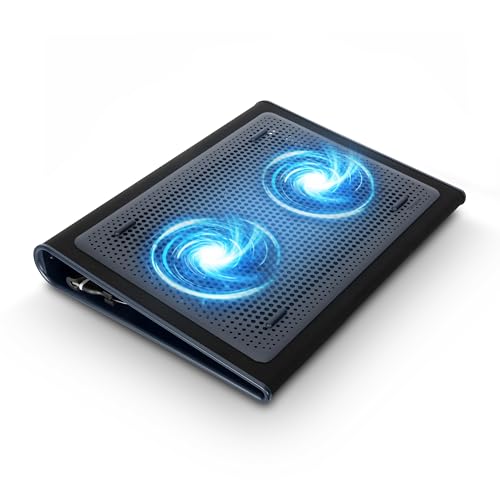
TECKNET Laptop Cooling Pad, 12-15.6 Inch, Quiet Cooling Fan

Our verdict: Two big 110mm fans with USB-C and a three-year warranty.

This TECKNET has two large 110mm fans with adjustable speed, a flat low-profile base, and both USB-C and USB-A ports. It fits 12 to 15.6 inch laptops, carries a three-year warranty and costs under $25. Larger fans move more air per revolution at lower speed, so two 110mm units can run quietly. USB-C helps on newer ultrabooks where USB-A ports are scarce.

It ranks third because two fans provide focused airflow rather than the broad coverage of the nine-fan model. The USB-C connector and longer warranty are what set it apart from the AIMIUZI and Kootek, whose warranty is 12 months or unstated.

Buy it for a newer ThinkPad ultrabook with USB-C. The caveat is the flat base, which gives less tilt than the taller pads. Skip it if you want maximum airflow coverage.

Fans
2 x 110mm, adjustable
Ports
USB-C and USB-A
Fit
12 to 15.6 inches
Warranty
3 years

What we like

  • +USB-C and USB-A ports
  • +Three-year warranty
  • +Adjustable fan speed
  • +Low-profile base

Watch out for

  • −Only two fans
  • −Flat base, minimal tilt

Buy it if: Newer ThinkPad ultrabook owners who want USB-C.

Skip it if: You want maximum airflow coverage.

4

Best Simple Cooler

AIMIUZI Laptop Cooling Pad Laptop Cooler Stand, 12-15.6 Inch, 5 Quiet Fans

Our verdict: Five fans, one switch wheel, and a 12-month warranty.

The AIMIUZI has five fans, one small and four large, controlled with a single switch wheel for on and off. It fits 12 to 15.6 inch laptops with five stand heights, two USB ports and a 12-month warranty, and costs under $25. A single control means no menu, mode or app, which suits an office desk where you just want it to run.

It ranks fourth because it is simpler than the TECKNET models, with fewer features and a shorter warranty than the USB-C pad. Against the Kootek, it has the same fan count but only five heights and no second switch to run partial fans.

Choose it for office use on a ThinkPad. The caveat is basic control, so you cannot trade airflow for quiet. Skip it if you want a USB-C port or flexible fan modes.

Fans
5 (1 small, 4 large)
Control
Single switch wheel
Heights
5 settings
Warranty
12 months

What we like

  • +Simple switch control
  • +Five stand heights
  • +Two USB ports
  • +Under $25

Watch out for

  • −Shorter warranty
  • −Basic controls

Buy it if: ThinkPad owners wanting simple office cooling.

Skip it if: You want a USB-C port.

5

Best Switchable Cooling

Kootek Laptop Cooling Pad Cooler Stand with 5 Quiet Fans for 12-17 Inch Laptop

Our verdict: Two switches let you run some fans or all of them.

The Kootek has five fans, one large and four small, with blue LEDs and two on/off switches for partial or full operation. It fits 12 to 17 inch laptops, offers six height settings, includes a dual USB hub and costs under $25. Two switches let you run only the large fan for quiet work, then all five under load.

It ranks fifth because it spans 17 inches like the Trullypine but with far fewer fans, so coverage under a big laptop is thinner. The two switches and six heights are what you gain, and it undercuts the Trullypine on price by a bucket.

Buy it for flexible cooling on a budget. The caveat is that fewer fans give less coverage and the lighting is blue only. Skip it if you want the strongest airflow.

Fans
5 (1 large, 4 small)
Switches
2, partial or full
Fit
12 to 17 inches
Heights
6 settings

What we like

  • +Two switches for fan control
  • +Six height settings
  • +Fits up to 17 inches
  • +Dual USB hub

Watch out for

  • −Fewer fans than top picks
  • −Blue LEDs only

Buy it if: IdeaPad owners wanting switchable cooling cheaply.

Skip it if: You want the strongest airflow.

6

Best for Lap Use

Targus 17 Inch Dual Fan Lap Chill Mat, Soft Neoprene Laptop Cooling Pad

Our verdict: A soft neoprene base made for laps, not desks.

The Targus Lap Chill Mat has two USB-A fans, a soft neoprene base for lap comfort and an ergonomic tilt. It fits laptops up to 17 inches, uses rubber stops to prevent slipping and costs $25 to $50. A neoprene base insulates your legs from heat and stays put on fabric, a job that a hard mesh stand does poorly.

It ranks sixth because two fans and one tilt angle limit airflow compared with the multi-fan pads. The soft base is what it offers that rigid stands do not. For a hot Legion on a desk, the Trullypine or TECKNET would out-cool it.

Choose it if you mainly use your laptop on your lap or a sofa. The caveat is limited height adjustment. Skip it if you work at a desk and want adjustable height.

Fans
Dual USB-A
Base
Soft neoprene
Fit
Up to 17 inches
Grip
Rubber stops

What we like

  • +Soft neoprene lap base
  • +Rubber stops prevent slipping
  • +Ergonomic tilt design
  • +Fits up to 17 inches

Watch out for

  • −Only two fans
  • −Fixed tilt

Buy it if: Lenovo owners who work on their lap.

Skip it if: You work at a desk and want adjustable height.

7

Best for Travel

TECKNET Laptop Cooling Pad, Portable Slim Laptop Cooler for 12-17 Inch Laptops

Our verdict: A slim, packable three-fan pad powered over USB.

This slim TECKNET has three fans at 1200 RPM, a portable profile and USB power. It fits 12 to 17 inch laptops and costs $25 to $50. A thin body slips into a laptop sleeve, and low RPM keeps the fans quiet in a cafe or classroom.

It ranks last because three fans at 1200 RPM give the least cooling here, though it is the easiest to pack. Against the Kootek, you trade fan count and switchable modes for portability. Against the other TECKNETs, it gives up noise rating and USB-C.

Buy it for frequent travel and light loads such as documents and video calls. The caveat is modest cooling for heavy workloads. Skip it if you run games, builds or renders.

Fans
3, 1200 RPM
Profile
Slim, portable
Fit
12 to 17 inches
Power
USB powered

What we like

  • +Slim and packable
  • +Fits up to 17 inches
  • +USB powered
  • +Low fan speed

Watch out for

  • −Fewest fans here
  • −Mild cooling only

Buy it if: ThinkPad owners who travel often.

Skip it if: You run heavy workloads.

Methodology

How We Ranked These

Size compatibility

Stated screen-size ranges were matched to Lenovo ThinkPad, IdeaPad and Legion sizes.

Fan layout

Fan count, size and speed show how much airflow a pad can move.

Noise

Stated decibel and RPM figures were weighed for office use.

Ergonomics

Height settings, tilt and lap comfort count for long sessions.

Ports and warranty

USB ports and warranty length add value.

Every Primea Score uses the same weights: Performance 30% · Build & Materials 20% · Everyday Usability 20% · Value 20% · Owner Satisfaction 10%. Full scoring rules

Buyer's guide

How to Pick the Right One for You

By Laptop Size

Match the pad's range to your screen.

LaptopOur pick
17-inch Legion or LOQTrullypine 12-Fan
15.6-inch IdeaPadTECKNET 9-Fan
Newer ThinkPad ultrabookTECKNET USB-C Dual Fan
12 to 14 inch ThinkPadAIMIUZI 5-Fan

By Budget

SpendOur pick
Under $25AIMIUZI, TECKNET USB-C or Kootek
$25-50Trullypine, TECKNET 9-Fan, TECKNET Slim or Targus

Hard Stand vs Soft Lap Mat

Hard stand

Gives airflow and adjustable height at a desk. The Trullypine, TECKNET 9-Fan and Kootek fit here.

Soft lap mat

Protects your legs and tilts the laptop. The Targus Lap Chill Mat fits here.

Most buyers should choose a hard stand unless they truly work on their lap.

By Where You Work

SettingOur pick
Office deskTECKNET 9-Fan
TravelTECKNET Slim
LapTargus Lap Chill Mat
Budget deskKootek

For USB-C Laptops Specifically

Look for

A pad with a USB-C port so you do not use up a precious USB-A slot.

In this ranking

The TECKNET USB-C Dual Fan pad includes both port types.

When to Spend More

Spend more if

You own a large 17-inch laptop, so the Trullypine is worth it.

Save if

You have a smaller laptop, so the AIMIUZI or Kootek is enough.

Questions

Frequently Asked Questions

Is any cooling pad made for Lenovo?+

No. These pads are general purpose and fit by screen size. Check the range on each listing against your model, since a 15.6 inch IdeaPad and a 17 inch Legion need different pads. Screen size is the number to use, not the model line.

What mistake do buyers make with cooling pads?+

They ignore where their laptop's vents sit. A pad with fans in the wrong place cools little, so check photos of the bottom of your laptop against the fan layout, as on the Trullypine. Twelve fans cover more spots than five.

Is the Trullypine worth it over the Kootek?+

If you want more fans, yes. The Kootek is cheaper and adds two switches and six heights, but it has five fans against twelve, so coverage is thinner under a large laptop.

How do I connect a cooling pad?+

Plug it into a USB port. The 2-fan TECKNET offers both USB-C and USB-A connectors, which helps if your Lenovo has few free ports. The Trullypine and Kootek add USB pass-through, so you do not lose a port. Check the cable reaches your laptop's side.

How do I keep a pad quiet?+

Run it at a lower speed where available. The 2-fan TECKNET and the Kootek's switches both allow it, and a 9-fan TECKNET rated under 40 dB is quiet in an office. Dust on the blades adds noise, so clean them.

Can a pad overhang a 17-inch laptop?+

Yes if it is rated for 15.6 inches or less. Choose a 17 inch rated pad such as the Trullypine, Kootek or Targus. Measure your laptop's width against the platform, and watch for the rear vents hanging past the edge.

Final take

Buy the Trullypine for a large Legion or LOQ, or when you want one pad that fits many sizes. The TECKNET 9-fan suits an IdeaPad on a desk, and the TECKNET 2-fan a newer ThinkPad with USB-C. Take the Kootek for cheap switchable cooling, the Targus for lap use and the slim TECKNET to travel. Match the stated screen range to your model first.

More Ranked & Reviewed Guides