
Primea ReviewsAll Reviews

Primea Reviews is reader-supported. When you buy through our Amazon links we may earn a commission, at no extra cost to you. Rankings are set by our editors and never sold. Learn more

Ranked & Reviewed by Primea Reviews

The 7 Best Laptop Cooling Pads for Alienware Laptops of 2026, Ranked & Reviewed

By the Primea Editorial TeamUpdated November 1, 202610 min read7 products ranked
The 7 Best Laptop Cooling Pads for Alienware Laptops of 2026, Ranked & Reviewed

The short answer

The Razer Adaptive Smart pad is the best cooling pad for Alienware laptops: a 140mm fan up to 3000 RPM, a sealed foam chamber and frames for 14 to 18 inch machines. The IETS GT500 5000 RPM turbofan wins on raw airflow, and the llano V12 adds a dust filter. Smaller laptops in quiet rooms suit the Metfut.

The Primea Scoreboard

Ranked & Reviewed

  1. Smart fan control and a sealed chamber make it the most complete pad here.

    95Outstanding
    Check price
  2. A real turbofan for chassis that run hot, noise be damned.

    92Outstanding
    Check price
  3. A turbo booster with a removable dust filter to protect the fan.

    89Excellent
    Check price
  4. Most of the turbofan benefit at a more livable maximum noise.

    87Excellent
    Check price
  5. Physical buttons and USB-C in a mid-priced turbo pad.

    85Excellent
    Check price
  6. A quiet pad with a Peltier panel, limited to smaller laptops.

    82Very Good
    Check price
  7. A cheap, feature-heavy pad to try external cooling.

    79Very Good
    Check price

Alienware owners tend to shop cooling pads by fan count, and that is the wrong axis. These laptops pull air through intakes on the underside, so a pad that props the machine up but covers the vents, or one whose fans fight the chassis airflow, can leave temperatures worse than a bare desk. What matters is where the pad moves air relative to those intakes.

We reviewed seven cooling pads and ranked them on paper by airflow design, laptop size coverage, noise, power and price tier. The list rests on spec sheets and owner reports, not thermal measurements, and each pick is placed by the tradeoff it makes against its neighbors. A pad you cannot stand to hear is one you will turn off, so noise counted for real.

Before you buy

What Actually Matters

01

Where the laptop breathes

Many Alienware models draw air from underside intakes and exhaust at the rear or sides. A cooling pad should move air toward those intakes without blocking them. Check your model's vent layout, then confirm the pad has an open or sealed fan area that lines up with it. A pad that covers the intakes can raise temperatures.

02

Fan type and RPM

Turbofans spin fast and push more air but are louder, while multi-fan pads spread air gently. RPM tells you the ceiling, not the quality. Pick a turbofan like the IETS GT500 for sustained gaming loads and a quiet multi-fan or Peltier design for office use, then run it below top speed most days.

03

Size coverage

A pad that is too small leaves part of the chassis unsupported, and one that is too large wastes desk space. Listings state a size range in inches, such as 13 to 17.3 or 15.6 to 19. Match your laptop's screen size and check that the fan sits under the vented zone of your model.

04

Noise in dB

Decibels are logarithmic, so 65 dB is much louder than 55 dB, and the IETS pair shows that gap. A pad you hate hearing is a pad you will switch off. Look for the stated maximum noise rating and plan to run the pad below the top speed, saving the loudest setting for demanding loads.

05

Power and USB ports

Most pads draw power from a laptop USB port, which can cost you a port. A built-in hub gives some back. Check the port count and type, since a USB 2.0 hub, like the llano V12's, may be too slow for external drives. Also note whether the pad needs more power than a port provides.

In-depth reviews

Our Ranked Picks, Reviewed

1

Best Overall

Razer Laptop Cooling Pad Adaptive Smart, Intelligent Fan Control

Our verdict: Smart fan control and a sealed chamber make it the most complete pad here.

The Razer pad uses a 140mm brushless fan up to 3000 RPM inside an airtight foam-sealed pressure chamber, with three interchangeable magnetic frames for 14 to 18 inch laptops, automatic fan control and a three-port USB hub. Sealing the gap between pad and chassis forces air through the intakes instead of letting it escape sideways, which is where cheaper pads leak performance.

It ranks first because it adapts to the laptop size and adjusts fan speed itself. The IETS turbofan spins faster, but it is louder and has no frame system.

Buy it for a hot-running Alienware chassis and long sessions. The caveat is price, the highest here, and a lower RPM ceiling than the turbofans. Skip it if you want the cheapest possible pad.

Fan
140mm, up to 3000 RPM
Fit
14 to 18 inch frames
Seal
Foam pressure chamber
Warranty
2 years

What we like

  • +Automatic fan control
  • +Airtight foam-sealed chamber
  • +Magnetic frames for 14-18 inch
  • +Two-year warranty

Watch out for

  • −Highest price tier here
  • −Lower RPM than turbofans

Buy it if: Owners with hot-running Alienware chassis and long sessions.

Skip it if: You want the cheapest possible cooling pad.

2

Best for Maximum Airflow

IETS GT500 Powerful Turbo-Fan (5000 RPM) Laptop Cooling Pad, 13-17.3 Inch

Our verdict: A real turbofan for chassis that run hot, noise be damned.

The IETS GT500 5000 RPM is a turbofan with variable speed from 0 to 5000 RPM, sealed foam for 13 to 17.3 inch laptops, a bottom air intake for rear-exhaust chassis and a 1-in-3-out USB hub. Turbofans push a high-pressure stream rather than a gentle breeze, which is what a dense Alienware heatsink needs under load.

It ranks second because it is loud, reaching a listed 65 dB at maximum speed, and the bulky design takes desk space. It beats the Razer on airflow and costs less.

Buy it for a hot Alienware chassis where airflow decides everything. Skip it if you work or stream in a quiet room. Run it at a mid setting for daily use and keep full speed for hard sessions.

Fan
Turbofan, 0 to 5000 RPM
Fit
13 to 17.3 inch
Noise
Up to 65 dB
Hub
1-in-3-out USB

What we like

  • +Highest RPM in ranking
  • +Variable speed control
  • +Sealed foam for airflow
  • +USB hub included

Watch out for

  • −Loud at max speed
  • −Bulky turbofan design

Buy it if: Hot-running Alienware chassis where airflow matters most.

Skip it if: You work or stream in a quiet room.

3

Best for Dusty Rooms

llano V12 Gaming Laptop Cooling Pad Laptop Cooler Laptop Cooling Fan Stand

Our verdict: A turbo booster with a removable dust filter to protect the fan.

The llano V12 has a 5.5 inch turbo booster fan with a 36W power output, a removable dust filter, a reinforced chassis for 15.6 to 19 inch laptops and a three-port USB 2.0 hub. A dust filter protects the fan and your laptop's intakes, and it is rare at this price.

It ranks third because the minimum fit is 15.6 inches and the hub is USB 2.0, too slow for drives. Against the IETS pair, it adds the filter but gives up the sealed foam.

Buy it for a large Alienware used in a dusty room, such as a workshop or a home with pets. Skip it if your laptop is smaller than 15.6 inches. Clean the filter every few weeks to keep the airflow from dropping.

Fan
5.5 inch turbo booster
Power
36W output
Fit
15.6 to 19 inch
Extra
Removable dust filter

What we like

  • +Removable dust filter
  • +36W turbo booster fan
  • +Reinforced chassis build
  • +Fits up to 19 inch

Watch out for

  • −Minimum 15.6 inch fit
  • −USB 2.0 hub only

Buy it if: Large Alienware laptops used in dusty rooms.

Skip it if: Your laptop is smaller than 15.6 inches.

4

Best Quieter Turbofan

IETS GT500 Powerful Turbo-Fan (4200 RPM) Laptop Cooling Pad, 13-17.3 Inch

Our verdict: Most of the turbofan benefit at a more livable maximum noise.

The IETS GT500 4200 RPM has the same sealed foam, variable-speed turbofan and bottom intake as the 5000 RPM, with a lower top speed of 4200 RPM and noise up to 55 dB, fitting 13 to 17.3 inch laptops. Ten decibels is a large perceptual step, so the lower model sounds much calmer at full speed.

It ranks fourth because it moves less air than the 5000 RPM unit and lists no USB hub. It is the better choice for an office that tolerates a fan but not a jet.

Buy it for turbofan cooling with calmer noise. Skip it if your chassis runs extremely hot under load, since the 5000 RPM model has more headroom.

Fan
Turbofan, 0 to 4200 RPM
Fit
13 to 17.3 inch
Noise
Up to 55 dB
Intake
Bottom air intake

What we like

  • +Quieter maximum noise
  • +Sealed foam for airflow
  • +Variable speed control
  • +Bottom intake for rear exhaust

Watch out for

  • −Less airflow than 5000 RPM
  • −No USB hub listed

Buy it if: Owners wanting turbofan cooling with calmer noise.

Skip it if: Your chassis runs extremely hot under load.

5

Best Button Controls

llano V10 Gaming Laptop Cooling Pad, RGB Laptop Cooler Stand

Our verdict: Physical buttons and USB-C in a mid-priced turbo pad.

The llano V10 uses a 4.72 inch turbo fan up to 3500 RPM, with copper heat conduction in the motor, foam inserts for 13 to 14 inch laptops, physical buttons for RGB and fan control, and USB-A and USB-C ports. Physical buttons mean you change speed without opening software.

It ranks fifth because its RPM ceiling is lower than the IETS and the RGB is cosmetic. It beats the V12 on small-laptop fit, since its foam inserts suit 13 to 14 inch machines.

Buy it for a smaller Alienware with simple control needs. Skip it if you run demanding loads on a large chassis. The USB-C port is a useful extra for newer devices.

Fan
4.72 inch, up to 3500 RPM
Motor
Copper heat conduction
Ports
USB-A and USB-C
Control
Physical buttons

What we like

  • +Physical button controls
  • +USB-C and USB-A ports
  • +Foam inserts for 13-14 inch
  • +Copper motor design

Watch out for

  • −Lower RPM ceiling
  • −RGB is mostly cosmetic

Buy it if: Smaller Alienware laptops with simple control needs.

Skip it if: You run demanding loads on a large chassis.

6

Best Quiet Option

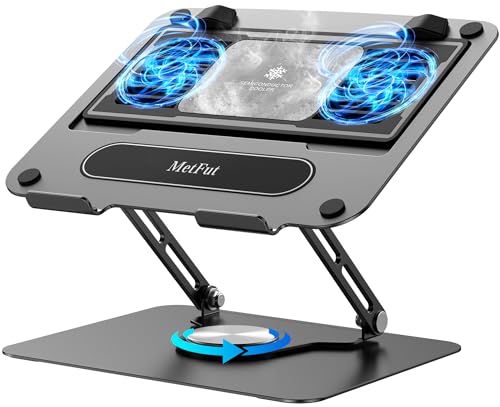
Metfut Laptop Cooling Pad with Detachable Fan & Cooler, Carbon Steel Framework

Our verdict: A quiet pad with a Peltier panel, limited to smaller laptops.

The Metfut has a detachable Peltier cooling panel, two quiet fans up to 20W with a compatible adapter, a carbon steel frame supporting up to 20 lbs, a fit for laptops up to 15.6 inches and a rated noise of 20 dB or less. A Peltier panel cools through a thermoelectric surface, which is quieter than a fan.

It ranks sixth because it is gentler than the turbofans and fits only up to 15.6 inches. It beats every other pick on quiet, though.

Buy it for a smaller Alienware used in a quiet room. Skip it if you own a 17 inch or larger model. Peltier cooling works as a helper, not a fix, so do not expect it to tame an extreme load.

Cooling
Detachable Peltier panel
Fans
2 quiet fans, up to 20W
Frame
Carbon steel, up to 20 lbs
Fit
Up to 15.6 inch

What we like

  • +Very quiet at 20 dB
  • +Detachable Peltier panel
  • +Sturdy carbon steel frame
  • +Supports up to 20 lbs

Watch out for

  • −Fits only up to 15.6 inch
  • −Gentler than turbofans

Buy it if: Smaller Alienware laptops used in quiet rooms.

Skip it if: You own a 17 inch or larger model.

7

Best Budget Option

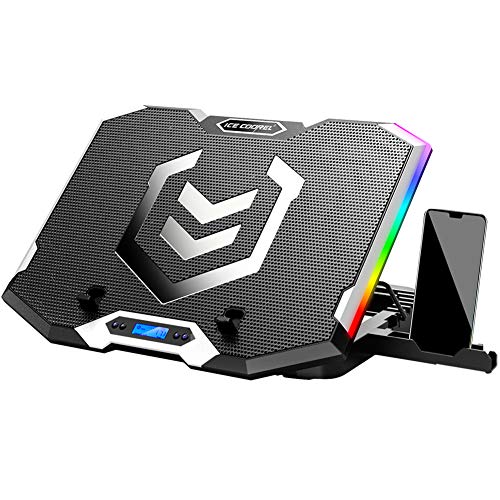
ICE COOREL Gaming Laptop Cooling Pad 15-17.3 Inch, 6 RGB Cooling Fans, LCD Screen

Our verdict: A cheap, feature-heavy pad to try external cooling.

The ICE COOREL has six transparent fans, an LCD fan speed display, six height settings, seven RGB lighting modes, two USB ports, a phone stand and a fit for 15 to 17.3 inch laptops. It is the cheapest pad in the ranking and packs in features at that price.

It ranks last because six small fans spread airflow thinly, and the lighting gets attention that thermals deserve. Compared with the llano V10, it offers less targeted cooling.

Buy it as a budget way to try external cooling. Skip it if your laptop already throttles hard. For serious thermals, the Razer or IETS pads move air with far more purpose.

Fans
6 transparent fans
Display
LCD fan speed
Height
6 settings
Fit
15 to 17.3 inch

What we like

  • +Lowest price in ranking
  • +LCD fan speed display
  • +Six height settings
  • +Phone stand included

Watch out for

  • −Small fans spread airflow
  • −Lighting over thermals

Buy it if: Buyers trying external cooling on a tight budget.

Skip it if: Your laptop is already thermal throttling hard.

Methodology

How We Ranked These

Airflow design

We compared fan type, RPM and whether the pad is sealed to push air into the laptop intakes.

Chassis fit

Listed laptop size ranges decided whether a pad suits Alienware models from 14 to 18 inches.

Noise level

Rated decibel figures were weighed, because loud fans are a daily annoyance.

Power and ports

We looked at wattage, USB hubs and port types that add real convenience.

Value for the tier

Each pad was judged against what its price bracket should deliver.

Every Primea Score uses the same weights: Performance 30% · Build & Materials 20% · Everyday Usability 20% · Value 20% · Owner Satisfaction 10%. Full scoring rules

Buyer's guide

How to Pick the Right One for You

By Laptop Size

Size coverage is the first filter, because several pads do not fit smaller Alienware models.

Laptop sizeOur pick
13 to 14 inchllano V10 RGB
15.6 inch, quiet useMetfut Laptop Cooling Pad
15 to 17.3 inch, budgetICE COOREL Cooling Pad
17.3 inch, maximum coolingIETS GT500 5000 RPM
17 to 18 inch, dusty roomllano V12 Cooling Pad

By Budget

SpendOur pick
$25-50ICE COOREL Cooling Pad
$50-100 for airflowIETS GT500 5000 RPM
$50-100 quieterIETS GT500 4200 RPM
$50-100 for buttons and USB-Cllano V10 RGB
$100-200 overall bestRazer Adaptive Smart

Turbofan vs Quiet Cooling

Turbofan

A fast single fan forces air through the chassis, giving the biggest cooling effect but more noise. Picks here: the IETS GT500 pair, llano V12 and llano V10.

Quiet cooling

Multiple small fans or a Peltier panel give gentler cooling at near silent levels. Picks here: the Metfut and ICE COOREL.

Most Alienware owners should default to a turbofan unless noise is a dealbreaker.

By Noise Tolerance

ToleranceOur pick
Needs near silenceMetfut Laptop Cooling Pad
Accepts moderate noiseIETS GT500 4200 RPM
Accepts loud at full speedIETS GT500 5000 RPM
Wants automatic controlRazer Adaptive Smart
Wants manual button controlllano V10 RGB

For Long Gaming Sessions Specifically

Look for

A sealed airflow path, high RPM or smart fan control and a sturdy frame, since cooling matters most when load is sustained for hours.

In this ranking

The Razer Adaptive Smart adjusts fans automatically with a foam-sealed chamber, while the IETS GT500 5000 RPM gives the most raw airflow.

When to Spend More

Spend more if

Your Alienware runs hot and you play for hours, in which case the Razer Adaptive Smart earns its premium with sealed airflow and a warranty.

Save if

You game casually or want to test the idea first, where the ICE COOREL or llano V10 RGB cost far less.

Questions

Frequently Asked Questions

Do cooling pads work with every Alienware laptop?+

Most fit if the size matches, but vent layout matters. Check that the fans sit under the intakes, not under a solid panel. Owners of 14 inch models should look at pads with foam inserts, like the Razer or the llano V10.

What is the biggest cooling pad mistake?+

Choosing by fan count and ignoring vent position. A pad that blocks intakes can raise temperatures. Confirm the airflow lines up with your chassis, and prefer the sealed designs from Razer and IETS.

Is the Razer pad worth it over a cheaper turbofan?+

If you run long sessions, the sealed chamber and smart control are worth it. For casual use, an IETS GT500 gives similar airflow for less, though it is louder. The warranty is the tie-breaker.

How do I set a pad up?+

Plug it into a USB port, place the laptop so the intakes sit over the fan, and pick a speed to suit the room. Start low and raise it only under heavy load. Check that rear vents stay clear.

How do I maintain a cooling pad?+

Wipe dust from the fan and grille with a dry brush every month or two. Pads with removable filters, like the llano V12, are simpler. Dust buildup cuts airflow quietly, so a pad can get worse without you noticing.

Will a pad fix thermal throttling?+

It can lower temperatures, but it does not replace repasting or cleaning internal fans. Treat it as a helper, not a repair. Severe throttling usually needs maintenance inside the laptop, not a better pad.

Final take

The Razer Adaptive Smart is the right cooling pad for most Alienware owners, since it seals the airflow path and tunes the fan itself. Choose the IETS GT500 when raw airflow outranks noise, the llano V12 for dusty rooms and the Metfut for quiet use. Match the fan position to your intakes first.

More Ranked & Reviewed Guides