
Primea ReviewsAll Reviews

Primea Reviews is reader-supported. When you buy through our Amazon links we may earn a commission, at no extra cost to you. Rankings are set by our editors and never sold. Learn more

Ranked & Reviewed by Primea Reviews

The 7 Best Laptop Cooling Pads for ASUS Laptops of 2026, Ranked & Reviewed

By the Primea Editorial TeamUpdated November 1, 202610 min read7 products ranked
The 7 Best Laptop Cooling Pads for ASUS Laptops of 2026, Ranked & Reviewed

The short answer

The Razer Adaptive Smart pad is the best overall, with a 140mm fan up to 3000 RPM, magnetic frames for 14 to 18 inch laptops and automatic control. The llano V12 is the heavy-duty pick for big ROG and TUF machines. The ChillCore covers the largest ROGs cheaply, while the TECKNET 12 to 15.6 inch pad suits VivoBooks quietly.

The Primea Scoreboard

Ranked & Reviewed

  1. Automatic fan control and swappable frames for the premium ROG or TUF buyer.

    94Outstanding
    Check price
  2. A turbo fan and reinforced chassis for big, heavy ASUS gaming laptops.

    91Excellent
    Check price
  3. Broad airflow coverage for the largest ASUS laptops on a small budget.

    88Excellent
    Check price
  4. A quiet, right-sized pad for thinner ASUS laptops.

    85Excellent
    Check price
  5. Run one fan for light work or all five for heavy tasks.

    82Very Good
    Check price
  6. Active cooling for a TUF laptop with a tight budget.

    80Very Good
    Check price
  7. A thin, packable pad for ZenBook and VivoBook travel.

    78Very Good
    Check price

ASUS builds everything from a thin 14 inch ZenBook to an 18 inch ROG, so the first cooling pad mistake is shopping for the wrong end of that range. A 15.6 to 19 inch turbo pad swallows a VivoBook, and a 12 to 15.6 inch pad leaves a big ROG hanging off the edges with its intake vents uncovered. Match the pad to the chassis before you look at fan counts, because airflow that misses the vents does nothing.

Our editors reviewed seven pads from their listings and ranked them on fit range, fan design, noise, adjustability and warranty. A cooling pad helps a laptop breathe, but it does not fix dust inside the case, which we flag where it matters.

Before you buy

What Actually Matters

01

Matching pad to chassis size

Pads state a laptop size range in inches, such as 12 to 15.6 or 15.6 to 19. If your laptop is outside it, the pad wobbles or leaves part of the base uncovered. Check your screen size against the stated range before ordering, and consider the intake vent location on your model, which sits underneath on most ASUS laptops.

02

One big fan versus many small fans

A single turbo fan pushes concentrated air at the hottest area, while arrays of small fans spread a gentler flow. Concentrated air helps under heavy gaming loads, while quiet multi-fan pads are enough for office work. Decide which workload you have, then look at the fan layout in the listing rather than the fan count alone.

03

RPM and noise

RPM is how fast a fan spins, and higher usually means louder. A pad rated under 40 dB is hard to hear, while a high-RPM fan can be intrusive in a quiet room. Look for stated RPM and decibel figures, and avoid pads that list neither, because you cannot predict their noise or airflow from the photos.

04

Height adjustment

Raising the back of the laptop changes typing comfort and airflow, since a gap under the case lets cool air in. More settings let you find a comfortable angle. Check the number of heights and the maximum lift on the listing. Several pads here offer five or six heights, and the ChillCore offers eight.

05

USB power and ports

Pads usually draw power from a laptop USB port, which takes a port you may need. A built-in hub passes some ports back, but the hub may be USB 2.0 and slow. Count the ports and check the version if you plan to plug in a mouse, headset or drive. A powered fan can also drain a battery.

In-depth reviews

Our Ranked Picks, Reviewed

1

Best Overall

Razer Laptop Cooling Pad Adaptive Smart, Intelligent Fan Control

Our verdict: Automatic fan control and swappable frames for the premium ROG or TUF buyer.

The Razer pad pairs a 140mm brushless fan, capable of up to 3000 RPM, with an airtight foam-sealed pressure chamber. The seal matters because it forces air through the laptop's intake vents, instead of letting it escape around the sides. Three interchangeable magnetic frames cover 14 to 18 inch laptops, and a 3-port USB Type A hub passes ports back.

It ranks first because those frames cover most ASUS gaming sizes with one pad, and fan control is automatic. Against the llano V12 it costs more, in the $100 to $200 bucket, but it adds a 2-year warranty.

Buy it for a ROG or TUF owner who wants set-and-forget cooling. The honest caveat is RPM: the fan tops out at 3000, below some rivals, and it is the most expensive pad in the guide.

Fan
140mm, up to 3000 RPM
Fit
14 to 18 inch frames
Seal
Foam pressure chamber
Warranty
2 years

What we like

  • +Automatic fan control
  • +Frames for 14-18 inch laptops
  • +Foam-sealed airflow chamber
  • +Two-year warranty

Watch out for

  • −Highest price tier
  • −Fan RPM below some rivals

Buy it if: ROG and TUF owners wanting automatic fan control.

Skip it if: You want the cheapest active cooling.

2

Best for Heavy Loads

llano V12 Gaming Laptop Cooling Pad Laptop Cooler Laptop Cooling Fan Stand

Our verdict: A turbo fan and reinforced chassis for big, heavy ASUS gaming laptops.

The llano V12 targets sustained airflow under a big, heavy chassis. A 5.5 inch turbo booster fan runs on a 36W power output, a removable dust filter keeps the intake clean, and a reinforced chassis holds laptops from 15.6 to 19 inches without flexing. It sells in the $50 to $100 bucket.

It ranks second because it concentrates airflow at a price well under the Razer, but gives up automatic control and a stated warranty. Concentrated air helps most when a large gaming laptop runs hot for hours.

Buy it for a large ROG or TUF under heavy loads. Skip it for anything smaller than 15.6 inches, because the pad would overhang. Its 3-port hub is only USB 2.0, so do not plan to run external drives through it.

Fan
5.5 inch turbo booster
Power
36W output
Fit
15.6 to 19 inch
Extra
Removable dust filter

What we like

  • +Turbo booster fan
  • +Reinforced chassis for heavy laptops
  • +Removable dust filter
  • +Fits up to 19 inch

Watch out for

  • −15.6 inch minimum fit
  • −USB 2.0 hub only

Buy it if: Large ROG or TUF laptops under heavy loads.

Skip it if: Your ASUS is smaller than 15.6 inches.

3

Best for 17-19 Inch ROG

ChillCore Laptop Cooling Pad, RGB Lights 9 Fans for 15.6-19.3 Inch Laptops

Our verdict: Broad airflow coverage for the largest ASUS laptops on a small budget.

The ChillCore uses nine fans across top and bottom vents for laptops from 15.6 to 19.3 inches. An LCD shows fan speed, eight heights tilt the keyboard, ten RGB modes add lights and two USB ports pass through. At $25 to $50, it covers the biggest ROG models at the lowest cost.

It ranks third because the airflow is spread across nine smaller fans instead of one strong one like the llano. That makes it gentle and broad rather than forceful.

Buy it for a 17 to 19 inch ROG on a tight budget. The caveats are that spread airflow struggles against a single hot GPU area, and the RGB lighting adds little cooling value. Treat it as a good stand with extra airflow, not a replacement for the llano's concentrated blast.

Fans
9, top and bottom vents
Fit
15.6 to 19.3 inch
Display
LCD fan speed
Heights
8 settings

What we like

  • +Fits up to 19.3 inch
  • +Nine-fan airflow coverage
  • +Eight height settings
  • +Low price tier

Watch out for

  • −Small fans spread airflow
  • −RGB adds little value

Buy it if: 17 to 19 inch ROG models on a budget.

Skip it if: You have a smaller ASUS laptop.

4

Best for VivoBook

TECKNET Laptop Cooling Pad with Phone Stand, 12-15.6 Inch

Our verdict: A quiet, right-sized pad for thinner ASUS laptops.

The TECKNET 12 to 15.6 inch pad has nine fans at up to 2600 RPM, a rated noise level under 40 dB and five height settings up to 6 inches. A built-in phone holder and two USB ports round it out. At $25 to $50, it is sized properly for thinner ASUS laptops.

It ranks fourth because it is the right size and the quietest pad here for a VivoBook, but it will not suit large ROG laptops. It also offers modest cooling power compared with the turbo-fan designs above.

It suits students and office users who want a calm desk. The caveat is scale: a 17 inch laptop will overhang it. If you own a ZenBook or VivoBook, this is the pad that actually fits.

Fans
9, up to 2600 RPM
Fit
12 to 15.6 inch
Noise
Under 40 dB
Height
5 settings, up to 6 inches

What we like

  • +Quiet, under 40 dB
  • +Fits 12 to 15.6 inch
  • +Built-in phone holder
  • +Five height settings

Watch out for

  • −Too small for large ROG
  • −Modest cooling power

Buy it if: VivoBook owners wanting a quiet, right-sized pad.

Skip it if: You own a 17 inch or larger ASUS.

5

Best Adjustable Fan Count

Kootek Laptop Cooling Pad Cooler Stand with 5 Quiet Fans for 12-17 Inch Laptop

Our verdict: Run one fan for light work or all five for heavy tasks.

The Kootek has five fans, one large and four small, with two switches that let you run one fan, or all five. That makes it flexible: light office work needs one quiet fan, while a heavy day can use the full set. It fits laptops from 12 to 17 inches, has six height settings and a dual USB hub, and costs under $25.

It ranks fifth because the listing gives no RPM or noise figure, so you cannot judge its power. Against the TECKNET it covers more sizes, but its numbers are unstated.

Choose it for a ZenBook that alternates light and heavy days. The caveat: without a documented RPM, trust the switches rather than a number, and expect modest cooling. Its blue LEDs are cosmetic.

Fans
5 (1 large, 4 small)
Switches
2 on/off
Fit
12 to 17 inch
Heights
6 settings

What we like

  • +Partial or full fan modes
  • +Fits 12 to 17 inch
  • +Under $25 price
  • +Dual USB hub

Watch out for

  • −No RPM figure listed
  • −Blue LEDs are cosmetic

Buy it if: ZenBook owners with light and heavy work days.

Skip it if: You need documented fan power.

6

Best Budget Gaming Look

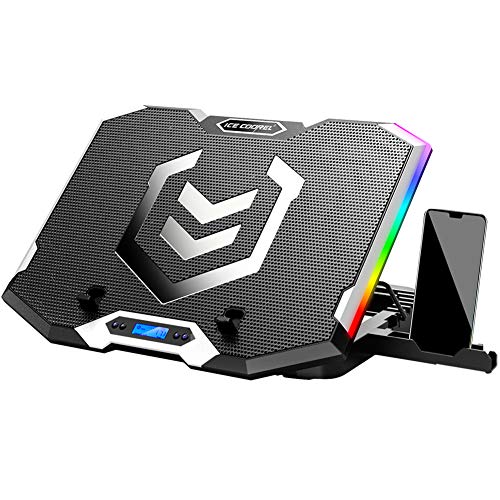
ICE COOREL Gaming Laptop Cooling Pad 15-17.3 Inch, 6 RGB Cooling Fans, LCD Screen

Our verdict: Active cooling for a TUF laptop with a tight budget.

The ICE COOREL has six transparent fans, an LCD showing fan speed, six height settings, seven RGB modes, two USB ports and a phone stand, fitting laptops from 15 to 17.3 inches. It targets gamers who want a lit-up desk without spending much, at $25 to $50.

It ranks sixth because six fans spread the airflow instead of concentrating it, so it trails the llano on heavy loads. The feature list leans toward lighting and display, not cooling power.

It suits TUF owners who want active cooling on a budget. Skip it if your laptop throttles under heavy load, because a stronger single fan will do more. If cooling is the priority, the llano V12 costs a little more and delivers noticeably more air.

Fans
6 transparent
Display
LCD fan speed
Fit
15 to 17.3 inch
Heights
6 settings

What we like

  • +LCD fan speed display
  • +Six height settings
  • +Phone stand included
  • +Low price tier

Watch out for

  • −Airflow spread thin
  • −Lighting over cooling

Buy it if: TUF owners wanting active cooling on a budget.

Skip it if: Your laptop throttles under heavy load.

7

Best Slim and Packable

TECKNET Laptop Cooling Pad, Portable Slim Laptop Cooler for 12-17 Inch Laptops

Our verdict: A thin, packable pad for ZenBook and VivoBook travel.

The slim TECKNET has three fans at 1200 RPM, a thin portable profile, a 12 to 17 inch fit and USB power. It folds into a bag, which makes it the traveller's pad, and it costs $25 to $50.

It ranks last because three fans at 1200 RPM move the least air in the guide. In exchange it takes almost no space when packed.

Buy it for light travel use with a ZenBook or VivoBook, where the goal is a cooler lap and a better typing angle. The caveat is that it is modest for gaming loads. A ROG running a heavy game will outrun it, so do not expect it to hold turbo clocks.

Fans
3 at 1200 RPM
Fit
12 to 17 inch
Profile
Slim, portable
Power
USB powered

What we like

  • +Slim, packable profile
  • +Fits 12 to 17 inch
  • +USB powered
  • +Low price tier

Watch out for

  • −Lowest fan RPM here
  • −Weak for gaming loads

Buy it if: Travelers with a ZenBook or VivoBook.

Skip it if: You play demanding games.

Methodology

How We Ranked These

Size coverage

We matched each pad's listed laptop range to ASUS lines from 12 inch ZenBooks to 19 inch ROG models.

Airflow design

Turbo fans, sealed chambers and multi-fan arrays were compared for how they move air.

Noise level

Rated dB figures and RPM were weighed because loud fans get switched off.

Adjustability

Height settings, fan switches and control options decided daily comfort.

Value for the tier

Each pad was judged against what its price bracket should deliver.

Every Primea Score uses the same weights: Performance 30% · Build & Materials 20% · Everyday Usability 20% · Value 20% · Owner Satisfaction 10%. Full scoring rules

Buyer's guide

How to Pick the Right One for You

By ASUS Line

ASUS's lineup spans thin ultrabooks to big gaming laptops, so match the pad to the series.

ASUS lineOur pick
ROG or TUF, premiumRazer Adaptive Smart
ROG, heavy gaming loadsllano V12
ROG 17 to 19 inch, budgetChillCore 9-Fan
VivoBook 12 to 15.6 inchTECKNET 12-15.6 Inch
ZenBook, light and heavy daysKootek 5-Fan

By Budget

SpendOur pick
Under $25Kootek 5-Fan
$25-50 large laptopsChillCore 9-Fan
$25-50 quietTECKNET 12-15.6 Inch
$50-100llano V12
$100-200Razer Adaptive Smart

Turbo Fan vs Multi-Fan Array

Turbo fan

A large single fan with strong concentrated airflow, built for sustained heavy load. Picks here: the llano V12 and Razer Adaptive Smart.

Multi-fan array

Many smaller fans for gentler, quieter spread cooling. Picks here: the ChillCore, TECKNET pads, Kootek and ICE COOREL.

Most gaming ASUS owners should default to a turbo fan, and ultrabook owners to an array.

By Noise Preference

PreferenceOur pick
Quietest, rated under 40 dBTECKNET 12-15.6 Inch
Switch fans off for light workKootek 5-Fan
Slim and gentleTECKNET Slim 3-Fan
Automatic speed controlRazer Adaptive Smart
Accept noise for powerllano V12

For Students and Travelers Specifically

Look for

A slim body, USB power and a size range covering 12 to 15.6 inch laptops so it fits a backpack and a dorm desk.

In this ranking

The TECKNET slim pad packs flat, and the TECKNET 12 to 15.6 inch pad adds a phone holder and a quiet under 40 dB rating.

When to Spend More

Spend more if

You run a large ROG or TUF under long gaming sessions, where the llano V12 or Razer Adaptive Smart earn their tier.

Save if

You use a thinner ASUS for office work, where the Kootek or TECKNET pads are plenty.

Questions

Frequently Asked Questions

Will a cooling pad fit my ASUS laptop?+

Check the stated size range against your screen size. Most pads cover 15.6 to 17 inches, while ultrabooks need the 12 to 15.6 inch TECKNET. Large ROG models may need the ChillCore or llano for 19 inch coverage, and bigger laptops need a firmer base.

What is the biggest cooling pad mistake?+

Buying a pad too big or too small for the laptop. Poor fit leaves vents uncovered and wastes airflow. Match the listed range first, then compare fans and noise. A well-fitted cheap pad beats a mismatched premium one.

Is the Razer pad worth it over the llano V12?+

If you want automatic control and a 2-year warranty, yes. The llano delivers strong airflow for less money. The Razer wins on convenience and frame options, but costs noticeably more, and its fan tops out at 3000 RPM.

How do I set up a pad?+

Plug it into a USB port, place the laptop so the intake vents sit over the fans, and pick a height. Start on low speed and increase only under load, to keep noise down and let the laptop reach a steady temperature first.

How do I maintain a cooling pad?+

Wipe dust off the fans and grille every month or two. The llano V12 has a removable filter to simplify this. Dust builds up and cuts airflow, which cancels the pad's benefit if you let it build.

Can a pad stop thermal throttling?+

It can help, but it does not replace cleaning the internal fans or repasting the processor. Treat it as a supplement, because severe throttling often points to dust or dried paste, which a pad cannot cure.

Final take

Buy the Razer if you own a ROG or TUF and want fan control handled for you. Choose the llano V12 for sustained airflow under big loads, the ChillCore for a 17 to 19 inch laptop on a budget, and the TECKNET or Kootek for ZenBooks and VivoBooks. The slim TECKNET is for travel only.

More Ranked & Reviewed Guides