
Primea ReviewsAll Reviews

Primea Reviews is reader-supported. When you buy through our Amazon links we may earn a commission, at no extra cost to you. Rankings are set by our editors and never sold. Learn more

Ranked & Reviewed by Primea Reviews

The 6 Best Laptop Cooling Pads for Dell Laptops of 2026, Ranked & Reviewed

By the Primea Editorial TeamUpdated November 1, 202610 min read6 products ranked
The 6 Best Laptop Cooling Pads for Dell Laptops of 2026, Ranked & Reviewed

The short answer

The Kootek 5-fan pad is the best cooling pad for Dell laptops: it names Dell, fits 12 to 17 inch machines, lets you run 1, 4 or 5 fans and costs under $25. The LIANGSTAR reaches 17.3 inches, the TECKNET is the slim travel pad, and the Razer is the premium adaptive option.

The Primea Scoreboard

Ranked & Reviewed

  1. Names Dell, runs five fans, and costs under $25.

    94Outstanding
    Check price
  2. Six switchable fans and a 17.3 inch reach for the same low price.

    91Excellent
    Check price
  3. A slim, light Dell-friendly pad for bags and desks alike.

    88Excellent
    Check price
  4. Six RGB fans with an LCD speed readout for gaming setups.

    85Excellent
    Check price
  5. A single big turbo fan for 15.6 to 19 inch machines.

    82Very Good
    Check price
  6. Adaptive smart cooling at a premium, tied to Razer software.

    79Very Good
    Check price

Fan count gets the attention on a cooling pad, but the size range decides whether the pad works at all. A 15.6 inch Dell Inspiron and a 17.3 inch Dell gaming machine sit on different platforms, and a pad that is too small leaves the intake vents hanging off the edge, where the fans cannot reach them. Match the stated range to your screen size, then think about fans.

We reviewed eight candidates and kept six whose spec sheets give a clear size range. Three name Dell outright, and the rest are included on size compatibility. Everything here comes from listings and owner reports, with no pad measured on a desk of ours. Rankings weigh size reach, fan control, height settings and portability against price.

Before you buy

What Actually Matters

01

Size compatibility

This is the range of laptop screen sizes the pad's platform supports. A pad too small leaves your Dell's bottom vents overhanging the edge, which defeats the cooling. Find your laptop's screen size and match it to the stated range in the listing title, such as the Kootek's 12 to 17 inch or the llano's 15.6 to 19.

02

Fan count and speed

More fans do not always mean better cooling, because the fan placement has to line up with your vents. Stated RPM tells you how hard each fan spins, and also how loud. Look for a switch or controller so you can run fewer fans for quiet work, as on the Kootek and LIANGSTAR.

03

Height adjustment

Height settings tilt the keyboard toward you, which helps typing comfort and airflow underneath. Pads with six or seven settings give finer control than two-position models. Check the count in the bullet points: the Kootek lists six and the LIANGSTAR seven. A steeper angle also lifts the rear vents, but too steep a tilt strains your wrists.

04

Power source

Most pads draw power through a USB port on your laptop, which uses one of your ports. Some, like the llano V12, need an external adapter. Check whether the box includes the adapter and whether the pad passes a USB port through, as the Kootek and TECKNET do. A free port matters on a thin laptop, where you may only have two.

05

Portability

A slim pad slides into a laptop bag, while a large gaming platform stays on a desk. This matters if you move between rooms. Look at the profile description and the stated weight if it is given. The TECKNET is the thin, light pick, while the Razer and llano suit a fixed desk. Check the weight if you carry it daily.

In-depth reviews

Our Ranked Picks, Reviewed

1

Best Overall

Kootek Laptop Cooling Pad Cooler Stand with 5 Quiet Fans

Our verdict: Names Dell, runs five fans, and costs under $25.

The Kootek covers 12 to 17 inch laptops, which spans most Dell Inspiron, Latitude and XPS sizes, and its listing names Dell as a compatible brand. It has five fans you can run as one, four or five, plus six height settings and a built-in dual USB hub. It costs under $25. Selectable fans let you trade airflow for noise, which suits quiet calls and heavy loads alike.

It tops the list because it pairs the Dell mention with the most flexible fan control in this group at the lowest price. The LIANGSTAR has six fans, but the Kootek adds the USB hub, so you give up no port when you plug in.

Buy it for a 15.6 inch Dell on a desk. The caveat is noise: all five fans together get loud, so use fewer for quiet work. Skip it if you have a 17.3 inch gaming laptop.

Fits
12-17 inch
Fans
5, selectable 1/4/5
Height settings
6
Extras
Dual USB hub

What we like

  • +Dell named as compatible
  • +Selectable fan modes
  • +Six height settings
  • +Under $25

Watch out for

  • −Five fans get louder
  • −17.3 inch is outside range

Buy it if: Dell owners with a 14 to 16 inch laptop who want a cheap, flexible pad.

Skip it if: You have a 17.3 inch Dell gaming laptop.

2

Best for 17 Inch Dells

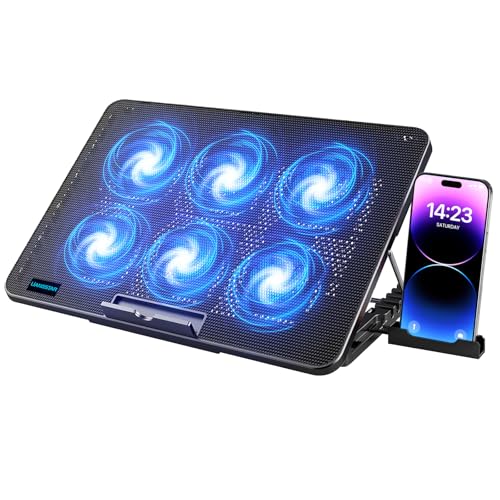
LIANGSTAR Laptop Cooling Pad, Laptop Cooler with 6 Quiet Fans for 12-17 Inch

Our verdict: Six switchable fans and a 17.3 inch reach for the same low price.

The LIANGSTAR lists 12 to 17.3 inch compatibility, names Dell and gives you six fans with independently switchable speed. It adds seven height settings and a large metal mesh surface, and costs under $25. The 17.3 inch ceiling is the point: large Dell gaming laptops need a platform that reaches their rear vents, and many pads stop at 17.

It sits one place below the Kootek because the Kootek bundles a USB hub, but the LIANGSTAR reaches 17.3 inches and offers one more height setting. For a big Dell, those two traits matter more than a pass-through port. Against the TECKNET, it has twice the fans for less money.

Pick it if your Dell is a large 17 inch model. The caveat is that more fans mean more total noise when all are on, and no hub is listed. Skip it if you want a USB hub built into the pad.

Fits
12-17.3 inch
Fans
6, switchable
Height settings
7
Surface
Large metal mesh

What we like

  • +Fits up to 17.3 inch
  • +Six switchable fans
  • +Seven height settings
  • +Dell named

Watch out for

  • −Total fan noise adds up
  • −No USB hub listed

Buy it if: Owners of 17 inch Dell laptops who want broad size support.

Skip it if: You want a USB hub built into the pad.

3

Best Slim Travel Pad

TECKNET Laptop Cooling Pad, Portable Slim Laptop Cooler

Our verdict: A slim, light Dell-friendly pad for bags and desks alike.

The TECKNET is a slim, lightweight pad with three fans at a documented 1200 RPM and double USB-A ports. It covers 12 to 17 inch laptops, names Dell and costs $25 to $50. A thin profile slides into a laptop bag beside the machine, which a thick six-fan platform cannot do, and dropping from five or six fans to three also lowers noise.

It ranks below the six-fan pads because three fans move less air, so a gaming load will find its limit sooner. What the thin body buys is portability, and a Dell ultrabook that runs warm on a lap or a sofa cushion needs little more.

Best for commuters and students. The caveat is price: it costs more than the Kootek for fewer fans. Skip it if you need maximum airflow for gaming.

Fits
12-17 inch
Fans
3 at 1200 RPM
Ports
Double USB-A
Profile
Slim, lightweight

What we like

  • +Slim and light
  • +Dell named
  • +Double USB-A ports
  • +Fits 12 to 17 inch

Watch out for

  • −Only three fans
  • −Costs more than Kootek

Buy it if: Students and commuters carrying a Dell in a bag.

Skip it if: You need maximum airflow for a gaming load.

4

Best Display Features

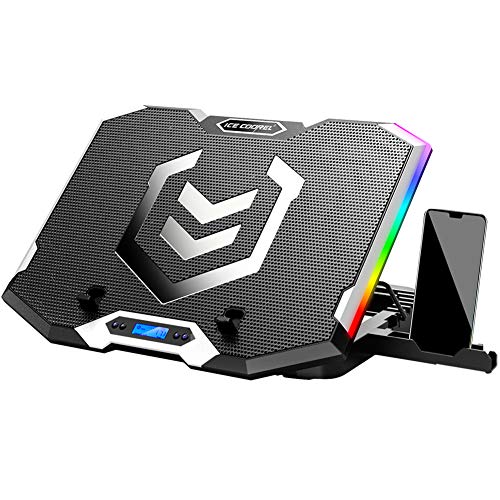
ICE COOREL Gaming Laptop Cooling Pad 15-17.3 Inch with 6 RGB Fans

Our verdict: Six RGB fans with an LCD speed readout for gaming setups.

The ICE COOREL targets 15 to 17.3 inch laptops with broad brand support. It has six transparent RGB fans, an LCD fan-speed display, six height settings, two USB ports and a phone stand, and costs $25 to $50. An LCD readout shows what speed the fans run at, which helps when you tune noise against cooling.

It ranks fourth because its listing does not name Dell, unlike the three above, and it adds RGB and a display that do not cool any better. The LIANGSTAR offers the same fan count and a 12 inch floor for less money, so small Dells cannot use this one at all.

Choose it for a gaming Dell on a desk where looks and a readout matter. The caveat is that it skips 12 to 14 inch laptops. Skip it if your Dell is under 15 inches.

Fits
15-17.3 inch
Fans
6 RGB
Display
LCD fan speed
Extras
2 USB, phone stand

What we like

  • +LCD shows fan speed
  • +Six RGB fans
  • +Phone stand built in
  • +Six height settings

Watch out for

  • −Dell not named
  • −No 12 to 14 inch support

Buy it if: Gaming Dell owners who want a visible readout and RGB.

Skip it if: Your Dell is under 15 inches.

5

Best Turbo Fan

llano V12 Gaming Laptop Cooling Pad Laptop Cooler

Our verdict: A single big turbo fan for 15.6 to 19 inch machines.

The llano V12 relies on one 5.5 inch turbo fan and a reinforced chassis, sized for 15.6 to 19 inch machines. It comes with a 36W external power adapter, a removable dust filter and three tilt angles, and costs $50 to $100. One large fan moves air through a sealed path, and a dust filter keeps it from clogging, which suits a machine that sits on a shelf.

It ranks below the multi-fan pads on value because of the price, and its cooling claim, a 44 degree reduction in 90 seconds, is the maker's own, so treat it as a listing statement. Against the Razer, it is cheaper but adds a cable.

Best for large Dell gaming laptops. The caveat is the external adapter, one more cable on the desk. Skip it if you want a USB-powered pad with nothing extra to plug in.

Fits
15.6-19 inch
Fan
5.5 in. turbo
Power
36W adapter
Filter
Removable dust

What we like

  • +Handles up to 19 inch
  • +Removable dust filter
  • +Reinforced chassis
  • +Three tilt angles

Watch out for

  • −Needs a power adapter
  • −Costs $50 to $100

Buy it if: Owners of large gaming Dells needing a strong single fan.

Skip it if: You want a USB-powered pad with no extra cable.

6

Best Premium Pick

Razer Laptop Cooling Pad Adaptive Smart, Intelligent Fan Control

Our verdict: Adaptive smart cooling at a premium, tied to Razer software.

The Razer pad uses three magnetic frames to span 14 to 18 inch laptops, with a documented 3000 RPM and adaptive fan control inside an airtight chamber with foam seals. It carries a two-year warranty and costs $100 to $200. Foam seals force the air through the laptop's vents instead of letting it leak around the edges, and adaptive control raises speed only when the machine heats up.

It ranks last because the price is the highest here and it requires Razer Synapse software, which adds setup the budget pads skip. The Kootek handles basic cooling for a fraction of the cost.

Worth it for a serious gaming Dell if you accept the software and want automatic fan control. The caveat is the cost for what a $25 pad also partly does. Skip it if you prefer a plug-in pad with no software.

Fits
14-18 inch
Speed
3000 RPM
Software
Razer Synapse
Warranty
2 years

What we like

  • +Adaptive fan control
  • +Foam-sealed airflow chamber
  • +Two-year warranty
  • +Spans 14 to 18 inch

Watch out for

  • −Needs Razer Synapse
  • −Priciest option here

Buy it if: Gaming Dell owners who want automatic fan control.

Skip it if: You prefer a plug-in pad with no software.

Methodology

How We Ranked These

Size range

We checked the stated laptop sizes against common Dell screen sizes from 12 to 17.3 inches.

Dell naming

We gave extra credit to listings that name Dell as compatible rather than leaving it to guesswork.

Fan setup

We compared fan count, stated RPM and whether speed can be controlled.

Adjustability

Height and tilt settings affect typing comfort, so we counted them.

Value

We scored each pad within its price bucket, from under $25 to $100 to $200.

Every Primea Score uses the same weights: Performance 30% · Build & Materials 20% · Everyday Usability 20% · Value 20% · Owner Satisfaction 10%. Full scoring rules

Buyer's guide

How to Pick the Right One for You

By Laptop Size

Match the pad to your Dell's screen first.

Dell screenOur pick
12 to 14 inchTECKNET Laptop Cooling Pad, Portable Slim
15.6 inchKootek Laptop Cooling Pad with 5 Quiet Fans
17.3 inchLIANGSTAR Laptop Cooling Pad with 6 Quiet Fans
Up to 19 inchllano V12 Gaming Laptop Cooling Pad

By Budget

SpendOur pick
Under $25Kootek Laptop Cooling Pad with 5 Quiet Fans
$25 to $50TECKNET Laptop Cooling Pad, Portable Slim
$50 to $100llano V12 Gaming Laptop Cooling Pad
$100 to $200Razer Laptop Cooling Pad Adaptive Smart

Many Fans vs Fewer Fans

Many fans

Spread airflow and let you switch some off. The Kootek, LIANGSTAR and ICE COOREL fit here.

Fewer fans

Quieter and often slimmer. The TECKNET with three fans and the llano V12 with one turbo fan fit.

Most Dell owners should start with a switchable multi-fan pad like the Kootek.

By Extra Features

WantOur pick
USB hubKootek Laptop Cooling Pad with 5 Quiet Fans
LCD fan readoutICE COOREL Gaming Laptop Cooling Pad
Automatic fan controlRazer Laptop Cooling Pad Adaptive Smart
Dust filterllano V12 Gaming Laptop Cooling Pad

For Dell Gaming Laptops Specifically

Look for

Support for 17.3 inch or larger, plus strong airflow that can handle sustained loads.

In this ranking

The LIANGSTAR reaches 17.3 inch and names Dell; the llano V12 reaches 19 inch with a turbo fan.

When to Spend More

Spend more if

You run a heavy gaming Dell daily and want the Razer's adaptive control and warranty.

Save if

You browse and write, so the Kootek or LIANGSTAR under $25 does the job.

Questions

Frequently Asked Questions

Will these pads fit every Dell laptop?+

Each listing gives a size range, such as 12 to 17 inch for the Kootek. Check your Dell's screen size against it. Three listings also name Dell directly: the Kootek, LIANGSTAR and TECKNET. Dell sizes vary by model, so use the screen size, not the model name.

What is the most common mistake?+

Buying a pad too small for the laptop. Overhanging vents lose the airflow benefit, so match size before fan count. A 17.3 inch Dell needs the LIANGSTAR or ICE COOREL's range, not a 12 to 17 inch limit.

Is the Razer worth it over a cheaper pad?+

Only if you want adaptive fan control and the two-year warranty. The Kootek covers basic cooling for far less money, and the Razer adds Synapse software you must install, so it suits only a gamer who wants automatic fan control.

How do I set up a pad?+

Plug the USB cable into your laptop, set the height, and place the laptop so its vents sit over the fans. Pick the fan mode that matches your workload. The llano V12 also needs its 36W external adapter plugged in.

How do I maintain a cooling pad?+

Dust builds up on fans. Wipe the grille regularly, and use the llano V12's removable filter if you own it. Unplug the pad before cleaning it, and brush the grille with a soft brush. Compressed air works on the fan blades too.

Does a pad help a thin Dell ultrabook?+

It can help if the laptop runs warm under load, but light office work may not need one. The TECKNET slim pad is the easiest to carry and does not add much bulk to a bag. Ultrabooks rarely need more than a few fans.

Final take

Buy the Kootek for a 15.6 inch Dell on a desk and the LIANGSTAR for a 17.3 inch machine. Choose the TECKNET if the pad rides in a bag, the llano V12 for a 19 inch gaming laptop, and the Razer only if you want adaptive control and accept the software. Check your Dell's screen size against the stated range before you compare fan counts.

More Ranked & Reviewed Guides