
Primea ReviewsAll Reviews

Primea Reviews is reader-supported. When you buy through our Amazon links we may earn a commission, at no extra cost to you. Rankings are set by our editors and never sold. Learn more

Ranked & Reviewed by Primea Reviews

The 7 Best Laptop Cooling Pads for ASUS TUF, Ranked & Reviewed

By the Primea Editorial TeamUpdated November 4, 20269 min read7 products ranked
The 7 Best Laptop Cooling Pads for ASUS TUF, Ranked & Reviewed

The short answer

The IETS GT500 at 5000 RPM is the strongest pad for an ASUS TUF, with a sealed foam collar that sends nearly all its airflow into the base. The llano V12 is the quieter alternative with a dust filter, and the cheaper 4200 RPM GT500 trims noise and cost. Razer suits owners who want automatic speed control, and the Metfut is the silent option for 15.6 inch models only.

The Primea Scoreboard

Ranked & Reviewed

  1. The strongest sealed turbo pad here, with speed from 0 to 5000 RPM.

    93Outstanding
    Check price
  2. A reinforced pad that supports 15.6 to 19 inch chassis and filters its own intake.

    90Excellent
    Check price
  3. The same sealed design at 4200 RPM, for less noise and less cost.

    88Excellent
    Check price
  4. A 140mm brushless fan that reads laptop temperature and sets its own speed.

    85Excellent
    Check price
  5. Nine fans and eight height settings across a pad that fits up to 19.3 inches.

    83Very Good
    Check price
  6. Six fans, six angles and a speed display for the lowest price tier.

    81Very Good
    Check price
  7. A thermoelectric panel with two fans under 20 dB, for 15.6 inch laptops only.

    78Very Good
    Check price

TUF laptops are built tough but they are not built cool. Under sustained load the fans spin up, the keyboard deck warms and the clock speeds start to sag, which is the moment a cooling pad earns its place. The trap is buying one that looks powerful but is sized for the wrong chassis: TUF Gaming comes in 15.6 and 17.3 inch versions, and several pads only support up to 15.6.

Our ranking weighs how well each pad delivers air into the base, how loud it gets at full speed and how wide a laptop range it supports. Sealed turbo designs lead because they funnel air where the laptop's own fans pull from. Open multi-fan pads follow, and a silent thermoelectric pad rounds out the list for a very specific buyer.

Before you buy

What Actually Matters

01

Sealed vs open airflow

A sealed pad uses a foam collar or pressure chamber so air cannot leak out sideways and must enter the laptop. Open fans just blow at the base. At high loads the difference is large. Look for foam seals or pressure chamber wording in the product details, as on the GT500 and the Razer.

02

Laptop size range

A pad's frame must support the whole base, and a fan placed wrongly misses the intake. TUF models are 15.6 or 17.3 inches, so a 15.6 inch limit excludes the larger ones. Find the stated range in the title or specs, like the ChillCore's 15.6 to 19.3 inch.

03

RPM and noise

RPM measures fan speed, and higher speed moves more air but makes more noise. Some pads list decibel levels too. Choose a variable speed model so you can drop to a quiet setting, and look for 0 to 5000 style ranges rather than a single fixed number.

04

Power draw

Pads run on USB power or a wall adapter. USB pads are portable but limit fan strength, while adapters like the llano's 36W allow bigger fans. Check which the listing uses, and remember a USB pad takes a port that your TUF may need for accessories.

05

Height and tilt

Raising the back of the laptop improves typing posture and lets the intake breathe. More height settings give finer control. Look for six to eight settings, as on the ICE COOREL and ChillCore, and check that the pad's rubber grips keep a heavy TUF from sliding.

In-depth reviews

Our Ranked Picks, Reviewed

1

Best Overall

IETS GT500 Powerful Turbo-Fan (5000 RPM) Laptop Cooling Pad

Our verdict: The strongest sealed turbo pad here, with speed from 0 to 5000 RPM.

The GT500 is a turbofan pad that runs at any speed from 0 to 5000 RPM. A sealed foam collar wraps the airflow path around the laptop base, and a 3-port USB hub gives the TUF's ports a little relief.

That collar is why it leads. Air that leaves the fan has only one place to go, which is up into the intake grille, so the pad's power is not wasted like it is on the open ICE COOREL. The 4200 RPM sibling uses the same design with a lower ceiling, and the llano V12 trades some airflow for a dust filter. The price tier, $50 to $100, is mid-range for what you get.

Buy it if your TUF throttles in long sessions and you game with headphones. The catch is volume: full speed is loud, so most users will run it at half power.

Fan
Turbofan, 0 to 5000 RPM
Seal
Foam collar, 360 degree airflow
Hub
3-port USB
Intake
Bottom air intake design

What we like

  • +Highest top speed here
  • +Foam collar seals airflow
  • +Continuous speed control
  • +USB hub included

Watch out for

  • −Loud at full speed
  • −No dust filter documented
  • −Bulky for travel

Buy it if: TUF owners who throttle in long sessions and wear headphones.

Skip it if: You play near sleeping people or without headphones.

2

Best for Larger TUF Models

llano V12 Gaming Laptop Cooling Pad Laptop Cooler Fan Stand

Our verdict: A reinforced pad that supports 15.6 to 19 inch chassis and filters its own intake.

The llano V12 uses a 5.5 inch turbo booster fan inside a reinforced frame that takes 15.6 to 19 inch laptops. It plugs into a 36W adapter, carries a 3-port USB hub for peripherals and includes a removable dust filter.

Its chassis range is the reason to pick it for a TUF F17 or A17, since it clears 17.3 inches comfortably, where the Metfut cannot. It sits second because its fan is smaller than the GT500's 5000 RPM turbofan and the airflow figure is less documented, but the dust filter keeps the pad running longer in a dusty room. Against the Razer, it is cheaper and has more USB flexibility.

Buy it if you own a larger TUF and want a pad that lasts. The drawback is that the adapter needs a wall socket, which limits where you can set up.

Fan
5.5 inch turbo booster
Laptop range
15.6 to 19 inch
Power
36W adapter
Filter
Removable dust filter

What we like

  • +Fits up to 19 inch laptops
  • +Dust filter can be removed
  • +Reinforced, sturdy frame
  • +USB hub for accessories

Watch out for

  • −Needs a wall adapter
  • −Hub is peripherals only
  • −Less airflow than the GT500

Buy it if: Owners of 17 inch TUF models who want a durable, filtered pad.

Skip it if: You need a portable pad powered through USB alone.

3

Best Value Turbo

IETS GT500 Powerful Turbo-Fan (4200 RPM) Laptop Cooling Pad

Our verdict: The same sealed design at 4200 RPM, for less noise and less cost.

This GT500 variant runs from 0 to 4200 RPM with the same sealed foam collar sized to the laptop, a bottom intake design and a 3-port USB hub.

It ranks third because the lower ceiling is a fair trade for many owners. A TUF that sits at the edge of throttling does not need 5000 RPM, and 4200 RPM is noticeably quieter at the top end. Against the 5000 RPM model it gives up some headroom, but it takes the sealing benefit intact, which is what the ICE COOREL and ChillCore below cannot match.

Buy it if you want the turbo design without paying for the loudest setting. The tradeoff is that heavy gaming at a 17 inch chassis may justify the extra speed of the 5000 RPM version, so choose by your thermal needs.

Fan
Turbofan, 0 to 4200 RPM
Seal
Foam collar sized to laptop
Hub
3-port USB
Intake
Bottom air intake design

What we like

  • +Sealed turbo airflow
  • +Quieter than the 5000 RPM
  • +Variable speed control
  • +USB hub included

Watch out for

  • −Lower ceiling for hot games
  • −No dust filter documented
  • −Foam collar adds bulk

Buy it if: TUF owners who want sealed turbo cooling at lower noise.

Skip it if: You push a 17 inch model to its thermal limit.

4

Best Automatic Control

Razer Laptop Cooling Pad Adaptive Smart, Intelligent Fan Control

Our verdict: A 140mm brushless fan that reads laptop temperature and sets its own speed.

Razer's pad has a 140mm brushless fan reaching 3000 RPM inside an airtight foam-sealed chamber, with three magnetic frame sizes and a 3-port Type-A hub. It adjusts speed automatically based on the laptop's temperature.

The automation is what you pay for. A TUF that idles at the desktop and spikes in games gets a pad that follows along, with no knob to turn. It ranks fourth because the 3000 RPM ceiling lags both GT500 models, and the premium tier price, $100 to $200, is steep for that airflow. The magnetic frames help it fit a range of widths.

Buy it if you hate fiddling with fan settings and want quiet by default. The caveat is that cooling per dollar is lower than the IETS pads.

Fan
140mm brushless, 3000 RPM
Control
Automatic
Fit
3 magnetic frame sizes
Chamber
Airtight foam seal

What we like

  • +Fan speed adjusts itself
  • +Brushless 140mm fan
  • +Magnetic frame sizes
  • +Airtight sealed chamber

Watch out for

  • −Priciest pad in the list
  • −Lowest turbo-class RPM
  • −Premium for convenience

Buy it if: Owners who want a quiet pad that needs no manual adjustment.

Skip it if: You want the most cooling for each dollar.

5

Best Large Multi-Fan

ChillCore Laptop Cooling Pad, RGB, 9 Fans, 15.6-19.3 Inch

Our verdict: Nine fans and eight height settings across a pad that fits up to 19.3 inches.

ChillCore's pad has 9 fans across top and bottom vents, 8 height settings, an LCD fan speed display and 10 RGB light modes. It fits laptops from 15.6 to 19.3 inches, the widest range on this list.

It wins on spread rather than force. Nine fans move a lot of total air across the base and suit a big TUF chassis, but the airflow is diffuse and not aimed at an intake. That puts it fifth, behind every sealed pad, and ahead of the ICE COOREL on fan count, height settings and size range.

Buy it if you own a 17 inch TUF and want cheap, broad cooling with comfortable tilt angles. The caveat: nine fans mean nine bearings to wear, and low-cost fans can get loud as they age.

Fans
9, top and bottom vents
Laptop range
15.6 to 19.3 inch
Height
8 settings
Display
LCD fan speed

What we like

  • +Widest laptop size range
  • +Eight height settings
  • +LCD speed readout
  • +Low cost tier

Watch out for

  • −Diffuse, unsealed airflow
  • −Nine fans to wear out
  • −RGB adds little

Buy it if: 17 inch TUF owners who want low-cost cooling and tilt choices.

Skip it if: You want the strongest airflow into the intake.

6

Best Budget Pick

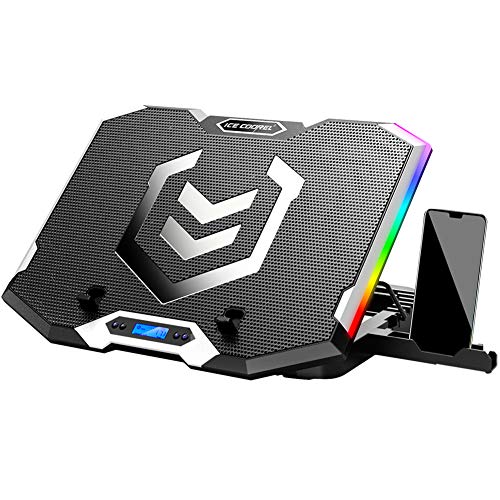
ICE COOREL Gaming Laptop Cooling Pad, 6 RGB Fans, LCD Screen

Our verdict: Six fans, six angles and a speed display for the lowest price tier.

The ICE COOREL has 6 fans spread across top and bottom vents, 6 height settings, an LCD fan speed display, 7 RGB lighting modes and 2 USB ports.

Owners buy it because it is the cheapest route to a real fan array, and it ranks sixth because its fans are smaller and fewer than the ChillCore's nine. The laptop range is not stated as clearly as the ChillCore's, so check it against your TUF size first. Against the Metfut, it moves more air but makes more noise.

Buy it if the TUF is a budget machine and the cooling need is moderate. The caveat is that open fans cannot match a sealed turbo pad in a heavy session, so expect a few degrees of improvement, not a transformation.

Fans
6, top and bottom vents
Height
6 settings
Display
LCD fan speed
Ports
2 USB

What we like

  • +Lowest cost tier
  • +Six height settings
  • +LCD speed readout
  • +Real multi-fan airflow

Watch out for

  • −Open, unsealed airflow
  • −Laptop range less clear
  • −RGB is cosmetic

Buy it if: Budget TUF owners who want a fan array and tilt adjustment.

Skip it if: Your laptop throttles badly in long sessions.

7

Quietest Pad

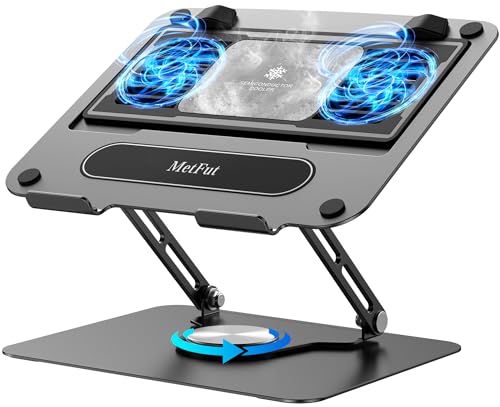
Metfut Laptop Cooling Pad with Detachable Fan and Cooler

Our verdict: A thermoelectric panel with two fans under 20 dB, for 15.6 inch laptops only.

The Metfut takes a different route: a thermoelectric Peltier cooling panel that contacts the laptop base, with 2 fans under 20 dB, a detachable cooler with spring dampers and a carbon steel frame. It supports laptops up to 15.6 inches and 20 lb.

Contact cooling is almost silent, which is its appeal, but it is a smaller effect than a turbo fan forcing air through the intake. That is why it ranks last, along with the 15.6 inch limit that excludes any TUF F17 or A17. For a TUF F15 used in a quiet room, it is a legitimate pick, and it beats the ICE COOREL for noise.

Buy it if silence is your priority and your TUF is 15.6 inches. The caveat: do not expect GT500 level cooling, and check the fit for your exact model.

Cooling
Thermoelectric (Peltier) panel
Noise
2 fans, under 20 dB
Support
Up to 15.6 inch, 20 lb
Frame
Carbon steel

What we like

  • +Near-silent operation
  • +Direct-contact cooling panel
  • +Carbon steel frame
  • +Detachable cooler

Watch out for

  • −15.6 inch limit only
  • −Weaker than turbo airflow
  • −Peltier panel draws power

Buy it if: 15.6 inch TUF owners who need quiet cooling for study or night use.

Skip it if: Your TUF is a 17 inch model or you need strong cooling.

Methodology

How We Ranked These

Air delivery

Sealed turbo pads that funnel air into the intake ranked above open fan arrays, which spread airflow thin.

Laptop size range

TUF comes in 15.6 and 17.3 inch sizes, so the stated chassis range decided which pads could earn a high spot.

Noise at full speed

We compared stated RPM and decibel figures, since a pad too loud to run helps no one.

Control and convenience

Variable knobs, automatic modes and LCD readouts were credited when they save real fiddling.

Build and upkeep

Frame material, dust filters and replaceable parts decided how long each pad should keep working.

Every Primea Score uses the same weights: Performance 30% · Build & Materials 20% · Everyday Usability 20% · Value 20% · Owner Satisfaction 10%. Full scoring rules

Buyer's guide

How to Pick the Right One for You

By TUF Screen Size

The first filter is whether the pad physically fits your TUF.

Your TUFOur pick
15.6 inch, quiet useMetfut Laptop Cooling Pad with Detachable Fan
15.6 inch, maximum coolingIETS GT500 Powerful Turbo-Fan (5000 RPM)
17.3 inch, dust-prone roomllano V12 Gaming Laptop Cooling Pad
17.3 inch, budgetChillCore Laptop Cooling Pad, 9 Fans
Either size, automatic controlRazer Laptop Cooling Pad Adaptive Smart

By Budget

SpendOur pick
$25 to $50ICE COOREL Gaming Laptop Cooling Pad
$25 to $50 (larger laptops)ChillCore Laptop Cooling Pad, 9 Fans
$50 to $100IETS GT500 Powerful Turbo-Fan (5000 RPM)
$50 to $100 (quieter)IETS GT500 Powerful Turbo-Fan (4200 RPM)
$50 to $100 (silent)Metfut Laptop Cooling Pad
$100 to $200Razer Laptop Cooling Pad Adaptive Smart

Sealed Turbo vs Open Fans

Sealed turbo

A single strong fan and a foam collar force air into the intake. It cools harder but is louder. Picks: IETS GT500 (5000 and 4200 RPM), llano V12, Razer.

Open fans

Many small fans spread gentle airflow across the base. It is cheaper and gentler. Picks: ChillCore, ICE COOREL.

Choose sealed turbo for gaming sessions that throttle the TUF, open fans for lighter use.

By Noise Tolerance

Your toleranceOur pick
Silent room, light gamingMetfut Laptop Cooling Pad
Quiet by defaultRazer Laptop Cooling Pad Adaptive Smart
Moderate noise acceptedIETS GT500 Powerful Turbo-Fan (4200 RPM)
Headphones always onIETS GT500 Powerful Turbo-Fan (5000 RPM)
Noise is not a concernICE COOREL Gaming Laptop Cooling Pad

For Long Gaming Sessions Specifically

Look for

A sealed fan design, adjustable speed and a power source that does not rely on a USB port. Choose a pad with a stated laptop range that covers your TUF.

In this ranking

The IETS GT500 at 5000 RPM leads for throttling TUF models. The llano V12 follows with a dust filter for keeping the fan clean through months of play.

When to Spend More

Spend more if

Your TUF throttles in games or you want automatic control. The GT500 and Razer are worth the extra for that.

Save if

You play light titles. The ICE COOREL and ChillCore give broad cooling for the least money.

Questions

Frequently Asked Questions

Will these pads fit my ASUS TUF?+

Most support 15.6 inch laptops and several go larger. The llano V12 reaches 19 inches and the ChillCore 19.3, but the Metfut stops at 15.6, so a 17.3 inch TUF needs one of the others.

What mistake do TUF owners make with cooling pads?+

Choosing by fan count. The ChillCore's nine fans cannot match one sealed IETS GT500 aimed at the intake. Compare airflow design and seal first, then count fans.

Is the 5000 RPM GT500 worth it over the 4200 RPM?+

Only if your TUF throttles at 4200 RPM. The 4200 RPM version is quieter and cheaper, while the 5000 RPM model is louder at 65 dB territory, so many players choose the lower speed.

How do I set up a turbo-fan pad on a TUF?+

Line the fan with your TUF's bottom grille, power the pad, and set a low speed first. Raise it only when temperatures climb. The llano V12 and GT500 both let you adjust from a control on the pad.

How do I maintain a cooling pad?+

Wipe blades and vents monthly. Rinse the llano V12's removable dust filter, and use compressed air on the IETS and ICE COOREL. Dust is what shortens the life of cheap pad fans.

Does a Peltier pad like the Metfut work better than a fan?+

No. The Metfut is quiet at under 20 dB, but contact cooling removes less heat than a turbo fan such as the IETS GT500. Pick it for noise, not performance, and only for 15.6 inch laptops.

Final take

For an ASUS TUF, the IETS GT500 at 5000 RPM is the pad that cools hardest because its foam collar aims every bit of airflow at the intake. The llano V12 is the better pick for a 17 inch model and a dusty desk, and the Razer rewards owners who want automatic control. Check your laptop's size before you buy, because the Metfut only fits 15.6 inch models.

More Ranked & Reviewed Guides