

Primea ReviewsAll Reviews

Primea Reviews is reader-supported. When you buy through our Amazon links we may earn a commission, at no extra cost to you. Rankings are set by our editors and never sold. Learn more

Ranked & Reviewed by Primea Reviews

The 7 Best Ink Tank Printers for Home Offices of 2026, Ranked & Reviewed

By the Primea Editorial TeamUpdated November 1, 202610 min read7 products ranked
The 7 Best Ink Tank Printers for Home Offices of 2026, Ranked & Reviewed

The short answer

The Epson EcoTank ET-4850 is the best ink tank printer for most home offices: scanner, copier, fax, feeder and Ethernet in a cartridge-free body. The ET-4950 goes longest between refills at up to three years of ink, and the ET-3850 adds Ethernet without fax. The ET-2800 and HP Smart Tank 5101 keep costs down.

The Primea Scoreboard

Ranked & Reviewed

  1. Every office feature a home worker could want, without a cartridge in sight.

    94Outstanding
    Check price
  2. The longest stretch between refills of anything in this ranking.

    92Outstanding
    Check price
  3. Ethernet and a document feeder without paying for fax or a touchscreen.

    90Excellent
    Check price
  4. Fax, feeder and Ethernet in a cheaper bracket than the premium models.

    88Excellent
    Check price
  5. The cheapest sensible entry into cartridge-free printing for a home office.

    85Excellent
    Check price
  6. The HP answer to the ET-2800, with two years of ink in the box.

    83Very Good
    Check price
  7. A bare-bones ink tank printer for very light offices.

    81Very Good
    Check price

Home office buyers overpay for ink tank printers in a predictable way: they buy features they will never touch. A fax port and a document feeder sound essential until you realize you scan one page a week, at which point the cheaper tank printer would have done everything you needed. The point of a tank machine is cheap pages, not a spec sheet.

We ranked seven ink tank printers on spec sheets and listing details: how much office hardware each includes, how it connects and how much ink ships in the box. The white ET-2800 was left out because it is the same printer as the black one in a different finish. Read each description against your actual week, not an imagined one.

Before you buy

What Actually Matters

01

Automatic document feeder

An ADF pulls multi-page documents through the scanner without you lifting the lid for each sheet. It matters because scanning a ten-page contract by hand is slow. Check the listing for ADF or automatic document feeder in the spec bullets, since entry models like the ET-2800 and ET-2400 usually omit it, and confirm it is a true feeder and not a flatbed only.

02

Ethernet versus Wi-Fi

Ethernet gives a stable wired link that does not drop when the router is busy. It matters if the printer sits far from the router or is shared between machines. Look for an Ethernet port in the specs rather than assuming a premium model has one, because the ET-4950 lists none despite its price, and the HP and ET-2800 have none either.

03

Starting ink supply

Some printers include enough ink for up to three years of typical use. That reduces early refills, which is the whole appeal of an ink tank. Read the box contents on the listing to see how many bottles come included, and compare years of ink with your page count, as the HP lists two years and the ET-4950 up to three.

04

Wi-Fi band support

A printer limited to 2.4GHz cannot join a router set to 5GHz only. It matters because many modern routers separate bands. Check the listing for the supported Wi-Fi band before you buy, and look at your router settings too. The HP Smart Tank 5101 is the model here that states 2.4GHz only.

05

Ink level visibility

Tanks with a visible level window let you refill before running dry. This prevents mid-job failures and wasted pages. Look for front panel tank levels in the specs, as the ET-2800 lists. A hidden tank is harder to judge, so you rely on software warnings, which can be slow to appear and easy to ignore.

In-depth reviews

Our Ranked Picks, Reviewed

1

Best Overall

Epson EcoTank ET-4850 Supertank with Scanner, Copier, Fax, ADF, and Ethernet

Our verdict: Every office feature a home worker could want, without a cartridge in sight.

The Epson ET-4850 is a cartridge-free Supertank with scanner, copier, fax, an automatic document feeder and an Ethernet port, built for office work. The feeder turns a ten-page contract into a one-touch scan, and wired networking keeps the printer reachable when Wi-Fi congests, which is where shared home offices fail first.

It ranks first because it carries the fullest office kit without a cartridge. The ET-4950 lasts longer between refills but lists no Ethernet, and the ET-3850 drops fax.

Buy it if you scan, copy and occasionally fax multi-page documents. The caveat is upfront cost, and fax is a feature most people never use, so skip it if you print a handful of pages a week and never scan.

Ink system
Cartridge-free tank
Office tools
Scan, copy, fax
Paper handling
Automatic document feeder
Network
Ethernet

What we like

  • +Full office feature set
  • +Document feeder included
  • +Wired Ethernet option
  • +Cartridge-free tanks

Watch out for

  • −Higher upfront cost
  • −Fax unused by most

Buy it if: A home office that scans, copies and occasionally faxes multi-page documents.

Skip it if: You print a handful of pages a week and never scan.

2

Best for Heavy Printing

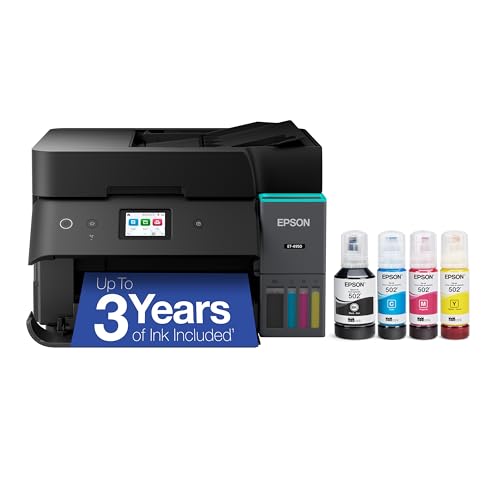
Epson EcoTank ET-4950 Supertank Printer, Up to 3 Years of Ink

Our verdict: The longest stretch between refills of anything in this ranking.

The Epson ET-4950 ships with up to three years of ink, a 2.4 inch color touchscreen, an automatic document feeder and an 18 pages per minute print speed. Starting with years of ink changes ownership: there is no first-month refill run and no cost surprise for a long time.

It ranks second because the listing shows no Ethernet or fax, and it sits in the premium bracket. Against the ET-4850, it wins on ink supply and screen, not on connectivity.

Buy it if you print daily and want to go years without buying ink. Skip it if you need fax or a wired network connection. The touchscreen also makes setup easier, so it suits a busy desk where you want controls on the machine.

Ink included
Up to 3 years
Display
2.4-inch touchscreen
Speed
18 PPM
Paper handling
Automatic document feeder

What we like

  • +Up to 3 years of ink
  • +Color touchscreen
  • +Document feeder included
  • +Cartridge-free tanks

Watch out for

  • −No Ethernet listed
  • −Premium price bracket

Buy it if: Daily printers who want to go years without buying ink.

Skip it if: You need fax or a wired network connection.

3

Best for Wired Networks

Epson EcoTank ET-3850 Supertank Printer with Ethernet and ADF

Our verdict: Ethernet and a document feeder without paying for fax or a touchscreen.

The Epson ET-3850 combines cartridge-free tanks with an automatic document feeder, Ethernet, mobile printing and a scanner and copier, with a bonus black ink bottle and USB cable in the box. It drops fax and the touchscreen, which many offices can live without.

It ranks third since it costs more than entry models and has no fax. It beats the ET-4800 below on price-for-features only if you do not need fax, and it adds the extra black bottle.

Buy it for a higher-volume office that wants a wired, shared printer. Skip it if you only connect over Wi-Fi and rarely scan, since you would be paying for Ethernet and a feeder you never use. A bonus bottle means the first refill is already paid for.

Ink system
Cartridge-free tank
Network
Ethernet
Paper handling
Automatic document feeder
In the box
Extra black ink bottle

What we like

  • +Ethernet included
  • +Document feeder included
  • +Bonus black ink bottle
  • +Mobile printing support

Watch out for

  • −No fax
  • −Costs more than entry models

Buy it if: Higher-volume offices that want a wired, shared printer.

Skip it if: You only connect over Wi-Fi and rarely scan.

4

Best Mid-Price Office Pick

Epson EcoTank ET-4800 Cartridge-Free Supertank Printer with Fax and Ethernet

Our verdict: Fax, feeder and Ethernet in a cheaper bracket than the premium models.

The Epson ET-4800 offers fax, Ethernet, a document feeder and wireless connectivity in a cartridge-free body, at a lower price than the premium models. It sits as the practical middle: you get office tools without the touchscreen or the long-life ink bundle.

It ranks fourth because there is no long-life ink supply and it is not the fastest. The ET-4850 above adds a more complete office feature set, and the ET-4950 lasts longer between refills.

Buy it for a small office that wants fax and a feeder on a budget. Skip it if you want the largest starting ink supply. Since Wi-Fi and Ethernet are both available, it is flexible about where the printer lives, which suits a room far from the router.

Ink system
Cartridge-free tank
Paper handling
Automatic document feeder
Extras
Fax and Ethernet
Price bracket
$100-200

What we like

  • +Fax and Ethernet included
  • +Document feeder included
  • +Lower price bracket
  • +Wi-Fi also available

Watch out for

  • −No long-life ink supply
  • −Not the fastest listed

Buy it if: Small offices that want fax and a feeder on a budget.

Skip it if: You want the largest starting ink supply.

5

Best Budget

Epson EcoTank ET-2800 Cartridge-Free Supertank Printer, Black

Our verdict: The cheapest sensible entry into cartridge-free printing for a home office.

The Epson ET-2800 is a wireless color all-in-one with cartridge-free tanks, scan and copy functions, a compact body and visible ink levels on the front panel. A visible level window means you refill before the tank runs dry, avoiding a failed print job mid-deadline.

It ranks fifth because it has no document feeder and works over Wi-Fi only. It is the lowest-cost EcoTank entry, which is why it still earns a spot ahead of the thin-listing ET-2400.

Buy it for moderate printing with low running costs on a budget. Skip it if you scan stacks of pages or need Ethernet. A flatbed scans one page at a time, which is fine for receipts and single forms but slow for contracts.

Ink system
Cartridge-free tank
Connectivity
Wireless
Functions
Print, scan, copy
Ink check
Front panel levels

What we like

  • +Lowest-cost EcoTank entry
  • +Visible ink levels
  • +Compact footprint
  • +Scan and copy built in

Watch out for

  • −No document feeder
  • −Wi-Fi only

Buy it if: Moderate printers who want low running costs on a budget.

Skip it if: You scan stacks of pages or need Ethernet.

6

Best Non-Epson Option

HP Smart Tank 5101 Wireless Refillable All-in-One Printer

Our verdict: The HP answer to the ET-2800, with two years of ink in the box.

The HP Smart Tank 5101 is a refillable-tank all-in-one that ships with two years of ink, scans and copies, and joins Wi-Fi on the 2.4GHz band only. Two years of ink in the box offsets the usual tank-printer price premium, and HP's software suits people who already use it.

It ranks sixth since it has no feeder, no Ethernet and a 2.4GHz-only radio. It is the answer to the ET-2800 from another maker, with more bundled ink.

Buy it for light to moderate printing if you prefer HP software. Skip it if your router is 5GHz only, because the printer will not connect. Check your router's band settings before ordering rather than after.

Ink included
2 years
Wi-Fi
2.4GHz only
Functions
Print, scan, copy
Ink system
Refillable tank

What we like

  • +Two years of ink included
  • +Scan and copy built in
  • +Refillable tank system
  • +Budget price bracket

Watch out for

  • −2.4GHz Wi-Fi only
  • −No feeder or Ethernet

Buy it if: Light-to-moderate printers who prefer HP software.

Skip it if: Your router is 5GHz only.

7

Best for Light Use

Epson EcoTank ET-2400 Cartridge-Free Supertank Printer

Our verdict: A bare-bones ink tank printer for very light offices.

The Epson ET-2400 is a compact wireless color all-in-one with cartridge-free tanks and scan and copy built in. It is the leanest EcoTank here, with a thin spec listing, and its job is to cut running costs for someone who prints now and then.

It ranks last because it has no feeder or Ethernet and the listing says little else. The ET-2800 gives visible ink levels for similar money.

Buy it for a very light office that wants cheap ink tank printing. Skip it if you need office extras like a feeder. With sparse specs, read the listing carefully before relying on it, since the details matter more when there are few of them.

Ink system
Cartridge-free tank
Connectivity
Wireless
Functions
Print, scan, copy
Design
Compact

What we like

  • +Cartridge-free tanks
  • +Compact design
  • +Scan and copy built in
  • +Low entry cost

Watch out for

  • −Thin spec listing
  • −No feeder or Ethernet

Buy it if: Very light users wanting cheap ink tank printing.

Skip it if: You need office extras like a feeder.

Methodology

How We Ranked These

Office hardware

We checked which models list a document feeder, fax and Ethernet, since these separate office printers from family ones.

Ink supply

We compared what ink comes with the printer, from standard bottles to up to three years.

Connectivity

We weighed wired Ethernet and Wi-Fi band support, which decide how easily the printer joins a home network.

Convenience features

Touchscreens, front-panel ink levels and print speed counted toward daily usability.

Price bracket

Each model was judged against the bracket it sits in, so a cheaper pick is not punished for lacking premium extras.

Every Primea Score uses the same weights: Performance 30% · Build & Materials 20% · Everyday Usability 20% · Value 20% · Owner Satisfaction 10%. Full scoring rules

Buyer's guide

How to Pick the Right One for You

By Office Task

Match the printer to what you actually do at your desk.

TaskOur pick
Scan multi-page documentsEpson EcoTank ET-4850
Print daily with minimal refillsEpson EcoTank ET-4950
Share over a wired networkEpson EcoTank ET-3850
Occasional single-page jobsEpson EcoTank ET-2800

By Budget

SpendOur pick
$100-200, basicEpson EcoTank ET-2800
$100-200, office toolsEpson EcoTank ET-4800
$100-200, HP ecosystemHP Smart Tank 5101
$200-500Epson EcoTank ET-4950

Wired vs Wireless

Wired Ethernet

A cable link is steadier for a shared office printer. The ET-4850, ET-3850 and ET-4800 include Ethernet.

Wireless only

Simpler to place anywhere in the room. The ET-2800, ET-2400 and HP Smart Tank 5101 are Wi-Fi only.

Most buyers should default to wireless unless the printer sits far from the router or serves several computers.

By Ink Strategy

PreferenceOur pick
Longest time before buying inkEpson EcoTank ET-4950
Two years of ink in the boxHP Smart Tank 5101
Spare black bottle includedEpson EcoTank ET-3850

For Small Desks Specifically

Look for

A compact body and a front-panel layout that does not need rear access.

In this ranking

The Epson EcoTank ET-2800 and ET-2400 are the compact designs listed, so they suit tight desks best.

When to Spend More

Spend more if

You scan stacks of paper or print every day. The ET-4850 and ET-4950 add the feeder and ink supply that justify the premium.

Save if

You print a few pages a week. The Epson EcoTank ET-2800 covers the basics for much less.

Questions

Frequently Asked Questions

Do ink tank printers use cartridges?+

No. Ink tank printers such as the EcoTank line are refilled from bottles into built-in tanks. That is why they are called cartridge-free, and why the Epson models here ship with bottles. The HP Smart Tank works the same way.

Is the white ET-2800 different from the black one?+

The listing shows the same features in a white finish. Only the black model is included to avoid a duplicate entry, so the ET-2800 ranking covers both colors, and the white version needs no separate review.

Is an ink tank printer worth it over a cartridge printer?+

If you print regularly, ink tanks are designed to lower running costs through refill bottles. If you print rarely, the savings matter less because the printer sits idle. The ET-4950 with its years of ink suits heavy users best.

How do I set one up?+

Fill each tank from its matching bottle, then connect over Wi-Fi or Ethernet using the manufacturer's app. Models with a USB cable in the box, such as the ET-3850, can also connect directly to a single computer.

How do I keep the ink flowing?+

Print something occasionally, and check the tank levels on the front panel where the model has them. Refill before a tank runs low, so the print head never runs dry and clogs.

Can the HP Smart Tank 5101 join my 5GHz network?+

Its listing says 2.4GHz only, so it will not connect to a router that only broadcasts 5GHz. Check your router settings first, or choose an Epson such as the ET-4850, which lists Ethernet as well.

Final take

The Epson ET-4850 is the right ink tank printer for most home offices that scan and copy, with a feeder, fax and Ethernet in one body. Choose the ET-4950 for the longest stretch between refills and the ET-2800 or HP 5101 if budget leads. Buy the features you use weekly, not the ones you imagine.

More Ranked & Reviewed Guides