
Primea ReviewsAll Reviews

Primea Reviews is reader-supported. When you buy through our Amazon links we may earn a commission, at no extra cost to you. Rankings are set by our editors and never sold. Learn more

Ranked & Reviewed by Primea Reviews

The 6 Best Docking Stations with 100W Power Delivery of 2026, Ranked & Reviewed

By the Primea Editorial TeamUpdated November 1, 20269 min read6 products ranked
The 6 Best Docking Stations with 100W Power Delivery of 2026, Ranked & Reviewed

The short answer

The Plugable Thunderbolt 4 dock is the best 100W docking station, with certified bandwidth, dual 4K or single 6K output and driverless setup. The Anker Prime brings the largest power budget at 160W max. The WAVLINK covers dual 5K and 4K displays, while the UGREEN and Acer are the low-cost compact picks.

The Primea Scoreboard

Ranked & Reviewed

  1. Certified Thunderbolt 4, driverless, and built for new MacBooks.

    94Outstanding
    Check price
  2. The largest power budget and port count here.

    91Excellent
    Check price
  3. 130W and dual high-resolution displays across Mac chips.

    88Excellent
    Check price
  4. A compact hub with a detachable 6-in-1 section.

    85Excellent
    Check price
  5. Dual 4K in a small aluminum hub at a low price.

    82Very Good
    Check price
  6. Three-monitor support at a very low price.

    79Very Good
    Check price

A dock labeled 100W does not always charge your laptop at 100W while it also drives monitors and drives. The headline number is often a shared power budget, and a laptop that wants 90W can end up short once peripherals take their cut. The wording of the listing matters more than the badge.

Our editors reviewed eight docks and ranked six, comparing power rating, display support, certification and port mix. The order rests on wattage claims, port lists and the way owners describe them, with no bench measurements, and prices are buckets. A triple-HDMI dock with mixed refresh rates and a near copy of an Anker model were left out.

Before you buy

What Actually Matters

01

Total vs laptop wattage

Total wattage is often a shared pool across every port, so a 100W dock may send noticeably less to the laptop once monitors and drives draw power. Look for wording such as laptop charging or upstream power. The Anker Prime lists 160W max total output, the WAVLINK lists 130W PD, and the Plugable lists 100W PD. Compare against your laptop's charger.

02

Thunderbolt vs USB-C

Thunderbolt certification guarantees bandwidth, while plain USB-C docks vary widely in what they deliver. It matters most when you run dual high resolution displays and fast external storage together. Search the listing for the word certified. The Plugable TBT-UDM carries Thunderbolt 4 certification, while the UGREEN and Acer list USB-C data speeds instead, so expect less headroom.

03

DisplayLink drivers

DisplayLink adds extra screens through software and needs a driver, and it can lag with video or games. The WAVLINK uses it to reach dual 5K and 4K output. Check whether the listing mentions DisplayLink, and install the driver before depending on the dock for real work, since the extra screens stay dark until it is installed.

04

Display limits

Display limits change with the number of monitors, and resolution and refresh rate caps shrink when three screens run. The Plugable TBT-UDM lists dual 4K or one 6K, the Anker Nano lists three displays, and the triple display Plugable runs one at 4K@30Hz. Read the exact combination in the listing, not just the headline count.

05

Port mix

Port mix decides what you can connect, and a small dock saves space but limits devices. Count USB-A, USB-C, Ethernet, card readers and audio against your daily gear. The Anker Prime has 14 ports, the WAVLINK has 13 and the UGREEN 7-in-1 has seven. Write down everything what you plug in, then match the list.

In-depth reviews

Our Ranked Picks, Reviewed

1

Best Overall

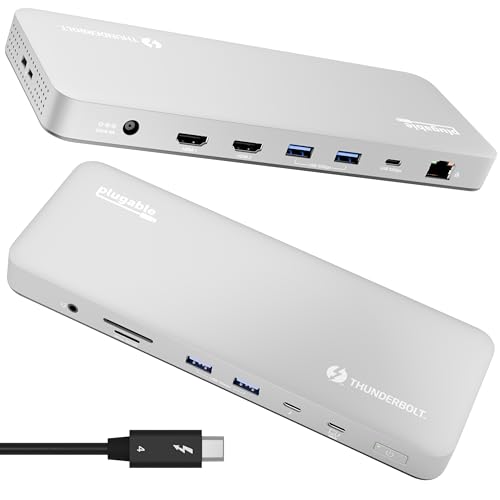
Plugable Thunderbolt 4 Dock (TBT-UDM), 100W Charging

Our verdict: Certified Thunderbolt 4, driverless, and built for new MacBooks.

The Plugable TBT-UDM is a Thunderbolt 4 certified dock rated for 100W power delivery. It supports dual 4K monitors over HDMI or one 6K display, and offers six USB ports, an SD card slot and Ethernet. Setup is driverless on Mac and Windows, and the listing says it is built for M4 and M5 MacBooks. It costs $100 to $200.

It ranks first because certification removes the guesswork that plagues generic USB-C docks. The Anker Prime beats it on power headroom, but it lacks the same certification claim, and the WAVLINK needs drivers.

Buy it for a MacBook or a modern Windows ultrabook that runs two screens. The caveat is that 100W is the ceiling, so power-hungry laptops with large chargers may charge slowly under load.

Standard
Thunderbolt 4 certified
Power
100W PD
Display
Dual 4K or one 6K
Ports
6 USB, SD, Ethernet

What we like

  • +Certified Thunderbolt 4
  • +Driverless setup
  • +100W charging
  • +Dual 4K or single 6K

Watch out for

  • −100W is the ceiling
  • −Fewer ports than larger docks

Buy it if: Mac and Windows users who want verified Thunderbolt.

Skip it if: You need more than 100W.

2

Best for Charging

Anker Prime Docking Station, 14-Port, 160W Max Output

Our verdict: The largest power budget and port count here.

The Anker Prime is a 14-port dock with 160W max total output, 10Gbps data, dual 4K display support, Ethernet and audio ports. The listing says it works with Dell, HP, Lenovo and more, and it falls in the $100 to $200 range.

The reason for the second slot is that it holds the largest power budget and port count in the ranking, ideal for charging a demanding laptop and a pile of accessories. Its 160W is a total figure shared across ports, not a guaranteed laptop charge, which is why the Plugable's certified approach keeps first place.

Buy it if you need a lot of ports and extra power headroom. The caveat is that 160W is the max total output, so check how much of it actually reaches the laptop port before relying on it.

Ports
14
Output
160W max
Data
10Gbps
Display
Dual 4K

What we like

  • +160W total output
  • +14 ports
  • +10Gbps data
  • +Ethernet and audio

Watch out for

  • −No Thunderbolt label
  • −Dual 4K cap

Buy it if: Power users charging many devices.

Skip it if: You want certified Thunderbolt.

4

Best Modular Hub

Anker Nano 13-in-1 Laptop Docking Station, 100W Max PD

Our verdict: A compact hub with a detachable 6-in-1 section.

The Anker Nano 13-in-1 dock offers 100W max power delivery, three displays through two HDMI ports and one DisplayPort, 10Gbps USB-C, three USB-A ports, an SD and TF card reader, Ethernet and audio. A detachable 6-in-1 hub section makes it modular. It is in the $100 to $200 range.

The reason for the fourth slot is that the modular design is clever but the listing is less detailed on certification and exact display limits than the Plugable. Three-monitor support is a draw, though the refresh rates for that combination are not clearly stated.

Pick it for a travel and desk hybrid, where you can leave the full dock at home and carry only the hub. The caveat is that three displays often limit refresh rate, so read the exact combination before planning a triple screen.

Power
100W max PD
Displays
3 (2 HDMI, 1 DP)
Design
Detachable 6-in-1 hub
Data
10Gbps USB-C

What we like

  • +Detachable 6-in-1 hub
  • +Triple display support
  • +10Gbps USB-C
  • +Card reader included

Watch out for

  • −100W is a maximum
  • −Triple display spreads bandwidth

Buy it if: Desk-and-travel users.

Skip it if: You want certified bandwidth.

5

Best Compact Budget

UGREEN 7-in-1 Docking Station Dual Monitor, Revodok Pro, 100W PD

Our verdict: Dual 4K in a small aluminum hub at a low price.

The UGREEN Revodok Pro is a compact aluminum 7-in-1 dock with 100W power delivery, dual 4K at 60Hz over HDMI and 10Gbps USB-A and USB-C data ports. It sits in the $25 to $50 bracket, the lowest tier in this guide.

It ranks fifth because seven ports is the smallest port count here, and the listing gives no Thunderbolt certification. Its strengths are size and price, since you get dual 4K output in a small aluminum body.

Buy it for a laptop that needs two monitors, a few USB ports and a clean desk. The caveat is that it has no Ethernet listed in the specs, so wired network users should look at the Plugable or Anker models.

Power
100W PD
Display
Dual 4K at 60Hz
Data
10Gbps USB-A/C
Build
Aluminum compact

What we like

  • +Dual 4K at 60Hz
  • +Compact aluminum body
  • +10Gbps data ports
  • +Low price bucket

Watch out for

  • −Only seven ports
  • −No Ethernet listed

Buy it if: Travel and light desk setups.

Skip it if: You need Ethernet and many ports.

6

Best Budget Triple Monitor

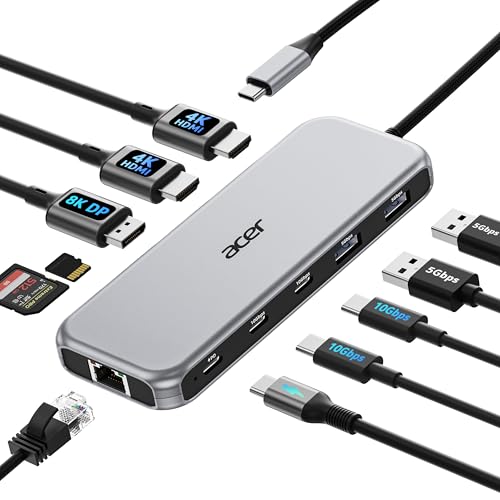
Acer Laptop Docking Station, 11-in-1, 100W PD

Our verdict: Three-monitor support at a very low price.

The Acer 11-in-1 dock offers 100W power delivery, three-monitor support with an 8K DisplayPort and a 4K at 60Hz HDMI output, 10Gbps data, 1Gbps Ethernet and an SD and TF card reader. It costs $25 to $50.

It ranks last because the listing leaves out certification details and the triple-monitor claim needs careful reading, since refresh rates drop when three screens run. The price is the draw, offering more outputs than many docks at triple the cost.

Buy it if you want three displays on a very small budget. The caveat is that cheap docks with many outputs often share bandwidth, so confirm the supported combination before you plan your layout.

Power
100W PD
Monitors
3 (8K DP, 4K60 HDMI)
Data
10Gbps
Network
1Gbps Ethernet

What we like

  • +Three-monitor support
  • +Gigabit Ethernet
  • +Card reader
  • +Low price bucket

Watch out for

  • −No premium certification
  • −Thin spec detail

Buy it if: Budget triple-monitor desks.

Skip it if: You want verified bandwidth.

Methodology

How We Ranked These

Power rating

We compared stated wattage and whether the figure is total or to the laptop.

Display support

Monitor count, resolution and refresh rate were scored against the claims.

Certification

Thunderbolt certification earned credit over generic USB-C labels.

Port selection

USB, Ethernet and card slots were counted.

Value for the bucket

Features were measured against each price range.

Every Primea Score uses the same weights: Performance 30% · Build & Materials 20% · Everyday Usability 20% · Value 20% · Owner Satisfaction 10%. Full scoring rules

Buyer's guide

How to Pick the Right One for You

By Laptop Type

Your laptop decides how much dock you need.

LaptopOur pick
New MacBook Air or ProPlugable Thunderbolt 4 Dock
Power-hungry Windows laptopAnker Prime 14-Port 160W
Mac, many chip generationsWAVLINK 13-in-1 130W
Ultrabook, travelUGREEN Revodok Pro 7-in-1

By Budget

SpendOur pick
$25 to $50 (compact)UGREEN Revodok Pro 7-in-1
$25 to $50 (3 monitors)Acer 11-in-1 100W
$100 to $200 (certified)Plugable Thunderbolt 4 Dock
$100 to $200 (modular)Anker Nano 13-in-1

Thunderbolt vs USB-C

Thunderbolt

Verified bandwidth with no drivers. The Plugable Thunderbolt 4 dock is the example.

USB-C

More ports for less, with varied performance. The Anker, WAVLINK, UGREEN and Acer docks are USB-C.

Most Mac buyers should default to Thunderbolt.

By Monitor Count

MonitorsOur pick
One 6KPlugable Thunderbolt 4 Dock
Two 4KUGREEN Revodok Pro 7-in-1
Two 5KWAVLINK 13-in-1 130W
ThreeAnker Nano 13-in-1

For Remote Workers Specifically

Look for

Reliable 100W laptop charging, Ethernet and a driverless setup.

In this ranking

The Plugable and Anker Prime both include Ethernet, and the Plugable is driverless.

When to Spend More

Spend more if

You need verified bandwidth or 130W and above, pointing to the Plugable or Anker Prime.

Save if

You only need basic dual 4K, where the UGREEN Revodok Pro works.

Questions

Frequently Asked Questions

Will a 100W dock charge my laptop fully?+

Only if the dock's laptop power matches your laptop. Check your charger rating, and remember a shared pool like the Anker Prime's 160W max is split among devices. The Plugable TBT-UDM and UGREEN list 100W PD, which suits thin laptops but not power-hungry workstations.

What is the common mistake?+

Assuming every USB-C dock matches Thunderbolt. The Plugable TBT-UDM is Thunderbolt 4 certified, while the UGREEN and Acer rely on standard USB-C speeds, which can limit display resolution and refresh rate. Look for the word certified in the listing.

Is the Plugable worth it over the UGREEN?+

If you want certified bandwidth and a driverless setup, yes. The UGREEN 10-in-1 is cheaper and handles dual 4K@60Hz with Ethernet, but it lacks Thunderbolt certification and the 6K option. Casual dual 4K users can save; heavy storage and display users should buy the Plugable.

Do I need a driver?+

For DisplayLink docks like the WAVLINK, yes, you install a driver before the extra screens work. The Plugable TBT-UDM is described as driverless for Mac and Windows, so setup is faster. Download the WAVLINK driver before you travel with it.

Can I run three monitors?+

The Anker Nano and Acer list three-monitor support, and the triple display Plugable runs three HDMI outputs. Read the supported resolution and refresh rate combination, because three screens often lower the refresh rate. The triple display Plugable manages only 4K@30Hz on one output.

Does it need its own power?+

Yes. Docks at this wattage ship with a power adapter, into the wall before connecting the laptop. The Plugable TBT-UDM and Anker Prime rely on that supply to pass power through. Use the included adapter, since a weaker brick can cut laptop charging.

Final take

Choose the Plugable if you want certified Thunderbolt 4 and a quick setup. The Anker Prime is the pick when power headroom matters most, and the WAVLINK handles two high resolution screens through DisplayLink. For tight budgets, the UGREEN fits dual 4K in a small body, and the Acer adds a third monitor. Match the wattage to your laptop charger.

More Ranked & Reviewed Guides