
Primea ReviewsAll Reviews

Primea Reviews is reader-supported. When you buy through our Amazon links we may earn a commission, at no extra cost to you. Rankings are set by our editors and never sold. Learn more

Ranked & Reviewed by Primea Reviews

The 6 Best Docking Stations for Dell Laptops of 2026, Ranked & Reviewed

By the Primea Editorial TeamUpdated November 4, 202610 min read6 products ranked
The 6 Best Docking Stations for Dell Laptops of 2026, Ranked & Reviewed

The short answer

The Dell SD25TB4 Pro is the best dock for a Dell laptop: Thunderbolt 4, a 180W adapter in the box and Dell power negotiation. The WD22TB4 is the cheaper previous-generation choice at 130W, the Plugable TBT-UDM works across brands, and the Anker Prime adds 14 ports. The WD19TBS is the entry-level Thunderbolt 3 dock.

The Primea Scoreboard

Ranked & Reviewed

  1. Thunderbolt 4, 8K display output and a 180W adapter, with Dell power negotiation.

    94Outstanding
    Check price
  2. 02
    Dell Thunderbolt Dock WD22TB4

    Best Value Dell Dock

    Dell Thunderbolt Dock WD22TB4

    Thunderbolt 4 with 130W power delivery from the previous Dell Smart Dock line.

    91Excellent
    Check price
  3. A certified Thunderbolt 4 dock with 100W charging that also works with Mac and other laptops.

    89Excellent
    Check price
  4. 14 ports with up to 160W output and dual 4K support, marketed for Dell, HP and Lenovo.

    87Excellent
    Check price
  5. 05
    Dell Thunderbolt Dock WD19TBS

    Best Entry Dell Dock

    Dell Thunderbolt Dock WD19TBS

    An entry-level Thunderbolt 3 Dell dock with 130W power delivery and Dell power negotiation.

    84Very Good
    Check price
  6. 06
    HP USB-C Dock G5

    Best Budget Cross-Brand

    HP USB-C Dock G5

    An 11-in-1 USB-C and Thunderbolt-compatible dock that is cross-brand, including Dell.

    82Very Good
    Check price

The most common Dell dock mistake is buying for ports and discovering a power problem. A Dell laptop that draws more watts than the dock delivers will charge slowly, or not at all under load, and it may nag you with a warning that the adapter is not recognized. That is why Dell sells its own docks with a feature called power negotiation, which third-party docks cannot always match.

We ranked six docks that list Dell compatibility in the specs, weighing power delivery, Thunderbolt generation and display support. Two of the six are Dell's own, three are third party with stated Dell support and one is an HP dock with cross-brand compatibility. We left out a duplicate listing of the SD25TB4 and one dock that does not list Dell compatibility.

Before you buy

What Actually Matters

01

Power delivery

Power delivery is the wattage the dock can pass to the laptop. A Dell with a 130W adapter on a 100W dock will charge slowly under load. The SD25TB4 includes a 180W adapter and the WD22TB4 offers 130W. Check your laptop's adapter rating on its label, then choose a dock that meets or beats it, since an underpowered dock can leave the battery draining while you work.

02

Dell power negotiation

Dell docks identify themselves to Dell laptops, which then accept the full wattage without warnings. Third-party docks may charge but sometimes trigger a nag message. The Dell models list this feature, and the Anker and Plugable listings do not. Look for the words OEM power negotiation on the page if full-speed charging matters, and check your laptop's charging warnings.

03

Thunderbolt generation

Thunderbolt 4 guarantees 40Gbps and support for two 4K displays, while Thunderbolt 3 is older and plain USB-C docks have less bandwidth. The SD25TB4, WD22TB4 and Plugable are Thunderbolt 4. Check your laptop's port label with the lightning bolt, because a USB-C only port cannot use a Thunderbolt dock's full speed and may limit you to one monitor.

04

Display outputs

The number and type of video ports decide how many monitors you can run. The SD25TB4 lists 8K output, the Plugable supports dual 4K HDMI or a single 6K, and the Anker dual 4K. Check the monitor resolution and refresh rate you want, since a dock may support 4K at 60Hz on one port only, and confirm which cable type each monitor needs.

05

Included cables and warranty

A dock needs a host cable and a power adapter, and missing ones add cost. The SD25TB4 includes HDMI, DisplayPort and Thunderbolt cables and a 3-year warranty. Check the box contents and warranty length, because a dock is a business tool you will use daily, and failures happen under load, so a longer term is real protection.

In-depth reviews

Our Ranked Picks, Reviewed

1

Best Overall

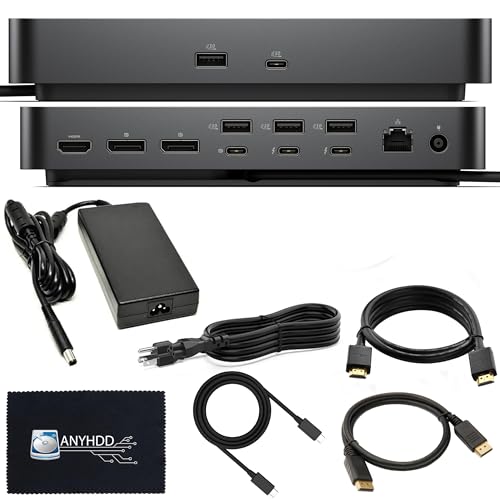
Dell SD25TB4 Pro Thunderbolt 4 Smart Dock

Our verdict: Thunderbolt 4, 8K display output and a 180W adapter, with Dell power negotiation.

Dell's SD25TB4 Pro is a Thunderbolt 4 dock that supports 8K display output. It includes a 180W power adapter, HDMI, DisplayPort and Thunderbolt cables and a 3-year warranty, and it negotiates power with Dell laptops. It sits in the $200 to $500 bucket.

The 180W adapter is why it ranks first. Most docks cap out around 100W or 130W, which is not enough to charge a workstation-class Dell while it works. Power negotiation also means the laptop reads the dock as a Dell adapter and charges at full speed. Cables in the box save a purchase. It beats the WD22TB4 on power and a longer warranty, and costs more.

Buy it for a Dell laptop that draws a lot of power. The price bucket is the limit.

Standard
Thunderbolt 4
Power adapter
180W included
Display
Up to 8K output
Warranty
3 years

What we like

  • +180W adapter in the box
  • +Dell power negotiation
  • +8K display output
  • +Three-year warranty

Watch out for

  • −Highest price bucket here
  • −Dell-focused compatibility
  • −Large for small desks

Buy it if: Power-hungry Dell laptops that need full-speed charging.

Skip it if: You want to spend under $200.

2

Best Value Dell Dock

Dell Thunderbolt Dock WD22TB4

Our verdict: Thunderbolt 4 with 130W power delivery from the previous Dell Smart Dock line.

The WD22TB4 is a Thunderbolt 4 dock with 130W power delivery from Dell's previous-generation Smart Dock line. It offers Dell OEM power negotiation, multiple display outputs and a standard Dell business warranty. It sits in the $100 to $200 bucket.

Second place goes to it because it keeps the features that matter, Thunderbolt 4 and power negotiation, for a lower price bucket. The 130W figure is 50W below the SD25TB4, which is only an issue for laptops with high-wattage adapters. Compared with the WD19TBS, it moves from Thunderbolt 3 to Thunderbolt 4.

Buy it for a standard Dell business laptop. The previous-generation label means the SD25TB4 has newer features such as 8K output.

Standard
Thunderbolt 4
Power delivery
130W
Compatibility
Dell OEM power negotiation
Warranty
Standard Dell business

What we like

  • +Thunderbolt 4
  • +Dell power negotiation
  • +130W delivery
  • +Lower price bucket than SD25TB4

Watch out for

  • −Previous generation
  • −Warranty shorter than the SD25TB4
  • −130W may fall short for big laptops

Buy it if: Standard Dell business laptops.

Skip it if: Your laptop draws more than 130W.

3

Best Cross-Brand

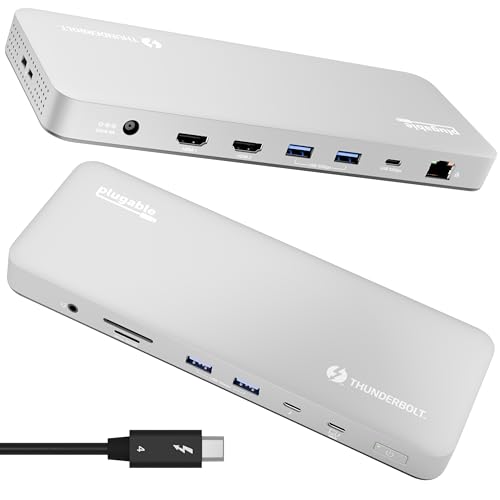
Plugable Thunderbolt 4 Dock (TBT-UDM)

Our verdict: A certified Thunderbolt 4 dock with 100W charging that also works with Mac and other laptops.

Plugable's TBT-UDM is a Thunderbolt 4 certified dock with driverless setup and 100W charging. It runs dual 4K HDMI displays or a single 6K display, has 6 USB ports, an SD card reader and Ethernet, and works across Dell, Mac and other Thunderbolt 4 laptops. It sits in the $100 to $200 bucket.

Cross-brand support is the point. If your household has a Dell and a MacBook, one dock covers both. Third place reflects that 100W is below Dell's 130W and the listing names no Dell power negotiation, so a high-draw Dell laptop may charge slowly. The Thunderbolt 4 certification is a genuine plus over docks that only claim compatibility.

Buy it for a mixed-laptop home or office. For a Dell with a high-wattage adapter, choose a Dell dock.

Standard
Thunderbolt 4 certified
Charging
100W
Displays
Dual 4K HDMI or single 6K
Ports
6x USB, SD, Ethernet

What we like

  • +Genuine Thunderbolt 4 certification
  • +Works with Dell and Mac
  • +Driverless setup
  • +Dual 4K or single 6K

Watch out for

  • −100W charging only
  • −No Dell power negotiation
  • −Not a Dell-branded dock

Buy it if: Homes and offices mixing Dell and Mac laptops.

Skip it if: Your Dell needs more than 100W.

4

Best Port Count

Anker Prime Docking Station, 14-Port

Our verdict: 14 ports with up to 160W output and dual 4K support, marketed for Dell, HP and Lenovo.

Anker's Prime dock has 14 ports with up to 160W maximum output, 10Gbps data transfer, dual 4K display support and audio and Ethernet ports. It is marketed as compatible with Dell, HP and Lenovo laptops and sits in the $100 to $200 bucket.

The 160W output is the standout, well above the Plugable's 100W and the WD22TB4's 130W for a lower price than the SD25TB4. It ranks fourth because it is a USB-C dock, not a Thunderbolt 4 dock per the listing, so it lacks Thunderbolt's bandwidth and the 8K support of Dell's own. The compatibility is marketed, not guaranteed.

Buy it for a desk with many peripherals. Test the charging with your exact Dell model.

Ports
14
Output
160W max
Data
10Gbps
Displays
Dual 4K

What we like

  • +Up to 160W output
  • +14 ports
  • +Dual 4K support
  • +Audio and Ethernet included

Watch out for

  • −Not a Thunderbolt 4 dock
  • −Compatibility is marketed only
  • −No Dell power negotiation

Buy it if: Crowded desks with many peripherals.

Skip it if: You need Thunderbolt 4 bandwidth.

5

Best Entry Dell Dock

Dell Thunderbolt Dock WD19TBS

Our verdict: An entry-level Thunderbolt 3 Dell dock with 130W power delivery and Dell power negotiation.

The WD19TBS is Dell's entry-level Thunderbolt 3 dock, with 130W power delivery, Dell OEM power negotiation, multiple USB and display ports and a standard Dell business warranty. It sits in the $100 to $200 bucket.

It matches the WD22TB4 on power, but runs on Thunderbolt 3, an older generation. That is why it ranks fifth. For many users, Thunderbolt 3 is enough, and the Dell power negotiation still works, but it offers less future headroom than the newer docks. Compared with the Plugable, it has more stated power and Dell-specific tuning.

Buy it if your Dell laptop uses Thunderbolt 3 or you find one at a good price. For a new laptop, step up to Thunderbolt 4.

Standard
Thunderbolt 3
Power delivery
130W
Compatibility
Dell OEM power negotiation
Warranty
Standard Dell business

What we like

  • +130W power delivery
  • +Dell power negotiation
  • +Multiple USB and display ports
  • +Dell business warranty

Watch out for

  • −Older Thunderbolt 3
  • −Less future headroom
  • −Entry-level feature set

Buy it if: Dell laptops that use Thunderbolt 3.

Skip it if: You are buying a new laptop.

6

Best Budget Cross-Brand

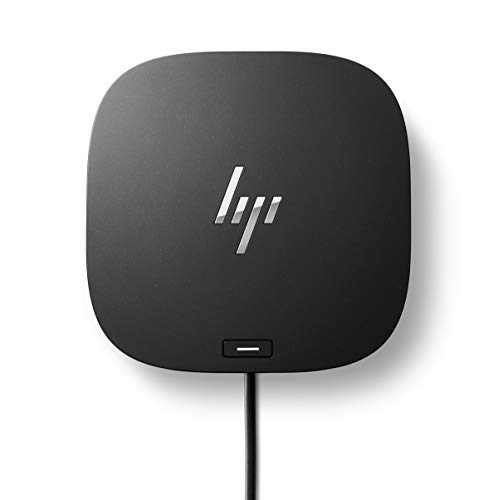
HP USB-C Dock G5

Our verdict: An 11-in-1 USB-C and Thunderbolt-compatible dock that is cross-brand, including Dell.

The HP G5 is an 11-in-1 dock that works with USB-C and Thunderbolt laptops, with charging, networking and data transfer, a compact business form factor and remote-manageable security. It lists cross-brand compatibility including Dell and sits in the $50 to $100 bucket.

The low bucket makes it the cheapest route to a dock for a Dell. It ranks last because it is an HP dock with no Dell power negotiation, no power figure in the listing and no Thunderbolt 4 claim, so charging speed is the unknown. The remote management is a bonus for office IT.

Buy it for a Dell on light office duty where cost matters. Check the charging wattage before relying on it.

Ports
11-in-1
Compatibility
USB-C and Thunderbolt laptops
Brands
Cross-brand including Dell
Price bucket
$50 to $100

What we like

  • +Lowest price bucket here
  • +Cross-brand including Dell
  • +11 ports
  • +Remote-manageable

Watch out for

  • −Charging wattage not listed
  • −No Dell power negotiation
  • −No Thunderbolt 4 claim

Buy it if: Light office use on a Dell, on a budget.

Skip it if: Your Dell needs high-wattage charging.

Methodology

How We Ranked These

Power delivery

Stated wattage and Dell power negotiation were weighed first, since charging speed is the main Dell dock failure.

Thunderbolt generation

Thunderbolt 4, Thunderbolt 3 and plain USB-C docks were compared for bandwidth and display support.

Display support

Number of monitors, resolution limits and 8K output were reviewed from the listings.

Dell compatibility

Dell-branded and certified docks scored above those that only market compatibility.

Ports and warranty

Port count, bundled cables and warranty length were weighed against price.

Every Primea Score uses the same weights: Performance 30% · Build & Materials 20% · Everyday Usability 20% · Value 20% · Owner Satisfaction 10%. Full scoring rules

Buyer's guide

How to Pick the Right One for You

By Laptop Power Needs

Check the wattage on your Dell's adapter first.

Laptop adapterOur pick
180W workstationDell SD25TB4 Pro Thunderbolt 4 Smart Dock
130W business laptopDell Thunderbolt Dock WD22TB4
130W, Thunderbolt 3Dell Thunderbolt Dock WD19TBS
Up to 160W, USB-CAnker Prime Docking Station, 14-Port
100W or lessPlugable Thunderbolt 4 Dock (TBT-UDM)

By Budget

SpendOur pick
$50 to $100HP USB-C Dock G5
$100 to $200, DellDell Thunderbolt Dock WD22TB4
$100 to $200, cross-brandPlugable Thunderbolt 4 Dock (TBT-UDM)
$200 to $500Dell SD25TB4 Pro Thunderbolt 4 Smart Dock

Dell Dock vs Third-Party Dock

Dell dock

Power negotiation and full-speed charging on Dell laptops. Picks: SD25TB4, WD22TB4 and WD19TBS.

Third-party dock

Cross-brand and often cheaper, but without Dell power negotiation. Picks: Plugable, Anker Prime and HP G5.

Default to a Dell dock unless you share it with non-Dell laptops.

By Display Setup

MonitorsOur pick
8K or four displaysDell SD25TB4 Pro Thunderbolt 4 Smart Dock
Dual 4KPlugable Thunderbolt 4 Dock (TBT-UDM)
Dual 4K, many portsAnker Prime Docking Station, 14-Port
One or two basic monitorsHP USB-C Dock G5

For a Workstation Dell Specifically

Look for

At least 130W delivery, ideally with a 180W adapter, plus Dell power negotiation so the laptop charges at full speed under load.

In this ranking

The Dell SD25TB4 Pro, which includes a 180W adapter and a 3-year warranty.

When to Spend More

Spend more if

Your Dell draws more than 130W or you run several high-resolution monitors. The SD25TB4 Pro is built for exactly that.

Save if

You use a thin Dell for basic office work. The WD22TB4 gives Thunderbolt 4 and power negotiation for less.

Questions

Frequently Asked Questions

Do I need a Dell-branded dock for a Dell laptop?+

No, but it helps. The Plugable and Anker docks work with Dell laptops, but they lack the Dell power negotiation of the WD22TB4 and SD25TB4, so charging may be slower or you may see an adapter warning.

What is the usual mistake?+

Buying a dock with less wattage than your adapter. A Dell on a 130W adapter will charge slowly through the Plugable's 100W. Check the adapter label, and choose a dock like the WD22TB4 that meets it.

Is the SD25TB4 worth more than the WD22TB4?+

Only for heavier laptops. The SD25TB4 adds a 180W adapter, 8K output and a 3-year warranty over the WD22TB4's 130W. For a standard business laptop, the cheaper dock is plenty.

How do I set up a dock?+

Plug in the power adapter, connect monitors to the dock, then attach the Thunderbolt or USB-C cable to the laptop. Plugable's setup is driverless, and Dell docks may prompt a firmware update.

How do I keep it working?+

Update firmware when Dell or the maker offers it, and keep the cables seated. A loose host cable is the most common cause of dropped monitors, so reseat it first. The Plugable TBT-UDM is driverless, so it needs less upkeep than most.

Will the HP dock work with my Dell?+

The HP G5 lists cross-brand compatibility including Dell, but the listing gives no charging wattage. It works for light office use, though a Dell dock is safer for a high-draw laptop.

Final take

For most Dell laptops with a big adapter, the Dell SD25TB4 Pro is the right dock, with Thunderbolt 4, a 180W adapter and power negotiation. The WD22TB4 is the value choice for standard business laptops, and the Plugable suits mixed Dell and Mac setups. The Anker Prime is the pick for ports, and the HP G5 is the budget fallback.

More Ranked & Reviewed Guides