
Primea ReviewsAll Reviews

Primea Reviews is reader-supported. When you buy through our Amazon links we may earn a commission, at no extra cost to you. Rankings are set by our editors and never sold. Learn more

Ranked & Reviewed by Primea Reviews

The 7 Best Digital Notebooks With a Pen Included of 2026, Ranked & Reviewed

By the Primea Editorial TeamUpdated November 4, 202610 min read7 products ranked
The 7 Best Digital Notebooks With a Pen Included of 2026, Ranked & Reviewed

The short answer

Out of the box, the reMarkable 2 is the most complete e-ink kit, with its Marker Plus stylus in the bundle and weeks of battery life. The reMarkable Paper Pro adds a color display and a larger writing surface. The Kindle Scribe Colorsoft suits readers who also take notes. If you prefer paper, the Noteorius kit includes both pen and folio.

The Primea Scoreboard

Ranked & Reviewed

  1. A complete e-ink writing kit: the Marker Plus stylus is in the box and you write directly on the screen.

    94Outstanding
    Check price
  2. A color e-paper display and a larger writing surface, with the Marker Plus included.

    92Outstanding
    Check price
  3. An 11 inch color e-reader with front light and a pen in the box, for books and notes together.

    90Excellent
    Check price
  4. A pen, folio and notebook in one purchase, syncing as you write and storing notes in the cloud.

    87Excellent
    Check price
  5. A Bluetooth pen set with OCR and audio recording at a budget price.

    85Excellent
    Check price
  6. Pen and notebook together, with real-time sync, text conversion and sharing on Android and iOS.

    83Very Good
    Check price
  7. An affordable pen and notebook kit with real-time sync, nothing more.

    81Very Good
    Check price

Look at the fine print on many digital notebooks and you will find the pen is sold separately. A device that cannot write until you add a stylus is a hidden surcharge, and the right stylus is often the expensive one. So the cleanest question in this category is not which screen is best but which box contains everything you need on day one.

This ranking only includes products that ship with a pen in the box. We reviewed seven, from e-ink slates to smart pen and paper kits, using their listings and manufacturer details. Scores weigh the writing surface, how notes sync, whether the pen is genuinely included and how much the whole bundle costs. Where a listing gives no figure, we leave it out.

Before you buy

What Actually Matters

01

Pen included or sold separately

Some e-ink devices list a base price without a stylus, and the pen can cost a large part of the total. Always confirm the pen is in the box. All seven picks here include one, such as the Marker Plus with the reMarkable models. Read the title and bullet points for the words pen included.

02

E-ink vs smart pen

E-ink devices let you write on a screen and keep everything on one device. Smart pen kits capture ink from special paper and send it to an app. The first costs more but feels cohesive. The second is cheaper and keeps real paper. Decide whether you want a screen or a page.

03

Battery life

E-ink screens only draw power when the image changes, so battery life stretches to weeks, as the reMarkable 2 listing says. Smart pens are smaller and need frequent charging. A dead pen means lost notes, so check how long a charge lasts and whether the pen charges by cable or dock.

04

Display and color

Grayscale e-ink is enough for text. Color e-paper, as on the Paper Pro and Kindle Scribe Colorsoft, helps with diagrams and color-coded notes but raises the price. Decide whether color will change how you work, because it moves a device from the $200 range into $500 plus.

05

App and export options

A great pen is useless if you cannot get notes out. Look for cloud sync, PDF export and platform support. Ophayapen lists sharing on Android and iOS, and Noteorius stores notes via cloud sync. Check whether the app needs a subscription, since some features may sit behind one.

In-depth reviews

Our Ranked Picks, Reviewed

1

Best Overall

reMarkable 2 with Marker Plus

Our verdict: A complete e-ink writing kit: the Marker Plus stylus is in the box and you write directly on the screen.

The reMarkable 2 is an e-ink notebook that you write on directly, and the Marker Plus stylus is part of the bundle. The listing cites weeks of battery life, which matters for something you carry daily and do not want to charge nightly.

It ranks first because the pen, screen and software are designed together, and the price tier of $200 to $500 buys a finished product rather than a kit you assemble. It sits just ahead of the Paper Pro because most people do not need a color screen and larger surface, and the $500 plus price is hard to justify for plain note taking.

Buy it if you want one box that is ready to write on. The caveat: it is a single-purpose grayscale device, so do not expect it to double as a tablet.

Type
E-ink digital notebook
Pen
Marker Plus stylus included
Input
Writes directly on screen
Battery
Weeks of battery life

What we like

  • +Stylus included in the box
  • +Weeks of battery life
  • +Writes directly on the screen
  • +Cheaper than the Paper Pro

Watch out for

  • −Grayscale display only
  • −Single-purpose device
  • −Upfront cost is high

Buy it if: People who want a ready-to-write e-ink kit with no extras to buy.

Skip it if: You want color or an all-purpose tablet.

2

Best Premium Bundle

reMarkable Paper Pro with Marker Plus

Our verdict: A color e-paper display and a larger writing surface, with the Marker Plus included.

The Paper Pro keeps the e-ink notebook idea and adds a color e-paper display and a larger writing surface, with the Marker Plus in the bundle. Color matters for annotating diagrams or color-coding notes, which the grayscale reMarkable 2 cannot do.

It ranks second because the $500 plus price is a steep premium for features many note takers will not use. Against the Kindle Scribe Colorsoft, it is a notebook first, while the Kindle is a reader that also takes notes. The larger surface is the real draw for sketching and for people who want more room per page.

Buy it if you annotate or draw in color. The caveat is price, which is the highest here, so it is a luxury for plain text notes.

Type
E-ink digital notebook
Display
Color e-paper
Surface
Larger writing area
Pen
Marker Plus included

What we like

  • +Color e-paper display
  • +Larger writing surface
  • +Marker Plus included
  • +Notebook-first design

Watch out for

  • −Priciest at $500 plus
  • −Overkill for text notes
  • −Single-purpose device

Buy it if: Annotators and sketchers who want color and a bigger page.

Skip it if: You only write plain text notes.

3

Best for Readers

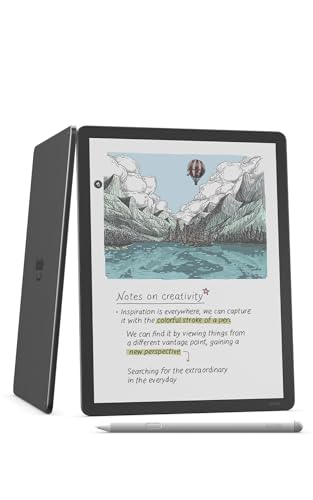
Amazon Kindle Scribe Colorsoft 64GB, 11 inch paper-like color display with front light, Pen included, Graphite

Our verdict: An 11 inch color e-reader with front light and a pen in the box, for books and notes together.

Amazon's Scribe Colorsoft pairs a color screen sized at 11 inches with a built-in front light and 64GB of storage, and the pen comes in the box. Its distinguishing job is combining reading and note taking in one e-ink device.

It ranks third because its core identity is reading, so the writing experience is a feature rather than the point, and the two reMarkable models are built for notes first. The front light is the useful extra: it lets you read and write in a dim room, which the other e-ink picks do not list.

Buy it if you read heavily and want to annotate books. The caveat: at $500 plus it costs as much as a premium notebook, so confirm you will use both modes.

Display
11 in color, paper-like
Storage
64GB
Lighting
Front light
Pen
Included

What we like

  • +Reads books and takes notes
  • +Front light for dim rooms
  • +64GB of storage
  • +Pen in the box

Watch out for

  • −Priced at $500 plus
  • −Reader first, notebook second
  • −Color adds cost

Buy it if: Heavy readers who want to annotate and take notes on one device.

Skip it if: You want a notebook-first writing experience.

4

Best Paper-and-Pen Kit

Noteorius Smart Notebook with Pen and Folio, Reusable Digital Writing Pad

Our verdict: A pen, folio and notebook in one purchase, syncing as you write and storing notes in the cloud.

Noteorius sells a complete smart pen and paper digitizer kit: the pen, the notebook and a folio all arrive together. Notes sync in real time as you write, and the app stores them in the cloud.

It ranks fourth because it is a different class from the three e-ink devices above. You get far less polish, but at $100 to $200 you also spend far less. Against SyncPen, the folio and a more complete box justify the higher price, even though SyncPen lists extra features.

Choose it if you want to keep writing on paper and still have digital copies. The caveat: smart pens read special paper, so check replacement pages before you commit.

Type
Smart pen and paper kit
Included
Pen and folio
Sync
Real time as you write
Storage
App with cloud sync

What we like

  • +Pen and folio in the box
  • +Real-time sync
  • +Cloud storage through app
  • +Fraction of e-ink price

Watch out for

  • −Needs special paper
  • −App-dependent
  • −Less polished than e-ink

Buy it if: Paper lovers who want a complete kit and digital copies.

Skip it if: You want a screen to write on.

5

Best Budget Pen Kit

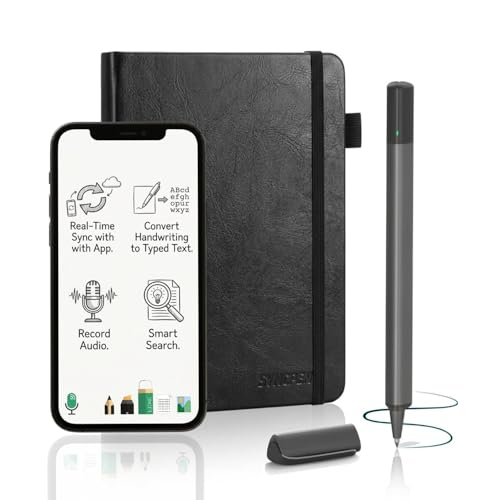
SyncPen Digital Notebook Smart Pen Set, Real Time Sync from Paper to App

Our verdict: A Bluetooth pen set with OCR and audio recording at a budget price.

SyncPen ships with a Bluetooth pen and lists OCR and audio recording, features usually reserved for pricier sets. It is a smart pen and paper digitizer at $50 to $100, with notes streaming from paper to the app.

It ranks fifth because the Noteorius includes a folio and more complete packaging for an extra $50 or so, and the e-ink devices above offer a whole different level of finish. Against the Ophayapen, SyncPen lists audio recording, which matters in meetings and lectures.

Buy it if you want the most features for the least money. The caveat: OCR accuracy depends on your handwriting, so do not rely on search until you have tested it.

Type
Smart pen and paper set
Pen
Bluetooth, included
Tools
OCR and audio recording
Price tier
$50 to $100

What we like

  • +Bluetooth pen included
  • +OCR and audio recording
  • +Budget-friendly
  • +Real-time paper-to-app sync

Watch out for

  • −No folio listed
  • −OCR depends on handwriting
  • −Needs matching paper

Buy it if: Budget buyers who want OCR and audio in a pen kit.

Skip it if: You want a polished device or a folio.

6

Best for Text Conversion

Ophayapen Smart Pen for Note Taking with Digital Smart Notebook and Writing

Our verdict: Pen and notebook together, with real-time sync, text conversion and sharing on Android and iOS.

This Ophayapen kit includes both the pen and the notebook, syncs in real time and converts handwriting to text. Sharing through the app works on Android and iOS, so notes can leave the app easily.

It ranks sixth because the $100 to $200 price matches the Noteorius, which adds a folio, and because it lists less detail than SyncPen on audio. What earns it a place is text conversion paired with cross-platform sharing, a combination that suits mixed phone and tablet households.

Buy it if you want text output from handwriting and need Android or iOS support. The caveat: conversion quality varies by handwriting, so keep original pages as backup.

Type
Smart pen and paper set
Included
Pen and notebook
Tools
Real-time sync, text conversion
Platforms
Android and iOS

What we like

  • +Converts handwriting to text
  • +Works on Android and iOS
  • +Pen and notebook included
  • +Easy sharing through app

Watch out for

  • −Same price as Noteorius
  • −No folio listed
  • −Conversion accuracy varies

Buy it if: Mixed Android and iOS households that want text output.

Skip it if: You want a folio or audio recording.

7

Best Affordable Kit

Yuan Digital Sync Pen with Notebook, Smart Writing Set for Note Taking

Our verdict: An affordable pen and notebook kit with real-time sync, nothing more.

The Yuan is a pen and notebook set with real-time sync for note taking, priced between $50 and $100. Both pieces ship together, which satisfies the include-a-pen test of this ranking.

It ranks last because it lists no OCR, no audio, no folio and no text conversion, while its price matches SyncPen. Against the Noteorius, you give up the folio and cloud details. It is still a legitimate entry point for someone trying a smart pen for the first time.

Choose it if your needs are basic and your budget is small. The caveat is the companion app, which the listing does not describe, so read owner feedback about it before you buy.

Type
Smart pen and paper set
Included
Pen and notebook
Sync
Real time
Price tier
$50 to $100

What we like

  • +Pen and notebook in the box
  • +Real-time sync
  • +Budget-friendly
  • +Simple to try

Watch out for

  • −No OCR or audio listed
  • −App details unknown
  • −Priced like SyncPen

Buy it if: First-time smart pen buyers with simple needs.

Skip it if: You want OCR, audio or text conversion.

Methodology

How We Ranked These

Pen in the box

Every product here ships with a pen, and we scored how complete the kit is without extra purchases.

Writing surface

E-ink screens, color displays and special paper were compared for how natural they are to write on.

Sync and apps

Real-time sync, cloud storage and cross-platform sharing decide how usable notes are later.

Features per dollar

OCR, audio, text conversion and storage were weighed against each price tier.

Running cost

Special paper, replacement pens and accessories add to the real price of ownership.

Every Primea Score uses the same weights: Performance 30% · Build & Materials 20% · Everyday Usability 20% · Value 20% · Owner Satisfaction 10%. Full scoring rules

Buyer's guide

How to Pick the Right One for You

By Device Type

Decide between a screen and a page first.

TypeOur pick
E-ink, grayscalereMarkable 2 with Marker Plus
E-ink, color and largerreMarkable Paper Pro with Marker Plus
E-reader with notesAmazon Kindle Scribe Colorsoft 64GB
Smart pen on paperNoteorius Smart Notebook with Pen and Folio

By Budget

SpendOur pick
$50 to $100SyncPen Digital Notebook Smart Pen Set
$100 to $200Noteorius Smart Notebook with Pen and Folio
$200 to $500reMarkable 2 with Marker Plus
$500 and upreMarkable Paper Pro with Marker Plus

E-Ink vs Smart Pen

E-ink device

You write on a screen that stores everything. The reMarkable 2, Paper Pro and Kindle Scribe Colorsoft work this way, with a pen in the box.

Smart pen and paper

Real paper, with strokes sent to an app. The Noteorius, SyncPen, Ophayapen and Yuan are the budget route to digital notes.

Go e-ink if you write daily and smart pen if you only want digital backups.

By Feature

NeedOur pick
Audio recordingSyncPen Digital Notebook Smart Pen Set
Text conversionOphayapen Smart Pen for Note Taking
Reading plus notesAmazon Kindle Scribe Colorsoft 64GB
Folio includedNoteorius Smart Notebook with Pen and Folio

For Students Specifically

Look for

A pen in the box, strong battery life, searchable notes and a price that fits a student budget.

In this ranking

SyncPen at $50 to $100 adds OCR and audio recording, and the reMarkable 2 offers weeks of battery life.

When to Spend More

Spend more if

You write daily and value one cohesive device. The reMarkable 2 or Paper Pro is the lasting purchase.

Save if

You want digital backups of paper notes. The Yuan or SyncPen costs far less.

Questions

Frequently Asked Questions

Do all of these include the pen?+

Yes. We only ranked products with a pen in the box, from the reMarkable Marker Plus to the Bluetooth pen in the SyncPen set. Always check that the listing title or bullets still say pen included before you order.

What is the most common mistake with digital notebooks?+

Assuming the pen is part of the price. Some devices sell the stylus separately. The reMarkable 2 and Kindle Scribe Colorsoft listings here include theirs, which makes the true cost clear from the start.

Is a color e-ink notebook worth it?+

Only if you annotate diagrams or sketch. The Paper Pro and Kindle Scribe Colorsoft add color at a $500 plus price. For text notes, the grayscale reMarkable 2 delivers the same core experience for much less.

How do I set up a smart pen?+

Charge it, install the app, pair by Bluetooth and write on the included notebook. With the Noteorius or Yuan kits, keep the phone nearby for the first page so the pen can calibrate and sync correctly.

How do I look after the pen tips?+

Replace worn tips on schedule, since a flattened tip skips strokes. Keep the pen capped when you carry it, and store the Marker Plus away from hard surfaces. Check whether refills are sold separately before you buy.

Can I use these with Android and iOS?+

It depends on the app. Ophayapen lists sharing on Android and iOS. For other kits, confirm platform support in the listing, and check whether the reMarkable or Kindle companion apps work with your phone.

Final take

If you want a complete kit with no surprises, the reMarkable 2 with Marker Plus is the one to buy: the pen is in the box and you write on the screen. Spend more for the Paper Pro only if you need color. Choose the Noteorius if you would rather stay on paper, and SyncPen if budget decides.

More Ranked & Reviewed Guides