
Primea ReviewsAll Reviews

Primea Reviews is reader-supported. When you buy through our Amazon links we may earn a commission, at no extra cost to you. Rankings are set by our editors and never sold. Learn more

Ranked & Reviewed by Primea Reviews

The 7 Best Digital Notebooks for Working Professionals, Ranked & Reviewed

By the Primea Editorial TeamUpdated November 3, 202611 min read7 products ranked
The 7 Best Digital Notebooks for Working Professionals, Ranked & Reviewed

The short answer

The reMarkable Paper Pro bundle with the Basalt folio is the complete premium package for professionals who write all day, and the reMarkable 2 is the better buy if color is not worth the extra money. The BOOX Note Air 5 C is for people who want Android apps on e-ink, the Kindle Scribe Colorsoft suits heavy readers who annotate, and the smart pen sets keep you on real paper.

The Primea Scoreboard

Ranked & Reviewed

  1. The color e-paper flagship with the Marker Plus and a folio already in the box.

    94Outstanding
    Check price
  2. 02
    reMarkable Paper Pro with Marker Plus

    Best Premium Hardware Only

    reMarkable Paper Pro with Marker Plus

    The same color Paper Pro and Marker Plus without the bundled folio.

    92Outstanding
    Check price
  3. 03
    reMarkable 2 with Marker Plus

    The premium writing feel without color, with weeks of battery life and a lower price.

    90Excellent
    Check price
  4. A 10.3 inch Android e-ink tablet with color, 6GB of RAM and 64GB of storage.

    88Excellent
    Check price
  5. An 11 inch color front-lit Kindle with a pen, blending an e-reader with a notebook.

    86Excellent
    Check price
  6. A smart pen and writing pad set that syncs to the cloud as you write, for $100 to $200.

    83Very Good
    Check price
  7. A smart pen and writing tablet with real-time sync for iOS and Android, aimed at design and meetings.

    80Very Good
    Check price

Most people shopping for a digital notebook compare screens and ignore the one question that decides everything: do you want to write on a device, or write on paper and have it copied? Those are different products. An e-ink notebook replaces the pad, while a smart pen set digitizes the pad you already use, and mixing the two up is how people end up with an expensive gadget that sits in a drawer.

We reviewed seven digital notebooks from their listings and spec details, and ranked them by how well they serve working professionals: writing feel, display type, bundled accessories, app flexibility and the size of the commitment. Where a listing leaves out a number, we say so rather than fill it in. Price buckets are used instead of exact prices.

Before you buy

What Actually Matters

01

Device type

A Type 2 e-ink notebook replaces paper with a screen, while a Type 3 smart pen set keeps paper and copies it. The first gives a seamless digital workflow, and the second is cheaper and familiar. Read the product description for words like e-paper, ePaper or smart pen to see which one you are buying.

02

Display and color

Color e-paper helps with highlighting, color-coded notes and annotating charts. Monochrome is crisper for pure text and cheaper. Screen size matters for full-page documents: the Paper Pro is the largest in this ranking, and the Note Air 5 C measures 10.3 inches.

03

Software and distractions

The reMarkable range is built to be quiet, with no apps to pull your attention. Android devices like the BOOX run apps, which is useful and risky. Decide whether you want a notebook or a small tablet, and then pick accordingly.

04

Pen quality and included accessories

The pen defines the writing feel. Check that the pen is included, as with the Marker Plus and the Kindle Scribe, and whether a folio or case is bundled. A missing pen can add a hundred dollars or more to the total.

05

Battery and long-term support

E-ink devices typically run for weeks, and the reMarkable 2 lists weeks of battery life. Smaller brands may not support their apps for years. Prefer makers with a track record when your notes are important work records.

In-depth reviews

Our Ranked Picks, Reviewed

1

Best Complete Package

reMarkable Paper Pro with Marker Plus and Basalt Book Folio

Our verdict: The color e-paper flagship with the Marker Plus and a folio already in the box.

The Paper Pro is reMarkable's color e-paper notebook, and this bundle includes the Marker Plus pen and the Basalt Book Folio. It carries the largest screen in this ranking and the same distraction-free interface the brand is known for, with no notifications competing with your notes.

It takes first place because it removes the guesswork: the pen, the case and the display are all matched, so a professional can start writing the day it arrives. Color matters more than it sounds in meetings, where highlighting a decision or tagging a section is faster with a hue than with a dash. The cost is the top price bracket, $500 and up, and a closed ecosystem, since this is a notebook first and a tablet never.

Buy it if you take notes all day and want the best writing surface available without assembling accessories. Skip it if you want to run apps, browse the web or watch video.

Display
Color e-paper
Pen
Marker Plus included
Case
Basalt Book Folio included
Bracket
$500+

What we like

  • +Largest screen in this ranking
  • +Color e-paper aids highlighting
  • +Pen and folio come in the box
  • +Distraction-free writing interface

Watch out for

  • −Top price bracket of $500 and up
  • −No general apps or web browsing

Buy it if: Heavy note-takers who want one complete premium device.

Skip it if: You want a tablet that also runs apps.

2

Best Premium Hardware Only

reMarkable Paper Pro with Marker Plus

Our verdict: The same color Paper Pro and Marker Plus without the bundled folio.

This is the Paper Pro with the Marker Plus and no folio. The device is identical to the pick above: color e-paper, the largest screen here and the same focused writing environment.

It ranks a step lower only because the bundle is the better deal when you want a case. Skipping the folio helps if you already own a sleeve, a bag with a padded pocket or a preferred cover, and it lets you spread the cost over time. The downside is a bare device that is more exposed in a bag, and you will likely add a case later anyway.

Choose it if you want the Paper Pro hardware and plan to add your own protection. Remember that a color e-paper screen is still a screen, so a sleeve is cheap insurance for a $500 and up device.

Display
Color e-paper
Pen
Marker Plus included
Case
Not bundled
Bracket
$500+

What we like

  • +Same color Paper Pro hardware
  • +Marker Plus pen included
  • +Lets you pick your own case
  • +Large screen for full-page notes

Watch out for

  • −No folio in the box
  • −Same high price bracket

Buy it if: Buyers who already own a sleeve or case.

Skip it if: You want protection included from day one.

3

Best Value Notebook

reMarkable 2 with Marker Plus

Our verdict: The premium writing feel without color, with weeks of battery life and a lower price.

The reMarkable 2 comes with the Marker Plus and lists weeks of battery life, a distraction-free interface and a premium writing surface. It sits in the $200 to $500 bracket, which makes it the cheapest reMarkable in this ranking.

It lands in third because the experience that matters, putting pen to e-paper, is close to the Paper Pro, and the lower price is easy to justify. The gap is color and screen size: the Paper Pro offers a bigger display and a hue-based workflow, while the reMarkable 2 is monochrome. For most meeting notes, signed documents and sketches, that is acceptable.

Buy it if you want the focused writing experience without paying flagship money. Skip it if color annotation is part of your daily routine.

Display
Monochrome e-paper
Pen
Marker Plus included
Battery
Weeks of use
Bracket
$200 to $500

What we like

  • +Premium writing at a lower price
  • +Weeks of battery life
  • +Marker Plus pen included
  • +No distractions while you write

Watch out for

  • −No color display
  • −Smaller screen than the Paper Pro

Buy it if: Professionals who want focus without the flagship cost.

Skip it if: You need color highlighting in your notes.

4

Best for App Flexibility

BOOX Tablet 10.3in Note Air 5 C, 6G 64G E Ink Tablet Color ePaper Notebook

Our verdict: A 10.3 inch Android e-ink tablet with color, 6GB of RAM and 64GB of storage.

The Note Air 5 C is a 10.3 inch color ePaper tablet running Android, with 6GB of RAM and 64GB of storage. It lets you install your own apps, which the reMarkable devices do not.

It ranks fourth because app freedom is a double-edged feature for a notebook. You can run a cloud drive, a reader and a note app on one e-ink screen, but you also invite the distractions that a focused writing device is meant to avoid. The Android base means more settings to learn and a slower, less focused feel than the reMarkable range, even if the hardware is capable.

It is the right choice for professionals who want to read PDFs, take handwritten notes and use specific apps on one device. If you want a pure writing experience, the reMarkable models are simpler and more polished.

Display
10.3 in color ePaper
Memory
6GB RAM, 64GB storage
Software
Android
Bracket
$500+

What we like

  • +Runs your own Android apps
  • +6GB RAM and 64GB storage
  • +Color ePaper for annotation
  • +Good for PDFs and reading

Watch out for

  • −Android adds distractions
  • −More settings to learn than rivals

Buy it if: Professionals who need specific apps on e-ink.

Skip it if: You want a quiet, focused writing device.

5

Best for Reading and Annotating

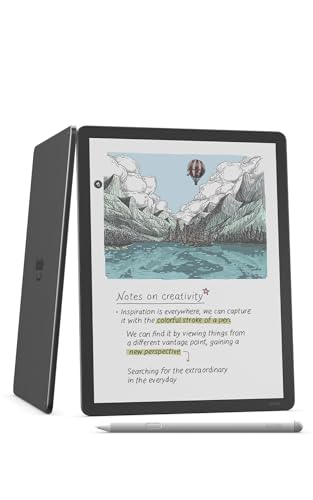
Amazon Kindle Scribe Colorsoft 64GB, 11 inch paper-like color display with front light, Pen included, Graphite

Our verdict: An 11 inch color front-lit Kindle with a pen, blending an e-reader with a notebook.

The Kindle Scribe Colorsoft has an 11 inch paper-like color display, a front light, 64GB of storage and a pen in the box. It combines an e-reader with a notebook, so reading a long report and marking it up happens on the same screen.

It ranks fifth because the notebook side is secondary to the reading side. If your work involves long documents, books or research papers that you annotate, the integration is excellent. If you mostly write fresh notes in meetings, the dedicated writing devices above offer a more refined pen workflow. The front light is a real plus for evening work, and the Kindle store gives you plenty of material to read.

Buy it if you read and annotate as much as you write. Skip it if your priority is page-after-page handwritten notes.

Display
11 in color, front-lit
Storage
64GB
Pen
Included
Type
E-reader and notebook

What we like

  • +Reads and annotates on one screen
  • +Front light works in the evening
  • +Pen comes in the box
  • +Large 11 inch color display

Watch out for

  • −Notes are secondary to reading
  • −Top price bracket of $500 and up

Buy it if: Researchers and managers who mark up long documents.

Skip it if: You mainly handwrite new notes in meetings.

6

Best for Staying on Paper

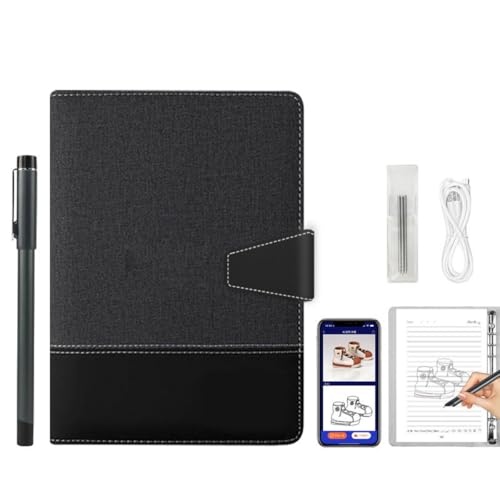
Noteorius Smart Notebook with Pen and Folio, Reusable Digital Writing Pad

Our verdict: A smart pen and writing pad set that syncs to the cloud as you write, for $100 to $200.

The Noteorius set is a smart pen, a reusable writing pad and a folio, and it syncs your writing in real time to an app with cloud storage. It is a Type 3 product in this ranking, meaning it digitizes handwriting rather than replacing the notebook with a screen.

It ranks sixth because the pad is a reusable writing surface and not a full e-ink display. You get the habit of writing on a pad and a searchable digital copy, at a far lower price than any e-ink device here. What you give up is the polish of dedicated hardware: the app experience, handwriting conversion and long-term support depend on a smaller maker, and the listing offers few specs.

It is a sensible entry point for professionals who want to try digital capture before committing. Back up your notes regularly, because a smaller app is a riskier home for years of material.

Type
Smart pen and pad set
Sync
Real-time with cloud storage
Includes
Pen and folio
Bracket
$100 to $200

What we like

  • +Syncs writing to an app live
  • +Pen and folio are included
  • +Far cheaper than e-ink devices
  • +Reusable pad cuts paper waste

Watch out for

  • −Smaller maker and app ecosystem
  • −Few specs listed for the pad

Buy it if: Professionals trying digital capture on a budget.

Skip it if: You want a premium e-ink writing surface.

7

Best for Design and Meetings

Digital Notebook Tablet with Smart Pen, Real-Time Sync Electronic Writing

Our verdict: A smart pen and writing tablet with real-time sync for iOS and Android, aimed at design and meetings.

This is a smart pen and tablet set with real-time sync, listed as compatible with Android and iOS and suited to design and meeting notes. Like the Noteorius, it digitizes your handwriting instead of acting as a full e-ink notebook.

It ranks last because the listing carries almost no technical detail, and the brand name is generic, so support and software updates are uncertain. A device in the $500 and up bracket should come with more evidence of quality than this listing provides. Dual platform support is a plus, but sketching accuracy and sync reliability are not documented here.

Consider it only if its feature set fits a design workflow you have already priced elsewhere. Otherwise, a reMarkable 2 gives you a better-supported device for similar or lower money.

Type
Smart pen and writing tablet
Sync
Real-time
Platforms
Android and iOS
Bracket
$500+

What we like

  • +Real-time sync as you write
  • +Works with Android and iOS
  • +Suited to design and meetings
  • +Digitizes handwriting automatically

Watch out for

  • −Listing gives few technical details
  • −Price is high for an unknown brand

Buy it if: Design workers who need quick handwriting capture.

Skip it if: You want a well-supported premium device.

Methodology

How We Ranked These

Writing surface

We compared color e-paper, monochrome e-paper and digitized pad surfaces for how close they get to the feel of paper.

Software focus

Distraction-free interfaces were weighed against Android flexibility, because a notebook that invites notifications defeats its own purpose.

Bundled accessories

Included pens, folios and cases were counted, since a missing accessory adds real cost to the premium models.

Professional workflow fit

We considered meeting notes, document annotation and design sketching, matching each device to the work it suits.

Value and risk

Feature depth was set against the $100 to $200, $200 to $500 and $500 and up brackets, with a penalty for listings that give little detail.

Every Primea Score uses the same weights: Performance 30% · Build & Materials 20% · Everyday Usability 20% · Value 20% · Owner Satisfaction 10%. Full scoring rules

Buyer's guide

How to Pick the Right One for You

By Work Style

What you do all day decides the right notebook more than any single spec.

Work styleOur pick
Constant meeting notesreMarkable Paper Pro with Marker Plus and Basalt Book Folio
Notes on a sensible budgetreMarkable 2 with Marker Plus
Reading and annotating reportsAmazon Kindle Scribe Colorsoft 64GB, 11 inch paper-like color display with front light, Pen included, Graphite
Notes plus apps on one deviceBOOX Tablet 10.3in Note Air 5 C, 6G 64G E Ink Tablet Color ePaper Notebook

By Budget

SpendOur pick
$100 to $200Noteorius Smart Notebook with Pen and Folio, Reusable Digital Writing Pad
$200 to $500reMarkable 2 with Marker Plus
$500 and up (device only)reMarkable Paper Pro with Marker Plus
$500 and up (complete)reMarkable Paper Pro with Marker Plus and Basalt Book Folio

E-Ink Notebook vs Smart Pen Set

E-ink notebook

You write on a screen that feels like paper, with search, handwriting conversion and a clean interface. Picks: reMarkable Paper Pro, reMarkable 2, BOOX Note Air 5 C, Kindle Scribe Colorsoft.

Smart pen set

You write on a pad and the pen records it, which is cheaper but less polished. Picks: Noteorius Smart Notebook, Digital Notebook Tablet with Smart Pen.

Default to an e-ink notebook if the notes matter to your career.

By Display Type

DisplayOur pick
Largest color screenreMarkable Paper Pro with Marker Plus and Basalt Book Folio
Monochrome for writingreMarkable 2 with Marker Plus
11 inch front-lit colorAmazon Kindle Scribe Colorsoft 64GB, 11 inch paper-like color display with front light, Pen included, Graphite
10.3 inch color with AndroidBOOX Tablet 10.3in Note Air 5 C, 6G 64G E Ink Tablet Color ePaper Notebook

For Executives and Managers Specifically

Look for

A quiet interface, a pen included, a clean way to export and share notes, and a case that looks professional in a boardroom.

In this ranking

The reMarkable Paper Pro bundle for a ready-made kit, the reMarkable 2 for a lower-cost version, and the Kindle Scribe Colorsoft if you review long documents.

When to Spend More

Spend more if

You write for hours every day and your notes are records you need to keep. The reMarkable Paper Pro bundle gives you the best surface and a matched case.

Save if

You mostly take quick meeting notes. The reMarkable 2 delivers the same focused experience for less, and the Noteorius set is the cheapest entry.

Questions

Frequently Asked Questions

Can I run apps like email or Slack on these devices?+

Only on the BOOX Note Air 5 C, which runs Android. The reMarkable models and the Kindle Scribe Colorsoft are designed for notes and reading, not for communication apps.

What is the most common mistake when buying a digital notebook?+

Buying a tablet when you wanted a notebook. A device that runs apps tends to pull your attention away, which defeats the purpose. Decide first whether you want a quiet writing device or a small computer.

Is the reMarkable Paper Pro worth it over the reMarkable 2?+

If you use color to highlight and organize, and you want a larger screen, yes. If your notes are mostly black text and sketches, the reMarkable 2 gives you nearly the same experience in the $200 to $500 bracket.

How hard is it to set up?+

E-ink notebooks like the reMarkable pair with an account and an app in a few minutes. Smart pen sets need app installation and pen pairing. Plan for an evening to move your note-taking habits across.

How do I keep my notes safe?+

Turn on cloud sync, export important notes as PDFs regularly and keep a second copy somewhere else. A device can be lost or damaged, and a smaller maker's app is a riskier long-term home for your notes.

Do I need a case or folio?+

Yes, in practice. The Basalt Book Folio comes with the top bundle, and the other e-ink devices benefit from a sleeve or cover. A screen in a bag without protection is an easy way to lose a $500 and up device.

Final take

For professionals who write all day, the reMarkable Paper Pro bundle with its folio is the best digital notebook here, and the reMarkable 2 gives most of the experience for less. The BOOX Note Air 5 C suits people who need Android apps, and the Kindle Scribe Colorsoft is the pick for heavy reading and annotation. Keep the smart pen sets for trials or tight budgets. Decide between a notebook and a tablet before you shop.

More Ranked & Reviewed Guides