
Primea ReviewsAll Reviews

Primea Reviews is reader-supported. When you buy through our Amazon links we may earn a commission, at no extra cost to you. Rankings are set by our editors and never sold. Learn more

Ranked & Reviewed by Primea Reviews

The 7 Best Digital Notebooks for Note Taking of 2026, Ranked & Reviewed

By the Primea Editorial TeamUpdated November 4, 202610 min read7 products ranked
The 7 Best Digital Notebooks for Note Taking of 2026, Ranked & Reviewed

The short answer

Heavy writers who want everything organized in folders should start with the reMarkable 2 and its Marker Plus. The Noteorius smart pen set is the better call if you want real paper and near-instant sync. SyncPen adds OCR and audio recording for less, while the two Rocketbook options are the cheapest way to file handwritten pages into the cloud.

The Primea Scoreboard

Ranked & Reviewed

  1. An e-ink notebook with a paper-like writing texture and folder organization, with the Marker Plus included.

    94Outstanding
    Check price
  2. A smart pen and folio set that syncs as you write and keeps your notes searchable almost at once.

    90Excellent
    Check price
  3. Real-time sync, OCR and audio recording in a $50 to $100 smart pen set.

    88Excellent
    Check price
  4. A compact pen and notebook set that syncs to your phone in real time.

    85Excellent
    Check price
  5. A budget-friendly sync pen and notebook set built for real-time note capture.

    83Very Good
    Check price
  6. A letter-size reusable spiral notebook with dotted pages that scans to cloud services.

    81Very Good
    Check price
  7. A 16-sheet reusable notepad with lined and dot grid pages for short, quick notes.

    79Very Good
    Check price

Digital notebooks sell a single promise, that your handwriting becomes searchable, and then split into three very different machines to deliver it. One kind is an e-ink slate you write on directly. Another is a smart pen that captures ink from real paper. The third is a reusable notebook you wipe clean after scanning. Buying the wrong type is the most common regret in this category.

So we ranked within those types rather than pretending they compete on specs. We reviewed seven current options from their listings and manufacturer details, and we scored writing feel, how fast notes sync, how searchable they become and how much each costs to keep using. Where a listing gives no figure, such as battery life, we left it unstated rather than guess.

Before you buy

What Actually Matters

01

Device type

Digital notebooks come in three types: e-ink devices you write on, smart pens that capture ink from paper, and reusable paper you scan. Each trades cost against convenience. The reMarkable 2 is the first, the SyncPen the second, and the Rocketbook the third. Decide type before brand, since switching later means rebuying everything.

02

Sync method

Real-time sync sends strokes to your phone as you write. Scan-based systems like Rocketbook wait until you photograph the page. Real time suits meetings, because notes are ready when you leave. Scanning suits slower, deliberate filing. Check the listing for the words real-time, and see how the companion app handles offline writing.

03

OCR and search

Optical character recognition converts handwriting into searchable text. It decides whether a notebook is an archive or a pile of images. SyncPen lists OCR, while others do not state it. Accuracy depends on your handwriting, so look for a free trial of the app and test with real notes before committing.

04

Paper and refill cost

Smart pens often need special paper, and refills add recurring cost. Reusable notebooks avoid that by wiping clean, but need compatible pens. The reMarkable 2 needs no paper at all. Check what replacement pages or pens cost before you buy, since a cheap starter set can become expensive over a year.

05

Organization tools

Organization means folders, tags, and cloud export. Without it, searchable notes still pile up. The reMarkable 2 lists digital folders, and the Noteorius uses app cloud sync. Look for export to PDF or cloud services in the listing, and consider how many notebooks and subjects you will realistically manage.

In-depth reviews

Our Ranked Picks, Reviewed

1

Best Overall

reMarkable 2 with Marker Plus

Our verdict: An e-ink notebook with a paper-like writing texture and folder organization, with the Marker Plus included.

The reMarkable 2 is an e-ink digital notebook, and the Marker Plus comes in the bundle. Its selling point is a paper-like writing texture, which is what separates a notebook you want to write on from a tablet you tolerate writing on. Digital organization and folders handle the filing a paper stack never could.

It ranks first because it is the only pick here where the writing surface, pen and organization are designed as one product. The smart-pen sets keep real paper but depend on a separate app, and the Rocketbooks scan after the fact. The $200 to $500 price is the cost of that polish.

Buy it if note taking is a daily habit. The caveat: it is a single-purpose device, so it will not replace a tablet for apps or color.

Type
E-ink digital notebook
Pen
Marker Plus included
Surface
Paper-like texture
Organization
Digital folders

What we like

  • +Paper-like writing texture
  • +Marker Plus included
  • +Folders for organizing notes
  • +No app juggling to write

Watch out for

  • −Highest price tier here
  • −Single-purpose device
  • −Not a general tablet

Buy it if: Daily note takers who want writing feel and organization in one device.

Skip it if: You want a cheap trial or need a device for apps.

2

Best Smart Pen Set

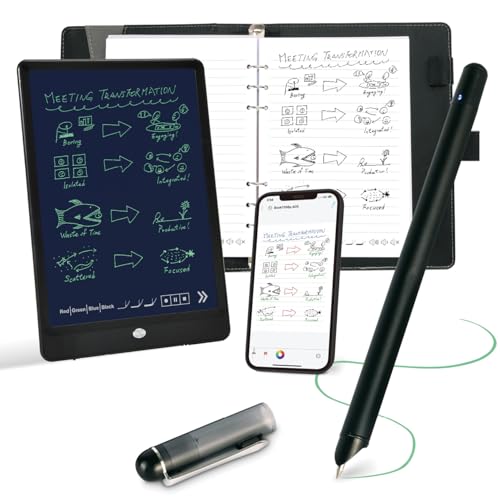
Noteorius Smart Notebook with Pen and Folio, Reusable Digital Writing Pad

Our verdict: A smart pen and folio set that syncs as you write and keeps your notes searchable almost at once.

Noteorius is a smart pen and paper digitizer set that syncs in real time as you write, then stores notes through an app with cloud syncing. The pen and a folio are included, so there is nothing else to buy.

It ranks second because real-time sync is the feature the Rocketbooks lack, and the $100 to $200 price undercuts the reMarkable 2 by a wide margin. Against SyncPen, it costs more and the listing does not mention OCR or audio, so the advantage is the folio-and-pen package.

Buy it if you want to keep writing on paper and still have searchable notes on your phone. The caveat: smart pens depend on their app and their specific paper, so check replacement pages before committing.

Type
Smart pen and paper digitizer
Sync
Real time as you write
Storage
App sync with cloud
Included
Pen and folio

What we like

  • +Syncs in real time
  • +Pen and folio included
  • +Cloud storage via app
  • +Cheaper than e-ink

Watch out for

  • −Relies on proprietary paper
  • −Needs the app to work
  • −No OCR claim on listing

Buy it if: People who like real paper but want notes searchable on a phone.

Skip it if: You dislike buying special paper refills.

3

Best Budget Smart Pen

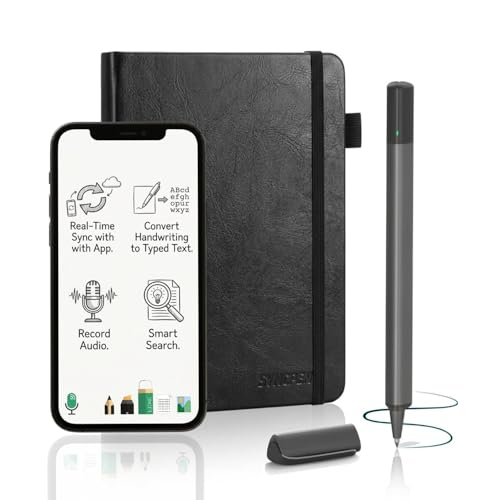
SyncPen Digital Notebook Smart Pen Set, Real Time Sync from Paper to App

Our verdict: Real-time sync, OCR and audio recording in a $50 to $100 smart pen set.

SyncPen streams strokes from paper to your phone, then adds handwriting recognition and a voice recorder, so each page stays searchable and tied to what was said. It is a smart pen and paper digitizer set at a budget price, between $50 and $100.

It ranks third rather than second because the Noteorius includes a folio and a more complete package, though SyncPen wins on stated features. Against the reMarkable 2, you give up the paper-like screen and folder system, and in return you pay a quarter of the price.

Choose it for lectures and meetings where audio context helps. The caveat: OCR on handwriting varies with how neat you write, so test it on your own notes before trusting searchability.

Type
Smart pen and paper set
Sync
Real time, paper to app
Tools
OCR and audio recording
Price tier
$50 to $100

What we like

  • +OCR makes notes searchable
  • +Audio recording adds context
  • +Real-time sync
  • +Budget-friendly price

Watch out for

  • −OCR depends on handwriting
  • −Needs specific paper
  • −No folio listed

Buy it if: Students and meeting-goers who want audio tied to handwriting.

Skip it if: You have messy handwriting and need reliable search.

4

Best for Phone Review

Ophayapen Smart Pen and Smart Digital Notebook, Real-time Mobile Sync

Our verdict: A compact pen and notebook set that syncs to your phone in real time.

Ophayapen is a compact smart pen and notebook set with real-time mobile sync. The pen and notebook are both in the box, and the focus is on reviewing what you wrote on your phone shortly after writing it.

It ranks fourth because the listing offers fewer stated extras than SyncPen, which adds OCR and audio, and fewer than Noteorius, which adds a folio. Mid-range pricing puts it between those two and the Yuan set. What it offers is a straightforward pen-and-paper workflow.

Buy it if your main need is glancing at notes on your phone between meetings. The caveat: the specs are thin, so confirm app compatibility with your phone before you order.

Type
Smart pen and notebook
Sync
Real-time to mobile
Included
Pen and notebook
Price tier
$50 to $100

What we like

  • +Real-time mobile sync
  • +Pen and notebook included
  • +Compact set
  • +Mid-range price

Watch out for

  • −Few stated features
  • −No OCR or audio claimed
  • −Phone app compatibility unclear

Buy it if: People who mostly review handwritten notes on a phone.

Skip it if: You want OCR, audio or folders.

5

Best Affordable Set

Yuan Digital Sync Pen with Notebook, Smart Writing Set for Note Taking

Our verdict: A budget-friendly sync pen and notebook set built for real-time note capture.

The Yuan is a smart pen and notebook set, with real-time sync built for note taking, at an affordable price. Pen and notebook are included, which makes it the plainest entry in the smart pen group.

It ranks fifth because it states nothing beyond the basics, while SyncPen adds OCR and audio and Noteorius adds a folio. Against the Rocketbooks, it adds live sync, which is the reason to pick it over reusable paper.

Choose it if you want to try a smart pen without spending much. The caveat: with so few features listed, it is a gamble on app quality, so check owner feedback on the companion app first.

Type
Smart pen and paper set
Sync
Real time
Included
Pen and notebook
Price tier
$50 to $100

What we like

  • +Real-time sync
  • +Pen and notebook included
  • +Affordable price
  • +Simple setup

Watch out for

  • −Minimal listed features
  • −Companion app unknown
  • −No OCR or audio claimed

Buy it if: First-time smart pen buyers on a tight budget.

Skip it if: You want a proven app and richer features.

6

Best Reusable Notebook

Rocketbook Core Reusable Spiral Notebook, Letter Size 8.5x11, Black, Dotted Pages, App-Connected, Erasable, Durable Cover

Our verdict: A letter-size reusable spiral notebook with dotted pages that scans to cloud services.

The Core is a reusable spiral notebook with dotted pages, sized at standard letter paper. You scan pages with the app, send them to cloud services, then wipe the pages clean and reuse them. It costs $25 to $50.

It ranks sixth because there is no real-time sync: notes reach the cloud only when you scan. It sits above the Flip because it offers full-size pages and a durable cover. Against the smart-pen sets, you save money and avoid special paper.

Buy it if you want low-cost filing and do not mind a scan step. The caveat: wipeable pages need the right pen, and old ink can ghost if you do not clean thoroughly.

Type
Reusable paper notebook
Size
Letter, 8.5 x 11 in
Pages
Dotted, erasable
Sync
App scan to cloud

What we like

  • +Wipe clean and reuse
  • +Full letter-size pages
  • +Scans to cloud services
  • +Low cost

Watch out for

  • −No real-time sync
  • −Scan step for every page
  • −Needs compatible pen

Buy it if: Budget users who want to file notes without buying paper refills.

Skip it if: You want instant sync as you write.

7

Best for Quick Notes

Rocketbook Flip Smart Notepad, Teal Cover, Lined/Dot Grid Rule, 8.5x11, 16 Sheets

Our verdict: A 16-sheet reusable notepad with lined and dot grid pages for short, quick notes.

The Rocketbook Flip is a smart notepad with 16 sheets, a lined and dot grid rule, and an 8.5 by 11 inch page. Like the Core, it scans to the app, and its pages wipe clean for reuse.

It ranks last because 16 sheets limit it to short notes, and it lacks the Core's spiral binding and durable cover. The advantage is the Flip format, which opens like a notepad and sits easily on a clipboard. At $25 to $50, it is as cheap as note filing gets here.

Choose it for quick lists, meeting jots and to-dos. The caveat: with only 16 sheets you will scan and wipe often, so it suits brief notes rather than a semester of lectures.

Type
Reusable smart notepad
Sheets
16
Rule
Lined and dot grid
Size
8.5 x 11 in

What we like

  • +Wipe clean and reuse
  • +Lined and dot grid pages
  • +Scans to the app
  • +Notepad format

Watch out for

  • −Only 16 sheets
  • −No real-time sync
  • −Short-note format

Buy it if: People who jot short notes and lists rather than long-form writing.

Skip it if: You take long lecture notes.

Methodology

How We Ranked These

Writing feel

E-ink texture, real paper and wipeable pages were compared for how natural they are to write on.

Sync and capture

Real-time sync scored above scan-after-writing, since delayed capture adds friction.

Searchability

OCR, folders and app organization determine whether notes can be found later.

Running costs

Special paper, refills and subscriptions were weighed against the upfront price tier.

Value

Included accessories and the price tier decide how much each option delivers per dollar.

Every Primea Score uses the same weights: Performance 30% · Build & Materials 20% · Everyday Usability 20% · Value 20% · Owner Satisfaction 10%. Full scoring rules

Buyer's guide

How to Pick the Right One for You

By Device Type

Start with the type of capture that suits how you work.

TypeOur pick
E-ink notebookreMarkable 2 with Marker Plus
Smart pen set with folioNoteorius Smart Notebook with Pen and Folio
Smart pen with OCR and audioSyncPen Digital Notebook Smart Pen Set
Reusable paperRocketbook Core Reusable Spiral Notebook

By Budget

SpendOur pick
$25 to $50Rocketbook Core Reusable Spiral Notebook
$50 to $100SyncPen Digital Notebook Smart Pen Set
$100 to $200Noteorius Smart Notebook with Pen and Folio
$200 to $500reMarkable 2 with Marker Plus

Real-Time Sync vs Scan-to-Cloud

Real-time sync

Notes appear in the app as you write. The Noteorius, SyncPen, Ophayapen and Yuan all work this way.

Scan-to-cloud

You photograph each page with the app. The Rocketbook Core and Flip use this, and it keeps costs low.

Choose real-time sync for meetings and scan-based filing for casual use.

By Page Count

NeedOur pick
Long-form notes, many subjectsreMarkable 2 with Marker Plus
A full letter-size notebookRocketbook Core Reusable Spiral Notebook
Short jots on 16 sheetsRocketbook Flip Smart Notepad
Compact pocket-size notesOphayapen Smart Pen and Smart Digital Notebook

For Lectures and Meetings Specifically

Look for

Real-time sync, OCR for search, and audio recording so you can match handwriting to what was said.

In this ranking

SyncPen lists OCR and audio recording, and the Noteorius syncs as you write.

When to Spend More

Spend more if

You write daily and value feel and folders. The reMarkable 2 at $200 to $500 is built for that.

Save if

Your notes are quick and disposable. A Rocketbook at $25 to $50 is enough.

Questions

Frequently Asked Questions

Can digital notebooks convert handwriting to text?+

Some can. SyncPen lists OCR, and the Ophayapen listing mentions text conversion in related models. Accuracy depends on handwriting, so test with a few pages before assuming every note will be fully searchable.

What is the biggest mistake buyers make?+

Mixing up types. A Rocketbook is reusable paper with a scan step, not an e-ink tablet. If you want to write and have notes appear instantly, choose a smart pen like the Noteorius or the reMarkable 2.

Is the reMarkable 2 worth it over a smart pen?+

If you write daily, yes. Its paper-like texture and folders beat any smart pen set. For occasional notes, the SyncPen or Noteorius delivers searchable text for a fraction of the $200 to $500 price.

How do I set up a smart pen notebook?+

Charge the pen, install the app, pair by Bluetooth and write on the included notebook. With the Noteorius or Yuan sets, calibrate on page one and keep the pen within phone range so strokes sync properly.

How do I maintain a reusable Rocketbook?+

Wipe pages with a barely damp cloth, not a wet one, and use the recommended pen. The Rocketbook Core's pages can ghost if ink sits for weeks, so clean after scanning and dry the page before writing again.

Do I need an internet connection to take notes?+

Not to write. The reMarkable 2 stores notes on the device, and smart pens such as SyncPen buffer strokes until the phone reconnects. You need a connection mainly to sync to the cloud or back up.

Final take

Daily writers who care about feel and organization should buy the reMarkable 2 and stop shopping. The Noteorius is the smarter buy if you want to keep paper and still have searchable notes. SyncPen adds OCR and audio for less, and Rocketbook remains the cheapest way to archive handwriting.

More Ranked & Reviewed Guides