

Primea ReviewsAll Reviews

Primea Reviews is reader-supported. When you buy through our Amazon links we may earn a commission, at no extra cost to you. Rankings are set by our editors and never sold. Learn more

Ranked & Reviewed by Primea Reviews

Vertical Mice for Tennis Elbow: 8 Ergonomic Picks, Ranked & Reviewed

By the Primea Editorial TeamUpdated November 3, 202611 min read8 products ranked
Vertical Mice for Tennis Elbow: 8 Ergonomic Picks, Ranked & Reviewed

The short answer

The Logitech MX Vertical is our top pick for people trying to reduce forearm rotation at the desk, thanks to its steeper tilt and premium build. The Logitech Lift is the gentler, smaller alternative, the Kinesis DXT2 is the specialist forearm-neutral design, and the Evoluent is the long-established wired option. A mouse is only one part of managing elbow pain, so see a clinician if it persists.

The Primea Scoreboard

Ranked & Reviewed

  1. The steepest tilt in the group, wrapped in a premium build, for people who want the most forearm rotation relief a mouse can offer.

    94Outstanding
    Check price
  2. A lighter body and a gentler angle, ideal for easing into a new grip.

    91Excellent
    Check price
  3. A specialist ergonomic brand's forearm-neutral design, wireless over RF.

    89Excellent
    Check price
  4. A long-established wired design with a fixed, well-documented angle.

    87Excellent
    Check price
  5. A cheap, mid-angle rechargeable mouse to test whether a vertical grip suits you.

    85Excellent
    Check price
  6. A compact, lighter-feeling mouse for small hands and sore arms on a budget.

    83Very Good
    Check price
  7. A budget wired vertical grip where adjustable DPI shortens arm sweeps.

    81Very Good
    Check price
  8. A foldable, ambidextrous mouse with an adjustable vertical angle, backed by a small review sample.

    79Very Good
    Check price

The temptation with elbow pain is to hunt for a single product that fixes it. No mouse does that. What a vertical mouse can do is change the position of your forearm, turning it from palm-down toward a handshake so the muscles that run to the outer elbow are not held in constant twist. That is a comfort measure, and it works best alongside rest, desk setup changes and advice from a doctor or physiotherapist.

That framing drove how we ranked these eight. We reviewed the listings and spec sheets for tilt angle, grip design, connection type, weight and price bucket, and we judged each mouse on how well it supports a neutral forearm. Nothing here is a treatment claim, and we say plainly where a listing gives no angle or has a thin review base.

Before you buy

What Actually Matters

01

Tilt angle

The angle controls how much your forearm rotates inward. A steeper tilt moves the hand toward a handshake posture, which is the main argument for a vertical mouse. Steeper takes longer to adjust to, so check whether the listing states an angle, and treat a missing figure as a moderate design.

02

Mouse weight

A heavy mouse needs more effort to push, and effort adds up across thousands of movements. Wired models without batteries are lighter, and compact rechargeable ones like the Lift and ProtoArc feel lighter in the hand. Look for the weight or a note such as lighter body in the description.

03

Palm support

If the shell does not support the palm, you end up gripping with your fingers and thumb, which can add tension rather than remove it. A full-size body like the MX Vertical gives the heel of the hand something to rest on. Match the body size to your hand length.

04

DPI and cursor speed

DPI sets how far the cursor moves per inch of mouse travel. A higher setting means you can cross a large or multi-monitor screen with a small wrist motion. Check for adjustable levels and a button that changes them without software, then keep the setting high enough to avoid long reaches.

05

Whole-desk setup

A mouse cannot offset a desk that is too high or a keyboard placed far away. Elbows should rest near your sides, with the mouse close to the keyboard. A vertical mouse helps most when paired with that setup and with regular breaks, and a clinician can advise on anything beyond ergonomics.

In-depth reviews

Our Ranked Picks, Reviewed

1

Best Overall

Logitech MX Vertical Wireless Mouse Ergonomic Design

Our verdict: The steepest tilt in the group, wrapped in a premium build, for people who want the most forearm rotation relief a mouse can offer.

The MX Vertical has a disclosed, steeper tilt than the Lift, adjustable DPI, a rechargeable battery and a premium build. A steeper tilt moves the forearm closer to a handshake posture, which is the main way a vertical mouse eases strain on the outer elbow.

It ranks first because the angle is the central feature for this use. A more upright body means less pronation, the inward twist of the forearm, and the full-size shell gives the palm solid support so you are not clawing at the mouse with your fingers. The tradeoff is an adjustment period, since a steep angle changes how every click feels.

Buy it as one supporting tweak to your desk setup, and have a clinician look at pain that keeps returning. If your hand is small, the shell may feel large, and the Lift becomes the better fit.

Tilt
Steeper, disclosed angle
DPI
Adjustable
Power
Rechargeable
Build
Premium

What we like

  • +Steeper angle cuts forearm twisting more
  • +Full-size shell supports the whole palm
  • +Adjustable DPI lowers big arm sweeps
  • +Rechargeable battery with premium build

Watch out for

  • −Adjustment period with the steep tilt
  • −Large body overwhelms smaller hands

Buy it if: Desk workers who want maximum forearm rotation reduction.

Skip it if: You have small hands or dislike strong angles.

2

Best Gentle Transition

Logitech Lift Vertical Ergonomic Wireless Mouse

Our verdict: A lighter body and a gentler angle, ideal for easing into a new grip.

The Lift is a compact, lighter vertical mouse with a gentler tilt angle, adjustable DPI and a rechargeable battery. It lands in the $50 to $100 range.

It takes second because a gentler angle lowers the odds that you drop the mouse after a week. People with sore forearms often struggle with a sudden change in grip, and the Lift keeps the shift modest. The cost is less rotation reduction than the MX, so it is a compromise between comfort and effort.

Choose it if a lighter mouse appeals and you see it as one tweak among several, not a fix on its own. Anyone who wants the steepest possible angle should pick the MX Vertical.

Tilt
Gentler angle
Body
Compact, lighter
DPI
Adjustable
Price bucket
$50 to $100

What we like

  • +Modest angle is easy to adopt
  • +Lighter body is less tiring to move
  • +Adjustable DPI shortens arm travel
  • +Rechargeable with a compact shell

Watch out for

  • −Less forearm rotation reduction than MX
  • −Not the cheapest way to try one

Buy it if: People easing into a vertical grip with sore forearms.

Skip it if: You want the steepest angle available.

3

Best Specialist Design

KINESIS DXT2 Ergonomic Vertical Mouse (RF Wireless)

Our verdict: A specialist ergonomic brand's forearm-neutral design, wireless over RF.

The DXT2 comes from Kinesis, a company known for ergonomic keyboards, and it is built around forearm-neutral positioning with an RF wireless link. The listing puts it at $100 to $200.

Third place reflects that it targets the problem directly but costs more than the Logitech models and gives fewer details on angle and battery. RF wireless means a USB receiver rather than Bluetooth, so it works with one computer at a time.

It suits buyers who want a specialist ergonomic brand and will pay for it, with a clinician consulted if pain keeps returning. Casual shoppers will find better value in the Lift.

Design
Forearm-neutral
Link
RF wireless
Brand
Ergonomic specialist
Price bucket
$100 to $200

What we like

  • +Built around a neutral forearm position
  • +Specialist brand focused on ergonomics
  • +RF receiver link needs no pairing menus
  • +No gamer styling, purely functional

Watch out for

  • −Premium price for few listed details
  • −RF link supports one computer only

Buy it if: Buyers who trust specialist ergonomic brands over general ones.

Skip it if: You need Bluetooth or want a lower price.

4

Best Wired Pick

Evoluent - World's Original Vertical Mouse, Wired Ergonomic Mouse

Our verdict: A long-established wired design with a fixed, well-documented angle.

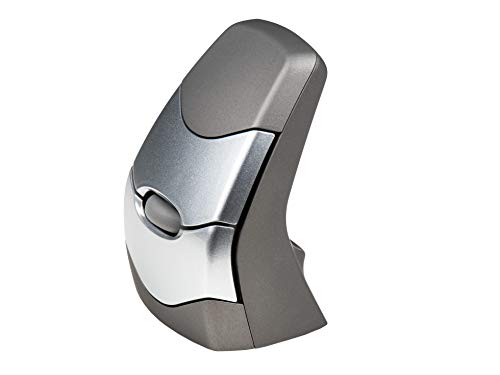
The Evoluent is a wired USB mouse with a fixed, well-documented tilt angle and no battery, making the body lighter. It bills itself as the original vertical mouse and costs $50 to $100.

Fourth place comes down to the fact that a lighter body is easier to push around when your arm is sore, and a well-documented angle means no surprises. The drawback is the cable and the fixed geometry: you cannot tune the angle if it turns out wrong.

Pick it if you use one desktop and want a proven shape without a battery. It is a comfort aid rather than a cure, and lingering pain deserves professional attention.

Tilt
Fixed, documented
Connection
Wired USB
Battery
None
Price bucket
$50 to $100

What we like

  • +Lighter body takes less effort to move
  • +Well-documented fixed tilt angle
  • +Long-established ergonomic design
  • +No battery or charging to think about

Watch out for

  • −Fixed angle cannot be adjusted
  • −Cable limits where it can sit

Buy it if: Desktop users who want a proven, simple vertical shape.

Skip it if: You want wireless or an adjustable angle.

5

Best Budget Trial

Lekvey Ergonomic Mouse, Rechargeable Vertical Wireless Mouse

Our verdict: A cheap, mid-angle rechargeable mouse to test whether a vertical grip suits you.

The Lekvey offers a mid-range tilt, a rechargeable battery and a 2.4GHz receiver for under $25. It is aimed at budget buyers who want to see whether less forearm twist helps at all.

It ranks fifth because the low price comes with less detail and no Bluetooth. Its mid-range tilt is a sensible starting point for people nervous about a steep angle, and the rechargeable cell avoids battery swaps.

Buy it to see whether a vertical grip eases your forearm before you spend more. If it helps, the Lift or MX are the natural upgrades.

Tilt
Mid-range
Power
Built-in rechargeable
Link
2.4GHz receiver
Price bucket
Under $25

What we like

  • +Mid-range tilt is a gentle start
  • +Very low cost to experiment
  • +Rechargeable battery avoids swapping
  • +Simple receiver link on one device

Watch out for

  • −No Bluetooth, single device only
  • −Fewer documented details than Logitech

Buy it if: Cautious buyers who want to test a vertical grip cheaply.

Skip it if: You want Bluetooth or a documented steep angle.

6

Best Lightweight Budget

ProtoArc EM11 NL Wireless Ergonomic Vertical Mouse, Rechargeable

Our verdict: A compact, lighter-feeling mouse for small hands and sore arms on a budget.

The EM11 NL has a compact, lighter body, a rechargeable battery and a 2.4GHz dongle. The listing pitches it as a budget-to-mid option for people who want a featherweight mouse.

It ranks sixth because a lighter mouse is easier to nudge but the compact shell gives the palm less support, and the tilt is not stated. Against the Lekvey it is smaller and lighter, but also less roomy.

It works for small hands that find full-size vertical mice bulky. It is not a standalone fix for elbow pain.

Body
Compact, lighter
Power
Built-in rechargeable
Link
2.4GHz dongle
Price bucket
Under $25

What we like

  • +Lighter body takes less effort to move
  • +Compact shell suits smaller hands
  • +Rechargeable battery without spares
  • +Low price with little risk

Watch out for

  • −Tilt angle is not clearly stated
  • −Small shell gives less palm support

Buy it if: Small-handed users who find big mice tiring.

Skip it if: You want a large, supportive palm rest.

7

Best Adjustable DPI Budget

TECKNET Wired Mouse, Comfortable Ergonomic Mouse with 6400 DPI

Our verdict: A budget wired vertical grip where adjustable DPI shortens arm sweeps.

The TECKNET is a wired vertical mouse with a 6400 DPI sensor and adjustable DPI levels, in the under $25 bucket. The listing pitches it at frugal buyers who want a cabled vertical grip with tunable DPI.

It ranks seventh because the DPI control is useful but the rest of the listing is thin. Higher DPI means the cursor travels further per inch of hand movement, so you can cross a large screen with small wrist motions rather than a long reach.

Choose it for a very low-cost trial with a simple cable. Persistent elbow pain still deserves a professional opinion.

Connection
Wired USB
Sensor
6400 DPI
DPI
Adjustable levels
Price bucket
Under $25

What we like

  • +Adjustable DPI shortens required arm motion
  • +No battery or pairing needed
  • +Lowest cost way to try wired
  • +Vertical grip reduces forearm twist

Watch out for

  • −Little detail on angle or materials
  • −Cable restricts mouse placement

Buy it if: Budget buyers who want DPI control and a cable.

Skip it if: You want a documented angle or wireless freedom.

8

Best Adjustable Angle

R-Go Twister Ambidextrous Mouse, Foldable design, Ergonomic vertical

Our verdict: A foldable, ambidextrous mouse with an adjustable vertical angle, backed by a small review sample.

The R-Go Twister has a foldable design with an adjustable vertical angle and an ambidextrous shape, in the $100 to $200 bucket. Being able to tune the angle is rare in this group and useful if you do not know what suits your forearm.

It ranks last because the listing carries a small, more mixed review sample, and the price is steep for what you know about it. Compared with the Evoluent's fixed angle it offers flexibility, though flexibility means you have to experiment.

It is for buyers curious about an adjustable-angle alternative who accept a less proven product. Left-handed users should note the ambidextrous shape.

Angle
Adjustable vertical
Design
Foldable
Hand
Ambidextrous
Price bucket
$100 to $200

What we like

  • +Adjustable angle lets you experiment
  • +Ambidextrous shape suits left hands
  • +Foldable body packs flat for travel
  • +Unusual flexibility in this group

Watch out for

  • −Small, mixed review sample on listing
  • −Premium price with limited evidence

Buy it if: Left-handed or curious buyers who want an adjustable angle.

Skip it if: You want a well-proven design for the money.

Methodology

How We Ranked These

Forearm positioning

We read each listing for tilt angle and design intent, favoring mice that clearly aim to reduce forearm rotation toward a handshake position.

Grip and weight

Body size, palm support and weight were compared, since a lighter, well-fitting mouse takes less effort to move all day.

Cursor control

Adjustable DPI and sensor options were credited, because faster cursor travel means smaller arm movements.

Connection and upkeep

Wired, RF and Bluetooth setups were judged for how much hassle they add, with battery management counted as a minor cost.

Value and evidence

Each pick was scored within its price bucket, with a thin or mixed review base lowering confidence slightly.

Every Primea Score uses the same weights: Performance 30% · Build & Materials 20% · Everyday Usability 20% · Value 20% · Owner Satisfaction 10%. Full scoring rules

Buyer's guide

How to Pick the Right One for You

By Tilt Angle

Match the angle to your tolerance for change; a steep tilt rotates the forearm further but takes longer to adopt.

Angle preferenceOur pick
Steepest availableLogitech MX Vertical
Gentle, easy startLogitech Lift
Mid-rangeLekvey Rechargeable
Fixed, documentedEvoluent Vertical Mouse
Adjustable angleR-Go Twister

By Budget

SpendOur pick
Under $25Lekvey Rechargeable
Under $25 (wired)TECKNET Wired Mouse
Under $25 (lightweight)ProtoArc EM11 NL
$50 to $100Logitech Lift
$100 to $200KINESIS DXT2

Steep Angle vs Gentle Angle

Steep angle

More forearm rotation is removed, but the grip feels strange at first and demands patience. The MX Vertical sits here.

Gentle angle

Easier to adopt and less likely to be abandoned, with somewhat less correction. The Lift and Lekvey fit this approach.

If you are unsure, start gentle and move steeper later.

By Hand and Desk Setup

SituationOur pick
Large handLogitech MX Vertical
Small handProtoArc EM11 NL
Left-handedR-Go Twister
Single desktop, no batteriesEvoluent Vertical Mouse

For Elbow Strain Specifically

Look for

A forearm-neutral shape, a lighter body, adjustable DPI and a desk setup that keeps the elbow near your side. Treat the mouse as one adjustment among several.

In this ranking

The MX Vertical offers the most correction, the Lift offers the easiest transition and the Kinesis DXT2 is the specialist-brand option.

When to Spend More

Spend more if

You spend most of the day on the mouse or have tried cheaper ones without comfort. The MX Vertical or Kinesis DXT2 gives better shape and support.

Save if

You are still testing whether a vertical grip helps. The Lekvey or TECKNET lets you find out cheaply.

Questions

Frequently Asked Questions

Will a vertical mouse cure tennis elbow?+

No. A vertical mouse can reduce forearm rotation, which may ease strain during desk work, but it is not a treatment. Persistent or worsening pain should be assessed by a doctor or physiotherapist.

What is the biggest mistake buyers make?+

Choosing the steepest angle straight away. The new grip can feel awkward and some people quit before their muscles adapt. A gentler model like the Lift is often a better starting point.

Is a vertical mouse worth it over a trackball or a normal mouse?+

If a normal mouse leaves your forearm twisted for hours, it is worth a trial. A trackball keeps the arm still, but a vertical mouse feels closer to a regular mouse, so many people find the learning curve shorter.

How long does it take to adjust?+

Expect several days of regular use before the grip feels natural, and longer for steep models. Start with short sessions and keep the old mouse nearby for the first week.

How do I clean and maintain one?+

Wipe the shell with a lightly damp cloth, clean the sensor window gently and keep dust out of the buttons. Rechargeable models should be charged before they run flat to help the battery last.

Can left-handed people use these?+

Many are right-hand shaped. The R-Go Twister is ambidextrous, and other listings here do not clearly state a left-hand version, so check the product page before ordering.

Final take

For people who want to cut forearm rotation at the desk, the Logitech MX Vertical is the strongest option, with the Logitech Lift as the gentler choice for smaller hands or first-time users. The Kinesis DXT2 and Evoluent suit those who prefer a specialist or wired design. Treat any mouse as a comfort aid and get persistent elbow pain checked by a professional.

More Ranked & Reviewed Guides