

Primea ReviewsAll Reviews

Primea Reviews is reader-supported. When you buy through our Amazon links we may earn a commission, at no extra cost to you. Rankings are set by our editors and never sold. Learn more

Ranked & Reviewed by Primea Reviews

The 7 Best Ergonomic Vertical Mice for Comfortable Desk Work, Ranked & Reviewed

By the Primea Editorial TeamUpdated November 3, 202610 min read7 products ranked
The 7 Best Ergonomic Vertical Mice for Comfortable Desk Work, Ranked & Reviewed

The short answer

The Logitech MX Vertical is the ergonomic vertical mouse to buy if you want a steep, disclosed tilt angle, a thumb rest and a rechargeable battery with dual wireless modes. The Logitech Lift is the smaller, gentler version, the Evoluent is the long-established wired original, and the ProtoArc EM11 and Lekvey are the low-cost rechargeable options.

The Primea Scoreboard

Ranked & Reviewed

  1. A steep, disclosed tilt angle, a shaped thumb rest, dual 2.4GHz and Bluetooth and a rechargeable battery.

    94Outstanding
    Check price
  2. A gentler disclosed tilt, a compact body option, dual wireless and a rechargeable battery.

    92Outstanding
    Check price
  3. A fixed, well-documented tilt, wired USB connection and a light battery-free body.

    90Excellent
    Check price
  4. A small vertical shell with an internal rechargeable cell and a USB dongle, priced under $25.

    87Excellent
    Check price
  5. A mid-range tilt, a rechargeable battery and a 2.4GHz receiver at a budget price.

    85Excellent
    Check price
  6. A wired USB ergonomic vertical mouse with no battery, in the $25 to $50 range.

    82Very Good
    Check price
  7. A right-hand specific wireless vertical mouse with a moderate tilt and AA batteries.

    79Very Good
    Check price

The common mistake with a vertical mouse is expecting instant comfort. A vertical grip turns your hand into a handshake position, which takes pressure off the forearm twist, but it also uses muscles you have not trained on a flat mouse. Most people feel clumsy for a week or two, and some quit before the benefit arrives. Pick the right size and angle, and give it a fair trial.

We reviewed eight vertical mice from their listings, set aside one budget wired model that largely duplicates another, and ranked seven. The comparison covers tilt angle, hand size options, connection type, battery, thumb support and price. The listings describe tilt in words rather than degrees in most cases, so we use their wording. Price buckets replace exact prices, and no figure comes from testing.

Before you buy

What Actually Matters

01

Tilt angle

A steeper tilt takes more forearm twist out of the posture but is harder to adapt to. A gentler tilt is easier to switch to. Look for a disclosed tilt in the description, and choose steep only if you are ready for a learning period.

02

Hand size

Oversized mice pull the fingers apart, while undersized ones push you into a clawed grip. Few vertical mice offer sizes. The Logitech Lift has a compact option, and the ProtoArc is small.

03

Wired or wireless

Wired mice never run out of power, while wireless mice give freedom. Bluetooth plus a 2.4GHz dongle, as on the Logitech models, lets you switch between devices. Pick for how you work.

04

Battery type

Rechargeable batteries cost less over time and weigh a little more. AA cells are easy to swap but wasteful. Look for built-in rechargeable on the listing if you do not want to buy batteries.

05

Thumb support and buttons

A thumb rest keeps the thumb from dragging on the desk, and side buttons help for navigation. A shaped rest, as on the MX Vertical, lowers strain. A basic mouse may lack both.

In-depth reviews

Our Ranked Picks, Reviewed

1

Best Overall Vertical Mouse

Logitech MX Vertical Wireless Mouse Ergonomic Design

Our verdict: A steep, disclosed tilt angle, a shaped thumb rest, dual 2.4GHz and Bluetooth and a rechargeable battery.

The MX Vertical has a steep disclosed tilt, a thumb rest shaped for the side buttons, dual connectivity over a 2.4GHz receiver or Bluetooth, and a rechargeable battery. It sits at the premium end of the range.

The steep angle is the point. A more upright mouse takes more forearm rotation out of the posture, which is what people with wrist or forearm strain are after. The thumb rest and side buttons keep your thumb in a natural position, and dual connectivity lets you pair it with a laptop and a desktop. The cost is price, and the size, which suits average to large hands but may feel big to small ones.

Buy it if you want the strongest ergonomic design from a major brand. Skip it if you have small hands, where the Lift is the better fit.

Tilt
Steep, disclosed angle
Connection
2.4GHz and Bluetooth
Battery
Rechargeable
Thumb
Shaped rest with side buttons

What we like

  • +Steep tilt removes forearm twist
  • +Dual 2.4GHz and Bluetooth
  • +Rechargeable battery
  • +Shaped thumb rest

Watch out for

  • −Premium price
  • −Large for small hands

Buy it if: Average to large hands with wrist strain.

Skip it if: You have small hands.

2

Best for Smaller Hands

Logitech Lift Vertical Ergonomic Wireless Mouse

Our verdict: A gentler disclosed tilt, a compact body option, dual wireless and a rechargeable battery.

The Lift is Logitech's smaller, gentler vertical mouse, with a disclosed tilt that is less steep than the MX Vertical's. It offers a compact body option, dual 2.4GHz and Bluetooth connectivity and a rechargeable battery, in the $50 to $100 range.

A gentler angle is easier to adapt to, which makes the Lift the better first vertical mouse. People often abandon a steep model in the first week because the posture feels strange, and a smaller, less extreme shape lowers that risk. The compact option also fits smaller hands, which most vertical mice ignore. It ranks second because the steeper MX relieves more forearm rotation for people who tolerate it.

Buy it if you have small to average hands or want an easy transition. Skip it if you want the strongest tilt.

Tilt
Gentler, disclosed angle
Size
Compact body option
Connection
2.4GHz and Bluetooth
Battery
Rechargeable

What we like

  • +Gentler angle eases the switch
  • +Compact option for small hands
  • +Dual wireless connectivity
  • +Rechargeable battery

Watch out for

  • −Less relief than a steeper mouse
  • −Costs more than budget models

Buy it if: Small to average hands, first vertical mouse.

Skip it if: You want the steepest angle.

3

Best Established Wired Design

Evoluent - World's Original Vertical Mouse, Wired Ergonomic Mouse

Our verdict: A fixed, well-documented tilt, wired USB connection and a light battery-free body.

The Evoluent is the long-established vertical mouse, with a fixed, well-documented tilt angle, a wired USB connection and no battery. It is priced in the $50 to $100 range, a premium for a wired mouse.

It earns third place because it is the design many ergonomic specialists point to when discussing vertical grips, and the wired connection means no battery to charge and no wireless dropouts. Without a battery, the body is lighter. The weak point is that it is wired, which suits a desktop but limits a laptop user who moves around, and the shape is a particular fit that not everyone finds comfortable.

Buy it if you want a proven design and do not need wireless. Skip it if you work from a couch or move between desks.

Tilt
Fixed, well-documented
Connection
Wired USB
Battery
None needed
Bracket
$50 to $100

What we like

  • +Proven, long-established design
  • +No battery to charge
  • +Light body
  • +No wireless dropouts

Watch out for

  • −Wired only
  • −Premium for a wired mouse

Buy it if: Desktop users who want a proven shape.

Skip it if: You need wireless.

4

Best Compact Rechargeable

ProtoArc EM11 NL Wireless Ergonomic Vertical Mouse, Rechargeable

Our verdict: A small vertical shell with an internal rechargeable cell and a USB dongle, priced under $25.

ProtoArc packs the EM11 NL into a small vertical shell, with an internal rechargeable cell and a USB dongle for wireless. It costs under $25.

The small size and rechargeable battery are what you want from a cheap vertical mouse. Compact fits smaller hands and travel bags, and a built-in battery avoids the cost of AAs. It ranks fourth because it lacks the Bluetooth option of the Logitech models and the build quality is a step lower. At this price, though, it is the best way to test whether a vertical mouse suits you.

Buy it if you want to try a vertical mouse for little money. Skip it if you want Bluetooth or a premium shape.

Size
Compact body
Battery
Built-in rechargeable
Connection
2.4GHz dongle
Bracket
Under $25

What we like

  • +Compact body fits small hands
  • +Rechargeable built-in battery
  • +Very low price
  • +Simple dongle connection

Watch out for

  • −No Bluetooth listed
  • −Build is less refined

Buy it if: A low-cost trial of a vertical grip.

Skip it if: You want Bluetooth.

5

Best Budget Comfort

Lekvey Ergonomic Mouse, Rechargeable Vertical Wireless Mouse

Our verdict: A mid-range tilt, a rechargeable battery and a 2.4GHz receiver at a budget price.

Lekvey sets its vertical wireless mouse at a mid-range tilt and powers it from an internal rechargeable cell, linking through a small 2.4GHz receiver. It sells for under $25.

A mid-range tilt sits between the steep MX Vertical and the gentle Lift, which makes it a comfortable compromise at a very low price. The rechargeable battery removes a running cost. It ranks fifth because the listing is silent about hand size options, and cheap mice often use a basic sensor and plastics that wear sooner than a premium one.

Buy it if you want a comfortable, no-frills vertical mouse cheaply. Skip it if you want a thumb rest or dual wireless.

Tilt
Mid-range
Battery
Built-in rechargeable
Connection
2.4GHz receiver
Bracket
Under $25

What we like

  • +Mid-range tilt is a good compromise
  • +Rechargeable battery
  • +Very low price
  • +Simple wireless setup

Watch out for

  • −No Bluetooth or thumb rest listed
  • −Basic build and sensor

Buy it if: Budget buyers who want a comfortable tilt.

Skip it if: You want premium features.

6

Best Simple Wired Choice

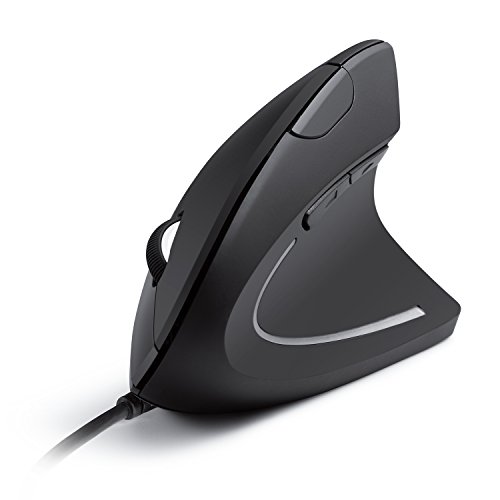
Anker USB Wired Vertical Mouse, Ergonomic Mouse for Computer and Laptop

Our verdict: A wired USB ergonomic vertical mouse with no battery, in the $25 to $50 range.

The Anker wired vertical mouse uses a USB connection with no battery and an ergonomic vertical design. It sells in the $25 to $50 range.

A wired mouse never runs out of charge and never loses signal, which is a plus for office use. The lighter body without a battery also eases wrist load. It ranks sixth because it offers no configuration extras and no thumb rest, and because the Evoluent offers a more developed shape for a modest price premium.

Buy it if you want a plain, dependable wired vertical mouse. Skip it if you want wireless.

Connection
Wired USB
Battery
None needed
Design
Ergonomic vertical
Bracket
$25 to $50

What we like

  • +Wired, nothing to charge
  • +Lighter body
  • +Simple plug-and-play
  • +Affordable

Watch out for

  • −Tethered by a cable
  • −No extras or customization

Buy it if: A desk that stays in one place.

Skip it if: You want wireless.

7

Best AA-Powered Trial

Anker 2.4G Wireless Ergonomic Mouse, Right Hand Vertical Mouse

Our verdict: A right-hand specific wireless vertical mouse with a moderate tilt and AA batteries.

The Anker 2.4G is a wireless vertical mouse with a moderate tilt, a right-hand specific design and AA battery power. It sells for under $25.

It appears last because AA batteries are a drag when rivals offer rechargeable cells, and the right-hand shape excludes left-handed users completely. It remains useful for people who want to test a vertical grip cheaply, and AAs are easy to swap in the middle of a workday.

Buy it if you are right-handed and want to try a vertical mouse for very little. Skip it if you are left-handed or dislike replacing batteries.

Tilt
Moderate
Hand
Right-hand specific
Connection
2.4GHz wireless
Power
AA battery

What we like

  • +Very low price
  • +Moderate tilt angle
  • +Wireless freedom
  • +Easy battery swaps

Watch out for

  • −AA batteries instead of rechargeable
  • −Right-handed users only

Buy it if: A cheap trial for right-handed users.

Skip it if: You are left-handed.

Methodology

How We Ranked These

Tilt angle

We compared steep, moderate and gentle disclosed tilts, because the angle decides how much forearm rotation a vertical mouse removes.

Hand fit

Compact body options, right-hand specific shapes and thumb rests were weighed for different hand sizes and grips.

Connection and power

Dual 2.4GHz and Bluetooth, dongle-only, wired and AA versus rechargeable power were compared for daily convenience.

Build and design heritage

Long-established ergonomic designs and major brands were credited over unproven shapes.

Value

Feature depth was set against the under $25, $25 to $50 and $50 to $100 brackets.

Every Primea Score uses the same weights: Performance 30% · Build & Materials 20% · Everyday Usability 20% · Value 20% · Owner Satisfaction 10%. Full scoring rules

Buyer's guide

How to Pick the Right One for You

By Hand Size

Fit matters more than any other spec on a vertical mouse.

Hand sizeOur pick
LargeLogitech MX Vertical Wireless Mouse Ergonomic Design
AverageEvoluent - World's Original Vertical Mouse, Wired Ergonomic Mouse
Small to averageLogitech Lift Vertical Ergonomic Wireless Mouse
Small, tight budgetProtoArc EM11 NL Wireless Ergonomic Vertical Mouse, Rechargeable

By Budget

SpendOur pick
Under $25 (rechargeable)Lekvey Ergonomic Mouse, Rechargeable Vertical Wireless Mouse
Under $25 (compact)ProtoArc EM11 NL Wireless Ergonomic Vertical Mouse, Rechargeable
$25 to $50Anker USB Wired Vertical Mouse, Ergonomic Mouse for Computer and Laptop
$50 to $100Logitech Lift Vertical Ergonomic Wireless Mouse

Steep Tilt vs Gentle Tilt

Steep tilt

Removes more forearm rotation but takes longer to adapt to. Picks: Logitech MX Vertical, Evoluent.

Gentle or moderate tilt

Easier to adopt, with less relief. Picks: Logitech Lift, Lekvey, Anker 2.4G.

Default to a gentler tilt for your first vertical mouse.

By Connection

NeedOur pick
Two devices with BluetoothLogitech MX Vertical Wireless Mouse Ergonomic Design
Laptop and desktop switchingLogitech Lift Vertical Ergonomic Wireless Mouse
Fixed desktop, no batteriesEvoluent - World's Original Vertical Mouse, Wired Ergonomic Mouse
Cheap wireless dongleLekvey Ergonomic Mouse, Rechargeable Vertical Wireless Mouse

For Wrist and Forearm Strain Specifically

Look for

A steep, disclosed tilt, a thumb rest and a size that fits your hand. Give it two weeks and pair it with desk and chair adjustments.

In this ranking

The Logitech MX Vertical for the strongest tilt, and the Logitech Lift for an easier transition.

When to Spend More

Spend more if

You use a mouse for hours daily or already feel strain. The Logitech MX Vertical and Lift offer better ergonomics and build.

Save if

You want to test a vertical grip. The ProtoArc or Lekvey costs under $25.

Questions

Frequently Asked Questions

Do vertical mice really reduce wrist strain?+

They can, because a handshake grip removes forearm twisting. Results vary, and a mouse alone does not fix a poor desk setup. Check your chair, desk height and breaks too, and see a professional for persistent pain.

What is the biggest mistake when switching to a vertical mouse?+

Quitting too soon. It feels awkward for the first week or two. Use it for all your work during a trial period and set the pointer speed to a comfortable level.

Is the Logitech MX Vertical worth it over the Lift?+

If you have average or large hands and want the steepest tilt, yes. If you have small hands or want an easier transition, the Lift is the better choice.

How hard is setup?+

Plug in the dongle or pair via Bluetooth, and adjust the sensitivity in settings. Logitech's software adds button customization. Wired mice need only a USB port.

Are there left-handed vertical mice?+

Some brands offer left-handed models, but this ranking lists mostly right-hand shapes, and the Anker 2.4G is explicitly right-hand specific. Check the listing for left-hand options before ordering.

How do I clean a vertical mouse?+

Wipe the shell with a lightly damp cloth and a little isopropyl alcohol, and clean the sensor window with a dry swab. Unplug a wired mouse first.

Final take

For most people with wrist or forearm strain, the Logitech MX Vertical is the best ergonomic vertical mouse here, thanks to a steep tilt, thumb rest and dual wireless. The Logitech Lift is the better pick for smaller hands, and the Evoluent suits wired desktops. The ProtoArc and Lekvey are cheap ways to try the idea. Give any vertical mouse two full weeks.

More Ranked & Reviewed Guides