

Primea ReviewsAll Reviews

Primea Reviews is reader-supported. When you buy through our Amazon links we may earn a commission, at no extra cost to you. Rankings are set by our editors and never sold. Learn more

Ranked & Reviewed by Primea Reviews

The 8 Best Vertical Mice for Comfortable Desk Work, Ranked & Reviewed

By the Primea Editorial TeamUpdated November 3, 202611 min read8 products ranked
The 8 Best Vertical Mice for Comfortable Desk Work, Ranked & Reviewed

The short answer

The Logitech MX Vertical is the vertical mouse to buy if you will use it all day, with a steeper tilt, Bluetooth plus a dongle and a rechargeable battery. The Logitech Lift is the better choice for average and smaller hands, the Evoluent is the long-established wired design, and the Anker wireless is the cheapest low-risk way to find out whether you like the shape at all.

The Primea Scoreboard

Ranked & Reviewed

  1. The most complete vertical mouse here, with a steep angle, two wireless modes and a rechargeable battery.

    95Outstanding
    Check price
  2. A compact body and a gentler tilt make this the easiest vertical mouse to adopt.

    92Outstanding
    Check price
  3. The long-running wired design that proved vertical mice work, with no battery to manage.

    90Excellent
    Check price
  4. A moderate angle at a price that makes a failed experiment cost almost nothing.

    88Excellent
    Check price
  5. Rechargeable convenience in a mid-size body without premium pricing.

    86Excellent
    Check price
  6. A compact rechargeable mouse that skips Bluetooth to stay cheap.

    84Very Good
    Check price
  7. A no-fuss wired vertical mouse with nothing to charge, pair or replace.

    82Very Good
    Check price
  8. The lowest price in the group, with adjustable DPI levels up to 6400.

    80Very Good
    Check price

The most common mistake with vertical mice is buying the steepest one first. A handshake grip sounds like an upgrade until your hand has to relearn every click, and plenty of people drop the mouse within a week because the angle was too aggressive for muscle memory built on a flat mouse. Comfort here is a matter of fit and ramp-up, not just how upright the body stands.

That shaped how we ranked these eight. We reviewed the spec sheets and listings for each mouse, comparing tilt angle where it is stated, connection type, battery design, body size and price bucket. Where a listing leaves a number out, we describe the design in general terms rather than invent one.

Before you buy

What Actually Matters

01

Tilt angle

The angle describes how far the mouse stands up from flat, and a steeper angle rotates your forearm closer to a handshake position. A steep angle changes the feel of every click and takes days to learn, while a gentler one feels familiar sooner. Look for a stated angle in the listing, and if there is none, treat the design as moderate.

02

Hand size and body shape

A mouse that is too large forces your fingers to stretch, and one that is too small makes you grip with the thumb. Compact bodies such as the Lift and ProtoArc suit smaller hands, while the full-size MX Vertical rewards larger ones. Measure from the wrist crease to the tip of your middle finger and compare it with reviews that mention hand length.

03

Wireless type

A 2.4GHz dongle is the simplest and usually the most stable link, while Bluetooth frees up a USB port and lets one mouse pair with a tablet or phone. Dual-mode mice like the Logitech pair cover both. If you use one desk computer, a dongle is enough; if you hop between devices, you want Bluetooth.

04

Battery design

Replaceable AA cells cost a little each year and can die mid-task, while a built-in rechargeable battery needs a quick USB top-up. Wired mice avoid the question entirely and are lighter as a result. Check whether the listing says rechargeable or AA, and whether the mouse can be used while it charges.

05

Handedness

Vertical mice are shaped asymmetrically, so many are right-hand only and a left-handed buyer needs a purpose-built model. The Anker wireless listing says right hand outright. Read the title and bullet points for the words right hand or ambidextrous before you order.

In-depth reviews

Our Ranked Picks, Reviewed

1

Best Overall

Logitech MX Vertical Wireless Mouse Ergonomic Design

Our verdict: The most complete vertical mouse here, with a steep angle, two wireless modes and a rechargeable battery.

The MX Vertical is Logitech's premium take on the upright mouse. It offers both a 2.4GHz receiver and Bluetooth, a built-in rechargeable battery and multi-device support through Logitech software, with a tilt angle steeper than the Lift below it.

It wins because nothing else in the group combines a pronounced angle, flexible connectivity and a premium build in one body. Being able to pair a work laptop and a personal tablet and flip between them saves real friction, and the rechargeable cell means no AA swaps. The tradeoff is that the full-size body suits larger hands best and the steeper angle takes a few days to get used to.

Buy it if you spend most of your day at a desk and want the closest thing to a do-it-all vertical mouse. Smaller hands should look at the Lift, and anyone on a budget can pick a cheaper rechargeable below.

Connection
2.4GHz and Bluetooth
Power
Rechargeable battery
Tilt
Steeper angle
Software
Multi-device support

What we like

  • +Dongle and Bluetooth in a single mouse
  • +Rechargeable battery removes AA swapping
  • +Steeper tilt reduces forearm twist further
  • +Premium build feels solid under the palm

Watch out for

  • −Full-size body is large for small hands
  • −Highest price bracket in this ranking

Buy it if: All-day desk workers who juggle two or three devices.

Skip it if: You have small hands or just want to try the concept.

2

Best for Average Hands

Logitech Lift Vertical Ergonomic Wireless Mouse

Our verdict: A compact body and a gentler tilt make this the easiest vertical mouse to adopt.

The Lift is a compact vertical mouse that carries the same dual 2.4GHz and Bluetooth connectivity as the MX model, with a rechargeable battery and Logitech's multi-device software. Its angle is gentler than the premium full-size picks, which is the main reason people stay with it.

It ranks second because it removes the biggest barrier to using a vertical mouse: the adjustment period. A less extreme tilt feels closer to a normal mouse, and the smaller body fits average to smaller hands without stretching. Compared with the MX Vertical it gives up some angle and some bulk, but it sits in the $50 to $100 bucket and weighs less in the hand.

Choose it if you have never used a vertical mouse or your hand falls on the smaller side. If you want the steepest angle available, the MX remains the stronger option.

Connection
2.4GHz and Bluetooth
Power
Rechargeable battery
Body
Compact vertical
Price bucket
$50 to $100

What we like

  • +Gentler angle eases the learning curve
  • +Compact body fits smaller hands well
  • +Dual wireless modes cover several devices
  • +Rechargeable battery needs no spares

Watch out for

  • −Less tilt than the full-size MX
  • −Costs more than the budget options

Buy it if: First-time vertical mouse users with average or small hands.

Skip it if: You want the steepest angle and a larger palm rest.

3

Best Wired Classic

Evoluent - World's Original Vertical Mouse, Wired Ergonomic Mouse

Our verdict: The long-running wired design that proved vertical mice work, with no battery to manage.

Evoluent bills this as the world's original vertical mouse, and it is a wired USB design with a fixed tilt angle and no battery. Without a cell inside, the body is lighter than the rechargeable rivals.

It ranks third because it earns its place on pedigree and simplicity rather than features. Wired means zero latency worries and nothing to charge, but it also means a cable tethered to your computer and no Bluetooth for a tablet or phone. The fixed angle is a double-edged feature: it is consistent and well documented, but you cannot adjust it if it turns out to be wrong for your wrist.

It suits people with one desktop who want a reliable shape and nothing to maintain. Skip it if you travel or like a clean desk without cables.

Connection
Wired USB
Tilt
Fixed angle
Battery
None needed
Price bucket
$50 to $100

What we like

  • +Wired link never needs charging
  • +Lighter body without a battery inside
  • +Established design with a long track record
  • +Consistent fixed angle from day one

Watch out for

  • −Cable limits desk layout freedom
  • −No Bluetooth for tablets or phones

Buy it if: Desktop users who want a stable shape and zero upkeep.

Skip it if: You switch between devices or work away from a desk.

4

Best Low-Risk Trial

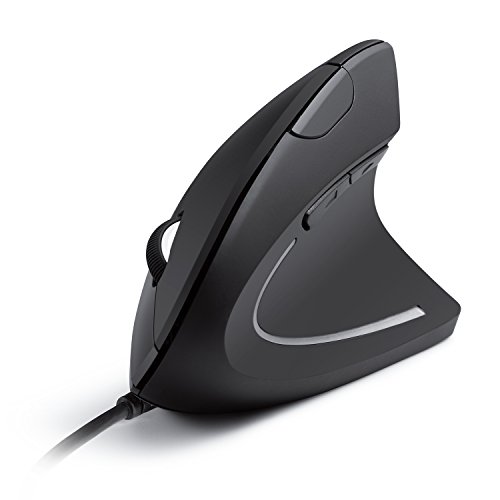
Anker 2.4G Wireless Ergonomic Mouse, Right Hand Vertical Mouse USB Receiver

Our verdict: A moderate angle at a price that makes a failed experiment cost almost nothing.

The Anker wireless vertical mouse uses a 2.4GHz USB receiver and AA battery power, with a moderate tilt and a right-handed design. It sits in the under $25 bucket, which makes it the lowest-risk way to find out whether you like holding a mouse on its side.

It takes fourth place because the budget price comes with compromises. AA batteries mean periodic swaps, there is no Bluetooth, and the shape is right-handed only, so left-handed users are excluded. Against the rechargeable Lekvey just below, it offers a more established brand name but a less convenient power setup.

Buy it if you want to test the concept before spending more. Skip it if you are left-handed or you use more than one computer.

Connection
2.4GHz USB receiver
Power
AA battery
Handedness
Right hand only
Price bucket
Under $25

What we like

  • +Cheapest way to try a vertical grip
  • +Moderate tilt is easy to adjust to
  • +Trusted brand name at a budget price
  • +Simple plug-in receiver setup

Watch out for

  • −Right-handed only, no left option
  • −AA batteries need periodic replacing

Buy it if: Curious right-handed users who want a cheap first try.

Skip it if: You are left-handed or switch between devices daily.

5

Best Budget Rechargeable

Lekvey Ergonomic Mouse, Rechargeable Vertical Wireless Mouse

Our verdict: Rechargeable convenience in a mid-size body without premium pricing.

The Lekvey is a mid-size vertical mouse with a rechargeable built-in battery and a 2.4GHz wireless receiver. It sits in the under $25 bracket, the same as the Anker, but swaps the replaceable AA cells for a battery you top up over USB.

It ranks below the Anker wireless on brand recognition and above the ProtoArc only slightly, because the listing does not state its tilt angle and offers no Bluetooth. What it does give you is a body size aimed at average hands and the convenience of charging instead of buying batteries.

It is a sensible choice for a single-computer desk where you want wireless without the running cost of batteries. If you need Bluetooth for a second device, step up to a Logitech.

Connection
2.4GHz receiver
Power
Built-in rechargeable
Body
Mid-size
Price bucket
Under $25

What we like

  • +Rechargeable battery avoids buying spares
  • +Mid-size body suits average hands
  • +Budget price for a wireless model
  • +Receiver connection is simple to set up

Watch out for

  • −No Bluetooth for second devices
  • −Tilt angle is not clearly stated

Buy it if: Single-desk users who want wireless without battery swaps.

Skip it if: You want Bluetooth or a documented tilt figure.

6

Best Compact Budget

ProtoArc EM11 NL Wireless Ergonomic Vertical Mouse, Rechargeable

Our verdict: A compact rechargeable mouse that skips Bluetooth to stay cheap.

The EM11 NL is a compact vertical mouse with a built-in rechargeable battery and a 2.4GHz USB dongle. It falls in the budget-to-mid price range and is aimed at buyers who do not need Bluetooth.

It ranks sixth because the compact body trades palm room for portability, so larger hands may find it cramped. Compared with the Lekvey it is smaller and arguably more portable, and compared with the Lift it costs far less but lacks Bluetooth and multi-device pairing.

It suits smaller hands and anyone who wants a rechargeable mouse to carry in a laptop bag. Skip it if your hand is large or you need a second pairing slot.

Connection
2.4GHz dongle
Power
Built-in rechargeable
Body
Compact
Price bucket
Under $25

What we like

  • +Compact shape travels easily in bags
  • +Built-in battery recharges over USB
  • +Low price for a rechargeable model
  • +Dongle link needs no pairing steps

Watch out for

  • −Small body cramps larger hands
  • −No Bluetooth or multi-device pairing

Buy it if: Small-handed users who carry a mouse between locations.

Skip it if: You have large hands or need Bluetooth pairing.

7

Best Plug-and-Play Wired

Anker USB Wired Vertical Mouse, Ergonomic Mouse for Computer and Laptop

Our verdict: A no-fuss wired vertical mouse with nothing to charge, pair or replace.

The Anker wired vertical mouse plugs straight into a USB port and draws power from the computer, so there is no battery inside and the body stays lighter. It is marketed for both computers and laptops and sits in the $25 to $50 bucket.

It lands seventh because it costs more than the cheapest wireless options while giving up the wireless freedom. Its advantage over the Evoluent is lower price, though it lacks that model's long track record. Wired reliability is the draw: no dropped connection, no dead battery on deadline day.

Choose it for an office desktop that stays put. Skip it if you want to move around or prefer a cable-free desk.

Connection
Wired USB
Power
Drawn from the host
Weight
Lighter, no battery
Price bucket
$25 to $50

What we like

  • +Nothing to charge or replace ever
  • +Lighter body without a battery pack
  • +Works for desktops and laptops alike
  • +Cheaper than the Evoluent classic

Watch out for

  • −Cable tethers the mouse to the port
  • −Priced above cheaper wireless rivals

Buy it if: Office users who want a dependable, zero-maintenance mouse.

Skip it if: You want a cable-free desk or travel often.

8

Best Cheapest Option

TECKNET Wired Mouse, Comfortable Ergonomic Mouse with 6400 DPI

Our verdict: The lowest price in the group, with adjustable DPI levels up to 6400.

The TECKNET plugs in by cable and lets you cycle through DPI levels, topping out at 6400. It is the lowest-priced model in the ranking and sits in the under $25 bucket.

It ranks last because the listing offers little beyond price and sensor adjustment. DPI is how far the cursor moves per inch of hand movement, so the adjustable levels help on large or multi-monitor setups, but a top setting of 6400 is more than most office work needs. Compared with the Anker wired model it is cheaper and gives DPI control, though it carries less brand weight.

Buy it if you want the cheapest wired vertical mouse that still lets you tune the cursor speed. If you will use it daily for years, the Evoluent is the sturdier bet.

Connection
Wired USB
Sensor
6400 DPI
DPI
Adjustable levels
Price bucket
Under $25

What we like

  • +Lowest price among all eight mice
  • +Adjustable DPI suits multi-monitor desks
  • +Wired link is simple and reliable
  • +No battery weight in the body

Watch out for

  • −Less brand reputation than the leaders
  • −Cable limits how you arrange the desk

Buy it if: Shoppers who want the absolute lowest price with adjustable DPI.

Skip it if: You want a proven design for years of daily use.

Methodology

How We Ranked These

Tilt angle and hand fit

We looked at how steep each mouse is described to be and which hand sizes it targets, since a bad fit is the main reason people abandon vertical mice.

Connection and power

Dongle, Bluetooth, wired and battery type were compared, favoring mice that save the user the most recurring hassle.

Build and brand record

Established makers and long-running designs earned credit for durability, since listings rarely publish warranty detail.

Controls and software

DPI adjustment, multi-device pairing and programmable options were weighed as practical extras beyond the shape.

Value in each price bucket

Each mouse was judged against its price bracket, so a cheap pick with a clear role can still outrank a pricey one with a narrow use.

Every Primea Score uses the same weights: Performance 30% · Build & Materials 20% · Everyday Usability 20% · Value 20% · Owner Satisfaction 10%. Full scoring rules

Buyer's guide

How to Pick the Right One for You

By Connection Type

How the mouse talks to your computer decides how much hassle you will have, so match it to your setup.

ConnectionOur pick
2.4GHz and BluetoothLogitech MX Vertical
Dual mode, compactLogitech Lift
2.4GHz dongleLekvey Rechargeable
Wired, establishedEvoluent Vertical Mouse
Wired, budgetTECKNET Wired Mouse

By Budget

SpendOur pick
Under $25Lekvey Rechargeable
Under $25 (cheapest)TECKNET Wired Mouse
Under $25 (compact)ProtoArc EM11 NL
$25 to $50Anker USB Wired Vertical Mouse
$50 to $100Logitech Lift

Wired vs Wireless

Wired

Nothing to charge and no pairing, with a lighter body because there is no battery. The Evoluent, Anker wired and TECKNET are the picks here.

Wireless

A cable-free desk and the option of Bluetooth for a second device. The Logitech MX Vertical, Logitech Lift, Lekvey and ProtoArc lead this group.

Choose wireless unless you sit at one desk and hate charging.

By Hand Size

Hand sizeOur pick
LargeLogitech MX Vertical
AverageLogitech Lift
Average, budgetLekvey Rechargeable
SmallProtoArc EM11 NL

For First-Time Vertical Mouse Users Specifically

Look for

A moderate angle, a body that fits your hand and a price you can walk away from. Plan on a week of adjustment before judging the shape.

In this ranking

The Anker wireless is the cheapest trial and the Logitech Lift is the gentlest premium option.

When to Spend More

Spend more if

You use the mouse for most of your working day or switch between devices. The Logitech MX Vertical is built for that.

Save if

You are still testing the idea. The Anker wireless or TECKNET costs little and shows whether the shape suits you.

Questions

Frequently Asked Questions

Do vertical mice work with Mac and Windows?+

Most do. Dongle models appear as a standard pointing device, and Bluetooth models pair like any other mouse. Extra buttons and DPI control may need the maker's software, so check the listing if you want those features.

What is the biggest mistake people make with a vertical mouse?+

Choosing the steepest angle straight away and giving up in a few days. Start with a moderate model, give yourself a week of regular use, and move to a steeper design only if the first feels comfortable.

Is a vertical mouse worth it over a normal one?+

It can be if a flat mouse leaves your forearm twisted for hours. The upright grip keeps the hand closer to a handshake position, but it will not suit everyone, and a good normal mouse beats a poorly fitting vertical one.

Do I need drivers to set one up?+

Basic movement and clicking work without software on all eight. Plug in the receiver or pair over Bluetooth and it works. Software is optional for the Logitech models and only needed for custom button assignments.

How do I clean a vertical mouse?+

Unplug or switch it off, wipe the shell with a slightly damp cloth and clean the sensor window with a dry cotton swab. Avoid soaking the body, since the seams around the buttons are not sealed against liquid.

Are there left-handed vertical mice here?+

The listings here are not clear on this except the Anker wireless, which is right-handed outright. Left-handed buyers should read the product page for a left-hand or ambidextrous mention before ordering.

Final take

Spend on the Logitech MX Vertical if you work at a desk all day and want one mouse for several devices. Pick the Logitech Lift when your hand is average or small, or when this is your first vertical mouse. Everyone else can start with the Anker wireless or the Lekvey and upgrade once they know how the shape feels.

More Ranked & Reviewed Guides