

Primea ReviewsAll Reviews

Primea Reviews is reader-supported. When you buy through our Amazon links we may earn a commission, at no extra cost to you. Rankings are set by our editors and never sold. Learn more

Ranked & Reviewed by Primea Reviews

8 Vertical Mice That Actually Suit Laptop Setups, Ranked & Reviewed

By the Primea Editorial TeamUpdated November 3, 202610 min read8 products ranked
8 Vertical Mice That Actually Suit Laptop Setups, Ranked & Reviewed

The short answer

The Logitech Lift is the best vertical mouse for a laptop because it has Bluetooth, so it needs no port, and a compact rechargeable body that slides into a bag. The ProtoArc EM11 NL is the cheaper compact choice if you have a spare USB-A port, the Lekvey adds a rechargeable battery for a desk-bound laptop, and the TECKNET and Anker wired models suit people who want zero pairing.

The Primea Scoreboard

Ranked & Reviewed

  1. Bluetooth plus a dongle, a compact shell and a rechargeable battery make it the natural laptop partner.

    94Outstanding
    Check price
  2. A small rechargeable mouse with a USB-A dongle for travellers who watch their money.

    91Excellent
    Check price
  3. Mid-size, rechargeable and cheap, but it expects a USB-A port on your laptop.

    89Excellent
    Check price
  4. A trusted-brand dongle mouse for people who don't mind swapping AA batteries.

    87Excellent
    Check price
  5. A stated 57-degree angle in a body made for small to medium hands.

    85Excellent
    Check price
  6. No battery, no dongle, no pairing; a cable and a plug.

    83Very Good
    Check price
  7. The cheapest wired option, with no dongle to lose and adjustable DPI.

    81Very Good
    Check price
  8. A wireless mouse that stretches from spreadsheets into casual games.

    79Very Good
    Check price

Laptop owners make a specific mistake with vertical mice: they pick a mouse and forget the port. Thin laptops often have two USB-C ports and nothing else, so a mouse with a USB-A dongle means a little adapter you will lose within a month. Bluetooth sidesteps that, which is why connection type matters more here than it does for a desktop.

This ranking sorts eight vertical mice by how well they fit a laptop routine. We reviewed the listings and spec sheets for connection, battery, body size and price bucket, and we weighed portability heavily. A mouse that lives in a bag has to survive being jostled and charged rarely, so we favored compact shells and simple setup.

Before you buy

What Actually Matters

01

Port compatibility

Many current laptops ship with only USB-C ports, while most budget vertical mice use a USB-A dongle. Without an adapter or Bluetooth, the mouse simply will not connect. Check your laptop's ports first, then read the listing for the words USB-A, Bluetooth or wired.

02

Bluetooth versus dongle

Bluetooth uses the laptop's built-in radio and keeps every port free, and it can pair with a phone or tablet. A dongle is stable and works instantly, but it takes a port and is easy to misplace. For a laptop that travels, Bluetooth is the safer bet.

03

Portability and size

A vertical mouse is taller than a normal one and takes more room in a laptop sleeve. Compact shells like the Lift and ProtoArc fit in a bag pocket, while full-size ones need real space. Compare dimensions on the listing before committing, and consider whether the mouse needs to leave your desk.

04

Battery habits

A rechargeable mouse needs a charge every so often, while an AA model needs spares. Wired mice need neither. Traveling users should favor rechargeable models and check whether the mouse can run while charging, which avoids stalling in the middle of a task.

05

Trackpad habits

People who move between a mouse and a laptop trackpad notice how DPI affects cursor travel across a big monitor. Adjustable DPI, as on the TECKNET, helps match the mouse to the screen. Check that the DPI button is easy to reach and that levels are listed.

In-depth reviews

Our Ranked Picks, Reviewed

1

Best Overall for Laptops

Logitech Lift Vertical Ergonomic Wireless Mouse

Our verdict: Bluetooth plus a dongle, a compact shell and a rechargeable battery make it the natural laptop partner.

The Lift is a compact vertical mouse that offers both Bluetooth and a 2.4GHz dongle, with a rechargeable battery. That Bluetooth fallback is what makes it the strongest laptop pick, since the listing highlights it for mobile use.

It beats every other mouse here because it solves the port problem and the bag problem together. If your laptop has only USB-C, you simply pair over Bluetooth and leave the dongle behind. The shell is small enough for a sleeve pocket, and being rechargeable means no AA cells rattling around. The tradeoff is price: it is the most expensive mouse in this ranking, in the $50 to $100 range.

Buy it if your laptop travels with you and you want a vertical mouse that adapts to wherever you work. If you only use the laptop at one desk, a cheaper dongle model does the job.

Connection
Bluetooth and dongle
Power
Rechargeable
Body
Compact
Price bucket
$50 to $100

What we like

  • +Bluetooth works on USB-C only laptops
  • +Compact shell fits a laptop sleeve
  • +Rechargeable battery means no spare cells
  • +Dongle backup if Bluetooth misbehaves

Watch out for

  • −Priciest mouse in this ranking
  • −Gentler tilt than premium full-size rivals

Buy it if: Travelling professionals and hybrid workers carrying a laptop daily.

Skip it if: Your laptop sits on one desk and cost matters most.

2

Best Budget Compact

ProtoArc EM11 NL Wireless Ergonomic Vertical Mouse, Rechargeable

Our verdict: A small rechargeable mouse with a USB-A dongle for travellers who watch their money.

The EM11 NL has a compact rechargeable body and a 2.4GHz USB-A dongle. The listing calls out a solid review base, and the price falls in the budget-to-mid range.

It takes second because the small size and low weight suit a laptop bag, and the price is a fraction of the Lift. The compromise is the dongle: it needs a USB-A port, so a modern ultrabook needs an adapter, and there is no Bluetooth to fall back on.

Choose it if your laptop has a USB-A port and you want frequent-travel portability for little money. If your machine is USB-C only, spend a bit more on the Lift.

Connection
2.4GHz USB-A dongle
Power
Rechargeable
Body
Compact
Price bucket
Under $25

What we like

  • +Small body slips into any bag
  • +Rechargeable cell avoids AA hassle
  • +Very low price for the feature set
  • +Solid owner feedback behind the listing

Watch out for

  • −USB-A dongle needs a port or adapter
  • −No Bluetooth backup connection

Buy it if: Budget travellers whose laptop still has a USB-A port.

Skip it if: Your laptop has only USB-C ports.

3

Best Rechargeable on a Budget

Lekvey Ergonomic Mouse, Rechargeable Vertical Wireless Mouse

Our verdict: Mid-size, rechargeable and cheap, but it expects a USB-A port on your laptop.

The Lekvey uses a 2.4GHz USB-A dongle and a built-in rechargeable battery in a mid-size body. It is listed in the under $25 range as a budget rechargeable.

It ranks third because its mid-size shell is less portable than the ProtoArc, though it gives average-sized hands a bit more room. Like the ProtoArc it has no Bluetooth, so USB-C-only laptops need an adapter.

It suits a laptop that lives docked at a desk, where portability matters less than hand comfort. Skip it if the laptop travels every day.

Connection
2.4GHz USB-A dongle
Power
Built-in rechargeable
Body
Mid-size
Price bucket
Under $25

What we like

  • +Extra room for average-sized hands
  • +Charges over USB, no battery buying
  • +Budget price for a wireless model
  • +Dongle needs no pairing steps

Watch out for

  • −Larger shell is less bag-friendly
  • −Dongle ties up a USB-A port

Buy it if: Docked laptop users with average-sized hands.

Skip it if: You carry the mouse in a bag every day.

4

Best AA-Powered Value

Anker 2.4G Wireless Ergonomic Mouse, Right Hand Vertical Mouse

Our verdict: A trusted-brand dongle mouse for people who don't mind swapping AA batteries.

The Anker pairs a USB-A dongle with AA battery power in a moderate-size body. It is right-hand specific and sits in the under $25 bracket.

It lands fourth because AA cells and the right-handed shape limit it. On the plus side, a fresh AA can be bought in any shop if the mouse dies on a trip, which a rechargeable model cannot match mid-journey without a cable.

It works for budget buyers with a USB-A port who prefer to carry spare cells. If you want a left-handed or Bluetooth model, look elsewhere.

Connection
2.4GHz USB-A dongle
Power
AA battery
Hand
Right only
Price bucket
Under $25

What we like

  • +Swap in a fresh AA anywhere
  • +Known brand at a low price
  • +Moderate tilt is easy to adopt
  • +Plug-in dongle works instantly

Watch out for

  • −Right-handed shape only
  • −No Bluetooth, USB-A port required

Buy it if: Right-handed laptop users who accept AA batteries.

Skip it if: You want rechargeable or left-hand options.

5

Best for Smaller Hands

Luhaso Ergonomic Vertical Wireless Mouse, 57 degree, Small/Medium Hands

Our verdict: A stated 57-degree angle in a body made for small to medium hands.

The Luhaso advertises a 57-degree tilt and a body sized for small to medium hands, with a wireless connection and a budget price in the under $25 bucket.

It ranks fifth because the listing is thin on how the wireless link works and what powers it, so a laptop user cannot tell if it needs a USB-A port. Its sizing candor is a plus, since a small hand on a big mouse is a common complaint.

Consider it if you have smaller hands and want a stated angle cheaply. Check the product page for the connection type before you order for a USB-C laptop.

Tilt
57 degrees
Sizing
Small to medium hands
Connection
Wireless
Price bucket
Under $25

What we like

  • +Clear 57-degree angle on the listing
  • +Sized honestly for smaller hands
  • +Low price limits purchase risk
  • +Compact enough for travel use

Watch out for

  • −Connection and battery details unclear
  • −Not suited to larger hands

Buy it if: Small-handed laptop users who want a defined tilt.

Skip it if: You need to confirm Bluetooth support first.

6

Best Wired for Laptops

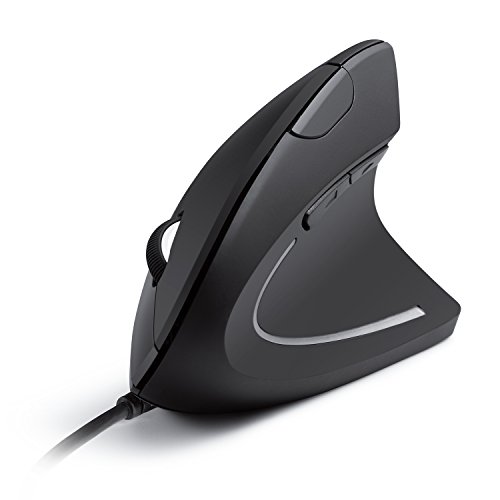
Anker USB Wired Vertical Mouse, Ergonomic Mouse for Computer and Laptop

Our verdict: No battery, no dongle, no pairing; a cable and a plug.

The Anker wired vertical mouse is marketed for computers and laptops alike. It connects over USB, has no battery, and is lighter for it, with a mid-range price in the $25 to $50 bucket.

It ranks sixth because a cable is awkward on a laptop that moves around, and the price is higher than the cheapest wireless options. Still, it removes every wireless failure mode: nothing to charge, nothing to pair, nothing to lose.

Choose it for a laptop that sits on a stand with an external monitor. A USB-C-only laptop will need an adapter for the plug.

Connection
Wired USB
Power
From the laptop
Weight
Light, no battery
Price bucket
$25 to $50

What we like

  • +Nothing to charge, pair or lose
  • +Light body without an internal battery
  • +Explicitly marketed for laptop use
  • +Works the moment it is plugged in

Watch out for

  • −Cable gets in the way when mobile
  • −Costs more than cheaper wireless picks

Buy it if: Laptops docked on a stand with an external display.

Skip it if: You work from cafes or move rooms often.

7

Best Cheapest Wired

TECKNET Wired Mouse, Comfortable Ergonomic Mouse with 6400 DPI

Our verdict: The cheapest wired option, with no dongle to lose and adjustable DPI.

The TECKNET uses a wired USB-A connection and offers a 6400 DPI sensor with adjustable levels. The listing notes there is no dongle to lose, and the price is under $25.

It takes seventh place because it shares the wired limitations of the Anker but offers less brand backing. DPI adjustment is genuinely handy on a laptop, where a small trackpad-sized movement can need to cross a large external screen.

It works for a stationary laptop where you want the cheapest possible setup. Anyone moving between rooms should pick a wireless model.

Connection
Wired USB-A
Sensor
6400 DPI
DPI
Adjustable
Price bucket
Under $25

What we like

  • +No dongle means nothing to lose
  • +Adjustable DPI helps on big screens
  • +Lowest price among the wired picks
  • +Zero pairing or charging effort

Watch out for

  • −Cable is awkward for mobile use
  • −Needs an adapter on USB-C laptops

Buy it if: Stationary laptop users who want the lowest cost.

Skip it if: You value portability or a premium finish.

8

Best Office-and-Play Hybrid

Attoe Gaming Mouse with 5D Rocker, Wireless Vertical Mouse with 2400 DPI

Our verdict: A wireless mouse that stretches from spreadsheets into casual games.

The Attoe is a wireless vertical mouse that adds a 2400 DPI sensor and a 5D rocker button, aimed at people who want office and light gaming duty from one device. The price is in the $25 to $50 bucket.

It finishes last because the listing has a small review sample and gives little on connection type, which is crucial for a laptop. The 5D rocker is a genuine extra, giving more inputs than the plain models.

Pick it if your laptop doubles as a casual gaming machine. For straight office use, the Lift or ProtoArc are safer.

Sensor
2400 DPI
Extra
5D rocker button
Connection
Wireless
Price bucket
$25 to $50

What we like

  • +5D rocker adds extra input options
  • +Suits office work and casual play
  • +Wireless link keeps the desk clean
  • +Fair price for a hybrid design

Watch out for

  • −Small review sample, less certainty
  • −Connection type not clearly described

Buy it if: Laptop owners who game casually after work.

Skip it if: You want a mouse with proven long-term reliability.

Methodology

How We Ranked These

Port and connection fit

We checked whether each mouse needs USB-A, offers Bluetooth or plugs in by cable, because modern laptops often have only USB-C.

Portability

Body size, weight and battery type were judged for life in a bag, favoring compact rechargeable designs.

Ergonomic fit

Stated tilt angles and hand-size targets were compared, since a mouse that does not fit gets dropped within days.

Setup simplicity

Plug-in dongles and cables scored well for zero configuration, with Bluetooth credited when it saves a port.

Price and owner confidence

Each mouse was judged against its price bucket, and a thin review base lowered a score slightly.

Every Primea Score uses the same weights: Performance 30% · Build & Materials 20% · Everyday Usability 20% · Value 20% · Owner Satisfaction 10%. Full scoring rules

Buyer's guide

How to Pick the Right One for You

By Laptop Port

Your laptop's ports narrow the field faster than any other factor, so start there.

Your laptop hasOur pick
USB-C onlyLogitech Lift
USB-A freeProtoArc EM11 NL
USB-A, wants rechargeableLekvey Rechargeable
USB-A, wants AA cellsAnker 2.4G Wireless
Any USB port, wiredAnker USB Wired Vertical Mouse

By Budget

SpendOur pick
Under $25ProtoArc EM11 NL
Under $25 (small hands)Luhaso 57 Degree
Under $25 (wired)TECKNET Wired Mouse
$25 to $50Anker USB Wired Vertical Mouse
$50 to $100Logitech Lift

Wired vs Wireless

Wired

No charge, no dongle, no pairing, but a cable on the desk. The Anker wired and TECKNET suit a laptop on a stand.

Wireless

Cleaner desk and easier travel, with a dongle or Bluetooth. The Lift, ProtoArc and Lekvey cover most laptop users.

Go wireless unless your laptop stays docked all day.

By How You Work

Work patternOur pick
Daily commute and cafesLogitech Lift
Occasional travelProtoArc EM11 NL
Docked at a home deskLekvey Rechargeable
Laptop on a standAnker USB Wired Vertical Mouse

For Hybrid Work Specifically

Look for

Bluetooth, a compact shell and a rechargeable battery, so one mouse moves between home and office without extra bits.

In this ranking

The Logitech Lift is built for this, and the ProtoArc is a lower-cost alternative if your laptop has a USB-A port.

When to Spend More

Spend more if

Your laptop travels daily or has only USB-C ports. The Logitech Lift removes both problems.

Save if

The laptop stays on one desk. The ProtoArc or a wired model costs far less.

Questions

Frequently Asked Questions

Will a vertical mouse work with a USB-C only laptop?+

Only if it uses Bluetooth or you add a USB-A to USB-C adapter. Of the eight here, the Logitech Lift has Bluetooth, while the dongle and wired models need an adapter on a USB-C-only machine.

What mistake do laptop owners make most?+

Buying a dongle mouse for a laptop with no spare USB-A port, then losing the adapter. Check your ports before ordering, or choose a Bluetooth mouse.

Is a vertical mouse worth it over the trackpad?+

If you use a laptop for hours at a time, yes. An upright mouse supports a more natural forearm position than reaching for a trackpad, though you give up some portability. Keep a compact model in your bag for travel.

How do I set up a Bluetooth mouse on a laptop?+

Switch the mouse to pairing mode, open the Bluetooth settings on your laptop and pick the mouse from the list. The Lift keeps its pairing for next time, and it can also use a dongle if Bluetooth misbehaves.

Do I need to charge the mouse every day?+

No. Rechargeable models are designed to last much longer between charges than a laptop does. Top it up when convenient, and avoid letting it drain fully when you travel.

Can I use a wired vertical mouse on a laptop?+

Yes, the Anker wired and TECKNET are both made for it. The cable can be awkward on a small desk, so they work best when the laptop is parked on a stand.

Final take

The Logitech Lift is the vertical mouse to buy for a laptop, because Bluetooth keeps your ports free and the compact rechargeable body travels well. Choose the ProtoArc when you have a USB-A port and a tight budget, and go wired with the Anker if the laptop never leaves its stand. The rest are fine, but they ask you to compromise on ports, size or battery.

More Ranked & Reviewed Guides