
Primea ReviewsAll Reviews

Primea Reviews is reader-supported. When you buy through our Amazon links we may earn a commission, at no extra cost to you. Rankings are set by our editors and never sold. Learn more

Ranked & Reviewed by Primea Reviews

The 5 Best Vertical Docking Stations for Clean Desk Setups of 2026, Ranked & Reviewed

By the Primea Editorial TeamUpdated November 1, 20269 min read5 products ranked
The 5 Best Vertical Docking Stations for Clean Desk Setups of 2026, Ranked & Reviewed

The short answer

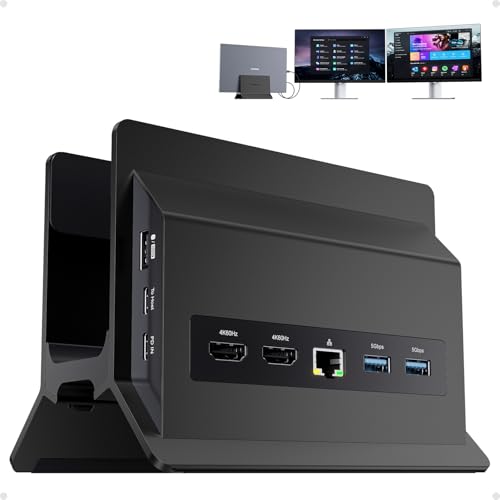
The PULWTOP 11-in-1 is the best vertical dock for a clean desk: stand and dock in one body with dual 4K 60Hz HDMI. The 4URPC is the pick for MacBook clamshell setups, and the Baseus Spacemate gives Windows users three displays. The Anker Nano and Plugable are docks, not stands.

The Primea Scoreboard

Ranked & Reviewed

  1. A real stand and dock in one body, with dual 4K output.

    94Outstanding
    Check price
  2. Built for MacBooks in clamshell mode, with a power adapter included.

    91Excellent
    Check price
  3. A slim dock that supports three displays and hides behind a stand.

    87Excellent
    Check price
  4. Fixed dock plus a detachable hub you can keep within reach.

    84Very Good
    Check price
  5. A dependable triple-HDMI dock that works with several systems.

    81Very Good
    Check price

A vertical dock promises the cleanest desk you can build: laptop upright, lid closed, one cable to a pair of monitors. The promise breaks on one detail. Clamshell mode only works if the dock can drive external screens at the resolution you want, and many cheap docks cannot give a MacBook a second display without a workaround. Saving footprint means nothing if the monitors stay dark.

We reviewed five options from spec sheets and listings, ranking them on integrated stand, display output, charging power, port count and compatibility. Only two are true vertical stand docks. The other three are compact docks designed to hide behind or beside a separate vertical laptop stand, which suits buyers who already own a stand they like.

Before you buy

What Actually Matters

01

Integrated stand versus separate dock

An integrated vertical dock holds the laptop and provides ports in a single footprint. A separate dock needs its own stand but is more flexible, and lets you swap either part. Check the title for the words vertical stand to see whether the stand is included. Only the PULWTOP and 4URPC integrate one here, so read the title carefully.

02

Display support

Dual or triple display output lets you close the laptop and work on full-size monitors. On MacBooks, extra screens may need special technology, and the chip sets a limit. Look for the exact count and resolution in the listing, such as 4K at 60Hz, and confirm your laptop supports that number before buying, since the laptop, not the dock, sets the real ceiling.

03

Power delivery

PD wattage is how much charge reaches the laptop through the cable. A laptop needing 96W will charge slowly or not at all on a weaker dock. Look for the wattage number and compare it with your laptop's charger. The Baseus, Anker and Plugable docks list 100W, enough for most thin laptops.

04

USB speed

Ten gigabit ports move large files about twice as fast as 5Gbps ports, which matters for external SSDs and backups. Check the speed printed beside each USB port in the product bullets, because a dock can advertise many ports while only a few run at full speed. Plugable lists six 5Gbps ports, which is fine for mice and keyboards but slow for drives.

05

Laptop fit

A vertical slot has a fixed width, so very thick laptops or laptops in cases may not fit. Check the stated slot width or compatible models before ordering, and measure your laptop with its case on. Without a case, a slim machine slides in cleanly, but a rugged sleeve may be too wide.

In-depth reviews

Our Ranked Picks, Reviewed

1

Best Overall

PULWTOP 11-in-1 USB C Docking Station, Vertical Laptop Dock Stand

Our verdict: A real stand and dock in one body, with dual 4K output.

The PULWTOP is an 11-in-1 vertical laptop dock stand with two HDMI 4K 60Hz outputs, three 10Gbps USB ports, two 5Gbps ports, Ethernet and PD3.0 charging passthrough. Stand and ports share one footprint, so the laptop sits upright and you run a single cable to the whole desk. Ten-gigabit ports make external SSDs usable.

It ranks first since it combines the integrated stand with dual 4K output and faster USB than the 4URPC, which offers USB 3.0 speed. The Baseus supports three displays but needs a separate stand.

Buy it for one piece that holds an upright laptop and handles docking. The caveat is fit: the vertical slot varies by laptop, and a thick machine or a bulky case may not slide in. It also passes power through rather than supplying its own charger.

Ports
11-in-1
Video
2x HDMI 4K 60Hz
USB
3x 10Gbps, 2x 5Gbps
Charging
PD3.0 passthrough

What we like

  • +Stand and dock in one
  • +Dual 4K 60Hz HDMI
  • +10Gbps USB ports
  • +Ethernet included

Watch out for

  • −Slot fit varies by laptop
  • −Passthrough, not own charger

Buy it if: Anyone wanting a single piece for an upright laptop and docking.

Skip it if: Your laptop is very thick or in a bulky case.

2

Best for MacBook Clamshell

4URPC MacBook Pro Docking Station, Vertical Stand for MacBook

Our verdict: Built for MacBooks in clamshell mode, with a power adapter included.

The 4URPC is a vertical stand built for MacBook Pro and Air, with two HDMI outputs for dual 4K 60Hz, a 100W power adapter included, SD and microSD slots, Ethernet and audio. Because it is designed around MacBooks, the slot and the clamshell workflow are the point, and the included adapter means you buy nothing else.

It ranks second since it offers only USB 3.0 speeds, below the PULWTOP's 10Gbps ports, and it will not help Windows owners. It does beat the Baseus on integration, because the stand is part of the box.

Buy it for a permanent MacBook clamshell desk with two monitors. Skip it if you use a Windows laptop or swap machines, because the slot is MacBook-shaped. The dual display output is the selling point, but check your MacBook's chip limit first.

Fit
MacBook Pro and Air
Video
2 HDMI, 4K 60Hz
Power
100W adapter included
Card slots
SD and microSD

What we like

  • +Built for MacBooks
  • +Power adapter included
  • +SD and microSD slots
  • +Dual monitor output

Watch out for

  • −Not for Windows laptops
  • −USB 3.0 speed only

Buy it if: MacBook owners building a permanent clamshell dual-display desk.

Skip it if: You use a Windows laptop or switch laptops often.

3

Best Compact Windows Dock

Baseus Spacemate Laptop Docking Station, 11-in-1 for Windows

Our verdict: A slim dock that supports three displays and hides behind a stand.

The Baseus Spacemate is an 11-in-1 USB-C dock supporting triple displays through 4K HDMI and DisplayPort, with 10Gbps USB-C and USB-A ports and 100W PD charging. An adapter is included. It is slim enough to hide behind a vertical stand, so you can pair it with a stand you already own.

It ranks third because it needs that separate stand, and the PULWTOP and 4URPC integrate one. Where it pulls ahead is display count: three screens beat the two on the stand docks, and 100W charging covers larger laptops.

Buy it if you run Windows and want three monitors with your own stand. Skip it if you want the stand and dock in one block. It targets Windows, so MacBook owners should read the display limits for their chip.

Ports
11-in-1
Displays
Triple, HDMI and DP
USB
10Gbps USB-C and A
Charging
100W PD

What we like

  • +Triple display support
  • +100W power delivery
  • +10Gbps ports
  • +Adapter included

Watch out for

  • −Needs a separate stand
  • −Windows-focused

Buy it if: Windows users pairing a dock with their own vertical stand.

Skip it if: You want the stand and dock in one unit.

4

Best Split Port Design

Anker Nano 13-in-1 Laptop Docking Station, Detachable 6-in-1 Hub

Our verdict: Fixed dock plus a detachable hub you can keep within reach.

The Anker Nano is a 13-in-1 dock with a detachable 6-in-1 hub, triple display support through two HDMI and one DisplayPort, 10Gbps USB-C, three USB-A, SD and TF slots, Ethernet and 100W Max PD. The split design is the trick: the main dock stays hidden while the hub sits within reach for cards and a quick USB stick.

It ranks fourth because it is not a vertical stand and you manage two pieces. The Baseus offers a similar display count in one body, and it costs the same.

Buy it for a desk where some ports should vanish and others stay close. Skip it if you prefer a single block, since a detachable hub is easy to misplace, and you need a separate stand to keep the laptop upright.

Ports
13-in-1 with 6-in-1 hub
Displays
3 (2 HDMI, 1 DP)
Charging
100W Max PD
Cards
SD and TF slots

What we like

  • +Detachable 6-in-1 hub
  • +Triple display support
  • +Card slots included
  • +Ethernet port

Watch out for

  • −Not a vertical stand
  • −Two pieces to manage

Buy it if: Desks where some ports should be hidden and some in reach.

Skip it if: You prefer one single block.

5

Best Broad Compatibility

Plugable USB C Triple Display Docking Station

Our verdict: A dependable triple-HDMI dock that works with several systems.

The Plugable triple display dock offers three HDMI outputs, 100W Power Delivery, six 5Gbps USB ports and compatibility with Windows, macOS and ChromeOS in a compact rectangular body. Cross-platform support is the reason to own it: a household with a Mac, a PC and a Chromebook can share one dock.

It ranks fifth because its USB ports top out at 5Gbps, half the speed of the PULWTOP, and it also needs a separate vertical stand. The Baseus and Anker docks give faster ports for similar money.

Buy it for a mixed household that moves between operating systems. Skip it if you need 10Gbps ports for external drives. Three HDMI outputs help, but check each laptop's display limit, since no dock raises what the machine itself supports.

Displays
Triple, 3x HDMI
Charging
100W PD
USB
6x 5Gbps
OS
Windows, macOS, ChromeOS

What we like

  • +Three HDMI outputs
  • +Works across three OS types
  • +Six USB ports
  • +100W Power Delivery

Watch out for

  • −Slower 5Gbps USB
  • −Needs separate vertical stand

Buy it if: Mixed Windows, Mac and Chromebook households.

Skip it if: You need 10Gbps ports.

Methodology

How We Ranked These

Vertical integration

Docks that combine a stand and hub ranked above compact docks that need a separate vertical stand.

Display output

Number of supported screens and resolution on the spec sheet were compared.

Charging power

Power Delivery wattage was checked against what a typical laptop needs.

Port speed and mix

USB speed, card slots and Ethernet were weighed for desk usefulness.

Platform compatibility

Mac-only versus cross-platform support was considered for each pick.

Every Primea Score uses the same weights: Performance 30% · Build & Materials 20% · Everyday Usability 20% · Value 20% · Owner Satisfaction 10%. Full scoring rules

Buyer's guide

How to Pick the Right One for You

By Laptop Type

Your laptop decides the shortlist before anything else.

LaptopOur pick
MacBook Pro or Air4URPC MacBook Pro Docking Station
Windows ultrabookBaseus Spacemate 11-in-1
Mixed OS householdPlugable USB C Triple Display Dock
Any thin laptop, one-piece deskPULWTOP 11-in-1 Vertical Dock

By Budget

SpendOur pick
Under $50No pick sits in this bucket
$50-100PULWTOP 11-in-1 or 4URPC MacBook dock
$100-200 compactBaseus Spacemate 11-in-1
$100-200 split designAnker Nano 13-in-1

All-in-One Stand vs Separate Dock

All-in-one stand

The laptop sits in the dock, giving the smallest footprint and the fewest cables on show. The PULWTOP and 4URPC follow this layout.

Separate dock

You pair any vertical stand with a compact dock, which offers more choice and more display ports but takes two spots on the desk. The Baseus, Anker Nano and Plugable fit here.

Most buyers should default to an all-in-one unit unless they need three displays.

By Number of Displays

DisplaysOur pick
One external monitorPULWTOP 11-in-1 Vertical Dock
Two monitors on a MacBook4URPC MacBook Pro Docking Station
Three monitors on WindowsBaseus Spacemate 11-in-1
Three HDMI screensPlugable USB C Triple Display Dock

For a Closed-Lid Home Office Specifically

Look for

A dock that powers the laptop through one cable, supports dual 4K at 60Hz and lets you plug a keyboard and mouse into it.

In this ranking

The 4URPC includes a 100W adapter and dual HDMI, and the PULWTOP offers 10Gbps ports with PD3.0 passthrough.

When to Spend More

Spend more if

You need three screens or a detachable hub for the desktop, which the Anker Nano and Baseus Spacemate deliver.

Save if

You use one or two screens. The PULWTOP or 4URPC handle that in the $50-100 bucket.

Questions

Frequently Asked Questions

Will a vertical dock work with any laptop?+

Not always. The slot has a fixed width, so thick laptops or laptops wearing cases may not fit, and some slots are tight even on slim machines. Check compatibility on the PULWTOP or 4URPC listing before buying.

What is the most common mistake?+

Buying a dock without checking its display output. Closing the laptop requires a dock that drives your monitors at the resolution and refresh rate you want, and a MacBook's chip sets how many it can power.

Is a vertical dock worth it over a regular hub?+

If desk space is tight, yes, since the stand and ports share one footprint. If you already own a stand, a compact dock like the Baseus Spacemate or Plugable may be enough and adds a third display.

How do I set it up?+

Connect the dock to power first, plug in the monitors, then connect the laptop with one USB-C cable. Install any required driver before first use, and check that the laptop recognizes each display.

Do these docks get hot?+

Docks generate some heat under heavy use. Keep vents clear and leave space around the body, especially in a tight stand slot, and avoid stacking items on top of the PULWTOP or Baseus docks, since trapped heat is the usual problem.

Why are some docks not vertical?+

Only the PULWTOP and 4URPC integrate a stand. The Baseus, Anker Nano and Plugable are compact docks that suit a separate vertical stand, so they are kept here for buyers building their own setup.

Final take

The PULWTOP is the right vertical dock for most clean desks, because stand and dock live in one body. MacBook owners building a clamshell desk should look at the 4URPC. Windows users who want three monitors get more from the Baseus Spacemate with a stand they already own. Confirm the display output before anything else.

More Ranked & Reviewed Guides