
Primea ReviewsAll Reviews

Primea Reviews is reader-supported. When you buy through our Amazon links we may earn a commission, at no extra cost to you. Rankings are set by our editors and never sold. Learn more

Ranked & Reviewed by Primea Reviews

The 6 Best USB4 NVMe SSD Enclosures Under $150, Ranked & Reviewed

By the Primea Editorial TeamUpdated November 3, 202610 min read6 products ranked
The 6 Best USB4 NVMe SSD Enclosures Under $150, Ranked & Reviewed

The short answer

The ACASIS TBU405 Pro is the USB4 NVMe enclosure to buy if you edit video on a Mac and want a certified Intel Thunderbolt chip, and the SABRENT EC-U4TN is the best match for a fast Gen4 drive. The Satechi Pro suits very large SSDs, the Lexar E750 is the pick for a recognized brand's warranty, and the Cable Matters is the cheap way in.

The Primea Scoreboard

Ranked & Reviewed

  1. A certified Intel JHL7440 chip, an active fan and listed testing on M1, M2 and M3 Macs and iPad Pro.

    93Outstanding
    Check price
  2. 3,900MB/s over USB4 and 2,700MB/s over Thunderbolt, cooled by a fan, for PCIe NVMe only.

    91Excellent
    Check price
  3. Up to 16TB, up to 3,840MB/s, a full accessory bundle and a 2-year warranty.

    89Excellent
    Check price
  4. An aircraft-grade aluminum body, Thunderbolt 4 tested, 3800MB/s rated and a 2-year warranty.

    87Excellent
    Check price
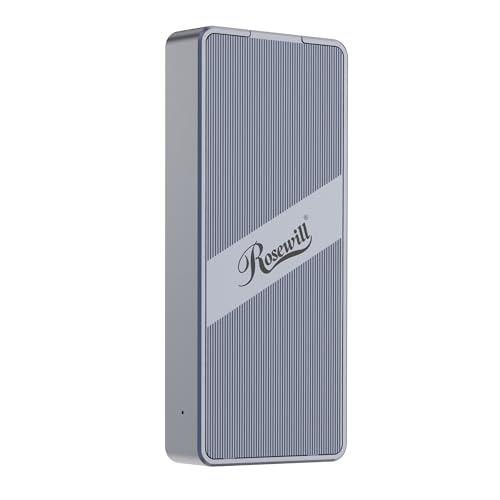
  5. 05
    Rosewill 40Gbps M.2 NVMe SSD Enclosure

    Best for Sustained Transfers

    Rosewill 40Gbps M.2 NVMe SSD Enclosure

    An ASM2464PD controller rated for up to 4 hours of full-speed use and drives up to 8TB.

    84Very Good
    Check price
  6. The cheapest 40Gbps option here, with a temperature-controlled fan but single-sided SSDs only.

    81Very Good
    Check price

The 40Gbps number on the box is the first thing to distrust. It is the speed of the link, not the speed of your drive, and the real ceiling for a USB4 enclosure sits well below it because NVMe traffic is tunneled through the cable. If you buy an enclosure for the headline figure, you will be disappointed. Buy it for the controller, the heat management and the drive sizes it accepts.

We reviewed six USB4 and Thunderbolt-class enclosures from their listings and spec sheets, ranking them by controller chip, cooling approach, supported M.2 lengths and capacities, warranty and price. Where a listing leaves out a figure, we say so instead of guessing. Price buckets replace exact prices, and every enclosure here falls well under $150.

Before you buy

What Actually Matters

01

Controller and compatibility

The bridge chip translates between USB4 and the drive, and it decides which hosts and drives work well. A certified Intel part is the safest on Macs, while ASM-class chips are common and fast. Look for the chip name on the listing, and treat a missing name as a warning.

02

Real speed vs the 40Gbps label

The link speed is 40Gbps, but tunneled NVMe throughput lands closer to 3,000 to 4,000MB/s on the best enclosures, and slower on Thunderbolt ports in some designs. The SABRENT lists 3,900MB/s on USB4 and 2,700MB/s on Thunderbolt. Prefer listings that give real MB/s figures.

03

Cooling and throttling

Fast SSDs run hot, and a drive that overheats slows itself down. Fans keep speed up on long copies, aluminum bodies conduct heat quietly, and a thin plastic shell does neither. If you move large files, favor a fan or an aluminum body.

04

Drive fit

Check the supported lengths (2230 to 2280), whether the enclosure takes single-sided drives only, and whether it accepts SATA M.2 at all. Some listings, like the SABRENT, take PCIe NVMe only. A drive that does not fit is the most common return.

05

Warranty and cables

A 2-year limited warranty, as on the Lexar and Satechi, is a reasonable baseline. Check that a quality 40Gbps cable is included, since a cheap cable can quietly cut speeds to USB 3 levels.

In-depth reviews

Our Ranked Picks, Reviewed

1

Best for Mac Creators

ACASIS 40Gbps M.2 NVMe SSD Enclosure with Cooling Fan (TBU405 Pro)

Our verdict: A certified Intel JHL7440 chip, an active fan and listed testing on M1, M2 and M3 Macs and iPad Pro.

The TBU405 Pro uses a certified Intel JHL7440 chip, an active cooling fan with a manual switch, and the listing says it has been tested with M1, M2 and M3 Macs and the iPad Pro. The Intel part is the point: it is a true Thunderbolt controller rather than a third-party USB4 bridge.

It takes first place because Mac users, who see the most trouble with unusual enclosure controllers, have the best reason to prefer a certified Intel chip. The fan helps hold speed on long transfers such as a multi-gigabyte video export, and the manual switch lets you turn it off for quiet work. The compromises are fan noise when it runs, and a listing that does not mention a long warranty.

Buy it if you edit video or move big project files on a Mac and want a Thunderbolt-certified chip. Skip it if you want a silent passive enclosure.

Controller
Certified Intel JHL7440
Cooling
Active fan, manual switch
Mac testing
M1, M2, M3 and iPad Pro
Link
40Gbps

What we like

  • +Certified Intel Thunderbolt chip
  • +Fan holds speed in long copies
  • +Listed for M1 to M3 Macs
  • +Fan has a manual switch

Watch out for

  • −Fan makes noise when running
  • −Warranty length is not highlighted

Buy it if: Mac video editors who want a certified controller.

Skip it if: You need a silent, fanless enclosure.

2

Best for Gen4 Drives

SABRENT USB4 NVMe SSD Enclosure (EC-U4TN)

Our verdict: 3,900MB/s over USB4 and 2,700MB/s over Thunderbolt, cooled by a fan, for PCIe NVMe only.

The EC-U4TN lists 3,900MB/s over USB4 and 2,700MB/s over Thunderbolt, with an integrated active cooling fan. It accepts PCIe NVMe drives only, with no SATA M.2 support.

It ranks second because it states both its USB4 and Thunderbolt numbers, which is honest and useful: a Thunderbolt port will run slower than a USB4 port on this enclosure. That makes it a good partner for a fast PCIe Gen4 drive on a modern PC, where the 3,900MB/s figure applies. The narrow focus is the downside, since an older SATA M.2 drive simply will not work in it.

Buy it if you own a Gen4 NVMe SSD and a USB4 port, and want the most speed available at this price. Check that your SSD is NVMe and not SATA before ordering.

USB4 speed
Up to 3,900MB/s
Thunderbolt speed
Up to 2,700MB/s
Cooling
Active integrated fan
Drives
PCIe NVMe only

What we like

  • +States USB4 and Thunderbolt speeds
  • +Active fan supports long transfers
  • +Tuned for PCIe Gen4 drives
  • +Fast on a USB4 port

Watch out for

  • −No SATA M.2 support
  • −Slower over Thunderbolt ports

Buy it if: Owners of a fast Gen4 NVMe SSD with a USB4 port.

Skip it if: You have a SATA M.2 drive.

3

Best for Large Drives

Satechi USB4 NVMe SSD Pro Enclosure

Our verdict: Up to 16TB, up to 3,840MB/s, a full accessory bundle and a 2-year warranty.

The Satechi Pro supports drives up to 16TB in 2230 to 2280 lengths, over PCIe Gen 4 by 4 at up to 3,840MB/s. It comes with a full accessory bundle and a 2-year limited warranty.

It ranks third because the capacity ceiling and the bundle are unique in this group. If you are shopping for a 10TB class drive, many enclosures are not rated for it, and Satechi lists 16TB outright. A named brand with a stated 2-year warranty also gives you somewhere to go if a unit fails. It trails the Sabrent only on the cooling story, since the listing does not highlight active cooling.

Buy it if you use very large SSDs and want a documented warranty with a complete accessory kit. Expect heat on long transfers if there is no active fan.

Capacity
Up to 16TB
Drive sizes
2230 to 2280
Speed
PCIe Gen 4x4, up to 3,840MB/s
Warranty
2-year limited

What we like

  • +Supports drives up to 16TB
  • +Accessory bundle included
  • +2-year limited warranty
  • +Fits 2230 to 2280 drives

Watch out for

  • −Cooling is not a highlight
  • −Costs more than budget rivals

Buy it if: Users running a 10TB or larger SSD.

Skip it if: You want an active fan for long transfers.

4

Best Brand Warranty

Lexar E750 40Gbps M.2 NVMe SSD Enclosure

Our verdict: An aircraft-grade aluminum body, Thunderbolt 4 tested, 3800MB/s rated and a 2-year warranty.

The E750 has an aluminum body that the listing calls aircraft-grade, a rated speed of up to 3800MB/s, Thunderbolt 4 testing and a 2-year limited warranty. Lexar is a known storage brand, which matters when you need support.

It ranks fourth because it gets the brand and warranty right, and loses ground on documentation: the listing gives no controller name and no drive-length support in the summary. An aluminum shell conducts heat out of the SSD without a fan, so it stays quiet, but a passive design can throttle on very long transfers.

Buy it if you want a quiet enclosure from a recognized maker with a clear warranty. Choose a fan-cooled model instead if you copy hundreds of gigabytes in one go.

Body
Aluminum
Speed
Up to 3800MB/s
Testing
Thunderbolt 4
Warranty
2-year limited

What we like

  • +Known storage brand and support
  • +2-year limited warranty
  • +Aluminum body spreads heat
  • +Quiet with no fan

Watch out for

  • −Passive cooling may throttle
  • −Controller chip is not named

Buy it if: Buyers who want brand support and silence.

Skip it if: You copy huge files for hours at a stretch.

5

Best for Sustained Transfers

Rosewill 40Gbps M.2 NVMe SSD Enclosure

Our verdict: An ASM2464PD controller rated for up to 4 hours of full-speed use and drives up to 8TB.

The Rosewill uses the ASM2464PD controller, is rated for up to 4 hours of full-speed use, and supports drives up to 8TB in 2230 to 2280 lengths. The four-hour claim is the unusual one, since most listings say nothing about sustained speed.

It ranks fifth because ASM2464PD is a well-known USB4 bridge chip, but the brand has a lower profile in storage than Lexar or Sabrent. The sustained-use rating is promising for long backups and large project archives. Treat it as a rated figure, not a measured result, and remember that real speed also depends on the SSD inside.

Buy it if you run multi-hour transfers and care more about endurance than a brand name. Check the return window in case your drive and controller do not get along.

Controller
ASM2464PD
Sustained use
Up to 4 hours full speed
Capacity
Up to 8TB
Drive sizes
2230 to 2280

What we like

  • +Rated for 4 hours at full speed
  • +Known ASM2464PD controller
  • +Fits 2230 to 2280 drives
  • +Supports drives up to 8TB

Watch out for

  • −Lower-profile storage brand
  • −Sustained rating is a seller figure

Buy it if: Long backups and big project archives.

Skip it if: You want a major storage brand's warranty.

6

Best Budget Entry

Cable Matters 40Gbps USB4 / Thunderbolt 4 SSD Enclosure

Our verdict: The cheapest 40Gbps option here, with a temperature-controlled fan but single-sided SSDs only.

The Cable Matters enclosure uses an ASM-class controller rated at 40Gbps, with an active temperature-controlled fan. It accepts single-sided M.2 drives only, up to 2280, and sits in the $25 to $50 bracket.

It ranks last because the single-sided limitation is a real catch. Many high-capacity SSDs use chips on both sides of the board, and those will not fit. If your drive is 1TB or 2TB single-sided, it works well and costs very little. The temperature-controlled fan only runs when needed, which is a smarter design than a fan that spins constantly.

Buy it if you have a standard single-sided drive and want the cheapest way into 40Gbps. Check that your SSD is single-sided before you order.

Controller
ASM-class, 40Gbps rated
Cooling
Temperature-controlled fan
Drive support
Single-sided M.2, up to 2280
Bracket
$25 to $50

What we like

  • +Cheapest 40Gbps enclosure here
  • +Fan runs only when needed
  • +Fits standard 2280 drives
  • +Simple, small design

Watch out for

  • −Single-sided drives only
  • −No long warranty highlighted

Buy it if: Budget builders with a single-sided SSD.

Skip it if: Your SSD has chips on both sides.

Methodology

How We Ranked These

Controller chip

We compared an Intel JHL7440 and ASM-class bridge chips, since the controller affects compatibility and the speed you can expect.

Cooling design

Active fans, temperature-controlled fans and aluminum passive bodies were weighed for how well they sustain speed in long transfers.

Drive support

Supported M.2 lengths, single-sided limits, SATA exclusion and capacities up to 16TB were checked against each listing.

Warranty and brand

Stated 2-year warranties and the standing of each maker were counted as evidence of support.

Value

Feature depth was set against the $25 to $50 and $50 to $100 brackets that all six enclosures occupy.

Every Primea Score uses the same weights: Performance 30% · Build & Materials 20% · Everyday Usability 20% · Value 20% · Owner Satisfaction 10%. Full scoring rules

Buyer's guide

How to Pick the Right One for You

By Computer

The host machine narrows the field faster than any spec.

Your computerOur pick
Apple Silicon MacACASIS 40Gbps M.2 NVMe SSD Enclosure with Cooling Fan (TBU405 Pro)
Modern PC with USB4SABRENT USB4 NVMe SSD Enclosure (EC-U4TN)
Mixed Mac and PCLexar E750 40Gbps M.2 NVMe SSD Enclosure
Laptop with Thunderbolt 4Satechi USB4 NVMe SSD Pro Enclosure

By Budget

SpendOur pick
$25 to $50Cable Matters 40Gbps USB4 / Thunderbolt 4 SSD Enclosure
$50 to $100 (fan, Mac)ACASIS 40Gbps M.2 NVMe SSD Enclosure with Cooling Fan (TBU405 Pro)
$50 to $100 (brand support)Lexar E750 40Gbps M.2 NVMe SSD Enclosure
$50 to $100 (large drives)Satechi USB4 NVMe SSD Pro Enclosure

Fan Cooling vs Passive Aluminum

Fan cooling

Holds speed during long transfers but adds noise and a part that can wear. Picks: ACASIS TBU405 Pro, SABRENT EC-U4TN, Cable Matters.

Passive aluminum

Silent and simple, but it can throttle on very long copies. Picks: Lexar E750, Satechi USB4 NVMe SSD Pro.

Default to a fan if you move hundreds of gigabytes at a time.

By SSD Capacity

DriveOur pick
Up to 2TB single-sidedCable Matters 40Gbps USB4 / Thunderbolt 4 SSD Enclosure
Up to 8TBRosewill 40Gbps M.2 NVMe SSD Enclosure
10TB to 16TBSatechi USB4 NVMe SSD Pro Enclosure
Fast PCIe Gen4 NVMeSABRENT USB4 NVMe SSD Enclosure (EC-U4TN)

For Video Editing Specifically

Look for

A certified controller, active cooling for long exports, a good cable and enough capacity for your footage. Avoid passive shells if clips run past an hour of transfer.

In this ranking

The ACASIS TBU405 Pro for Mac editors, the SABRENT EC-U4TN for fast Gen4 drives on a PC, and the Satechi Pro for large footage libraries.

When to Spend More

Spend more if

Your files are valuable or your transfers are long. The ACASIS, SABRENT and Satechi models reward the extra spend with cooling or capacity.

Save if

You have a standard single-sided SSD and short transfers. The Cable Matters at $25 to $50 is enough.

Questions

Frequently Asked Questions

Will a USB4 enclosure work on a Thunderbolt 4 laptop?+

Yes. USB4 and Thunderbolt 4 share the same connector, and the enclosures here work on either. Speeds can differ by port, as the SABRENT listing shows with 3,900MB/s over USB4 and 2,700MB/s over Thunderbolt.

What is the most common mistake when buying an NVMe enclosure?+

Buying one that does not fit the drive. A SATA M.2 drive will not work in a PCIe NVMe enclosure, and a double-sided drive will not fit the Cable Matters. Check the drive type and sides before ordering.

Is the ACASIS worth it over the Cable Matters?+

If you use a Mac or move large files, yes. The ACASIS has a certified Intel chip and Mac testing, while the Cable Matters is limited to single-sided SSDs. For a basic single-sided drive and occasional transfers, the cheaper one is fine.

How hard is setup?+

Open the case, slide the SSD into the M.2 slot, fix it with the screw or latch, close the case and plug it in. Most take five minutes with no tools beyond the supplied screwdriver. A new drive needs formatting.

Why is my enclosure slower than advertised?+

The 40Gbps number is the link rate, not the drive speed. A slow SSD, a poor cable, a USB 3 port or heat throttling can all cut the result. Use the included cable and a USB4 or Thunderbolt port.

Do I need to worry about heat?+

On long transfers, yes. Fast SSDs get hot and slow themselves down. A fan, as on the ACASIS and SABRENT, or an aluminum shell, as on the Lexar, helps. Avoid leaving the enclosure on soft surfaces.

Final take

For Mac creators, the ACASIS TBU405 Pro is the best USB4 NVMe enclosure here, with a certified Intel chip and an active fan. The SABRENT EC-U4TN is the pick for a fast Gen4 drive, the Satechi Pro handles the biggest SSDs, and the Lexar E750 offers brand support in a quiet aluminum body. The Cable Matters is the budget entry, but only for single-sided drives. Check your drive before your cart.

More Ranked & Reviewed Guides