
Primea ReviewsAll Reviews

Primea Reviews is reader-supported. When you buy through our Amazon links we may earn a commission, at no extra cost to you. Rankings are set by our editors and never sold. Learn more

Ranked & Reviewed by Primea Reviews

The 7 Best Thunderbolt NVMe Enclosures for Fast External SSDs, Ranked & Reviewed

By the Primea Editorial TeamUpdated November 3, 202611 min read7 products ranked
The 7 Best Thunderbolt NVMe Enclosures for Fast External SSDs, Ranked & Reviewed

The short answer

The ACASIS TBU405 Pro is the pick if you want a true Intel Thunderbolt controller, with a quoted 2,805/2,734 MB/s read and write and an active fan. The Lexar E750 is the better choice for newer hosts and carries a two-year warranty, and the ORICO adds a heatsink for sustained transfers. The Sabrent EC-T3NS remains the safe, certified, older Thunderbolt 3 design.

The Primea Scoreboard

Ranked & Reviewed

  1. An Intel JHL7440 controller, a cooling fan and quoted speeds near the Thunderbolt 3 ceiling.

    94Outstanding
    Check price
  2. Up to 3,800 MB/s, Thunderbolt 4 compatible, and backed by a two-year warranty.

    92Outstanding
    Check price
  3. Quotes 3,700/3,100 MB/s, with a thermal pad plus a standalone heatsink for the drive in the box.

    90Excellent
    Check price
  4. An ASM2464PD enclosure with a PWM fan, S.M.A.R.T. monitoring and 4TB support.

    88Excellent
    Check price
  5. A silent, fanless double-sided fin design with support for drives up to 8TB.

    86Excellent
    Check price
  6. Up to 3,900 MB/s on USB4 and 2,700 MB/s on Thunderbolt 3 or 4, with a cooling fan.

    84Very Good
    Check price
  7. 07
    Sabrent EC-T3NS Thunderbolt 3 Enclosure

    An Intel-certified, fanless Thunderbolt 3 enclosure with a detachable cable.

    82Very Good
    Check price

The word Thunderbolt on an enclosure listing can mean three different things, and only one of them promises the speed you are paying for. Some enclosures use a genuine Intel Thunderbolt controller, some use a USB4 chip that also speaks Thunderbolt to compatible hosts, and some are older Thunderbolt 3 designs that top out well below what a modern NVMe drive can do. Pairing the wrong chip with the wrong laptop is the usual reason an expensive drive feels ordinary.

This ranking sorts seven enclosures by controller, quoted throughput, cooling and drive support. We reviewed listings and spec sheets, and where speeds come from the seller we treat them as claims, not measurements. Any figure we mention is the one printed on the listing, so check the exact model and your computer's ports before buying.

Before you buy

What Actually Matters

01

Controller chip

The controller bridges the NVMe drive to the Thunderbolt or USB4 port, and it sets the speed ceiling and compatibility. Intel JHL7440 is a Thunderbolt 3 controller, while ASMedia ASM2464PD is a USB4 bridge that also works over Thunderbolt hosts. Look for the chip name in the listing, since it tells you more than the 40Gbps label.

02

Real throughput ceiling

Thunderbolt 3 tunnels about 2,800 MB/s of PCIe data, while USB4 bridges can reach about 3,800 MB/s on a compatible port. A port or cable that cannot carry 40Gbps will cut that further. Check your computer's port label and use the supplied cable.

03

Cooling

NVMe drives throttle when they exceed their safe temperature, so a long copy can slow to a fraction of its start speed. Fans, fins and heatsinks all help, and a fan holds speed best. Look for named cooling features and whether a thermal pad is included.

04

Drive length and capacity

Drive length is written as 2230, 2242, 2260 or 2280, meaning width and length in millimeters, and most laptops use 2280. Maximum capacity varies from 4TB to 8TB by model. Check that the listing names your drive size before you buy.

05

NVMe only versus SATA

Some enclosures accept only NVMe drives, while others also take SATA M.2. A SATA M.2 drive in an NVMe-only enclosure will not be detected. Look for the words NVMe only in the specs, and confirm the key type of your drive.

In-depth reviews

Our Ranked Picks, Reviewed

1

Best Overall

ACASIS TBU405 Pro 40Gbps NVMe Enclosure

Our verdict: An Intel JHL7440 controller, a cooling fan and quoted speeds near the Thunderbolt 3 ceiling.

The TBU405 Pro uses an Intel JHL7440 controller, offers 40Gbps and works with USB4, Thunderbolt 3 and Thunderbolt 4 hosts. The listing quotes about 2,805 MB/s reads and 2,734 MB/s writes, and an active cooling fan keeps the drive in check.

It takes first place because the Intel chip is the genuine Thunderbolt controller, which tends to give the most predictable behavior on Mac and Windows Thunderbolt ports. Those figures sit close to the practical limit of a Thunderbolt 3 tunnel, which carries roughly 2,800 MB/s of PCIe data, so you are not leaving much speed on the table. The fan matters during long copies, because NVMe drives throttle once they heat up. It ranks above the USB4 chip designs mainly for predictability.

Buy it if you use a Mac or a Thunderbolt-equipped Windows laptop and want the least compatibility drama. Be aware that a fan adds noise, and that it will not exceed Thunderbolt 3 speeds even on a faster port.

Controller
Intel JHL7440
Interface
40Gbps, USB4/TB3/TB4
Quoted speed
2,805/2,734 MB/s
Cooling
Active fan

What we like

  • +Genuine Intel Thunderbolt controller
  • +Quoted speed near the TB3 ceiling
  • +Active fan resists throttling
  • +Works with USB4 and TB4 hosts

Watch out for

  • −Fan adds some noise
  • −Capped at Thunderbolt 3 speeds

Buy it if: Mac and Thunderbolt laptop users who want a predictable genuine-controller enclosure.

Skip it if: You want the highest speeds a USB4 chip can reach.

2

Best Warranty

Lexar E750 40Gbps NVMe Enclosure

Our verdict: Up to 3,800 MB/s, Thunderbolt 4 compatible, and backed by a two-year warranty.

The Lexar E750 quotes speeds up to 3,800 MB/s, is Thunderbolt 4 compatible, and supports 2230, 2242, 2260 and 2280 drives. It carries a two-year limited warranty.

It ranks second because the combination of a faster quoted ceiling and a recognized storage brand is unusual at this price. A 3,800 MB/s figure is beyond what the Thunderbolt 3 tunnel can carry, which tells you the enclosure uses a USB4-class bridge and relies on a compatible host to reach it. The two-year warranty is the detail to weigh: enclosures from lesser-known sellers often offer one year or an unclear policy. It sits below the ACASIS only because the listing does not name a controller or describe cooling.

Choose it if you have a USB4 or Thunderbolt 4 laptop and want brand support behind the box. Check the cooling by looking at user photos, since the listing is silent on a fan.

Quoted speed
Up to 3,800 MB/s
Host
Thunderbolt 4 compatible
Drive sizes
2230/2242/2260/2280
Warranty
2-year limited

What we like

  • +Highest quoted speed in the group
  • +Two-year limited warranty
  • +Supports four drive lengths
  • +Recognized storage brand

Watch out for

  • −Controller is not named
  • −Cooling is not described

Buy it if: Buyers with USB4 or Thunderbolt 4 laptops who value brand support.

Skip it if: Your computer only has older USB 3 ports.

3

Best Cooling Kit

ORICO 40Gbps NVMe Enclosure with Fan

Our verdict: Quotes 3,700/3,100 MB/s, with a thermal pad plus a standalone heatsink for the drive in the box.

The ORICO enclosure offers 40Gbps and quotes 3,700 MB/s reads and 3,100 MB/s writes. It includes a thermal pad and a separate heatsink for the SSD, a fan, a CNC aluminum body and a transparent side panel.

It lands third because it gives you the most cooling hardware of the group. A bare NVMe drive in a sealed aluminum shell relies on one thermal pad to move heat to the case, while this kit lets you add a heatsink and run a fan, which is the setup that holds speed during a hundred-gigabyte copy. The transparent panel is a styling choice that some buyers will like and others will ignore. It ranks below the ACASIS and Lexar because the listing names neither the controller nor a warranty length.

Buy it if you move large video files regularly and want the cooler running drive. Skip it if you want a silent unit, since a fan always makes some sound.

Quoted speed
3,700/3,100 MB/s
Interface
40Gbps
Cooling
Fan, thermal pad and heatsink
Body
CNC aluminum, clear panel

What we like

  • +Thermal pad and separate heatsink included
  • +Active fan keeps temperatures down
  • +High quoted read speed
  • +CNC aluminum body

Watch out for

  • −Controller and warranty not stated
  • −Fan noise under load

Buy it if: Video editors and photographers who move large files and want strong cooling.

Skip it if: You want a silent, fanless enclosure.

4

Best With Drive Monitoring

UGREEN 40Gbps NVMe Enclosure with Cooling Fan

Our verdict: An ASM2464PD enclosure with a PWM fan, S.M.A.R.T. monitoring and 4TB support.

This UGREEN uses the ASM2464PD bridge chip for 40Gbps, has an active PWM fan and supports 2230, 2242, 2260 and 2280 drives up to 4TB. It reports S.M.A.R.T. data so you can check drive health.

It ranks fourth because it is a solid, fully specified product without any one standout. A PWM fan changes speed with temperature, so it should stay quiet during light use and spin up only for heavy transfers, which is better than a fan that runs at one speed. S.M.A.R.T. monitoring is a useful feature on a drive that holds your backups, since it can warn you before a failure. The 4TB limit is lower than the fanless UGREEN, which accepts 8TB.

Choose it if you want active cooling and drive health reporting on a standard budget. If you plan to fit an 8TB drive, look at the fanless model.

Controller
ASM2464PD
Cooling
Active PWM fan
Max capacity
Up to 4TB
Monitoring
S.M.A.R.T.

What we like

  • +PWM fan adjusts to temperature
  • +S.M.A.R.T. health monitoring
  • +Named ASM2464PD controller
  • +Supports four drive lengths

Watch out for

  • −Limited to drives up to 4TB
  • −Fan adds noise during copies

Buy it if: Backup users who want cooling and drive health data in one enclosure.

Skip it if: You plan to fit an 8TB drive.

5

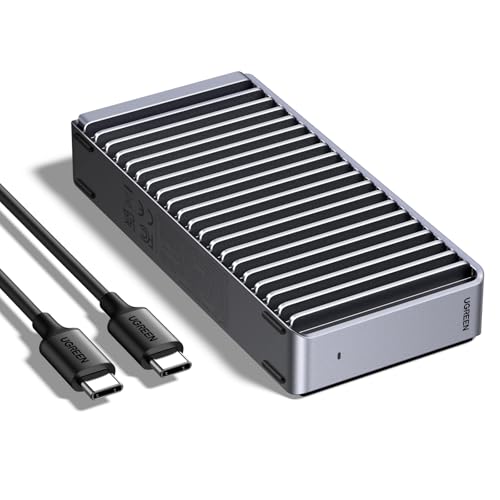
Best Fanless 8TB

UGREEN 40Gbps M.2 NVMe Enclosure

Our verdict: A silent, fanless double-sided fin design with support for drives up to 8TB.

This UGREEN enclosure uses the ASM2464PD chip for 40Gbps over USB4, Thunderbolt 3 and Thunderbolt 4. It takes 2230, 2242, 2260 and 2280 drives up to 8TB and cools passively with double-sided fins.

It places fifth because passive cooling has a ceiling. A fanless aluminum body is quiet and has no moving part to fail, which suits a desk where noise matters or a travel bag, but under a long write the drive heats up and can throttle. The 8TB support is the unusual part, since many enclosures stop at 4TB. It sits just under the fan version only because sustained transfers are more likely to slow down.

Buy it for quiet use, bulky archives and travel. If you routinely copy hundreds of gigabytes at a time, the fan model or the ORICO is the better fit.

Controller
ASM2464PD
Cooling
Fanless double-sided fins
Max capacity
Up to 8TB
Hosts
USB4, TB3, TB4

What we like

  • +Silent, with no fan to fail
  • +Supports drives up to 8TB
  • +Works with USB4 and Thunderbolt
  • +Four drive lengths supported

Watch out for

  • −Passive cooling may throttle
  • −No fan for long transfers

Buy it if: Quiet-desk and travel users who want large capacity without a fan.

Skip it if: You copy huge files for long stretches.

6

Best USB4 Speed Claim

Sabrent EC-U4TN USB4 NVMe Enclosure

Our verdict: Up to 3,900 MB/s on USB4 and 2,700 MB/s on Thunderbolt 3 or 4, with a cooling fan.

The Sabrent EC-U4TN quotes up to 3,900 MB/s on USB4 and 2,700 MB/s on Thunderbolt 3 and 4, supports 2230, 2242, 2260 and 2280 NVMe drives, and includes an active fan. It works with NVMe drives only.

It ranks sixth because the two figures tell you something important: it will be fastest on a USB4 port and slower on Thunderbolt 3 or 4. That makes it a better choice for newer PCs than for older Macs. The 3,900 MB/s claim is the highest in the group, and Sabrent has a long history in NVMe accessories. It trails the Lexar and ACASIS since the listing does not give a controller or warranty length.

Pick it if you have a USB4 machine and want the highest claimed ceiling. The NVMe-only statement also means it will not accept SATA M.2 drives.

USB4 speed
Up to 3,900 MB/s
TB3/TB4 speed
Up to 2,700 MB/s
Drive sizes
2230/2242/2260/2280
Cooling
Active fan

What we like

  • +Highest claimed USB4 throughput
  • +Active fan for sustained use
  • +Clear speeds for each port type
  • +Established Sabrent brand

Watch out for

  • −Slower on Thunderbolt 3 and 4
  • −NVMe drives only, no SATA M.2

Buy it if: USB4 laptop and desktop owners chasing the highest claimed speed.

Skip it if: You use an older Thunderbolt-only Mac.

7

Best Certified TB3 Design

Sabrent EC-T3NS Thunderbolt 3 Enclosure

Our verdict: An Intel-certified, fanless Thunderbolt 3 enclosure with a detachable cable.

The EC-T3NS is an Intel-certified Thunderbolt 3 enclosure with quoted speeds up to 1,600 MB/s, a solid aluminum fanless body and a detachable cable.

It ranks last because its speed is about half of the newer designs, but that is not the whole story. Intel certification means the design passed Intel's checks for Thunderbolt behavior, which reduces the compatibility surprises that cheap clones can bring. The detachable cable is a practical benefit, as you can swap in a longer or shorter lead and replace it if it frays. A drive that fits the 1,600 MB/s ceiling still gives a large jump over a USB 3 portable drive.

Buy it if you have an older Thunderbolt 3 laptop and value certification and silence over peak speed. Skip it if you want the full speed of a modern NVMe drive.

Quoted speed
Up to 1,600 MB/s
Certification
Intel-certified Thunderbolt 3
Cable
Detachable
Cooling
Fanless solid aluminum

What we like

  • +Intel-certified Thunderbolt 3
  • +Detachable cable can be swapped
  • +Fanless and silent
  • +Solid aluminum body

Watch out for

  • −1,600 MB/s is well below newer models
  • −Thunderbolt 3 generation design

Buy it if: Older Thunderbolt 3 laptop owners who want certified, silent operation.

Skip it if: You want the full speed of a modern NVMe drive.

Methodology

How We Ranked These

Controller and certification

We weighed whether the listing names an Intel Thunderbolt chip, a USB4 bridge, or a certified design, since the controller decides compatibility.

Quoted throughput

We compared the speeds printed on each listing and treated them as seller claims, noting the Thunderbolt 3 tunnel ceiling of roughly 2,800 MB/s.

Cooling design

We looked at fans, fins, heatsinks and thermal pads, because NVMe drives slow down when they overheat in a sealed case.

Drive support

We checked supported lengths and maximum capacity, as 2230 to 2280 and 8TB support affect which drives you can use.

Warranty and value

We counted named warranties and brand support, then weighed them against the price bracket.

Every Primea Score uses the same weights: Performance 30% · Build & Materials 20% · Everyday Usability 20% · Value 20% · Owner Satisfaction 10%. Full scoring rules

Buyer's guide

How to Pick the Right One for You

By Host Port

Your computer's port decides how much of an enclosure's speed you can actually use.

Your portOur pick
Older Thunderbolt 3 Mac or PCACASIS TBU405 Pro 40Gbps NVMe Enclosure
USB4 or Thunderbolt 4 laptopLexar E750 40Gbps NVMe Enclosure
USB4 desktop portSabrent EC-U4TN USB4 NVMe Enclosure
Thunderbolt 3, certified designSabrent EC-T3NS Thunderbolt 3 Enclosure

By Budget

SpendOur pick
$50 to $100, best overallACASIS TBU405 Pro 40Gbps NVMe Enclosure
$50 to $100, with warrantyLexar E750 40Gbps NVMe Enclosure
$50 to $100, big capacityUGREEN 40Gbps M.2 NVMe Enclosure
$50 to $100, older MacSabrent EC-T3NS Thunderbolt 3 Enclosure

Fan vs Fanless Cooling

Fan cooled

A fan holds speed during long copies and keeps the drive cooler, but adds noise and a part that can wear out. Picks: ACASIS TBU405 Pro, ORICO, UGREEN with fan, Sabrent EC-U4TN.

Fanless

Silent and simple, with no moving parts, but it can throttle when copying large files for a long time. Picks: UGREEN 40Gbps M.2, Sabrent EC-T3NS.

Choose a fan if you copy large files often, and fanless if you value silence.

By Drive Capacity

Drive you plan to useOur pick
Up to 2TB, everydayLexar E750 40Gbps NVMe Enclosure
Up to 4TB, with monitoringUGREEN 40Gbps NVMe Enclosure with Cooling Fan
Up to 8TB, quietUGREEN 40Gbps M.2 NVMe Enclosure
Compact 2230 driveSabrent EC-U4TN USB4 NVMe Enclosure

For Video Editing Specifically

Look for

Active cooling, a genuine 40Gbps host port, and high sustained write speed. A heatsink and fan keep the drive from throttling mid-render.

In this ranking

The ORICO 40Gbps NVMe Enclosure with Fan and ACASIS TBU405 Pro are the best fits, with the ORICO adding the extra heatsink.

When to Spend More

Spend more if

You copy large files daily, own a Thunderbolt 4 or USB4 machine, or need warranty backing. The Lexar E750 and ACASIS TBU405 Pro justify it.

Save if

You mainly back up occasionally and have an older port. The Sabrent EC-T3NS or the UGREEN fanless model is enough.

Questions

Frequently Asked Questions

Will these work with a USB-C port that is not Thunderbolt?+

They will usually connect, but at USB 3 speeds, which are well below 40Gbps. The full speed needs a Thunderbolt or USB4 port. Check the label next to your port.

What is the most common mistake with these enclosures?+

Using a cable that cannot carry 40Gbps. A basic USB-C cable can drop speeds to a fraction. Use the supplied cable or a cable marked for 40Gbps.

Are they worth it over a ready-made portable SSD?+

They are if you already own a fast NVMe drive or want to pick the capacity and brand yourself. A portable SSD is simpler and often cooled well. An enclosure lets you move the drive back into a computer later.

How do I install a drive?+

Open the case, slot the M.2 drive at an angle, and secure it with the supplied screw or latch. Add the thermal pad, close the case and connect the cable. Format the drive in your operating system's disk utility.

Will my drive overheat inside?+

It can during long writes without cooling. A fan or heatsink helps, and thermal throttling is the usual reason speeds fall. Pause between very large copies if you use a fanless model.

Do these work with both Mac and Windows?+

Yes, in general, since they appear as ordinary external drives. Thunderbolt Macs work best with Intel Thunderbolt chips, while newer USB4 hosts suit the ASMedia models. Check the maker's compatibility notes for your exact computer.

Final take

The ACASIS TBU405 Pro is the best Thunderbolt NVMe enclosure here because of its Intel controller and fan cooling. The Lexar E750 is the better pick for USB4 and Thunderbolt 4 machines, with a two-year warranty. The ORICO is the right choice for heavy file transfers, and the Sabrent EC-T3NS is for older Thunderbolt 3 laptops that value certification.

More Ranked & Reviewed Guides