
Primea ReviewsAll Reviews

Primea Reviews is reader-supported. When you buy through our Amazon links we may earn a commission, at no extra cost to you. Rankings are set by our editors and never sold. Learn more

Ranked & Reviewed by Primea Reviews

The 6 Best USB4 NVMe Enclosures Under $100 for Fast External SSDs, Ranked & Reviewed

By the Primea Editorial TeamUpdated November 3, 202610 min read6 products ranked
The 6 Best USB4 NVMe Enclosures Under $100 for Fast External SSDs, Ranked & Reviewed

The short answer

The Rosewill 40Gbps enclosure is the best pick for long backups and edits because it is rated to hold full speed for up to four hours. The UGREEN is the quiet fanless choice, the Cable Matters is the cheapest way into a fan-cooled 40Gbps case, and the Satechi is the one to buy if you own a drive larger than 8TB.

The Primea Scoreboard

Ranked & Reviewed

  1. 01
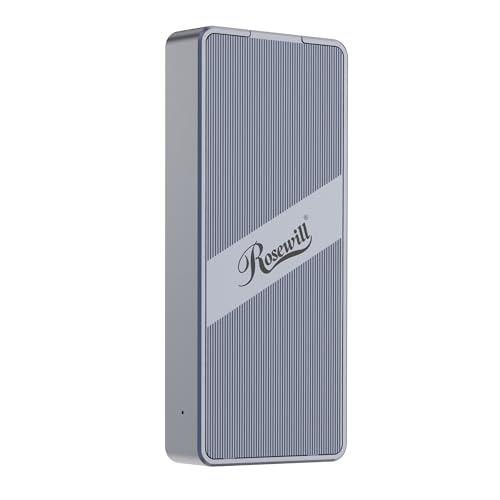
    Rosewill 40Gbps M.2 NVMe SSD Enclosure

    Best for Sustained Transfers

    Rosewill 40Gbps M.2 NVMe SSD Enclosure

    ASM2464PD controller and a stated four-hour full-speed rating suit long backups and edits.

    94Outstanding
    Check price
  2. Silent passive cooling with double-sided fins on an ASM2464PD and an ultra-slim body.

    92Outstanding
    Check price
  3. A dual-chip JHL7440 and RTL9210 design with a PWM fan and 8TB support.

    90Excellent
    Check price
  4. Thermal pad, SSD heatsink, a fan and push-to-slide tool-free installation in one case.

    88Excellent
    Check price
  5. The lowest price tier for a fan-cooled 40Gbps case, limited to single-sided 2280 drives.

    86Excellent
    Check price
  6. Supports drives up to 16TB over PCIe Gen 4x4 with a two-year limited warranty.

    84Very Good
    Check price

The 40Gbps on the box is not the number that decides how an external NVMe enclosure feels. A fast SSD in a poorly cooled case will start fast, then throttle after a few minutes of sustained copying and drop to a fraction of its speed. The question worth asking is how long the enclosure holds its pace, and what is inside it to make that possible.

So this ranking leans on controller chip, cooling design and drive compatibility rather than the headline rating. We reviewed six USB4 and Thunderbolt-class enclosures from their listings: controller chips, fan or fanless cooling, supported M.2 lengths, maximum drive capacity and warranty. Where a figure is not published, we leave it out.

Before you buy

What Actually Matters

01

Controller chip

The bridge chip translates between your NVMe drive and the USB4 or Thunderbolt port, and it sets the speed ceiling and compatibility. Chips such as the ASM2464PD are widely used for 40Gbps designs. Look for the chip name in the listing, since a missing name usually means a generic or older part.

02

Cooling design

NVMe drives throttle when they run hot, and an enclosure with no real thermal path turns a fast SSD into a slow one on long copies. A fan and heatsink move heat out actively, while fins shed it passively and quietly. Check for a thermal pad, a heatsink or a stated sustained-speed duration.

03

Single versus double-sided drives

Some enclosures only fit drives with chips on one side of the board, which excludes many high-capacity models. Double-sided drives are common above 2TB. Check the listing for a single-sided limit before buying if your drive is large.

04

Maximum capacity and length

An enclosure that tops out at 8TB is fine for nearly everyone today, but larger drives need a case rated higher. Lengths from 2230 to 2280 cover the common M.2 formats, including small handheld drives. Check both numbers against the drive you plan to use.

05

Host port compatibility

A 40Gbps enclosure needs a USB4 or Thunderbolt port on your computer to reach its top speed. Plugged into a slower USB-C port, it falls back to a lower rate. Check your laptop or desktop port specification before assuming you will get the full rating.

In-depth reviews

Our Ranked Picks, Reviewed

1

Best for Sustained Transfers

Rosewill 40Gbps M.2 NVMe SSD Enclosure

Our verdict: ASM2464PD controller and a stated four-hour full-speed rating suit long backups and edits.

The Rosewill uses the ASM2464PD controller and supports drives up to 8TB in 2230 to 2280 lengths. Its listing states it is rated for up to four hours of full-speed use, Expect to pay between $50 and $100.

The four-hour figure is why it leads. Throttling is the number one complaint with NVMe enclosures, and a stated sustained duration tells you the manufacturer designed the thermal path for long jobs rather than benchmark bursts. The ASM2464PD is a well-known 40Gbps bridge chip for USB4 and Thunderbolt, so compatibility with modern laptops is rarely a worry.

Buy it for video editing, large photo libraries or multi-hour backups. It does not publish a warranty term on the listing, so confirm that before ordering.

Controller
ASM2464PD
Sustained rating
Up to 4 hours
Max capacity
8TB
Drive sizes
2230 to 2280

What we like

  • +Stated four-hour sustained rating
  • +ASM2464PD controller is proven
  • +Supports drives up to 8TB
  • +Fits 2230 to 2280 lengths

Watch out for

  • −Warranty term not on listing
  • −Cooling details are limited

Buy it if: Editors and photographers moving large files for hours.

Skip it if: You want a documented warranty period.

2

Best Fanless Design

UGREEN 40Gbps M.2 NVMe Enclosure

Our verdict: Silent passive cooling with double-sided fins on an ASM2464PD and an ultra-slim body.

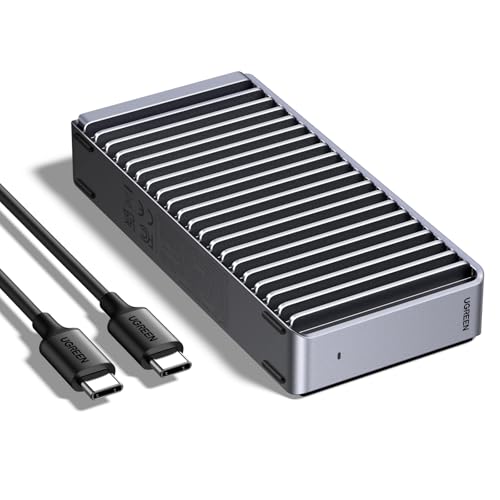
The UGREEN pairs the ASM2464PD chip with fanless passive cooling, double-sided fin heat dissipation and an ultra-slim body, and it supports drives up to 8TB. Pricing lands between $50 and $100.

It lands second because silence is a real advantage on a desk where a small fan whine is noticeable, such as a bedroom office or during calls. Passive fins rely on the aluminum body to shed heat, which works well for bursts and moderate loads. The tradeoff against the Rosewill is that a fanless design has less margin on very long transfers, and the listing gives no sustained-speed rating.

It is a great choice for mixed daily use: game libraries, photo catalogs and backups. If you routinely copy a terabyte at a time, favor a fan-cooled case.

Controller
ASM2464PD
Cooling
Fanless, double-sided fins
Max capacity
8TB
Body
Ultra-slim

What we like

  • +Completely silent in operation
  • +Double-sided fins spread heat
  • +Slim body travels easily
  • +Supports drives up to 8TB

Watch out for

  • −No sustained speed rating
  • −Less margin on huge transfers

Buy it if: Quiet workspaces and mixed everyday SSD use.

Skip it if: You copy a terabyte at a time.

3

Best Dual-Chip Design

ANYOYO 40Gbps M.2 NVMe Enclosure with Cooling Fan

Our verdict: A dual-chip JHL7440 and RTL9210 design with a PWM fan and 8TB support.

The ANYOYO uses a JHL7440 plus RTL9210 dual-chip arrangement, a PWM auto-adjusting cooling fan and support for drives up to 8TB in 2230 to 2280 lengths. The tier is $50 to $100.

It ranks third because the dual-chip design is documented and the PWM fan ramps with temperature, which keeps noise down when the drive is idle. The JHL7440 is a Thunderbolt-class controller, so the case suits Thunderbolt hosts well, and the RTL9210 handles fallback to slower USB ports.

Choose it if you want a documented controller design and active cooling. It ranks behind the Rosewill and UGREEN because those publish a sustained rating or a silent design, while this one asks you to accept a fan.

Controllers
JHL7440 and RTL9210
Cooling
PWM auto fan
Max capacity
8TB
Drive sizes
2230 to 2280

What we like

  • +Documented dual-chip controller design
  • +PWM fan adjusts with temperature
  • +Handles Thunderbolt-class hosts
  • +Supports drives up to 8TB

Watch out for

  • −Fan adds some noise
  • −No sustained-speed rating

Buy it if: Thunderbolt laptop owners wanting active cooling.

Skip it if: You want a silent enclosure.

4

Best Cooling Bundle

ORICO 40Gbps M.2 NVMe SSD Enclosure with Fan

Our verdict: Thermal pad, SSD heatsink, a fan and push-to-slide tool-free installation in one case.

The ORICO includes a thermal pad and an SSD heatsink, a transparent panel design and a push-to-slide tool-free install, plus a cooling fan. It is a $50 to $100 purchase.

It takes fourth place because it has the most complete cooling kit in the group, which matters if your drive is a bare stick without a heatsink. Fitting a pad and heatsink is what actually moves heat into the case body, and tool-free installation saves time if you swap drives. The listing leaves out the controller chip and maximum capacity, so we cannot confirm sustained speed the way we can for the Rosewill.

Buy it if you are putting a bare drive in and want everything included. Check the controller and capacity on the listing first.

Cooling
Fan, heatsink, thermal pad
Install
Push-to-slide, tool-free
Design
Transparent panel
Speed class
40Gbps

What we like

  • +Thermal pad and heatsink included
  • +Tool-free push-to-slide install
  • +Transparent panel shows the drive
  • +Fan adds active cooling

Watch out for

  • −Controller chip not listed
  • −Maximum capacity not stated

Buy it if: Owners fitting a bare M.2 drive for the first time.

Skip it if: You need a documented controller and capacity.

5

Best Low-Cost Fan Case

Cable Matters 40Gbps USB4 SSD Enclosure

Our verdict: The lowest price tier for a fan-cooled 40Gbps case, limited to single-sided 2280 drives.

The Cable Matters enclosure has an ASM-class controller rated for 40Gbps, an active temperature-controlled fan and support for single-sided M.2 drives up to 2280 length. It is in the $25 to $50 range.

It ranks fifth because the single-sided limit is a genuine constraint: high-capacity drives often place chips on both sides of the board, and those will not fit. It is also not clear what capacity ceiling it has. Where it wins is price, since a fan-cooled 40Gbps case this cheap is unusual.

Buy it if your drive is a common single-sided 1TB or 2TB model and you want the cheapest sensible upgrade. Skip it if you have a double-sided drive or plan to buy a large one later.

Speed
40Gbps USB4
Cooling
Active, temperature controlled
Drive type
Single-sided M.2
Max length
2280

What we like

  • +Lowest price tier in ranking
  • +Fan is temperature controlled
  • +ASM-class controller at 40Gbps
  • +Simple 2280 support

Watch out for

  • −Single-sided drives only
  • −Capacity ceiling not stated

Buy it if: Budget buyers with a single-sided 2280 drive.

Skip it if: Your drive has chips on both sides.

6

Best for Huge Drives

Satechi USB4 NVMe SSD Pro Enclosure

Our verdict: Supports drives up to 16TB over PCIe Gen 4x4 with a two-year limited warranty.

The Satechi Pro supports drives up to 16TB in 2230 to 2280 lengths, uses PCIe Gen 4x4 with speeds up to 3840MB/s and carries a two-year limited warranty. Street price falls in the $50 to $100 tier.

It ranks last in this group only because the 3840MB/s figure is lower than what a 40Gbps enclosure with a modern bridge chip can deliver, so speed-focused buyers do better elsewhere. It wins on a different axis: capacity headroom and a published warranty, which the other cases do not offer.

Choose it if you own or plan to buy a 10TB or larger drive, where the 8TB limit of the rivals would be a hard stop. Skip it if raw speed is your only priority.

Max capacity
16TB
Interface
PCIe Gen 4x4
Speed
Up to 3840MB/s
Warranty
2-year limited

What we like

  • +Supports drives up to 16TB
  • +Two-year limited warranty
  • +PCIe Gen 4x4 interface
  • +Fits 2230 to 2280 lengths

Watch out for

  • −Speed trails newer chips
  • −Cooling details not listed

Buy it if: Owners of very large drives who want a warranty.

Skip it if: You want the fastest possible transfers.

Methodology

How We Ranked These

Controller and bridge chip

We compared the listed controllers, since the bridge chip sets compatibility, speed ceiling and how the enclosure behaves on a Thunderbolt or USB4 port.

Cooling and sustained speed

Fan, passive fin and heatsink designs were scored on how long they can plausibly hold speed, with stated sustained ratings counting for the most.

Drive compatibility

Supported lengths, single or double-sided boards and the maximum capacity decided which drives each enclosure accepts.

Build and installation

Tool-free installs, thermal pads and the body design were credited for how easily a drive can be fitted and kept cool.

Value under $100

Each enclosure was weighed against its price range and what it provides in documented specifications and warranty.

Every Primea Score uses the same weights: Performance 30% · Build & Materials 20% · Everyday Usability 20% · Value 20% · Owner Satisfaction 10%. Full scoring rules

Buyer's guide

How to Pick the Right One for You

By Cooling Type

Cooling decides whether the drive holds its speed, so it is the first filter to apply.

CoolingOur pick
Stated sustained ratingRosewill 40Gbps M.2 NVMe SSD Enclosure
Silent passive finsUGREEN 40Gbps M.2 NVMe Enclosure
Fan plus heatsink bundleORICO 40Gbps M.2 NVMe SSD Enclosure with Fan
Cheap active fanCable Matters 40Gbps USB4 SSD Enclosure

By Budget

SpendOur pick
$25 to $50Cable Matters 40Gbps USB4 SSD Enclosure
$50 to $75UGREEN 40Gbps M.2 NVMe Enclosure
$50 to $100 (long jobs)Rosewill 40Gbps M.2 NVMe SSD Enclosure
$50 to $100 (huge drives)Satechi USB4 NVMe SSD Pro Enclosure

Fan Cooling vs Passive Cooling

Fan cooling

Moves heat out actively and holds speed on long jobs, with some noise. Picks: Rosewill is rated for four hours, plus ANYOYO, ORICO and Cable Matters.

Passive cooling

Silent and simple, with less headroom on huge transfers. Picks: UGREEN with double-sided fins.

Default to a fan or a stated sustained rating if you move large files regularly.

By Drive Size

Your driveOur pick
Single-sided 2280Cable Matters 40Gbps USB4 SSD Enclosure
Up to 8TBRosewill 40Gbps M.2 NVMe SSD Enclosure
Short 2230 driveUGREEN 40Gbps M.2 NVMe Enclosure
10TB or largerSatechi USB4 NVMe SSD Pro Enclosure

For Video Editing Specifically

Look for

A controller you can name, active cooling or a stated sustained rating, and a drive that is not throttling after ten minutes.

In this ranking

Rosewill for long exports and ingest, ANYOYO for Thunderbolt Macs, and ORICO if your bare SSD needs a heatsink.

When to Spend More

Spend more if

You move hundreds of gigabytes at a time or need a warranty. The Rosewill and Satechi justify their price range.

Save if

You mostly back up small files or carry a drive for light use. The Cable Matters is enough.

Questions

Frequently Asked Questions

Will a USB4 enclosure work on my older laptop?+

Yes, though it falls back to the speed of the port. On a 10Gbps USB-C port you will get around a quarter of the 40Gbps rating, which is still fast for most tasks.

What is the most common mistake with NVMe enclosures?+

Buying one without checking whether the drive is single or double-sided, or forgetting the thermal pad. A drive that is loose or uncooled can throttle or fail to mount.

Is fan cooling worth it over a fanless case?+

For long copies and editing, yes, because fans keep the controller and drive below throttling temperatures. For light use a passive case like the UGREEN is quieter and simpler.

How do I install a drive?+

Open the case, seat the M.2 drive in the slot, add the supplied thermal pad and close it, then connect the cable. Some models like the ORICO use a tool-free slide mechanism.

Do I need to format the drive?+

A new drive needs to be initialized and formatted in Windows Disk Management or macOS Disk Utility. An already formatted drive mounts as it is, and exFAT works across both systems.

Does heat damage the SSD?+

Modern drives protect themselves by slowing down when hot, so the usual result is lower speed rather than damage. Good cooling still extends the useful life and keeps speeds consistent.

Final take

Buy the Rosewill if you move big files for hours, and the UGREEN if a silent desk matters more. The Cable Matters is the cheapest sensible fan-cooled option for a single-sided 2280 drive, and the Satechi is the only choice above 8TB. Skip any enclosure that will not name its controller or its cooling plan.

More Ranked & Reviewed Guides