
Primea ReviewsAll Reviews

Primea Reviews is reader-supported. When you buy through our Amazon links we may earn a commission, at no extra cost to you. Rankings are set by our editors and never sold. Learn more

Ranked & Reviewed by Primea Reviews

The 6 Best UPS Battery Backups for NAS Devices, Ranked & Reviewed

By the Primea Editorial TeamUpdated November 3, 202611 min read6 products ranked
The 6 Best UPS Battery Backups for NAS Devices, Ranked & Reviewed

The short answer

The CyberPower CP850PFCLCD is the safest all-round UPS for a NAS, with a pure sine wave output, automatic voltage regulation and an LCD readout. The APC 850VA suits a multi-bay NAS that shares the UPS with a router, and the APC BE650G1 is the proven value pick. The Ubiquiti UniFi UPS Tower is for UniFi homes, and the WALLECUBE is a niche but purpose-built option for DC-powered NAS boxes.

The Primea Scoreboard

Ranked & Reviewed

  1. A pure sine wave UPS with AVR, an LCD and USB signaling, which is what modern NAS power supplies want.

    94Outstanding
    Check price
  2. APC's 850VA unit, rated for NAS, router and PC loads with USB shutdown signaling.

    92Outstanding
    Check price
  3. A widely used 650VA APC with USB signaling and a standard, replaceable battery.

    90Excellent
    Check price
  4. A 1000VA/600W tower with UniFi monitoring, sized for a NAS plus the network gear.

    88Excellent
    Check price
  5. The smallest APC here, enough for a single-bay NAS and a router.

    86Excellent
    Check price
  6. A compact 150W DC UPS built for DC-powered NAS and mini PCs, with app control.

    84Very Good
    Check price

People shop for a NAS UPS by how many minutes of runtime it promises, and that is the wrong yardstick. A NAS does not need to stay on during an outage. It needs a clean, orderly shutdown before the battery runs out, so the file system closes properly and no RAID array is left rebuilding. That means the feature to hunt for is USB signaling that tells the NAS to shut itself down, not a bigger battery.

This ranking sorts six UPS units around that idea. We reviewed spec sheets and listings for capacity in VA and watts, output waveform, voltage regulation, USB connectivity, battery replaceability and ecosystem fit. Runtime figures are missing from most listings, and they depend on your drives and load, so we do not quote any. Check your NAS manual for its supported UPS list before buying.

Before you buy

What Actually Matters

01

Sine wave versus simulated sine

A pure sine wave UPS produces a smooth AC waveform on battery, while a simulated one uses steps that approximate it. Active PFC power supplies in some NAS and mini PCs can reject the stepped version and shut off. Look for the words pure sine wave or PFC sinewave in the listing.

02

VA versus watts

VA is the apparent power and watts the real power the UPS can deliver, and the watt rating is the limit that counts. Add up the NAS, router and any switch loads in watts and stay at or below about 60 to 70 percent of the UPS rating. Check the watt figure on the listing, not just the VA.

03

USB shutdown signaling

A USB cable lets the UPS tell the NAS that mains has failed and the battery is draining. The NAS then shuts down cleanly on a timer or at a set battery level. Most NAS operating systems support APC and CyberPower units, so check your vendor's UPS compatibility page.

04

Automatic voltage regulation

AVR boosts or trims the incoming voltage during a brownout or surge without switching to battery. It saves battery wear in areas with unstable power and keeps the NAS running through small dips. Look for AVR on the spec list, since many cheaper units omit it.

05

Replaceable battery

UPS batteries are sealed lead-acid cells that wear out in about three to five years. A unit with a standard replaceable battery costs far less to keep going than one you have to discard. Check for user replaceable or standard battery wording, and note the replacement cartridge model.

In-depth reviews

Our Ranked Picks, Reviewed

1

Best Overall

CyberPower CP850PFCLCD PFC Sinewave UPS Battery Backup and Surge Protector

Our verdict: A pure sine wave UPS with AVR, an LCD and USB signaling, which is what modern NAS power supplies want.

The CP850PFCLCD is an 850VA unit with PFC sine wave output, automatic voltage regulation, an LCD display and USB connectivity. It is built for computers and network gear with active power factor correction supplies.

It ranks first because the output waveform matters more for a NAS than for most devices. Many modern NAS and mini PC power supplies use active PFC, and some of them misbehave or switch off on the stepped, approximated waveform that cheaper battery backups produce during an outage. A pure sine wave removes that risk. AVR corrects low or high mains voltage without draining the battery, which extends battery life in areas with unstable power, and the LCD shows load and runtime in real time.

Buy it for a two- to four-bay NAS, especially one with an APFC power supply. The caveat is that CyberPower is a general-purpose brand, so check your NAS vendor's compatibility list before assuming the USB signal will be accepted.

Capacity
850VA
Waveform
PFC sine wave
Regulation
AVR included
Interface
USB and LCD

What we like

  • +Pure sine wave suits APFC supplies
  • +AVR handles voltage swings cleanly
  • +LCD shows load at a glance
  • +USB lets the NAS shut down safely

Watch out for

  • −Costs more than basic Back-UPS units
  • −Check NAS vendor compatibility list

Buy it if: Buyers whose NAS or mini PC uses an APFC-equipped power supply.

Skip it if: You only need basic surge protection on a tight budget.

2

Best for Multi-Bay NAS

APC UPS 850VA/450W UPS Battery Backup & Surge Protector for PC, Router, NAS

Our verdict: APC's 850VA unit, rated for NAS, router and PC loads with USB shutdown signaling.

This APC Back-UPS offers 850VA and 450W, is listed for PC, router and NAS use, and includes USB shutdown signaling and surge protection.

It takes second place because it has the headroom for a multi-bay NAS plus a router or modem on the same unit. APC's USB signaling is recognized by almost every NAS operating system through a standard UPS protocol, which is why this brand is the one most guides default to. It loses to the CyberPower because Back-UPS class units usually output a stepped approximation of a sine wave on battery rather than a true one, so a few APFC supplies can trip. In practice, most NAS power supplies cope.

Choose it for a four- or six-bay NAS at home or a small office where the router also needs to stay alive through a short outage. Verify your NAS model's UPS list.

Capacity
850VA / 450W
Rated for
PC, router, NAS
Signaling
USB shutdown
Protection
Surge included

What we like

  • +450W handles multi-bay NAS loads
  • +Router can share the same UPS
  • +Widely recognized USB signaling
  • +Surge protection included

Watch out for

  • −Battery output is not pure sine
  • −More expensive than the 650VA unit

Buy it if: Buyers with a multi-bay NAS or who also need to protect a router on the same UPS.

Skip it if: Your NAS has a sensitive APFC power supply.

3

Best Proven Pick

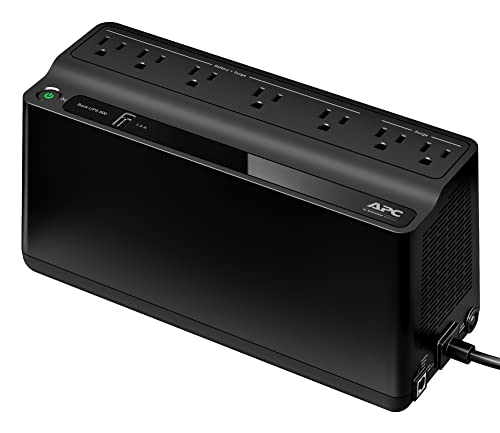
APC UPS 650VA/390W Battery Backup & Surge Protector for PC, NAS | BE650G1

Our verdict: A widely used 650VA APC with USB signaling and a standard, replaceable battery.

The BE650G1 provides 650VA and 390W, is rated for PC and NAS, has USB connectivity for shutdown signaling and uses a standard replaceable battery.

It is third because it covers a typical two-bay NAS with room to spare, and it has a long track record. The replaceable battery is the detail that counts. A UPS battery typically lasts three to five years, and a model that lets you swap in a new one at low cost outlasts the units that get thrown away. It ranks below the 850VA model because the 390W ceiling leaves less margin for a bigger NAS, a router and a switch together.

Buy it for a one- or two-bay NAS plus a modem. Skip it if you plan to add a drive enclosure or a mini PC to the same outlet.

Capacity
650VA / 390W
Rated for
PC and NAS
Signaling
USB shutdown
Battery
Standard replaceable

What we like

  • +Replaceable battery extends service life
  • +Proven, widely compatible design
  • +USB shutdown signaling
  • +Right size for a two-bay NAS

Watch out for

  • −390W leaves limited headroom
  • −No AVR or LCD listed

Buy it if: Buyers who want a proven, widely compatible general-purpose NAS UPS.

Skip it if: You will add several devices to the same unit.

4

Best for UniFi Networks

Ubiquiti UniFi UPS Tower 1000VA/600W Uninterruptible Power Supply (UPS-Tower)

Our verdict: A 1000VA/600W tower with UniFi monitoring, sized for a NAS plus the network gear.

The UniFi UPS Tower provides 1000VA and 600W, integrates with the UniFi ecosystem and uses a tower form factor suited to a shelf or rack setup. The listing highlights higher capacity for combined NAS and networking loads.

It ranks fourth because its main advantage is relevant only to a particular owner. If your router, switches and access points are UniFi, the UPS reports into the same console, so you see battery state and outage alerts alongside the rest of the network. At 600W it has the most capacity here, which fits a larger NAS plus a switch and a gateway. At $200 to $500, it costs the most, and its NAS signaling depends on how the UniFi integration handles shutdown commands.

Choose it if you run UniFi and want one console for everything. Otherwise an APC or CyberPower gives the same protection for less.

Capacity
1000VA / 600W
Ecosystem
UniFi integration
Form
Tower, shelf or rack
Price bracket
$200 to $500

What we like

  • +Highest capacity in this ranking
  • +Monitors inside the UniFi console
  • +Tower form fits shelf or rack
  • +Covers NAS plus network gear

Watch out for

  • −Priciest option here
  • −Value depends on owning UniFi

Buy it if: Buyers already using UniFi networking gear who want integrated monitoring.

Skip it if: You do not use UniFi and want the best price.

5

Best Budget Pick

APC UPS 600VA/330W UPS Battery Backup for Computer, Router, NAS, BE600M1

Our verdict: The smallest APC here, enough for a single-bay NAS and a router.

The BE600M1 gives 600VA and 330W, is listed for computer, router and NAS use, includes USB shutdown signaling, and uses a standard replaceable battery.

It ranks fifth because it is the minimum viable option. A single-bay NAS and a modem sit comfortably inside 330W, and you still get USB signaling and a battery you can replace. It falls behind the BE650G1 only by a small margin of capacity, and is a similar product in practice.

Buy it if your NAS is a single-bay or two-bay unit with light drives and your router is low-power. Do not use it for larger arrays, because the load will leave very little runtime, and pushing a UPS near its limit shortens battery life.

Capacity
600VA / 330W
Rated for
Computer, router, NAS
Signaling
USB shutdown
Battery
Standard replaceable

What we like

  • +Low price of entry
  • +USB signaling for safe shutdown
  • +Replaceable battery
  • +Compact for a desk or shelf

Watch out for

  • −330W suits only small loads
  • −Little spare capacity for growth

Buy it if: Budget-conscious buyers with a single-bay NAS or basic home server.

Skip it if: Your NAS has more than two bays.

6

Best DC NAS Option

WALLECUBE NAS UPS Compatible for: Synology, Ugreen, TerraMaster, QNAP. 150W DC Uninterruptible Power Supply with Remote APP Control

Our verdict: A compact 150W DC UPS built for DC-powered NAS and mini PCs, with app control.

The WALLECUBE is a 150W DC UPS that lists compatibility with Synology, Ugreen, TerraMaster and QNAP. It offers remote app control and a compact home-server form factor, and it supplies DC output rather than a mains outlet.

It finishes sixth because it only suits NAS units that run on an external DC adapter, which is typical of small 2- and 4-bay home models and mini PCs. Those owners can skip the double conversion of a mains UPS, which wastes some power as heat. It does not replace a conventional UPS for a NAS with an internal AC supply, and the listing does not describe a shutdown signaling method, so check how it tells the NAS to power down.

Pick it if your NAS uses a barrel-plug DC adapter that matches the unit's voltage. Check connector and voltage compatibility carefully before ordering.

Output
150W DC
Compatibility
Synology, Ugreen, TerraMaster, QNAP
Control
Remote app
Form
Compact home server

What we like

  • +Purpose-built for DC-powered NAS
  • +Remote app control and alerts
  • +Compact size fits a shelf
  • +Stated multi-brand compatibility

Watch out for

  • −Unsuitable for AC-powered NAS
  • −Shutdown method not described

Buy it if: Buyers with a DC-powered NAS from a supported vendor who want purpose-built compatibility.

Skip it if: Your NAS plugs into the wall with a standard AC cord.

Methodology

How We Ranked These

Output waveform

We looked for pure sine wave output, since APFC power supplies in newer NAS and mini PC hardware prefer it over stepped waveforms.

Shutdown signaling

We checked for USB connectivity, as the NAS needs a signal to shut down cleanly before the battery runs out.

Capacity headroom

We compared VA and watt ratings against typical NAS, router and switch loads, with attention to leaving margin.

Battery serviceability

We favored units with replaceable batteries, because a UPS battery is a consumable and replacement is cheaper than a new unit.

Ecosystem and value

We considered integration such as UniFi monitoring or app control, and weighed each unit's price bracket against what it adds.

Every Primea Score uses the same weights: Performance 30% · Build & Materials 20% · Everyday Usability 20% · Value 20% · Owner Satisfaction 10%. Full scoring rules

Buyer's guide

How to Pick the Right One for You

By NAS Size

The number of bays and the other gear on the same outlet decide how much capacity you need.

Your NAS setupOur pick
Single-bay NAS and modemAPC UPS 600VA/330W BE600M1
Two-bay NAS and routerAPC UPS 650VA/390W BE650G1
Four- to six-bay NAS and routerAPC UPS 850VA/450W Battery Backup
NAS with switches and gatewayUbiquiti UniFi UPS Tower 1000VA/600W

By Budget

SpendOur pick
$50 to $100, small NASAPC UPS 600VA/330W BE600M1
$50 to $100, DC NASWALLECUBE NAS UPS 150W DC
$100 to $200CyberPower CP850PFCLCD PFC Sinewave UPS
$200 to $500Ubiquiti UniFi UPS Tower 1000VA/600W

Pure Sine Wave vs Simulated Sine Wave

Pure sine wave

A smooth waveform that every power supply handles, including active PFC types. It costs a little more. Picks: CyberPower CP850PFCLCD.

Simulated sine wave

A stepped output that works with most NAS power supplies and costs less. A few APFC supplies can trip. Picks: the three APC Back-UPS models.

Default to pure sine wave if your NAS or mini PC manual mentions active PFC.

By Power Input Type

How your NAS is poweredOur pick
Standard AC cord, APFC supplyCyberPower CP850PFCLCD PFC Sinewave UPS
Standard AC cord, any supplyAPC UPS 850VA/450W Battery Backup
External DC adapterWALLECUBE NAS UPS 150W DC
UniFi network on same UPSUbiquiti UniFi UPS Tower 1000VA/600W

For Home Media Servers Specifically

Look for

USB shutdown signaling, enough watts for the drives plus the router, and a replaceable battery. Runtime matters less than a clean shutdown.

In this ranking

The APC UPS 650VA/390W BE650G1 is the sensible pick for a two-bay media server, and the APC 850VA unit suits a larger array.

When to Spend More

Spend more if

Your NAS holds irreplaceable data, has an APFC supply, or sits in a place with unstable power. The CyberPower CP850PFCLCD adds sine wave output and AVR.

Save if

You have a small NAS and rare outages. The APC BE600M1 gives you signaling and a replaceable battery for less.

Questions

Frequently Asked Questions

Will my NAS shut down automatically on a power cut?+

Yes, if the UPS is connected to the NAS by USB and the NAS supports UPS monitoring. You set a delay or battery threshold in the NAS settings. Check your vendor's compatibility list before buying.

What mistake do people make when sizing a UPS for a NAS?+

They pick a unit by VA instead of watts and run it near its limit. A heavily loaded UPS has less runtime and wears out faster. Aim for a total load below about two thirds of the watt rating.

Is a pure sine wave UPS worth it over a cheaper one?+

It is if your NAS or mini PC has an active PFC power supply, since some of those misbehave on a stepped waveform. For many older or simpler supplies a standard Back-UPS is fine. The NAS manual or vendor forum usually says which.

How do I set up the USB connection?+

Plug the NAS into the battery-backed outlets, connect the UPS USB port to the NAS, and enable UPS support in the NAS software. Then set the shutdown trigger. Run a test pull of the mains plug once to confirm the NAS shuts down.

Can I plug a laser printer into the UPS?+

It is better not to, because laser printers draw a large surge when they warm up. Put them on a surge-only outlet if there is one. Keep the battery outlets for the NAS, router and switch.

When should I replace the battery?+

Most UPS batteries last three to five years in normal conditions. Replace it when the unit reports a battery fault or the runtime falls sharply. Standard replaceable batteries make the job a quick swap.

Final take

The CyberPower CP850PFCLCD is the best UPS for a NAS, because its pure sine wave output, AVR and USB signaling cover the failures that matter. The APC 850VA is the sensible choice for a bigger array that shares the unit with a router. The APC BE650G1 is the value pick, the Ubiquiti suits UniFi homes, and the WALLECUBE is only for DC-powered NAS boxes.

More Ranked & Reviewed Guides