
Primea ReviewsAll Reviews

Primea Reviews is reader-supported. When you buy through our Amazon links we may earn a commission, at no extra cost to you. Rankings are set by our editors and never sold. Learn more

Ranked & Reviewed by Primea Reviews

The 7 Best Triple-Monitor Docking Stations of 2026, Ranked & Reviewed

By the Primea Editorial TeamUpdated November 1, 202610 min read7 products ranked
The 7 Best Triple-Monitor Docking Stations of 2026, Ranked & Reviewed

The short answer

The Anker Prime DL7400 is the best overall, with three 4K@60Hz displays through DisplayLink, 140W power and a cooling fan. The WAVLINK Neo gives triple 4K for less, and the Dell SD25TB4 drives displays natively on compatible Windows laptops. The two Plugable docks suit office desks, the Anker 160W is mostly a dual-screen charger, and the WAVLINK Pro needs a laptop port for the third screen.

The Primea Scoreboard

Ranked & Reviewed

  1. Genuine triple 4K@60Hz with generous power and a cooling fan.

    94Outstanding
    Check price
  2. Triple 4K@60Hz for the least money here.

    92Outstanding
    Check price
  3. Driver-free triple display via native MST on Windows laptops.

    90Excellent
    Check price
  4. A true three-display office dock with one cable and wide OS support.

    88Excellent
    Check price
  5. Three HDMI outputs plus Ethernet and an SD slot for Windows-first desks.

    85Excellent
    Check price
  6. Maximum charging power with dual native 4K, plus a laptop port for screen three.

    82Very Good
    Check price
  7. Dual 4K@60Hz with a third screen from your laptop's own port.

    79Very Good
    Check price

The classic triple-monitor mistake is trusting the number of video ports on the box. A dock with three outputs does not guarantee three equal screens, because the real limits are bandwidth and the technology behind the video. Some drive one 4K display at 30Hz beside two 1080p screens, which looks fine on a spec table and feels sluggish the moment you scroll a long spreadsheet.

Our editors reviewed seven docks from their listings and ranked them on resolution and refresh per screen, video technology, charging wattage, port mix and host compatibility. Where a dock really drives two screens and leans on your laptop for the third, we mark it down, because a spare laptop output is a condition many buyers do not meet.

Before you buy

What Actually Matters

01

True triple output

A dock may list three video ports yet drive only two screens without help from the laptop. Look for the phrase three simultaneous displays and the stated resolution of each. If the listing says third display via laptop port, you will need a spare output. The WAVLINK Pro and the Anker 160W both work this way.

02

Resolution and refresh per screen

Docks share bandwidth, so one 4K@30Hz plus two 1080p@60Hz is common on cheaper units. 30Hz feels laggy for scrolling and motion, and it shows most on the primary screen. Check that all three displays list 60Hz if you want smooth results. The Anker DL7400 and WAVLINK Neo state 4K@60Hz on all three, while the Plugable models do not.

03

DisplayLink versus native

DisplayLink compresses video through a driver you install, which works across many laptops but can add lag. Native Thunderbolt or MST needs no driver but depends on your laptop. Choose based on which your laptop supports, and test with a trial of the real workload. If you manage a locked-down work machine, a driver install may need IT approval.

04

Power Delivery wattage

The dock charges your laptop through the same cable. If the wattage is below your laptop's charger, battery life falls under load. Compare the stated PD figure, such as 100W, 130W, 140W or 160W, with your charger and your laptop's rating. A thin laptop needs far less, but a workstation machine can draw the full amount.

05

Host connection and OS

Some docks work over Thunderbolt 4 only, others over standard USB-C or USB-A. Operating system support also varies. Check the listing for your OS and the port type on your laptop before ordering, because a dock is useless if the host port does not match. A dock that lists Windows, macOS and ChromeOS, like the Plugable, is easier to share between machines.

In-depth reviews

Our Ranked Picks, Reviewed

1

Best Overall

Anker Prime Docking Station (DL7400)

Our verdict: Genuine triple 4K@60Hz with generous power and a cooling fan.

The DL7400 drives three 4K displays at 60Hz through DisplayLink. It offers 14 ports, up to 140W of power output, a built-in cooling fan and a smart display that reports connection and power status. DisplayLink compresses video through a driver, which is how one cable carries three high-resolution streams on a laptop with limited native outputs.

It ranks first because no screen has to give up resolution, unlike the Plugable models. The WAVLINK Neo matches the three 4K@60Hz at a lower tier, but without a fan or 140W of power. It belongs in the $200 to $500 bucket.

Buy it for professionals who need three sharp screens and strong charging. The caveats: it requires the DisplayLink driver, and it is the most expensive pick here.

Displays
3x 4K@60Hz
Technology
DisplayLink
Power
140W max output
Ports
14 total

What we like

  • +Three 4K@60Hz displays
  • +140W maximum power output
  • +Built-in cooling fan
  • +Smart status display

Watch out for

  • −Requires DisplayLink driver
  • −Highest price tier here

Buy it if: Professionals who need three sharp screens and power.

Skip it if: You want driverless native video.

3

Best Native Windows Dock

Dell Pro Thunderbolt 4 Smart Dock (SD25TB4)

Our verdict: Driver-free triple display via native MST on Windows laptops.

The Dell SD25TB4 supports up to four displays through two DisplayPort 1.4 outputs, one HDMI 2.1 and two Thunderbolt 4 ports. It adds 130W Power Delivery, 2.5GbE networking and Wi-Fi. Native MST support depends on the laptop, but where it works, video travels without compression.

It ranks third because it avoids DisplayLink entirely, which many people prefer for driver-free reliability. The price is the $200 to $500 bucket, and the laptop dependence means the Anker or WAVLINK are safer on unknown hardware.

Buy it for a Windows laptop that supports MST and a desk that wants no driver. Skip it if your laptop does not support MST. The caveat: with MST, screens share the available bandwidth, so check the supported resolution per screen with your laptop maker before ordering.

Displays
Up to 4
Outputs
2x DP 1.4, HDMI 2.1, 2x TB4
Charging
130W PD
Network
2.5GbE and Wi-Fi

What we like

  • +Native MST, no DisplayLink
  • +Up to four displays
  • +130W Power Delivery
  • +2.5GbE and Wi-Fi

Watch out for

  • −MST depends on laptop
  • −Higher price tier

Buy it if: Windows laptop owners wanting driverless video.

Skip it if: Your laptop does not support MST.

4

Cheapest True Triple

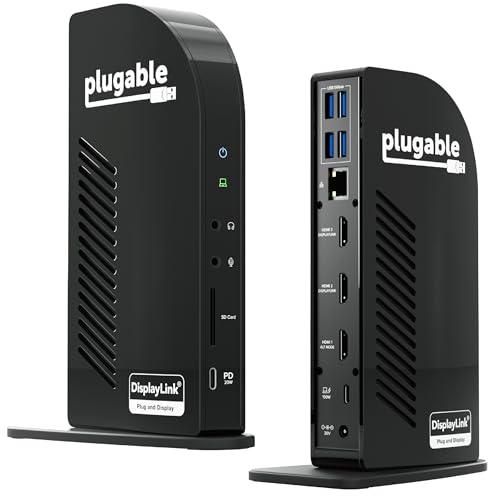
Plugable USB C Triple Display Docking Station

Our verdict: A true three-display office dock with one cable and wide OS support.

The Plugable triple dock drives three displays at once: one 4K@30Hz and two 1080p@60Hz over HDMI. It adds 100W Power Delivery, six 5Gbps USB ports and compatibility with Windows, macOS and ChromeOS, over a single cable. It costs $100 to $200.

It ranks fourth because only one screen can hit 4K, and that only at 30Hz. For office work such as email and documents, 1080p side screens are fine, and the cross-platform support is a plus.

Buy it for a desk of simple side screens and mixed operating systems. Skip it if you want three sharp 4K displays. The caveat: 30Hz on the 4K screen makes cursor movement and scrolling feel slow, so use it as the static reference display, not your main working screen.

Displays
1x 4K@30Hz, 2x 1080p@60Hz
Charging
100W PD
USB
6x 5Gbps ports
OS
Windows, macOS, ChromeOS

What we like

  • +Three simultaneous displays
  • +Windows, macOS and ChromeOS
  • +100W Power Delivery
  • +Six USB 5Gbps ports

Watch out for

  • −4K limited to 30Hz
  • −Two screens only 1080p

Buy it if: Office work with simple 1080p side screens.

Skip it if: You want three sharp 4K displays.

5

Best Port Variety

Plugable USB-C 13-in-1 Triple Monitor Docking Station (UD-ULTCDL)

Our verdict: Three HDMI outputs plus Ethernet and an SD slot for Windows-first desks.

The UD-ULTCDL drives three HDMI displays over DisplayLink and adds 100W USB-C charging, Gigabit Ethernet, an SD card slot and four more USB ports in a 13-in-1 design. It is priced in the $100 to $200 bracket and aimed at Windows desks.

It ranks fifth because the listing gives no resolution or refresh figures for the three outputs, unlike the Anker or the WAVLINK Neo. You are buying the port mix and trusting the outputs.

Buy it if you need Ethernet and an SD slot alongside three screens on a Windows desk. Skip it if you need confirmed 4K@60Hz output. Before ordering, ask Plugable for the per-display resolution limits, because three HDMI outputs over one cable always share bandwidth, and the driver is required.

Displays
3x HDMI via DisplayLink
Charging
100W USB-C
Network
Gigabit Ethernet
Extras
SD reader, 4 USB ports

What we like

  • +Three HDMI outputs
  • +Gigabit Ethernet included
  • +SD card reader
  • +100W USB-C charging

Watch out for

  • −No resolution figures listed
  • −Needs DisplayLink driver

Buy it if: Windows desks needing Ethernet and an SD slot.

Skip it if: You need confirmed 4K@60Hz output.

6

Most Power Delivery

Anker Prime Docking Station, 14-Port 160W

Our verdict: Maximum charging power with dual native 4K, plus a laptop port for screen three.

This Anker Prime has native dual 4K displays, 160W maximum power output, 10Gbps data transfer, audio and Ethernet ports in a 14-port design. It costs $100 to $200. The 160W budget matters for creator laptops that draw more than a standard 100W charger delivers.

It ranks sixth because it is a dual-display dock, so triple use depends on a spare laptop port. The 160W budget is its advantage over the other docks, none of which list that much.

Buy it for a power-hungry laptop with a spare video port to feed a third screen. Skip it if you want three screens from the dock alone. The caveat: native video depends on your laptop's support, and the third display runs from the laptop, not the dock.

Displays
Native dual 4K
Power
160W max output
Data
10Gbps
Ports
14 total

What we like

  • +160W power output
  • +Native dual 4K video
  • +10Gbps data transfer
  • +Audio and Ethernet ports

Watch out for

  • −Only dual displays alone
  • −Third screen needs laptop port

Buy it if: Power-hungry laptops with a spare video port.

Skip it if: You want three screens from the dock alone.

Methodology

How We Ranked These

True triple capability

We separated docks that drive three displays alone from those that need a laptop port for the third.

Resolution and refresh

Listed 4K and 60Hz support across all three screens was weighed against 30Hz compromises.

Driver technology

DisplayLink versus native Thunderbolt or MST was compared for setup simplicity.

Power and ports

Charging wattage, USB, Ethernet and SD ports earned credit for desk convenience.

Value for the tier

Each dock was judged against what its price bracket should deliver.

Every Primea Score uses the same weights: Performance 30% · Build & Materials 20% · Everyday Usability 20% · Value 20% · Owner Satisfaction 10%. Full scoring rules

Buyer's guide

How to Pick the Right One for You

By Laptop Setup

Your laptop's ports and operating system decide which dock technology will work.

Laptop setupOur pick
Any laptop, three 4K screensAnker Prime DL7400
Windows laptop with MST supportDell Pro Thunderbolt 4 Smart Dock
Mixed Windows, Mac and ChromebookPlugable USB C Triple Display Dock
Laptop with spare HDMI portWAVLINK Pro Dual 4K
High-wattage workstation laptopAnker Prime 14-Port 160W

By Budget

SpendOur pick
$100-200 triple 4KWAVLINK 12-in-1 Neo
$100-200 office triplePlugable USB C Triple Display Dock
$100-200 with Ethernet and SDPlugable 13-in-1 UD-ULTCDL
$100-200 dual plus laptop portWAVLINK Pro Dual 4K
$200-500Anker Prime DL7400

DisplayLink vs Native Video

DisplayLink

A driver encodes video over USB, so it works on many laptops and can drive three screens. Picks here: the Anker DL7400, WAVLINK Neo, both Plugable docks and the WAVLINK Pro.

Native video

Video passes through Thunderbolt or MST with no driver, but depends on laptop support. Pick here: the Dell SD25TB4.

Most buyers should default to DisplayLink unless driver-free setup matters.

By Screen Quality

NeedOur pick
Three 4K@60Hz screensAnker Prime DL7400
Triple 4K for lessWAVLINK 12-in-1 Neo
One 4K and two 1080pPlugable USB C Triple Display Dock
Up to four displaysDell Pro Thunderbolt 4 Smart Dock
Dual native 4KAnker Prime 14-Port 160W

For Hybrid Office Workers Specifically

Look for

A single cable connection, Ethernet, and enough Power Delivery to charge the laptop, so you can plug in and start work.

In this ranking

The Plugable triple dock offers single-cable triple display with 100W PD, and the Dell SD25TB4 adds 2.5GbE and Wi-Fi.

When to Spend More

Spend more if

You need three sharp 4K screens and a high power budget, where the Anker Prime DL7400 earns its tier.

Save if

Side screens are for chat and reference, where the Plugable triple dock or WAVLINK Neo cost less.

Questions

Frequently Asked Questions

Will a triple-monitor dock work with my laptop?+

Most DisplayLink docks work across many laptops, while native docks depend on your laptop's support. Check the host port and operating system, and read the listing's compatibility notes. Ask the seller if your laptop model is not named.

What is the most common triple dock mistake?+

Assuming three ports means three equal screens. Bandwidth often limits one display to 4K@30Hz. Read the per-display specs, and compare the Plugable's 4K@30Hz with the Anker's three 4K@60Hz. The gap is large at 30Hz.

Is the Anker worth it over the WAVLINK Neo?+

If you need 140W power and a cooling fan, yes. For most buyers the WAVLINK Neo delivers the same triple 4K@60Hz for less. Power and build are the difference, along with the Anker's status display.

How do I set up a DisplayLink dock?+

Install the DisplayLink driver, connect the dock, then use display settings to arrange screens. Plug in power first, and reboot if a screen is missing. A fresh cable can also fix dropouts.

How do I keep a dock cool?+

Leave space around the dock and avoid stacking items on it. The Anker Prime DL7400 has a built-in fan. Heat can cause display dropouts, which look like flicker or a blank screen. Give the dock room to breathe.

Can I use a triple dock with a Mac?+

Some docks list macOS support, such as the Plugable triple dock. Check the listing for your Mac's port type. DisplayLink also needs a macOS driver, and macOS updates can break it, so check driver support after each update.

Final take

Buy the Anker DL7400 for three sharp screens and strong charging, or the WAVLINK Neo when price matters. Choose the Dell SD25TB4 if your Windows laptop supports MST and you hate drivers. Plugable fits office desks with simple side screens, and the last two suit dual-screen setups with a spare laptop port.

More Ranked & Reviewed Guides