
Primea ReviewsAll Reviews

Primea Reviews is reader-supported. When you buy through our Amazon links we may earn a commission, at no extra cost to you. Rankings are set by our editors and never sold. Learn more

Ranked & Reviewed by Primea Reviews

The 6 Best TP-Link Network Switches of 2026, Ranked & Reviewed

By the Primea Editorial TeamUpdated November 1, 202610 min read6 products ranked
The 6 Best TP-Link Network Switches of 2026, Ranked & Reviewed

The short answer

The TP-Link TL-SG105 is the best switch for most desks, five Gigabit ports with QoS and a three-year warranty under $25. The TL-SG1005P adds four PoE+ ports. The TL-SG105S-M2 and TL-SG108S-M2 bring 2.5G, the TL-SG116 offers 16 Gigabit ports, and the TL-SG3452P is a managed 48-port PoE+ rack switch for large installs.

The Primea Scoreboard

Ranked & Reviewed

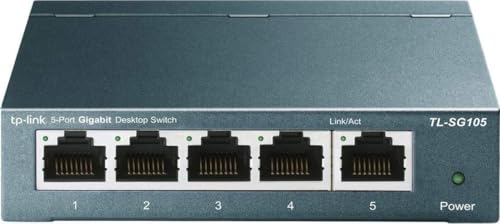
  1. The plug-and-play five-port switch that fits most desks.

    93Outstanding
    Check price
  2. Powers four PoE+ devices from one box with 65W total.

    90Excellent
    Check price
  3. Five 2.5G ports that run over existing Cat5e cabling.

    88Excellent
    Check price
  4. Eight fanless 2.5G ports for a growing multi-device setup.

    86Excellent
    Check price
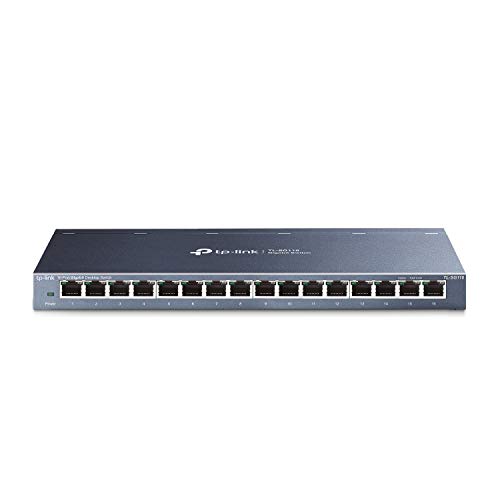
  5. Sixteen Gigabit ports for a crowded closet.

    83Very Good
    Check price
  6. A 48-port managed PoE+ switch for large installs.

    80Very Good
    Check price

Most people shopping for a network switch count ports and stop. The number that actually limits you is the speed of each port. A Gigabit switch quietly throttles a 2.5G internet plan or a 2.5G NAS, and a switch without PoE cannot power a camera no matter how many ports it has. Port count is cheap to fix later; speed and power are not.

Six TP-Link switches are ranked here from spec sheets, weighing port speed, PoE budget, port count, management features and warranty length, and we checked what each listing states rather than benchmarking throughput. They run from a five-port Gigabit box under $25 to a 48-port managed PoE+ rack unit, so the order puts general usefulness first and size or specialization last.

Before you buy

What Actually Matters

01

Port speed

Port speed is the maximum data rate per port, either 1Gbps or 2.5Gbps here. A Gigabit switch caps a faster router or NAS no matter how large its total capacity. Check the listing for the per-port speed, not only the total switching capacity, and match it to your fastest device, because the slowest link in a chain sets the real speed.

02

PoE budget

PoE sends power over the Ethernet cable. The total budget is shared across ports, so 65W covers a few devices but not many. Add up each device's wattage before buying, and leave a margin of at least ten percent, since devices can draw more at startup. The TL-SG1005P has 65W for four ports, while the TL-SG3452P has 384W across 48.

03

Unmanaged vs managed

Unmanaged switches work on plug-in with no setup. Managed switches add routing and VLAN control through a web interface. Most homes do not need management, and a managed unit costs more and needs configuring. Check the listing for the word managed or L2+ before assuming simplicity, and remember a managed switch is wasted money in most homes.

04

Port count

Buy a few more ports than you need today. Extra ports cost little, but replacing a full switch costs more, and a crowded switch has no room for a new console or camera. Count every wired device, including TVs and printers, then add two or three spares for future gear, such as a streaming box or a second desk.

05

Warranty and case

Warranties here run from 3 to 5 years, and a metal case and fanless design help with heat and noise. Check both on the listing. A fanless metal case is quiet in a living room, and the operating temperature range matters in a closet or a garage, where heat builds up quietly.

In-depth reviews

Our Ranked Picks, Reviewed

Methodology

How We Ranked These

Port speed

We compared Gigabit and 2.5G ports and which cabling each needs.

PoE budget

We looked at PoE+ port counts and total wattage for powered devices.

Port count

We matched port totals to typical home and office device counts.

Management features

We separated plug-and-play models from managed switches with routing and SFP.

Warranty

We compared warranty lengths, from 3 to 5 years.

Every Primea Score uses the same weights: Performance 30% · Build & Materials 20% · Everyday Usability 20% · Value 20% · Owner Satisfaction 10%. Full scoring rules

Buyer's guide

How to Pick the Right One for You

By Port Speed

Speed should match the slowest bottleneck in your path.

Your networkOur pick
All Gigabit, few devicesTP-Link TL-SG105 5-Port Gigabit Unmanaged Switch
2.5G router or NAS, five devicesTP-Link TL-SG105S-M2 5-Port 2.5G Unmanaged Switch
2.5G, eight devicesTP-Link TL-SG108S-M2 8-Port 2.5G Unmanaged Switch
Gigabit, 16 devicesTP-Link TL-SG116 16-Port Gigabit Unmanaged Switch

By Budget

SpendOur pick
Under $25TP-Link TL-SG105 5-Port Gigabit Unmanaged Switch
$25 to $50TP-Link TL-SG1005P 5-Port Gigabit PoE Switch
$50 to $100TP-Link TL-SG108S-M2 8-Port 2.5G Unmanaged Switch
$500 and upTP-Link TL-SG3452P 48-Port L2+ Managed PoE Switch

Gigabit vs 2.5G

Gigabit

Cheaper and fine for most homes. The TL-SG105, TL-SG1005P and TL-SG116 are Gigabit.

2.5G

Removes the ceiling for fast plans. The TL-SG105S-M2 and TL-SG108S-M2 run over Cat5e.

Default to Gigabit unless a device you own already supports 2.5G.

By Power Needs

NeedOur pick
No PoETP-Link TL-SG105 5-Port Gigabit Unmanaged Switch
Up to four small PoE devicesTP-Link TL-SG1005P 5-Port Gigabit PoE Switch
Many PoE devicesTP-Link TL-SG3452P 48-Port L2+ Managed PoE Switch
Quiet fanlessTP-Link TL-SG108S-M2 8-Port 2.5G Unmanaged Switch

For Home Security Cameras Specifically

Look for

PoE+ ports and a total budget that exceeds your cameras combined wattage.

In this ranking

The TL-SG1005P gives four PoE+ ports at 65W total. For large camera counts, the TL-SG3452P gives 384W.

When to Spend More

Spend more if

You run 2.5G gear or need management. The TL-SG108S-M2 and TL-SG3452P fit.

Save if

Your gear is Gigabit. The TL-SG105 is in the under $25 bracket.

Questions

Frequently Asked Questions

Will a 2.5G switch work with Gigabit devices?+

Our listings do not cover this in detail, but 2.5G switches generally negotiate lower speeds. Check the listing to confirm backward compatibility with your Gigabit gear before buying.

What is the biggest mistake with switches?+

Overbuying ports or ignoring speed. Match port speed to your fastest device, and buy PoE only if you have cameras or access points to power, not as an extra, because PoE ports cost more per port.

Is the TL-SG1005P worth it over the TL-SG105?+

Yes if you have PoE devices, thanks to four PoE+ ports at 65W total. If not, the TL-SG105 is cheaper and does the same switching with a lower price and a smaller footprint.

Do I need new cables for 2.5G?+

The 2.5G models here are listed as working over existing Cat5e cabling, so you may not need to rewire, which saves time in a finished house. Damaged or very long cables may still limit the speed, so test the cable if you see only Gigabit links.

How do I keep a switch cool?+

Give it airflow and avoid stacking it under other equipment or inside a closed cabinet without ventilation. The TL-SG116 lists a 0 to 40 degree C operating range, which suits most rooms but not a hot attic.

Can the SG3452P be used at home?+

It can, but it is built for large installs with 48 PoE+ ports and management. Most homes will pay for ports and features they never use, so pick the TL-SG116 instead unless you truly need management or a large PoE budget.

Final take

Buy the TL-SG105 unless a device you own already runs faster than Gigabit or needs power. Choose the TL-SG1005P for cameras and access points, the TL-SG105S-M2 or TL-SG108S-M2 for 2.5G gear, and the TL-SG116 for a crowded closet. The TL-SG3452P belongs in offices, not homes.

More Ranked & Reviewed Guides